Why Are You Obese
## 🚀 Plugin Description: Why Are You Obese
### **Short Description:**
Tired of slow eating animations interrupting your flow? **Why Are You Obese** drastically speeds up food consumption, reducing the standard eating time for most items to a mere **0.5 seconds**, while preserving crucial balance for powerful consumables.
—
### **Detailed Description:**
**Why Are You Obese** is a must-have plugin for any fast-paced Minecraft server (PvP, Survival, Factions) where quick action is key. It intelligently overrides the default slow eating mechanics, allowing players to heal and regain hunger almost instantly during combat or intense exploration.
#### **Key Features & Mechanics:**
1. **Lightning-Fast Consumption (0.5 Seconds):**
* Most standard food items (Steak, Bread, Carrots, etc.) are consumed in just **0.5 seconds** (10 ticks) upon right-click.
* This eliminates the long, interruptible vanilla eating animation, making gameplay significantly smoother and more responsive.
2. **Balanced Special Items (1.5 Seconds):**
* To maintain server balance, highly impactful items retain their standard consumption time of **1.5 seconds (30 ticks)**.
* This applies to:
* **Golden Apples** (`GOLDEN_APPLE`)
* **Enchanted Golden Apples** (`ENCHANTED_GOLDEN_APPLE`)
* **Potions** (All types of drinkable potions)
* *You will still need to hold and wait to consume these powerful items, ensuring fair play.*
3. **Seamless Integration:**
* The plugin works directly with the item in the player’s main hand, requiring no extra commands or complicated setup.
* It respects all default food effects and hunger restoration values.
#### **Why You Need Why Are You Obese:**
* **Better PvP:** Never be caught lagging behind because of a slow eating animation. Get a quick health boost and return to the fight!
* **Smoother Survival:** Less time standing still eating, more time exploring, building, or mining.
* **Optimal Balance:** Get the speed you want without breaking the core balance of your server’s most powerful consumables.
Whitelister
🎮 Whitelister – Discord Whitelist Management
Manage your Minecraft whitelist directly through Discord – simple, fast, and clean!
✨ Features
– 💬 Intuitive Usage: Just write player names in a Discord channel – done!
– ✅ Emoji Feedback: Clean emoji reactions (✅/⛔) instead of cluttering text messages
– 👥 Multi-User Support: Each Discord user can whitelist multiple players (configurable)
– 📊 Clear Overview: List all your whitelisted players with !list
– 🗑️ Easy Removal: Remove players from whitelist with !remove PlayerName
– 💾 Persistent Storage: All data remains saved after server restarts
– 🔒 Channel-Based: Bot only responds in a designated Discord channel
🚀 Quick Start
1. Create Discord Bot at https://discord.com/developers/applications
2. Enable MESSAGE_CONTENT Intent (important!)
3. Enter bot token and channel ID in config.yml
4. Load plugin onto server and start
5. Done! Write player names in Discord channel to whitelist them
WhitelistCycle
# Multiple whitelist configurations!
This plugin allows you to manage whitelists on the fly!
* Allows creating lists.
* Manage them by adding/removing players.
* To change current whitelist – use a single command!
## Usage:
`/whitelistcycle` is the command to manage everything!
`/whitelistcycle addList ` to create new list.
`/whitelistcycle removeList ` to remove a list.
`/whitelistcycle addPlayer ` to add a player to a list.
`/whitelistcycle removePlayer ` to remove a player from a list.
`/whitelistcycle currentList` to infrom the sender which list is the current Whitelist (and shows the players in the list)
`/whitelistcycle currentList ` to switch to other list – essentially changing the whitelist on the fly.
### Notes:
– Each update to player taht in current list via `addPlayer /removePlayer` will directly update the whitelist itself.
– All names (lists/players) must be a single word.
– this plugin keeps the native way of whitelists.json and rewrites it as needed:
– **By server defaults** any player with OP bypasses whitelist check.
– Usages of the default `whitelist` command is possible **IT IS NOT RECOMMANDED THO**.
– Whitelists.json will get overided when a list is updated from the plugin.
– There is no hook into player login etc.. allowing other plugins.
– Whitelist will get turned ON everytime server gets started.
WhitelistByTime

## About
This is a plugin for a minecraft server. It allows you to add players for a certain time or permanently.
**The plugin is developed and tested for Paper and Folia 1.20.x-1.21.x. It also supports forks of Paper and Folia.**
## Features
– Fully **customizable**.
– Supports **MiniMessage**.
– Compatible with **any SQL database**.
– **Case-sensitive** nickname support.
– Player **freezing** feature.
– PlaceholderAPI (**PAPI**) support.
– **Lightweight**: minimal load on the **main thread**.
– **Multi-server** support: utilizes **SQL transactions**.
– **Safe**: the code is extensively covered by **automated tests**.
– **UUID support**: stores UUIDs in online/floodgate (GeyserMC) modes to handle nickname changes.
## Feedback
**Please report any bugs, errors, or feature suggestions on Discord:** https://discord.gg/4XUPywnEyE
## Stats
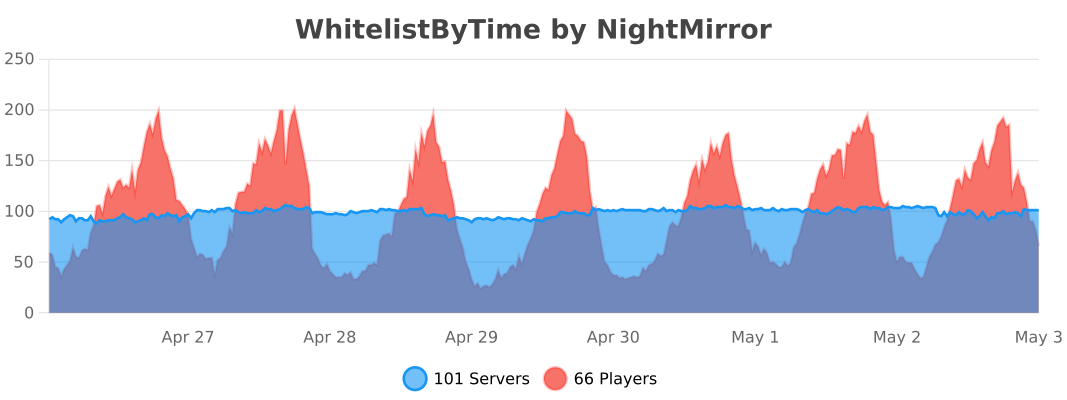
*Statistics are obtained through bstats metrics.*
Whitelist | by DevSarok
## Whitelist | by DevSarok
You might ask me why?
When I play on some server, I got whitelist but when I join it still says that I’m not whitelisted. So this plugin is the same whitelist mechanism. But that
this plugin checks on the name.
So,
you don’t need to ask somebody to join your server before they can be whitelisted.
## Still don’t understand?
Example,
when you made a new server in your network,
the server is just pure new. No one joined,
no one is opped, no plugins at all, except that
whitelist is turned on.
Ok so, when this happens,
you open your console and type “/whitelist add ”
and when you join the server,
it still says that You are not whitelisted.
And the last thing you do is that,
you Turn Off The Whitelist,
Join the server,
Turn the Whitelist back on,
add yourself to the whitelist
But sometimes, when someone wants to join,
you have to repeat that process again.
So this plugin simplifies that process.
Instead of that process above,
now:
1. New Server
2. Install Plugin
3. Turn off Vanilla Whitelist
4. Do /easywl add
5. That’s all.
6. Oops, and make sure you did /easywl on so the easy whitelist is on.
### For Bedrock: /easywl add _username
### For Java: /easywl add username
Commands:

WhiteCommandList
## WhiteCommandList:
**WhiteCommandList is a simple plugin that allows you to
create groups and allow them certain commands.**
### config:
“`
# WhiteCommandList configuration
ShowOnlyAllowed: true – When you type /, the tooltips only show items that you are allowed to see.
AllowOperatorAll: true – Can operators use all commands?
Messages:
no-permission: “You do not have permission to use this command.”
Groups:
default:
Commands:
– “/login”
– “/register”
Players:
– “(Alw)” – (Alw) means all players who are not in other groups
admin:
Commands:
– “/login”
– “/nl-relore” – if you write a command and a subcommand with a – (like /nl-relore), it means that only that subcommand will be available
– “/ban”
Players:
– “Notch”
– you can manage and create your group’s
“`
**The plugin does not have the function of granting the necessary permissions to people from groups if necessary, but the plugin pairs well with the RealPermissions plugin which provides this function.**
White Noise Generator [Archived]
# White Noise Generator Plugin
This plugin generates unique, randomly filled chunks using white noise, creating chaotic and abstract landscapes. The world generation uses noise from octaves to determine the block placement, creating a random yet visually interesting world. You can customize the scale, octaves, and noise intensity, as well as adjust the block palette for the world generation. ⚙️
## Features ✨
– Generates world chunks based on white noise, creating a visually chaotic landscape. ️
– The block palette can be customized to use different concrete blocks for world generation.
– Adjustable parameters: Control the scale, octaves, and noise intensity for more variety and control in the world generation.
– Automatically enforces valid parameter ranges — values outside of the allowed range are automatically adjusted. ⚖️
– Compatible with Minecraft 1.20 and later versions. ️
## Configuration ️
You can customize the generation settings using the following parameters:
– **blocks**: List of blocks to be used for generation (e.g., `blocks=orange_concrete,lime_concrete`).
– **Range**: Any blocks available in Minecraft. It should be a comma-separated list (e.g., `orange_concrete,lime_concrete`).
– **scale**: Controls the frequency of the noise. A lower value makes the noise more “chunky,” while a higher value makes it smoother.
– **Default**: `0.02`
– **Range**: `0.02 to 1.0` (Values outside this range will be automatically adjusted).
– **octaves**: Defines the level of detail in the noise. A higher number of octaves creates more complex patterns.
– **Default**: `8`
– **Range**: `1 to 16` (Values outside this range will be automatically clamped).
– **noise**: Controls the intensity of the noise. A higher value results in more distinct block placements.
– **Default**: `0.5`
– **Range**: `0.0 to 1.0` (Values outside this range will be automatically adjusted).
## How to Use
Simply install the plugin and set the world generator to `WhiteNoiseGenerator` in your world settings. Customize the generation by adding parameters such as block types, scale, octaves, and noise intensity in the world creation command.
### Examples of Using with Multiverse-Core
#### 1. Creating a New World with White Noise Generator
Ensure that Multiverse-Core is installed on your server. To create a new world using the White Noise Generator, use the following command:
“`
/mv create new normal -t FLAT -g WhiteNoiseGenerator
“`
This command will create a new world using your plugin for world generation.
#### 2. Creating a New World with Custom Parameters
If you want to use custom parameters (e.g., different blocks, scale, octaves, etc.), you can specify them in the command:
“`
/mv create new normal -t FLAT -g WhiteNoiseGenerator:{blocks=orange_concrete,lime_concrete;scale=0.2;octaves=8;noise=0.5}
“`
This command will generate a world with specific block types, scale, octaves, and noise intensity.
#### 3. Using the Plugin with World Settings
If you want to automatically set the generator for multiple worlds or adjust additional settings, you can manually edit the `worlds.yml` file found in the Multiverse-Core folder. In this file, under each world’s configuration, you can set the generator key to use the White Noise Generator:
“`
yml
:
generator: WhiteNoiseGenerator:{blocks=blue_concrete;scale=0.03;octaves=8;noise=0.6}
“`
This will apply the generator to that world.
## Automatic Range Enforcement ⚖️
The plugin automatically enforces valid ranges for the parameters. If a user provides a value outside the allowed range (for scale, octaves, or noise), the plugin will adjust the value to the nearest valid option:
– **scale**: Any value below `0.02` will be set to `0.02`, and any value above `1.0` will be set to `1.0`. ⚖️
– **octaves**: Values outside the range of `1 to 16` will be adjusted to the closest value within that range.
– **noise**: Values below `0.0` will be set to `0.0`, and any value above `1.0` will be set to `1.0`.
—
wHit – PvP Combo System
# ⚔️ wHit – PvP Combo System
**Lightweight. Optimized. Satisfying.**




—
## 🚀 Overview
**wHit** is a highly optimized PvP enhancement plugin designed for Practice and Survival servers. It provides satisfying audio feedback and visual indicators when players perform combos.
Unlike other heavy plugins, **wHit** is designed with performance in mind, ensuring 0% lag impact on your server tick rate.
## ✨ Features
* **⚡ Optimized Performance:** Uses `O(1)` HashMap lookups and efficient memory management.
* **🔊 Satisfying Sounds:** Different sounds for normal combos and critical hits.
* **🎯 Smart Detection:** Combo streak starts after the 2nd hit to prevent spam noise.
* **🎨 Hex Color Support:** Full RGB support (e.g., `&#FFA500`) for Action Bar messages.
* **⏱️ Auto-Reset:** Streak resets automatically if no hit occurs within 1 second.
* **🌍 Localization:** Fully configurable messages via `messages.yml`.
## 📥 Installation
1. Download the latest `.jar` from the **Releases** tab.
2. Drop the file into your server’s `plugins` folder.
3. Restart your server.
4. Edit `config.yml` and `messages.yml` to your liking.
5. Run `/whit reload` to apply changes.
## ⚙️ Configuration
📄 config.yml (Click to view)
“`yaml
sounds:
combo-hit:
sound: “ENTITY_EXPERIENCE_ORB_PICKUP”
volume: 1.0
pitch: 1.5
crit-hit:
sound: “ENTITY_ARROW_HIT_PLAYER”
volume: 1.0
pitch: 0.5
“`
💬 messages.yml (Click to view)
“`yaml
reload-success: “�FF00&lwHit &8» &fConfiguration files have been �FF00&nsuccessfully&f reloaded.”
no-permission: “&c&lwHit &8» &cYou do not have permission to use this command!”
command-usage: “&e&lwHit &8» &7Usage: &f/whit reload”
actionbar-format: “&#FFA500&lCOMBO: &e&l%combo%”
“`
WhispersNightmare – Psychological Horror
👁️ **WhispersNightmare – Psychological Horror Without Mods**
WhispersNightmare is a server-side psychological horror plugin for Minecraft 1.21.x that lets you troll your friends and terrify players without requiring any mods on the client.
No installation.
No commands.
No escape.
Just… something watching you.
🩸 What Is WhispersNightmare?
WhispersNightmare turns a normal Minecraft server into a creeping horror experience where players constantly feel observed, followed, and unsafe — even in broad daylight.
There is no visible monster.
No jumpscare mobs.
No sanity bar.
Only the feeling that an entity is always there.
Perfect for:
Trolling friends on a vanilla server
Horror SMPs
Psychological experiments
ARG-style servers
Creepy survival worlds
😈 Troll Your Friends (No Mods Required)
Your friends do not need to install anything.
They join the server…
And the nightmare begins automatically.
Players will experience:
Whispering sounds behind them
Doors opening by themselves
Lights going out nearby
Chests that feel like they’ve been touched
Strange messages only they can see
Subtle visual distortions
Unexplainable effects when standing still
They will ask:
“Did you hear that?”
“Did you move that door?”
“Why do I feel watched?”
You say nothing.
👁️ The Entity That Watches
WhispersNightmare simulates the presence of an unseen entity:
It never appears directly
It never attacks
It never explains itself
But it reacts to:
Player movement
Silence
Stillness
Proximity
The longer you stay still…
The closer it feels.
🔊 Psychological Horror Features
✔ 3D positional horror sounds
✔ Random whispers and ambient noises
✔ Visual particle hallucinations
✔ Subtle potion effects (nausea, slowness, blindness…)
✔ Automatic world manipulation
✔ Movement-based events
✔ No patterns, fully unpredictable
Everything happens in the background, silently.
⚙️ Technical Details
✅ Minecraft 1.21.x
✅ Paper / Spigot compatible
✅ Server-side only
✅ No mods required
✅ No commands
✅ No permissions
✅ Lightweight & optimized
✅ Multiplayer safe
Just drop it in your /plugins folder.
🎭 Why Players Love (and Hate) It
It feels real
It feels personal
It never tells you what’s happening
It makes players doubt the game itself
This is not a jumpscare plugin.
This is psychological horror.
⚠️ Warning
This plugin is not recommended for:
Children
Sensitive players
Servers where players expect comfort
It is designed to disturb, not entertain casually.
👁️ Final Words
You are not being attacked.
You are not being chased.
You are being observed.
And it has always been there.
WhereMyFrame
Create invisible item frames in the simplest way by clicking with shears. Just press SHIFT and right-click on the item frame with shears. Everything is ready!
#### The plugin is perfect for vanilla servers!

### Configuration:
“`yaml
# Will the durability of the scissors be wasted when creating an invisible item frame
# Default: true
damagingShears: true
# Is it possible to leave an empty invisible item frame
# Default: false
allowEmptyItemFrame: false
“`
### Commands:
・**/wheremyframe reload** – plugin reload.
・**/wheremyframe info** – plugin information.
#### ❤️ Icon by cheharka