WoolSocks
## Description
WoolSocks is a lightweight Bukkit/Spigot/Paper plugin that adds a custom pair of woolen “socks” (white leather boots) which render players wearing them—undetectable by Sculk Sensors. These socks wear down with use, can automatically break when their durability runs out, and are fully configurable without needing to restart the server.
## Features
– Custom Item: White leather boots renamed “Wool Socks” with lore.
– Configurable Events: Choose which GameEvent types to block (e.g. STEP, HIT_GROUND, SWIM, JUMP).
– Durability System: Socks take configurable damage per block walked (wears down faster than leather boots).
– Automatic Breakage: Socks break and drop off when durability reaches zero, with a sound effect.
– Low‑Durability Warning: Send a one‑time warning message when socks fall below a configurable durability threshold.
– Hot‑Reloadable Config: /woolsocks reload command to reload all settings and recipes without restarting.
## Installation
Download the latest WoolSocks.jar.
Place the JAR in your server’s plugins/ folder.
Start or reload your server.
Edit plugins/WoolSocks/config.yml
## Usage Examples
Crafting
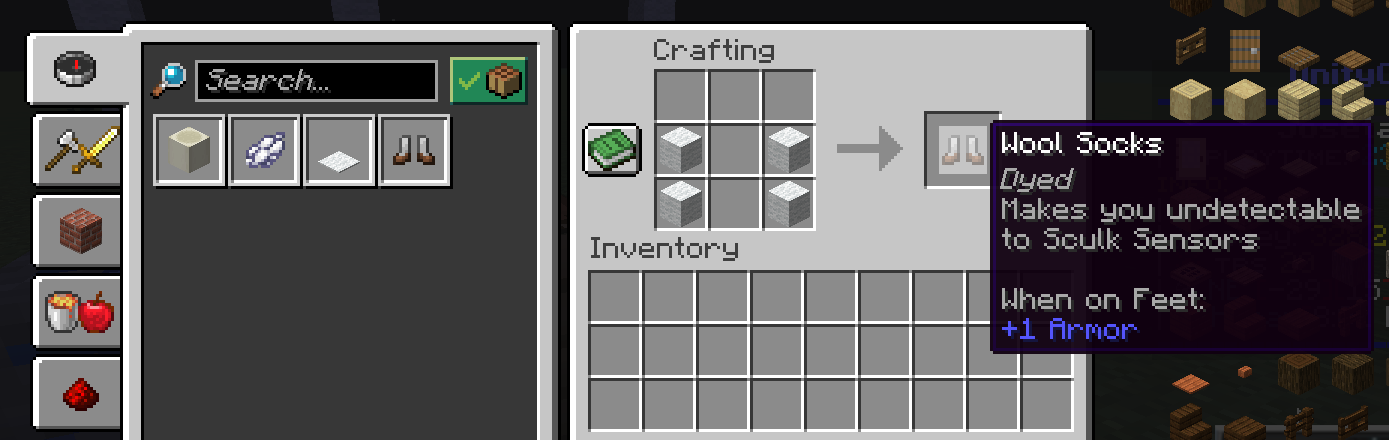
Place 4 × White Wool in the same shape as Leather Boots to craft Wool Socks.
Blocking Events
With default settings, walking (STEP) and landing from jumps (HIT_GROUND) will never trigger nearby Sculk Sensors.
Durability & Breakage
The socks will visibly wear out. Once durability reaches zero, they break, play a rupture sound, and drop off.
_Thank you for using WoolSocks! Enjoy sneaky exploration without the hum of Sculk Sensors._
Wool Burner
# Wool Burner
**Allows you to delete (burn) all wool in contact like a chain reaction by using a blaze powder item. (Like in bedwars)**
**Usage**
Right click a wool block (of any colour) with a blaze rod item to burn all of the wool in contact with it.
Each world should be first toggled on. Worlds are not enabled by default.
The speed of the burning of wool can be changed. Go to
.//plugins/WoolBurner/config.yml and change the value in _blocks-per-tick_ to any integer. It is the number of blocks deleted each tick. Defaults to 5 if there is no integer present there. DO NOT KEEP THE VALUE VERY HIGH, IT CAN CAUSE LAG.
**Commands**
/wb (alias: /woolburner): Get the plugin’s information
/woolburnertoggle [world] (alias: /wbtoggle [world]): Toggle woolburner in a specific world.
**Permissions**
– woolburner.info : Use the /wb command
– woolburner.toggle: Use /wbtoggle command
**Issues and potential new features**:
You can reach out to me in my discord server. [Discord ID – armyfury]
**Other Projects:**
– Summon Friendly Mobs
– WildLife
WoolProofed
🔇 WoolProofed
A Paper/Spigot plugin that makes wool blocks act as realistic soundproofing material!
WoolProofed uses advanced packet interception to block all sounds when wool is placed between the sound source and the player. Perfect for creating soundproof redstone rooms, silent storage systems, or reducing noise pollution in your builds!
✨ Features
🎯 Complete Sound Blocking: Automatically blocks ALL block sounds (redstone, pistons, droppers, dispensers, observers, buttons, levers, doors, trapdoors, and more) when wool is in the line of sight
🌈 All Wool Colors Supported: Works with all 16 wool colors (white, orange, magenta, light blue, yellow, lime, pink, gray, light gray, cyan, purple, blue, brown, green, red, black)
🔬 Smart Raytrace Detection: Uses precise raytrace calculations to check every block between sound source and player
⚡ Performance Optimized: Efficient packet interception that only blocks sounds when necessary
🔌 Plugin-Based: Works server-side, no client mods required
📋 Requirements
Required Dependencies:
ProtocolLib 5.3.0+ – Download and place in your plugins/ folder
Server Requirements:
Paper or Spigot 1.21.x
Java 17 or higher
📦 Installation
Download ProtocolLib (minimum version 5.3.0)
Download WoolProofed from the releases page
Place both JAR files in your server’s plugins/ folder
Restart your server
Enjoy realistic soundproofing!
🎮 Usage
Simply build walls, floors, or ceilings using wool blocks between yourself and any noisy redstone contraptions, farms, or machinery. The plugin automatically detects when wool blocks the direct line between a sound source and the player’s position.
Example Use Cases:
🔴 Silent redstone rooms – no more annoying clicking sounds
🏭 Quiet farm designs – build farms without the constant noise
🏠 Soundproof housing – keep your base peaceful
🎵 Recording studios – eliminate background noise for content creation
⚙️ How It Works
WoolProofed uses ProtocolLib to intercept sound packets before they reach the player’s client. When a sound is about to play:
The plugin captures the sound packet using ProtocolLib’s packet listeners
It calculates a raytrace path from the sound source to the player’s eye position
Every 0.5 blocks along this path, it checks if a wool block exists
If wool is detected, the sound packet is cancelled before reaching the client
If no wool is found, the sound plays normally
This approach is the only reliable method to block sounds in Minecraft, as it prevents the sound from ever reaching the player rather than trying to stop it after it’s already been sent.
🔧 Technical Details
API Used: Paper API 1.21.1-R0.1-SNAPSHOT
Packet Types: NAMED_SOUND_EFFECT, WORLD_EVENT
Raytrace Step Size: 0.5 blocks
Detection Range: Unlimited (follows Minecraft’s natural sound range)
Performance Impact: Minimal – only processes sounds when players are nearby
🐛 Known Limitations
Requires ProtocolLib to function
Client-side sounds (like UI clicks) cannot be blocked
Music discs and jukeboxes are not affected
WoodlyChopper
# WoodlyChopper
**Chop down one log with your axe, and the whole tree falls!**
This plugin is made for players who prefer to build and enjoy Minecraft their own way without unnecessary limits. WoodlyChopper is lightweight, compatible with protection plugins, and includes a simple, beginner-friendly configuration file located in **plugins/woodlychopper/config.yml**.
Features:
– ✅ Optional leaf removal
– ✅ Vanilla durability support
– ✅ Protection-plugin compatibility
– ✅ Anti-lag limits
– ✅ Simple, human-readable config file
WoLobbyPvp
# ENG
# ⚔️ WoLobbyPvp – Complete Lobby Combat System
WoLobbyPvp is a lightweight and powerful tool for server owners that turns boring lobby wait times into exciting fun. The plugin allows players to dynamically enter PvP mode using a single item, without the risk of losing inventory or damaging the lobby.
## 🚀 How does it work? (Plugin Mechanics)
The plugin was designed with intuitiveness in mind. It requires no commands from the player:
Automatic Start: Upon joining the server, the player receives a sword in the slot specified in the configuration.
Smart Activation: Combat doesn’t start immediately. Once the sword is selected, a configurable Warmup begins, displayed as an elegant Title in the center of the screen.
Combat Armor: With a single click (LMB), the player summons an armor set. The plugin intelligently saves the player’s current outfit (e.g., skins or decorative armor) and restores it immediately after the fight ends.
Lobby Safety: PvP only works between players who have the mode active. People without the sword in hand are completely safe and cannot be attacked.
No Durability Loss: All items used within the plugin are indestructible (Infinite Durability).
## ⚙️ Configuration Guide (config.yml)
You can customize every element of the plugin to fit your needs:
YAML
“`
# ==========================================
# woLobbyPvp – Configuration
# ==========================================
# Waiting time (in seconds) from the moment the sword is held to full PvP activation.
# The code uses this value in the onSlotChange method to start the countdown.
warmup-seconds: 3
# The item the player will automatically receive upon joining the server.
# They must hold it in their hand to activate combat mode.
activator-item:
# Hotbar slot (1-9) where the player will receive the sword.
slot: 1
# Item material (use names from Spigot documentation, e.g., DIAMOND_SWORD).
material: WOODEN_SWORD
# Display name (supports & colors). Checked in the isPvPItem method.
name: “&c&lChallenge Sword”
# Item lore – adds atmosphere and informs the player about the rules.
lore:
– “&7Status: &eLobby PvP”
– “”
– “&fHold this sword to fight!”
– “&fClick &6LMB&f to equip armor.”
– “”
– “&7Note: Putting the sword away disables PvP mode.”
# The armor set that appears on the player after clicking the Left Mouse Button (LMB).
# These items are created dynamically by the createItem function in the code.
armor:
helmet:
material: IRON_HELMET
name: “&cHelmet”
chestplate:
material: IRON_CHESTPLATE
name: “&cChestplate”
leggings:
material: IRON_LEGGINGS
name: “&cLeggings”
boots:
material: IRON_BOOTS
name: “&cBoots”
# All text and messages displayed to the player while using the plugin.
messages:
# Displayed as a Title and in chat when the countdown ends.
pvp-enabled: “&a&lFIGHT! &7PvP mode has been activated.”
# Information shown after putting the sword away or leaving the server.
pvp-disabled: “&c&lEND! &7PvP mode has been disabled.”
# Main Title text during the countdown.
warmup-title: “&eGet ready…”
# Title Subtitle – %seconds% is automatically replaced by the remaining time in the code.
warmup-subtitle: “&7Combat starts in: &c%seconds%s”
# Message after clicking LMB when the armor is equipped.
armor-equipped: “&a&oYour armor has been equipped!”
“`
## 🛠️ Technical Info and Permissions
The plugin is optimized and does not strain the server CPU.
Permissions:
wolobbypvp.admin – Access to the /wolobbypvp reload command (reloads configuration without restarting the server).
Technical Details:
Versions: Supports versions 1.18.2 and up (thanks to the implemented VersionManager).
Security: Uses advanced UUID mapping to store saved armor, preventing errors even if a player abruptly leaves the server.
Restrictions: The plugin automatically blocks dropping PvP items (DropItem) and manually removing armor from armor slots.
## ❓ FAQ – Frequently Asked Questions
Do players lose their items upon death? No. The plugin blocks item drops and automatically respawns the player with their original inventory restored.
Can I change the sword slot? Yes, in the activator-item.slot section of the config, you can set any slot from 1 to 9.
Does the plugin conflict with other lobby plugins? The plugin works independently. If another plugin grants effects on join, WoLobbyPvp will simply add its items to the designated slots.
### 🆘 Support and Help
Having trouble with configuration? Found a bug?
Discord: wojteko
Bugs: Please report via private message on Discord. Do not use the review section for bug reports!
Project Author: wojteko
# PL
# ⚔️ WoLobbyPvp – Kompletny System Walki w Lobby
WoLobbyPvp to lekkie i potężne narzędzie dla właścicieli serwerów, które zamienia nudne oczekiwanie w lobby w ekscytującą zabawę. Plugin pozwala graczom na dynamiczne przechodzenie w tryb PvP za pomocą jednego przedmiotu, bez ryzyka utraty ekwipunku czy niszczenia lobby.
### 🚀 Jak to działa? (Mechanika Pluginu)
Plugin został zaprojektowany z myślą o intuicyjności. Nie wymaga od gracza wpisywania żadnych komend:
Automatyczny Start: Gracz po wejściu na serwer otrzymuje miecz na określonym w konfiguracji slocie.
Inteligentna Aktywacja: Walka nie zaczyna się od razu. Po wybraniu miecza następuje konfigurowalne odliczanie (Warmup), wyświetlane jako elegancki Title na środku ekranu.
Zbroja Bojowa: Jednym kliknięciem (LPM) gracz przywołuje zestaw zbroi. Plugin inteligentnie zapisuje obecne ubranie gracza (np. skiny lub zbroje ozdobne) i przywraca je natychmiast po zakończeniu walki.
Bezpieczeństwo Lobby: PvP działa tylko między graczami, którzy mają aktywny tryb. Osoby bez miecza w ręku są całkowicie bezpieczne i nie mogą być atakowane.
Brak Zużycia: Wszystkie przedmioty używane w ramach pluginu są niezniszczalne (Infinite Durability).
### ⚙️ Przewodnik po Konfiguracji (config.yml)
Każdy element pluginu możesz dostosować do własnych potrzeb:
YAML
“`
# ==========================================
# woLobbyPvp – Konfiguracja
# ==========================================
# Czas oczekiwania (w sekundach) od momentu wzięcia miecza do ręki do pełnej aktywacji PvP.
# Kod używa tej wartości w metodzie onSlotChange do uruchomienia odliczania.
warmup-seconds: 3
# Przedmiot, który gracz otrzyma automatycznie po wejściu na serwer.
# Musi trzymać go w ręce, aby aktywować tryb walki.
activator-item:
# Slot w pasku szybkiego wyboru (1-9), na który gracz otrzyma miecz.
slot: 1
# Materiał przedmiotu (używaj nazw z dokumentacji Spigota, np. DIAMOND_SWORD).
material: WOODEN_SWORD
# Nazwa wyświetlana (obsługuje kolory &). Sprawdzana w metodzie isPvPItem.
name: “&c&lMiecz Wyzwania”
# Opis przedmiotu – dodaje klimatu i informuje gracza o zasadach.
lore:
– “&7Status: &eLobby PvP”
– “”
– “&fTrzymaj ten miecz, aby walczyć!”
– “&fKliknij &6LPM&f, aby ubrać zbroję.”
– “”
– “&7Uwaga: Schowanie miecza wyłącza tryb PvP.”
# Zestaw zbroi, który pojawia się na graczu po kliknięciu Lewym Przyciskiem Myszy (LPM).
# Przedmioty te są tworzone dynamicznie przez funkcję createItem w kodzie.
armor:
helmet:
material: IRON_HELMET
name: “&cHełm”
chestplate:
material: IRON_CHESTPLATE
name: “&cKlata”
leggings:
material: IRON_LEGGINGS
name: “&cSpodnie”
boots:
material: IRON_BOOTS
name: “&cButy”
# Wszystkie napisy i komunikaty, które widzi gracz podczas korzystania z pluginu.
messages:
# Wyświetlane jako Title i na czacie w momencie zakończenia odliczania.
pvp-enabled: “&a&lWALKA! &7Tryb PvP został aktywowany.”
# Informacja po schowaniu miecza lub wyjściu z serwera.
pvp-disabled: “&c&lKONIEC! &7Tryb PvP został wyłączony.”
# Główny napis Title podczas odliczania.
warmup-title: “&ePrzygotuj się…”
# Podnapis Title – %seconds% jest automatycznie zamieniane na czas pozostały w kodzie.
warmup-subtitle: “&7Walka zacznie się za: &c%seconds%s”
# Komunikat po kliknięciu LPM, gdy zbroja wskoczy na swoje miejsce.
armor-equipped: “&a&oTwoja zbroja została założona!”
“`
### 🛠️ Informacje Techniczne i Uprawnienia
Plugin jest zoptymalizowany i nie obciąża procesora serwera.
Uprawnienia (Permissions):
wolobbypvp.admin – Dostęp do komendy /wolobbypvp reload (przeładowanie konfiguracji bez restartu serwera).
Szczegóły techniczne:
Wersje: Wspiera wersje od 1.18.2 wzwyż (dzięki zaimplementowanemu VersionManager).
Bezpieczeństwo: Wykorzystuje zaawansowane mapowanie UUID do przechowywania zapisanych pancerzy, co zapobiega błędom nawet przy nagłym wyjściu gracza z serwera.
Blokady: Plugin automatycznie blokuje wyrzucanie przedmiotów PvP (DropItem) oraz ręczne zdejmowanie zbroi z slotów pancerza.
### ❓ FAQ – Najczęściej Zadawane Pytania
Czy gracze tracą swoje itemy po śmierci? Nie. Plugin blokuje wypadanie przedmiotów (Drop) i automatycznie respawnuje gracza z przywróconym ekwipunkiem podstawowym.
Czy mogę zmienić slot miecza? Tak, w sekcji activator-item.slot w configu możesz ustawić dowolne miejsce od 1 do 9.
Czy plugin koliduje z innymi pluginami na lobby? Plugin działa niezależnie. Jeśli inny plugin nadaje efekty przy wejściu, WoLobbyPvp po prostu doda swoje przedmioty na wskazane sloty.
## 🆘 Wsparcie i Pomoc
Masz problem z konfiguracją? Znalazłeś błąd?
Discord: wojteko
Błędy: Proszę zgłaszać poprzez wiadomość prywatną na Discord. Nie używaj sekcji recenzji do zgłaszania błędów!
Autor projektu: wojteko
WolfToolbox
An open source Minecraft server plugin, the current function:
– for players with specific permissions to add a portable workbench.
– for players with specific permissions to add a portable enderchest.
– …and other features in future!
This is my first attempt at writing a plugin, so I hope you can give me a little support!
Other features will be added in later versions!
(English section translated by DeepL.)

The translation of each message on this screenshot is below:
– [WolfToolBox] You do not have permission to execute this command!
– *Player permissions have been set.(wolftoolbox.workbench and wolftoolbox.enderchest)
– [WolfToolBox] Crafting Table has been opened!
Open Source Source Code Repository: https://github.com/xionglongztz/WolfToolbox
WolfPound
WolfPound – Adopt a Wolf Today!

Current Version: v1.0.4
Features:
– Lets users buy wolves (or you could make them free )
– Integrates with iConomy, BOSEconomy, RealEconomy, Essentials Built in Economy, and Permissions! (ToDoo: Integrate Vault)
– Spawn wolves as neutral, friendly or REALLY ANGRY
– Spawn multiple wolves with one command! (Disclaimer: I am not responsible for the massive amount of wolves you spawn, or if wolves start getting in fights)
– Limit the number of wolves you can spawn with the command
– Multi-World Support! All options are now configurable PER WORLD!
documentation
WolfNames
# WolfNames

## 🐺 Features
– **Assign random names** to tamed wolves from 80+ name pool
– **Customize wolf names** and collar colors
– **Set a taming limit** for players (default: 5)
– **18 unique wolf abilities** with max level 10
– **6 evolution tiers**: Pup → Wolf → Alpha → Legendary → Mythic → Divine
– **Wolf XP and leveling system**
– **10 personality traits** affecting wolf behavior
– **Pack mechanics** with leader buffs
– **Detailed stats tracking** (kills, damage, K/D ratio, distance)
– **5 combo abilities** unlocking at level 8+
– **Enhanced particle effects** and sounds
– **Auto-save system** every 5 minutes
– **Leaderboards** for competitive play
– **Localization support** (English/Spanish)
## 📋 Commands
– `/wolfnames summon ` – Teleport your wolf to your location
– `/wolfnames name ` – Rename wolf and set collar color
– `/wolfnames info ` – Display detailed wolf information
– `/wolfnames upgrade ` – Upgrade a wolf’s ability
– `/wolfnames abilities` – List all available abilities
– `/wolfnames pack [create|disband|info]` – Manage wolf packs
– `/wolfnames stats [name]` – View detailed statistics
– `/wolfnames trait ` – Change wolf personality (30 levels)
– `/wolfnames top [kills|damage|level]` – View leaderboards
– `/wolfnames evolve ` – Force evolution (admin only)
## 🔄 Wolf Evolution System
Wolves automatically evolve every 10 levels through XP gained from:
– **Combat**: 2-500 XP based on mob type
– **Feeding**: 10 XP per bone
### Evolution Tiers:
– **Level 1-9**: Pup (10 HP, 1x stats)
– **Level 10-19**: Wolf (20 HP, 1.5x stats)
– **Level 20-29**: Alpha (30 HP, 2x stats)
– **Level 30-39**: Legendary (40 HP, 3x stats)
– **Level 40-49**: Mythic (50 HP, 4x stats)
– **Level 50+**: Divine (60 HP, 5x stats)
## ⚔️ All 18 Abilities
### Combat Abilities:
– **Speed Boost** – Increases movement speed
– **Strength Boost** – Enhances attack damage
– **Thunder Strike** – Chance to call lightning on attack
– **Life Steal** – Heals wolf based on damage dealt
– **Poison Fangs** – Poisons enemies on bite
– **Bloodlust** – Damage boost when low health
### Defense Abilities:
– **Damage Resistance** – Reduces incoming damage (max 50%)
– **Regeneration** – Restores health over time
– **Shield** – Chance to block attacks completely
– **Fire Resistance** – Immunity to fire and lava
– **Guardian Angel** – Chance to cheat death (5% per level)
### Utility Abilities:
– **Invisibility** – Becomes invisible during combat
– **Teleport** – Auto-teleports to owner when too far
– **Night Vision** – See in the dark
– **Jump Boost** – Higher jumps
### AOE Abilities:
– **Howl** – Buffs allies, debuffs enemies in radius
– **Frost Aura** – Slows nearby enemies
– **Pack Leader** – Buffs nearby pack members
## 🌟 Combo Abilities (Unlock at Level 8+)
– **Shadow Strike** – Speed Boost + Invisibility = Invisible critical attacks
– **Storm Caller** – Thunder Strike + Frost Aura = AOE lightning and freeze
– **Vampire Lord** – Life Steal + Bloodlust (Lv10) = Extreme life drain
– **Berserker** – Strength + Damage Resistance (Lv10) = Unstoppable force
– **Immortal** – Regeneration + Guardian Angel (Lv10) = Near invincibility
## 💰 Upgrading Wolf Abilities
Use `/wolfnames upgrade `. Cost scales with level and tier:
– Base cost: (Current Level + 1) × 5 × Tier Multiplier
– Levels 6-10 cost double
– Example: Level 5→6 on Alpha wolf = 6 × 5 × 3 × 2 = 180 levels
## 🎭 Wolf Traits (Personalities)
Each wolf spawns with a random trait affecting behavior:
– **Aggressive** – Strength boost when attacking
– **Protective** – Resistance when near owner
– **Brave** – Bonuses when low health
– **Stealthy** – Invisible in darkness
– **Energetic** – Constant speed boost
– Plus: Playful, Loyal, Independent, Cunning, Calm
## 🔐 Permissions
### Main Permissions:
– `wolfnames.*` – All permissions (default: op)
– `wolfnames.use` – Basic commands (default: true)
– `wolfnames.admin` – Admin commands (default: op)
– `wolfnames.evolve` – Force wolf evolution (default: op)
– `wolfnames.breed` – Wolf breeding with ability inheritance (default: true)
– `wolfnames.bypass.limit` – Bypass wolf taming limit (default: op)
– `wolfnames.trait` – Change wolf traits (default: true)
– `wolfnames.stats.others` – View other players’ wolf stats (default: op)
### Pack Permissions:
– `wolfnames.pack.create` – Create wolf packs (default: true)
– `wolfnames.pack.manage` – Manage wolf packs (default: true)
### Upgrade Permissions:
– `wolfnames.upgrade.all` – Upgrade all abilities without restrictions (default: op)
– `wolfnames.upgrade.speed_boost` – Upgrade speed boost (default: true)
– `wolfnames.upgrade.strength_boost` – Upgrade strength boost (default: true)
– `wolfnames.upgrade.regeneration` – Upgrade regeneration (default: true)
– `wolfnames.upgrade.howl` – Upgrade howl (default: true)
– `wolfnames.upgrade.fire_resistance` – Upgrade fire resistance (default: true)
– `wolfnames.upgrade.invisibility` – Upgrade invisibility (default: true)
– `wolfnames.upgrade.damage_resistance` – Upgrade damage resistance (default: true)
– `wolfnames.upgrade.thunder_strike` – Upgrade thunder strike (default: true)
– `wolfnames.upgrade.life_steal` – Upgrade life steal (default: true)
– `wolfnames.upgrade.teleport` – Upgrade teleport (default: true)
– `wolfnames.upgrade.shield` – Upgrade shield (default: true)
– `wolfnames.upgrade.frost_aura` – Upgrade frost aura (default: true)
– `wolfnames.upgrade.poison_fangs` – Upgrade poison fangs (default: true)
– `wolfnames.upgrade.night_vision` – Upgrade night vision (default: true)
– `wolfnames.upgrade.jump_boost` – Upgrade jump boost (default: true)
– `wolfnames.upgrade.pack_leader` – Upgrade pack leader (default: true)
– `wolfnames.upgrade.bloodlust` – Upgrade bloodlust (default: true)
– `wolfnames.upgrade.guardian_angel` – Upgrade guardian angel (default: true)
## ⚙️ Configuration Highlights
– 80+ default wolf names
– Tame limit: 5 (configurable)
– Max ability level: 10
– Auto-save interval: 300 seconds
– Particle effects: enabled
– Sound effects: enabled
## 📊 Stats Tracked
– Total kills
– Damage dealt/taken
– K/D ratio
– Distance traveled
– Time alive
– Experience points
– Current level and tier
Xino Cosmetics
Wolf Cosmetics – Enhance Your Minecraft Experience!
Wolf Cosmetics brings an exciting layer of customization and rewards to your Minecraft server, enhancing player engagement and gameplay. With this plugin, players can unlock and personalize unique cosmetics and receive exclusive rewards through customizable supply drops!
Customizable Supply Drops
Players can earn cosmetic items by participating in supply drops! Each cosmetic has a rarity level—Common, Uncommon, Rare, Epic, Legendary, and Mythic—with drop rates you can adjust in the config file. Customize the drop percentages to fit your server’s economy and reward system!
Cosmetics Customization
Players can access a dedicated cosmetics menu to personalize their Minecraft experience with the following features:
Auras: Surround yourself with stunning particle effects! Customize aura size, height, speed, particle count, and whether they remain stationary or move. Choose from various effects like flames, sparks, and more.
Kill Effects: Make your kills unforgettable with explosive effects, smoke, or custom particle bursts. Each kill can leave a lasting impression!
Chat Colors: Add flair to your in-game chats by choosing from a wide range of colors, making your messages stand out.
Chat Tags: Display your status or rank with custom chat tags, such as [VIP] or [Admin], with colors and formatting options.
Arrow Particles: Enhance your archery skills with custom arrow trails, leaving glowing paths or spark effects behind every shot.
Elytra Particles: Take your flying experience to the next level with dazzling particle effects while gliding with your Elytra.
Configurable Settings
Server admins can fine-tune most aspects of the plugin via config.yml:
Adjust supply drop rates for each rarity level.
Add or remove cosmetics easily.
Modify aura effects, kill effects, and chat customization settings.
WLink
WLink is a lightweight Bukkit/Paper Minecraft plugin designed to make sharing URLs with players quick and easy. Instead of pasting raw links into chat, WLink displays a clean, clickable button directly in the chat that players can click to instantly open any configured URL in their browser.
Features:
– Send players clickable URL buttons directly in chat
– Fully configurable links via config.yml — add as many links as you want
– Tab-completion support so players can see all available links
– Permission-based access to prevent unauthorized use
– Reload the config on-the-fly without restarting the server
Commands:
“`
/link
“`
— Sends you a clickable chat button that opens the configured URL
“`
/link reload
“`
— Reloads the config.yml without a server restart
Permissions:
“`
link.use
“`
— Required to use the /link command