X-Clearlag
[](https://www.spigotmc.org/resources/x-clearlag-custom-cleaning-1-8-1-21-11.132713/) [](https://wiki-x-proyects.vercel.app/) [](https://discord.com/invite/Yb6GsfGWmd)
# **X-ClearLag**
*Next-generation entity cleanup with Folia support, proximity protection, and multi-language modular tasks*
—
## 📄 Description
**X-ClearLag** is the ultimate, professional-grade entity management solution for modern servers. Completely rebuilt from the ground up, it offers **native Folia compatibility**, wall-clock precision tasks, and advanced performance optimizations. Protect your players’ experience with the brand-new **Proximity Protection system**, automatically intervene during lag spikes with **TPS-based emergency cleanups**, and monitor your world smoothly using the **Interactive Chunk Inspector**.
All of this without a single annoying console warning. Supports **Spigot, Paper, Purpur, and Folia (1.8.x – 26.1)**.
## ⚡ Main Commands
**`/xcl [subcommand]`** (*Aliases: `/clearlag`, `/xclearlag`*)
– **`help`** – Shows the interactive help menu.
– **`reload`** – Hot-reloads configuration and language files.
– **`clear`** – Manually triggers the main cleanup tasks instantly.
– **`inspect`** – Opens the **Interactive Chunk Inspector** to hunt down entity clusters.
– **`clearchunk `** – Wipes all entities from a targeted chunk.
– **`tpchunk `** – Teleports instantly to a specific chunk coordinate.
– **`update`** – Checks for the latest X-ClearLag updates.
## ⭐ Key Features
– **Folia & Next-Gen Support** — 100% compatible with Folia’s regional threading model. Built for elite performance.
– **Player Proximity Protection** — Smartly ignores dropped items and entities that are right next to your active players.
– **TPS Monitor & Auto-Cleanup** — Server lagging? X-ClearLag detects TPS drops and automatically triggers an emergency surgical cleanup.
– **Batch Processing & Anti-Spike** — Removes thousands of entities in controlled batches over multiple ticks, preventing the classic “clearlag server freeze”.
– **Interactive Chunk Inspector** — View the Top 12 busiest chunks and manage them through interactive chat clicks.
– **Internal Notifications & PAPI** — Use `[TITLE], [ACTIONBAR], [BROADCAST], [SOUND]` directly in config. Full PlaceholderAPI support.
– **BossBar Countdown** — Elegant visual countdown bar for players during the last 60s (Requires 1.9+).
– **Task-Based Architecture** — Create unlimited independent cleanup tasks. Make one run every 5 mins for drops, and another every 30 mins to run `save-all`.
– **Granular Protection** — Secure mobs by name-tag, leash state, type whitelist, or world blacklists.
## 🌐 Multi-Language Support
– **English** — `en`
– **Español** — `es`
– **Português** — `pt`
– **日本語** — `ja`
– **Русский** — `ru`
– **Custom** — `custom`
## 🔑 Permissions
– **`xclearlag.admin.*`** — Grants all admin permissions (Default: OP).
– **`xclearlag.admin.reload`** — Access to `/xcl reload`.
– **`xclearlag.admin.clear`** — Access to `/xcl clear`.
– **`xclearlag.admin.inspect`** — Access to `/xcl inspect`.
– **`xclearlag.admin.clearchunk`** — Access to `/xcl clearchunk`.
– **`xclearlag.admin.tpchunk`** — Access to `/xcl tpchunk`.
– **`xclearlag.admin.update`** — Access to `/xcl update`.
– **`xclearlag.bypass`** — Bypass countdown messages (Default: false).
– **`xclearlag.notify`** — Receive cleanup notifications (Default: true).
## 🧩 Developer API
X-ClearLag provides a lightweight API for other plugins to interact with the cleanup engine. Support for custom events like `XPreClearEvent` (cancellable) and `XPostClearEvent` allows you to prevent cleanups during critical moments or track performance metrics easily. Full **PlaceholderAPI** support included!
## ⚙️ Configuration Example
> [!TIP]
> This is a basic example. For a full explanation of every setting and module, please visit our [Official Wiki](https://wiki-x-proyects.vercel.app/).
“`yaml
prefix: “&8[&bX-ClearLag&8] &7”
language: “en”
tps-check:
enabled: true
threshold: 16.0
interval: 60
task-to-run: [“clearlag”]
bossbar:
enabled: false
color: “RED”
style: “SOLID”
tasks:
clearlag:
enabled: true
interval: 300
min-players: 3
remove-drops: true
protect-named: true
protect-leashed: true
protect-near-player: false
near-player-radius: 16
countdown: [60, 30, 10, 5, 3, 2, 1]
countdown-commands:
60:
– ‘[TITLE] &b&lX-ClearLag’
– ‘[SUBTITLE] &7Cleanup in &c60s’
– ‘[SOUND] NOTE_PLING’
10:
– ‘[ACTIONBAR] &eEntities removed in &c10s&e!’
entities: [ARROW, SNOWBALL, EXPERIENCE_ORB]
protected-entities: [PLAYER, VILLAGER, ARMOR_STAND]
commands: []
optimizations:
batch-size: 100
chunks-per-tick: 40
“`
—
xClearBlocks
#🧹 ClearBlock: Scheduled Region Clearing for Spigot/Paper
ClearBlock is an essential maintenance plugin designed for survival, creative, or resource servers that rely on fixed areas (like build plots or mining worlds) staying clean and lag-free.
It utilizes the power of WorldGuard to precisely target and remove specific blocks and dropped items on a set schedule, ensuring a pristine environment for your players without constant manual intervention.
✨ Features
WorldGuard Integration: Target a specific ProtectedRegion ID defined in your WorldGuard setup. Only blocks and items inside this region are scanned and cleared.
Asynchronous Scanning: The heavy task of scanning thousands of blocks runs asynchronously (on a separate thread) to prevent server main thread lag, maintaining smooth gameplay.
Configurable Block Clearing: Specify a list of blocks (e.g., COBWEB, WATER, LAVA, GRAVEL) that will be instantly cleared.
Dropped Item Removal: Toggle a configuration option (clear-items-enabled: true) to automatically remove all dropped org.bukkit.entity.Item entities within the target region.
Scheduled Warnings: Players receive configurable, synchronized chat warnings 30 seconds before the clear event starts, giving them time to secure their items and avoid confusion.
Configurable Interval: Set the clear interval in Minecraft Ticks (e.g., 72000 ticks = 1 hour).
⚙️ Installation & Setup
Requirements
Spigot/Paper/BukkitTacoSpigot (1.18+)
WorldGuard (v7.0.9 or newer recommended)
WorldEdit (v7.2.14 or newer recommended)
Configuration (config.yml)
Stop your server.
Place the xClearBlock.jar in your plugins/ folder.
Start the server once to generate the default config.yml, then stop it again.
Edit the configuration:
“`
# The list of materials (blocks) to clear. Use ALL CAPS names.
blocks-to-clear:
– COBWEB
– LAVA
– WATER
# The ID of the WorldGuard region that should be scanned and cleared.
# THIS MUST BE A REGION YOU HAVE PRE-DEFINED!
target-region-id: my_clearing_region
# Set to true to clear all dropped items (org.bukkit.entity.Item) within the region.
clear-items-enabled: true
# How often the clearing task should run, in Minecraft Ticks.
# 72000 Ticks = 1 hour
clear-interval-ticks: 1200
“`
Start your server. The plugin will announce its successful enablement in the console.
💖 Brought to you by Xaso Studios!
This project is proudly supported by Phyntra Host.
If you’re looking for incredibly fast, lag-free hosting to run your large Spigot, Paper, or custom server with complex plugins like ClearBlock, check out their plans:
👉 [[Phyntra Host]](https://billing.phyntra.net/)
[Optional: Add a logo/banner image for the host here if Modrinth allows.]
xChunkHoppers
# xChunkHoppers
### 🚀 The Ultimate Chunk Collector Plugin




—
## 📋 Description
**xChunkHoppers** is the ultimate solution for Survival, SkyBlock, and Factions servers. It allows you to create “Magic Hoppers” that automatically collect items within a specific radius or the entire Chunk without the need for water streams or lag.
Optimized for high performance, with support for **Hex Colors**, **Effects**, **GUI Menu**, and a **complete API** for developers.
## ✨ Key Features
* **🛡️ Extreme Performance:** Smart caching and `PersistentDataContainer` (PDC). Zero lag.
* **📡 Multi-Types:** Create infinite hopper types (VIP, GOD, BASIC) with configurable ranges (8×8, 64×64, Full Chunk).
* **🎨 Premium Design:** Full support for HEX colors (`&#RRGGBB`) and gradients.
* **🖥️ GUI Menu:** Visual admin panel to obtain items (`/xch menu`).
* **💾 Data Persistence:** `data.yml` system to save locations across restarts.
* **🎵 Visual Effects:** Fully configurable sounds and particles when placing blocks.
* **🔌 Developer API:** Simple API to integrate with other plugins.
* **⚙️ Filtering:** Whitelist or blacklist of materials (e.g., only Cactus and Iron).
—
## 📥 Installation
1. Download `xChunkHoppers.jar`.
2. Place it in your server’s `/plugins/` folder.
3. (Optional) Install **PlaceholderAPI** to use variables.
4. Restart the server.
5. Configure the hopper types in `config.yml` and enjoy!
—
## Example Video:
## 💻 Commands and Permissions
| Command | Description | Permission |
| :— | :— | :— |
| `/xch give [amount]` | Gives a specific ChunkHopper to a player. | `xchunkhoppers.admin` |
| `/xch menu` | Opens the GUI menu with all hoppers. | `xchunkhoppers.admin` |
| `/xch reload` | Reloads the configuration and database. | `xchunkhoppers.admin` |
### Other Permissions
* `xchunkhoppers.place` » Allows placing Chunk Hoppers.
* `xchunkhoppers.break` » Allows breaking and retrieving Chunk Hoppers.
—
## 🛠️ Configuration
“`yaml
# ___ _ _
#__ __ / __ |__ _ _ _ __ | | __ / /___ _ __ _ __ ___ _ __ ___
# / // / | ‘_ | | | | ‘_ | |/ // /_/ / _ | ‘_ | ‘_ / _ ‘__/ __|
# > Made with ❤️ by WillfryDev for the community.
xChat

## xChat – Your Ultimate Chat Solution
`〢Use ProtocolLib`
xChat – Advanced and Professional Chat Formatting
Tired of basic and outdated chat plugins? xChat is here to completely transform communication on your server. This plugin doesn’t just format the chat; it turns it into an interactive, modern, and fully customizable experience.
From rank-based formats and interactive text when hovering over to a complete private messaging system with quick replies and socialspy, xChat is designed to be the only chat tool you’ll ever need.
⭐ Main Features ⭐
✅ Professional Chat Formatting
Hex/RGB Colors: Use the full Minecraft color palette! (&#RRGGBB).
Full PlaceholderAPI Support: Show any player statistics directly in the chat.
Rank-based Formats (via Vault): Perfect integration with LuckPerms and other permission plugins to show prefixes and group formats.
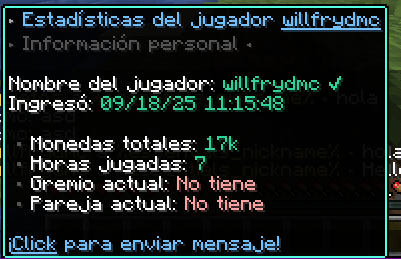
Interactive Hover Text: Show detailed player stats (money, hours played, etc.) just by hovering over their name.
Click to Whisper: Click on a player’s name in the chat to instantly start a private message.
✅ Advanced Private Messaging System
Customizable Formats: Set how the sent and received messages look.
Quick Reply Command (/r): Reply to the last private message with a single command. Essential for your users!
Notification Sounds: A small sound when receiving a message to ensure it doesn’t get missed.
✅ Staff and Server Tools
Social Spy (/socialspy): Allows staff members with permissions to monitor private messages to keep the community safe.
Ignore System (/ignore): Allows users to persistently ignore other players.
Anti-Spam: Prevents chat flooding with a configurable cooldown between messages.
Update Notifier: Alerts in the console when a new version of xChat is available on Modrinth.
✅ Optimization and Compatibility
Lightweight and Optimized: Built on the Paper API and using packets with ProtocolLib for maximum performance.
100% Customizable: Absolutely all messages, formats, and functions can be adjusted from the generated config.yml.
Anonymous Statistics with bStats: To help us understand how the plugin is used and improve it.
🖼️ Plugin Previews


**🔧 Commands and Permissions**
“`yaml
Comando Alias Permiso Descripción
/xchat reload /xc reload xchat.reload Recarga la configuración del plugin.
/xchat help /xc help (Ninguno) Muestra la ayuda principal.
/msg /tell, /w (Ninguno) Envía un mensaje privado.
/reply /r (Ninguno) Responde al último mensaje privado.
/ignore /ign (Ninguno) Gestiona tu lista de ignorados.
/socialspy /spy xchat.socialspy Activa/desactiva el espía de PMs.
(Bypass Spam) – xchat.antispam.bypass Permite saltarse el cooldown del chat.
“`
Export to Spreadsheets
🔌 Required Dependencies
To make xChat work with its full potential, you need to install these three plugins:
Vault: For permission and economy plugin integration.
PlaceholderAPI: To use the thousands of available placeholders.
ProtocolLib: For advanced feature functionality.
**🐠Config.YML**
“`yaml
# ___ _ _
# __ __ / __ |__ __ _| |_
# / // / | ‘_ / _` | __| Plugin by
# > ”
reply_usage: “&cUse it like this: /{label} ”
player-not-found: “&cThat player is not online.”
cannot-message-self: “&cYou cannot message yourself.”
no-reply-target: “&cYou have no one to reply to.”
social-spy-on: “&aSocialSpy enabled. You will now see private messages.”
social-spy-off: “&cSocialSpy disabled.”
# HELP MESSAGES (/xchat help, /ignore help)
# // ___ __ _
# / / __|/ _` | Idea by
# / // __ (_| | xPlugins
# / /___/__, |
# |___/
help-message:
xchat:
– “&7——-&f xChat Help &7——”
– “”
– “&#AEC6CF> /xchat help 󖣃➛&f Displays this help message.”
– “&#AEC6CF> /xchat reload 󖣃➛&f Reloads plugin configuration.”
– “”
– “&7—————————————”
ignore:
– “&7—————–&f Ignore Help &7——————–”
– “”
– “&#AEC6CF /ignore help 󖣃➛&f Displays this help.”
– “&#AEC6CF /ignore list 󖣃➛&f See who you are ignoring.”
– “&#AEC6CF /ignore add 󖣃➛&f Start ignoring them.”
– “&#AEC6CF /ignore remove 󖣃➛&f Stop ignoring them.”
– “”
– “&7—————————————”
# IGNORE SYSTEM (/ignore)
# _____
# _ __ _ _ __ ___ _ __ ___
# / // _` | ‘_ / _ | ‘__/ _ Idea by
# // /_| (_| | | | | (_) | | | __/ xPlugins
# ____/ __, |_| |_|___/|_| ___|
# |___/
ignore:
enabled: true
storage: “ignores.yml”
messages:
added: “&aYou are now ignoring &f%target%.”
removed: “&eYou are no longer ignoring &f%target%.”
not_found: “&cPlayer not found.”
usage: “&eUsage: /ignore [player]”
cannot_ignore_self: “&cYou cannot ignore yourself.”
list_empty: “&7You are not ignoring anyone.”
list_header: “&6Ignoring:”
list_format: “&7- &f%target%”
# Anti Spam
# _ _ _ __
# /_ _ __ | |_(_) / __ __ __ _ _ __ ___
# //_\| ‘_ | __| |_____ | ‘_ / _` | ‘_ ` _ Idea by
# / _ | | | |_| |_____| |_) | (_| | | | | | | xPlugins
# _/ _/_| |_|__|_| __/ .__/ __,_|_| |_| |_|
# |_| 1.0.0
anti-spam:
enabled: true
delay-seconds: 3
message: “&#ff0000 ⚠ Slow down! You must wait %time% second(s) before chatting again.”
# GENERAL PLUGIN MESSAGES
# // ___ __ _
# / / __|/ _` | Idea by
# / // __ (_| | xPlugins
# / /___/__, |
# |___/
plugin-messages:
reload: “Ke25f ✔ Hey! xChat configuration has been reloaded!”
no-permission: “&#ff2c2c ☀ Oops! You don’t have permission to run this command!”
# UPDATE NOTIFIER
# _ _
# / / _ __ __| | __ _| |_ ___
# / / ‘_ / _` |/ _` | __/ _
# _/ / |_) | (_| | (_| | || __/
# ___/| .__/ __,_|__,_|_____|
# |_| 1.0.0
update-checker:
enabled: true
“`
⚙️ Installation
Download the xChat .jar file.
Make sure you have the 3 dependencies above installed.
Place all the .jar files in your server’s plugins folder.
Start or restart the server.
Configure everything to your liking in the generated config.yml file!
❤️ Support and Credits
Created with love by WillfryDev (xPlugins inc.).
XCatch
# XCatch
### Efficient yet effective plugin to catch X-rayers for Minecraft 1.13-1.19.
XCatch analizes how a player is mining by looking it how many turns it makes and how many rare ores it finds in a small period of time.
## Features
– Send an alert to staff after a configurable amount of flags.

– Automatically ban players after a configurable amount of flags (off by default).
– See flags and bans of online or offline players in a gui.

– Ability to specify multiple ban times depending on how many previous bans a player has
– Log flags in a Discord channel with DiscordSRV
– Ability to execute commands after a number of flags
[ ](https://dediamondpro.dev/bisecthosting)
## Why use this over other plugins
– Plugins that hide ores (like Orebfuscator) are generally very CPU intensive, while XCatch is not and those plugins can be bypassed if the player knows the seed, which can be easily obtained with a seedcracker mod, while XCatch cannot be easily bypassed.
– Plugins that announce when a player has mined a lot of ores (like OreAnnouncer) have way more false flags when players are just lucky or when they find a big ore vein
## Commands
– /xcatch help, shows all commands.
– /xcatch view [], shows flags of all players or the player specified.
– /xcatch info, get some statistics about XCatch on your server

– /xcatch reload, reload the XCatch config.
– /xcatch debug , get some debug stats of a player.
## Permissions
– xcatch.alert: Players with this permission get notified of a flag.
– xcatch.command: Players with this permission get access to the XCatch command
– xcatch.bypass: Players with this permission bypass all XCatch checks
– xcatch.noban: Players with this permission will still get flagged as normal, but XCatch won’t automtically ban them
## FAQ
Q: XCatch isn’t detecting me Xraying
A: **Make sure you don’t have the XCatch.bypass permission**
Q: How do I configure XCatch?
A: The configuration file is in the `XCatch` folder an is named `config.yml`, there are clear descriptions of what everything does in the config file.
xBossBar

# xBossBar 〽️
**xBossBar** is a powerful and customizable bossbar management plugin for Minecraft servers. It allows server administrators to create, manage, and display bossbars with personalized colors, styles, titles, and per-player visibility.
### Key Features 💫
– **BossBar Management** – Create, remove, and edit bossbars with ease.
– **Custom Titles** – Set unique titles for each bossbar.
– **Colors & Styles** – Multiple colors and styles including segmented and solid bars.
– **Per-Player Bars** – Show bossbars to specific players or all players.
– **Progress Control** – Dynamically set bossbar progress in-game.
– **API Support** – Fully featured API to integrate bossbars with other plugins or custom systems.
– **User-Friendly** – Simple and clear commands for fast management.
### Useful Links 🔗
– [GitHub Repository](https://github.com/xDrygo/xBossBar) – Access the source code, latest releases, and submit **Issues** for bug reports, feature requests, or questions.
– [Wiki Documentation](https://wiki.drygo.dev/xbossbar) – Guides for commands, configuration, placeholders, and API usage.
### Support ❓
For technical issues, unexpected behavior, or enhancement suggestions, please submit an **Issue** on the [GitHub repository](https://github.com/xDrygo/xBossBar/issues). This ensures your feedback is tracked and addressed efficiently.
—
xBossBar is designed to provide a **robust, flexible, and professional bossbar management solution**, allowing Minecraft server owners to enhance gameplay with visually engaging and fully customizable bossbars.
xBlocked

## 📌 xBlocker Description
## Example #1
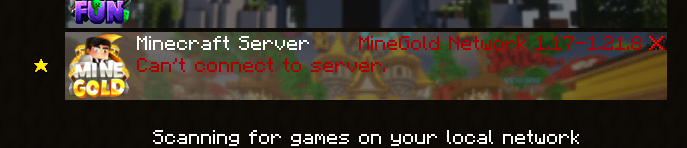
xBlocker is the ultimate plugin to control and customize the connection experience on your Minecraft server, designed for admins who want professionalism, flexibility, and full compatibility.
🔹 Version Management:
Set a minimum allowed protocol (e.g. from 1.16.5 upwards) and block outdated or incompatible clients with clear, customized messages.
🔹 Custom Messages:
Server List (Ping) text to inform players about unsupported versions.
Unique disconnection screens, with dynamic placeholders like %server_version%.
Full integration with i18n (multi-language): messages automatically adapt to the player’s locale.
🔹 Internationalization (i18n):
Multi-language system with support for Spanish, English, and Portuguese, among others. The plugin detects the client’s locale and shows the appropriate translation.
🔹 Compatibility & Performance:
Optimized IP → protocol caching.
Works on Spigot, Paper, and forks (for MOTD).
Proxy support (BungeeCord / Velocity) through xMotd integration.
🔹 Extra Tools for Admins:
Built-in Modrinth update notifier.
Optional usage stats via bStats.
Advanced debug mode for testing and troubleshooting.
✨ With xBlocker you gain total control over how your server appears in the client list and how version mismatches are handled — all with a professional, multi-language, hassle-free experience.
## ✨ Config.yml ✨
“`yaml
# _________ _____.__
# _ ___ ____ _____/ ______| ____
# / / / _ / __| |/ ___
# ___( <_> ) | | | / /_/ >
# ______ /____/|___| /__| |_____ /
# / / /_____/
# Hecho con amor por 777 Studios – xPlugins
#
# Wiki y informacion: https//xblocker.willfry.net/
# =========================
# I18N (MULTI-LENGUAJE)
# =========================
i18n:
enabled: true # true = usar bundles /messages/*.yml
default-lang: “es_ES” # idioma por defecto
# PLAYER_LOCALE_THEN_DEFAULT: usa el locale del cliente; si no, default
# FIXED: fuerza el idioma en fixed-lang
mode: “PLAYER_LOCALE_THEN_DEFAULT”
fixed-lang: “es_ES” # usado si mode=FIXED
ping-lang: “es_ES” # idioma para PING/MOTD (no hay Player)
# Mapeos para normalizar locales reportados (ej. es -> es_ES)
locale-map:
es: “es_ES”
en: “en_US”
pt: “pt_BR”
# =========================
# Notificador de Actualizaciones (Modrinth) (No tocar)!!
# =========================
updates: # (No tocar)!!
modrinth: # (No tocar)!!
enabled: true # (No tocar)!!
project: “xblocked” # (No tocar)!!
# Comprobar cada X horas (>=1)
check-interval-hours: 1 # (No tocar)!!
notify: # (No tocar)!!
console: true
admins-on-join: true
permission: “xblocked.update”
# =========================
# bStats (No tocar)!!
# =========================
bstats:
enabled: true
plugin-id: 27316
# — Compatibilidad de versiones —
# Protocolo mínimo permitido (735 = MC 1.16.5; 763 = 1.20.1; 769 = 1.21.1, etc.)
min-protocol: 735
# Texto que se muestra a la DERECHA en la lista de servidores cuando
# el cliente es más antiguo que min-protocol o no coincide con el servidor.
# Se procesa con el mismo formato indicado en motd.format (auto/legacy/mini).
# NOTA: si i18n.enabled=true, se usará messages/.yml -> serverlist.incompatible.
# Este texto queda como FALLBACK si desactivas i18n.
incompatible-message: “&c ✖️ ¡Oye! 1.19.4 – 1.21x”
# — Caché IP -> protocolo detectado (handshake) —
cache-ttl-seconds: 45 # Tiempo de vida de la entrada
cache-soft-limit: 1000 # Límite suave de entradas (limpieza si se excede)
# Motd ( Solo para Spigot x paper ) Para velocity/bungee Usa xMotd
motd:
enabled: false # true para habilitar el MOTD personalizado
format: auto # auto | legacy | mini
center: true # centra cada línea (approx. por caracteres)
center-width: 50 # ancho usado para el centrado
# Si i18n.enabled=true y existe messages/.yml->motd.*, se prioriza ese contenido.
line1: “&cxBlocked &7| &fLobby”
line2: “&f¡Bienvenido!”
# — Mensaje de desconexión en LOGIN (Outdated server/client) —
disconnect:
enabled: true
# Si es true, solo reemplaza mensajes tipo “Outdated …”.
# Si es false, reemplaza cualquier kick de login por este mensaje.
only-on-version-mismatch: true
format: auto # auto | legacy | mini
# Placeholders disponibles:
# %server_version% -> versión del servidor (ej: git-Paper-196 (MC: 1.20.1))
# Si i18n.enabled=true, se usa messages/.yml->disconnect.incompatible (por jugador).
# Este texto queda como FALLBACK si desactivas i18n.
message: “✖ Servidor/cliente no coinciden. Usa %server_version%”
#### ##### #### # # #### ### #### ##### ### # #
# # # # # # # # # # # # # # # ## #
# # ##### #### # # #### ##### # # # # # # #
# # # # # # # # # # # # # # # ##
#### ##### # ### # # # # #### ##### ### # #
debug: true # logs de handshake/ping/disconnect
debug-force-incompatible: false # fuerza el estado incompatible para
“`
## ✨ Messanges / ES and EN
“`yaml
# _____ ____ ____ ___________ |__| ____ ______
# / _/ __ / / ___/__ | |/ __ / ___/
# | Y Y ___/| | \___ / __ _ | ___/ ___
# |__|_| /___ >___| /____ >(____ /__| |___ >____ >
# Hecho con amor por 777 Studios – xPlugins
# Usa colores HEX (<#RRGGBB>) o de Minecraft (&a, &b, etc.)
meta:
name: “English (US)”
version: 1
serverlist:
incompatible: “✖ Your version is not supported. Please use %server_version%”
disconnect:
incompatible: “✖ Server/client mismatch. Please use %server_version%”
motd:
line1: “GhostBlocker”
line2: “Professional connection control”
admin:
reloaded: “Config reloaded.”
“`
—
xBlockCommand

## xBlockerCommands
 
A powerful and flexible Minecraft plugin to block commands on your server.
## 📋 Description
xBlocker is a Spigot/Paper plugin that allows server administrators to block specific commands from being used by players. It features a flexible configuration system, wildcard support, and an intuitive command interface.
## ✨ Features
– **Block any command** – Prevent players from using specific commands
– **Wildcard support** – Use `*` to block groups of commands (e.g., `minecraft:*`)
– **Permission system** – Bypass blocks with permissions
– **Dynamic management** – Add/remove blocked commands without editing files
– **Customizable messages** – Full color code support
– **Logging system** – Track blocked command attempts
– **Tab completion** – Easy command usage
– **Lightweight** – Minimal performance impact
## 🔧 Installation
1. Download the latest `xBlocker.jar` from releases
2. Place the file in your server’s `plugins/` folder
3. Restart your server
4. Configure the plugin in `plugins/xBlocker/config.yml`
5. Use `/xb reload` to apply changes
## 📦 Requirements
– Minecraft 1.17 or higher
– Spigot, Paper, or any compatible server software
– Java 16 or higher
## 🎮 Commands
| Command | Description | Permission |
|———|————-|————|
| `/xb reload` | Reload the configuration | `xblocker.reload` |
| `/xb list` | List all blocked commands | `xblocker.admin` |
| `/xb add ` | Add a command to the block list | `xblocker.admin` |
| `/xb remove ` | Remove a command from the block list | `xblocker.admin` |
**Aliases:** `/xblocker`, `/xb`, `/blocker`
## 🔐 Permissions
| Permission | Description | Default |
|————|————-|———|
| `xblocker.admin` | Full access to the plugin | OP |
| `xblocker.bypass` | Bypass all command blocks | OP |
| `xblocker.reload` | Reload the configuration | OP |
## ⚙️ Configuration
“`yaml
# List of blocked commands
blocked-commands:
– “op”
– “deop”
– “stop”
– “reload”
– “minecraft:give”
– “plugins”
– “pl”
– “version”
– “ver”
# Plugin messages
messages:
blocked-command: “&c&lAccess Denied! &7This command is blocked.”
no-permission: “&cYou don’t have permission to use this command.”
reload-success: “&aConfiguration reloaded successfully!”
command-added: “&aCommand added to the block list.”
command-removed: “&aCommand removed from the block list.”
# Enable logging of blocked command attempts
enable-logging: true
“`
## 🎯 Usage Examples
### Block a single command
“`
/xb add gamemode
“`
### Block all commands from a namespace
“`
/xb add minecraft:*
“`
### Remove a blocked command
“`
/xb remove gamemode
“`
### View all blocked commands
“`
/xb list
“`
### Reload configuration
“`
/xb reload
“`
## 🤝 Contributing
Contributions are welcome! Please feel free to submit a Pull Request.
## 📝 License
This project is licensed under the MIT License.
## 🐛 Bug Reports
If you find a bug, please open an issue on GitHub with:
– Minecraft version
– Server software and version
– Plugin version
– Steps to reproduce
– Error logs (if any)
xBetterVanish
BetterVanish is a high-performance vanish plugin designed specifically for modern Paper servers (1.21.10). It goes far beyond simple invisibility and delivers a fully undetectable stealth mode built for professional staff environments.
When a player activates vanish, they are completely removed from normal gameplay detection. They are invisible, silent, immune to damage, and cannot trigger redstone, sculk sensors, vibrations, pressure plates, or mob spawning. Vanished players do not appear in command selectors, tab completion, the /list command, or the server’s player count. Join, leave, death, and advancement messages are fully suppressed.
Players with the permission vanish.see can view vanished players with 50% transparency, ensuring staff coordination without exposing hidden moderators.
BetterVanish maintains full persistence across:
Teleports
World changes
Respawns
Gamemode changes
Rejoins
The plugin is optimized for performance and built with a clean architecture using a dedicated VanishManager system and public API for integration with other plugins.
Key Features:
True stealth vanish system
Damage immunity and survival flight
No item pickup or entity collisions
No combat tracking or statistic recording
Optional fake join/leave messages
Configurable actionbar indicators
Auto-vanish on join support
Server list player count filtering
BetterVanish is designed for serious server owners who require reliability, stability, and complete control over staff invisibility.
xAntiCheat

## xAntiCheat – Advanced Protection
It’s time to take your server’s security to the next level! xAntiCheat is a powerful, modern, and highly configurable anti-cheat solution, designed from the ground up to be both effective and lightweight. Created for servers seeking robust protection without sacrificing performance, xAntiCheat offers an arsenal of tools to keep cheaters at bay.
This plugin is the result of careful engineering to provide administrators with full control – and a flawless user experience.
⚡ Main Features
xAntiCheat is packed with features designed for efficient administration and precise detection.
Precise and Varied Detections
Our multi-layered system covers the most common and frustrating cheats:
“`yaml
Combat
– Reach
– Velocity
– AutoClicker
Movement
– Fly
– Speed
– Jesus
– NoSlowDown
“`
World and Player:
Scaffold / SafeWalk: Detects building bridges at impossible speeds and angles, and walking on the edge of blocks without sneaking.
NoFall: Prevents players from negating fall damage.
Flexible Punishment System
Verification Sequence: No more instant and questionable bans! xAntiCheat can freeze a suspicious player for a few seconds before applying the final punishment, sending an alert to the staff.
Configurable Actions: Decide what happens when a cheater is detected. You can execute any console command (ideal for ban, tempban, mute…) or use our kick system with a custom message, allowing you to create ban screens in the style of major servers.
Professional Tools for Staff
Inspection GUI: Use /xac check to open a graphical interface and see a player’s violation levels in real-time.
Smart Alerts: Chat notifications are clickable and suggest the /tp command for quick teleportation.
Bypass Permission: Administrators with the xanticheat.bypass permission are ignored by the anti-cheat, allowing them to build and test without being disturbed.
Reload Command: Reload the entire configuration with /xac reload without needing to restart the server.
Advanced Logs and Notifications
SQLite Database: All violations are saved persistently. Cheaters can’t escape by simply reconnecting! Additionally, a detailed log of each flag is saved with useful information like ping, TPS, and the client brand.
Discord Integration: Automatically send punishment notifications to your Discord channel via a Webhook, keeping your moderation team informed at all times.
Optimization and Compatibility
Lightweight and Efficient: Designed to have a minimal impact on your server’s performance, with database operations and Discord notifications running asynchronously.
Highly Configurable: Virtually every aspect of the plugin can be modified through config.yml and lang.yml, from detection values to every single message.
Supported Version: Optimized for Minecraft 1.16.5 (and Paper/Spigot based servers).
## Config.yml
“`yaml
# _ _ _ ___ _ _
# __ __ /_ _ __ | |_(_) / __ |__ ___ __ _| |_
# / ///_\| ‘_ | __| |/ / | ‘_ / _ / _` | __|
# > Ejecuta un comando de consola (para usar con plugins como LiteBans, Essentials, etc.).
# ‘kick’ -> Expulsa al jugador con un mensaje personalizado desde lang.yml.
type: “kick”
# Rellena esto SOLO si usas ‘type: command’.
command_format: “ban %player% [xAntiCheat] %reason%”
# Secuencia de castigo
punishment_sequence:
# Activa la congelación del jugador por unos segundos antes de ejecutar el comando de castigo.
freeze:
enabled: true
# ¿Cuántos segundos durará la congelación antes del castigo final?
duration_seconds: 5
# Sistema de Expiración de Violaciones (Decay)
violation_decay:
enabled: true
interval_seconds: 300
amount_to_reduce: 1
# Configuración de la Interfaz Gráfica (GUI)
gui:
title: “&8xAntiCheat &7| Violaciones de &c%player%”
size: 27
fill_item: “GRAY_STAINED_GLASS_PANE”
# Configuración de los registros (logs)
logging:
# Activa el guardado de cada violación en la base de datos.
database:
enabled: true
# Integración con Discord
discord:
# Activa el envío de notificaciones a Discord
enabled: true
# Pega aquí la URL del Webhook que creaste en tu servidor de Discord.
webhook_url: “”
# Nombre de usuario que aparecerá en Discord
username: “xAntiCheat”
# URL del avatar (logo) que aparecerá en Discord
avatar_url: “https://i.imgur.com/k6JjwL4.png”
# Configuración de los checks de hacks
checks:
speed:
enabled: true
max_violations: 15
reason: “Velocidad Anormal (Speed)”
fly:
enabled: true
max_violations: 10
reason: “Vuelo Ilegal (Fly)”
jesus:
enabled: true
max_violations: 20
reason: “Movimiento Anormal sobre Líquidos (Jesus)”
nofall:
enabled: true
max_violations: 8
reason: “Daño por Caída Anulado (NoFall)”
reach:
enabled: true
max_violations: 15
reason: “Alcance Anormal (Reach)”
max_distance: 3.2
scaffold:
enabled: true
max_violations: 20
reason: “Construcción Ilegal (Scaffold)”
velocity:
enabled: true
max_violations: 10
reason: “Modificación de Knockback (Velocity)”
reduction_threshold_percent: 95
noslowdown:
enabled: true
max_violations: 12
reason: “Sin Ralentización (NoSlowDown)”
autoclicker:
enabled: true
max_violations: 25
reason: “Clics Anormales (AutoClicker)”
max_cps: 20
“`
## Lang.yml
“`yaml
# xAntiCheat Language File by WillfryDev
# Prefijo para todos los mensajes del plugin
prefix: “&8[&c&lxAntiCheat&8] &r”
# Mensajes para el staff que tiene el permiso ‘xanticheat.alerts’
alerts:
flag: “%prefix%&c%player% &ffalló el check &c%check% &7(&cx%violations%&7)”
hover_text: “&a ✔ ¡Oye! &f¡Haz clic para teletransportarte hacia &c%player%&f!”
# Mensaje para la pantalla de expulsión (si ‘punishment.type’ es ‘kick’)
kick_screen_format:
– “”
– “&c¡Has sido expulsado por Actividad Sospechosa!”
– “”
– “&8 ▸ &fRazón: &c%reason%”
– “&8 ▸ &fBaneado por: &cConsola”
– “&8 ▸ &fFecha: &e%date%”
– “”
– “&7¿Crees que la suspensión fue injusta?”
– “&fPuedes apelar este baneo en: &b&ndiscord.ejemplo.com”
– “”
# Mensajes para la secuencia de congelación
freeze:
player_message: “&c ✘ ¡Actividad sospechosa detectada! &fRealizando una última comprobación…”
staff_alert: “%prefix%&c ✘ ¡Oye! &fEl jugador &c%player% &fha sido congelado por sospecha de hacks. Castigo final en &c%seconds%&f segundos.”
# Mensajes para los comandos
commands:
no_permission: “%prefix%&c ✘ ¡Oye! No tienes permiso para ejecutar este comando.”
reload_success: “%prefix%&a ✔ ¡Éxito! La configuración y los mensajes han sido recargados exitosamente.”
unknown_command: “%prefix%&c ✘ ¡Ups! Comando desconocido. Usa /xac help para ver la ayuda.”
help_message:
– “&8&m—————–&r &c&lxAntiCheat &8&m—————–”
– “”
– “&8 • &c/xac help &7▸ &fMuestra este menú de ayuda.”
– “&8 • &c/xac reload &7▸ &fRecarga la configuración del plugin.”
– “&8 • &c/xac check &7▸ &fRevisa las violaciones de un jugador.”
– “”
– “&8&m—————————————————-”
# Textos para la Interfaz Gráfica (/xac check)
gui:
item_name: “&fCheck: &c%check_name%”
item_lore:
– “”
– “&8 ▸ &fEl jugador ha acumulado un total de”
– “&8 ▸ &C%violations%/%max_violations%&f violaciones para este check.”
– “”
– “&8 • &fEstado: %status%”
– “”
status:
safe: “&aSeguro”
suspicious: “&eSospechoso”
failed: “&cFallido”
“`
🚀 Installation
Download the xAntiCheat .jar file.
Place it in your server’s plugins folder.
Restart the server.
Done! You can now configure the config.yml and lang.yml files to your liking.
—-
🔥 Support and Suggestions
Have a question or an idea for a new detection? Join our community!