xibao-1.8.9
This mod is an unofficial Forge 1.8.9 remastered version of the “Xibao” mod, which has been open-sourced on GitHub.
This mod will display a “good news” or “bad news” notification, or simply a default background, when the player disconnects from a server or fails to join a server.
_In fact, the only difference between this mod and the original mod is the name and Minecraft version._
Note: This mod already includes Mixins, so do not add the MixinBooter mod, as it may cause errors.
Other Xibao:
– [Xibao Plus Plus](https://modrinth.com/mod/xibao-plus-plus)
– [XiBao xx](https://modrinth.com/mod/xibaoxx/)
XG7Lobby
# I’ll record it again…
# This plugin depends on a core! Download it below:
https://modrinth.com/plugin/xg7plugins
—
# XG7Lobby – Complete Lobby/Hub System
## 📖 What is XG7Lobby?
**XG7Lobby** is a powerful lobby/hub management plugin designed to revolutionize the server join experience. With a wide range of configurable options, the plugin offers **more than 20 customizable features**, including: **Global PVP**, **interactive menus**, **animated scoreboard/tablist**, **custom forms for Geyser**, and much more!
—
## ⚡ Main Features
### 🏰 Multi-Lobby System
Configure **as many lobbies as you want**, including cross-server locations with SQL database support! Players can easily teleport using the `/lobby` command, with a configurable cooldown system and the option to teleport to a specific lobby ID.
### 🎨 Advanced Menu System
Improve your lobby experience with XG7Lobby’s menu system. You can use custom Geyser forms, personalized GUIs, and configurable hotbars — all adjustable to your liking!
### 📊 Scoreboard, Tablist, Bossbar & More
Bring your server to life with **fully animated** scoreboards, tablists, and bossbars. Display useful information such as player statistics, server status, or events in a visually appealing and dynamic way.
### 🎉 Join, Quit & First Join Events
Customize what happens when players join or leave the server, and make a great first impression on new players with a special welcome. Add messages, sounds, effects, or even rewards to make joining and leaving more memorable.
### ⚔️ Global PVP System
Does the lobby sometimes feel boring? With the global PVP system, that won’t be a problem anymore! Let players fight each other in the lobby with the powerful system provided by XG7Lobby, including full statistics for kills, deaths, and KDR.
### 🦘 Multi-Jump System
Go beyond the classic double jump! Configure triple jumps, infinite jumps, or unique jump effects to add fun mechanics to your server.
### 🚀 LaunchPad
Add excitement with customizable launchpads that throw players into the air. Perfect for hubs, lobbies, or minigame arenas with a fun and interactive touch.
### 🛡️ Complete Moderation System
Keep your server safe with robust moderation tools, including warning systems, mute, kick, ban, IP-ban, and automatic punishments based on configurable infraction levels.
### 💬 Advanced Chat Protection
A complete protection system including anti-swearing, anti-spam, and blocking unwanted commands. Keep your chat clean and organized automatically.
### 🔧 Build System
Control who can build in the lobby using the `/build` command, with full protection against block breaking and placing.
### 👻 Vanish System
Allows staff members to become invisible to other players using the `/vanish` command.
### ⚙️ Custom Commands
Add your own commands to fit your server’s style. Customize shortcuts, actions, and utilities without needing extra plugins.
### 👤 NPC & Hologram System
Create user interaction by taking advantage of the new NPC and hologram creation features!

—
## 📋 Full Feature List
* Fully configurable
* Multiple lobbies
* Global PVP system
* Custom menus (GUI, forms, and hotbar)
* Animated scoreboard, tablist, and bossbar
* Multi-jump system
* Launchpad
* Moderation system
* World-based lobby
* Join and quit events
* First join events
* Repeating events
* Auto broadcast
* Customizable MOTD
* Build system
* Custom commands
* Vanish system
* Anti-swearing
* Anti-spam
* NPCs and holograms
* Action queue system
* Preferences menu
* Hide chat
flow
# Flow – Reimagining Communication in Minecraft
## Elegance in Every Detail
Flow isn’t just a chat plugin. It’s a completely reimagined way of communicating in Minecraft, where every detail is meticulously crafted. Minimalist. Intuitive. Revolutionary.
### ✨ The Magic of Simplicity
– **Local Chat**
Communicate naturally with nearby players
– **Global Chat**
Add “!” at the start of your message – and the whole server will hear you
– **Smart Tooltips**
Hover for important information
– **Instant Messages**
Private communication with a single click
### 🎨 Social Features
– **Mentions**
Tag players with @username for instant notifications
– **Emojis**
Express yourself with built-in emoji support
– **Anti-Spam**
Smart protection against chat abuse
– **Chat Filter**
Keep conversations clean automatically
– **Ignore System**
Control who you interact with
### 🔧 Player Settings
– **Private Messages Control**
Enable or disable private messages
– **AFK System**
Set your status and custom AFK message
– **Personal Settings GUI**
Easy-to-use interface for all player settings
### 🎨 Limitless Customization
Customize Flow to your needs:
– Full PlaceholderAPI support
– Flexible message formats
– Interactive tooltips
– LuckPerms integration
### ⚡️ Performance
Built for speed:
– Asynchronous processing
– Optimized code
– Minimal overhead
## 🌟 Perfect for Any Server
| Server Type | Compatibility |
|————-|—————|
| Anarchy | ✓ |
| PvP | ✓ |
| Duels | ✓ |
| RPG | ✓ |
## 📝 Configuration Guide
### Basic Settings
“`yaml
# Radius for local chat in blocks
local-chat-radius: 100
# Prefix for global messages
global-chat-prefix: ‘!’
# Time format for timestamps
time-format: ‘HH:mm:ss’
“`
### Message Formats
Customize how messages appear in different chat types:
“`yaml
format:
# Local chat format
local: ‘%luckperms_prefix%%player_name% &8→ &f%message%’
# Global chat format
global: ‘&6[G] %luckperms_prefix%%player_name% &8→ &f%message%’
# Private messages format
private:
outgoing: ‘&d→ &7%recipient%&8: &f%message%’
incoming: ‘&dFrom &7%sender%&8: &f%message%’
“`
### Player Settings
Configure personal settings for each player:
“`yaml
settings:
# Default AFK message
default-afk-message: “I am currently AFK. I will respond when I return.”
# Default settings state
default-settings:
private-messages-enabled: true
afk-status: false
“`
### Messages Customization
All plugin messages can be customized in messages.yml:
“`yaml
messages:
private-messages:
disabled-sender: “&cYou have private messages disabled!”
disabled-recipient: “&cThis player has private messages disabled!”
player-afk: “&7%player% is AFK: %message%”
settings:
private-messages-enabled: “&aPrivate messages enabled!”
private-messages-disabled: “&cPrivate messages disabled!”
afk-enabled: “&aAFK status enabled!”
afk-disabled: “&cAFK status disabled!”
“`
### Hover Effects
Configure tooltips that appear when hovering over messages:
“`yaml
hover:
enabled: true
format:
– ‘&8&m ‘
– ”
– ‘ &fPlayer: &7%player_name%’
– ‘ &fRank: &7%luckperms_prefix%’
– ‘ &fPing: &7%player_ping%ms’
– ”
– ‘ &fTime: &7%time%’
– ”
– ‘ &7Click to message’
– ”
– ‘&8&m ‘
“`
### Anti-Spam Protection
Prevent chat abuse with customizable limits:
“`yaml
anti-spam:
enabled: true
cooldown: 2 # Seconds between messages
max-messages: 5 # Maximum messages
time-window: 10 # Time window in seconds
“`
### Chat Filter
Keep your chat clean with word filtering:
“`yaml
chat-filter:
enabled: true
banned-words:
– “word1”
– “word2”
“`
### Emoji System
Add expressive emojis to your chat:
“`yaml
emojis:
‘:heart:’: ‘❤’
‘:star:’: ‘⭐’
‘:smile:’: ‘☺’
‘:fire:’: ‘🔥’
‘:rainbow:’: ‘🌈’
# And many more…
“`
### Mention System
Configure how player mentions work:
“`yaml
mentions:
format: ‘§e@%player%§r’
sound:
enabled: true
type: ‘ENTITY_EXPERIENCE_ORB_PICKUP’
volume: 1.0
pitch: 1.0
title:
enabled: true
text: ‘§eMention from %player%’
“`
### Color Schemes
Define default colors for chat elements:
“`yaml
colors:
name: ‘&7’ # Player names
arrow: ‘&8’ # Arrows in format
message: ‘&f’ # Message text
“`
### PlaceholderAPI Integration
Flow supports all PlaceholderAPI expansions:
– `%luckperms_prefix%` – Player’s prefix
– `%luckperms_suffix%` – Player’s suffix
– `%player_name%` – Player’s name
– `%player_ping%` – Player’s ping
– `%player_world%` – Player’s world
### Permissions
– `flow.reload` – Access to /flowreload
– `flow.bypass.filter` – Bypass chat filter
– `flow.bypass.antispam` – Bypass anti-spam
– `flow.emojis` – Use emojis in chat
– `flow.color` – Use color codes in chat
### Color Codes
Flow supports standard Minecraft color codes:
– `&0-9, &a-f` – Colors
– `&k` – Magic
– `&l` – Bold
– `&m` – Strikethrough
– `&n` – Underline
– `&o` – Italic
– `&r` – Reset
### Tips
– Use `&` for color codes
– Test your formats in-game with /flowreload
– Keep anti-spam values balanced
– Regular expressions are supported in chat filter
– Use hover tooltips to display additional information
– Customize click actions for interactive chat
## 💫 Commands
/msg Send a private message
/r Reply to last message
/ignore Ignore/unignore a player
/flowreload Reload configuration
/settings Open settings menu
## 📦 Dependencies
**Required:**
– Paper 1.19+
– PlaceholderAPI
**Optional:**
– LuckPerms (for ranks and prefixes)
## 🚀 Installation
1. Place plugin in plugins folder
2. Install PlaceholderAPI
3. Download required expansions:
“`
/papi ecloud download luckperms
/papi reload
“`
4. Restart server
5. Configure in config.yml
—
You can find [Changelog Here](https://femboypig.github.io/flow-changelog/)
> “Flow – the future of Minecraft communication”
Xfilter
**Xfilter** is a powerful Minecraft plugin designed to maintain clean and safe communication within your server by filtering out unwanted words from player messages. Server administrators can easily manage the list of filtered words using commands, and the plugin supports an unlimited number of filtered words. When a player attempts to send a message containing any filtered word, the message is blocked, and a notification is sent to the player. Xfilter provides full flexibility to customize and update the filtered word list in real-time, ensuring smooth moderation without disrupting gameplay.
## Key Features:
Unlimited filtered words.
Real-time filtering of chat messages.
Easy-to-use commands for managing filtered words.
Only operators (OPs) can add or remove words from the filtered list.
# How to Use Xfilter:
– 1. Adding a Filtered Word:
Command: /xfilterword add or /xfw add
Example: /xfw add badword
This adds the specified word to the filtered word list. If the word is already filtered, you will receive a message saying it’s already in the list.
– 2. Removing a Filtered Word:
Command: /xfilterword remove or /xfw remove
Example: /xfw remove badword
This removes the word from the filtered list. If the word is not found, you will be notified.
– 3. What Happens When a Player Uses a Filtered Word:
If a player sends a message containing a filtered word, the message will not be sent, and the player will receive a message: “Sorry, you can’t send this message because you used a filtered word.”
# Permissions:
Only OPs can use the commands to add or remove words from the filtered list.
Filtered words are stored in filteredwords.yml, and the plugin allows you to add unlimited words for filtering.
Xenon
## Xenon
Xenon is a lightweight, open-source network core plugin designed for small to mid-sized Minecraft networks. It provides essential backend systems to help you manage players, permissions, and moderation across multiple servers.
## Features
* **Grant System** – Flexible permission grants with support for temporary and permanent ranks
* **Rank System** – Fully manageable rank hierarchy for structured permission control
* **Punishment System** – Bans, mutes, warnings, and other moderation tools
* **Gift Card System** – Redeemable codes for ranks, perks, or rewards
* **Alt Detection System** – Identify and manage alternate accounts
* **Advanced Chat Filter** – Blocks most variations of profanity
* **Server Manager** – Execute and broadcast commands across connected servers
* **Many More..** – There is more..
> **Note:** Xenon is not intended for production environments or large-scale networks. If you’re running a larger or more demanding network, consider using heather instead.
## Authors:
– All credits go to matheus.
XD’s Utils
## Description
XD’s Utils is a plugin and mod that provides a custom web interface that you can monitor the whole server, create backups to restore points of your server with a simple script to restore to a backup, an API to get and modify data of the server and plugin through sending web requests, and more!
## Features
| Feature | Implementation |
|——————-|—————-|
| Invsee | ✅ |
| AFK Detector | ✅ |
| Bounties | ✅ |
| Custom Shops | ✅ |
| Economy | ✅ |
| Chat Muting | ✅ |
| Chat Censoring | ✅ |
| Disabled Commands | ✅ |
| Disabled Items | ✅ |
| Custom Messages | ✅ |
| Backups | ✅ |
| Web Interface | ✅ |
| Commands | ✅ |
> ✅ : Implemented
>
> 🚧 : Work in Progress
>
> ❌ : Not implemented
## Config
Config Example
“`yml
# /$$ /$$ /$$$$$$$ /$$
# | $$ / $$| $$__ $$| $/
# | $$/ $$/| $$ $$|_//$$$$$$$
# $$$$/ | $$ | $$ /$$_____/
# >$$ $$ | $$ | $$ | $$$$$$
# /$$/ $$| $$ | $$ ____ $$
# | $$ $$| $$$$$$$/ /$$$$$$$/
# |__/ |__/|_______/ |_______/
# /$$ /$$ /$$ /$$ /$$
# | $$ | $$ | $$ |__/| $$
# | $$ | $$ /$$$$$$ /$$| $$ /$$$$$$$
# | $$ | $$|_ $$_/ | $$| $$ /$$_____/
# | $$ | $$ | $$ | $$| $$| $$$$$$
# | $$ | $$ | $$ /$$| $$| $$ ____ $$
# | $$$$$$/ | $$$$/| $$| $$ /$$$$$$$/
# ______/ ___/ |__/|__/|_______/
# ============================ #
# WEB #
# ============================ #
# Enabled (true/false)
enable_web: true
# Hosted Port (1000-99999)
port: 8080
# ============================ #
# BACKUPS #
# ============================ #
# Enabled (true/false)
enable_backups: true
# Folders to back up & Backup interval (Folder Names: Minutes)
folders:
– world: 120
– world_nether: 240
– world_the_end: 240
– plugins/XDs-Utils: 300
# Max folder size (MB) (-1/0 for unlimited)
max_size: 1024
# Max backups (Int) (-1/0 for unlimited)
max_backups: 10
# Compression level (0-9)
compression_level: 7
# ============================ #
# MESSAGES #
# ============================ #
# Message to send when a player joins for the first time (true/false)
enable_first_join_message: true
# %player% – Player’s name
# %message% – Message to send
first_join_message: “%yellow%Welcome %gray%%player% %yellow%to the server!”
# Message to send when a player joins (true/false)
enable_custom_join_message: true
# %player% – Player’s name
# %message% – Message to send
join_message: “%green%+ %gray%%player%”
# Message to send when a player leaves (true/false)
enable_custom_leave_message: true
# %player% – Player’s name
# %message% – Message to send
leave_message: “%red%- %gray%%player%”
# Custom player messages (true/false)
enable_custom_message_format: true
# %player% – Player’s name
# %message% – Message to send
custom_message_format: “%gray%%player% %dark_gray%» %gray%%message%”
# ============================ #
# DISABLED ITEMS #
# ============================ #
# Items to disable (Item IDs)
disabled_items:
# – minecraft:item_1
# – minecraft:item_2
# – minecraft:item_3
# Method to disable items
# 1 – Removes Recipe
# 2 – Removes Recipe & Clears Item
disable_method: 1
# ============================ #
# DISABLED COMMANDS #
# ============================ #
disabled_commands:
# – “/command_1”
# – “/command_2”
# – “/command_3”
# ============================ #
# CHAT CENSORING #
# ============================ #
# Words to censor
censored_words:
# – “censored_word1”
# – “censored_word2”
# – “censored_word3”
# Regex patterns to censor
censor_regex_patterns:
# – “censored_regex_pattern1”
# – “censored_regex_pattern2”
# – “censored_regex_pattern3”
# Method to censor words
# 0 – Do nothing (Only logs)
# 1 – Replaces Words with ‘*’
# 2 – Removes Words from message
# 3 – Do not send message
censor_method: 1
# ============================ #
# ECONOMY #
# ============================ #
# Enable the shop (true/false)
enable_shop: true
# Allow anyone to create shops (true/false)
anyone_create_shops: true
# Enable bounties (true/false)
enable_bounties: true
# Bounty you gain when you kill a player (Int/Float/Double)
kill_reward: 100.00
# Amount of money to give to players when join the next day (Int/Float/Double)
daily_balance: 100.00
# Items in the default shop (Item ID: Cost, Amount, Slot)
shop_items:
– minecraft:elytra:
cost: 50000
amount: 1
slot: 0
– minecraft:netherite_ingot:
cost: 25000
amount: 1
slot: 1
– minecraft:diamond:
cost: 2500
amount: 1
slot: 2
– minecraft:emerald:
cost: 2500
amount: 1
slot: 3
– minecraft:gold_ingot:
cost: 50
amount: 1
slot: 4
– minecraft:iron_ingot:
cost: 50
amount: 1
slot: 5
“`
XDailyVoucher
# XDailyVoucher
A feature-rich daily rewards and voucher system for your Minecraft server!
## 📚 Overview
XDailyVoucher brings an engaging rewards system to your server, encouraging player retention through daily login rewards and a flexible voucher system.
### ✨ Features
**Daily Rewards:**
– Progressive rewards with streak bonuses
– Custom rewards for each day
– Special weekly rewards
– Visual GUI interface
– Persistent streak tracking
**Voucher System:**
– Create custom vouchers
– Multiple rewards per voucher
– Support for both command and item rewards
– Visual GUI for editing voucher contents
– Flexible command execution
– Admin distribution controls
– Player redemption system with limits
## 🎮 Usage
### Player Commands:
– `/xdv daily` – Open daily rewards GUI
– `/xdv redeem ` – Redeem available vouchers
### Admin Commands:
– `/xdv reload` – Reload configuration
– `/xdv voucher ` – Create vouchers
– `/xdv vgui ` – Edit voucher items through GUI
– `/xdv give [amount]` – Distribute vouchers
– `/xdv dailyitem ` – Set rewards
– `/xdv active ` – Enable redemption
– `/xdv deactive ` – Disable redemption
– `/xdv vlist` – List all vouchers
## 📋 Requirements
– Paper 1.17+
– Vault
## ⚙️ Configuration
Easily customize through `config.yml`:
– Base reward amounts
– Streak multipliers
– All messages and notifications
## 🔒 Permissions
– `xdv.admin` – Administrative access
– `xdv.use` – Basic player access (default: true)
## 🔧 Installation
1. Download the plugin
2. Place in plugins folder
3. Restart server
4. Configure settings
## 🤝 Support
Need help? Found a bug? Have a suggestion?
– Create an issue on our [GitHub](https://github.com/Akar1881/xdailyvoucher)
## 📝 License
Released under the GNU License
XColor
###### **Update for this plugin incoming!!**
### Features
1. **Customizable Prefixes:**
– Modify the your Name as the owner want with Minimessage Format:
`/cosmetics prefix ` – MiniMessage Support
2. **Reset Options:**
– Reset customizations for name or prefix:
`/cosmetics reset`
### Benefits:
– **Enhanced Personalization:** Express yourself with unique colors, bold styles, and custom statuses.
– **Easy Reset Options:** Quickly return to default settings without hassle.
– **Role-Specific Access (Upcoming):** Admins can control access with a detailed permission system for better server management.
### Commands:
– “/cosmetics prefix “
– “/cosmetics reset“
### Permissions
– “colorstatus.command.cosmetics.reset“
– “colorstatus.command.cosmetics.prefix“
## Placeholder API
– Placeholder
– `%xcolor_cosmetics_prefix_name%`
– `%xcolor_cosmetics_prefix_text%`
### Coming SOON
– ~~Placeholder API~~
– Database for Multi-server support
– More Cosmetics
– More Commands/Commands Options
xCoinFlip
🎲 xCoinFlip
The best modern and immersive betting system for your Minecraft server
—

—
**xCoinFlip** is a highly optimized and fully customizable plugin that adds a “Heads or Tails” (Coinflip) betting system to your server. Designed to offer a fresh and addictive experience, it allows players to wager their money on 1v1 duels with high-quality animations, boosting engagement and improving your network’s economy flow.
—
> ### ✨ Recent Highlights (v1.0.1)
> * **New:** **Cryptographically Secure Randomness** using `SecureRandom` for 100% fair duels.
> * **New:** **Suspenseful Roulette Animation** with realistic friction/slowing effects.
> * **New:** **Trillion (T) Support** in smart amount parsing for large economies.
> * **New:** **Chat-based Creation Prompt** to quickly set bets without long commands.
—
> ### 🔥 Key Features
– 🎰 **Immersive Roulette Animation:** Unlike other basic betting plugins, our GUI features a spectacular “friction” spin effect. The player heads start spinning smoothly and gradually slow down, generating an incredible level of tension and suspense just before the winner is revealed.
– 🔒 **Provably Fair:** The probability engine is entirely unpredictable. Written using secure randomness parameters (`SecureRandom`), it guarantees a purely impartial 50/50 ratio, eliminating any chance of scams or player exploits.
– 💬 **Lightning-Fast Wagers:** Tired of typing long commands? Players can simply open the GUI, click the “Create Game” button, and the plugin will seamlessly capture their next chat message. It even supports amount abbreviations! Drop a `1.5k`, `50m`, `3B`, or even **`2T`** and the plugin handles the rest.
– 💾 **Excellent Performance (H2 Built-in):** Comes with its own asynchronous built-in database manager to store pending games without consuming main-thread resources, meaning you don’t even need to hassle with external MySQL setups.
– 🎨 **100% Customizable:** The power is in your hands. Modify the GUI layouts (slots, titles, items), chat messages, action bars, sounds, win chances, and global broadcasts directly through the `.yml` files.
– 🎆 **Visual Rewards:** Spectacular victory effects including snappy sounds, firework launches, and totem particles to properly celebrate large wins.
– 📡 **Discord Webhook Integration:** Automatically broadcast massive wins and epic duels directly to your Discord community channels via configurable webhooks.
—
> ### ⚙️ Commands & Permissions
**General Commands – `/cf` or `/coinflip`**
* `/cf menu` : Opens the main active games GUI. *(No specific permission required by default)*
* `/cf create ` : Instantly create a new coinflip wager without opening the GUI.
* `/cf help` : View available commands based on player privileges.
**Admin Commands:**
* `/cf reload` : Hot-reload `config.yml`, `gui.yml`, and `animation.yml` without needing to restart your server.
* **Default Admin Permission:** `xcoinflip.admin` (Can be modified in config).
—
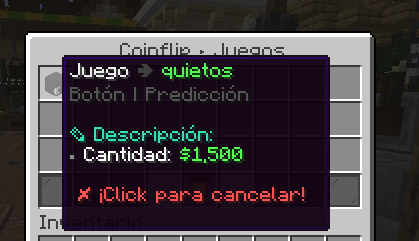
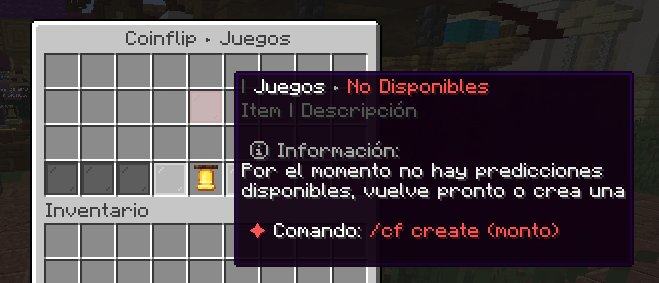
> ### 🎢 Example Menu (Custom)
—
> ### 🧩 Dependencies
To ensure xCoinFlip runs smoothly, your server requires the following:
* **[Vault](https://modrinth.com/plugin/vault)** – *(Required)*
* **Any Economy Provider** (EssentialsX, CMI, etc.) – *(Required)*
* **[PlaceholderAPI](https://modrinth.com/plugin/placeholderapi)** – *(Optional but recommended)*
—
> ## 💗 Servers that use our plugin
> * **SolarCraftMc** (Survival Vanilla)
> * **MineFania** (Survival OP)
—
> ### 💬 Support & Community
> Developed and maintained by the **xPlugins** team.
> If you have any questions, suggestions, or need help configuring the plugin, you are more than welcome to join our official [Discord](https://xplugins.es/).
>
> 😊 **Available in: ES / EN / CUSTOM**
xChat

## xChat – Your Ultimate Chat Solution
`〢Use ProtocolLib`
xChat – Advanced and Professional Chat Formatting
Tired of basic and outdated chat plugins? xChat is here to completely transform communication on your server. This plugin doesn’t just format the chat; it turns it into an interactive, modern, and fully customizable experience.
From rank-based formats and interactive text when hovering over to a complete private messaging system with quick replies and socialspy, xChat is designed to be the only chat tool you’ll ever need.
⭐ Main Features ⭐
✅ Professional Chat Formatting
Hex/RGB Colors: Use the full Minecraft color palette! (&#RRGGBB).
Full PlaceholderAPI Support: Show any player statistics directly in the chat.
Rank-based Formats (via Vault): Perfect integration with LuckPerms and other permission plugins to show prefixes and group formats.
Interactive Hover Text: Show detailed player stats (money, hours played, etc.) just by hovering over their name.
Click to Whisper: Click on a player’s name in the chat to instantly start a private message.
✅ Advanced Private Messaging System
Customizable Formats: Set how the sent and received messages look.
Quick Reply Command (/r): Reply to the last private message with a single command. Essential for your users!
Notification Sounds: A small sound when receiving a message to ensure it doesn’t get missed.
✅ Staff and Server Tools
Social Spy (/socialspy): Allows staff members with permissions to monitor private messages to keep the community safe.
Ignore System (/ignore): Allows users to persistently ignore other players.
Anti-Spam: Prevents chat flooding with a configurable cooldown between messages.
Update Notifier: Alerts in the console when a new version of xChat is available on Modrinth.
✅ Optimization and Compatibility
Lightweight and Optimized: Built on the Paper API and using packets with ProtocolLib for maximum performance.
100% Customizable: Absolutely all messages, formats, and functions can be adjusted from the generated config.yml.
Anonymous Statistics with bStats: To help us understand how the plugin is used and improve it.
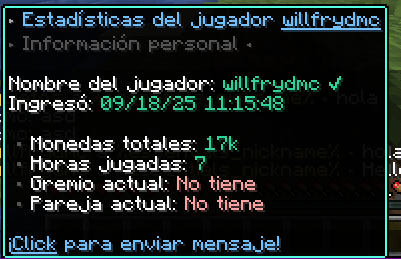
🖼️ Plugin Previews


**🔧 Commands and Permissions**
“`yaml
Comando Alias Permiso Descripción
/xchat reload /xc reload xchat.reload Recarga la configuración del plugin.
/xchat help /xc help (Ninguno) Muestra la ayuda principal.
/msg /tell, /w (Ninguno) Envía un mensaje privado.
/reply /r (Ninguno) Responde al último mensaje privado.
/ignore /ign (Ninguno) Gestiona tu lista de ignorados.
/socialspy /spy xchat.socialspy Activa/desactiva el espía de PMs.
(Bypass Spam) – xchat.antispam.bypass Permite saltarse el cooldown del chat.
“`
Export to Spreadsheets
🔌 Required Dependencies
To make xChat work with its full potential, you need to install these three plugins:
Vault: For permission and economy plugin integration.
PlaceholderAPI: To use the thousands of available placeholders.
ProtocolLib: For advanced feature functionality.
**🐠Config.YML**
“`yaml
# ___ _ _
# __ __ / __ |__ __ _| |_
# / // / | ‘_ / _` | __| Plugin by
# > ”
reply_usage: “&cUse it like this: /{label} ”
player-not-found: “&cThat player is not online.”
cannot-message-self: “&cYou cannot message yourself.”
no-reply-target: “&cYou have no one to reply to.”
social-spy-on: “&aSocialSpy enabled. You will now see private messages.”
social-spy-off: “&cSocialSpy disabled.”
# HELP MESSAGES (/xchat help, /ignore help)
# // ___ __ _
# / / __|/ _` | Idea by
# / // __ (_| | xPlugins
# / /___/__, |
# |___/
help-message:
xchat:
– “&7——-&f xChat Help &7——”
– “”
– “&#AEC6CF> /xchat help 󖣃➛&f Displays this help message.”
– “&#AEC6CF> /xchat reload 󖣃➛&f Reloads plugin configuration.”
– “”
– “&7—————————————”
ignore:
– “&7—————–&f Ignore Help &7——————–”
– “”
– “&#AEC6CF /ignore help 󖣃➛&f Displays this help.”
– “&#AEC6CF /ignore list 󖣃➛&f See who you are ignoring.”
– “&#AEC6CF /ignore add 󖣃➛&f Start ignoring them.”
– “&#AEC6CF /ignore remove 󖣃➛&f Stop ignoring them.”
– “”
– “&7—————————————”
# IGNORE SYSTEM (/ignore)
# _____
# _ __ _ _ __ ___ _ __ ___
# / // _` | ‘_ / _ | ‘__/ _ Idea by
# // /_| (_| | | | | (_) | | | __/ xPlugins
# ____/ __, |_| |_|___/|_| ___|
# |___/
ignore:
enabled: true
storage: “ignores.yml”
messages:
added: “&aYou are now ignoring &f%target%.”
removed: “&eYou are no longer ignoring &f%target%.”
not_found: “&cPlayer not found.”
usage: “&eUsage: /ignore [player]”
cannot_ignore_self: “&cYou cannot ignore yourself.”
list_empty: “&7You are not ignoring anyone.”
list_header: “&6Ignoring:”
list_format: “&7- &f%target%”
# Anti Spam
# _ _ _ __
# /_ _ __ | |_(_) / __ __ __ _ _ __ ___
# //_\| ‘_ | __| |_____ | ‘_ / _` | ‘_ ` _ Idea by
# / _ | | | |_| |_____| |_) | (_| | | | | | | xPlugins
# _/ _/_| |_|__|_| __/ .__/ __,_|_| |_| |_|
# |_| 1.0.0
anti-spam:
enabled: true
delay-seconds: 3
message: “&#ff0000 ⚠ Slow down! You must wait %time% second(s) before chatting again.”
# GENERAL PLUGIN MESSAGES
# // ___ __ _
# / / __|/ _` | Idea by
# / // __ (_| | xPlugins
# / /___/__, |
# |___/
plugin-messages:
reload: “Ke25f ✔ Hey! xChat configuration has been reloaded!”
no-permission: “&#ff2c2c ☀ Oops! You don’t have permission to run this command!”
# UPDATE NOTIFIER
# _ _
# / / _ __ __| | __ _| |_ ___
# / / ‘_ / _` |/ _` | __/ _
# _/ / |_) | (_| | (_| | || __/
# ___/| .__/ __,_|__,_|_____|
# |_| 1.0.0
update-checker:
enabled: true
“`
⚙️ Installation
Download the xChat .jar file.
Make sure you have the 3 dependencies above installed.
Place all the .jar files in your server’s plugins folder.
Start or restart the server.
Configure everything to your liking in the generated config.yml file!
❤️ Support and Credits
Created with love by WillfryDev (xPlugins inc.).