VoteKick
# VoteKick
A democratic voting system that allows players to collectively remove disruptive players from the server through a clean, fair voting process.
## Features
– **Simple Voting Interface** – Unobtrusive UI with F1/F2 keybinds or chat commands
– **Anti-Abuse Protection** – Prevents harassment and vote spam with cooldowns and immunity periods
– **Configurable Client UI** – Adjustable scaling, positioning, and visual options
– **Real-time Vote Tracking** – Live progress bars and vote counts
– **Flexible Configuration** – Extensive server-side settings for fine-tuning
## Usage
### Starting a Vote
“`
/votekick
/vk
“`
### Voting
– Press **F1** for YES (kick player)
– Press **F2** for NO (keep player)
– Commands: `/vote yes` or `/vote no`
### Status
“`
/vote status
“`
### Admin Commands
“`
/votekick-admin cancel
/votekick-admin force
/votekick-admin reload
/votekick-admin history [page]
“`
Requires the `votekick.admin` permission (or op level configured in `permissions_admin_default_level`).
`cancel` ends the active vote without a kick; `force` ends it as passed.
## Configuration
### Server Configuration
Located in `config/votekick.properties`:
“`properties
# Basic Settings
vote_duration_seconds=30
vote_pass_percentage=0.6
minimum_players=2
cooldown_seconds=120
# Protection System
new_player_protection_enabled=true
post_kick_protection_enabled=true
harassment_detection_enabled=true
vote_threshold_modifiers_enabled=true
# Customization
require_kick_reason=true
allow_self_voting=false
# Permissions (default op levels)
permissions_enabled=true
permissions_start_default_level=0
permissions_vote_default_level=0
permissions_admin_default_level=2
permissions_exempt_default_level=2
# Vote History
vote_history_enabled=true
vote_history_max_entries=200
vote_history_retention_days=90
“`
### Client Configuration
Customize your voting experience through:
– **ModMenu Integration** – Graphical configuration screen
– **Properties File** – `config/votekick-client.properties` for manual editing
Options include UI scaling, panel positioning, sound controls, and animation settings.
## Permissions
Permission nodes:
– `votekick.start` — allow starting votes
– `votekick.vote` — allow casting votes
– `votekick.admin` — allow admin commands
– `votekick.exempt` — exempt a player from being vote-kicked
Defaults are controlled by `permissions_*_default_level` in the server config (0 = all, 2 = ops).
If a permissions API is present (Fabric Permissions API or LuckPerms on Fabric/NeoForge), the nodes above are checked;
otherwise the defaults apply.
### LuckPerms setup
– **Fabric**: install `LuckPerms` and `fabric-permissions-api` on the server.
– **NeoForge**: install `LuckPerms` on the server.
Example grants:
“`
/lp group default permission set votekick.start true
/lp group default permission set votekick.vote true
/lp group mod permission set votekick.admin true
/lp group mod permission set votekick.exempt true
“`
## Vote History
History is stored in `config/votekick_history.json` and follows the retention/max entry limits.
## Anti-Abuse Features
– **New Player Protection** – Grace period for first-time joiners
– **Post-Kick Immunity** – Temporary protection after being kicked
– **Harassment Detection** – Automatic protection for repeatedly targeted players
– **Vote Cooldowns** – Prevents spam voting and target harassment
– **Threshold Modifiers** – Requires more votes to kick frequently kicked players
## Requirements
– **Fabric**: Fabric API (required), ModMenu (optional for GUI configuration)
– **NeoForge**: no extra dependencies
– Must be installed on both client and server
## Default Behavior
– Server operators and players with permission level 2+ are exempt from being vote-kicked.
– All other players can participate in voting (unless protected).
## Compatibility
– Minecraft 1.20.1 (Fabric only)
– Minecraft 1.20.4, 1.20.6, 1.21.1, 1.21.4 (Fabric + NeoForge)
Vote Command


Requires the library mod Collective.
Vote Command is a minimalistic configurable mod which adds an informational /vote command which tells players how and where to vote for servers. This can increase the position in server lists.
Configurable: ( how do I configure? )
voteCommandMessage (default = “This is an example /vote message. You can change it in the config.”): The message which will be sent to players when they use the /vote command.
You can input specific links, or an explanation on how to vote:

So for example:

——————
You may freely use this mod in any modpack, as long as the download remains hosted within the Modrinth ecosystem.
Serilum.com contains an overview and more information on all mods available.
Comments are disabled as I’m unable to keep track of all the separate pages on each mod.
For issues, ideas, suggestions or anything else there is the Github repo. Thanks!
Voltrox Manhunt
**Voltrox Manhunt** is a fully-featured, highly customizable Manhunt plugin built for competitive and casual servers. Featuring real-time tracking, GUI control, PlaceholderAPI support, and deep configuration — everything you need for the ultimate Minecraft Manhunt experience.
Gallery
# ✨ CORE FEATURES
Classic Speedrunner vs Hunters gameplay
Real-time tracking with Action Bar coordinates + Compass pointing
Ingame GUI for manhunts with `/vm`
Fully customizable Config.yml (messages, sounds, settings)
# ✨ GAME MECHANICS
Headstart system by freezing hunters in place with a countdown
Hunter respawn kits (configurable items)
Tracking Compass system
Raise the stakes with a Hardcore Mode (Remove hunters on death)
# ✨ VISUAL & AUDIO
Custom Title announcements (Win, Loss, Dragon Kill)
Fully customizable Sound effects
Live Action Bar runner tracking
Player Head GUI for visual player selection
# ✨ External Plugins
PlaceholderAPI Support
Permissions for other plugins like LuckPerms. (default true)
# ⚙️ FULLY CONFIGURABLE
Messages, titles, sounds
Headstart duration
Respawn kits
Compass cooldown
Hunter removal on death
Dimension broadcasts
Compass display name
Placeholders (Requires PlaceholderAPI)
Replace X with a number! Ex: %voltroxmanhunt_runner1% returns the first runner.
%voltroxmanhunt_runner% – Name of first runner
%voltroxmanhunt_runner_count% – Number of runners
%voltroxmanhunt_runner_list% – Comma-separated list of all runner names
%voltroxmanhunt_runnerX% – Name of runner at position X
%voltroxmanhunt_runner_uuid% – UUID of first runner
%voltroxmanhunt_runner_health% – Health of first runner
%voltroxmanhunt_runner_health_percent% – Health percentage of first runner
%voltroxmanhunt_runner_hunger% – Hunger level of first runner
%voltroxmanhunt_runner_world% – World name of first runner
%voltroxmanhunt_runner_dimension% – Dimension name of first runner
%voltroxmanhunt_runner_x% – X coordinate of first runner
%voltroxmanhunt_runner_y% – Y coordinate of first runner
%voltroxmanhunt_runner_z% – Z coordinate of first runner
%voltroxmanhunt_runner_names% – All runner names
%voltroxmanhunt_runnerX_name% – Name of runner X
%voltroxmanhunt_runnerX_uuid% – UUID of runner X
%voltroxmanhunt_runnerX_health% – Health of runner X
%voltroxmanhunt_runnerX_health_percent% – Health percentage of runner X
%voltroxmanhunt_runnerX_hunger% – Hunger level of runner X
%voltroxmanhunt_runnerX_world% – World name of runner X
%voltroxmanhunt_runnerX_dimension% – Dimension name of runner X
%voltroxmanhunt_runnerX_x% – X coordinate of runner X
%voltroxmanhunt_runnerX_y% – Y coordinate of runner X
%voltroxmanhunt_runnerX_z% – Z coordinate of runner X
%voltroxmanhunt_runnerX_ping% – Ping of runner X
%voltroxmanhunt_runnerX_gamemode% – GameMode of runner X
%voltroxmanhunt_runnerX_is_online% – “Yes” if runner X is online
%voltroxmanhunt_runnerX_is_dead% – “Yes” if runner X is dead
%voltroxmanhunt_hunter_count% – Number of hunters
%voltroxmanhunt_hunters_list% – Comma-separated list of all hunter names
%voltroxmanhunt_is_runner% – “Yes” if player is runner
%voltroxmanhunt_is_hunter% – “Yes” if player is hunter
%voltroxmanhunt_game_active% – “Yes” if game is active
%voltroxmanhunt_headstart_active% – “Yes” if headstart is active
%voltroxmanhunt_distance% – Distance to hunter’s current target
%voltroxmanhunt_distance_formatted% – Distance with units (km or blocks)
%voltroxmanhunt_direction% – Cardinal direction to target
%voltroxmanhunt_tracking_target% – Name of hunter’s current target
%voltroxmanhunt_compass_cooldown% – Remaining compass cooldown in seconds
%voltroxmanhunt_spectator_count% – Number of spectators
%voltroxmanhunt_is_spectator% – “Yes” if player is spectator
%voltroxmanhunt_spectators_list% – Comma-separated list of spectator names
%voltroxmanhunt_status% – Player’s status: Runner, Hunter, Spectator, Headstart, or Inactive
%voltroxmanhunt_multi_runner_enabled% – “Yes” if multi-runner is enabled
%voltroxmanhunt_max_runners% – Maximum number of runners allowed
**✔ Fully recoded with really flexible configurations!**
# ❗ REQUIREMENTS
**Minecraft**: 1.16.5+
**Java**: 16+
**Optional Dependency**: PlaceholderAPI
**Need Support?**
Contact me for help on the discord.
⚠ The Modrinth page (this) and the Spigot page is the only official source! Do NOT download it from any external site.
VolleyBall UPDATE
# VolleyBall UPDATE
> _1.21.x support | No Dependencies_
Updating the “VolleyBall” plugin. This simple plugin is designed specifically for private servers. It allows you to create a ball and interact with it in the open world of minecraft.

# ⭐ Key Features ⭐
## Full Customixzable Physics
– 360 degree rotation
– Realistic bounces with adjustable energy loss
– Unique block interactions (ice,slime, honey blocks)
– Fine-tune gravity and speed
## Your Own Ball Skins
– Use any Minecraft head textures
– Easy setup via skins.yml (supports Minecraft-Heads format)
## Permission-Based Skins
– Create exclusive skins with permission locks
– Create your own permission
– Custom deny messages
## Unique Crafting System
– Interactive crafting: Right-click pufferfish + 8 leathers
– Visual effects when creating balls
## No Dependencies!
– Works standalone – no extra libraries needed
– Minimal server performance impact
– The old version required library compilation
# ✨ Usage ✨
To create a ball, right-click on a live pufferfish while holding 8 pieces of leather in your hand.
Throw the ball: Left-click (LMB).
Throw the ball harder: Left-click (LMB) while running or jumping.
Throw power slider: Hold SHIFT.
Pick up the ball: Press SHIFT near the ball.
# ⚡ Commands ⚡
/ballskin – Open skin selection menu
/ballsreload: Reload configs(volleyball.reload required)
/ballsummon: Spawn a ball (volleyball.summon required)
# ⚙️ Configs ⚙️
config.yml
“`# All speed is measured in BPS – blocks per second
# Config VolleyBall Plugin Update
ENABLE_BALL_CRAFTING: true
IPT: 20 # Number of physics processing iterations per tick. Not recommended to change
GRAVITY: -0.05 # Gravity
DEFAULT_BOUNCE_ENERGY_LOSS: 2 # Default energy loss on bounce. Energy / DEFAULT_BOUNCE_ENERGY_LOSS
MAX_SPEED: 40 # Maximum ball speed
MAX_ROT_SPEED: 100 # Maximum ball rotation speed
ROT_BREAKING_SPEED: 1000 # Maximum rotation braking speed
ROT_SPEED_PROPORTION: 1000 # Rotation acceleration proportion based on speed. Applied when the ball bounces
THROW_CHECKING_SPEED: 0.06 # Throw power slider speed
MAX_THROW_POWER: 19 # Maximum throw power (in BPS)
MIN_THROW_POWER: 8 # Minimum throw power (in BPS)
DESPAWN_TIME: 10000 # Time (in ticks) after which a stationary ball will despawn
DEFAULT_SKULLSKIN: ball # Default ball skin
# Block settings
BLOCKS_ENERGY_LOSSES: # Custom energy losses for specific blocks
WATER: 5
SLIME_BLOCK: 1
MOSS_BLOCK: 3
HAY_BLOCK: 5
HONEY_BLOCK: 100
ICE: 1.2
PACKED_ICE: 1.1
BLUE_ICE: 0.9
TRANSPARENT_BLOCKS: # Blocks that the ball can pass through && Most transparent blocks are automatically enabled
– PINK_PETALS
TEXT:
SKIN_MENU_TITLE: “>> Skin Selection <<"
SKIN_ALREADY_SELECTED: "The skin has already been selected"
CLICK_TO_SELECT: "Click to select this skin"
SOUND:
SOUND_ID: "BLOCK_BAMBOO_BREAK"
VOLUME: 6.0
PITCH: 1.0
```
skins.yml
“`
# skin:
# name:
# url: example: http://textures.minecraft.net/texture/93c2f1c5d2c8f0e33730c14dca1c1d1e1abd8596b0839d6738d18f46432b6fa6 – insert only the hash at the end
# perm: You can create your own *Optional
# lock_msg: *Optional
# Config VolleyBall Plugin Update
# Use “§” for the default colors.
ball:
name: §fBall
url: 93c2f1c5d2c8f0e33730c14dca1c1d1e1abd8596b0839d6738d18f46432b6fa6
premium_ball:
name: §dPremium Ball
url: a794284953646833c49db0bae137cc93a774cb6ec8c53d1bcef6cd124a5a71ca
perm: volleyball.premiumball
lock_msg: “§cYou can’t use this ball!”
“`
# ⛏️ New Ball Skin ⛏️
Spoiler
The plugin uses the official Minecraft API, so you need to use official Minecraft heads. For example, you can use a site like Minecraft-Heads. In the “url” field, you need to insert the set of characters at the end of the link. For example, for the link:
“`
http://textures.minecraft.net/textu…0c14dca1c1d1e1abd8596b0839d6738d18f46432b6fa6
“`
in the “url” field, insert:
“`
93c2f1c5d2c8f0e33730c14dca1c1d1e1abd8596b0839d6738d18f46432b6fa6
“`
You can also set a permission requirement for using a specific ball skin. To do this, use the optional parameters perm and lock_msg. In perm, specify any permission, and in lock_msg, write the message that will be displayed if a player does not have access to this skin.
VoidRescue
# VoidRescue
**Never lose your gear to the void again!** VoidRescue automatically saves players from void deaths by teleporting them to safety with a cinematic slow-falling descent.
## 🌟 How It Works
When a player falls below Y=-5 (configurable), VoidRescue springs into action:
1. **Searches for safety** – Scans up to 64 blocks around the player for solid, hazard-free ground
2. **Lifts you up** – Teleports the player 200-300 blocks above the safe spot
3. **Controlled descent** – Applies Slow Falling when within 5 blocks of ground for a smooth landing
4. **Prevents damage** – Optionally cancels fall damage from the rescue
## ✨ Features
– **Smart pathfinding** – Avoids lava, fire, cacti, magma blocks, campfires, and other hazards
– **Multi-dimension support** – Works in Overworld, Nether, and The End (individually toggleable)
– **Game mode filtering** – Only rescues Survival and Adventure players (Creative/Spectator ignored)
– **Anti-spam cooldown** – 8-second cooldown prevents rescue loops
– **Async processing** – Safe spot detection runs asynchronously to prevent server lag
– **Visual feedback** – Portal particles, sound effects, and action bar messages
– **Fallback system** – Uses world spawn if no safe spot found
## ⚙️ Configuration
Fully customizable via `config.yml`:
– Trigger Y-level threshold
– Rescue height range (min/max)
– Slow Falling duration
– Per-dimension enable/disable
– Fall damage cancellation toggle
– Cooldown duration
## 📋 Requirements
– **Minecraft:** 1.21+
– **Server:** Paper or compatible fork (Purpur, Pufferfish, etc.)
– **Java:** 21+
VoidChat+
# 💬 VoidChat+ | Advanced Communication
**VoidChat+** is a professional, high-performance communication solution for modern Minecraft servers. It provides a complete chat management system by splitting communication into local and global channels, while maintaining top-tier security with integrated Anti-Swear and Anti-Bot mining requirements.
### 🛠️ Key Features
* **Dual-Channel System** – Seamless transition between local (proximity-based) and global communication (using the `!` prefix).
* **Infinite Local Mode** – Configure local chat range to `-1` to cover the entire world or dimension, perfect for specialized survival modes.
* **Anti-Bot Security** – Unique system requiring new players to mine a specific amount of blocks before they are granted the ability to chat.
* **HEX & PAPI Support** – Full support for modern HEX colors and PlaceholderAPI integration for dynamic, beautiful chat formats.
* **Admin Chat Spy** – Allows staff members to monitor local conversations to ensure community guidelines are followed.
—–
### 💻 Installation & Setup
1. Download the `.jar` file.
2. Drop the file into your server’s `/plugins` folder.
3. Restart your server to generate the configuration files.
4. Customize your settings and word filters in `config.yml`.
—–
### 📜〢 Configuration Example
“`yaml
############################################################
# #
# VOIDCHAT – CREATED BY KUBA_121 #
# Professional local & global chat system #
# #
############################################################
############################################################
# #
# PERMISSIONS: #
# – voidchat.use: Access to basic commands #
# – voidchat.reload: Access to /voidchat reload #
# – voidchat.admin: Access to Admin/Spy/Clear/Toggle #
# – voidchat.color: Ability to use & and HEX colors #
# – voidchat.bypass: Bypass block break requirement #
# – voidchat.globalbypass: Bypass global cooldown #
# #
############################################################
# — GENERAL SETTINGS —
# Time in seconds for global message (!) cooldown.
# Bypass this with voidchat.globalbypass permission.
global-message-cooldown: 30
# Distance in blocks for the local chat.
# Set to -1 for infinite range (everyone in the world hears you).
local-chat-range: 100.0
# Number of blocks a player must break before they can use the chat.
blocks-required: 10
# Should the block requirement be active?
chat-requirement-enabled: true
# — ANTI SWEAR —
anti-swear:
# List of words that will be replaced with ****
banned-words:
– “badword1”
– “badword2”
– “badword3”
# — CHAT FORMATTING —
# You can use Placeholders from PAPI (if installed) using %placeholder%
# {player} and {message} are internal placeholders.
# Format for global chat (triggered by ! at the start)
global-format: “&a&lGLOBAL &r&8»&7 {player}: {message}”
# Format for local chat (based on range)
local-format: “&e&lLOCAL &r&8»&7 {player}: {message}”
# — SYSTEM MESSAGES —
messages:
# The global prefix for all system messages
prefix: “&b&lVoidChat &r&8»&7”
# Error when player lacks required permissions
no-permission: “%prefix% You lack the &bvoid power &7to do this.”
# Notification for successful config reload
reload-success: “%prefix% Configuration &bpurged &7and &breloaded &7successfully.”
# Message when no one is in range for local chat
no-one-in-range: “%prefix% &7The void is silent. No one is close enough to hear you.”
# Requirement message. Use {blocks_required} for remaining count.
requirement-not-met: “%prefix% &7Your voice is weak. Break &b{blocks_required} &7more blocks to speak.”
# Global chat cooldown notification
global-cooldown: “%prefix% &7The void needs &b{time_remaining}s &7to resonate again.”
# Admin Spy mode toggles
admin-enabled: “%prefix% &bAdmin Spy &7is now &aactive&7. All whispers are yours.”
admin-disabled: “%prefix% &bAdmin Spy &7has been &cdisactivated&7.”
# Global mute notifications (self-toggle)
global-muted: “%prefix% &7You have &cclosed &7your ears to the global void.”
global-unmuted: “%prefix% &7You can now &ahear &7the global resonance again.”
global-muted-error: “%prefix% &cYou cannot speak while your global ears are closed.”
# Chat Management (Clear & Toggle)
chat-cleared: “%prefix% &7The chat has been &bpurified &7by &b{player}&7.”
chat-toggled-on: “%prefix% &aGlobal resonance has been restored. Chat is now enabled.”
chat-toggled-off: “%prefix% &cThe void has been silenced. Chat is now disabled.”
chat-disabled-error: “%prefix% &cThe chat is currently suppressed by an administrator.”
# Command usage and help
usage-voidchat: “%prefix% Usage: &b/voidchat &8<&7help/reload/admin/clear/toggle&8>”
only-players: “%prefix% &cOnly those with a physical form can use this command.”
# Help menu structure
help-menu:
– “&8&m——–&r &b&lVoidChat Help &8&m——–”
– “&7/voidchat help &8- &fDisplays this menu”
– “&7/voidchat reload &8- &fReloads the configuration”
– “&7/voidchat admin &8- &fToggle Admin Spy mode”
– “&7/voidchat clear &8- &fClear the chat history”
– “&7/voidchat toggle &8- &fEnable or disable the chat”
– “&7/global &8- &fSend a global message”
– “&bTip: &7Use &b!message &7or &b/g &7for global!”
– “&8&m——————————–”
“`
—–
### 🛡️ Support & Community
Join our **Code Hub** for technical support, bug reports, and updates.
* **Discord:** [[Join Support Server]](https://discord.gg/jdWeSJbcKx)
* **Source:** [[GitHub]](https://www.google.com/search?q=https://github.com/kuba-121/VoidChat)
VoidChat


# VoidChat – Modern Chat Management Plugin
VoidChat is a modern and lightweight chat management plugin created for servers that value performance, clarity, and full control over player communication.
The plugin allows staff members to manage the global chat in a fast and intuitive way using a clean, well-designed GUI. Instead of relying on multiple commands or complicated setups, VoidChat puts everything in one place, making chat moderation simple and efficient.
One of the biggest advantages of VoidChat is its flexibility. The entire plugin, including all messages and the management GUI layout, is fully configurable through the `config.yml` file. This allows server owners to easily adapt the plugin to their server’s style, language, and formatting preferences without touching any code.
VoidChat is built on the latest Paper API, ensuring maximum compatibility, stability, and performance. It runs smoothly even on larger servers and has a minimal impact on server resources. Additionally, the plugin supports modern **MiniMessage** formatting, allowing you to create clean, colorful, and highly customizable text messages.
MiniMessage documentation:
https://docs.papermc.io/adventure/minimessage/


## Features
– Enable and disable global chat
– Clear chat through an intuitive GUI
– Chat slow mode with configurable delay
– GUI integration for all major chat controls
– Broadcast messages to all online players
– World blacklist support (configurable)
– Permission-based bypass system (`voidchat.bypass`)
– Fully configurable via `config.yml`
– Built on the latest Paper API
– Lightweight and optimized for performance
– MiniMessage formatting support
## Commands
– `/chat` – Opens the chat management GUI *(permission: `voidchat.chat`)*
– `/chat help` – Displays the help message
– `/chat reload` – Reloads the configuration file
– `/chat slow ` – Enables chat slow mode
– `/chat broadcast ` – Broadcasts a message to all online players
## Permissions
– `voidchat.chat` – Allows access to the chat management GUI
– `voidchat.bypass` – Bypasses chat restrictions (operators bypass by default)
## Why VoidChat?
VoidChat is the perfect solution for servers looking for a professional, modern, and easy-to-use chat management system. Whether you run a small community server or a large network, VoidChat gives you full control over chat without unnecessary complexity.
VoidCapes
# VoidCapes
You need a cat picture on your computer to use this mod!
## ✨ Features
– Free HD and Animated Capes
– Commands for managing capes for admins
## 🎨 Getting a Free Cape
Want a custom cape? It’s completely free! Simply message **”Xandarian”** on Discord to request your personalized cape.
VoidAFK
# Void AFK – Simple & Configurable AFK Manager with Rewards
## What is Void AFK?
– Void AFK is a lightweight and easy-to-manage plugin for your Minecraft server that helps you automatically detect and handle AFK (Away From Keyboard) players. Keep track of who’s actively playing and even reward those who spend time on your server!
## Features
* **Automatic AFK Detection:** Players are automatically marked as AFK after a configurable period of inactivity (no movement, interactions, etc.).
* **Visual AFK Tag:** Players marked as AFK get a customizable prefix or tag added to their name, both in the chat display name and the player list (tab menu).
* **Activity Monitoring:** Any configured activity (movement, interaction, etc.) will automatically remove the AFK status and restore the player’s name.
* **Configurable Threshold:** Easily set the inactivity time required to trigger AFK status in the `config.yml`.
* **Customizable Messages:** All messages sent to players and command responses are fully configurable, supporting standard Minecraft color codes (`&`).
* **Optional Rewards System:** Reward your AFK players by executing a configurable console command at regular intervals. Perfect for rewarding playtime!
* **Highly Configurable Rewards:** Configure the reward interval (in minutes), the console command template (`%player%` placeholder supported), an optional player message, and add visual flair with customizable particle and sound effects!
* **Reward Visuals & Sound:** Make rewards satisfying with configurable particles and sounds played around the player upon receiving a reward.
—
## Placeholders (install PlaceholderAPI plugin to use it)
– `%voidafk_is_afk%` (true/false)
– `%voidafk_afk_time%` (formatted time)
—
## Commands
– `/voidafk reload` – Reloads the plugin’s `config.yml`.
– `/voidafk reward ` – Sets the console command template for rewards. Use `%player%` as a placeholder.
– Alias: `/vafk`
—
## Permissions
– `voidafk.reload` – Allows using the `/voidafk reload` command. (Default: OPs)
– `voidafk.reward` – Allows using the `/voidafk reward` command. (Default: OPs)
—
## Installation
1. Download the latest `VoidAFK-VERSION.jar` file from this page.
2. Place the JAR file into the `plugins` folder of your Spigot/Paper server.
3. Start or restart your server.
4. (Optional) Edit the generated `plugins/VoidAFK/config.yml` to customize settings. Use `/voidafk reload` in-game or in console to apply changes.
—
## Support & Reporting Issues
If you find any bugs, have feature requests, or need help, please…
– … Leave a comment on SpigotMC page.
Providing server version, plugin version, and any relevant console errors will help a lot!
—
## Credits
Developed with passion by **Void Labs**.
—
## Future Plans
– Add an `/afk` command for players to manually toggle AFK status.
– Implement preventing more specific actions while a player is AFK.
– More options for the AFK tag (eg. changing displayname).
– More functionalities
Stay tuned for updates!
VoiceMouth


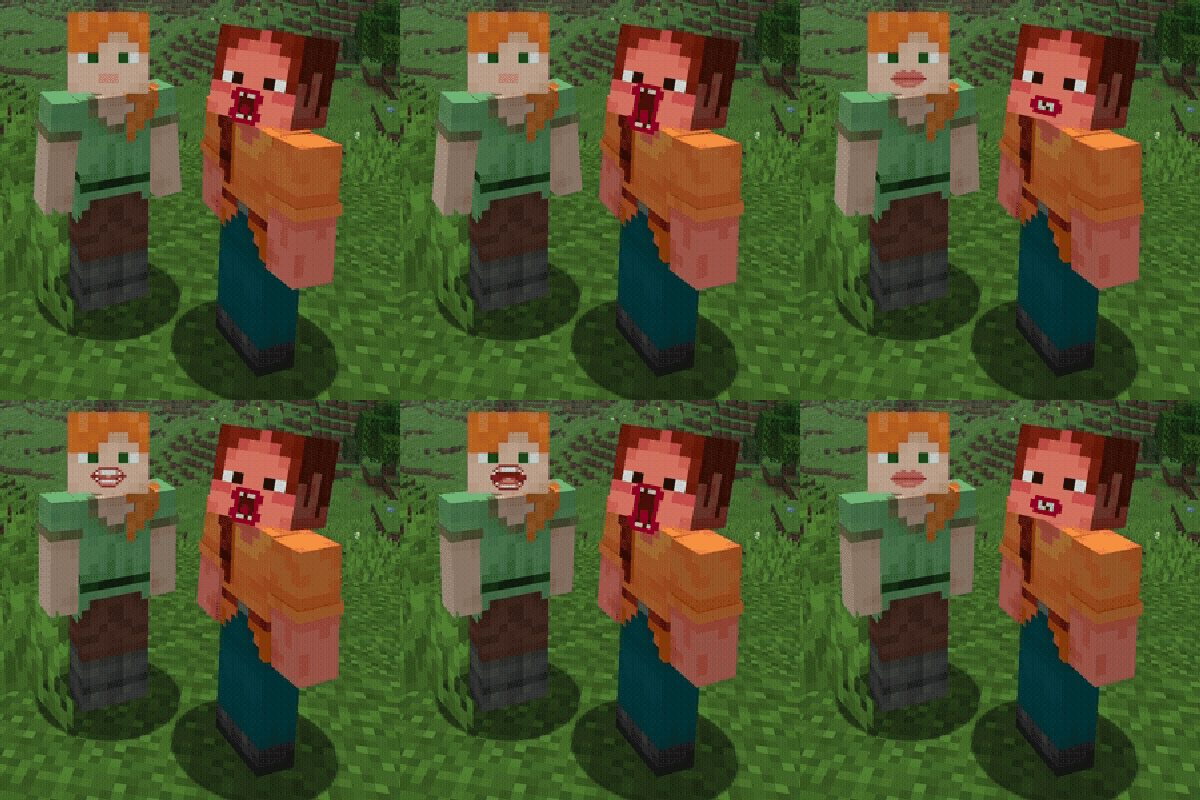
This Minecraft mod enhances immersion by adding a dynamic, animated mouth to player characters during voice communication via Simple Voice Chat. Whenever a player speaks, their character’s mouth opens and moves in sync with microphone activity, creating the illusion of real-time speech.

### ✨ Features
* Smooth and natural-looking mouth animation
* Real-time synchronization with voice input
* Seamless integration with Minecraft’s visual style
* Ideal for roleplay and multiplayer servers
### 🎨 Customization
Additionally, players can choose from a selection of different mouth styles, allowing them to customize how their character looks while speaking. The mod also provides options to adjust the position of the mouth on the character’s face, ensuring compatibility with various skins and personal preferences.