VoteMe
“`
__ __ _ _ __ __
/ /__ | |_ ___| |/| | / | ___
V / _ | __/ _ |/| | |/| |/ _
_/ ___/_____/_| |_||_| |_|___/
“`
**Turn every vote into a reward. No ports. No daemons. Just a clean API.**

![MC Version]()
![API]()
![Author]()
—
## What is VoteMe?
VoteMe is a lightweight, pure API-based voting plugin for Java Edition servers. Players open a clean chest GUI, click a site, and their reward lands in their inventory — no port forwarding, no external listener, no daemon process needed.
It supports two of the biggest Minecraft server listing sites out of the box, and every single piece of behavior — sounds, messages, rewards, GUI title, vote party threshold — is configurable down to the last character.
—
## Feature Overview
“`
/vote Opens a 27-slot chest GUI
/vote list Lists all vote site links in chat
Join Reminder Tells players how many votes they haven’t claimed yet
Dual API Support Minecraft Pocket Servers + Minecraft-MP, one or both
Fully Async Zero impact on main thread — all API calls are non-blocking
Reward System Any console command as a reward (items, money, permissions)
Vote Party Server-wide reward event when a vote milestone is hit
Sound Feedback Villager + XP Orb sounds for every vote outcome
PlaceholderAPI 4 ready-to-use placeholders for scoreboards
Hot Reload /votereload — no restart needed after config changes
“`
—
## Requirements
| Requirement | Version | Notes |
|—|—|—|
| Java | 21+ | |
| Paper or Spigot | 1.21.1 | Also runs on Purpur, Pufferfish, and other forks |
| PlaceholderAPI | Any | Optional — unlocks `%voteme_*%` placeholders |
—
## Installation
**Step 1.** Drop `VoteMe.jar` into your `/plugins` folder.
**Step 2.** Start the server once to generate the config file at `plugins/VoteMe/config.yml`.
**Step 3.** Open the config and fill in your API key(s) and server page URL(s).
**Step 4.** Run `/votereload` in-game or from console. Done.
—
## Configuration
“`yaml
# ╔══════════════════════════════════════════════════════════╗
# VoteMe Configuration — by Herza
# ╚══════════════════════════════════════════════════════════╝
# ── Vote Sites ─────────────────────────────────────────────
# Set api-key to “” to disable that site.
# You can run one site, or both at the same time.
minecraft-pocket:
api-key: “”
name: “Minecraft Pocket Servers”
url: “https://minecraftpocket-servers.com/server/YOUR_ID”
minecraft-mp:
api-key: “”
name: “Minecraft-MP”
url: “https://minecraft-mp.com/server/YOUR_ID”
# ── Join Reminder ──────────────────────────────────────────
# When a player joins, VoteMe checks all enabled sites.
# If unclaimed votes exist, the player gets a private message.
# Set to false to disable.
join-reminder: true
# ── Rewards ────────────────────────────────────────────────
# Console commands executed when a player claims a vote.
# Variable: {player}
rewards:
– “give {player} diamond 1”
– “eco give {player} 500”
# ── Messages ───────────────────────────────────────────────
# Supports & color codes. Variables: {player}, {link}
# Set any value to “” to disable that message.
messages:
success: “&a[Vote] &fThank you for voting, &e{player}&f! Rewards sent.”
already-claimed: “&e[Vote] &fYou already claimed your reward today.”
not-voted: “&c[Vote] &fYou haven’t voted yet. Head to: &e{link}”
error: “&c[Vote] &fCould not reach the voting API. Try again later.”
# ── Broadcast ──────────────────────────────────────────────
# Sent to ALL online players when someone claims a vote.
# Variables: {player}, {link}. Set to [] to disable entirely.
broadcast:
– “&6[Vote] &e{player} &fjust claimed their vote rewards! Vote at &e{link}&f.”
# ── Vote Party ─────────────────────────────────────────────
# Fires every time total votes hit a multiple of this number.
# Set to 0 to disable vote party entirely.
vote-party: 50
# Console commands run for EVERY online player when the party fires.
# Variable: {player}
vote-party-rewards:
– “give {player} diamond 5”
# ── GUI ────────────────────────────────────────────────────
gui:
title: “&8» &6&lVoteMe &8«”
# ╔══════════════════════════════════════════════════════════╗
# PlaceholderAPI — requires PlaceholderAPI plugin
#
# %voteme_total_votes% All-time total votes recorded
# %voteme_party_progress% Votes in the current party cycle
# %voteme_party_target% Target to trigger a party (N/A if off)
# %voteme_party_needed% Remaining votes until next party (N/A if off)
#
# Scoreboard examples:
# “&fTotal Votes &e%voteme_total_votes%”
# “&fParty &e%voteme_party_progress%&7/&6%voteme_party_target%”
# “&fNext Party In &e%voteme_party_needed% &fvotes”
# ╚══════════════════════════════════════════════════════════╝
“`
### Where to get your API key
**Minecraft Pocket Servers** — Log into your dashboard at `minecraftpocket-servers.com`, open your server settings, and copy the API key from the voting section.
**Minecraft-MP** — Log into `minecraft-mp.com`, go to your server panel, and find the API key under the voting/API tab.
—
## Commands
| Command | What it does | Permission |
|—|—|—|
| `/vote` | Opens the vote chest GUI | `voteme.vote` |
| `/vote list` | Lists all vote site names and links in chat | `voteme.vote` |
| `/votereload` | Reloads config without restarting the server | `voteme.admin` |
—
## Permissions
| Node | Default | Description |
|—|—|—|
| `voteme.vote` | All players | Access to `/vote` and `/vote list` |
| `voteme.admin` | OP only | Access to `/votereload` |
—
## PlaceholderAPI
Install PlaceholderAPI and VoteMe registers its expansion automatically on startup — no extra commands needed.
| Placeholder | Returns |
|—|—|
| `%voteme_total_votes%` | All-time total votes recorded by the plugin |
| `%voteme_party_progress%` | Votes counted in the current party cycle |
| `%voteme_party_target%` | Vote count target to fire a party (`N/A` if disabled) |
| `%voteme_party_needed%` | Votes remaining until the next party (`N/A` if disabled) |
Works with any scoreboard plugin that supports PlaceholderAPI — CMI, FeatherBoard, AnimatedScoreboard, etc.
“`
&fTotal Votes &e%voteme_total_votes%
&fParty &e%voteme_party_progress%&7/&6%voteme_party_target%
&fNext Party &e%voteme_party_needed% &fvotes
“`
—
## How the Vote API Works
VoteMe talks directly to each site’s HTTP API. There is no listener port, no webhook server, and no firewall rules to configure.
### Minecraft Pocket Servers — two-step flow
“`
Step 1 GET /api/?object=votes&element=claim&key=KEY&username=PLAYER
Response: “1” = unclaimed | “2” = already claimed | “0” = not voted
Step 2 (only if step 1 returns “1”)
GET /api/?action=post&object=votes&element=claim&key=KEY&username=PLAYER
Response: “1” = success
“`
### Minecraft-MP — single-step flow
“`
GET /api/?action=post&object=votes&element=claim&key=KEY&username=PLAYER
Response: “1” = claimed | “2” = already claimed | “0” = not voted
“`
All requests run on a separate async thread. The main server thread is never touched.
—
## Sound Feedback
Every vote outcome plays a distinct sound sequence so players always know what happened without even reading the chat.
| Event | Sound Sequence |
|—|—|
| Vote claimed | `VILLAGER_YES` → `XP_ORB` pitch 1.2 → `XP_ORB` pitch 1.5 → `VILLAGER_CELEBRATE` |
| Not voted / already claimed / error | `VILLAGER_NO` |
| Vote party fires | `VILLAGER_CELEBRATE` → `XP_ORB` x3 rising → `VILLAGER_YES` (all online players) |
—
## Vote Party
Every time a vote is claimed, the server-wide counter goes up by one. When it hits a clean multiple of your configured `vote-party` number, every player currently online receives the `vote-party-rewards` commands and a full sound sequence.
Between milestones, a broadcast keeps everyone in the loop:
“`
[VoteParty] 23/50 votes reached! 27 more needed.
“`
Set `vote-party: 0` to turn it off entirely.
—
## Join Reminder
Two seconds after a player joins (delayed to not overlap with other join messages), VoteMe checks all enabled vote sites in the background. If any site has an unclaimed vote waiting for that player, they get a private message:
“`
[VoteMe] You still have 2 votes on our voting service. Use /vote list
[VoteMe] You still have 1 vote on our voting service. Use /vote list
“`
The count reflects exactly how many sites have an unclaimed vote — not how many times they voted. Set `join-reminder: false` to disable.
—
### Adding a New Vote Site
Feel free to request an more Vote Service
Contact me at [email protected]
## License
“`
MIT License — Copyright (c) 2025 Herza
Free to use, fork, modify, and redistribute with attribution.
See LICENSE for full text.
“`
VoteListener
# VoteListener
## Setup
This mod is powered by NuVotifer-Fabric. Make sure to setup NuVotifier
first, by following their Setup Guide.
## Config
The config file is located in `./config/votelistener.json`.
“`json5
{
// Special characters used in commands need to be escaped. Use a website like
// https://www.freeformatter.com/json-escape.html to escape your commands
// Commands have special placeholders:
// ${uuid} – Vote player UUID
// ${username} – Vote player name
// ${serviceName} – Voting website name
// ${address} – IP address of the voter
// ${timeStamp} – Timestamp of the vote
// A list of commands that get executed when the vote is received
“commands”: [
“tellraw @a [{“text”:”${username}”,”color”:”blue”},{“text”:” voted on “,”color”:”aqua”},{“text”:”${serviceName}”,”color”:”blue”}]”
],
// A list of commands that gets executed when the player that voted is online or when they join
// The commands will be executed by the player, as if they were OP
// You can use @s to target the player (in commands that support entity selectors)
“onlineCommands”: [
“give @s diamond 1”
],
// A map of vote count milestones to commands
// The commands work like onlineCommands, but are only executed once for each milestone
“milestones”: {
// After 5 votes the player receives 5 apples
“5”: [
“give @s apple 5”
],
“10”: [
“give @s golden_apple 2”
]
}
}
“`
## Placeholders
– `votelistener:vote_count` – The number of votes a player has accumulated
## Permissions
You need to be an operator or have these permissions
– `votelistener.reload` – Access to `/votelistener reload` command
VoteKick
# ⚡VoteKick⚡
VoteKick is a simple and easy to use vote-kicking plugin that supports 1.8 up to 1.20.6 (Paper, Bukkit, Spigot, Purpur and Folia)
There are also settings you can configure in the config.yml file and messages.yml for editing plugin messages!
# Commands
`/votekick` or `/vk`
– Permission: **votekick.***
## Here are the sub commands for `/votekick`
– /votekick **start [PLAYER]** – Start a vote kick on a player
– /votekick **yes** – Vote YES
– /votekick **no** – Vote NO
– /votekick **cancel** – Cancel the vote kick
– /votekick **check** – Check the status of the ongoing vote kick
– /votekick **reload** – Reload the configuration files
This is also my first plugin I have ever made but I never really bothered uploading it so here you go.
VoteForCommand
## About
**VoteForCommand** allows players to vote for server commands execution.
This easy-to-use plugin can liven up the atmosphere on your server, as it allows you to add commands of any complexity.

## Configuration
You can fully customize voting options in the config:
“`yaml
votingCommands:
freeDiamond:
name: “FREE DIAMOND!!” # Display name in menu and chat
description: “Give a random player diamond!” # Description shown to players
material: “DIAMOND” # Item used as icon in menu
commands: # Commands executed if vote passes
– “execute as @r run give @s minecraft:diamond 1”
cooldown: 3600 # Cooldown in seconds before this vote can be started again
percentToWin: 50.0 # Required % of FOR votes to pass
minimumOnline: 5 # Minimum players online to start vote
heal:
name: “Sacred blessing”
description: “Sacred blessing of the goddess of health. All players will receive regeneration.”
material: “GOLDEN_APPLE”
commands:
– “execute as @a at @s run particle minecraft:heart ~ ~1 ~ 0.5 1 0.5 0.1 10”
– “effect give @a minecraft:glowing 5 0 true”
– “effect give @a minecraft:regeneration 120 1 true”
cooldown: 3600
percentToWin: 70.0
minimumOnline: 10
“`
## Permissions and commands
“`yaml
commands:
vote:
description: “Open vote menu.”
usage: “/vote”
permission: “voteforcommand.vote.use”
reload:
description: “Reload plugin config.”
usage: “/reload”
permission: “voteforcommand.reload.use”
aliases:
– votereload
permissions:
voteforcommand.vote.use:
description: “Allow player to use /vote command (open menu).”
default: true
voteforcommand.vote.participant:
description: “Allow player to click [FOR] and [AGAINST] buttons in chat.”
default: true
voteforcommand.reload.use:
description: “Allow admin to use /reload command for plugin.”
“`
VoteBan Players
# VoteBan
This plugin supports ANY ban or mute system since it uses custom commands.
Commands:
– /votemute [reason] – Start a vote mute for a player online.
– /voteban [reason] – Start a vote ban for a player online.
– /votekick [reason] – Start a vote kick for a player online.
– /addvote – Vote for a current ban/kick in progress.
Permissions:
– VOTEBAN.* – Access to all commands.
– VOTEBAN.VOTE – Use the /addvote command.
– VOTEBAN.STARTKICK – Use the /votekick command.
– VOTEBAN.STARTBAN – Use the /voteban command.
– VOTEBAN.STARTMUTE – Use the /votemute command.
– VOTEBAN.BYPASS – Not allow votes on players with this permission.
Images



VoteBan
## Introduction
With VoteBan, servers can be kept clean of griefers or other unwanted players.
Players can start votes for a ban against another players. This is particularly useful for small servers.
Various settings can be made regarding the conditions under which vote bans may be started and when votes are successful.
The plugin uses bStats.
## Atttention!
The current releases are preview versions. Major bugs may occur and not all planned features have been implemented.
Please report bugs and suggestions on my Discord server.
The following ToDos are planned for the next updates:
– MySQL and/or SQLite implementation
– improved messages
– ~~make the last not changeable messages changeable~~
– ~~add start voteban cooldown for vote initiator~~
## Features
– players can start vote bans
– various setting options
– adjustable messages
## Wiki & Support
Which permissions are available? What does _insert feature_ actually do? All these questions are answered in the VoteBan Wiki.
If you still don’t know what to do or have found a bug, feel free to contact me.
Quicklinks: Discord | Wiki | Installation & Setup | Commands & Permissions
## Impressions


## My other resources

Vote2Sleep
# 🌙 Vote2Sleep – Democratic Night Skipping
Transform your Minecraft experience with **Vote2Sleep**, the ultimate cross-platform mod for democratic sleep voting! Say goodbye to waiting for every player to sleep and hello to fair, community-driven night skipping.
## ✨ Why Vote2Sleep?
**🌍 Universal**: Works on Fabric now, Forge, Quilt, and NeoForge coming soon
**⚡ Smart**: Intelligent vote requirements based on online players
**🎨 Beautiful**: Stunning visual effects and intuitive UI
**🔧 Flexible**: Highly configurable to match your server’s needs
## 🚀 Key Features
### 🎯 Core Functionality
– **Sleep Voting System**: Players vote by entering beds
– **Storm Clearing**: Vote to clear storms during the day
– **Multi-World Support**: Enable/disable per dimension
– **Smart Requirements**: Configurable vote percentages and minimums
– **Auto-Timeout**: Votes expire automatically to prevent spam
### 🎨 Visual Excellence
– **Dynamic Boss Bars**: Real-time vote progress for all players
– **Epic Titles**: Dramatic night skip announcements
– **Particle Effects**: Beautiful effects during voting and skipping
– **Action Bars**: Instant feedback on vote casting
– **Sound Integration**: Customizable audio cues
### ⚙️ Admin Control
– **World Management**: Enable/disable per world instantly
– **Force Skip**: Admin override for emergency situations
– **Vote Cancellation**: Cancel ongoing votes when needed
– **Live Config**: Modify settings without restart
– **Statistics**: Track usage patterns and player engagement
## 📋 Quick Commands
“`bash
/sleep # Cast your vote to skip night!
/sleep status # Check current voting progress
/sleep enable # Enable mod in current world (admin)
/sleep help # Full command reference
“`
## ⚙️ Smart Configuration
Vote2Sleep adapts to your server with intelligent defaults:
– **Vote Percentage**: Require 50% of players by default
– **Minimum Players**: At least 1 vote required
– **Exempt Players**: Spectators and creative players excluded
– **Timeout System**: Votes expire after 60 seconds
– **Skip Delay**: 3-second countdown for dramatic effect
## 🎮 Perfect for Every Server
### 🏠 **Small Servers (2-10 players)**
– Low vote requirements ensure quick nights
– Perfect for friend groups and family servers
– Minimal configuration needed
### 🏘️ **Medium Servers (10-50 players)**
– Balanced vote requirements keep gameplay flowing
– Great for community servers and small networks
– Extensive customization options
### 🏢 **Large Servers (50+ players)**
– Scaled requirements prevent vote spam
– World-specific settings for different areas
– Advanced admin controls for management
## 🌟 Version Compatibility
### Minecraft Versions
**1.16.2** → **1.21.8**
### Mod Loaders
| Platform | Status | Notes |
|———-|——–|——-|
| **Fabric** | ✅ Full Support | All versions 1.16+ |
| **Quilt** | ✅ Full Support | Versions 1.19+ |
| **Forge** | ✅ Full Support | All versions 1.17+ |
| **NeoForge** | ✅ Full Support | Versions 1.20+ |
*Choose your platform – Vote2Sleep works everywhere!*
## 🎯 How It Works
1. **🛏️ Player enters bed** → Vote automatically cast
2. **📊 Requirements checked** → Smart calculation based on online players
3. **⏳ Countdown begins** → 3-second dramatic pause
4. **🌅 Night skipped!** → Time advances with stunning effects
5. **✨ Benefits applied** → Optional healing, feeding, phantom reset
### Vote Calculation
“`
Required Votes = ceil(Online Players × Vote Percentage)
Minimum: 1 player | Exempt: Spectators, Creative mode
“`
## 🔧 Installation Guide
### For Server
1. **Install** Vote2Sleep on your server
2. **Enable/Disable** in desired worlds: `/sleep enable`
3. **Configure** settings in `config/vote2sleep/`
4. **Restart** server (optional – live config supported!)
## 🎨 Customization Options
### Visual Settings
– **Boss Bar Colors**: Blue, Green, Pink, Purple, Red, White, Yellow
– **Boss Bar Styles**: Solid, Segmented (6, 10, 12, 20 segments)
– **Particle Types**: Happy villagers, end rods, hearts, notes
– **Sound Effects**: Full sound library support
### Gameplay Settings
– **Vote Percentage**: 10% to 100% of players
– **Player Limits**: Set minimum and maximum vote requirements
– **Timeout Duration**: 30 seconds to 10 minutes
– **Skip Delay**: Instant to 30 seconds countdown
– **Player Effects**: Optional healing, feeding, statistics reset
### World-Specific Options
– **Individual Percentages**: Different requirements per world
– **Dimension Support**: Overworld, Nether, End, custom dimensions
– **Weather Control**: Enable/disable storm clearing
– **Time Restrictions**: Night-only or 24/7 voting
## 🔐 Permissions System
Vote2Sleep includes a comprehensive permission system:
| Permission | Default | Description |
|———–|———|————-|
| `vote2sleep.use` | All Players | Cast votes and check status |
| `vote2sleep.admin` | Operators | Manage worlds and reload config |
| `vote2sleep.force` | Operators | Force skip night/storms |
| `vote2sleep.exempt` | None | Exempt from vote requirements |
## 🌍 Multi-Language Support
– **English** – Full support with rich messages
– **Portuguese (Brazilian)** – Complete translation
– **Spanish** – Complete translation
– **More languages coming soon!**
*Want to help translate? We’d love your contribution!*
### Mod Compatibility
Vote2Sleep plays nicely with:
– **Dimension mods** (The Aether, Twilight Forest)
– **Performance mods** (Sodium, OptiFine, Starlight)
## 🐛 Troubleshooting
**Vote not working?**
– ✅ Check if world is enabled: `/sleep enable`
– ✅ Verify it’s night time or stormy
– ✅ Ensure you’re not in creative/spectator mode
**Boss bar missing?**
– ✅ Check if other players voted in your world
– ✅ Verify boss bar is enabled in config
**Commands not responding?**
– ✅ Confirm you have the correct permissions
– ✅ Try `/sleep help` for command syntax
## 🚀 What’s New
### Version 1.0.0
– **🌐 Universal platform support** (Fabric/Forge/Quilt/NeoForge)
– **📱 Modern UI** with enhanced visual effects
– **⚡ Smart vote system** with improved calculations
## 🤝 Community & Support
### Get Help
– **📋 GitHub Issues**: Report bugs and request features
– **💬 Discord Server**: Join our community for support
– **📖 Wiki**: Comprehensive guides and tutorials
– **🎥 YouTube**: Video tutorials and showcases
### Contribute
– **🌐 Translations**: Help localize Vote2Sleep
– **🐛 Bug Reports**: Help us improve stability
– **💡 Feature Ideas**: Shape the future of Vote2Sleep
– **📝 Documentation**: Improve guides and tutorials
## 💝 Support Development
Love Vote2Sleep? Here’s how you can help:
– **⭐ Star** the project on GitHub
– **📢 Share** with friends and communities
– **🐛 Report** bugs to help us improve
– **💡 Suggest** new features and improvements
**🌙 Transform your Minecraft nights today with Vote2Sleep!**
*Compatible with Minecraft 1.16.2 – 1.21.8 | Fabric, Quilt, Forge & NeoForge*
Vote2Sleep
# 🌙 Vote2Sleep — The Ultimate Sleep Voting Plugin for Minecraft
Tired of waiting for everyone to sleep?
With **Vote2Sleep**, your players can **vote to skip the night or clear storms** — all with smooth animations, sound effects, and real-time feedback that make the experience satisfying for the whole server.
Perfect for **survival** and **multiplayer** worlds that value collaboration and immersion.
—
## ✨ Main Features
🛏️ **Smart Voting System**
Players can start a vote just by entering a bed or using `/sleep`.
You decide how many players are needed, how long votes last, and what happens when they succeed.
🌤️ **Skip Nights and Storms**
Vote to skip long nights or rainy days.
You can enable or disable each feature individually for full control.
🎨 **Beautiful Visuals**
* Boss bars, titles, and action bars that update in real time
* Configurable sounds and particle effects
* Optional dawn animation that transitions smoothly into daylight
* Support for multiple colors and styles
⚙️ **Complete Customization**
Every aspect can be tuned from the config file — percentages, timeouts, effects, animations, and even per-world settings.
You can create a calm, immersive experience or something flashy and dynamic.
💾 **Statistics & Database**
Track vote data and activity with **SQLite** or **MySQL**.
Perfect for large servers that want detailed insights or cross-server stats.
🧭 **Advanced Options**
* Exempt specific gamemodes (like creative or spectator)
* Use permission-based exemptions (`vote2sleep.exempt`)
* Automatic config updates — keeps your settings intact during upgrades
* Built-in update checker and metrics support
—
## 🌍 Multi-Platform Compatibility
✅ Works perfectly on:
* **Bukkit**
* **Spigot**
* **Paper**
* **Purpur**
* **Folia**
It’s designed to be lightweight, lag-free, and 100% compatible across major platforms.
—
## 🧩 Commands Overview
| Command | Description |
| ———————————- | ———————————————— |
| `/sleep` | Start or join a vote to skip the night or storm |
| `/sleep status` | View current vote progress |
| `/sleep enable` / `/sleep disable` | Enable or disable the plugin in a specific world |
| `/sleep reload` | Reload configuration files |
| `/sleep stats` | Show voting statistics |
| `/sleep cancel` | Cancel the active vote |
| `/sleep force` | Instantly skip night or storm |
Aliases: `/v2s`, `/sleepvote`, `/vote2sleep`
—
## 💡 Configuration Highlights
“`yaml
settings:
vote-percentage: 0.5 # 50% of players required
skip-delay-seconds: 3 # Delay before skipping
allow-night-skip: true # Enable night skipping
allow-storm-skip: true # Enable storm skipping
bed-interaction: true # Allow starting votes by using beds
reset-statistics: true # Reset player phantom statistics when night is skipped
heal-players: false # Heal players when night is skipped
feed-players: false # Feed players when night is skipped
display:
boss-bar:
enabled: true
color: “BLUE”
effects:
lightning-on-skip: false
particle-effects: true
animation:
dawn:
enabled: false
duration-seconds: 3
advanced:
database:
enabled: false
“`
Each category is neatly organized — from visuals to advanced behavior — so even beginners can tweak it easily.
See the full config.yml
for advanced customization, animations, and more.
—
## 🚀 Quick Setup
1. Download `Vote2Sleep.jar`
2. Drop it into your `/plugins/` folder
3. Start the server
4. Run `/sleep enable` and let your players vote!
That’s it — no complex setup needed. It works perfectly right out of the box.
—
## 💫 Why Servers Love Vote2Sleep
* Makes sleeping **fair and democratic**
* Adds **immersive visuals and atmosphere**
* Requires **no dependencies** to work
* Keeps configs safe through updates
* Designed for **performance and simplicity**
—
📦 **Requirements:**
* Minecraft **1.21.4+**
* Java **21+**
🔗 **Source & Docs:** GitHub – Vote2Sleep
⭐ *Make the night disappear — together.*
Vote Restart
# VoteRestart
VoteRestart adds a 30-second in-game voting cycle for server restarts on Paper 1.20+. Players can start votes, cast yes/no, and admins can cancel votes or ban participants.
## Features
– 30 s voting window with alerts at 20 s, 10 s, and 5 s
– Single `/vote` command with intuitive subcommands
– Ban or unban players from voting
– Cancel votes before they complete
– Players can silence vote notifications for themselves
– Adventure API–powered chat messages for clear formatting
## Commands
| Command | Description |
|———————–|———————————-|
| `/vote start` | Start a 30 s restart vote |
| `/vote yes` | Vote in favor |
| `/vote no` | Vote against |
| `/vote cancel` | Cancel the ongoing vote |
| `/vote ban ` | Ban a player from voting |
| `/vote unban `| Unban a previously banned player |
| `/vote silence` | Toggle personal vote alerts |
## Permissions
– `voterestart.start`
– `voterestart.vote`
– `voterestart.cancel`
– `voterestart.ban`
– `voterestart.silence`
Vote Protect
Vote Protect – is a Minecraft server plugin that allows players to initiate a democratic vote to transfer another player to adventure mode. Perfect for protecting your server from griefers, cheaters, or suspicious behavior without the need for server admins.
⚙️ Key Features:
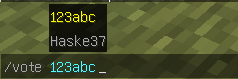
✅ Voting via /vote
Any player can start a vote to transfer another player to adventure mode.
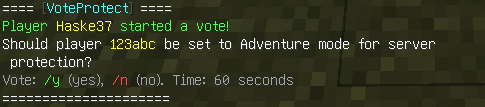
️ Voting for “Yes” or “No”
Players vote via the /y and /n commands for 60 seconds.
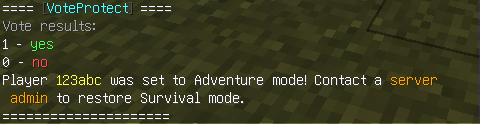
Automatic restriction of rights
If the majority votes (more than 50%) “Yes”, the player is transferred to GameMode.ADVENTURE.
Cooldown 15 minutes
Players without OP rights have a cooldown between votes.

OP players are not limited
Players with OP rights can use commands without waiting.
Dual language support
Easily switchable languages via config.yml:
language: en
language: ru
️ Message configuration
All texts are stored in messages_en.yml and messages_ru.yml — you can edit them for yourself.
To prevent players from starting voting, simply add their nicknames to the voteprotect_whitelist.yml file. The system will automatically check the list and will not allow you to start voting against the specified players.
⚠️ To return the player to survival mode, the server operator must use the standard vanilla Minecraft command – /gamemode survival
✅ Compatibility:
Servers 1.21+ (including 1.21.8)
Spigot / Paper
NEW VERSION 1.3
Now you can set for yourself how long the voting will last. Just specify the required number of seconds in the config. The system will pick up the new value on its own.
How to set up:
Open config.yml.
Find the vote_duration parameter.
Set the desired time in seconds.
Restart the plugin.
Everything is ready! Now all voting will take place at the time you set.
