VPS IP
## 🛡 VPS (Verify Player Security) – Protect Your Server from Nickname Spoofing
# 🇺🇸
VPS is a security plugin for Minecraft servers that prevents players from logging in under someone else’s nickname. It locks a player’s nickname to their first IP address and denies access from any other IP. The plugin also blocks VPN/Proxy connections and limits the number of players per IP.
🔹 Key Features:
✅ Nickname-to-IP Lock – Players can only join from their first IP.
✅ VPN/Proxy Blocking – Uses ProxyCheck.io for detection.
✅ Limit Players per IP – Configurable in config.yml.
✅ Multi-language Support – Auto-detects the server language.
✅ Powerful Admin Commands – Manage IP registrations in-game.
🔹 Commands:
/vps adduser – Manually register a player.
/vps removeuser – Remove a player from the list.
/vps list – Show all registered players.
/vps clean – Clear the IP registration list.
/vps info – Display current plugin settings.
⚙ Fully configurable via config.yml.
——————————————————————-
## 🛡 VPS (Verify Player Security) – Защита от входа с чужого аккаунта
# 🇷🇺
VPS – это плагин для защиты серверов Minecraft от входа под чужими никами. Он привязывает ник игрока к его IP-адресу при первом входе и не позволяет зайти с другого IP. Также плагин может блокировать подключение через VPN/Proxy и ограничивать количество игроков с одного IP.
🔹 Основные функции:
✅ Привязка ника к IP – Ник можно использовать только с первого IP.
✅ Блокировка VPN/Proxy – Проверка через ProxyCheck.io.
✅ Ограничение игроков с одного IP – Настраивается в config.yml.
✅ Поддержка нескольких языков – Автоматически выбирает язык сервера.
✅ Гибкие команды для администраторов – Управление списком IP прямо из игры.
🔹 Команды:
/vps adduser <ник> – Добавить игрока в список.
/vps removeuser <ник> – Удалить игрока из списка.
/vps list – Показать список зарегистрированных игроков.
/vps clean – Очистить список IP.
/vps info – Показать текущие настройки плагина.
⚙ Настраивается через config.yml.
VoxlyTagger
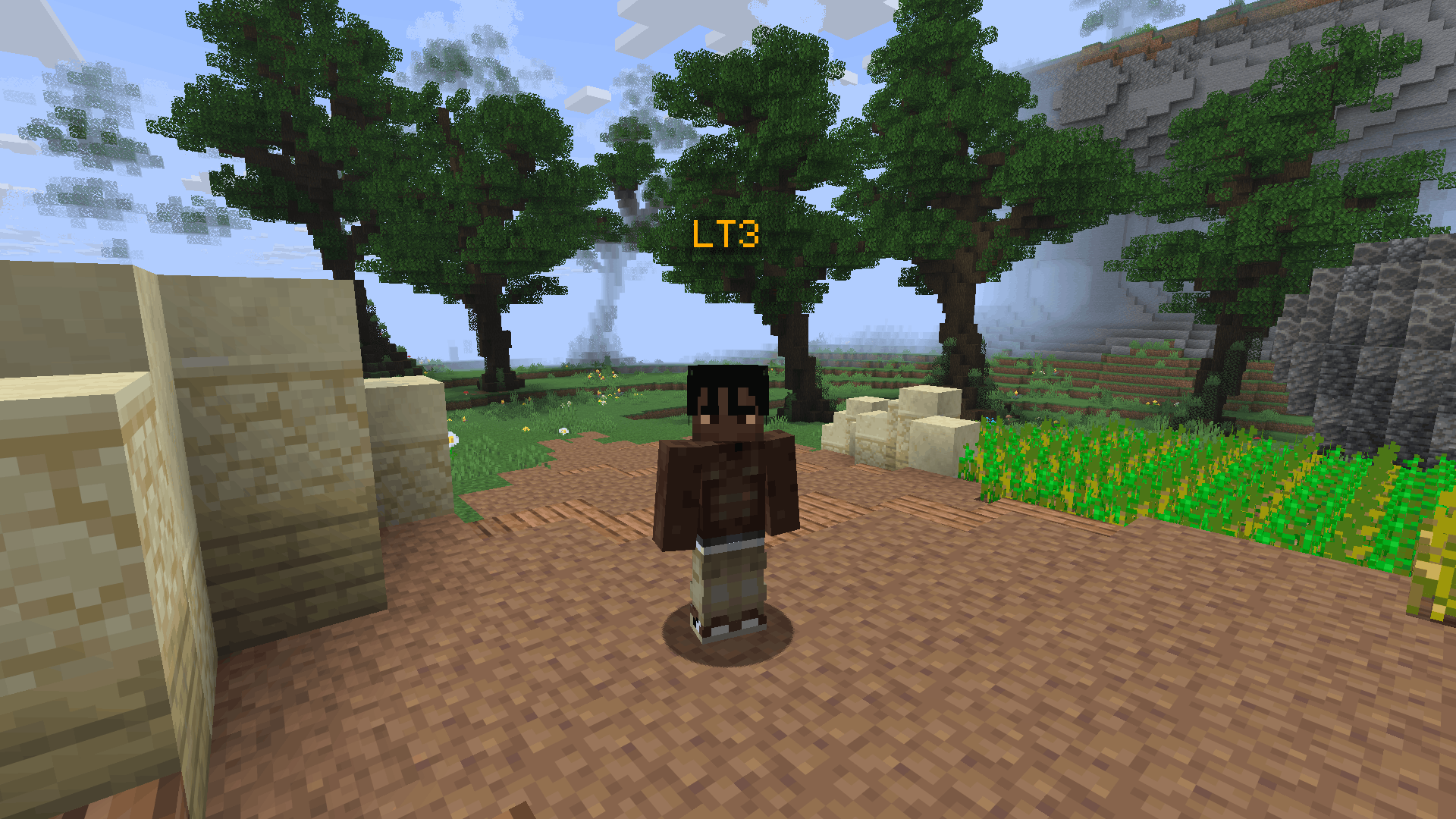
**VoxlyTagger** enhances your multiplayer experience by displaying player tiers from the VoxlyTiers leaderboard directly in-game.
If you would like to report an issue or are looking forward to get tested and earn a tier, join the VoxlyTiers Discord: VoxlyTiers Discord Invite.
See a player’s tier floating above their head in real time, making it easy to recognize skill levels at a glance. You can also quickly look up any player’s tier using the command:
“`
/voxtier
“`
## Input

## Output

## Another Preview
VoxlOrigins
Currently adds:
– voxlhuman: gain damage and defense when your hp is under half
– elf: cooldown reduction for the iron’s spellbooks mod
– dark elf: attacks have a chance to apply random debuffs
– dragon blooded: resistance to temperature damage and a (bad) dragon claw ability
– ork: get bonus defense for every unique buff you have
– arborian: slowly regain hunger and health in the sun
– kitsune: increased speed and attack speed
– bunikin: increased jump height and a chance to not take damage
– frogg: increased oxygen and mana regen while submerged
– brainburner: regain hunger and reload faster with scorched guns while on magma blocks
– lilisapien: while at high hunger gain maximum health and more damage, but drain hunger quickly
built for the unofficial forge version of origins, should work on other versions
Optional Dependencies:
– Scorched guns 2
– Iron’s Spells and Spellbooks
Voxel Earth
# Voxel Earth
> Real places, in Minecraft.

Voxel Earth is a full pipeline for turning photogrammetry and 3D Tiles into block-based worlds.
It streams Google Photorealistic 3D Tiles (and other sources) into Minecraft as voxelized chunks, so you can walk through real cities, mountains, and landmarks — block by block.
– 🌍 Stream real-world 3D Tiles into Minecraft
– 🧱 CPU voxelization, no GPU required on the server
– ⚡ Designed to work hand-in-hand with FastAsyncWorldEdit (FAWE)
– 🌐 Web client for browser-side experiments and previews
– 🧪 Separate CLIs for each pipeline stage (download → decode → voxelize)
—
## Links & Community
– **Website:** https://voxelearth.org
– **Play server:** `play.voxelearth.org`
– **Web client demo:** https://beta.voxelearth.org (browser viewer)
– **Discord:** https://discord.gg/8MK8J9EQGe
– **Monorepo (reference):** https://github.com/ryanhlewis/VoxelEarth
—
**What is Voxel Earth and why should I use it?**
Voxel Earth is a Minecraft + web ecosystem for exploring real-world geometry as voxels:
– **3D Tiles to blocks**
Fetches photogrammetry tiles (e.g. Google Photorealistic 3D Tiles), normalizes them, and converts them into Minecraft block palettes.
– **On-demand streaming**
Tiles are pulled and voxelized as players move around, so you can “walk into” a real city and watch it appear around you.
– **Flexible pipeline**
Each major step (download, Draco decode, voxelization) exists as a separate CLI tool and as embedded code in the plugin. You can test each stage locally before wiring everything together.
– **Server-friendly**
The Minecraft plugin is built as a single shaded JAR, with CPU voxelization and async integration with FAWE for high-throughput placement.
—
## Downloads
> **Note:** Links below are placeholders / targets; some may not exist yet.
– **Minecraft plugin (core Voxel Earth JAR)**
– GitHub Releases: https://github.com/ryanhlewis/VoxelEarth/releases
– Modrinth: https://modrinth.com/plugin/voxelearth
– SpigotMC: https://www.spigotmc.org/resources/voxel-earth.130155/
– **Web client**
– GitHub: https://github.com/voxelearth/web-client
—
## Minecraft Plugin
### Requirements
– **Server:** Paper or Spigot **1.20+** with **FastAsyncWorldEdit (FAWE) installed**
– **Java:** **Java 21+**
—
## Commands
VoxelEarth’s plugin adds commands for geocoding, tile loading, and per-player preferences:
“`yml
/visit
Teleport to a geocoded location (city, landmark, etc.) and stream tiles around it.
/visitradius
Configure how many tiles /visit loads around the target area.
/moveradius
Set how many tiles are loaded as the player moves.
/movethreshold
Movement distance (in blocks) required before triggering new loads.
/moveload
Enable/disable movement-based loading for yourself.
/visitother
Teleport another player to a geocoded location and stream tiles.
/visitradiusother
/moveradiusother
/movethresholdother
Admin variants that adjust settings and notify other players.
/voxelapikey
Store a Google API key for geocoding and tile access (per server).
“`
Permissions are namespaced under `voxelearth.*` and default to `true` or `op` as appropriate (see `plugin.yml` for full details).
—
## Web Client
If you just want to experiment with tiles and voxelization **in your browser**, use the web client:
* **Repo:** https://github.com/voxelearth/web-client
* **Live demo:** https://beta.voxelearth.org
The web client:
* Fetches Google Photorealistic 3D Tiles in the browser
* Normalizes/rotates them into a viewable frame
* Can hand off data to the Voxel Earth voxelization pipeline
* Is ideal for exploring regions, testing zoom/SSE parameters, and visually inspecting tilesets before you spin up a Minecraft server
—
## License
Voxel Earth and its companion CLIs are released under the **MIT License**, unless otherwise noted in sub-projects.
See the `LICENSE` file in this repository for full terms.
“Minecraft” is a trademark of Mojang AB.
Voxel Earth is not affiliated with or endorsed by Mojang AB, Microsoft, or Google.
VoxasVoice
**VoxasVoice brings real proximity voice chat to Minecraft. 🎙️**
Talk to players around you with spatial audio that actually makes sense — the closer someone is, the louder they sound. Walk away and their voice naturally fades. It feels exactly how you’d expect voice chat in Minecraft to work.
**🗣️ Proximity Voice Chat**
Speak and be heard by nearby players. Voice volume scales with distance automatically — no setup needed, it just works.
**👥 Private Voice Groups**
Want to talk with your team across the map? Create a private voice group and invite your friends. Groups support password protection so strangers can’t join. Distance doesn’t matter inside a group.
**🔇 Player Controls**
See who’s talking nearby and take control. Mute specific players, adjust individual volumes, and manage your experience without leaving the game.
**🎛️ Advanced Audio Settings**
Fine-tune your microphone and speaker settings, enable noise reduction, and monitor your voice levels with a built-in voice meter.
**🔒 Encrypted & Secure**
All voice traffic is encrypted end-to-end. Your conversations stay private.VoxasVoice requires the Fabric mod on the client and the plugin-bridge on the server. Both are included in this release.
Ready to make your Minecraft world actually feel alive? Give it a try. 🌍
Chat – Vox
**Vox** – A modern, convenient, customisable and evolving chat plugin that allows you to make your chat unique. There is a possibility of extensive configuration settings.
## Capabilities & Features
### Global Chat

### Local Chat

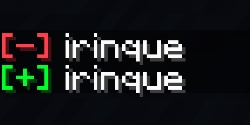
### Customizable Join & Quit Messages
### Death Messages

### Private Messages with sounds

## Commands
“`/voxchat“`, “`/vox“`, “`vc“`
## Update plan
– Chat for administration;
– Mentions;
– Scheduled Messages;
– More Customisation;
– World Channels
Vouch
# Vouch


Vouch is a secure, server-side authentication mod designed for modern Minecraft. It handles player registration, login, and two-factor authentication entirely on the server, meaning players do not need to install anything on their clients to join.
We currently support Minecraft **1.21.1 through 1.21.4** on both Fabric and NeoForge.
## How it works
When a player joins, they are placed in a “pre-auth” state where they cannot move, interact, or see chat until they log in.
* **New players** use `/register ` to create an account.
* **Returning players** use `/login ` to access the server.
* **Session Persistence:** If a player disconnects and reconnects quickly from the same IP, their session is remembered so they don’t have to type their password again immediately.
## Key Features
**Security & Performance**
We use Argon2id for password hashing, which is the current industry standard for security. Crucially, all database operations and hashing run asynchronously on separate threads. This ensures that Vouch has zero impact on your server’s TPS, even during heavy login spikes.
**Two-Factor Authentication (2FA)**
Players can optionally secure their accounts with TOTP 2FA. When enabled via `/2fa setup`, the mod renders a QR code directly onto an in-game map item. Players can scan this with Google Authenticator, Authy, or Aegis to generate time-based codes.
**Database Support**
Vouch is flexible with data storage. It defaults to H2 (no setup required), but fully supports SQLite, MySQL, and PostgreSQL via HikariCP for larger servers that need connection pooling.
**Customization**
The mod is localized in English (`en_us`) and Spanish (`es_mx`), but all messages can be customized. You can also configure sound effects, titles, and boss bars to match your server’s style.
## Requirements
* Minecraft **1.21.1, 1.21.2, 1.21.3, or 1.21.4**
* Java **21** or higher
* **Fabric** (requires Fabric API) or **NeoForge**
* **Architectury API** is required for both loaders
## Documentation
For full configuration guides, permission nodes, and advanced setup, please visit our documentation:
**https://vouch.nozz.skin**
## Server-side only
This mod is strictly server-side. Do not install it on the client.
—

Votiful
## A High-Performance Vote Listener for NuVotifier
This plugin is a lightweight, high-performance addon for NuVotifier, designed specifically to handle a massive number of concurrent votes without impacting your server’s performance.
## Why Choose This Plugin?
Does your server lag when many players vote at once? This plugin was built to solve that exact problem. After struggling with performance issues on our own server, we developed a robust system capable of processing votes with extreme efficiency. It’s battle-tested and stable under pressure, ensuring your server remains responsive even during peak voting hours. If you run a demanding server and need a reliable vote-processing solution, this is the plugin for you.
## Features
This plugin expands NuVotifier by adding two core, performance-focused features:
* **Vote Statistics:** Track essential voting data with provided placeholders. Easily display total votes, top voters, and more on scoreboards, in GUIs, or anywhere else PlaceholderAPI is supported.
* **Vote Event:** A dedicated system allows admins to easily and reliably hook into the voting process to create custom rewards, trigger server commands, or integrate with other systems.
## Video
Votes Update
# 🗳️ Vote Update
Bring back 23w13a_or_b april fools version to newer versions
– 31 votes available!
– No players limit
– Open-source
– Fully customable localization
# 🟪 ItemsAdder
Votes Update is compatible with ItemsAdder.
The only thing you need to do is to extract
the pack in `plugins/ItemsAdder/contents`
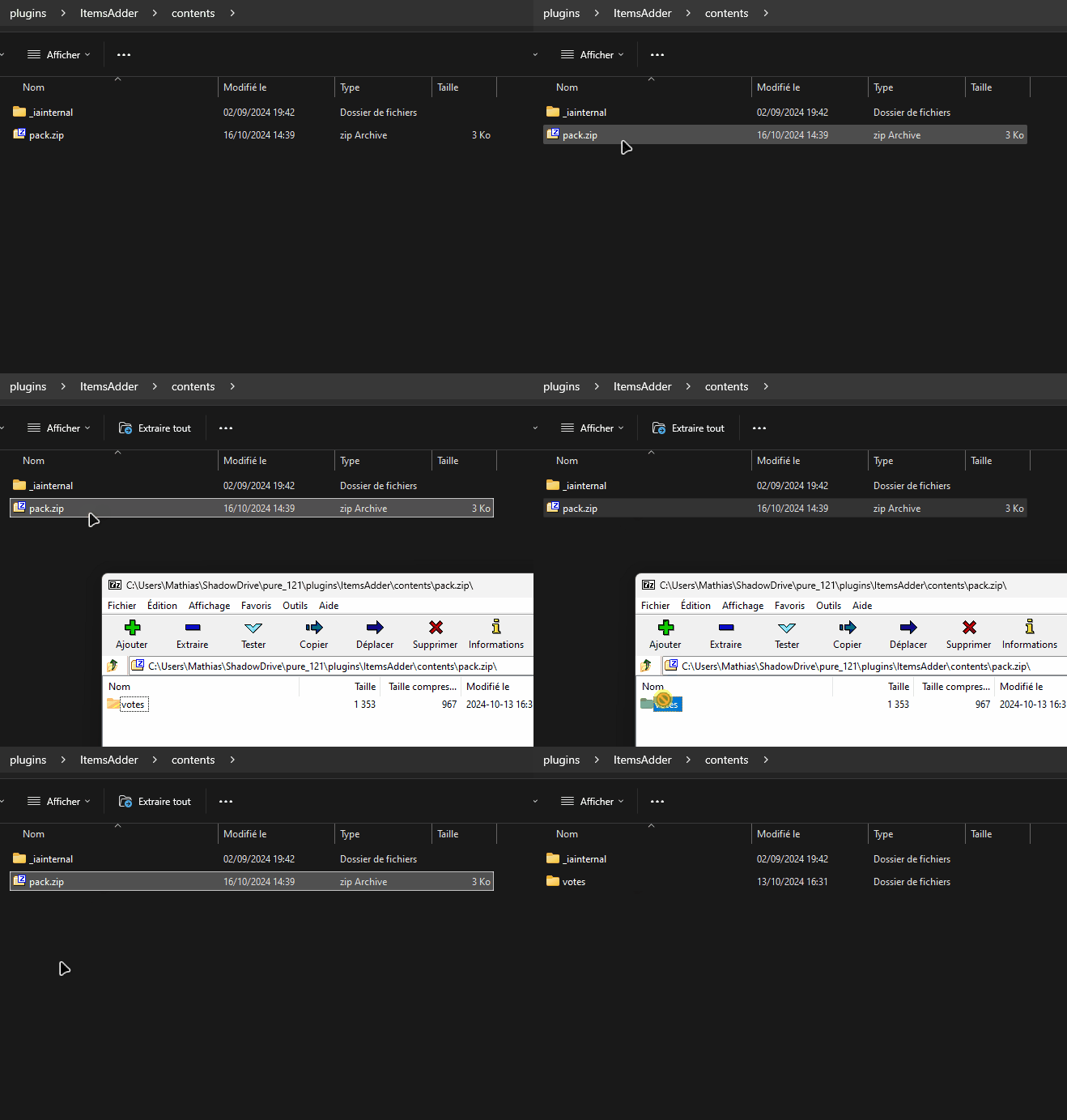
Votes Update will automaticlly detect the pack and make necessary changes.
VotePass
“`text
_ __ __ ____
| | / /___ / /____ / __ ____ ___________
| | / / __ / __/ _ / /_/ / __ `/ ___/ ___/
| |/ / /_/ / /_/ __/ ____/ /_/ (__ |__ )
|___/____/__/___/_/ __,_/____/____/
“`
README LANGUAGES [ [**English**](README.md) | [中文](README_CN.md) ]




# **VotePass**
> You have been **”Passed by Vote”** !
An efficient and fair verification plugin for whitelisted servers,
which supports players to submit whitelist requests by themselves
and be reviewed by all players who have passed.
> This plugin has been published on SpigotMC and Modrinth.

## Features & Advantages
– **Database Sync!** Based on database storage, data is safe and synchronized.
– **Easy to configure!** Simple and convenient configuration method, all content can be configured!
– **User-friendly GUI!** Full UI configuration, very easy for players to operate.
– **Player participation!** Players can participate in the management of the server, making them more involved.
## Screenshots


## Dependencies
– **[Recommend]** Placeholders based on PlaceholderAPI .
For development dependencies, please
see Dependencies .
## Extensions
> Have you developed an extension plugin related to this plugin?
> Welcome to submit your extension plugin in Issues
> and we will add it to the list!
### **VotePass-Mailer**
Support email notify for VotePass in game servers.
### **VotePass-QQNotify**
Support QQ notify for VotePass in lobby servers.
## Commands
The main command is `/VotePass` or `/vp`.
### Lobby side
“`text
# request
@ Player command
– Submit a whitelist request for a specific server.
– If the server has configured the rules, the rule agreement will be opened first;
– If not, the question-related GUI will be popped up directly for the player to fill in.
# accept
@ Player command
– Agree to the rules of the specified server and start filling in the answers to the questions.
# deny
@ Player command
– Refuse the rules of the specified server.
# reload
@ Admin command
– Reload the configuration file.
# toggle
@ Admin command
– Enable/Disable the vote application for the corresponding server.
“`
### Game side
“`text
# requests
@ Player command
– View all whitelist requests that have not been participated in.
# handle
@ Player command
– (Continue to) process the specified whitelist request.
# abstain
@ Player command
– Enable/Disable the auto abstain function.
# manage
@ Admin command
– Open the administrator operation GUI to directly operate the whitelist.
# reload
@ Admin command
– Reload the configuration file.
# sync
@ Admin command
– Synchronize the whitelist of the corresponding server to the database.
# migrate
@ Admin command
– Migrate the whitelist of the server from the “whitelist.json”.
# list
@ Admin command
– List all players in whitelist.
# add
@ Admin command
– Add a player to the whitelist.
– Player should joined the server(e.g lobby) at least once.
# remove
@ Admin command
– Remove a player from the whitelist.
“`
## Configurations
You can find configuration translations
at VotePass-Translations.
### Plugin Configuration (`config.yml`) .
Will be generated on the first boot up.
### Messages Configuration (`messages.yml`)
Will be generated on the first boot up.
### Server Application Configuration ([`servers/*.yml`](lobby/plugin/src/main/resources/servers/survival.yml))
All server’s application configuration are separate configuration files,
stored in the lobby’s `/servers/` for easy management.
You can edit the storage path of the server configuration file in the plugin configuration file.
## Permissions
“`text
# VotePass.admin
– The permissions for all admin commands and functions.
# VotePass.abstain
– The permission that allow user to toggle auto abstain.
“`
## Statistics


## Open Source Licence
The source code of this project adopts the GNU General Public License v3.0.
## Supports
This project is mainly developed by the Artfrom Games .

Many thanks to Jetbrains for kindly providing a license for us to work on this and other open-source projects.
