znodes
# znodes

Map painting – but in block game. Fork of the original minecraft-nodes project by phonon
I created this fork due to the the last commit on phonon’s repo being from two years ago. I have no intention of supporting older versions, if you are on an outdated version, update.
Other plugin modules such as the dynmap and ports plugin will be moved to seperate repos.
## What is nodes?
Nodes takes inspiration from Towny, Hearts of Iron 4, and the famous Minecraft factions experience from 2014.
* Map segmented into pre-created territories which are groups of contiguous minecraft chunks.
* Territories have different resource nodes which provide different resource yields from mining and different rates for farming, animal breeding, etc…
* Players form a town which controls territories. Initial territory claims must be connected.
* War is capturing territories from another town.
* Towns choose 1 territory to be their capital which cannot be taken until all other territories are captured.
* A captured territory is occupied and provides resource benefits to the occupier. The occupier has the option to annex a territory and add it to their town.
## Notable Changes Over Upstream
* Folia Support
* Modern version support
original author: phonon
znodes fork maintainer: tlm920
zmsg
What are the capabilities of this plugin? :
This plugin is designed to differentiate itself from other chat plugins that don’t require a dependency generator; this plugin allows you to…
1. /chattoggel
2. /msgtoggel
3. /w
4. /msg
5. admincommands
6. /zmsg reload
7. /msgalerts
**What does Chattogel do?**
You are able to deactivate the chat; for example, a player writes something in the chat, but you can’t see it. However, if you have ChatTogel enabled, you can still send messages.
**What does /msgtoggel do?**
/msgtoggel lets you toggle whether you want to receive private messages from players. I also have /msgblock in mind, but that will come later.
**What does msg or w do?**
/msg or /w is simply like the original Minecraft message. Msg is like typing in chat, but only to one person.
**What does /zmsg reload do?**
It simply reloads the configuration without having to stop the server.
**What does /msgalerts do?**
It allows you to see what players write in the message.
Has the Plugins Permission ?
Yes, of couse the permission is:
– zmsg.chat.color
– zmsg.chat.toggle
– zmsg.cooldown.bypass
– zmsg.msg.bypass
– zmsg.msg.toggle
– zmsg.msgalerts
– zmsg.reload
– zmsg.repeat.bypass
_**If you have any questions about the plugin, you can reach me at disord my username:**_
mrzitrroneog
ZMiracle (MIRACULOUS) RABBIT MIRACULOUS
– Hi, this is the ZMiracle mod. This mod is dedicated to the cartoon series LadyBug and Cat Noir. The mod is early, but it will develop quickly! (The mod supports survival)
– Compatible with optifine
– The mod adds Kwami to the game, which make it possible to transform into a hero. Kwami come from Miraculous Jewelry that can be created thanks to a Grimoir. (it is advised to use JEI for crafting)
– Also in mod there is a full localization of the Russian language and a choice of suit and camouflage – /zmenu
> Key Bing:
1. Z – Detransformation
2. X – Transformation
3. C – Power
4. V – Hide/Show kwami
5. B – Renounce
6. N – Weapon Mode
– Rabbit update last. Mod closed. I`m sorry
zLink
zLink is your custom link plugin. It works by connecting to a database and giving the user a code, that code the user can input into your project to link their account. Right now you can fetch the users uuid, luckperms rank, display name, world, game mode and when they first joined.
**Please Note: This plugin is still in beta, there will be bugs and it will not be perfect.**
If you would like to get releases before it comes here please visit: [Our Official Website](https://link.zavrobot.tech/)
zLife Season 1
Start with 1 heart and 7–13 lives. On death: lose 1 life, gain 1 heart. On kill: gain 1 life. Name color shows lives: Red (1–3), Yellow (4–6), Lime (7–9), Dark Green (10+). Run out of lives = elimination.
ZithiumTags
ZithiumTags is the ultimate tag plugin for your server. Easily create tags for users and allow them to create their own custom tags with our Tag Voucher system.
This plugin is still in BETA extensive testing has gone into the plugin before release, but issues are expected please report any in our discord.
## **Features:**
– Gradient Support
– Tag Vouchers
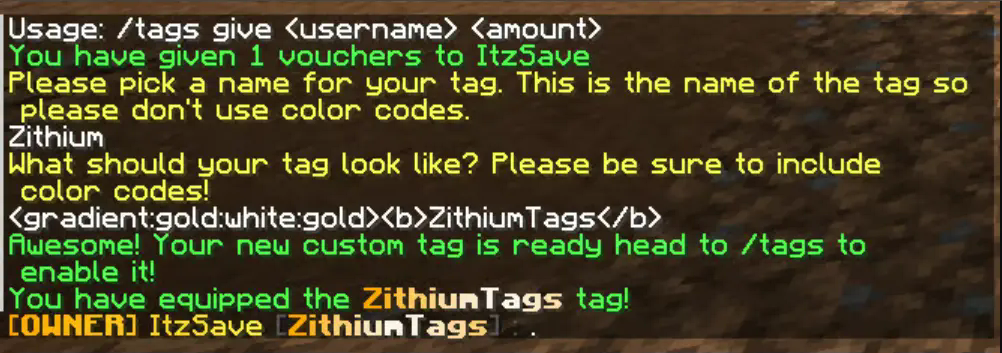
– Players can be given tag vouchers to make custom tags that only they can use.
– Unlimited Tags
– Custom tag permissions
– Tag Colors
– Players can custom color their tags with the built-in color menu.
– Admins/Owners can also create custom colors to add as presets.
## **Images**
The text prompt when a user redeems a custom tag voucher.
Zithium ChatFilter
A simple chat filtering plugin designed to keep your chat clean and safe for all users.
[](https://aspirehosting.net/aff.php?aff=21)
Permissions:
– chatfilter.bypass – Bypasses the chat filter.
ZInvisItemFrames
# ZInvisItemFrames
Allow players to craft and place invisible item frames. Folia-compatible invisible item frame plugin.
## Features
– Craft invisible item frames
– Customizable crafting recipe. (Can choose ANY ITEM for the recipe)
– Empty invisible frames can have a glowing outline (configurable)
– MiniMessage support for all text formatting
## Compatibility
– Paper 1.20.1 -> 1.21.4
– Folia-compatible
– Java 17+
## Dependencies
– [MCKotlin](https://modrinth.com/plugin/mckotlin)
## Crafting Recipe
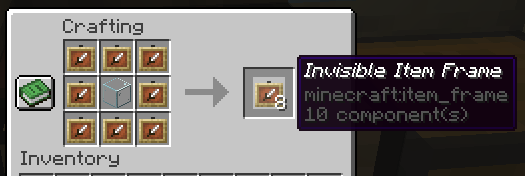
The default crafting recipe is 8 item_frame (or glow_item_frame) in a circle with one custom item in the middle.
You can change the middle-item with `/ziif item`.
You can also configure how many invisible item frames are crafted from the recipe.
## Commands
– `/ziif help` – Show help information
– `/ziif item` – Set the recipe item to the item in your hand
– `/ziif reload` – Reload the configuration
– `/ziif give [–glow]` – Give invisible item frames to a player
## Permissions
– `zinvisitemframes.craft.item_frame` – Allow crafting invisible item frames
– `zinvisitemframes.craft.glow_item_frame` – Allow crafting invisible glow item frames
– `zinvisitemframes.place.item_frame` – Allow placing invisible item frames
– `zinvisitemframes.place.glow_item_frame` – Allow placing invisible glow item frames
– `zinvisitemframes.admin` – Access to all plugin commands
## Installation
1. Download the latest version of ZInvisItemFrames from [Modrinth](https://modrinth.com/plugin/zInvisItemFrames/versions).
2. Download the appropriate version of MCKotlin from [Modrinth](https://modrinth.com/plugin/mckotlin)
3. Place the downloaded `.jar` files into your server’s `plugins/` folder.
4. Restart your server.
5. Configure the plugin to your liking by editing the `.yml` files in the `plugins/ZInvisItemFrames/` folder.
## Configuration
“`yaml
recipe:
item: [] # Set with `/ziif item` command
quantity: 8 # How many frames are crafted per recipe
check-permission: # Whether to check permissions for crafting/placing invis frames
craft: false
place: false
empty-frame:
glow: true # Whether empty frames should glow
visible: true # Whether empty invis frames should be visible
name:
invisible_item_frame: “Invisible Item Frame”
invisible_glow_item_frame: “Invisible Glow Item Frame”
“`
zHead
[](https://minestrator.com/a/GROUPEZ)
zHead is a swift and intuitive plugin enabling you to access thousands of custom Minecraft skulls with distinctive designs. This user-friendly skulls plugin opens the door to creative design possibilities, significantly improving your builds’ quality and offering creative liberty to both you and your players.
Should you seek additional methods to make your builds stand out with ease, zHead is the perfect solution!
Credit: [https://minecraft-heads.com/](https://minecraft-heads.com/)
## Commands:
– **/zhead** (aliases: /head, /zhd) – `zhead.use` – Display commands
– **/zhead reload** – `zhead.reload` – Reload configuration files
– **/zhead info** – `zhead.info` – Get head information
– **/zhead give [] []** – `zhead.give` – Give a head
– **/zhead search ** – `zhead.search` – Search heads
– **/zhead random [] []** – `zhead.random` – Give a random head
– **/playerhead ** – `zhead.player.head` – Give a player’s head
## Inventory Permissions:
– `zhead.miscellaneous`
– `zhead.plants`
– `zhead.monsters`
– `zhead.humanoid`
– `zhead.humans`
– `zhead.food.drinks`
– `zhead.decoration`
– `zhead.blocks`
– `zhead.animals`
– `zhead.alphabet`
– `zhead.refresh`
## Placeholders:
– **%zhead_count%** – Displays the total number of heads
– **%zhead_count_format%** – Displays the total number of heads with a format
– **%zhead_category_count_%** – Displays the total number of heads for a category
– **%zhead_category_count_format_%** – Displays the total number of heads for a category with a format
**API**: [https://github.com/Maxlego08/zHead?tab=readme-ov-file#api](https://github.com/Maxlego08/zHead?tab=readme-ov-file#api)
[](https://bstats.org/plugin/bukkit/zHead/21364)
## We would like to extend our heartfelt thanks to [Minecraft-Heads.com](https://minecraft-heads.com/) for providing their API, which has been an invaluable source of all the data used in our project.
ZenPings
# ZenPings
**ZenPings** is a lightweight, no-nonsense Minecraft plugin for Paper servers that brings clean, customizable ping notifications to your chat.
Mention players with `@Username` to grab their attention in the chaos of multiplayer chats — complete with sound alerts, highlight effects, and action bar messages. Stay noticed, stay organized, without the clutter.
—
## ✨ Features
– 🔔 **Ping Alerts** – Mention players using `@Username` to play a sound and highlight their name.
– 🎛️ **Toggle Support** – Players can easily enable or disable pings using `/ping` or `/ping on/off`.
– ⏱️ **Anti-Spam Cooldown** – Prevent ping spam with a fully configurable cooldown timer.
– 🚀 **Ultra Optimized** – Built in **Kotlin**, with performance as a core focus.
– 📦 **Paper-Only** – Designed specifically for modern **Paper servers** for best compatibility and speed.
—
## 📜 Commands
| Command | Description |
|———————|————————————–|
| `/ping` | Toggle ping alerts on/off |
| `/ping on` / `off` | Explicitly enable/disable pings |
| `/ping reload` | Reload plugin configuration (admin) |
—
## 🔐 Permissions
| Permission | Description |
|————————|——————————————-|
| `zenpings.toggle` | Allows use of `/ping` |
| `zenpings.reload` | Allows use of `/ping reload` |
| `zenpings.color.vip` | Grants **gold-colored** pings |
| `zenpings.color.default` | Grants **aqua/gray/custom** ping colors |
—
## ⚙️ Configuration (`config.yml`)
“`yaml
replacement-text: “@%player%”
sound: BLOCK_NOTE_BLOCK_PLING
volume: 1.0
pitch: 0.8
prefix: “@”
cooldown-seconds: 5
action-bar-message: “%player% mentioned you!”
“`
## 📬 Support
Need help or have a feature suggestion?
– 💬 Join the **ZenPings Discord**: [Click Here](https://discord.gg/HFP5v3rZAA)
– 🛠️ Open an issue on [GitHub](https://github.com/luvtoxic/ZenPings/issues)
We’re here to help!
—
## 🧾 License
**ZenPings** is licensed under a **non-commercial license**.
You are free to:
– ✅ Use it on public or private servers
– ✅ Modify the source code for personal or public use
– ✅ Share modified versions **with credit**
You may not:
– ❌ Sell this plugin or its modified versions
– ❌ Include it in paid products, bundles, or setups
Read the full terms in [`LICENSE`](https://github.com/luvtoxic/ZenPings?tab=License-1-ov-file).
—
## 🧑💻 Credits
> Built with ☕ and ❤️ by [luvtoxic](https://github.com/luvtoxic)
—