WelcomeMessageGUI+
## Version 1.0.0
**Initial Release**
### ✨ Features
– 🎨 **Full Color Support** – Use HEX colors (`&#FF0000`) or standard Minecraft colors (`&a`, `&b`, etc.)
– 💬 **Chat Editor** – Click in GUI, type in chat (supports **Ctrl+V copy-paste!**)
– 🖱️ **Beautiful GUI** – Centered 5-row interface with colored glass borders
– ⚡ **Live Preview** – Test your title before saving
– 🔄 **Config Reload** – Reload settings without restarting
– 🎯 **Smart Input** – Type `cancel` to abort editing
– 💾 **Persistent** – Everything saves to `config.yml`
### 🎮 Commands
| Command | Description |
|———|————-|
| `/welcomemsg` | Open the settings GUI |
| `/welcomemsg reload` | Reload configuration |
| `/welcomemsg preview` | Preview the welcome title |
| `/welcomemsg set title ` | Set title via command |
| `/welcomemsg set subtitle ` | Set subtitle via command |
**Aliases:** `/wm`, `/welcome`
### 🔒 Permission
– `welcomemessage.admin` – Access to all commands and GUI (default: op)
### 🛠️ Installation
1. Download the JAR
2. Place in `plugins/` folder
3. Start server (generates `config.yml`)
4. Edit in-game via GUI or edit `config.yml` manually
5. Enjoy! 🚀
### ⚙️ Config Example
“`yaml
welcome:
title: “�FF00Welcome!”
subtitle: “&#FFFFFFHave fun playing!”
enabled: true
fade_in: 30 # Ticks (1.5s)
stay: 70 # Ticks (3.5s)
fade_out: 30 # Ticks (1.5s)
“`
### 🔧 Technical
– MC 1.21+ (Paper/Spigot/Purpur)
– Java 21
– ❌ Not compatible with Fabric/Forge/NeoForge
### Support
If you run to any issues don’t hesitate sending a message to my discord or my website. 🙂
WelcomeManager

### Introducing GreetingsManager – the ultimate plugin to foster community spirit on your server while rewarding friendly interactions!
With GreetingsManager, players can greet newcomers and returning players alike, earning configurable rewards for their warm welcome. Whether it’s a first-time join or a familiar face, the plugin differentiates between the two, offering distinct, fully customizable rewards – even supporting multiline rewards for added creativity.
But it doesn’t stop there: every greeting counts! GreetingsManager keeps track of each player’s total welcomes and showcases them on a leaderboard, encouraging healthy competition and recognizing your server’s most welcoming members.
Flexibility is at the heart of the plugin. Server owners can define multiple trigger keywords that activate a welcome reward, allowing for unique server culture and vocabulary. And to ensure no welcome goes forgotten, players can opt in (or out) of personalized join reminders, prompting them when someone new arrives.
Managing the system is a breeze with extensive debug and admin tools. All data is securely stored in local .yml files, with a lightweight algorithm capable of handling hundreds of entries in under a second – proving both efficient and reliable and will scale with your server.
A standout feature introduced in version 1.3.0 is the **WelcomeChain system**. When a player joins for the first time, others are invited to participate in a chain of greetings. Players who join the chain will automatically send either a randomly selected greeting from a pool of prewritten messages or a personalized greeting if they’ve set their own.
Disclaimer:
For optimal usage, this system leverages CMI’s Sudo system for seamless automated chat interaction. Since 1.3.5-r the plugin will auto-detect if CMI isn’t installed and will fallback on a chat default system. This system should work for most chat-plugins, making this plugin work fully standalone.
In short, GreetingsManager is more than just a reward plugin – it’s a tool to build community, celebrate kindness, and make every join a memorable moment. Ready to make your server the friendliest place around?


WelcomeAds

WelcomeAds is a customizable Minecraft plugin that enhances player engagement with interactive, inventory-based welcome screens. Create seamless multi-page carousels, integrate custom sounds, and deliver dynamic content effortlessly!


This plugin requires a resource pack to function properly; you can use ItemsAdder, Oraxen, or NexO to create font images, or manually add them to your own resource pack. Check out the wiki here.
You can use Placeholder with ‘PlaceholderAPI’ installed.

– Add as many page as you want
– Auto page scrolling, and you can loop it too.
– Per item commands on click
– Per screen background
– Per screen event checker (inventory open/close) command
– Per screen permission
– Load type setting (on join/ after resourcepack load)
– PlaceholderAPI supported
– Player head with offline player skin supported
– Background fade out when closing the screen
– Hex and minecraft color support. You can use ‘Legacy’ mode for hex generator website.
– Texteffect support (or any Shader working with title text)
– for example, you can use ItemsAdder text effect
– Forcing player to stay on the page
– Custom items with modeldata, lore, name support
– Per session screen showing support

### Installation
– Place the WelcomeAds.jar file in your Minecraft server’s plugins folder.
– Restart or reload your server.
– Configure the plugin settings in the generated config.yml file.
– Install one of these plugins for easier use: ItemsAdder (Example file provided), Oraxen, or NexO. These plugins have custom emoji functions that will be used to display background colors and GUI images.
– If you do not have any of the above plugins, you can still use WelcomeAds, but you will need to manually create a font texture for the background and GUI images.
– Enjoy the custom welcome screen functionality!
### Commands
– welcomeads open
– welcomeads reload

This is my practice project, so if you encounter any issues, feel free to report them on GitHub. If you have any suggestions, you’re welcome to contact me via the Discord information provided on my GitHub profile. Thank you for your support!
with love from TiNY <3
found me / get support on discord server: https://discord.gg/JMdjgnzG8W
WelcomeRaffle
# WelcomeRaffle
A lightweight Minecraft plugin that turns welcoming new players into a **fun raffle event**.
—
## 📖 How It Works
1. When a player joins for the **first time**, the raffle begins.
2. Everyone else sees a configurable **action bar message**:
3. Players have a set time window (default **10 seconds**) to type `welcome` in chat.
4. After the timer ends, **one random player** is chosen as the winner.
5. The winner silently receives rewards — no broadcasts, no alerts.
—
## ⚙️ Features
– 🎯 Triggers only on **first join**
– 💬 **Customizable** action bar message (`config.yml`)
– ⏳ Configurable raffle duration
– 🎲 Random winner selection
– 🔒 **Silent rewards** (no messages or broadcasts)
– 🛠️ Rewards fully configurable via commands
—
## 📝 Example `config.yml`
“`yaml
# Action bar message shown when a new player joins
join-message: “Say “welcome” for a chance to win rewards!”
# How long the raffle lasts (in seconds)
raffle-duration: 10
# Commands to run for the winner
# %player% will be replaced with the winner’s name
rewards:
– “give %player% diamond 3”
– “eco give %player% 500”
Welcome Players
# Welcome players upon their first time joining!
This datapack lets server owners and modpack creators to welcome players to their projects!
Modpack creators, use the mod version of this.
_You are able to use this in ANY modpack or server!_
**To make a custom message, change mode 4 of welcome.mcfunction. You must also change load.mcfunction “scoreboard players set wpmode wpconfig 4” to set effect.**
—
Use “scoreboard players set wpmode wpconfig 1-4” to change how the welcome message looks!
Look at **Gallery** to find screenshots of each mode.
Any issues? Find me on Discord as optim00se
Welcome Message


Requires the library mod Collective.
Welcome Message is a server utility mod designed to make sending a welcome message to players logging into the server easy. There are three configurable messages which can be sent whenever someone joins the world. Each message can have a different colour and be completely clickable with an optional URL input. Any message config can also be left empty to prevent it from being sent.
By default the messages are only sent to players joining a dedicated server, e.g. not a singleplayer world. This can however be toggled in the config.
Configurable: ( how do I configure? )
onlyRunOnDedicatedServers (default = true): If the mod should only run on dedicated servers. When enabled it’s not sent when in a singleplayer world.
sendEmptyLineBeforeFirstMessage (default = true): Whether an empty line should be send before to first message to separate the welcome from other chat messages that might be sent.
messageOneText (default = “Welcome to the server!”): The first message a player will receive when joining the world. Can be left empty.
messageOneColourIndex (default = 2, min 0, max 15): 0: black, 1: dark_blue, 2: dark_green, 3: dark_aqua, 4: dark_red, 5: dark_purple, 6: gold, 7: gray, 8: dark_gray, 9: blue, 10: green, 11: aqua, 12: red, 13: light_purple, 14: yellow, 15: white
messageOneOptionalURL (default = “”): If a link is entered here, the complete message will be clickable.
messageTwoText (default = “Downloaded from CurseForge! This is a clickable link.”): The second message a player will receive when joining the world. Can be left empty.
messageTwoColourIndex (default = 14, min 0, max 15): 0: black, 1: dark_blue, 2: dark_green, 3: dark_aqua, 4: dark_red, 5: dark_purple, 6: gold, 7: gray, 8: dark_gray, 9: blue, 10: green, 11: aqua, 12: red, 13: light_purple, 14: yellow, 15: white
messageTwoOptionalURL (default = “https://curseforge.com/members/serilum/projects“): If a link is entered here, the complete message will be clickable.
messageThreeText (default = “You should probably edit this in the config :): The third message a player will receive when joining the world. Can be left empty.
messageThreeColourIndex (default = 15, min 0, max 15): 0: black, 1: dark_blue, 2: dark_green, 3: dark_aqua, 4: dark_red, 5: dark_purple, 6: gold, 7: gray, 8: dark_gray, 9: blue, 10: green, 11: aqua, 12: red, 13: light_purple, 14: yellow, 15: white
messageThreeOptionalURL (default = “”): If a link is entered here, the complete message will be clickable.

——————
You may freely use this mod in any modpack, as long as the download remains hosted within the Modrinth ecosystem.
Serilum.com contains an overview and more information on all mods available.
Comments are disabled as I’m unable to keep track of all the separate pages on each mod.
For issues, ideas, suggestions or anything else there is the Github repo. Thanks!
Welcome Mat
### A friendly way to roll out the welcome mat for your players!
**WelcomeMat** is a lightweight, powerful plugin that enhances your server’s welcome experience. It provides customizable join/leave messages, titles, animations, and sounds to make players feel at home on every login.
## 🎉 What’s New!
### Version 1.3.1 (Latest)
– 🍃 **Folia-Ready Animations**: Visual effects now use the latest Folia entity schedulers (1.21.8+) with automatic signature detection, clamped delays, and no unsafe Bukkit fallbacks.
– 🧠 **Smarter Diagnostics**: If future Folia builds introduce new scheduler signatures, they’re logged automatically so you can keep running the same jar everywhere.
– 🧾 **Auto Version Metadata**: `plugin.yml` now inherits the Gradle version, guaranteeing accurate version strings inside the jar.
– 🌌 **Skyward & Copper Packs**: Two new message packs inspired by the 1.21 “Chase the Skies” and “Copper Age” updates, selectable right from the GUI.
### Version 1.2.x Highlights
– **Message Packs System**: Multiple themed collections (default, friendly, professional, funny, RPG) with GUI switching.
– **Multi-Language Support**: English and Spanish out of the box with easy CLI/GUI selection.
– **Improved Configuration Display**: Human-friendly display names and cleaner GUI organization.
—
## 🔄 Compatibility
– Fully tested on **Bukkit/Spigot, Paper, Purpur, and Folia** from **Minecraft 1.13 through 1.21.10**.
– Region-aware scheduler paths keep Folia’s watchdog happy while the same jar continues to run flawlessly on single-threaded servers.
—
## Features
– 🎨 **Customizable Messages**
– Rich join/leave text with color codes and placeholders
– Player-specific greetings and per-pack collections
– Display-name helpers and multi-language support (EN/ES)
– 📜 **Welcome Titles**
– Configurable title/subtitle timing and colors
– 🔊 **Interactive Sounds**
– Join/leave sounds with per-player toggles, volume, and pitch
– ✨ **Animation System**
– Fire Spiral, Green Spike Firework, and more join effects
– Folia-safe schedulers and per-player animation preferences
– ⚙️ **Extensive Configuration**
– Feature toggles, admin logging, instant `/wm reload`
– GUI-driven settings for packs, languages, sounds, and more
## 📋 Commands
– `/welcomemat` or `/wm` – Base command
– `/wm sound` – Toggle join/leave sounds for yourself
– `/wm reload` – Reload the plugin configuration
– `/wm help` – Show help message
– `/wm animation` – Toggle join animations for yourself
– `/wm language` – Change the plugin language
– `/wm pack` – Change the message pack
– `/wm config` – Modify plugin configuration
## 🔑 Permissions
– `welcomemat.reload` – Allow reloading the configuration (default: op)
– `welcomemat.bypass` – Bypass welcome messages (default: false)
– `welcomemat.sound.toggle` – Allow toggling sounds (default: true)
– `welcomemat.animation.toggle` – Allow toggling animations (default: true)
– `welcomemat.admin.log` – Receive admin log messages (default: op)
– `welcomemat.language` – Allow changing the plugin language (default: op)
– `welcomemat.pack` – Allow changing message packs (default: op)
– `welcomemat.config` – Allow modifying plugin configuration (default: op)
## 📦 Installation
1. Download the latest version of WelcomeMat
2. Place the `.jar` file in your server’s `plugins` folder
3. Restart your server
4. Configure the plugin in `plugins/WelcomeMat/config.yml`
## ⚙️ Configuration
“`yaml
features:
join-message: true
leave-message: true
join-title: true
join-sound: true
leave-sound: true
other-players-sounds: true
join-animation: true
admin-logging: true
messages:
join: “&e%player% &ajust joined the server!”
leave: “&e%player% &chas left the server!”
player-specific:
example-player:
join: “&6Welcome back, special player %player%!”
leave: “&eGoodbye, special player %player%!”
titles:
join:
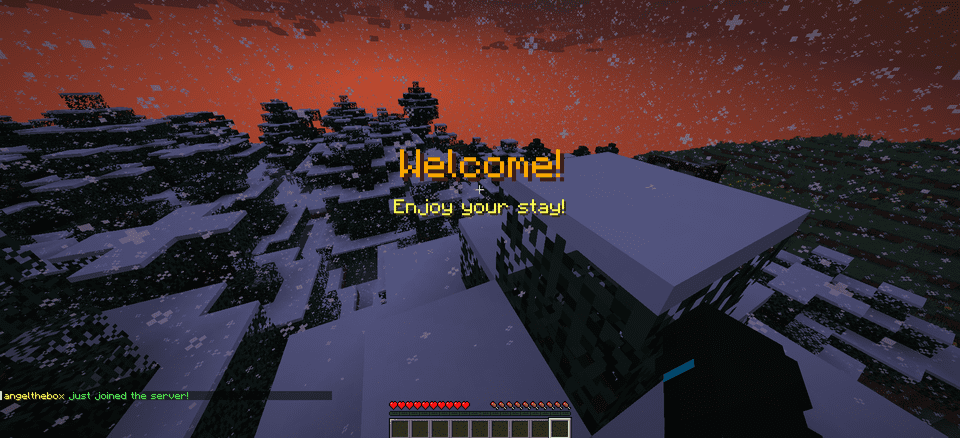
title: “&6Welcome!”
subtitle: “&eEnjoy your stay!”
sounds:
join:
sound: ENTITY_PLAYER_LEVELUP
volume: 1.0
pitch: 1.0
leave:
sound: ENTITY_IRON_GOLEM_DEATH
volume: 0.5
pitch: 1.0
animations:
green-spike:
enabled: true
duration: 40
height: 2.0
# Message Packs
message-packs:
# Currently selected pack (default, friendly, professional, funny, rpg)
selected: “default”
# Default pack (original messages)
default:
join:
– “&e%player% &ajust joined the server!”
leave:
– “&e%player% &chas left the server!”
# Friendly pack
friendly:
join:
– “&d✨ &e%player% &ahas joined the party! &d✨”
– “&aWelcome back, &e%player%&a! We missed you! &d❤”
leave:
– “&e%player% &7had to go… &cSee you soon! &d💕”
– “&7Until next time, &e%player%&7! &d👋”
“`
## 🌐 Language Support
WelcomeMat now supports multiple languages:
“`yaml
# Available languages: english, spanish
selected-language: “english”
languages:
english:
name: “English”
messages:
reload:
success: “&aConfiguration reloaded successfully!”
sound:
enabled: “&aJoin/leave sounds enabled!”
disabled: “&cJoin/leave sounds disabled!”
spanish:
name: “Español”
messages:
reload:
success: “&a¡Configuración recargada con éxito!”
sound:
enabled: “&a¡Sonidos de entrada/salida activados!”
disabled: “&c¡Sonidos de entrada/salida desactivados!”
“`
## 🎵 Available Sounds
### Modern (1.13+)
– `ENTITY_PLAYER_LEVELUP`
– `ENTITY_IRON_GOLEM_DEATH`
– `BLOCK_NOTE_BLOCK_PLING`
– `BLOCK_NOTE_BLOCK_CHIME`
– `BLOCK_NOTE_BLOCK_BELL`
– And more…
### Legacy (1.8-1.12) (Under development)
– `LEVEL_UP`
– `IRONGOLEM_DEATH`
– `NOTE_PLING`
– `NOTE_PIANO`
– And more…
## 💡 Example Configurations
### Professional Server with Message Packs
“`yaml
# Use the professional message pack
message-packs:
selected: “professional”
# Set the language to English
selected-language: “english”
sounds:
join:
sound: BLOCK_NOTE_BLOCK_PLING
volume: 0.8
pitch: 1.5
animations:
green-spike:
enabled: true
duration: 30
height: 1.5
“`
### VIP Server with Custom Messages
“`yaml
messages:
join: “&d✨ &e%player% &ahas joined the party! &d✨”
leave: “&e%player% &7had to go… &cSee you soon!”
player-specific:
VIP_Player:
join: “&6⚡ The legendary &e%player% &6has arrived! ⚡”
leave: “&6The legend &e%player% &6must go… &7Until next time!”
sounds:
join:
sound: ENTITY_PLAYER_LEVELUP
volume: 1.0
pitch: 1.2
animations:
green-spike:
enabled: true
duration: 50
height: 2.5
“`
## 📝 Support
If you encounter any issues or have suggestions:
– Create an issue on our [GitHub repository](https://github.com/coffeeisle/welcome-mat)
– Join our [Discord server](https://discord.gg/cJ4uP2xF7h)
—
Made with ❤️ by angeldev0
[Download](https://modrinth.com/plugin/welcome-mat) • [Source](https://github.com/coffeeisle/welcome-mat) • [Discord](https://discord.gg/cJ4uP2xF7h)
Wedding and Priests

# Wedding & Priests 💍
A complete Marriage management system for Spigot/Paper servers, featuring customizable wedding actions, specialized priest roles, adoption system, family trees, and union level progression.



## 📌 Contents
– [About](#-about)
– [Features](#-features)
– [Installation](#-installation)
– [Marriage Flow](#-marriage-flow)
– [Commands](#-commands)
– [Permissions](#-permissions)
– [Configuration](#-configuration)
– [Multi-Partner Mode](#-multi-partner-mode)
– [Union Levels](#-union-levels)
– [Placeholders](#-placeholders)
– [FAQ](#-faq)
—
## 📖 About
### 💍 What is it?
Wedding & Priests is a complete marriage plugin for your Minecraft server. It lets players propose, accept, and formalize in-game marriages — complete with economy costs, customizable wedding rings, specialized priest roles, divorce mechanics, adoption system, and family tree visualization.
The plugin also features an exclusive **Union Level** system where couples level up their relationship over time, unlocking exclusive bonuses like:
– More adoption slots
– Increased XP boosts
– Custom permissions
### ⚙️ How it works
The process follows a structured flow:
1. **Player A Proposes** → to Player B, naming a specific online Priest
2. **Player B Accepts** → or refuses the proposal
3. **Priest Formalizes** → charges both parties a fee and collects a commission
4. **DONE!** → The couple is married! 💍
### 🔌 Dependencies
| Dependency | Type | Description |
|————|——|————-|
| **Vault** | Required | Must be installed with any supported economy plugin |
| **Economy Plugin** | Required | EssentialsX, CMI, Towny, etc. |
| **LuckPerms** | Optional | Auto-assign groups to married players |
### 🌐 Language
The plugin supports multiple languages. The default language is **English** (`lang_en.yml`). You can create custom language files by copying the default and translating the values. The active language is selected in `config.yml`.
—
## 🎮 Features
| Feature | Description |
|———|————-|
| **Marriage Proposals** | Propose with a named priest, accepts/refuse system |
| **Priest Role** | Specialized role to officiate marriages |
| **Economy** | Marriage costs, divorce costs, priest commissions |
| **Wedding Rings** | Customizable rings with NBT data |
| **Shared Home** | Teleport to a couple’s home |
| **Multi-Partner Mode** | Multiple spouses per player |
| **XP Boost** | Bonus XP when near your partner |
| **Last Seen** | Show offline time in couple list |
| **Priest Blessing** | Speed + Luck buff to nearby players |
| **Adoption System** | Adopt children into the family |
| **Excommunication** | Prevent remarriage after bad divorces |
| **Family Tree** | View complete family hierarchy |
| **Union Levels** | Level up bonuses over time |
—
## 🛠 Installation
### Steps
1. Drop the `WeddingandPriests.jar` file into your server’s `/plugins` folder
2. Ensure Vault and an economy plugin are installed and running
3. Start (or restart) your server to generate configuration files
4. Edit `plugins/WeddingandPriests/config.yml` to your liking
5. Run `/marriagereload` or restart to apply changes
⚠️ **Important:** The plugin will automatically disable itself if Vault is not found on startup.
—
## 🔄 Marriage Flow
“`
Player A Proposes
↓
Player B Accepts
↓
Priest Formalizes
↓
DONE: Married! 💍
“`
– A **Priest must be named** in the initial proposal command
– The proposal expires after `proposal-expiry` seconds
– While pending, the proposer cannot send another proposal
💡 **Tip:** Player B can refuse using `/marry refuse `, which notifies both parties.
—
## 💻 Commands
### Basic Commands
| Command | Description | Permission |
|———|————-|————|
| `/marry ` | Send a marriage proposal | `marry.user` |
| `/marry accept ` | Accept a proposal | `marry.user` |
| `/marry refuse ` | Refuse a proposal | `marry.user` |
| `/marry divorced` | Divorce your partner | `marry.user` |
| `/marry married [page]` | List married couples | `marry.user` |
| `/marry help` | Show help menu | `marry.user` |
### Marriage Features
| Command | Description | Permission |
|———|————-|————|
| `/marry officialize ` | (Priest) Formalize marriage | `marry.priest` |
| `/marry tp` | Teleport to partner | `marry.tp` |
| `/marry sethome` | Set shared home | `marry.user` |
| `/marry home` | Teleport to home | `marry.user` |
| `/marry blessing` | (Priest) Buff nearby players | `marry.priest` |
| `/marry adopt ` | Adopt a child | `marry.user` |
| `/marry acceptadopt ` | Accept adoption | `marry.user` |
| `/marry excommunicate ` | (Priest) Excommunicate | `marry.priest` |
| `/marry family` | View family tree | `marry.user` |
### Admin Commands
| Command | Description | Permission |
|———|————-|————|
| `/marry setitem` | Save wedding ring item | `marry.admin` |
| `/marriagereload` | Reload configuration | `marry.admin` |
| `/priests` | List online priests | `marry.user` |
—
## 🔑 Permissions
| Permission Node | Description | Default |
|—————-|————|———|
| `marry.user` | Basic commands | **TRUE** (All) |
| `marry.tp` | Use `/marry tp` | **TRUE** (All) |
| `marry.priest` | Act as Priest | **OP** |
| `marry.admin` | Admin commands | **OP** |
💡 **Tip:** Give `marry.priest` to a group using LuckPerms: `/lp group permission set marry.priest true`
—
## ⚙️ Configuration
### File: `plugins/WeddingandPriests/config.yml`
“`yaml
# ── General Settings ──────────────────────
language: “en”
settings:
marriage-cost: 500000.0
divorce-cost: 0.0
priest-commission: 0.10
proposal-expiry: 60
tp-cooldown: 30
married-group: “”
marriage-item-base64: “”
# ── Multi-Partner Mode ────────────────────
multi-partners:
enabled: false
max-partners: 1
# ── Wedding Effects ────────────────────
effects:
wedding:
enabled: true
firework-count: 3
firework-colors:
– “255,0,128”
– “255,105,180”
– “255,215,0”
particles-heart:
enabled: true
particles-villager-happy:
enabled: true
# ── Shared Home ────────────────────────
shared-home:
enabled: true
max-radius: 100
# ── XP Boost ────────────────────────────
xp-boost:
enabled: true
multiplier: 1.1
proximity-radius: 10
show-message: true
# ── Last Seen ──────────────────────────
last-seen:
enabled: true
show-in-list: true
# ── Priest Blessing ──────────────────────
blessing:
enabled: true
duration-seconds: 300
radius: 20
# ── Adoption ─────────────────────────
adoption:
enabled: true
base-max-children: 1
cost: 100000.0
# ── Excommunication ──────��────────────
excommunication:
enabled: true
priest-cost: 500000.0
duration-days: 7
prevent-remarriage: true
# ── Union Levels ───────────────────────
union-levels:
enabled: true
xp-per-day: 100
“`
—
## 💑 Multi-Partner Mode
Enable multiple spouses per player:
“`yaml
multi-partners:
enabled: true
max-partners: 3 # or higher
“`
⚠️ **Warning:** Switching between single and multi mode mid-server may cause data inconsistencies. Backup `marriages.yml` first.
—
## ⭐ Union Levels
Couples level up their relationship over time based on days married.
| Level | Days Together | Bonus |
|——-|————-|——-|
| 1 | 5+ | +1 adoption slot, 1.2x XP |
| 2 | 15+ | +2 adoption slots, 1.3x XP |
| 3 | 30+ | +3 adoption slots, 1.4x XP |
| 4 | 60+ | +4 slots, 1.5x XP, custom perm |
| 5 | 100+ | +5 slots, 1.6x XP, legend perm |
—
## 🏷️ Placeholders
Use these placeholders in scoreboards, holograms, or chat plugins:
| Placeholder | Description |
|————|————-|
| `%marry_partner%` | Partner’s name |
| `%marry_time_together%` | Time married (days) |
| `%marry_union_level%` | Current union level |
| `%marry_adoption_slots%` | Available adoption slots |
| `%marry_children_count%` | Number of adopted children |
| `%marry_last_seen%` | Partner’s last seen time |
### Example PlaceholderAPI usage:
“`yaml
# In your scoreboard
partner: “%marry_partner%”
time: “%marry_time_together% days”
level: “Union Level %marry_union_level%”
“`
—
## ❓ FAQ
**Q: The plugin disables on startup — why?**
> A: Vault or an economy provider was not found. Ensure Vault.jar and a compatible economy plugin are installed.
**Q: Can players marry while offline partners exist?**
> A: Proposals require both players to be online. Divorce and couples list work offline.
**Q: Where is marriage data stored?**
> A: `plugins/WeddingandPriests/marriages.yml`. Auto-saved on marriage, divorce, or shutdown.
**Q: How do I set the wedding ring?**
> A: Hold the item and run `/marry setitem` (requires `marry.admin`).
**Q: Can I reload without restarting?**
> A: Yes, run `/marriagereload` (requires `marry.admin`).
**Q: How do I give a player the Priest role?**
> A: `/lp user permission set marry.priest true`
WebStats

**View statistics from the scoreboard, PlaceholderAPI placeholders and other plugins in a web page!**
## Features
– **Multiple sources:** WebStats can combine statistics from these sources:
– **Scoreboard** objectives
– **Placeholders** (requires [PlaceholderAPI](https://www.spigotmc.org/resources/placeholderapi.6245/))
– **MySQL database:** with a customisable configuration, you can gather statistics from any plugin
– **Discord integration:** You can add WebStats as a webhook to your Discord server.
– **SkinsRestorer integration:** When present, WebStats will display player heads from SkinsRestorer (also for offline-mode and bedrock players).
– **Player head display:** The plugin uses the service provided by mc-heads.net to automatically display player heads next to the names.
– **Objective sorting:** Click on the column headers to sort on that objective. Clicking again reverses the sort.
– **Automatic data updates:** By default, WebStats refreshes the data every 10 seconds, though this is configurable and can also be disabled.
– **Online / AFK status:** When [EssentialsX](https://modrinth.com/plugin/essentialsx) is present, WebStats uses it to mark AFK players. Otherwise, you will still be able to see who is online.
– **Online player filter:** You can filter to only display online players for if you have many players.
– **Pagination:** For webpage performance, max 100 players are displayed by default with next/previous page controls.
– **Objective filtering:** In the config file, you can filter which scoreboard objectives should be visible on the webpage. By default, the filter only contains `’*’`, which means all objectives.
– **Custom column order:** By default, columns are displayed in alphabetical order. You can set your own order and select which columns should be shown.
– **Statistics export:** Save the statistics in a `.csv` file so you can make nice graphs.
## Installation
There are two ways to use WebStats: with your own server (more customisable) or with an integrated server (easier). The download contains the plugin jar plus a javascript file, you only need the javascript file for when you are using your own webserver.
For both methods, you need to open a port on the Minecraft server for the plugin to communicate over. Make sure to change the port number in config.yml (and in the web client initialisation when using your own server).
### Using integrated web server
Set `serve-webpage` in the config file to `true` and restart. That’s it.
### Using own web server
Copy the Javascript file from the zip file and import it as a Javascript module. You also need to initialise WebStats when the page loads, more detailed information and an example are present [on Github](https://github.com/Dantevg/WebStats/wiki/Getting-Started#set-up-webpage-front-end).
Please refer to the [Github wiki](https://github.com/Dantevg/WebStats/wiki/Config-file) for more information about the configuration file. It also has pages with more detailed information for some features.
## More info
I have made a simple demo page with dummy data for you to try out: [demo](https://dantevg.nl/mods-plugins/WebStats/demo/)
For more in-depth information, please see the [Github wiki](https://github.com/Dantevg/WebStats/wiki).
If you need help, or for bug reports, feedback and suggestions, please open an issue on https://github.com/Dantevg/WebStats/issues, or post in the [Spigotmc forum thread](https://www.spigotmc.org/threads/web-stats.492833/).
websocks
Plugin Features and Effects
This plugin allows a Minecraft server to connect to a web-based server platform, providing external server pages and player community features.
After installation and setup, the server will gain the following features, all provided for free:
A publicly accessible server page, which can be used as an official website
Server runtime data display, including online player count, historical activity curves, and TPS
A server-specific forum where visitors can read posts and bound players can participate in discussions
A server chat room visible only to bound players, synchronized with in-game chat
Support for applying cross-server message communication with other connected servers
Automatic synchronization of OP / administrator permissions to the platform
The plugin does not modify gameplay logic.
All communication is handled asynchronously, and server operation will not be affected if the platform is temporarily unavailable.
⸻
Usage
Place the plugin into the plugins directory and restart the server
Apply for a server Key and configure it in the plugin configuration file
Run /websocks reload to reload the configuration
Players can use the /webbind command in-game to obtain a one-time binding link and complete account binding on the web platform.
Players with OP permission will automatically receive corresponding management permissions on the platform after binding.
Server Keys can be requested for free through one of the following methods:
Send an email to [email protected] with basic information about your server
Join the Discord server at https://discord.gg/NKh2x3dwrJ to request a Key (responses may be slower on Discord)
This plugin supports Simplified Chinese, Traditional Chinese, English, and Japanese.