WordleGame
# Welcome to Wordle!
a Minecraft Wordle clone plugin for your server
## How to play
to play just run:
“`
/wordle
“`
Don’t like that game?
“`
/wordle refresh
“`
## Game Mechanics
1. A dialog interface with a keyboard to type whatever word you desire: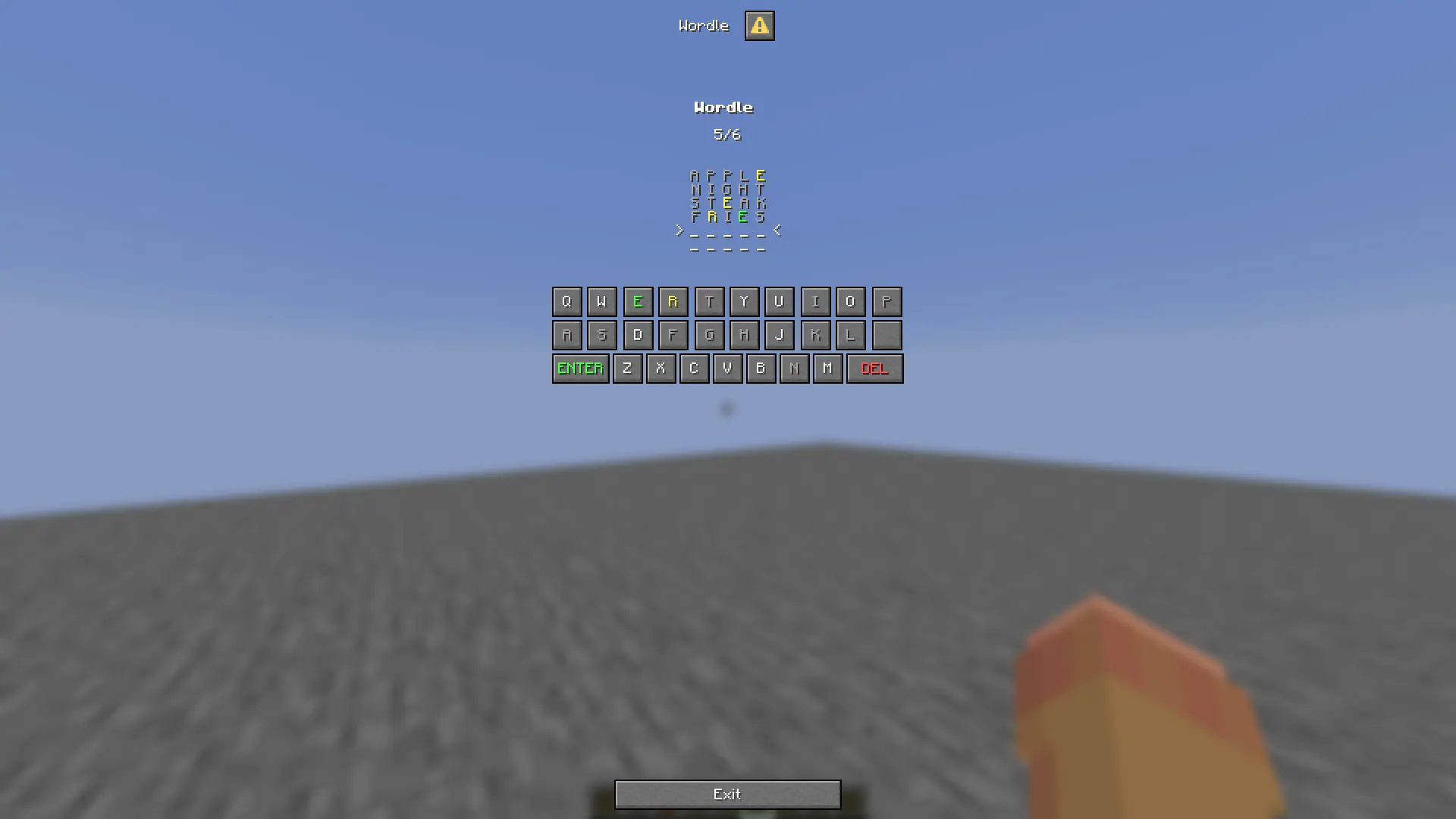
2. Well not every word, just valid ones: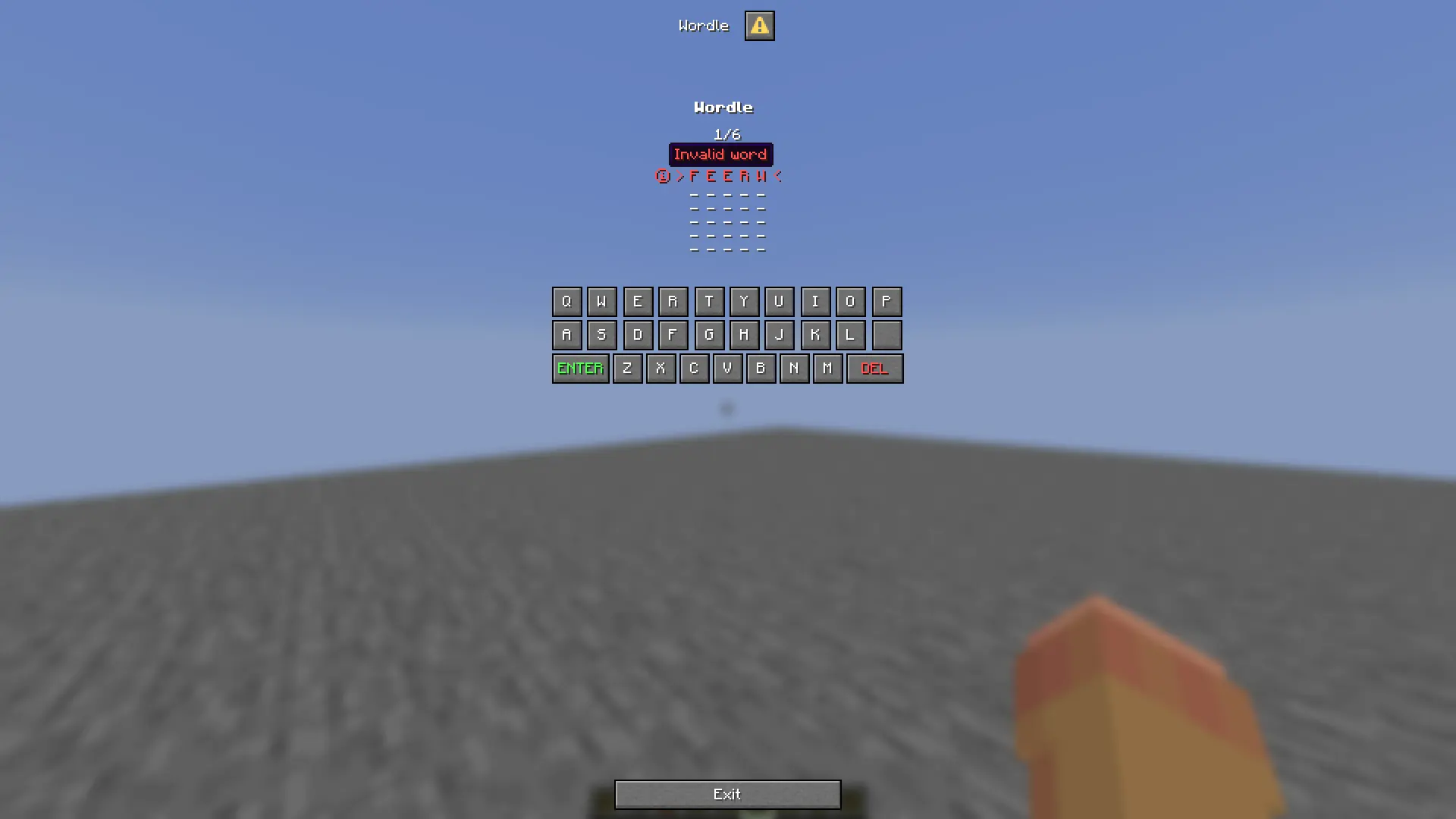
3. When you finish a grid of your game will be sent to you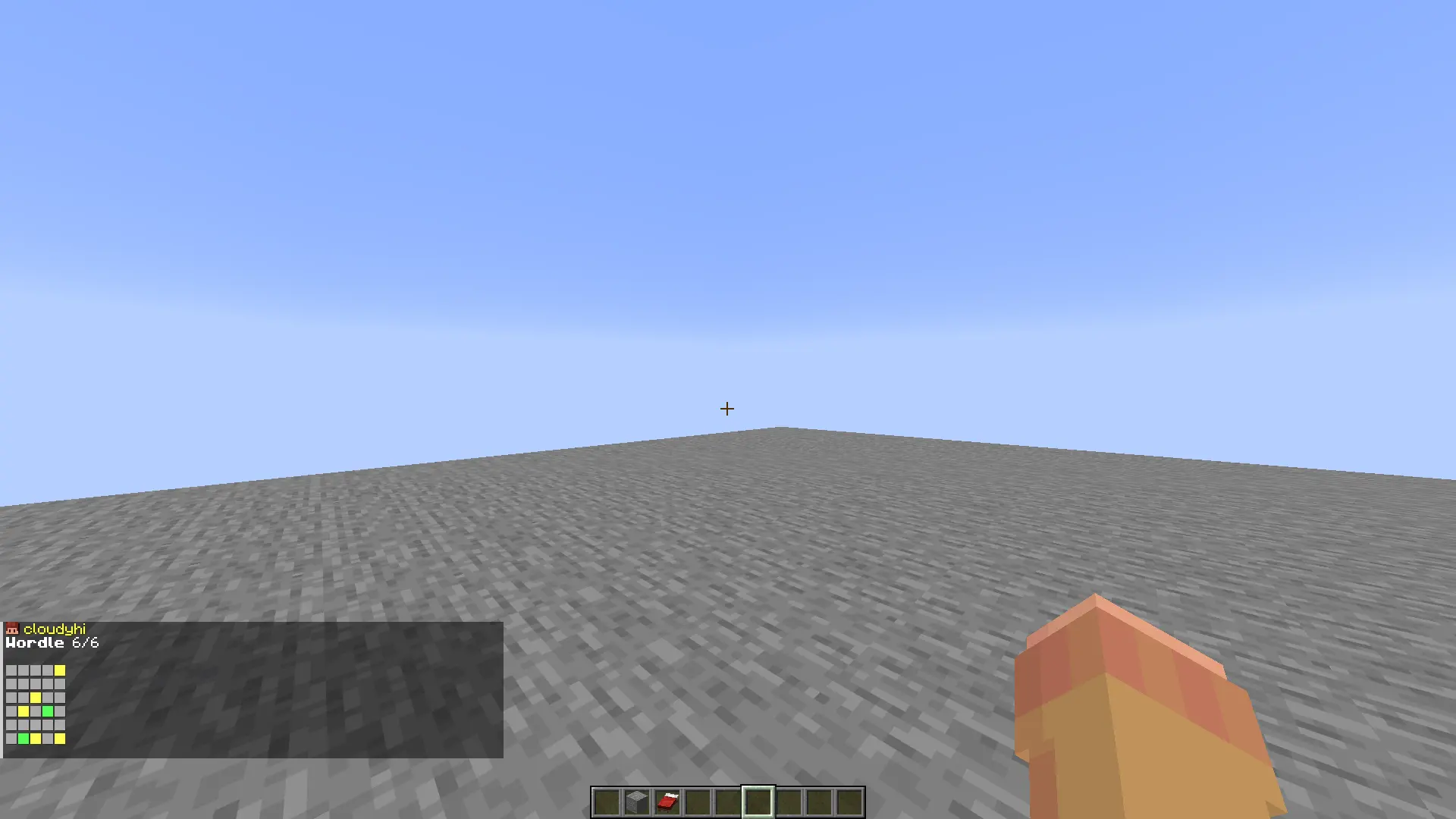
Word Scrambler

Word Scrambler
Is a fun chat game where every 15 minutes (customisable) a random word appear in chat and reward the fastest user to put it back !

Happy player !

Everything is customisable !
You can use any item in the plugin as rewards with in-game command :
“`
/wordscramblerreward
“`
and having in hands the item as reward.
What’s customisable in config.yml ?
– The reward item
– The word that will be scrambled
– All the text
– The plugin prefix
– The time allowed to user to answer
– The time between each event
– Is it case sensitive?
– Sound effect
– Win title screen
WooStoreLink
# WooStoreLink

_WooStoreLink is a powerful plugin that bridges your Minecraft server with your WooCommerce store. It automatically delivers in-game items, ranks, or commands to players after a purchase is completed—fully synced via a secure REST API._
Whether you’re selling VIP ranks, crate keys, or cosmetic items, WooStoreLink makes the process seamless, secure, and automatic.
**✔ Compatible with Minecraft 1.20.1+**
> ### **⚠ THIS IS A BETA RELEASE. BUGS MAY OCCUR.**

[Download StoreLinkforMC WordPress Plugin HERE](https://wordpress.org/plugins/storelinkformc/)

https://discord.gg/ddyfucfZpy
“`
WooStoreLink lets you link your WooCommerce store to your Minecraft server.
Automatically deliver in-game items, run commands, or grant ranks as soon as a player completes a purchase.
“`
## **✨ Features**
Seamless integration between WordPress (WooCommerce) and Minecraft.
Automatically delivers items, runs commands, or assigns ranks after purchase.
Secure REST API with token-based authentication.
✅ Compatible with Spigot, Paper, Purpur, and forks.
Admin interface in WordPress to manage deliveries.
⏳ Periodic auto-check for online players (/wsl check).
Duplicate prevention, cleanup, and logging.
Flexible delivery rules (items + commands).
Multi-language support (EN, ES included).
## **⚙ How It Works**
Install the WooStoreLink WordPress Plugin from: [https://mrdino.es/woostorelink-plugin](https://mrdino.es/woostorelink-plugin)
Configure your products to deliver Minecraft items or run commands.
Install this Spigot plugin and set the API token + domain in config.yml.
You’re done! Players will receive purchases automatically.
## **Commands**
“`
/wsl check — Manually check your pending purchases.
/wsl reload — Reload plugin config and language.
/wsl checkplayer — Admin-only manual check for another player.
/wsl status — Show API configuration and connection status.
/wsl wp-link — link Minecraft account to a WordPress email.
/wsl wp-verify — verify a linking code sent via email.
```
## **Permissions**
```
DEFAULT
woostorelink.check
woostorelink.status
woostorelink.help
woostorelink.wp-link
woostorelink.wp-verify
OP
woostorelink.admin
woostorelink.reload
woostorelink.check.others
```
## **config.yml Example**
```
products:
test:
items:
- "minecraft:stick 1"
commands:
- "say Thanks {player} for your order!"
- "title {player} title {"text":"Thank you!","color":"green"}"
vip_rank:
commands:
- "lp user {player} parent add vip"
- "say {player} is now VIP!"
```
## **Documentation & Help**
Full documentation and setup guides:
[https://mrdino.es/woostorelink-plugin](https://mrdino.es/woostorelink-plugin)
## **Requirements**
✅ WordPress with WooCommerce
✅ WooStoreLink WordPress Plugin (required)
✅ Minecraft server with Spigot, Paper, or fork
✅ PHP 7.4+ and WordPress 5.8+
## **Support & Feedback**
For support, feature requests, or help:
[https://discord.gg/ddyfucfZpy](https://discord.gg/ddyfucfZpy)
_The documentation site is still in development. Please be patient while we prepare a complete, stable release and tools._
Wooden slab and stairs
Mod adds slab and stairs made of wood to the game.
Slab and stairs can be made from:
– Oak
– Spruce
– Birch
– Jungle
– Acacia
– Dark Oak
– Mangrove
– Cherry
– Pale Oak
– Bamboo
– Crimson
– Warped
There is also a Stripped wood option!
Wolves Of Other Furs (W.O.O.F)
# Unfortunately, Mojang has added wolf variants into vanilla in the 1.20.5 update.
This means that some of the core features of the Wolves of Other Furs mod may now be redundant.
While it’s great to see Mojang expanding on their wolf mechanics, I’ll need to carefully consider the mod’s future direction.
I plan to move the dog bowls and dog beds into a separate mod at a later date.
Thank you 🙂
[](https://www.curseforge.com/minecraft/mc-mods/mru)  [](https://discord.gg/UzHtJKqHny) [](https://ko-fi.com/mineblock11)
## Information
**Wolves Of Other Furs** is a mod that reworks the interaction between you – the player -and wolves.
The mod adds **variants** of the vanilla wolves – found in their corresponding biomes. There are currently 10 variants in Wolves Of Other Furs currently, with more planned for future updates.
W.O.O.F also adds **dog beds**, and **dog bowls**. Crafting recipes can be found in the recipe book or Just Enough Items (or whatever you use). **Leads are dyeable as well.**
Here are some common variants, you should explore to find the others!

## Screenshots


## Compatability
Wolves Of Other Furs supports the following mods:
– Oh The Biomes You’ll Go!
– Wolves With Armor
– iChuns’ Let Sleeping Dogs Lie
By using my mods, you agree to the [Modpack Distribution Guidelines](https://imb11.dev/legal/modpacks) and the [End User License Agreement](https://imb11.dev/legal/eula)
WolfNames
# WolfNames

## 🐺 Features
– **Assign random names** to tamed wolves from 80+ name pool
– **Customize wolf names** and collar colors
– **Set a taming limit** for players (default: 5)
– **18 unique wolf abilities** with max level 10
– **6 evolution tiers**: Pup → Wolf → Alpha → Legendary → Mythic → Divine
– **Wolf XP and leveling system**
– **10 personality traits** affecting wolf behavior
– **Pack mechanics** with leader buffs
– **Detailed stats tracking** (kills, damage, K/D ratio, distance)
– **5 combo abilities** unlocking at level 8+
– **Enhanced particle effects** and sounds
– **Auto-save system** every 5 minutes
– **Leaderboards** for competitive play
– **Localization support** (English/Spanish)
## 📋 Commands
– `/wolfnames summon ` – Teleport your wolf to your location
– `/wolfnames name ` – Rename wolf and set collar color
– `/wolfnames info ` – Display detailed wolf information
– `/wolfnames upgrade ` – Upgrade a wolf’s ability
– `/wolfnames abilities` – List all available abilities
– `/wolfnames pack [create|disband|info]` – Manage wolf packs
– `/wolfnames stats [name]` – View detailed statistics
– `/wolfnames trait ` – Change wolf personality (30 levels)
– `/wolfnames top [kills|damage|level]` – View leaderboards
– `/wolfnames evolve ` – Force evolution (admin only)
## 🔄 Wolf Evolution System
Wolves automatically evolve every 10 levels through XP gained from:
– **Combat**: 2-500 XP based on mob type
– **Feeding**: 10 XP per bone
### Evolution Tiers:
– **Level 1-9**: Pup (10 HP, 1x stats)
– **Level 10-19**: Wolf (20 HP, 1.5x stats)
– **Level 20-29**: Alpha (30 HP, 2x stats)
– **Level 30-39**: Legendary (40 HP, 3x stats)
– **Level 40-49**: Mythic (50 HP, 4x stats)
– **Level 50+**: Divine (60 HP, 5x stats)
## ⚔️ All 18 Abilities
### Combat Abilities:
– **Speed Boost** – Increases movement speed
– **Strength Boost** – Enhances attack damage
– **Thunder Strike** – Chance to call lightning on attack
– **Life Steal** – Heals wolf based on damage dealt
– **Poison Fangs** – Poisons enemies on bite
– **Bloodlust** – Damage boost when low health
### Defense Abilities:
– **Damage Resistance** – Reduces incoming damage (max 50%)
– **Regeneration** – Restores health over time
– **Shield** – Chance to block attacks completely
– **Fire Resistance** – Immunity to fire and lava
– **Guardian Angel** – Chance to cheat death (5% per level)
### Utility Abilities:
– **Invisibility** – Becomes invisible during combat
– **Teleport** – Auto-teleports to owner when too far
– **Night Vision** – See in the dark
– **Jump Boost** – Higher jumps
### AOE Abilities:
– **Howl** – Buffs allies, debuffs enemies in radius
– **Frost Aura** – Slows nearby enemies
– **Pack Leader** – Buffs nearby pack members
## 🌟 Combo Abilities (Unlock at Level 8+)
– **Shadow Strike** – Speed Boost + Invisibility = Invisible critical attacks
– **Storm Caller** – Thunder Strike + Frost Aura = AOE lightning and freeze
– **Vampire Lord** – Life Steal + Bloodlust (Lv10) = Extreme life drain
– **Berserker** – Strength + Damage Resistance (Lv10) = Unstoppable force
– **Immortal** – Regeneration + Guardian Angel (Lv10) = Near invincibility
## 💰 Upgrading Wolf Abilities
Use `/wolfnames upgrade `. Cost scales with level and tier:
– Base cost: (Current Level + 1) × 5 × Tier Multiplier
– Levels 6-10 cost double
– Example: Level 5→6 on Alpha wolf = 6 × 5 × 3 × 2 = 180 levels
## 🎭 Wolf Traits (Personalities)
Each wolf spawns with a random trait affecting behavior:
– **Aggressive** – Strength boost when attacking
– **Protective** – Resistance when near owner
– **Brave** – Bonuses when low health
– **Stealthy** – Invisible in darkness
– **Energetic** – Constant speed boost
– Plus: Playful, Loyal, Independent, Cunning, Calm
## 🔐 Permissions
### Main Permissions:
– `wolfnames.*` – All permissions (default: op)
– `wolfnames.use` – Basic commands (default: true)
– `wolfnames.admin` – Admin commands (default: op)
– `wolfnames.evolve` – Force wolf evolution (default: op)
– `wolfnames.breed` – Wolf breeding with ability inheritance (default: true)
– `wolfnames.bypass.limit` – Bypass wolf taming limit (default: op)
– `wolfnames.trait` – Change wolf traits (default: true)
– `wolfnames.stats.others` – View other players’ wolf stats (default: op)
### Pack Permissions:
– `wolfnames.pack.create` – Create wolf packs (default: true)
– `wolfnames.pack.manage` – Manage wolf packs (default: true)
### Upgrade Permissions:
– `wolfnames.upgrade.all` – Upgrade all abilities without restrictions (default: op)
– `wolfnames.upgrade.speed_boost` – Upgrade speed boost (default: true)
– `wolfnames.upgrade.strength_boost` – Upgrade strength boost (default: true)
– `wolfnames.upgrade.regeneration` – Upgrade regeneration (default: true)
– `wolfnames.upgrade.howl` – Upgrade howl (default: true)
– `wolfnames.upgrade.fire_resistance` – Upgrade fire resistance (default: true)
– `wolfnames.upgrade.invisibility` – Upgrade invisibility (default: true)
– `wolfnames.upgrade.damage_resistance` – Upgrade damage resistance (default: true)
– `wolfnames.upgrade.thunder_strike` – Upgrade thunder strike (default: true)
– `wolfnames.upgrade.life_steal` – Upgrade life steal (default: true)
– `wolfnames.upgrade.teleport` – Upgrade teleport (default: true)
– `wolfnames.upgrade.shield` – Upgrade shield (default: true)
– `wolfnames.upgrade.frost_aura` – Upgrade frost aura (default: true)
– `wolfnames.upgrade.poison_fangs` – Upgrade poison fangs (default: true)
– `wolfnames.upgrade.night_vision` – Upgrade night vision (default: true)
– `wolfnames.upgrade.jump_boost` – Upgrade jump boost (default: true)
– `wolfnames.upgrade.pack_leader` – Upgrade pack leader (default: true)
– `wolfnames.upgrade.bloodlust` – Upgrade bloodlust (default: true)
– `wolfnames.upgrade.guardian_angel` – Upgrade guardian angel (default: true)
## ⚙️ Configuration Highlights
– 80+ default wolf names
– Tame limit: 5 (configurable)
– Max ability level: 10
– Auto-save interval: 300 seconds
– Particle effects: enabled
– Sound effects: enabled
## 📊 Stats Tracked
– Total kills
– Damage dealt/taken
– K/D ratio
– Distance traveled
– Time alive
– Experience points
– Current level and tier
WolfCraft
# Wolfcraft Mod
WolfCraft Mod is simple money modification. There are 4 types of coins in it: copper, iron, gold, netherite. All coins are made from one unit of material (copper, iron, gold, netherite ingots) and one template. The template cannot be created for the balance, it may be changed in the future.
Xino Cosmetics
Wolf Cosmetics – Enhance Your Minecraft Experience!
Wolf Cosmetics brings an exciting layer of customization and rewards to your Minecraft server, enhancing player engagement and gameplay. With this plugin, players can unlock and personalize unique cosmetics and receive exclusive rewards through customizable supply drops!
Customizable Supply Drops
Players can earn cosmetic items by participating in supply drops! Each cosmetic has a rarity level—Common, Uncommon, Rare, Epic, Legendary, and Mythic—with drop rates you can adjust in the config file. Customize the drop percentages to fit your server’s economy and reward system!
Cosmetics Customization
Players can access a dedicated cosmetics menu to personalize their Minecraft experience with the following features:
Auras: Surround yourself with stunning particle effects! Customize aura size, height, speed, particle count, and whether they remain stationary or move. Choose from various effects like flames, sparks, and more.
Kill Effects: Make your kills unforgettable with explosive effects, smoke, or custom particle bursts. Each kill can leave a lasting impression!
Chat Colors: Add flair to your in-game chats by choosing from a wide range of colors, making your messages stand out.
Chat Tags: Display your status or rank with custom chat tags, such as [VIP] or [Admin], with colors and formatting options.
Arrow Particles: Enhance your archery skills with custom arrow trails, leaving glowing paths or spark effects behind every shot.
Elytra Particles: Take your flying experience to the next level with dazzling particle effects while gliding with your Elytra.
Configurable Settings
Server admins can fine-tune most aspects of the plugin via config.yml:
Adjust supply drop rates for each rarity level.
Add or remove cosmetics easily.
Modify aura effects, kill effects, and chat customization settings.
WLC
A lightweight and customizable plugin configuration for managing player join, first join, and leave messages with full color support and in-game admin controls.
## 🖥️ Compatibility
* Compatible with **Minecraft 1.19 – 1.21+** (both Paper and Spigot)
* Supports **Java 17+ servers**
## 📝 Changelog
**v1.0 – Initial Release**
* First release of the Welcome Message Config plugin
* Basic first join/join/leave message support
* In-game admin commands to manage messages
## 🔮 Planned Features
* Placeholder support (e.g., %online%, %world%)
* GUI configuration menu for easier editing
* Custom animations or sounds on join/leave
* Title, Action bar on join/leave
* Rewards on first join
* Rewards on welcoming
> ⚠️ Note: This is my first plugin and my first upload! If you notice any errors or bugs, please let me know on Discord.
ReadMe
# 📘 Welcome Message Config – README
This configuration file controls join/leave messages and admin commands for your plugin.
## ⚙️ Features
* Custom **first join message**
* Custom **regular join message**
* Custom **leave message**
* Enable/disable each message type
* Admin command to edit settings in-game
## 🧩 Configuration Overview
### 🔹 First Join Message / Join Message / Leave Message
“`yaml
firstjoin_message/join_message/leave_message:
enabled: true
text: “&7[&5+&7] %player%”
“`
* `enabled`: Enable/disable the first-time join/join/leave message
* `text`: Message shown when a player joins for the first time/join/leave
## 🎨 Formatting
* `&` is used for color codes (Minecraft formatting)
* `%player%` will be replaced with the player’s name
## 🛠️ Admin Command
### Base Command
“`
/wlcadmin
“`
### Permission
“`
wlcadmin.use
&cYou do not have permission to perform this command. (%permission%)
“`
## 📌 Available Subcommands
“`
/wlcadmin reload
/wlcadmin setfirstjoinmessage
/wlcadmin setfirstjoinenabled
/wlcadmin setjoinmessage
/wlcadmin setjoinenabled
/wlcadmin setleavemessage
/wlcadmin setleaveenabled
“`
## ⚠️ Usage Notes
* Boolean values must be `true` or `false`
* Invalid usage will return an error message with correct syntax
Deafult Config
“`
firstjoin_message:
enabled: true
text: “&7[&5+&7] %player%”
join_message:
enabled: true
text: “&7[&a+&7] %player%”
leave_message:
enabled: true
text: “&7[&c+&7] %player%”
wlcadmin_command:
permission: wlcadmin.use
nopermissionmessage: “&cYou do not have permission to perform this command. (%permission%)”
correctusage: “Correct usage /wlcadmin ”
reload:
successfully: “&aThe configuration has been successfully reloaded.”
warning: “&eThe configuration was reloaded, but some values may not be valid.”
error: “&cAn error occurred while reloading the configuration.”
setfirstjoinmessage:
successfully: “&aThe join message has been updated successfully.”
error: “&cUsage: /wlcadmin setfirstjoinmessage ”
setfirstjoinenabled:
successfully: “&aThe join message state has been updated to %newstate%.”
samestate: “&eThe join message state is already set to this value.”
error: “&cUsage: /wlcadmin setfirstjoinenabled ”
setjoinmessage:
successfully: “&aThe join message has been updated successfully.”
error: “&cUsage: /wlcadmin setjoinmessage ”
setjoinenabled:
successfully: “&aThe join message state has been updated to %newstate%.”
samestate: “&eThe join message state is already set to this value.”
error: “&cUsage: /wlcadmin setjoinenabled ”
setleavemessage:
successfully: “&aThe leave message has been updated successfully.”
error: “&cUsage: /wlcadmin setleavemessage ”
setleaveenabled:
successfully: “&aThe leave message state has been updated to %newstate%.”
samestate: “&eThe leave message state is already set to this value.”
error: “&cUsage: /wlcadmin setleaveenabled ”
“`
Witness
# 🕵️ Witness
### *No crime goes unseen. No truth stays hidden.*




**The walls have eyes.**

—
## 👁️ The Concept
In standard Minecraft, a murder in a dark alley is just a respawn screen. **Witness** changes the stakes. If a crime is committed within the line of sight of another player, it is no longer just your word against theirs—it is an **Official Testimony.**
This plugin creates a tangible “paper trail” for every illegal act, forcing criminals to be calculated and victims to find protection.
—
## ✨ Key Features
### 📜 Official Testimony Records
When a crime (murder, theft, or griefing) is detected, the plugin automatically generates a **Testimony Book** for nearby witnesses.
– **NBT-Secured Data:** Includes the timestamp, coordinates, suspect’s name, and victim’s name.
– **Evidence Level:** Categorizes crimes from “Misdemeanor” to “High Felony.”
– **Non-Forgeable:** Records are signed by the server, making them valid evidence for trials.
### 🕵️ Dynamic Detection Logic
Witness doesn’t just check radius; it checks **Line of Sight**.
– **Stealth Mechanics:** Sneaking or wearing certain gear can reduce your detection profile.
– **Environmental Factors:** Foliage and darkness can affect whether a witness “clearly identifies” the suspect.
– **Anonymous Tips:** Servers can be configured to allow witnesses to remain anonymous to avoid retaliation.
### 📋 The Criminal Record
Every player has a permanent file accessible via the suite.
– **Active Charges:** Lists all witnessed crimes that haven’t been resolved.
– **Prescription System:** Minor crimes eventually fade, but major felonies stay on your record forever.
—
## 🔗 CivCraft Suite Integration
**Witness** is the primary “data feeder” for the rest of the **CivCraft Ecosystem**:
| Integration | Synergy Effect |
|————-|—————-|
| 🏹 **BountyBoard** | Automatically puts a price on a suspect’s head once a report is filed. |
| ⚖️ **Tribunal** | Reports are used as the primary evidence in court cases. |
| 🪪 **Reputation** | Being witnessed committing a crime causes an instant, massive drop in social score. |
| ⚔️ **ReanimateMC** | Failing to help a “Downed” player can be flagged as “Negligence” or “Abandoned.” |
| 🪦 **Epitaph** | Linking a Testimony Record to a Gravestone displays the “Cause of Death” in detail. |
—
## 🛠️ Commands & Permissions
| Command | Description | Permission |
|———|————-|————|
| `/witness report` | Manually file a report for a crime you just saw | `witness.report` |
| `/witness record ` | View the criminal history of a player | `witness.check` |
| `/witness evidence` | View the data of a Testimony Book in your hand | `witness.use` |
| `/witness purge` | (Admin) Clear a player’s criminal record | `witness.admin` |
—
## 📦 Installation
1. Download **Witness.jar**.
2. Install **CivCraft Core** to enable cross-plugin crime reporting.
3. Drop into your `/plugins` folder and restart.
4. Define your “Crime Zones” in the config to toggle detection in specific areas.
—
## ⚙️ Configuration Snippet
“`yaml
# Witness – Configuration
crimes:
detect-murder: true
detect-theft: true # Requires chest-lock or similar plugin
detect-grief: false # Recommended for creative/unprotected zones
detection:
max-distance: 32
require-line-of-sight: true
blindness-blocks-detection: true
reporting:
auto-generate-book: true
alert-guards-on-crime: true