World Creation
– Players can create unlimited personal worlds
– Worlds persist between server restarts
– Automatic world loading/unloading based on player activity
– Support for different world types and environments
World Categories
– **Creative Build**: Traditional creative building worlds
– **Adventure/Story**: Narrative-driven worlds
– **Parkour**: Obstacle course and challenge worlds
– **PvP/Minigame**: Competitive gameplay worlds
– **Prototype/Development**: Testing and development worlds
World Visibility Settings
– **Public**: Anyone can join
– **Private**: Owner access only
– **Friends Only**: Invited players only
– **Whitelisted**: Specific player whitelist
2. Advanced Mode System
Build Mode
– Unlimited creative inventory
– Flight enabled
– No damage taken
– Fast block breaking
– Access to build tools (copy, paste, fill, brush)
Play Mode
– Game rules enforced
– Adventure/survival restrictions
– Scripts and events active
– Normal gameplay experience
Dev Mode
– Creative permissions with script access
– Developer tools available
– Debugging features enabled
– Testing environment
3. Player Context System
Player Roles
– **Owner**: Full control over world (scripts, settings, delete, invite, promote)
– **Developer**: Can modify scripts and world logic, but not delete world
– **Builder**: Can modify blocks and world structures
– **Player**: Can play the world, subject to script-triggered rules
– **Visitor**: Limited access, cannot modify world unless explicitly allowed
Context Management
– Persistent player settings across sessions
– World-specific preferences and configurations
– Mode-aware player behavior
– Player location tracking across worlds
4. World Permission System
Fine-grained Access Control
– Add/remove builders for your worlds
– Grant developer access for script editing
– Maintain whitelist for restricted worlds
– Manage player roles dynamically
World Browser
– GUI-based world browsing system
– Category filtering
– Search functionality
– World information display
– Pagination for large server lists
– Visual world representation
World Discovery
– `/worldlobby games` – Open world browser
– `/worldlobby list` – Text-based world list
– `/worldlobby join ` – Join specific world
– `/worldlobby locate ` – Find player’s location
6. World Configuration
Dynamic Settings
– Change world visibility (public/private/etc.)
– Set world categories
– Toggle weather systems
– Enable/disable mob spawning
– Update world descriptions
– Configure game rules
Advanced Lobby System
– Themed lobby areas (Space, Ocean, Forest)
– Interactive lobby elements
– Featured worlds display
– Quick travel options
– Lobby-specific features
World Statistics
– Track world usage and metrics
– Player count tracking
– Creation timestamps
– `/worldlobby stats [world-name]`
Data Management
– Persistent world metadata
– Player context preservation
– Configuration file management
– World state tracking
Performance Optimization
– Automatic world unloading
– Efficient player tracking
– Minimal resource usage
– Asynchronous operations where possible
Commands Reference
Basic Commands
– `/worldlobby` – Main command
– `/worldlobby help` – Show help
– `/worldlobby create ` – Create world
– `/worldlobby list` – List all worlds
– `/worldlobby join ` – Join world
– `/worldlobby delete ` – Delete world
– `/worldlobby lobby` – Return to lobby
Feature Parity
WorldLobby999 includes comprehensive feature parity with OpenCreative+:
✅ **World Management**: Full world creation, deletion, and management
✅ **Mode System**: Build, Play, and Dev modes with appropriate rule sets
✅ **Player Roles**: Owner, Developer, Builder, Player, and Visitor roles
✅ **Visibility Controls**: Public, Private, Friends Only, Whitelisted worlds
✅ **World Categories**: Creative, Adventure, Parkour, PvP, and Development categories
✅ **World Browser**: GUI-based world discovery system
✅ **Player Context**: Advanced context system with persistent settings
✅ **Permission System**: Comprehensive access control system
✅ **World Configuration**: Full settings and configuration management
WorldListTrashCan
## Allows players to customize their home world’s trash bin.
This cleaning plugin operates within a specific world (the player’s home) and, when cleaning items, gathers them into a trash bin that the player has personally set up in their home. It combines various features, supports Folia, boasts highly configurable settings, and is compatible with multiple languages.
(This plugin is more suitable for pairing a world with a team’s server, such as the Home server (using the PlayerWorldsPro plugin or other Home plugin servers). If you close the World Garbage can, its functions can also completely replace other cleaning plugins)
**Now, here’s a hellish joke for you:**
**Player** : Hey, my quantum solar panels got swept away by the cleaning plugin. Can you compensate me?
**OP** : No way, you can’t prove it, and my cleaning plugin doesn’t keep records.
**Player** : I just bought them!
**OP** : What if you hid them, and I compensate you, essentially doubling them?
**Player** : ***
**OP** : Even if there were public trash bins on the server, someone would snatch up those solar panels.
**OP** : What should I do?
And there you have it, this plugin was born.
When Foila supports multiple worlds, this cleaning plugin will benefit everyone
### Features:
—
– **Fully customizable tip**
Support multiple prompt messages
You can achieve fully customized prompts
For example, when there are three seconds left, let “bossbar”, “actionbar”, “chat”,and “title” prompt together,
Alternatively, you can have the bossbar change its style every second (solid, non solid, including its color, can be different every second)
After version 5.7.0, it supports switching between different prompt sounds per second, as well as setting different volumes and tones per second
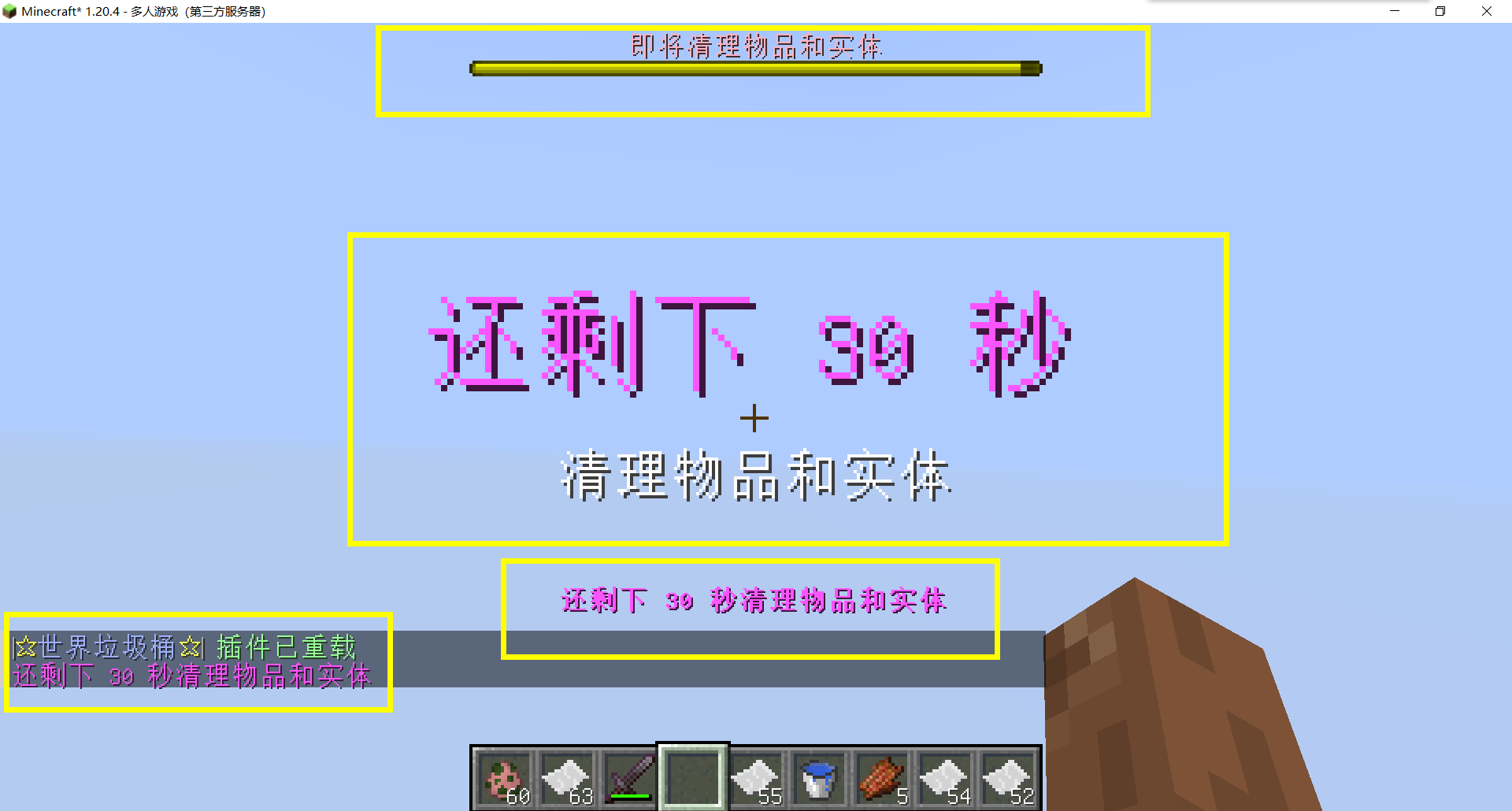
– Thank you to QQ 1664907770 (“笑脸猫”) for providing the material package for the “itemsadder” plugin (applicable to public trash cans) [Click here to download](https://www.hostize.com/zh/v/3TE06XKXx8) (IteamsAdder/WorldTrashCan config and resource)
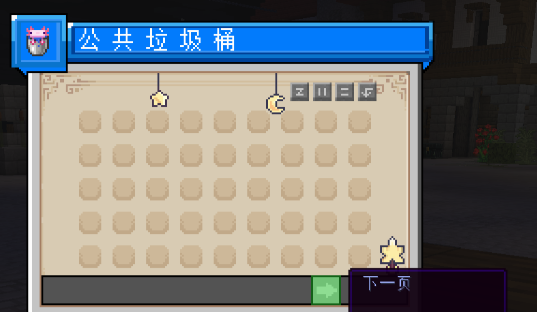
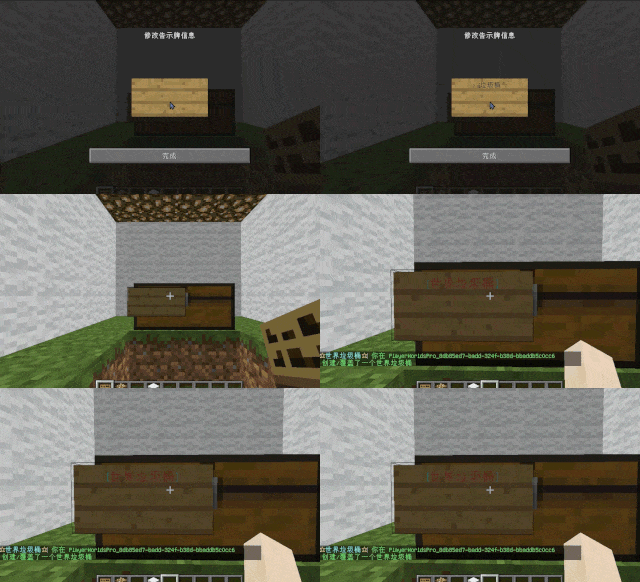
– **Player-Created World Trash Bin:**
Players have the ability to create a trash bin in their world.
Similar to the mechanics of previous sign-locked chests, the font on the sign will undergo a
transformation after creation.
When the cleaning process is initiated, items will be automatically added to the home trash bin.
Configurable settings allow players to specify detection names and transformed names after cleaning.
“To meet the demands of a small number of people, here is a reminder”
How to create a world trash can:
Place the chest on the ground, hold the signboard and right-click on the chest. Enter [世界垃圾桶] in the configuration file (configured in Set. SighCheckName), and once the font is converted, it is created. Every time the garbage is cleaned, it will be placed in the marked chest
In the default configuration file, the names of the three worlds “world, dim-1, dim1” are disabled, creating a “world trash can” (excluding op)
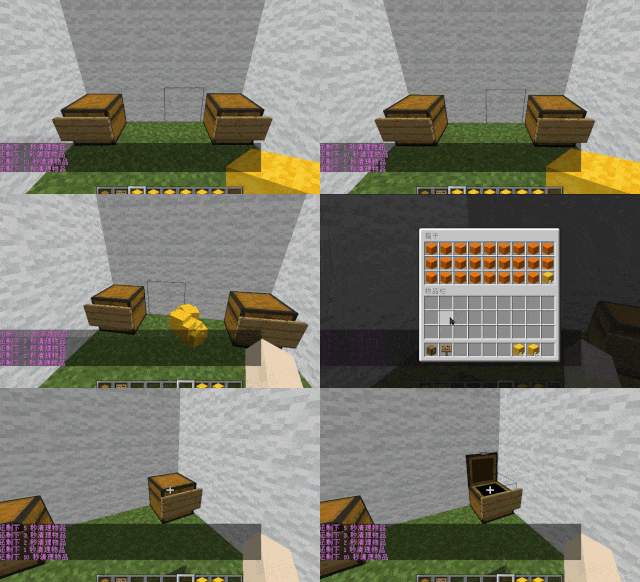
– **Support for Multiple Home Trash Bins:**
Players can use commands to grant special players the ability to place additional home trash bins.
Default quantities for home trash bins are configurable.
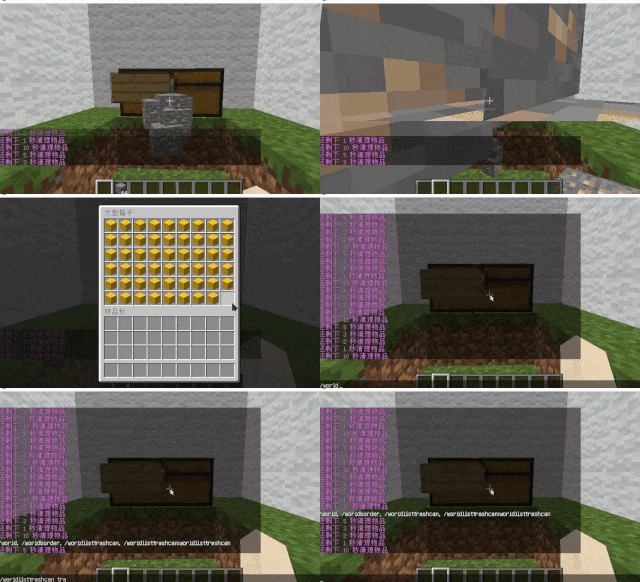
– **Home Trash Bin Overflow to Public Trash Bin:**
Items from home trash bins overflow into the public trash bin.
Public trash bins can have a configurable maximum page count and a blacklist.
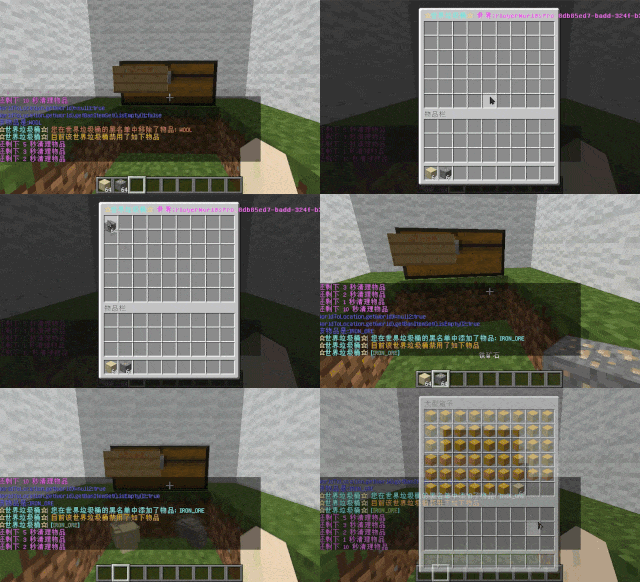
– **Item Exclusion and Public Trash Bin Handling:**
Players can add items to the home trash bin blacklist to prevent their recycling.
Excluded items go directly to the public trash bin.
Configuration includes support for excluding items with special lore (e.g., items from the QS shop with
showLocation).
Public trash bins can either clear new items during each sweep or accumulate all trash without clearing.
– **The public trash can can enable logging:**
Record what items the player took away

– **Entity Cleanup:**
Optional cleanup of all animals/monsters.
Command (/WorldListTrashCan Look) to view entity types and configure entity blacklists/whitelists.
Support for cleaning special entities from mod.
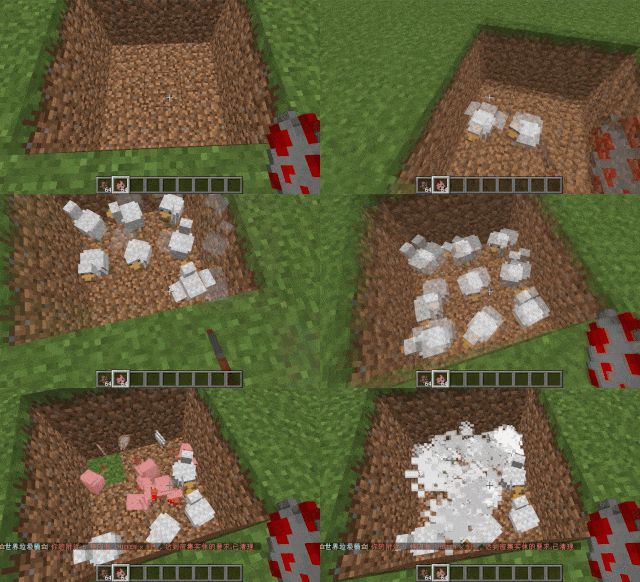
– **Dense Entity Cleanup:**
Configurable radius, target quantity, kill or remove options, and player notifications for dense entity
cleanup.
– **Spam/Command Limitations:**
Configurable chat/command intervals, whitelist commands, and informative messages.
Defense against item dropping.
Players can manually enable or disable the item-drop defense mode.
– **Performance Optimization:**
All optimizations have configurable options in the settings.
1. Quick removal of uncollectible arrows (e.g., arrows from skeletons or bows with infinite
enchantments).
2. Prohibit players from trampling on farmland
### How to Install
—
– **Throw it into the Plugins folder**
### Commands:
—
– **/wtc reload**
Reloads the plugin.
– **/wtc GlobalTrash**
Opens the public trash bin.
– **/wtc help**
Displays help information.
– **/wtc ban**
Opens the local world trash blacklist GUI.
– **/wtc Look**
Right-click to get entity type (useful for adding to the configuration blacklist/whitelist).
– **/wtc GlobalBan**
Opens the global world trash blacklist GUI.
– **/wtc add [WorldName] [Quantity]**
Sets the maximum quantity for the trash bin in the specified world (defaults to the world at your feet if not specified).
– **/wtc DropMode**
Opens or closes drop mode.
### Placeholders
—
– **%WTC_ClearTime%**:
Time until the next cleaning.
### Permission
—
– **WorldListTrashCan.BanGui**:
Permission to open the GUI for adding items to the player’s home trash bin blacklist.
– **WorldListTrashCan.GlobalTrashOpen**:
Permission to open the global trash bin.
– **WorldListTrashCan.help**:
Permission to access command help.
– **WorldListTrashCan.DropMode**:
Permission to open or close drop mode.
***(The above is available by default)***
– **WorldListTrashCan.GlobalBan**:
Permission to open the global trash bin blacklist GUI.
– **WorldListTrashCan.Look**:
Permission to right-click and query the entity type.
***(The above is not available by default)***
[](https://app.travis-ci.com/thatguycy/WorldDynamics-Engine) [](https://www.gnu.org/licenses/gpl-3.0) 

## Description
More than just a Towny Addon, it’s a **Towny Essential Upgrade**!
WorldDynamics Engine is a sophisticated roleplay plugin designed for geopolitical servers. It allows players to immerse themselves in dynamic political landscapes, manage resources, engage in diplomacy, and shape the world with their decisions.
– **Custom Government Structures**: Choose from a variety of government forms to shape the political structure of your nations.
– **Dynamic Organization Management**: Create, manage, and dissolve various types of organizations, including both business entities and governmental bodies.
– **Financial Management for Organizations**: Execute financial transactions within organizations, facilitating deposits and withdrawals to manage funds effectively.
– **Robust Member Management**: Empower organization leaders with the ability to add or remove members, offering significant control over their internal structure.
– **Detailed Information Display**: Access comprehensive information about nations and organizations, enhancing transparency and strategic planning.
– **Flexible Command System**: Engage with an intuitive and adaptable command system, tailored to facilitate user interaction with the plugin’s diverse functionalities.
– **International Organizations**: Participate in global alliances and international bodies, extending influence beyond national borders.
## Future Features
– **Dynamic Political Borders**: Strategically create and adjust nation borders, reflecting the evolving geopolitical landscape.
– **Advanced Resource Management**: Control and trade unique resources, introducing an element of economic strategy and resource conservation.
– **Diplomatic Engagement Systems**: Engage in complex treaties, form alliances, and conduct high-stakes negotiations to influence international relations.
– **Sophisticated Economic System**: Develop and manage a multi-faceted economy, encompassing trade networks, market dynamics, and financial policies.
– **Military Strategy and Defense**: Build formidable armies, strategize defensive tactics, and engage in warfare to protect and expand your nation.
– **Cultural Expansion and Influence**: Spread your nation’s cultural influence, shaping global cultural trends and interactions.
– **Environmental and Technological Dynamics**: Address challenges posed by climate change and technological advancements, adding a layer of environmental strategy.
– **Espionage Mechanics**: Implement espionage and counterintelligence operations, introducing a stealthy aspect of information warfare and intrigue.
– **Global Impact of International Organizations**: Influence world affairs by participating in or establishing international organizations, shaping global policy and diplomacy.
## Installation
Instructions on how to install the WorldDynamics Engine plugin.
– **1)** Place WorldDynamicsEngine-X.X.jar in the “plugins” folder.
– **2)** Install [TownyAdvanced](https://www.spigotmc.org/resources/towny-advanced.72694/) and [Vault](https://www.spigotmc.org/resources/vault.34315/), these are both **essential**.
## License
This project is licensed under the [](https://www.gnu.org/licenses/gpl-3.0) – see the [LICENSE](https://github.com/thatguycy/WorldDynamics-Engine/blob/main/LICENSE) file for details.
WorldColor
## WorldColor – A lightweight Minecraft server plugin that adds a colorful world indicator via the %color% placeholder.
> ## 🌟 Key Features:
Displays a customizable symbol (default: ☁) in different colors based on player’s world:
Overworld: Green (#8FBC8F)
Nether: Red (#F08080)
End: Purple (#9370DB)
Full configuration via config.yml:
Change the display symbol
Customize colors for each world
PlaceholderAPI support
/worldcolor-reload command to apply config changes without restart
### Anti-Swear
This helps to prevent any sensitive or inappropriate words from your chat to help keep it clean.
It has the ability to customize words (BlackList / WhiteList).
### Anti-Repeat
This prevents players from repeating the same words or letters over and over again.
### Anti-ADs
It will block any type of IPs or URLs from the player.
### Anti-Caps
This helps to prevent the player from sending large uppercased messages in the chat!
# Configurations!
### Detection Messages!
If anyone triggers one of the security settings, you will be alerted, and they will be alerted as well.
“`yaml
DetectedMessage: “&c%player_name%’s message got detected by the following flags &e[%flags%] n———-> &6%message%” # Change how the detection message is sent
DetectedPlayerMessage: “&cYou have been detected by the following flags &e[%flags%]” # Changes how the message is sent to the player (set it to “” if you don’t want to send it)
“`
### Switch Messages (For Proxies)
This will notify everyone in the server or the previous and current server when a player switches from one server to another!
“`yaml
# This switch message is only available for both BungeeCord & Velocity
SwitchSettings:
enabled: true
global: true # false is just the current server & previous server / true all the servers
premessage: “&a%player_name% &ehas switched from &6%previous_server% &eto &f%current_server%”
comessage: “&a%player_name% &ehas arrived from &6%previous_server%”
“`
### Others
“`yaml
SpamMessage: “&cYour message is blocked by the &eAnti-Spamn&7Remaining time: %duration% seconds” # Changes how the anti-spam message is sent (set it to “” if you don’t want to send it)
ChatClearMessage: “&eThe Chat has been cleared by &a%sender%” # Changes how the cleared chat message gets sent
NoPermissionMessage: “&eYou’re not allowed to use this command!”
“`
# Utilities Features!
### Aliases
This feature enhances WorldChatter’s placeholders by allowing customization of player and place names using two new placeholders: `{player_name}` and `{player_place}`.
### Chat Locking
This allows staff or console to lock or unlock the chat using `wc lock`!
“`yaml
ChatLockMessage:
enabled: true
public: true # TRUE | Shows the message to everyone or FALSE | just the sender
locked: “&eThe Chat is now &cLOCKED &eby &a%sender%”
unlocked: “&eThe Chat is now &aUNLOCKED &eby &a%sender%”
currently: “&eThe Chat is Currently &clocked”
“`
### Clear Chat!
Clear the chat with `wc clear`!
### Custom Join and Quit Messages!
Customize join and quit messages with special permissions for certain players.
“`yaml
Join:
enabled: true
level: 1 # 1 is just current place / 2 the whole server
place: “world” # place to send the message
message: “&a%player_name% &fhas joined the game!”
permmode: true # Checks to use the permissions mode to send messages / disabled will use default message
permissions:
“admin”:
permissions: [ “worldchatter.control”, “*” ]
message: “&a%player_name% &fhas joined the gamen&e[Teleport to %player_name%]”
Quit:
enabled: true
level: 1 # 1 is just current place / 2 the whole server
place: “world” # place to send the message – type %place% to make it the last player’s place
message: “&a%player_name% &fhas left the game!”
permmode: false # Checks to use the permissions below to show a different message or no!
permissions:
“admin”:
permissions: [ “worldchatter.control”, “*” ]
message: “&a%player_name% &fhas left the game &8You have nothing to do to that player :P”
“`
### Notifications
Customize notification sounds for detections.
“`yaml
notification:
enabled: true
staff: # notification detection for staff
sound: “BLOCK_NOTE_BLOCK_PLING” # the sound to play as the notification you can find it here by https://helpch.at/docs/SERVER_VERSION_GOES_HERE/index.html?org/bukkit/Sound.html
volume: 1 # volume of the sound
pitch: 1 # pitch of the sound
player: # notification detection to the player
sound: “BLOCK_NOTE_BLOCK_PLING”
volume: 1
pitch: 1
“`
### Channels
Introducing the new **Channels** Feature!
Add Places or Players **or both if you would like!** Into each other and priortize them from top to bottom according to the importance of each channel!
“`yml
GlobalSending: true
channels:
admin:
players:
– “OmarOmar93”
– “HoneySalted”
– “Notch”
places:
– “World”
– “Lobby”
main:
places:
– “world”
– “world_nether”
– “world_the_end”
“`
### Debug Mode – (Implemented in Channels only Currently)
The New Debug mode is what prints out more information about WorldChatter! like, Warnings, Errors and infos for each action happening inside the plugin!
# WorldChatterAPI
Learn more about the API and its capabilities by [Clicking here!](https://github.com/OmarOmar93/WorldChatterAddonChecker)
# Donate!
If you’d like to support the development of WorldChatter and other projects, consider donating!
[Buy me a Coffee!](https://www.paypal.com/paypalme/omaomar93)
# Other Projects!
[WorldCaster](https://modrinth.com/plugin/worldcaster)
Standalone Broadcast Add-on
# Supported Plugins!
– PlaceholderAPI
– Multiverse-Core
– ItemsAdder (With PlaceholderAPI)
– Luckperms
– And other plug-ins that have PlaceholderAPI’s placeholder!
# Massive thank you to:
– **Abdelaziz189356** – For the help with 2.0, 2.1, and 3.0 being possible, 3.0 Tester!
– **yousife_7aloly** – The tester for 2.0!
– **FastEverlast** – The Tester for 2.4!
– **Fabrizio Santana, 4zy** – 3.0 Testers
There are lots of additional features to explore!
Thank you for taking the time to read this and use the plugin!
The WorldChat plugin enhances the chat functionality by ensuring that players can only send and receive chat messages within the same world. This means that if a player is in the Nether, their chat messages will only be visible to other players in the Nether. Similarly, if a player is in the End, their chat messages will only be visible to other players in the End. This feature promotes more immersive and relevant conversations based on the player’s current environment. [More detailed description here.](https://ashsource.ashkiano.com/resource-detail/19)
Check out AshSource for more plugins and resources [ashsource.ashkiano.com](https://ashsource.ashkiano.com/)
Are you a developer?
Join AshSource to share your work with a growing community! Get started now at [ashsource.ashkiano.com](https://ashsource.ashkiano.com/)
Work together to level up your multiplayer Minecraft server to unlock features and rewards!
## Features
– Level up your multiplayer server by gaining XP through normal gameplay
– **Reward your players** for leveling up the world with:
– Items
– Increasing the world border
– Permissions, groups, and currency (requires [Vault][vault])
– **Control what players can access** based on World Level:
– Building Nether or The End portals
– Mining blocks
– Placing blocks
– Crafting items
– **Trigger any command** upon world level up
– Highly [**customizable**][config] with a full config [schema][schema]
– Add custom XP sources globally or at a per-level basis
– Scale leveling exactly to your liking
– Specify groups of levels per-world or groups of worlds
– Exclude certain worlds from the plugin
– Support for infinite level scaling and rewards
– Optionally reward offline or new players for level gains
– **Customizable messages**, with [MiniMessage][minimessage]
formatting support
– Optionally add [Vault]() for **full
integration with your permission and economy plugin** of
choice
*GIF showing leveling up, Nether access, and world border increases*
### Customizable Server XP Bar

### Level Up Alerts
## Configuration
**This plugin likely requires configuration before it can be useful to you.**
The default configuration file will be created for you, but it can also be found
[here][config]. If your text editor
supports [JSON/YAML schemas](https://json-schema.org/understanding-json-schema/about),
you will also get configuration autocomplete suggestions and linting.
You can find a more detailed example
config [here](https://gitlab.com/ASTRELION/worldlevels/-/blob/main/src/main/resources/example.config.yml).
### Config Examples
*These are partial configurations for the `levels` section specifically.*
How level ranges and XP requirements work
“`yaml
levels:
‘1’:
# level 1 should always require 0 XP
xp: 0.0
‘2’:
# level 2 requires 100 XP to get to
xp: 100.0
‘3’:
xpStep:
# level 3 adds 50 to the previous requirement, making it 150 XP to get to
add: 50.0
‘4’:
xpStep:
# level 4 multiplies the previous requirement by 2, making it 300 XP to get to
mult: 2.0
‘5-10’:
xpStep:
# levels 5-10 adds 50 to the previous requirement, making the following for each:
# level 5 requires 350
# level 6 requires 400
# level 7 requires 450
# level 8 requires 500
# level 9 requires 550
# level 10 requires 600
add: 50.0
’11-‘:
# Level 11 and beyond (scales infinitely) requires 1000 XP to get to
xp: 1000.0
“`
Lock the Nether and The End at the start, and unlock them when the
server reaches level 2 and 3, respectively
“`yaml
levels:
‘1’:
xp: 0.0
# Prevent Nether and End portals from being used initially
allowEnd: false
allowNether: false
‘2’:
xp: 2000.0
# Unlock Nether portals at level 2
allowNether: true
titles:
– title: Netherunlocked!
‘3’:
xp: 4000.0
# Unlock End portals at level 3
allowEnd: true
titles:
– title: The Endunlocked!
‘4-‘:
xp: 8000.0
“`
Award players with different items, and unlock crafting and mining
“`yaml
levels:
‘1’:
xp: 0.0
items:
IRON_INGOT: 1
levels:
crafting:
DIAMOND_HELMET: false
DIAMOND_CHESTPLATE: false
DIAMOND_LEGGINGS: false
DIAMOND_BOOTS: false
mining:
DIAMOND_ORE: false
placing:
DIAMOND_ORE: false
‘2’:
xp: 2000.0
items:
COPPER_INGOT: 1
# crafting: is omitted here because by default all crafting is allowed
# so, at level 2, players can craft diamond armor
# mining: and placing: are omitted for the same reason
‘3-4’:
xp: 4000.0
items:
# Since ‘3-4’ is a range, this awards a diamond for both levels 3 and 4
DIAMOND: 1
‘5-‘:
xp: 8000.0
items:
# Since ‘5-‘ scales infinitely, this awards a netherite ingot every single
# level from 5 onwards
NETHERITE_INGOT: 1
“`
How you can manipulate the world border for each level.
“`yaml
levels:
‘1’:
xp: 0.0
# Sets the initial world border to have a radius of 128, centered at 0,0
worldBorder:
radius: 128
center:
x: 0
z: 0
‘2’:
xp: 2000.0
# Sets the radius of the world border for achieving level 2 at 256
worldBorder:
radius: 256
‘3’:
xp: 4000.0
# Adds the radius of the world border for achieving level 3 to the previous
# radius, making it 512
worldBorder:
radiusStep:
add: 256
‘4-‘:
xp: 8000.0
# Multiplies the radius of the world border for achieving level 4 and onward
# to the previous radius, making it 768, 1152, 1728, and so on
worldBorder:
radiusStep:
mult: 1.5
“`
Award permissions, groups, and currency for certain levels (requires Vault)
“`yaml
levels:
‘1’:
xp: 0.0
‘2’:
xp: 2000.0
# Assigns ‘mypermission.one’ to all players
permissions:
– “mypermission.one”
# Gives all players 50.0 currency
currency:
add: 50.0
‘3’:
xp: 4000.0
# Assigns ‘mypermission.two’ to all players
permissions:
– “mypermission.two”
# Multiply all player’s current currency by 2
currency:
mult: 2.0
‘4’:
xp: 8000.0
# Adds all players to the ‘mygroup’ group
groups:
– “mygroup”
“`
Run commands on level up
“`yaml
levels:
‘1’:
xp: 0.0
‘2’:
xp: 2000.0
# Runs the ‘time set day’ command via the server console
commands:
– “time set day”
‘3’:
xp: 4000.0
# Runs the ‘say You leveled up!’ command via the server console
commands:
– “say You leveled up!”
“`
Require the server’s players to collectively mine a certain amount of
different tiers of ore to get to the next level.
“`yaml
levels:
‘1’:
xp: 0.0
xpWeights:
# This makes it so no vanilla XP sources contribute world level XP
DEFAULT: 0.0
customXPSources:
mineIgnoresSilkTouch: true # set this to prevent XP gains for mining with silk touch
playerMine:
COAL_ORE: 1 # Awards 1 XP for each coal ore mined
‘2’:
xp: 100.0 # requires 100 coal ore mined (defined in level 1) to get this level
xpWeights:
DEFAULT: 0.0
customXPSources:
mineIgnoresSilkTouch: true
playerMine:
COPPER_ORE: 1
‘3’:
xp: 200.0 # requires 200 copper ore mined (defined in level 2) to get this level
xpWeights:
DEFAULT: 0.0
customXPSources:
mineIgnoresSilkTouch: true
playerMine:
IRON_ORE: 1
‘4’:
xp: 300.0 # requires 300 iron ore mined (defined in level 3) to get this level
xpWeights:
DEFAULT: 0.0
customXPSources:
mineIgnoresSilkTouch: true
playerMine:
DIAMOND_ORE: 1
‘5’:
xp: 400.0 # requires 400 diamond ore mined (defined in level 4) to get this level
“`
Specify levels based on world and share rewards
“`yaml
groups:
WorldGroup:
name: The Overworld
# This group only applies to the world named “world”
worlds:
– world
# When this group levels up, it will share items and permission rewards to players in
# the groups listed
rewardOtherGroups:
– NetherGroup
– EndGroup
# Rewards players past rewards when they join the group for the first time
rewardNewPlayers: true
# Rewards players past rewards when they join the group after being offline
rewardOffline: true
levels:
“1-“:
xp: 0.0
xpStep:
add: 100.0
# Every level, this will reward every player in any of the groups a
# gold ingot, due to rewardOtherGroups
items:
GOLD_INGOT: 1
NetherGroup:
name: The Nether
worlds:
– world_nether
rewardOtherGroups:
– WorldGroup
– EndGroup
levels:
“1-“:
xp: 0.0
xpStep:
add: 100.0
EndGroup:
name: The End
worlds:
– world_the_end
rewardOtherGroups:
– NetherGroup
– WorldGroup
levels:
“1-“:
xp: 0.0
xpStep:
add: 100.0
“`
## Messages
The default messages file will be created for you, but it can also be found
[here][messages]. If your text editor
supports [JSON/YAML schemas](https://json-schema.org/understanding-json-schema/about),
you will also get configuration autocomplete suggestions and linting.
Messages support [MiniMessage][minimessage], and have the following custom replacements
available:
| Replacement | Description |
|————————————-|—————————————————————–|
| `` | Current world level |
| `` | Amount of current XP relative to the current level requirements |
| `` | XP requirement to reach the next level |
| `` | Absolute total current XP |
| `` | Name of the level group |
| `` | Plugin version |
| `` | Plugin Modrinth URL |
| `` | Makes inner text clickable for the Modrinth URL |
## Permissions
| Permission | Description |
|—————————–|————————————————————————————|
| `worldlevels.earn.exempt` | Prohibit the player from gaining World Levels XP (by default, all players earn XP) |
| `worldlevels.help` | Access to the `worldlevels help` command |
| `worldlevels.reload` | Access to the `worldlevels reload` command |
| `worldlevels.reset.all` | Access to the `worldlevels reset all` command |
| `worldlevels.reset.rewards` | Access to the `worldlevels reset rewards` command |
| `worldlevels.update` | Access to the `worldlevels update` command |
| `worldlevels.version` | Access to the `worldlevels version` command |
| `worldlevels.xp.add` | Access to the `worldlevels xp add` command |
| `worldlevels.xp.get` | Access to the `worldlevels xp` command |
| `worldlevels.xp.set` | Access to the `worldlevels xp set` command |
## Commands
All the following are prefixed with `worldlevels`. For example, `worldlevels help`.
*Arguments in `<>` are required, arguments in `[]` are optional.*
| Command | Description |
|————————–|——————————————————————————————————-|
| `help` | Shows a list of commands |
| `reload` | Reload the plugin configuration and save from file |
| `xp` | Gets the current XP total and level |
| `xp add ` | Add the given amount of XP to the total, supports negatives |
| `xp set ` | Sets the total XP to the given amount |
| `update` | Checks for plugin updates |
| `version` | Prints the plugin version |
| `reset all` | Resets total XP back to 0 and allows all players to regain rewards |
| `reset rewards [player]` | Resets rewards for the given player (or all players), allowing them to regain rewards for past levels |
## Metrics
This plugin collects anonymized usage statistics via [bStats][bstats]. bStats is
used by many plugins and provides useful statistics for development, but it can
be disabled in the bStats `config.yml` for your server.
In addition to the default stats collected, World Levels also counts a few
stats to better gauge how the plugin is used. These are:
– The number of level groups your server uses
– The average number of worlds in each level group
– The average number of levels in each level group
DownloadPlugin is a Minecraft server plugin that allows players to download the world they are currently in as a ZIP file. This is especially useful for large building servers or personal worlds.
## Features
– Download any world with `/download ` command.
– Only allows downloads from worlds that are not blocked.
– Generates ZIP files named as `...zip`.
– Provides clickable download links in chat.
– Logs all downloads if enabled.
– Automatically deletes old downloads based on expiration time.
– Deletes all ZIPs on server start to prevent storage issues.
– Supports internal HTTP port and public port via tunnels (like Playit.gg).
## Commands
/download
– ``: A numeric code chosen by the player to make the ZIP filename unique. Example: `/download 12345`
– Blocked worlds cannot be downloaded.
## Configuration (`config.yml`)
“`yaml
blocked-worlds:
– world_nether
– world_the_end
log-downloads: true
log-file: downloads.log
http-port: 8100 # Internal port where the HTTP server runs
public-port: 27429 # Public port that players use to access downloads
download-expiration: 3600 # Expiration time in seconds for automatic deletion
public-ip: “147.185.221.23” # Server’s public IP address or domain
WorldComment
## World Comment (Sub*note*ica)
Post comments associated with locations from your in-game world. An idea similar to [Danmaku](https://en.wikipedia.org/wiki/Danmaku_subtitling) in videos, or Subnautica’s well-received feedback system.
**It takes some additional configuration to be able to attach screenshots to comments – See [Instructions on Configuration](https://github.com/zbx1425/world-comment/wiki/Configurations)**.
This mod is inspired by the feedback tool in *Subnautica*. Players can take a screenshot and leave a comment to send feedback to the production team, the feedback will be sent in association with location information and the production team can see a map of the location with an overall rating. Also, the visual style of the comment “posts” is inspired by *Death Stranding*.
And it also got me thinking about the idea of [Danmaku](https://en.wikipedia.org/wiki/Danmaku_subtitling); they have the advantage over normal comments in that they relate to the content of the video at a given time, enhancing the viewing experience for the viewer. In this way, something similar could be done for Danmaku in the game world of Minecraft.
In addition, in order to ensure the normal operation under the multi-server cluster configuration of [Teacon 2023](https://www.teacon.cn/2023), a Redis-based synchronization function has been added, so that the comments in each sub-server can be synchronized with each other and saved in a persistent manner.
### What is this?:
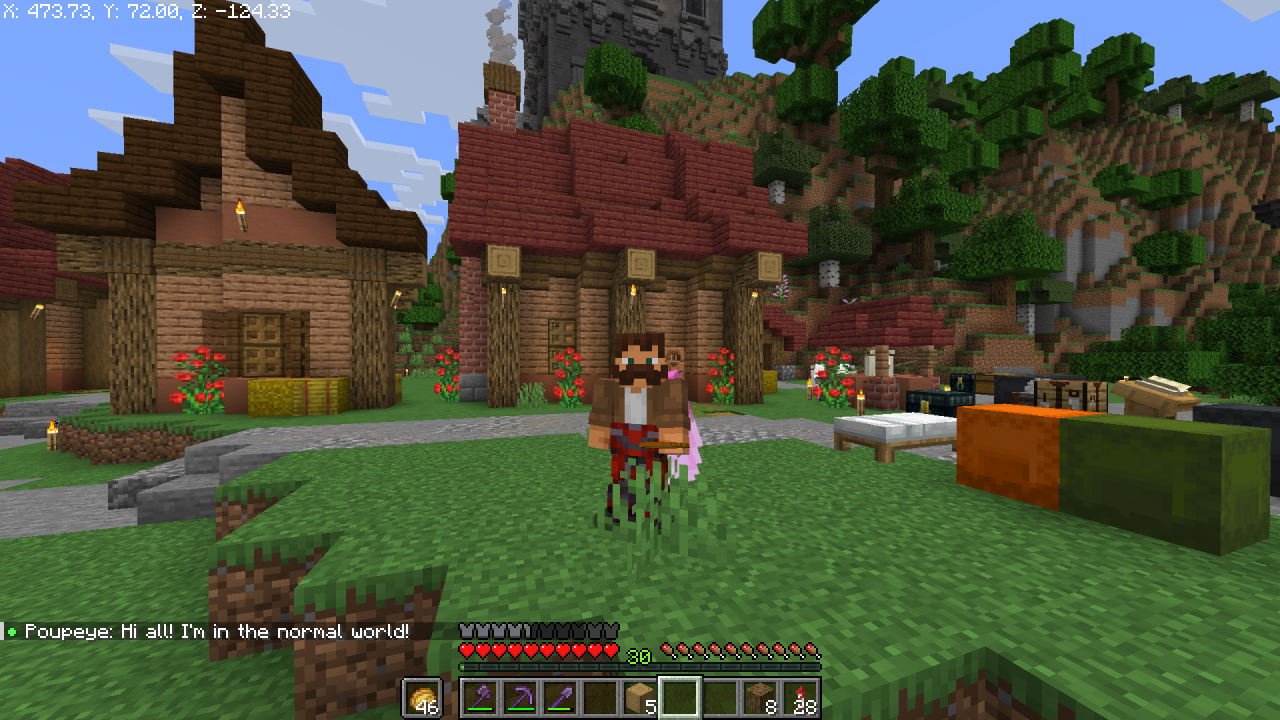
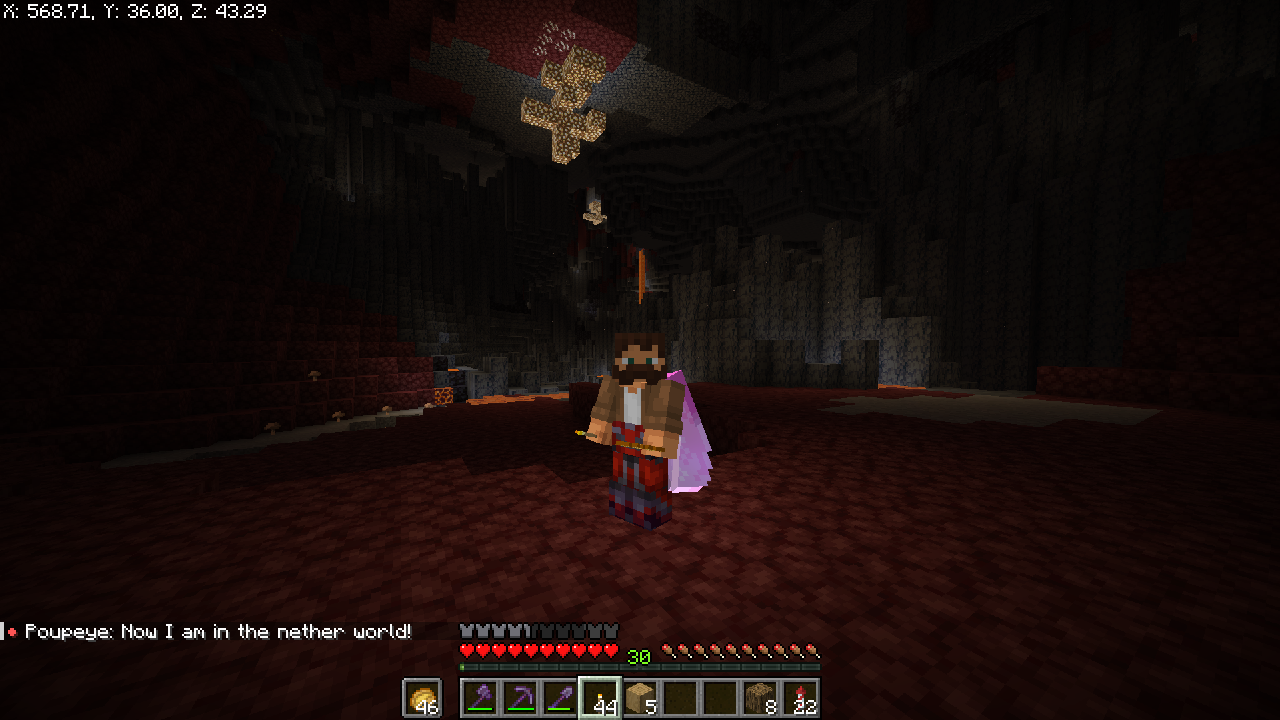
If you’ve been looking for a toilet, you’ve come to the wrong place. World Color is a simple plugin that will help you find out what world your friend is currently in. All it does is add a small indicator in the game chat next to the player’s name. Depending on what world he is in, the indicator changes its color.
# Demonstration:
### Normal world:

### Nether:

### The End: