WynnBubbles
# WynnBubbles

Show the people what you’re trying to say. Chat floats above players heads and changes colors for party, guild, and private chat. A fork of [TalkBubbles](https://modrinth.com/mod/talkbubbles) designed to work specifically with Wynncraft chat. Made for my modpack [World of Wynncraft](https://modrinth.com/modpack/world-of-wynncraft)

## What’s Up
– Shows chat bubbles above players’ heads when they talk
– Different colors for party, guild, and private messages
– Configurable bubble size, position, and colors
– Removes unwanted unicode symbols from chat
– Stops system messages during raids and dungeons from displaying (as happens using TalkBubbles)
– Works with player ghosts
## Installation
1. Make sure you have Fabric Loader and Fabric API installed
2. Download and install Cloth Config API
3. Download the latest version of WynnBubbles from the versions page
4. Place the downloaded .jar file in your Minecraft mods folder
## Future Features
– Custom icons above player head when casting spells that put messages in chat like War Scream, Heal, Windy Feet
– Custom bubble Border styles for different ranks
– Custom icons above player head when picking buffs in a raid
– Suggest features on the GitHub issues page!
## Configuration
You can configure WynnBubbles through the Mod Menu interface or config file:
1. Install [Mod Menu](https://modrinth.com/mod/modmenu) if you haven’t already
2. In the game, go to Mods -> Find “WynnBubbles” -> Click “Configure”
3. Adjust settings like bubble scale, colors, and chat range
4. Toggle showing your own bubbles on/off
## Usage
– Chat normally in-game to see bubbles appear
– Bubbles will show different colors for:
– Yellow = Party chat
– Aqua = Guild chat
– Orange = Private messages
– Bubbles automatically disappear after a configurable time
– Access the mod’s configuration through Mod Menu to adjust bubble appearance
## Requirements
– Minecraft 1.21 or 1.21.1
– Fabric Loader 0.16.5 or higher
– Fabric API
– Cloth Config API
– Mod Menu
## Go Ham
– I don’t know nothing about java so if you wanna fork this and fix it up go ham
– Feel free to use this in your modpack
– If you know how to make the bubbles prettier please help
## Acknowledgments
– Thanks to Globox_Z for the original TalkBubbles mod
– Thanks to RATC for not kicking me out while spamming guild chat to test this mod
– Thanks to IgbarVonSquid!!!
## Support
If you encounter any issues or have any questions, please open an issue on the GitHub repository.
Wyld Life’s Wyldcards
These are the Wyldcards I made for my spin-off of Grian’s Wild Life.
Session one’s Wyldcard:
You Start The season on 1200 Mana Every half heart of damage you take you lose one mana Below 1200 is Blue Below 1000 is Cyan Below 800 is Dark Green Below 600 is Green Below 400 is Yellow Below 200 is red Below 100 is Dark Red When you are dark red you will have strength I, when you hit zero mana, you are out of the series
Session Three’s Wyldcard:
At the start of the season, lives are randomized from 2 to 6. The lives you have determine the hearts you will have
6 lives – 5 Hearts
5 lives – 10 Hearts
4 Lives – 15 Hearts
3 Lives – 20 hearts
2 Lives – 25 Hearts
One Life – You start on 30 hearts.
When you get a kill on red life, you get +5 hearts. Dying on red life will make you lose 30 hearts. When you lose all your hearts you are eliminated!
WYG – What’d Ya Got

—


[](https://github.com/ZetaPlugins/WYG)
[](https://modrinth.com/plugin/wyg)
[](https://strassburger.org/discord)
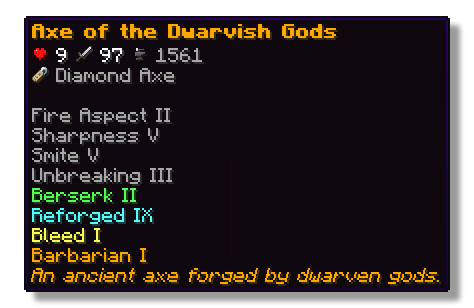
This plugin lets players show off whatever they’re holding right in chat! Just type a simple placeholder in your message, and your item pops up for everyone to see. Others can hover over it to check out its name, enchantments, and all the details just like in your inventory.
## Features
– ✅ Show off main hand, off-hand and armor
– ✅ Use a simple command or placeholders in chat
– ✅ Quickly see what item a player is showing off with icons in the chat
– ✅ See all details of an item when hovering above the name in chat
– ✅ Fully configurable
## Permissions
– **wyg.use** – Allows usage of WYG commands
– **wyg.hand** – Allows showing items in main hand
– **wyg.offhand** – Allows showing items in offhand
– **wyg.helmet** – Allows showing helmet
– **wyg.chestplate** – Allows showing chestplate
– **wyg.leggings** – Allows showing leggings
– **wyg.boots** – Allows showing boots
– **wyg.equipment.others** – Allows showing other players’ equipment
– **wyg.reload** – Allows reloading the WYG configuration (default: op)
## Configuration
You can find the configuration files in the plugins/WYG folder. The main configuration file is config.yml.
config.yml
“`yml
# ═══════════════════════════════════════════════════════════════════════════════
#
# █████ ███ █████ █████ █████ █████████
# ▒▒███ ▒██ ▒▒███ ▒▒███ ▒▒███ ███▒▒▒▒▒███
# ▒███ ▒███ ▒███ ▒▒███ ███ ███ ▒▒▒
# ▒███ ▒███ ▒███ ▒▒█████ ▒███
# ▒▒███ █████ ███ ▒▒███ ▒███ █████
# ▒▒▒█████▒█████▒ ▒███ ▒▒███ ▒▒███
# ▒▒███ ▒▒███ █████ ▒▒█████████
# ▒▒▒ ▒▒▒ ▒▒▒▒▒ ▒▒▒▒▒▒▒▒▒
#
# ═══════════════════════════════════════════════════════════════════════════════
#
# WYG – What’d Ya Got!
# The first item display plugin featuring 1.21+ sprites
#
# • Advanced placeholders
# • Fully translatable
# • Advanced formatting with MiniMessage
#
# Documentation:
# • All Placeholders: https://docs.zetaplugins.com/wyg/config/config
# • Formatting: https://docs.advntr.dev/minimessage/format.html
# • Sprites: https://mcasset.cloud/1.21.10/assets/minecraft/textures
#
# ═══════════════════════════════════════════════════════════════════════════════
# ═══════════════════════════════════════════════════════════════════════════════
# Share Message Settings
# ═══════════════════════════════════════════════════════════════════════════════
# Configure the message displayed when running /wyg
#
# Relevant Placeholders:
# – The player’s name
# – The player’s head sprite
# - – The formatted item (uses item-display config below)
#
# Examples:
# “ shared - ”
# “ shared - ”
# “ shared - ”
# “ → - ”
share-message:
format: “ shared - ”
# ═══════════════════════════════════════════════════════════════════════════════
# Item Display Settings
# ═══════════════════════════════════════════════════════════════════════════════
# Configure how items are displayed in chat
#
# Available Placeholders:
# – The item sprite/icon
# - – The item name
#
# You can also use custom sprites here:
# – A heart icon
# – A checkmark icon
#
# Examples:
# “[ - ]”
# “[ - ]
”
# “
# “ - ”
# “ - ”
item-display:
format: “ - ”
# ═══════════════════════════════════════════════════════════════════════════════
# Hover Tooltip Configuration
# ═══════════════════════════════════════════════════════════════════════════════
# You are entering advanced territory! Everything here is already setup to
# replicate Minecraft’s default tooltips!
hover-text:
enabled: true
# ─────────────────────────────────────────────────────────────────────────────
# Tooltip Layout
# ─────────────────────────────────────────────────────────────────────────────
# Define the order and formatting of tooltip elements
#
# Available Placeholders:
# – Item name (single line)
# – Stack size (skipped if amount is 1)
# – All enchantments (multi-line, skipped if none)
# – All lore lines (multi-line, skipped if none)
# – All attributes with slot headers (multi-line, skipped if none)
# – Attack damage across all slots (skipped if none)
# – Attack speed across all slots (skipped if none)
# – Armor across all slots (skipped if none)
# – Armor toughness across all slots (skipped if none)
# – Knockback resistance across all slots (skipped if none)
# – Durability display (skipped if item has no durability)
# – Base material name (skipped based on render-if-same-as-name setting)
#
# Custom Sprites:
# You can use anywhere in the layout!
# Examples:
# “ ”
# “ Enchanted!”
#
# Notes:
# • Empty lines (“”) create spacing between sections
# • Empty lines are automatically skipped if no content surrounds them
# • Any placeholder can be wrapped in MiniMessage formatting
#
# Examples:
# “”
# “”
# “ ”
layout:
– “”
– “”
– “”
– “”
– “”
– “”
– “”
# ─────────────────────────────────────────────────────────────────────────────
# Item Name Configuration
# ─────────────────────────────────────────────────────────────────────────────
# Configure how the base item name (material name) is displayed
#
# Available Placeholders:
# – The material’s translatable name
#
# Note: This is different from which shows the item’s custom display name
#
# render-if-same-as-name: Whether to show when it’s identical to
# (i.e., when the item hasn’t been renamed)
item-name:
format: “”
render-if-same-as-name: false
# ─────────────────────────────────────────────────────────────────────────────
# Enchantment Format
# ─────────────────────────────────────────────────────────────────────────────
# Format for individual enchantment lines
#
# Available Placeholders:
# – The enchantment name (translatable)
# – The enchantment level (translatable)
#
# You can add sprite icons here too:
# “ ”
enchantment-format: “”
# ─────────────────────────────────────────────────────────────────────────────
# Stack Size Format
# ─────────────────────────────────────────────────────────────────────────────
# Format for stack size display
#
# Available Placeholders:
# – The stack amount
stack-format: “Stack Size: ”
# ─────────────────────────────────────────────────────────────────────────────
# Durability Format
# ─────────────────────────────────────────────────────────────────────────────
# Format for durability display
#
# Available Placeholders:
# – Current durability (max – damage)
# – Maximum durability
durability-format: “Durability: /”
# ─────────────────────────────────────────────────────────────────────────────
# Attribute Display Settings
# ─────────────────────────────────────────────────────────────────────────────
# Configure how item attributes are displayed in tooltips
attributes:
# Slot Header Format
# Format for slot headers (e.g., “When in Main Hand:”)
#
# Available Placeholders:
# – The slot name
#
# Note: Set to empty string (“”) to hide slot headers entirely
slot-header-format: “”
# Individual Attribute Formats
# Configure display for each attribute type
#
# Available Placeholders:
# – The numeric value
# – The attribute name
#
# You can add custom sprites to attributes:
# “ ”
#
# Note: Default colors match vanilla Minecraft
# • dark_green – Offensive stats (damage, attack speed)
# • blue – Defensive stats (armor, toughness, knockback resistance)
formats:
attack_damage: “ ”
attack_speed: “ ”
armor: “+ ”
armor_toughness: “+ ”
knockback_resistance: “+% ”
“`
## Support
If you need help with the setup of the plugin, or found a bug, you can join our discord [here](https://strassburger.org/discord).
[](https://strassburger.org/discord)
—
[](https://bstats.org/plugin/bukkit/WYG/27519)
Mod for writers
# Mod for writers


## EN:
(sorry for my English)
### About
This minecraft mod adds you the ability to write notes, autographs and id-cards using the Item Edit plugin.
It also adds document folders in different colours, which are created using the same method as the notes, but from bundles rather than paper.
**Attention**, that all these items have their own textures you also need to install Optifine, CIT Resewn or other mod that adds MCPatcher functionality on new versions
### Credits
[**Pjero2**](https://t.me/PGCode) – code and all other
[**BowInHead**](https://t.me/BowInHead) – textures
[**_dzudzu_**](https://t.me/dtyzdtyz) – helping with some questions
## RU:
(не прощайте мне мой русский)
### Что это такое?
Это – майнкрафт мод, который добавляет вам возможность писать разные записки, оставлять автографы и даже удостоверения личности. Всё это он делает с помощью комманд такого замечательного плагина как ItemEdit.
Также он добавляет папки для документов разных цветов, что создаются также, как и записки, но используя мешочек вместо бумаги.
**Внимание!** Что бы все эти предметы имели свои собственные текстурки также требуется установить Optifine, CIT Resewn или другой мод, что добавляет функционал MCPatcher на новые версии.
### Кто работал над модом?
[**Pjero2**](https://t.me/PGCode) – люти программист и вообще это я сейчас пишу всем ку
[**BowInHead**](https://t.me/BowInHead) – люти артерша нарисовала текстурки
[**_dzudzu_**](https://t.me/dtyzdtyz) – помогал разобраться с гитхабом, модрингом и прочими приколами
Wrapped
# Minecraft Wrapped — Play Time Tracker
A Fabric mod that tracks your total playtime across every Minecraft world and server you’ve ever played, plus the detail behind it: blocks, deaths, biomes, mob kills, distance, XP, advancements.
Your lifetime hours show on the title screen as a small HUD. Stats sync to minecraftwrapped.com, where you get a personal dashboard and a shareable Wrapped card every Sunday.
# Features
– Lifetime playtime aggregated across every world and server you join — vanilla tracks per-world, this gives you the total.
– Active vs AFK split, with a configurable idle threshold.
– Title-screen HUD that ticks up in real time as you play.
– Retroactive import of your pre-mod single-player history from `saves/*/stats/.json` on first launch.
– Per-event detail: block break/place include block type, tool, biome, coordinates; deaths include cause and dimension; mob kills include mob type.
– Session boundaries with server attribution for multiplayer sessions.
– Offline-resilient — events queue to a local file and sync when you reconnect.
– Web dashboard: 24h × 7-day activity heatmap, top blocks, top servers, biome wheel, playstyle radar, top death causes.
– Weekly Wrapped card auto-generated every Sunday at 00:00 UTC.
Title-screen idle time does not count toward your hours. Only time spent in a world is recorded.
# How it works
The mod reads Minecraft’s own `ServerStatHandler` and `stats/*.json` files on a poll — vanilla already tracks blocks mined, mobs killed, distance walked, and playtime, so there’s no point re-intercepting them with mixins. A small set of mixins covers the things vanilla doesn’t: per-event coordinates, biome, session boundaries, server hostname, your own chat. Fewer mixins, fewer conflicts. Tested clean against Sodium, Lithium, and FerriteCore.
# Data and privacy
Play data syncs to minecraftwrapped.com. The cross-device total, the dashboard, and the Wrapped card all rely on a server-side aggregate; without sync you’d just have per-machine numbers, which is what vanilla gives you already.
**Consent lives on the client.** The mod stores its own Tier 1 / Tier 2 toggles locally and is the only authority for what it captures. The website cannot change those toggles remotely — there is no endpoint for it, and the mod’s bytecode never reads one. Each sync attaches the mod’s current local consent to the batch it’s sending.
In practice that means: turning a tier off in `/wrapped settings` stops the mod from sending it, full stop. The Data Vault’s **Pause** button on the website is a server-side filter — it tells the ingest endpoint to drop matching events as they arrive. The mod itself keeps capturing locally until you also turn it off there.
What’s captured by default:
– *Tier 1* — session start/end with server hostname, blocks broken/placed, deaths, mobs killed, distance, biome time, XP, advancements, your own chat messages.
– *Tier 2* — per-event coordinates, periodic inventory snapshots, damage dealt/taken, food consumed, fishing events, breeding events.
What’s never captured: IP addresses, device fingerprints, input patterns, system info beyond Minecraft + OS version, chat from other players, private messages, voice-chat audio.
The Data Vault at `minecraftwrapped.com/dashboard/vault` has full JSON export, delete-by-category, and a one-click wipe of every event the service has ever stored. Uninstalling the mod stops new collection. Deleting your account removes everything. Full policy: minecraftwrapped.com/privacy.
# Install
1. Download the jar matching your Minecraft version.
2. Install **Fabric API** (also on CurseForge).
3. Drop both into your `mods/` folder.
4. Launch — tracking starts immediately and your lifetime hours appear on the title screen.
To see the dashboard or share Wrapped cards, sign in at minecraftwrapped.com with Microsoft and paste the one-time install code the mod prints in chat. Skip this and your stats still sync; you just won’t have a dashboard or a public profile.
# Compatibility
– Minecraft **1.21.11 – 1.21.x** (Fabric)
– Java **21**
– Requires **Fabric API**
– Client-only — not needed on the server
– Tested with Sodium, Lithium, FerriteCore
Forge / NeoForge are on the roadmap, not in this build.
***
**Links**
– Site & dashboard — https://minecraftwrapped.com
– Privacy policy — https://minecraftwrapped.com/privacy
– Terms — https://minecraftwrapped.com/terms
– Discord (community, bugs, feature ideas) — https://discord.gg/HqNuvhpD
– Example profile — https://minecraftwrapped.com/p/blocklibrarian
Wormhole Artifact
### 🌀 **Now you can teleport to your friends!**
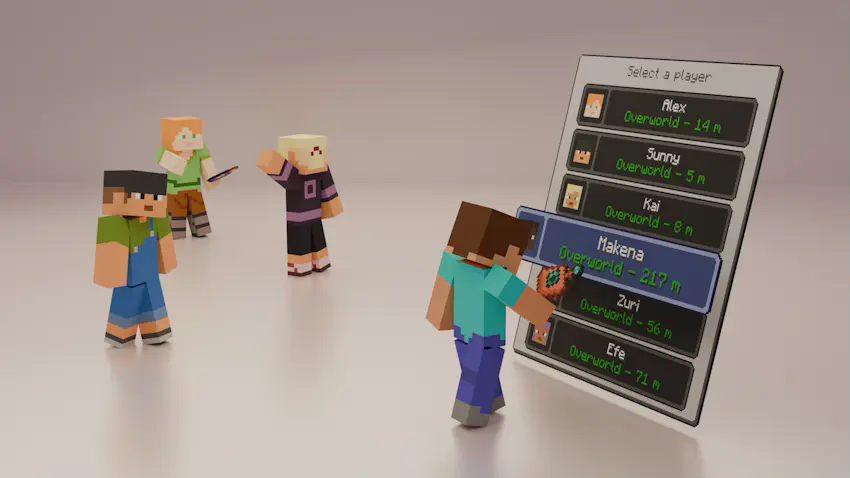
Introducing the Wormhole Artifact, an useful item that allows you to teleport to your friends through a simple UI, perfect for multiplayer survival, it offers a fair and balanced alternative to traditional teleportation with commands, keeping the game immersive and challenging.
#
### ✨ **Main Features**
– The Wormhole Artifact allows you to teleport to friends, but only within the same dimension.
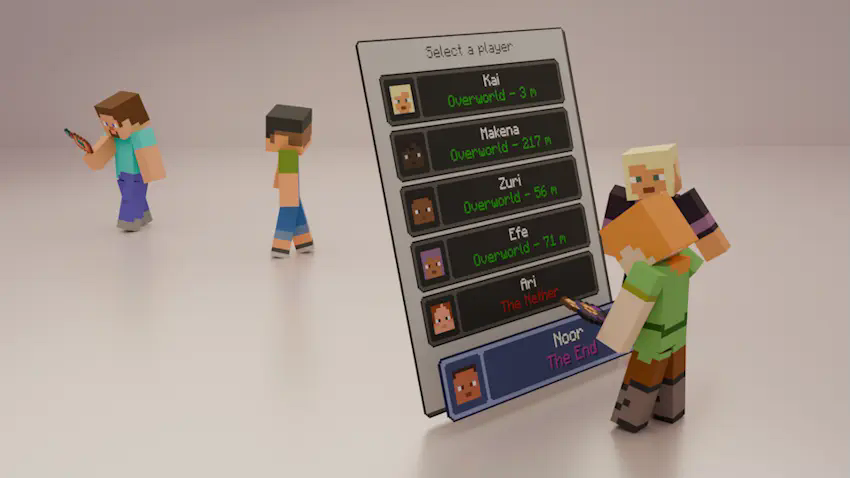
– It can be upgraded to the Wormhole Remote, which lets you teleport to players even if they are in a different dimension.
– The UI displays, in real time, information about all players who have a Wormhole Artifact or Wormhole Remote in their inventory:
– Their name and head icon.
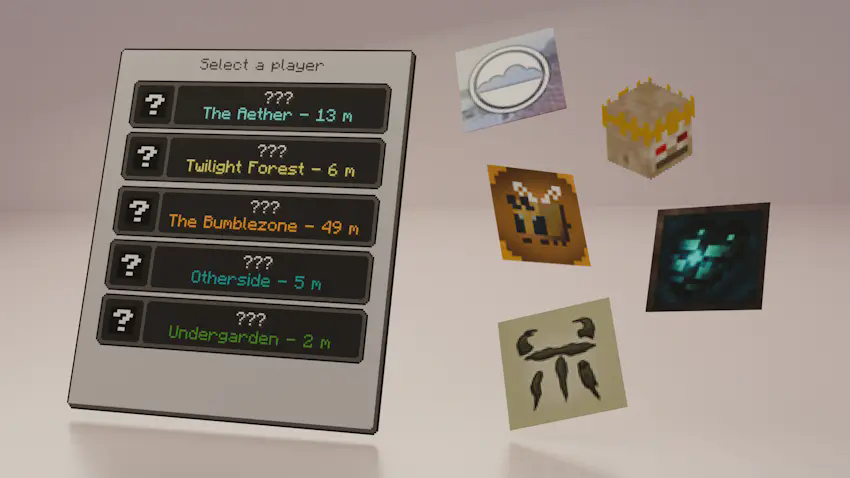
– Their current dimension (including the five modded dimensions shown in the images; otherwise, it will display “???”).
– Their block distance from you (only if you are in the same dimension).
#
### ⚙️ **Configurable Settings**
You can customize various aspects of the mod in the wormhole-artifact-config.toml file, including:
– Durability of both the Wormhole Artifact and Wormhole Remote.
– Cooldown time for using either item.
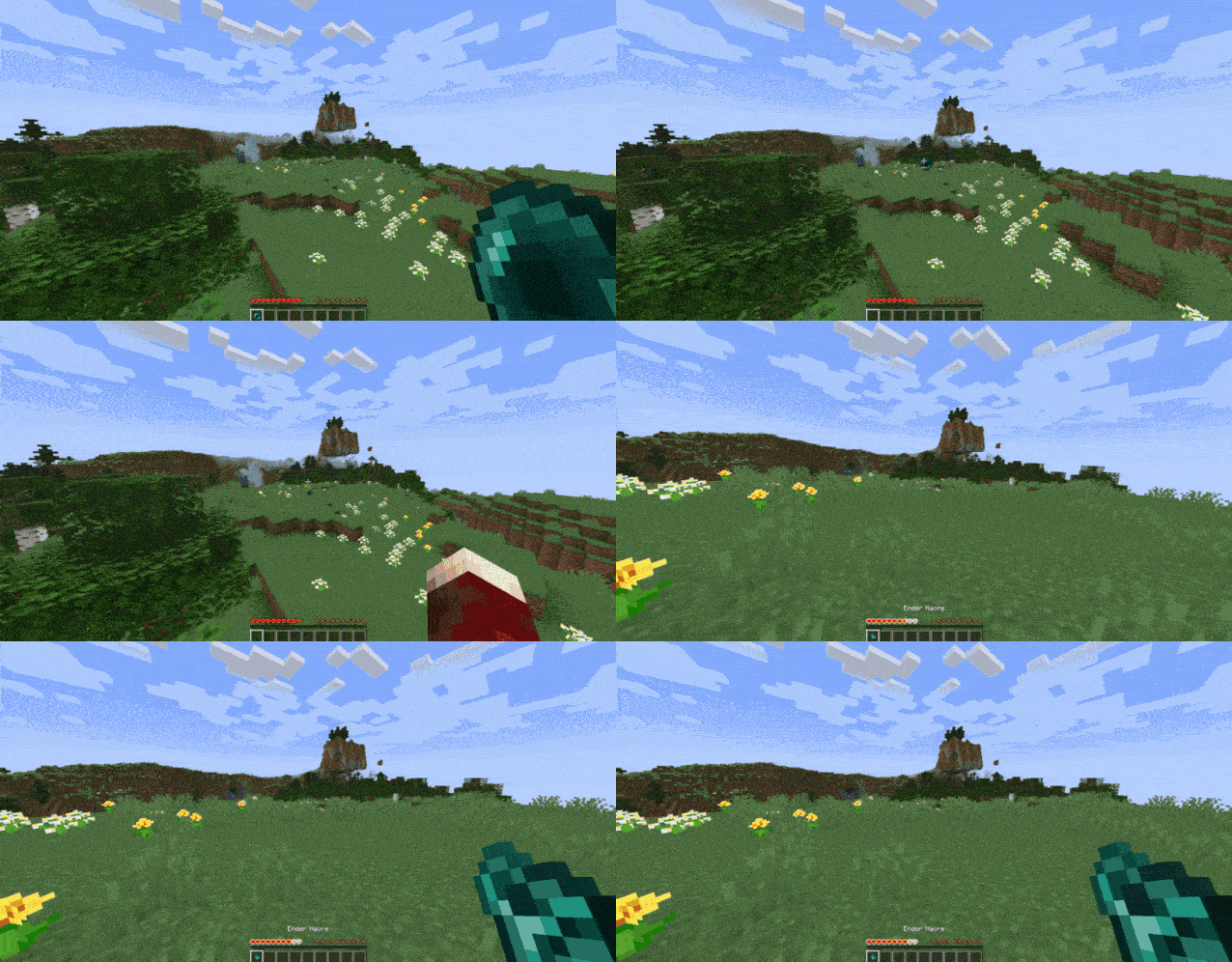
– Ender Nacre drop rate from Ender Pearls.
#
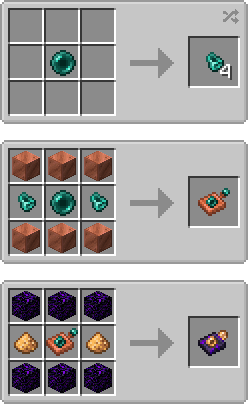
### 📕 **Recipes**
#
### 💬 **Permissions**
✔️ **Allowed**
– You may include this mod in CurseForge and Modrinth modpacks.
– You are free to use this mod in your videos (credits and a link to the mod page in the description would be appreciated).
❌ **Not Allowed**
– Reuploading this mod to any other websites, launchers, or apps.
– Using any content from this mod (textures, models, recipes, tags, etc.) in other projects.
– Selling this mod in any way or including it in paid modpacks.
#
### 🖼️ **Explanation Renders (and a gif)**
📌 **You can teleport to your friends from your same dimension with the Womrhole Artifact!**
📌 **Also you can teleport to friends from other dimensions with the Wormhole Remote!**
📌 **The UI can display the names of modded dimensions!**
📌 **Also you can get Ender Nacre from using Ender Pearls!**
WorlPreGen
# WorlPreGen
**WorlPreGen** is a powerful and modern chunk pre-generation plugin for Paper servers.
It allows you to pre-generate your worlds efficiently while keeping full control over performance, monitoring, and task management.
## Features
– Multi-world chunk pre-generation
– Run multiple generation tasks simultaneously
– Circle-based generation (more shapes coming soon)
– Full task control: start, pause, resume, cancel
– Detailed real-time progress tracking
– Console monitoring with live stats:
– progress %
– chunks processed / remaining
– chunks per second
– ETA (estimated time remaining)
– TPS protection system (auto pause/resume)
– Persistent tasks (auto save & resume after restart)
– Admin GUI with:
– world overview
– task details
– quick controls
– Modrinth update checker
– Fully configurable (performance, tracking, notifications)
– Clean and optimized codebase for stability
## Why WorlPreGen?
WorlPreGen focuses on **clarity, control and performance**.
Unlike traditional tools, it provides:
– better monitoring
– cleaner admin experience
– real-time feedback
– safer generation handling
## Commands
– `/wpg ui` → Open admin GUI
– `/wpg start` → Start generation
– `/wpg pause` → Pause task
– `/wpg resume` → Resume task
– `/wpg cancel` → Cancel task
– `/wpg status` → View task status
## Permissions
– `worlpregen.admin`
– `worlpregen.notify`
—
**WorlPreGen is actively developed.**
WorldwideChat

### What is WorldwideChat?
WorldwideChat is a plugin that lets you communicate with people who may not speak your language. It utilizes various translation APIs to translate different parts of Minecraft on the fly.
This was made in response to the lack of existing translation plugins, and as a former server owner myself this would have come in handy at times.
_If you want to support my work, please feel free to donate at the link above 🙂 Anything is much appreciated!_
**_(Note that you MUST have at least JDK 11 installed for this plugin to function. Additionally, if you are on 1.13-1.15, please always use WorldwideChat-spigot.jar REGARDLESS of if you are actually using paper or not.)_**
**Feel free to try the plugin for yourself at the following IP address:**
Test Server IP
152.67.252.19 (New and Improved)

Features
– Amazon Translate, Azure Translate, ChatGPT, DeepL Translate, Google Translate, Libre Translate, Ollama, and Systran Translate support.
– Translate chat, signs, entities, items, and written books with an interactive GUI.
– Translation globally, for other players, or just you.
– The plugin itself has been translated into more than 30 languages.
– A cache that stores the most used phrases by players on your server, improving speed and reliability in the event of slow API response times.
– A blacklist to avoid translating certain phrases/words.
– Rate limits so your players don’t fill up a quota too quickly.
– Persistent translation options saved per player across server reboots and reloads.
– Stat tracker to keep track of how your players use this plugin.
– A configuration GUI to easily change config.yml.
– MySQL/MariaDB, PostgreSQL, and MongoDB support.
– Citizens (NPC Dialogue) + DecentHolograms Support.

Github Wiki
https://github.com/dominicfeliton/WorldwideChat/wiki/Commands-&-Permissions

YouTube Tutorial
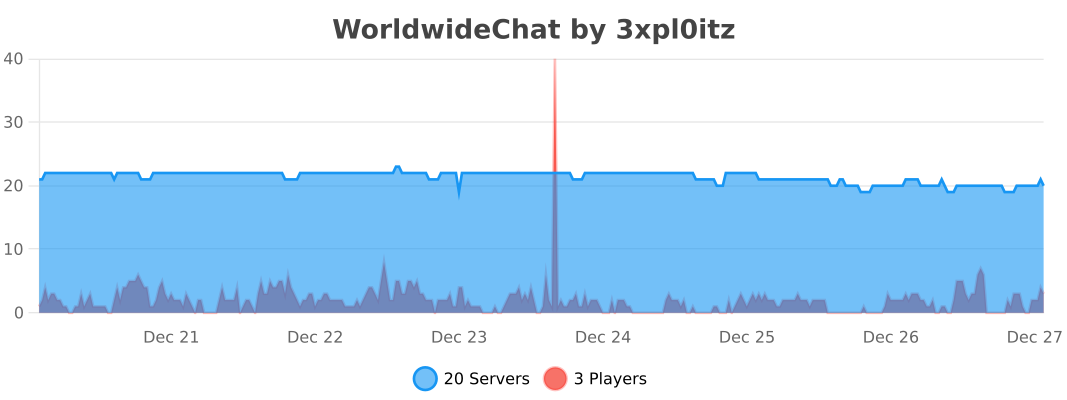
Please avoid posting bad ratings before asking questions. If you have problems or bugs with the plugin you can either file an issue on Github, or post on the plugin discussion page. Enjoy!
WorldsColors
**🌎 WorldsColors** brings visual clarity and style to your Minecraft server by automatically coloring player nicknames depending on the dimension they are in.
Make Nether inhabitants glow in intimidating red, let Overworld adventurers keep a clean look, and give End explorers a soft, mystical pink — all fully automated and seamless.
**✨ Key Features**
Instant dimension-based coloring
Player name colors update immediately when entering or leaving a dimension.
Everywhere you need it
Colors are shown in chat, the TAB player list, and above player heads.
100% server-side
No client-side installation required — players can join with a vanilla client.
Highly compatible
Designed to work smoothly with other mods that modify chat or TAB lists.
Fully customizable
Configure colors for any dimension using a simple and flexible config file.
**🔧 Commands**
/worldscolor reload
Reload the configuration instantly without restarting the server.
WorldName
## 🌍 Dimension Nickname Colors
> **[EN]**
> This plugin changes the color of player nicknames in chat depending on the dimension they are currently in.
> **[RU]**
> Этот плагин меняет цвет никнеймов игроков в чате в зависимости от измерения, в котором они находятся.
—
## 🎨 Nickname Colors / Цвета никнеймов
> **[EN]**
> – **Overworld** — 🟢 Green
> – **Nether** — 🔴 Red
> – **End** — 🟦 Cyan
> **[RU]**
> – **Обычный мир (Overworld)** — 🟢 Зелёный
> – **Незер (Nether)** — 🔴 Красный
> – **Энд (End)** — 🟦 Циановый
—
## 📥 Installation Guide / Установка
### 🔧 [EN] Installation Guide
1. Download a compatible **server core**
([Paper](https://papermc.io/downloads/paper) / [Purpur](https://purpurmc.org/download/purpur)).
2. Download the plugin `.jar` file from [Modrinth](https://modrinth.com/plugin/worldname/versions).
3. Start the server once to generate all folders.
4. Stop the server completely.
5. Open the `plugins` folder in your server directory.
6. Move the downloaded plugin `.jar` file into the `plugins` folder.
7. Start the server again.
8. The plugin will automatically start working — no configuration required.
—
### 🔧 [RU] Гайд по установке
1. Скачайте подходящее **ядро сервера**
([Paper](https://papermc.io/downloads/paper) / [Purpur](https://purpurmc.org/download/purpur)).
2. Скачайте файл плагина `.jar` со [страницы Modrinth](https://modrinth.com/plugin/worldname/versions).
3. Запустите сервер **один раз**, чтобы создались все папки.
4. Полностью **выключите сервер**.
5. Откройте папку `plugins` в директории сервера.
6. Переместите файл плагина `.jar` в папку `plugins`.
7. Снова запустите сервер.
8. Плагин сразу начнёт работать — настройка не требуется.
—
📸 Screenshot / Скриншот
