VividHorizons
# VividHorizons by ilb0tta (1.6.1 – 26.1.2)

⚙️ Installation guide
– Go into the **Versions** tab of this page and download the resource pack for the version that you need.
– Now put the file you just downloaded into the Minecraft’s **resourcepacks** folder, which is situated in this directory.
“`
C:UsersYOUAppDataRoaming.minecraftresourcepacks
“`
– No need to unzip or changing file structure.
– Go into Minecraft –> Options –> Go into Resource packs and apply the resource pack you’ve just put in.
## 🎁 What is the point of this pack?
This simple resource pack aims to create a better and more enjoyable experience for all Minecraft players, by changing biomes, grass and foliage (e.g. leaves) colors to make them more vivid and colorful.
Ah, and **NO MODS OR OPTIFINE NEEDED**.
## ✨ Features
– Boosted Biomes colors,
– Boosted Grass colors,
– Boosted Foliage and Dry variant colors,
– Usable with other resource pack, such as 32x ones.
– Always (or near) up to date for the latest Minecraft version!
## ❤️ Support and Questions
If you have any kind of questions or run into issues with the resource pack, don’t hesitate to leave a comment or ask a question, and I’ll be happy to help.
[Found a bug? / Report an issue. Click here.](https://github.com/ilb0tta/VividHorizons/issues)
[Have a question or suggestion? Click Here.](https://github.com/ilb0tta/VividHorizons/discussions/new/choose)
## 📖 License and more…
This pack is licensed under **ARR**, which stands for “All Rights Reserved”.
What does this mean?
This means that this work is owned by me, **ilb0tta**, and you, the user, are allowed to download and use this pack **only from official sources where it has been published by me** (such as Modrinth.com).
Any other use is **strictly prohibited**, including, but not limited to:
– Reposting or redistributing the pack;
– Modifying the pack and sharing the modified version;
– Selling any part of this work;
– Using assets from this pack in other projects.
If you have any questions or doubts feel free to contact me.
Credits
– Resource Pack made by **ilb0tta**, All Rights Reserved;
– pack.png file **© ilb0tta**, All Rights Reserved;
– VividHorizons is an original name created by **ilb0tta**, All Rights Reserved.
My Goal
My goal is to provide the community with high-quality content that improves players’ gameplay. So please, don’t steal, copy or redistribute someone else’s work. Making something with your own hands makes you feel more confident and grateful towards yourself. ❤️
## 💎 Sponsors
### NextDNS
Browse safer with **_NextDNS_**, it automatically blocks ads, trackers, and malicious sites **before they can even load**, across all your sites, apps, devices and networks, with zero hassle.
Protect your family with **built-in parental controls** and manage everything easily from a simple, **real-time dashboard**. With **encrypted DNS servers** in multiple locations, your privacy stays secure wherever you are.
[**Create an account through this link**](https://nextdns.io/?from=up775rtn) and get **_unlimited protection on all your devices_** for **just $19.99 per year!**
### HidenCloud
Need a powerful **AMD-powered DDR5 RAM** Dedicated Minecraft Hosting platform that **doesn’t break the bank**? Check out **HidenCloud**, starting at just less than **50$/YEAR** for a good MC plan. [**Try HidenCloud now with this link**](https://dash.hidencloud.com/aff/XIBLH3) to get a **5% DISCOUNT CODE** on your entire order. (And support my projects!)
NOTE: to get the discount simply click the link, scroll down and click “**set up**” a plan, then your discount code will be **already applied at your checkout!**
TIP: you can **stack** coupons!
Thank you for supporting my projects, I truly appreciate it!,
ilb0tta.
Visual Enchantment Books
# Important
[Chime](https://modrinth.com/mod/chime), [CIT Resewn](https://modrinth.com/mod/cit-resewn), or [Optifine](https://optifine.net/home) must be installed to use this pack.
# About
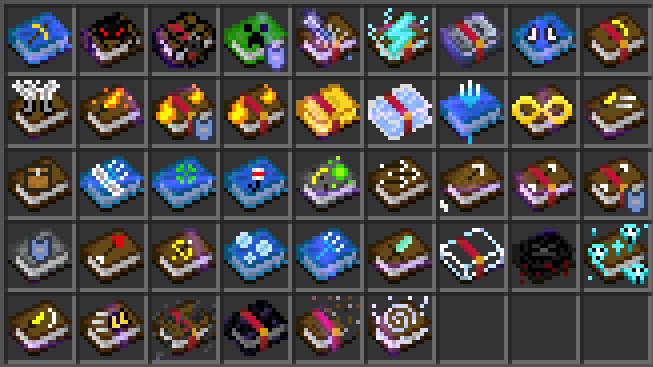
A resource pack adding custom better textures to enchantment books.
Visual Tunes
Introducing Visual Tunes! a pack that aims to improve the overall textures of the jukebox and music discs to make them more enjoyable to find, and make the Minecraft music disc experience more exciting when listening to your favorite song!
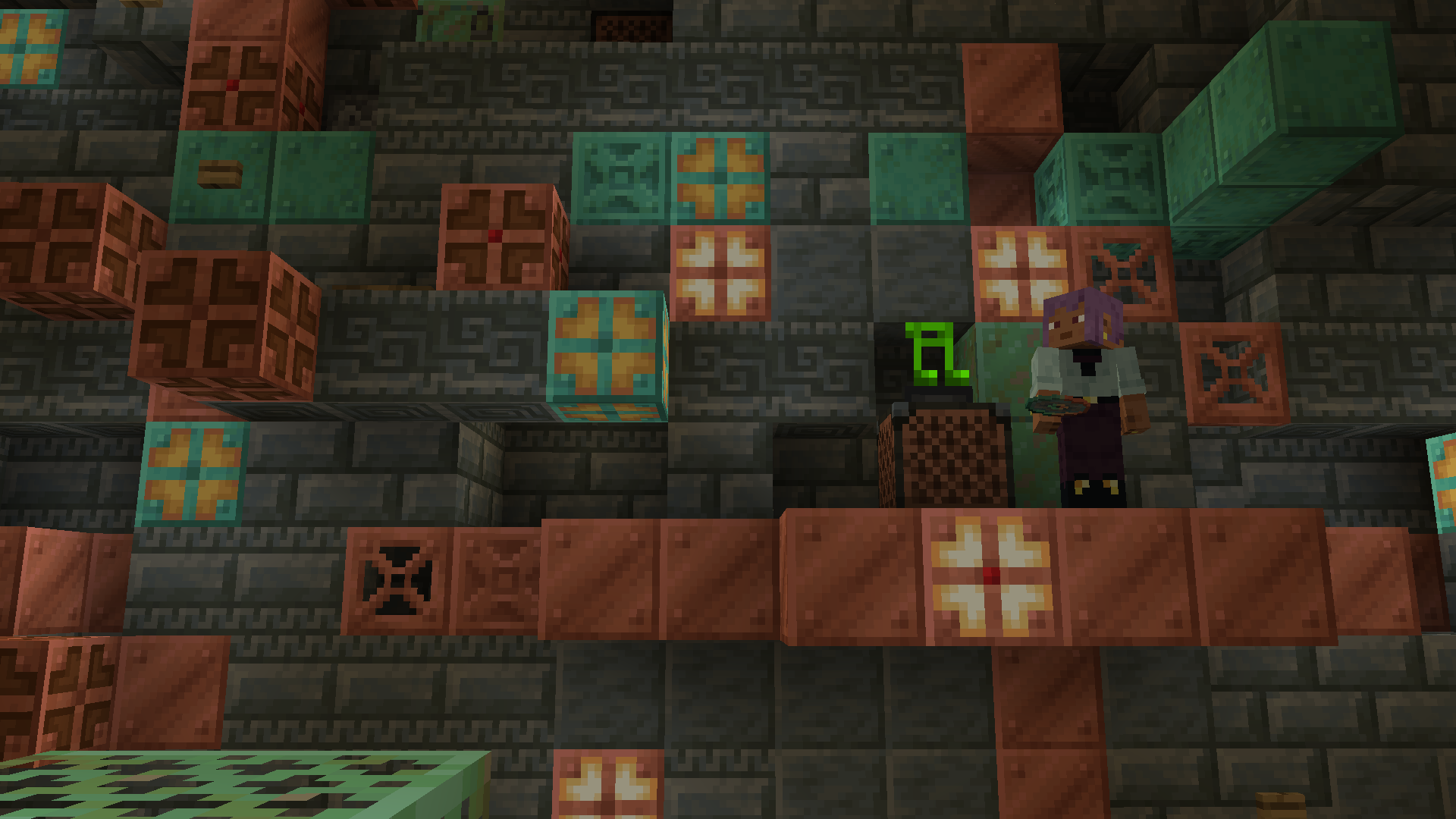
**Time to Jam!**
—
I felt like the enjoyment of finding music discs and listening to them wasn’t all there. so I changed some things to make it more enjoyable!
Wanna listen to some tunes?, this pack provides:
– New Jukebox & Disc Textures with more to come if any new disc is added!
**Updated Music Discs Textures as of 1.21.7! pack v2.0.4:** 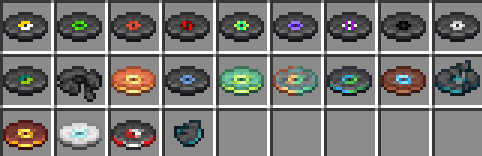
**Disclaimer:**
– plans to make each music disc show in the jukebox are not planned at the moment, as i have currently not found a way to do so.
# found a bug to report?
– I currently do not have a server or anything in that field for bugs to be reported, for the time being this is where you should report any bugs for this resourcepack: https://www.planetminecraft.com/texture-pack/visual-tunes/
a server about my texture packs have not been made. however, plans to do so with an upcoming large scale pack in the future is being considered!
with that being said!
**what are you waiting for?, go listen to some music thats even more enjoyable!**
Visual Stews
# 🌻 Better Effects and Flower Crafting
This texture pack for Suspicious Stews adds a unique visual touch to the game: the flowers used to craft the stew are visible inside, as if soaked in the broth. Additionally, the stew changes color depending on the effect it grants the player. For example, the stew that gives Saturation is yellow and contains flowers like the Dandelion or Blue Orchid, which can be used in crafting. A creative way to easily identify the effects of each stew!
## 🔍 Practical example
To better understand the pack you can just look at its logo:

The purple part will be the flower used to craft the stew, the blue part will be what effect it will give to the player and the orange part will only be aesthetic.
You can find every stew in the gallery.
(Source: [Minecraft Wiki](https://minecraft.fandom.com/wiki/Suspicious_Stew))
Check out this resource-pack’s collection: [here](https://modrinth.com/collection/ldN6hLmX)!
# ❓ FAQ
### 📂 Using Parts of This Resource Pack
Regarding parts created by me, whether they are textures, models, sounds, or any other elements, proper credit must be given when using them. This means that you must clearly credit the original creator (myself) and provide a visible link to the official Modrinth page where the resource-pack can be downloaded.
This applies to all uses, including streaming, video content, and any form of public content creation. Proper attribution ensures the recognition of the original work and allows others to discover and explore the resource-pack.
### 📦 Using the Entire Resource Pack
You are allowed to use the entire resource-pack publicly, including in projects, servers, or other public uses. While proper credit to the original creator (myself) with a visible link to the official Modrinth page is **strongly appreciated** when the pack is used in full, it is not strictly required. However, this does not grant permission to re-upload or redistribute the resource-pack on any platform or website without explicit consent.
Any attempt to republish the resource-pack as your own or distribute it through unauthorized channels is strictly prohibited. If you wish to modify or share the resource-pack in any way, please contact me for approval. The goal is to ensure that the resource-pack remains under proper control and that all creators are respected for their work.
### ⚖️ Consequences of Non-Compliance
Failure to respect these guidelines may initially result in a polite request for compliance. However, if these conditions are not followed, it will lead to the total removal of the content in question.
# 🛠️ Compatibility & Requirements
Starting from version **1.2.0**, this pack offers full support for *Minecraft 1.21.5 and above*, leveraging the new vanilla system to dynamically update suspicious stew textures without requiring any mods.
For users on versions earlier than 1.21.5, please use **version 1.1.0** of the pack together with **OptiFine** or **CIT Resewn** to enable the dynamic textures.
> ⚠️ **Note:** Version 1.1.0 is no longer supported and may not receive updates or texture changes due to ongoing improvements and optimizations in newer versions.
Be sure to select the version that fits your Minecraft setup to get the best experience!
Visual Redstone Vanilla Plus
## About
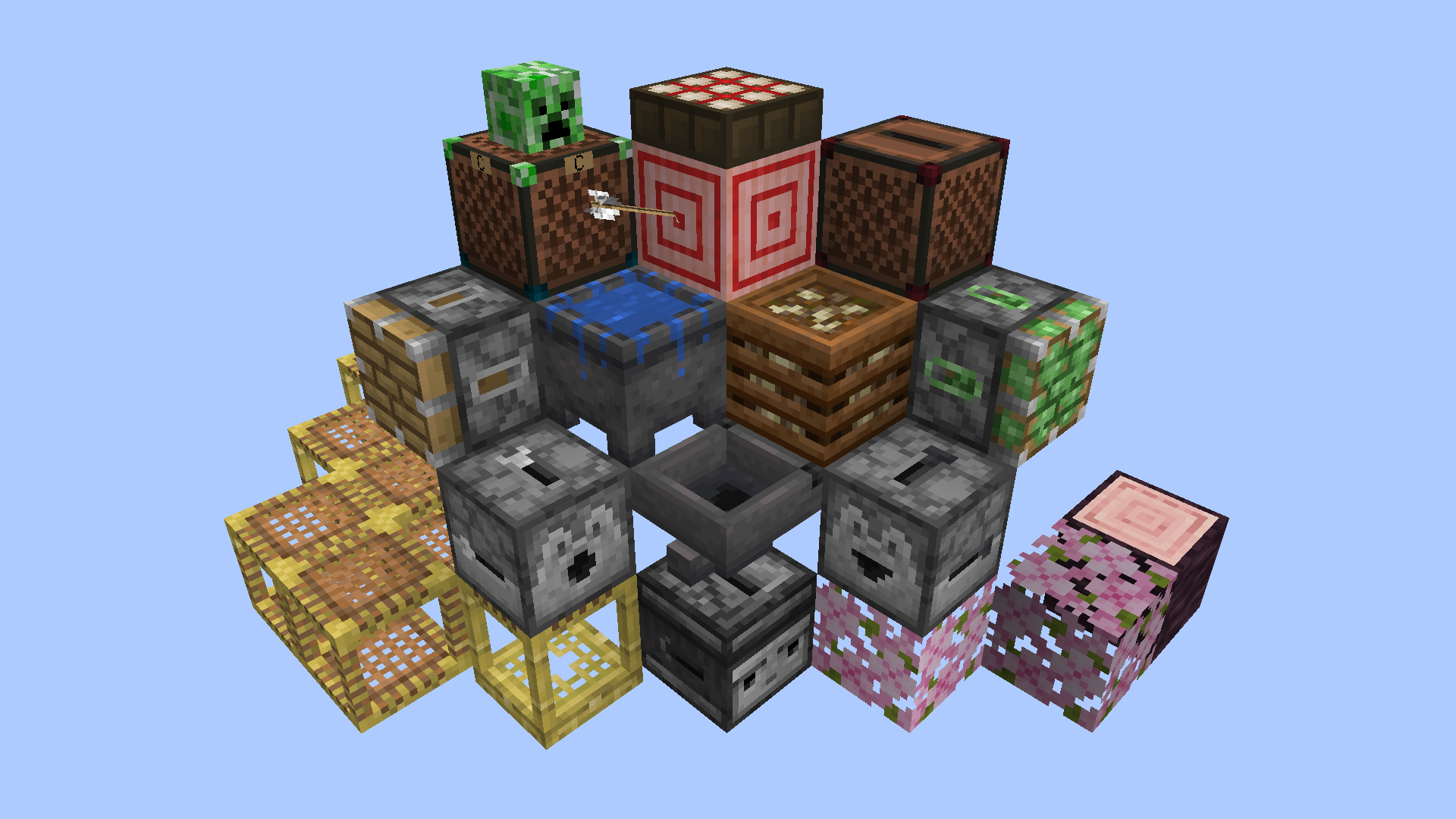
This resource pack makes it easier to see and understand redstone devices by adding visible mechanisms, lights and other indicators to various blocks while remaining as vanilla-looking as possible.
Inspired by [Vanilla Tweaks](https://vanillatweaks.net/) and [Redstone Tweaks](https://modrinth.com/resourcepack/redstone-tweaks), and also uses some of those packs’ model files and a handful of edited textures as a base for this pack’s custom tweaks. No straight-up copies.
I recommend the ‘Unlit Redstone Ore’, ‘Groovy Levers’ and ‘Visual Honey Stages’ Vanilla Tweaks to go alongside this pack, as they complement it perfectly. Place VRVP at the top of the resource pack list so it has priority over everything else that might overwrite it.
## Changed Blocks
– Cauldrons
– Composters
– Daylight Detectors
– Dispensers
– Droppers
– Hoppers
– Jukeboxes
– Leaves
– Note Blocks
– Observers
– Pistons and Sticky Pistons
– Repeater and Comparator undersides
– Scaffolding
– Target Blocks
– Tripwire
Check the Gallery images and descriptions to see how these blocks are changed.
## Credits
Made by batbrain55
Inspired by, and using .json files and a few edited textures from Redstone Tweaks: https://www.curseforge.com/minecraft/texture-packs/redstone-tweaks
Inspired by, and using an edited version of the Pixel Consistent Tripwire from Vanilla Tweaks for older versions: https://vanillatweaks.net/
Base textures and the video game of Minecraft by Mojang
Visual Potions Effects (All languages)
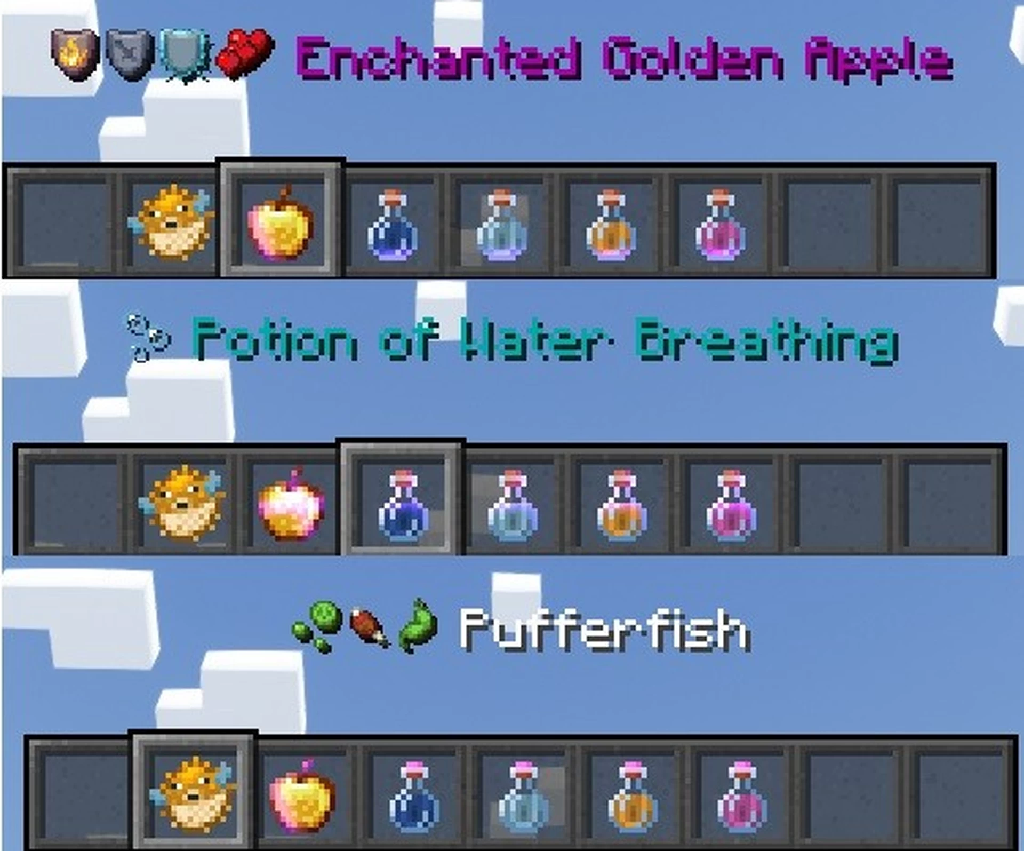
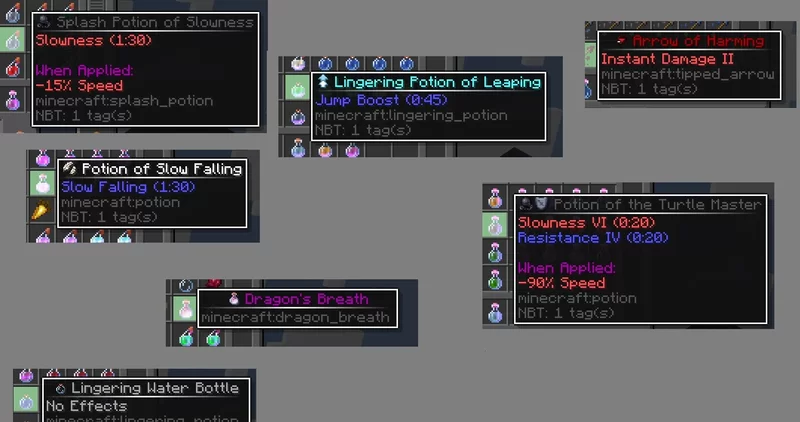
A simple pack that will display an icon of the effect(s) of potions, splash potion, lingering potions and tipped arrow. It will also display the name of the item to best match the overall color of the icon.
Also added icon to bottle o’enchanting, pufferfish and golden apple.
If I forgot any item that give potion effect let me know in a comment on planet minecraft and I’ll add it.
(https://www.planetminecraft.com/texture-pack/visual-potions/)
Visual Name Tags
## Summary
Gives name tags different textures based on their name. Such as:
– Dinnerbone
– Grumm
– Toast
– Johnny
– jeb_
Aditional modded name tag easter eggs may be added in the future
## My socials
[](https://twitter.com/DMgaming101)
[](https://discord.gg/B9YYAwYPvV)
Visual 3D Mace
**THIS PROJECT IS NOT AFFILIATED WITH OREVILLE STUDIOS**
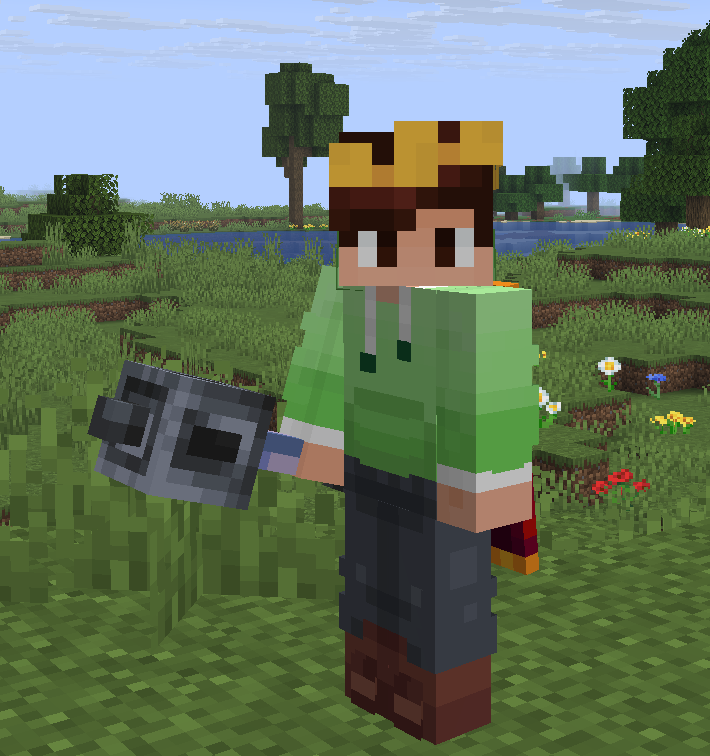
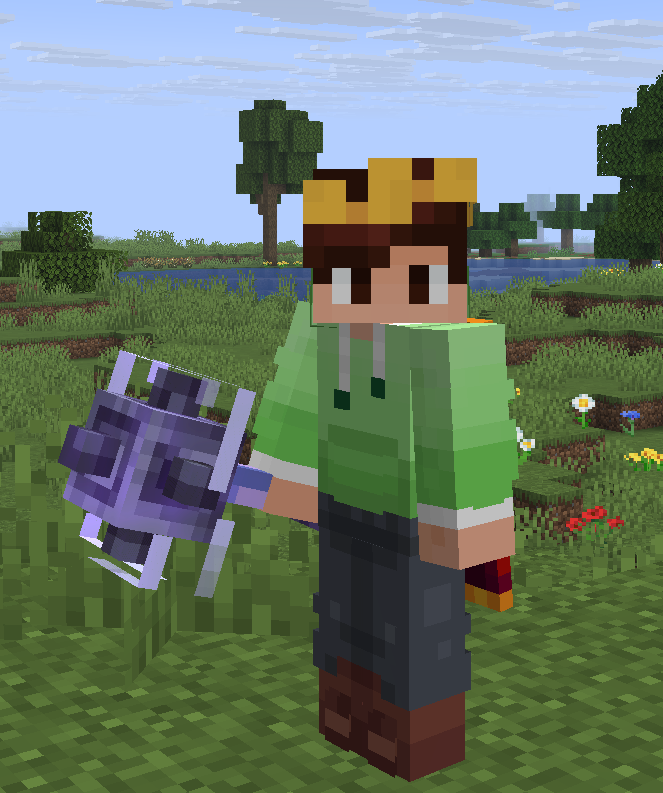
**_This resource pack adds a 3D handheld mace inspired by Actions & Stuff, while maintaining its 2D sprite in the inventory, on the ground, and in item frames._**
It also has enchantment-specific models for each mace-specific enchantment.
– **Wind burst:** Animated wind swirling around the heavy core of the mace
– **Breach/Density:** Spikes on the sides of the heavy core
– **Unenchanted or none of the above**: Just heavy core
**Note:** There may be some visual issues regarding the wind-swirling effect with the enchantment glint. Therefore, it is recommended to adjust your enchantment glint strength in accessibility to 50% or less for optimal results
LeoTweaks Visual Leaves
### This Resourcepack gives all Leaves their own distinction, depending on decayability.
—
Once you’re familiar with the pack, you’ll be able to tell if a leaf is Decaying, Placed by another player or natural – at just a glance!
Inspired by the works of [6_28318530717958](https://modrinth.com/user/6_28318530717958)
Visual Goat Horns
Ever thought of how goat horns could do a better job displaying what sound will they make? Well search no more, because Visual Goat Horns is here!
This pack adds 7 new textures for goat horns to represent the sounds sing, seek, feel, admire, call, yearn and dream, as shown in order in the image. The default texture is for the default sound, ponder.
