Volcanic Dark

As a dark mode resource pack, Volcanic Dark aims to fill the niche of those who want UI that is both pleasing to look at and is *actually* dark.
This pack also prioritizes visual clarity; You should be able to *see* what you’re doing, after all.
### Note on Feature Availability
Every feature is confirmed working starting from 1.21.4. [Respackopts](https://modrinth.com/mod/respackopts) is supported starting from 1.21
Versions prior to 1.21.2 may be missing some features present in screenshots in the gallery due to older versions of Minecraft simply missing support for later resource pack features. Additionally, colored shulker boxes require either [OptiFine](https://optifine.net/home) or an OptiFine alternative like [OptiGUI](https://modrinth.com/mod/optigui/).
Currently Supported Mods
– AppleSkin
– AuthMe
– Better Command Block UI
– Enchanted’s Sodium Options
– Entity Texture and Model Features
– Inventory Blur
– InventoryProfilesNext
– ItemSwapper
– ModMenu
– ReplayMod
– Respackopts
– RoughlyEnoughItems
– SimpleVoiceChat
Terms of Use
For the sake of transparency, while this is under All Rights Reserved, there are plenty of things you are allowed to do with this resource pack. *Note that this list is subject to change in the future. Likely if I find a license that actually has all this stuff included.*
### You are allowed to:
– Include this resource pack in any modpacks, videos, and/or showcases. While not required, linking back to this project would be *highly* appreciated!
– Make and upload your own resource packs using this style to add support for more mods provided you try not to include files from this project and clarify that it was made by someone else. “Unofficial”, if you will.
– Steal and modify non-unique assets from this project to help make your own resource packs (like the pack.mcmeta file). Ye.
### You are ***NOT*** allowed to:
– Reupload this pack to other resource pack hosting sites, *especially* not scammy ones.
– Port this resource pack to Minecraft: Bedrock Edition, or any other Minecrafts, Bedrocks, or Editions.
– Redistribute a modified version of this resource pack.
– Attempt to sell this thing. Come on now.
– Steal unique assets. Generic stuff like core shaders and “items” .json files are perfectly fine to take and reference, but don’t grab a texture from this and put it into your own pack please.
– To reiterate, my resource packs are only available on Modrinth and CurseForge (and sometimes GitHub). **If you are reading this, are not on one of those two platforms and the thief was stupid enough to leave this message in, you should probably leave, purge everything to do with the site you were just on, and run an antivirus scan.**
Void’s Weapon Enchantment Overlay
Shows melee weapon enchantments on the item:
Spears:
Blue – Knockback 1
Cyan – Knockback 2
Orange – Fire Aspect
Breeze Rod – Lunge

Maces:
White – Wind Burst (scales with level)
Cyan – Density
Purple – Breach
Blaze Rod – Fire Aspect

Sword:
Blue – Knockback 1
Cyan – Knockback 2
Orange – Fire Aspect

Why these enchantments?
Breach & Density – Mutually exclusive
Fire Aspect – Damage ticks from fire block knockback; burning zombies can ignite the player
Knockback – Extra knockback isn’t always good
Wind Burst & Lunge – Involuntary movement on all attacks
All other enchants are straight upgrades
Slightly changes spears:

Makes maces smaller: (gallery)
Feedback and support: discord – name:”silvrvr”
Void’s Transparent GUI
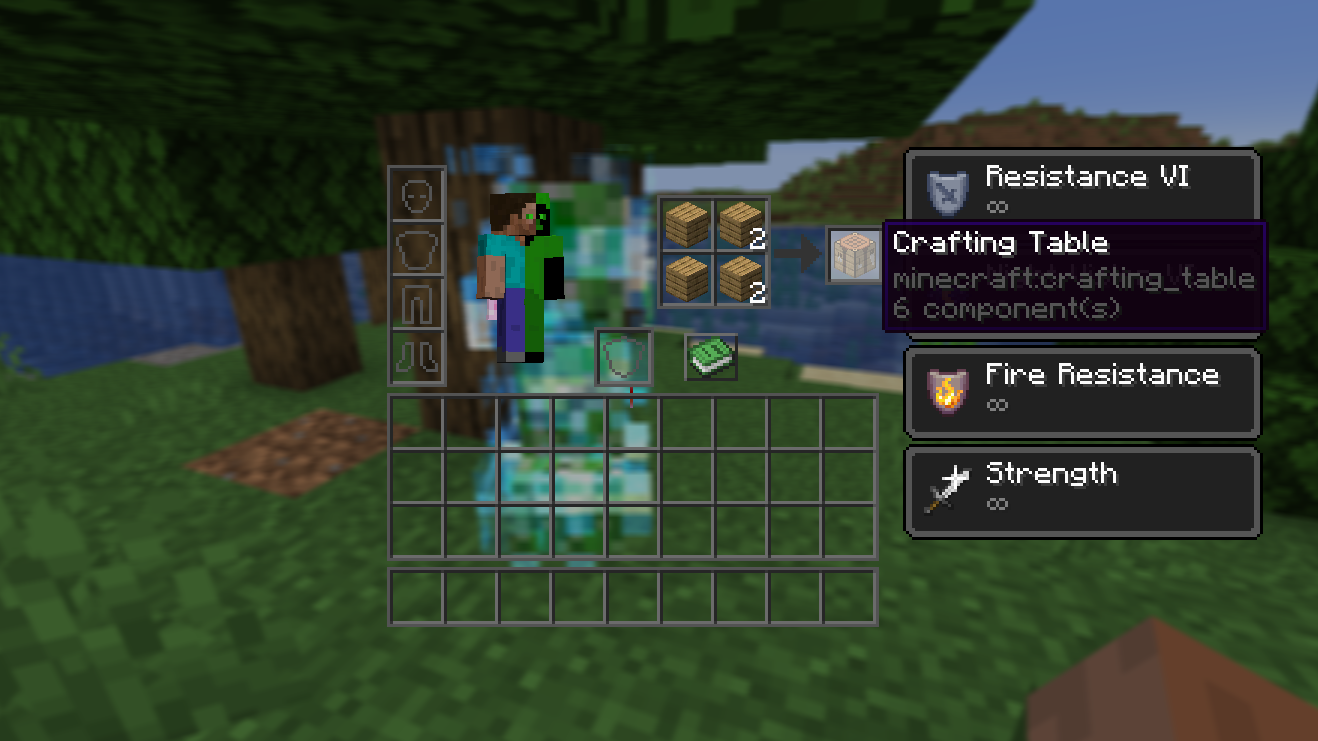
Have you ever been killed while crafting something and thought, “If only I could’ve seen that threat through the crafting grid….”
Well, now you can!
# Features
This resource pack modifies all interfaces to make them transparent and see-through. It balances form and function by reducing the amount of interface on your screen while not sacrificing aesthetics and a vanilla look and feel. It also blends the traditional transparent and dark GUI styles together to make an interface that is very pleasant on the eyes.
This pack includes
* Advancements
* Anvil
* Beacon
* Blast Furnace
* Brewing Stand
* Cartography Table
* Chests (single, double, barrel, ender)
* Crafter
* Crafting Table
* Creative Inventory
* Dispenser
* Enchanting Table
* Furnace
* Grindstone
* Hopper
* Horse
* Inventory
* Loom
* Recipe Book
* Shulker Box
* Smithing
* Smoker
* Social Interaction
* Stonecutter
* Villager
* and Various Realms-related pop-ups and buttons
# Credits
* [Vanilla Tweaks](https://vanillatweaks.net/terms/) for the base textures that I took inspiration from/built off of.
* [Lunar Client](https://www.lunarclient.com/), which I used in many of the screenshots in the gallery for their menu blur.
Void’s Tipped Arrow Overlay
Makes the arrow feather redstone and glowstone for arrows with an extended effect and level 2 ones respectively so you can easily tell what upgrade was applied to a arrow without hovering over it.
Void’s Protection Overlay
Colours netherite armor to show it’s protection enchantment:
– Protection – Cyan
– Blast Protection – Purple
– Fire Protection – Orange
– Projectile Protection – Yellow
Void’s Potion Upgrade Overlay
Adds a redstone part to extended potions and a glowstone one to level 2 ones so you can easily tell what upgrade was applied to a potion without hovering over it.
Void’s Pearls
this resource pack makes end items like the End Frame or Ender Pearl purple, fitting the End Dimension and the Endermen. The Eye of Ender textures have a bit of orange on the iris because of the blaze rods used to make them. This Resource pack **doesnt require CIT or Optifine**
Also go check out my PVP Resource pack:
[Voidd’s PvP & Utils](https://modrinth.com/resourcepack/voidds-pvp-utils)
Void’s Durability Overlay
### **Please consult server rules before using this pack on servers**
(Netherite and diamond) armors change color from green to red based on their durability (+cyan at full durablity) (model only for now)
Feedback and support: discord – name:”silvrvr”
Void’s Crossbow Enchant Overlay
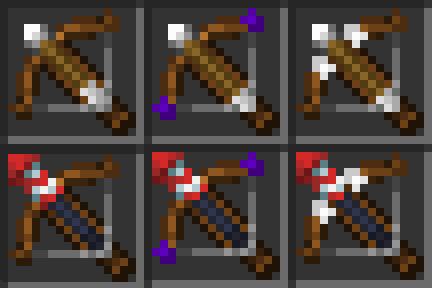
Adds little parts to a crossbow, showing it’s enchantments:
Purple – Multishot
White – Piercing
Feedback and support: discord – name:”silvrvr”
Void’s Crossbow Effect Overlay
Shows the arrow loaded into a crossbow so you can easily tell what it is. the end of the arrow is glowstone/redstone to show which upgrade was added to it.
Feedback and support: discord – name:”silvrvr”