Vythisi
This pack is a combination I made using a bunch of nice resource
packs. My goal was to improve the game’s immersion and enhance the
exploration experience. To achieve this, I aimed to add variety to
plants and natural blocks, as well as incorporating detailed elements
and 3D blocks, such as an improved GUI, grass details, and bushy
leaves. Additionally, I fixed some bugs and made the game seem more
consistent through small tweaks, including OptiFine features like
glowing ores, glowing armor trims and animated textures.
As of its first public release, this pack is, in my opinion, complete
enough to really improve your experience. However, I still plan on
adding more, such as improved sounds, item detailing, and overall
enhancements to further enrich this beautiful game.
I won’t update this pack soon, as I am currently
working on another big project that aims to improve mobs.
Using OptiFine is highly recommended as many features can’t work without it.
Texture packs used :
Fire Rekindled (www.curseforge.com/minecraft/texture-packs/fire-rekindled) by Tec
Treeshroom+ (www.planetminecraft.com/texture-pack/treeshrooms) by Enkera
Lush Icons (www.planetminecraft.com/texture-pack/lush-icons) and visual leaf decay (www.planetminecraft.com/texture-pack/visual-leaf-decay) by 6_28318530717958
Chests to pouches (www.planetminecraft.com/texture-pack/chests-to-pouches) by Entium
Enhanced items (www.planetminecraft.com/texture-pack/enhanced-items-dripstone-nether-sprouts-amethyst) by _MrMango
Consistent moss (www.planetminecraft.com/texture-pack/consistent-mossy-blocks-java) by NeraW
Advanced GUI (www.planetminecraft.com/texture-pack/custom-gui) by Blasjel
vxprze’s gray hardcore
turns your boring vanilla hearts into gray hardcore hearts
if you want you can use it in your modpack

Vunyx’s Redstone Pack
If you want to publish a project containing my work, please mention my username “Vunyx” somewhere. Also, a link to my project would be much appreciated.
# Description
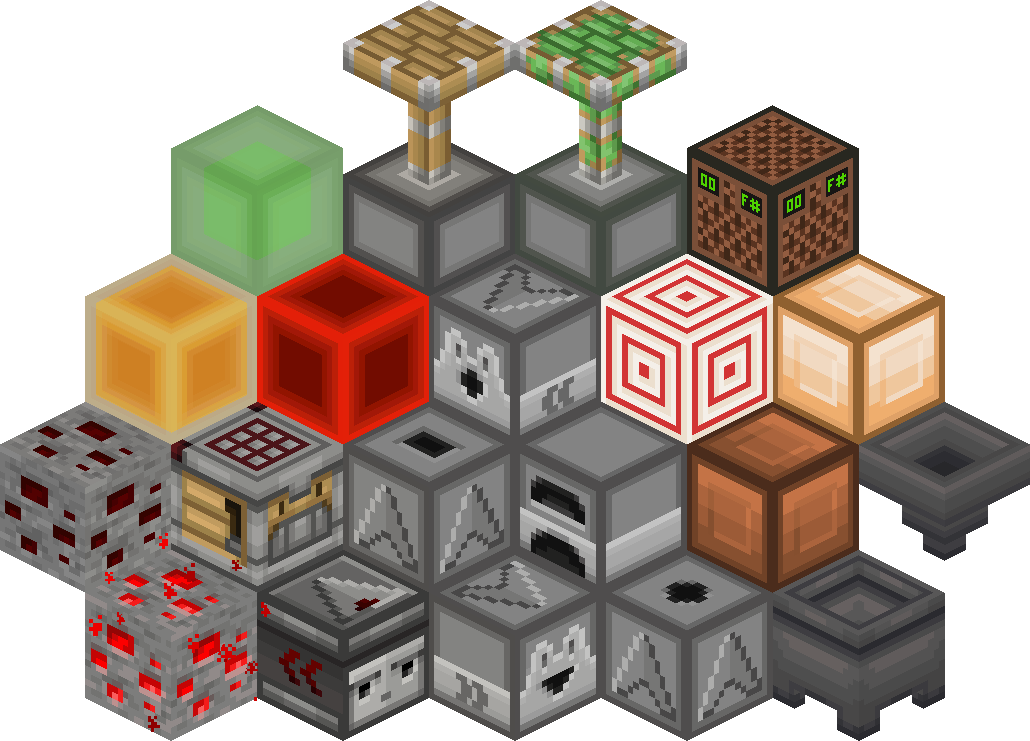
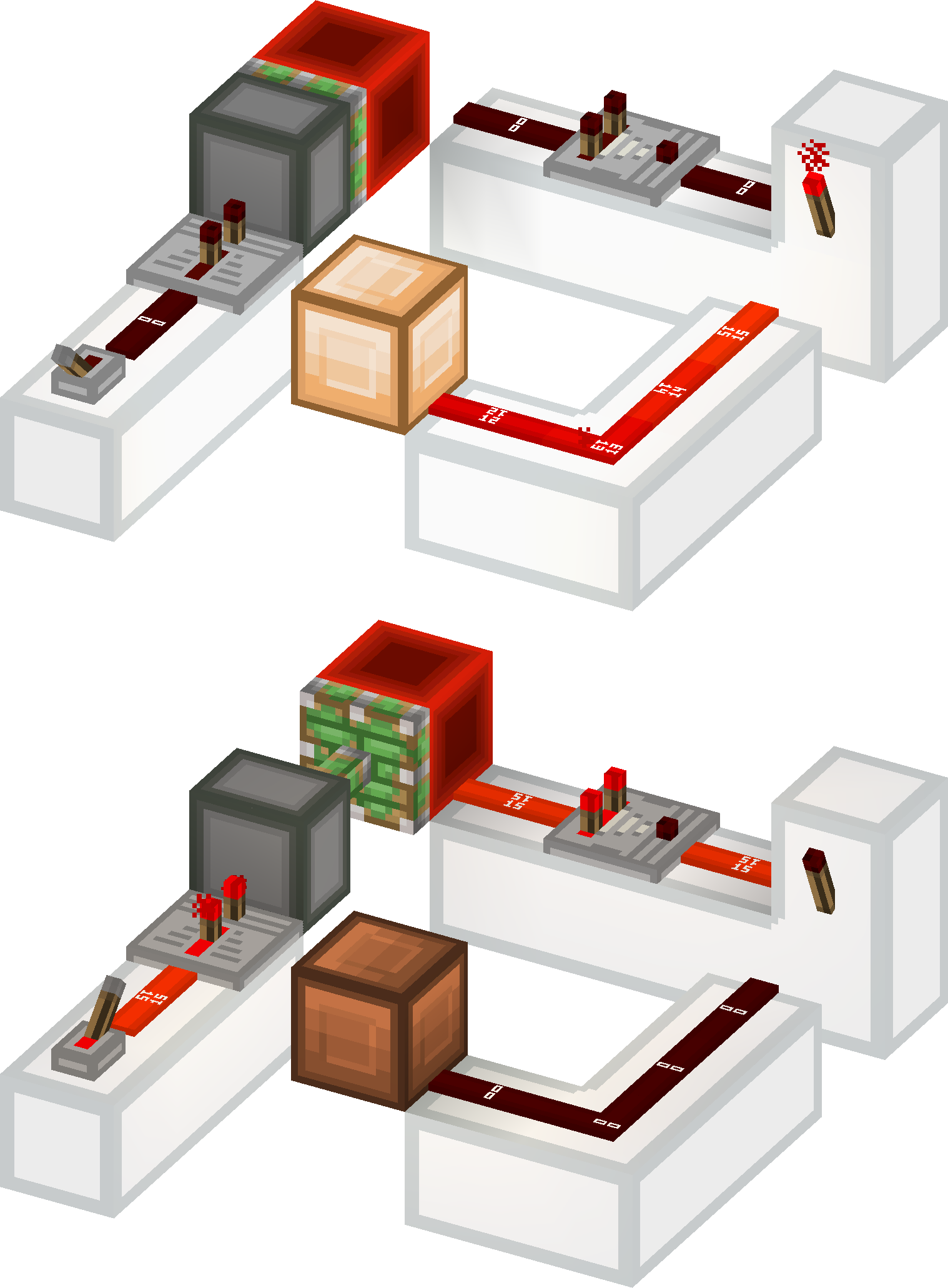
This resource pack gives a **clean look** to all redstone components, while keeping a **vanilla feel**. It brings features from [Vanilla Tweaks](https://vanillatweaks.net/picker/resource-packs), such as **directional indicators** for blocks like droppers or observers, and **visual block states** for blocks like note blocks.
List of current features:
– **smooth clean look** for all redstone related blocks (including rails and minecarts too)
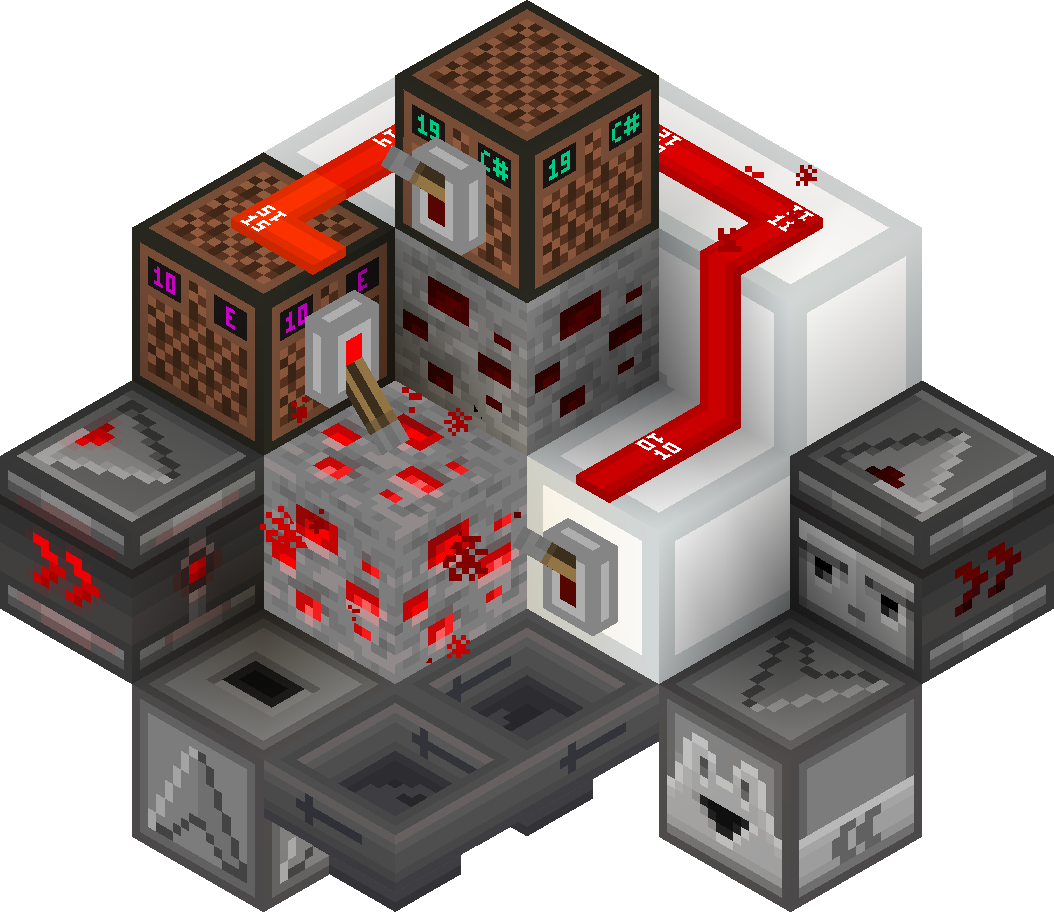
– **directional indicators** for dispensers, droppers, hoppers and observers
– **block states indicators** for redstone dust, redstone ore, levers and note blocks
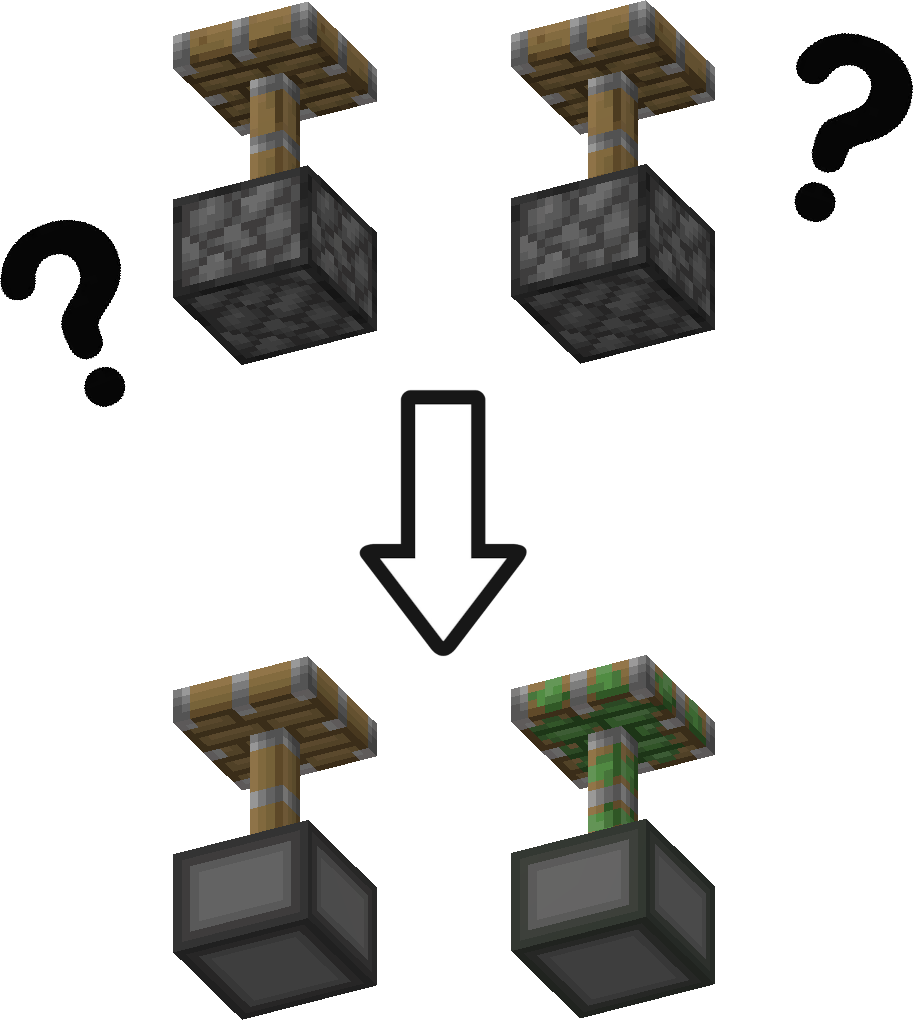
– removes ambiguity between normal and sticky pistons
– **connected outline** for all **wool and glass** blocks (you need [Continuity](https://modrinth.com/mod/continuity) or [Optifine](https://optifine.net/downloads) for the outlines to connect)
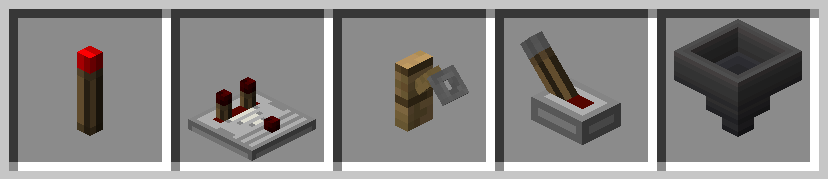
– **3D item models** for all types of torches, repeaters, comparators, levers, tripwire hooks, hoppers and cauldrons
Plans for the future:
– add indicators for cauldrons, composters, beehives and bee nests
– give a clean look to chests and barrels
– versions for 1.13 and older
– reduce file size
### Here is a quick overview of the pack:
### This is how your redstone circuits will look like:
### Block states and direction indicators:
### No ambiguity between normal and sticky pistons:
### 3D item models:
# How to install
After downloading the resource pack, go to **options -> resource packs** and click the **Open Pack Folder** button, or open `%appdata%.minecraftresourcepacks` directly. Put the resource pack in this folder. It should then show up under **Available**. Click the arrow to switch it to the **Selected** tab and click **Done**. That’s it, the pack should now be installed properly.
Vulkan [16x]
Vulkan 16x is an awesome PvP pack with volcano-inspired colours. Every texture was designed to look good without becoming distracting during fights, making it perfect for fights. Despite the very colourful colour palette, the textures remain easy on the eyes and work well for long sessions. If you want a pack that combines strong visuals with PvP performance, Vulkan 16x delivers a stylish experience that feels great to use in every fight.
Voxel’s Mobs
This resource pack was made by popular demand to make the textures for mobs I make over on tiktok available to the public!
VoxelCraft textures
# **VoxleCraft Textures**
**VoxelCraft Textures is a resource pack that overhauls vanilla Minecraft’s textures by offering resolution of 128x**
## **Why should you download?**
**The pack is currently in beta for Java edition only. Once the pack is completed, the pack will be uploaded to Bedrock edition. The pack offers, you a uniqueness to your Minecraft gameplay, adding unique textures to items, blocks, mobs, everything!**
### **Follow the pack’s updates:**
[Instagram](https://www.instagram.com/voxelcraft_textures)
[Discord](https://discord.gg/H2HJ7N8n5B)
Voxelation
### About
With this resource pack, just about all blocks have had their textures simplified down to one color, without transparency or translucency. Essentially, it makes Minecraft look like voxel-art (more than it already did).
Items and entities were left unchanged.
### How I made this
I made a small program, using java, that can sweep through every file in a folder that it created. When it comes across an image file, it gets the average color of the entire image, than recolors the entire image to that color. The program worked wonderfully, blowing through the 900+ different block textures in a matter of seconds! However, there are some drawbacks. Firstly, some blocks look rather weird now (I’m looking at you, lanterns, soul lanterns, and torches). Secondly, transparency is no more (glass is no longer viable for making windows). Lastly, some blocks (like chests and shulker boxes) were unaffected due to using entity textures, not block textures.
Voxel1’s Better Nether Forests
**you can use distibute these assets as long as you give credit to me and the origninal creators. do not claim it as your own work unless you give credit and modify it in some way.**
his pack, in my opinion, improves the nether forests and makes them more immersive.
it uses assets from the ‘More Nether Roots’ pack and ‘Grass+’ pack and I really hope this counts as giving credit.
_(use optifine or any other mod that allows for emissive textures for the best results)_
Vorlitix’s Bullets
Changes arrows to bullets!
In fact, these bullets are 9mm Mauser and 8mm Mauser, however I classified them as “9mm Bullet” and “8mm Bullet” to be easier to find, hence the pack name.
Why mauser bullets? Well, this pack is supposed to be paired with [Pekit’s Bows to Guns WWII edition](https://www.curseforge.com/minecraft/texture-packs/pekits-bows-to-guns-wwii). **Please** go shoot them a download, as their guns pair perfectly, and are meant to pair, with these bullets! **These guns do NOT require optifine** to work. They work perfectly on vanilla, as well as these bullets due to the bullets just being a retexture of the arrow.
I have also implemented different noises to the arrow landing noise to make them sound somewhat realistic.
This pack **should** support 1.14 and above but is specifically made for 1.19.
Enjoy!
Voodoo Doll of Undying
A small pack that allows you to change the totem of undying into a smaller version of your skin
for people who want to use their own skin:
– requires ability to use image editors like paint.net or blockbench (image editor option)
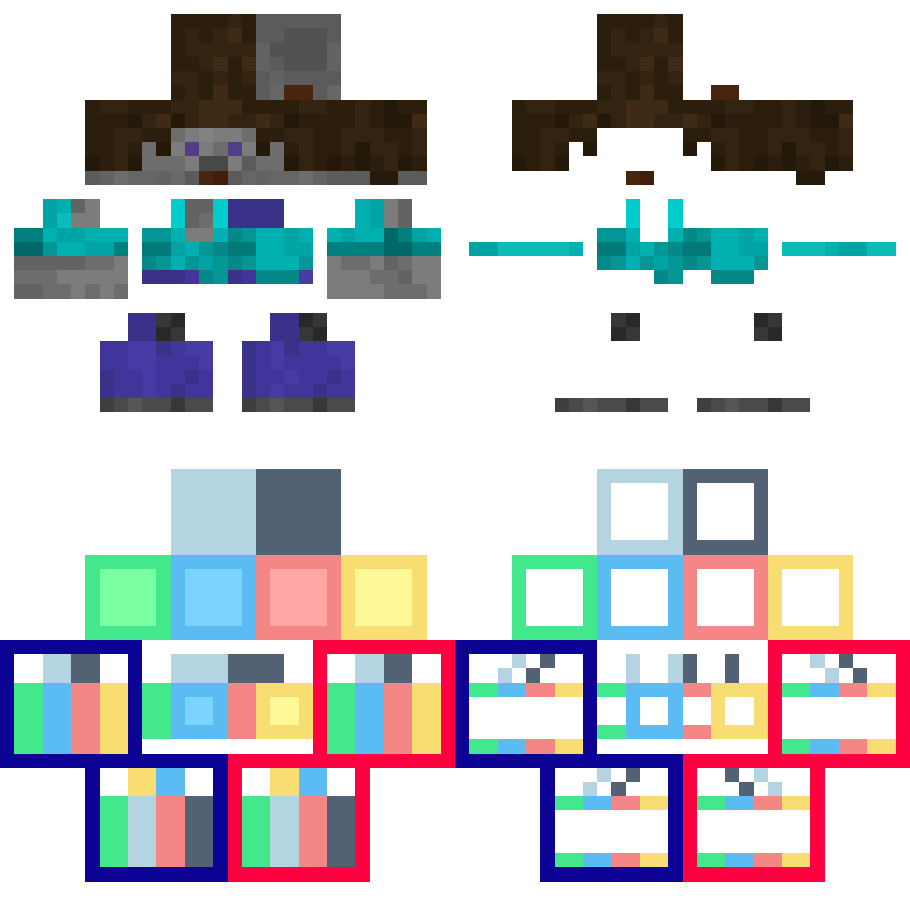
– the totem texture has a template of how a “steve” texture would look like when scaled down to the doll’s dimentions
# How to Customize?
1. open the resource pack and go to “assets/minecraft/textures/item“ and extract “totem_of_undying.png“
2. open “totem_of_undeying.png“ in image editing software
“`
[left side is for base right side is for outer layer]
[both left leg and left arm are on the left side of each section, same with right side but on right]
“`
3. edited “totem_of_undying.png“ put back in “assets/minecraft/textures/item“
4. reload the resource pack using debug shortcut “[F3] + [T]“
5. done