John is a really fast shader, high fps anywhere from intergrated graphics to high end GPU’s!
It looks best when you use PBR resource packs!
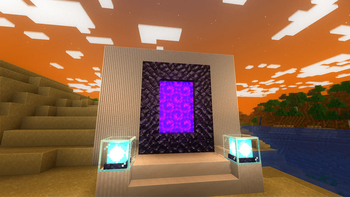
**This shader has:**
– waving plants/leaves/water
– simple specular sky reflections
– emmisive textures support
– colored shadows
– fog
– clouds
– outlines
– high fps on any machine
_Iris only at the moment_
Incremental shaders
Incremental Shaders improves various visual aspects of the game through small, progressive enhancements; delivering cleaner lighting, richer colors, and better overall clarity while preserving the original look and feel.
-Shadows with distortion to reduce aliasing
-Day/night cycle with proper darkening and blue-shifted night vision
-Distance fog that gets thicker at night
-Waving grass, flowers, and leaves (fades out at distance)
-ACES tone mapping with a cool blue tint
-Rain and thunderstorm effects (darker, desaturated, foggier)
-Torch flicker
-Vignette
Image Shader
# Image Shader
Only use a shader to display an image on your screen~
**Note: compiling the shader may take some time!**
### How to prepare a custom image~
First, use ffmpeg (or any tool) to resize your image to **160×160 pixels**.
“`bash
Using ffmpeg:
ffmpeg -i Input.png -vf scale=160:160 image.png
“`
Then place the resized image in the same directory as the Python script below.
Run the script to produce an `image_chunks` folder, then copy the 16 **.glsl files** inside into `shaders/data/image_chunks` (you need to unpack the shader pack first).
Enter the game, enable the custom image option in the shader settings, and wait for the shader to finish compiling — Then it’s ok~
A Python Script
“`python
from PIL import Image
import os
def generate_glsl_chunks(image_path, output_dir=”image_chunks”):
try:
img = Image.open(image_path).convert(‘RGBA’)
except FileNotFoundError:
print(f”Error: Image file not found at {image_path}”)
return
width, height = img.size
if width != 160 or height != 160:
print(f”Error: Image must be 160×160 pixels, but it is {width}x{height}.”)
print(f”You can use:”)
print(f”ffmpeg -i image.png -vf scale=160:160 output.png”)
print(f”to adjust the image resolution.”)
return
Shaders typically fall into one of two camps: completely overhauling minecraft’s style or completely copying it. This shader aims to overhaul the graphics while making it feel like nothing has changed. It’s the same style as vanilla minecraft but built for my own preferences, which are:
– Beautiful and Pleasant
– Unobtrusive
– Sharp AA
– Gameplay-Oriented
– Interesting and Exciting
– Performant
### Supports [Voxy](https://modrinth.com/mod/voxy), [Distant Horizons](https://modrinth.com/mod/distanthorizons), [Colorwheel](https://modrinth.com/mod/colorwheel), and more!
### Note: Optifine is only partially supported. If you think it should be more supported, you can always let me know
## How to install:
– 1: Install either [Fabulously Optimized](https://modrinth.com/modpack/fabulously-optimized) (full modpack, preferred) or [Iris](https://modrinth.com/mod/iris)/[Occulus](https://modrinth.com/mod/oculus) (single mod, can be added anywhere)
– 2: Download the latest version of this shader
– (If you want to see the values used by each style, you can download a style-specific version)
– 3: Launch minecraft, go to the shaderpacks menu, and click the ‘Open Shader Packs Folder’ button
– 4: Put the downloaded shader zip into the shaderpacks folder
– 5: Select the shader within the shaderpacks menu
## Performance Comparisons:
I’m not sure how trustworthy these results are, but it should give you a rough idea of the performance between shaders. Also, you can compare your graphics card to mine [here](https://www.techpowerup.com/gpu-specs/geforce-gtx-1070.c2840). Tests:
### License Overview:
**This is not exact or binding in any way.**
#### You can (with restrictions):
– Use this for gameplay, screenshots, videos, etc
– Use this in modpacks
– Create public and/or private modifications
– Reuse shader code
#### You cannot (without any exceptions):
– Redistribute this shader with little to no modifications
– Create shortened / indirect links to this shader
#### You can read the full license [Here](https://github.com/What42Pizza/I-Like-Vanilla/blob/main/LICENSE).
Note: this shader has very limited testing and is very likely to break in niche cases, but I’m very open to fixing any and all bugs that are reported
Please visit your local church
HyShaders – Horror Edition
This is a lightweight, horrorfantasy shader designed to give you a dark, gritty, atmospheric experience while keeping Minecraft’s blocky, pixel aesthetic
### Modes
**Ultra vs Lite:** Ultra costs more performance but looks better, lite is my super
optimized version of the shader that looks really great but still
delivers top notch performance
### Manual Installation
**1.** Download the mod & unzip it
**2.** Install Iris
**3.** Put the file(s) found in the mod download into your “shaderpacks” folder (if it doesn’t exist, create one)
**4.** Launch the game and enjoy!
**Note:** It’s recommened to install manually so you can choose which exact version of the shader you want (Lite or Ultra). By default it will autoinstall the “Lite” version. If that is the version you want then disregard this message
### Alternative Versions
– [Fantasy Edition](https://modrinth.com/shader/hyshaders-fantasy) | A vibrant, bright, atmospheric aesthetic.
– [Vanilla Edition](https://modrinth.com/shader/hyshaders-vanilla-edition) | A vanilla-like Minecraft aesthetic.
– [Horror Edition](https://modrinth.com/shader/hyshaders-horror) | A horror, rustic, or medieval aesthetic.
### Credits & Permissions
Modpacks: Yes, you may use this shader in your modpacks
Forked version of [BSL](https://capttatsu.com/bslshaders/), with permission from the original author _(granted on 7/11/24 via X DMs)_. Tweaked for better performance, different aesthetic & color grading
Glimmer
[](https://ko-fi.com/jbritain)
[](https://discord.gg/b9SHNcvs6c)
Shader development is hard and takes a lot of time. If you enjoy my shaders, please consider supporting my work!
Glimmer is a Minecraft shaderpack designed to be simple and performant whilst maintaining a physically based and natural look.
## Features
– ‘Potato’, ‘Toaster’, ‘Integrated Graphics’ and ‘Dedicated Graphics’ presets, designed to run on anything from your fridge to a NASA supercomputer.
– Colored block lighting!
– Distant Horizons & Voxy support!
– Colorwheel support
– ‘Infinite Ocean’, adding water stretching out of render distance.
– Complete LabPBR 1.3 compliance.
– Shadows, using either the shadow map or approximated from the lightmap.
– Screen space reflections and refractions.
– Procedural 2D clouds.
– Temporal filtering to reduce noise at low sample counts.
– Bloom
## Compatibility
– OpenGL 4.3+ – macOS is *not* supported, nor is the Raspberry Pi. Most modern GPUs (integrated or dedicated) should work fine.
– Iris 1.6+, OptiFine is *not* supported.
## Acknowledgements
– Andrew Hilmer, for his [Shadertoy implementation](https://www.shadertoy.com/view/slSXRW) of Sébastien Hillaire’s [‘A Scalable and Production Ready Sky and Atmosphere Rendering Technique’](https://github.com/sebh/UnrealEngineSkyAtmosphere)
– [Belmu](https://github.com/BelmuTM) – Reference code for SSR
– [Emin](https://github.com/EminGT) – Shadow bias calculation from [Complementary](https://github.com/ComplementaryDevelopment/ComplementaryReimagined)
– [NinjaMike](https://github.com/NinjaMike) – Directional lightmapping method
– [sixthsurge](https://github.com/sixthsurge) – A decent amount of code reference from [Photon](https://github.com/sixthsurge/photon)
– [Null](https://github.com/Null-MC/) – Help porting in the atmospheric scattering code
– As always, the members of the ShaderLABS Discord server who have helped me get this far learning how to do all this
– Many other people, there are links scattered throughout the code
## Get in touch
If you have an issue with Glimmer or just want to chat, you can [join my Discord server](https://discord.gg/b9SHNcvs6c) or find me in `#jbritains-shaderpacks` in the [shaderLABS Discord server](https://discord.gg/RpzWN9S).
**This shader completely inverts the colors in Minecraft. Everything looks like you’re looking at a negative photo. Supports daylight, night, water, blocks, mobs, and interface. Suitable for those who want a strange, surreal, or psychedelic experience in the game.**
Important! This, along with the GitHub page for this project, is the only official place to find Forget-me-not. Any other site you find this project, including unethical mod rehosting sites like 9minecraft, are untrusted sources. Never download files from untrusted sites.
# Forget-me-not Shaders
**Forget-me-not** is a semi-realistic pipeline shader for the [Canvas](https://modrinth.com/mod/canvas) mod. It’s designed to give the most authentic and immersive experience while sticking to “traditional” rendering methods to keep up good performance.
**Canvas** is a client-side renderer mod that uses shaders for advanced rendering with the goal of having a modern and very flexible design for high performance and better readability. The shader system is entirely different from Optifine and Iris & Sodium and as such, Forget-me-not won’t work with any of these mods! See the `how to use` section for installation instructions.
## notice
If you’re a developer or mod hoster, Forget-me-not is licensed under the [LGPL v3.0](https://www.gnu.org/licenses/lgpl-3.0.en.html), so please make sure to read over the terms of the LGPL if you use any of Forget-me-not’s original code or distribute it.
## how to use third-party shaders with canvas
1. Be sure you’re on 1.19.4 or above. Support is not guaranteed for versions that Canvas doesn’t actively support.
3. Get Canvas Renderer mod through [Modrinth](https://modrinth.com/mod/canvas). **Keep in mind that Canvas does not work with Sodium, Iris, OptiFine, or OptiFabric.**
4. Download your preferred pipeline shaderpack. If you’re looking for alternatives to Forget-me-not, try out [Lumi Lights](https://github.com/spiralhalo/LumiLights/releases), [Lomo (not for gameplay as of this writing)](https://github.com/fewizz/lomo/releases), or [Aerie (vanilla-plus, wip)](https://modrinth.com/shader/aerie-shaders).
5. Launch your game, put your downloaded `.zip` file into your `resourcepacks` folder and activate the resource pack. (Don’t extract it!)
6. Navigate to `Options / Video Settings / Canvas / Pipeline Options / Pipelines` and select the pipeline that you want to play with.
## troubleshooting
– Experiencing bad shadow outcomes? In `Options / Video Settings / Canvas / Debug`, set `Shadow Priming Strategy` to `TIERED` and `Disable Shadow Self-Occlusion` to true.
– Does Canvas say in chat that some shaders are broken? Please grab your log in `.minecraft/logs/latest.log` and all contents of the `.minecraft/canvas_shader_debug/` folder and either make an issue on GitHub or let me know about it on Discord.
– Does every Canvas pipeline break other than Canvas Basic? If so, your device is probably incompatible with Fabulous graphics, which most Canvas pipelines use. Unfortunately, there’s no fix for this.
## feature highlights
– seasons! be immersed in your world as the seasons change over time
– HDR, bloom, and tone mapping
– dramatic skies with atmospheric scattering and custom realistic clouds
– water waves and reflections
– support for PBR, with hundreds of built-in default materials
– contact-hardening variable penumbra shadows
– advanced anti-aliasing (TAA)
## credits
Forget-me-not wouldn’t be nearly as polished as it is if it weren’t for the help of people like fewizz, spiralhalo, Grondag, and many others from the Canvas community for contributing and testing. Many thanks to:
– The [shaderLABS discord channel #snippets](https://discord.com/channels/237199950235041794/525510804494221312/959153316401655849) for many useful code snippets
– [Lumi Lights](https://github.com/spiralhalo/LumiLights) by spiralhalo for lots of different inspiration & help, and also references for a working TAA implementation
– [lomo](https://github.com/fewizz/lomo/releases) by fewizz for inspiration for many different things, as well as the raytracer and lots of invaluable contributions
FastPBR
## **What is the FastPBR Shader?**
This is a fast shaderpack that still offers high-quality visuals and uses PBR atmospherics, hence its name.
**PBR does not mean specular support, so do not confuse these terms despite this being a common misconception in the shaderpacks community.**
## **Where can I download it?**
Either here or via my website (link below).
## **What features does it offer?**
* Dynamic soft shadows
* Optional screen-space indirect lighting using HBIL
* Temporal Anti-Aliasing and Upscaling (TAAU)
* Procedural realistic skybox including volumetric clouds
* Volumetric fog
* Various optional lens effects such as depth of field, lens flares and vignette
* **Compatibility with Distant Horizons since v2.0**
## **Any Requirements?**
* **Iris 1.6.0 or newer**
* **OptiFine is NOT supported and will not be unless it catches up with Iris’ more advanced featureset**
* A graphics card that supports OpenGL 4.3 or newer
* Windows/Linux
## **External Links:**
* My Website: [Link](https://rre36.com)
* My Discord Server: [Link](https://discord.gg/y5xzQ6H)
[](https://www.patreon.com/bePatron?u=19790203)
Fantasy Shaders Reimagined
## **Fantasy Shaders Reimagined**
This shader is based on the [Complementary Shaders](https://modrinth.com/shader/complementary-reimagined). Fantasy Shaders are a modification of the Complementary Shader, intended to make the game more colorful, striking, and vibrant, in a fantasy style.
This is my first project for Minecraft Java so it may have bugs and things to improve, so I would appreciate it if you left me either a bug report or suggestions to improve this mod on my [Discord server](https://discord.gg/7Z6FuKmGwG).
### **Modifications**
– The color of the night has been changed to a fantasy blue king, including skies, auroras, clouds, nebulas…
– The color of the day has become brighter, the sky now has a white horizon and the upper part is light blue including the clouds.
– Sunsets and sunrises are now more colorful as if you were in a fantasy world.
– The reflection of the surface and the sky at night has been improved, giving a mirror-like effect.
– The End has been recolored so that the color of its environment is attached to the purple tone of the Endermans.
– The rays of light have been intensified.
– Now the night and the End are starry.
### **Compatibility**
– This was created using [Iris](https://www.irisshaders.dev/) but since this is a modification of the complementary shader it should also work in [Optifine](https://optifine.net/home).
### **Notes**
– Fantasy Shader is a modification that complies with all Complementary Shaders licenses and terms of use.
– This shader is based on the original work and fully respects the copyright and license terms. My person also has his [License](https://github.com/AleGraphics17/privacy-policy/blob/main/License) which I invite you to comply with.
– I don’t have all the credit for this, most of the credit goes to [Emin](https://www.patreon.com/emingt), creator of the [Complementary Shaders](https://modrinth.com/shader/complementary-reimagined), since the Fantasy Shader is just a modification of these.
### **Changes**
– Compatible with Iris Minecraft v1.21.11
– A nebula has been added to the End sky.
– The night fog was greenish, now it’s blue, aligning with the horizon.
– The intensity of the light emitted by blocks like ores has been increased…