Yggdrasil Proxy
# YggdrasilProxy
When starting the game, the proxy in the device is automatically read to speed up Yggdrasil verification.
It extends Vanilla’s behavior and is more automated.
## Specific implementation
There is a setting in Windows, and its path is: “settings-> network-> proxy-> manual settings”.
YggdrasilProxy automatically reads them from the registry and verifies it, if it works, then use it immediately.
It basically works with network tools like Clash, you don’t need to proxy all traffic across the entire network card, you can easily connect to Yggdrasil Server through the proxy.
When registry data is not read, or is a non-Windows operating system, then YggdrasilProxy falls back to read environment variables (it does not need to be set in the JVM startup parameters, because they are annoying enough), it reads the following environment variables in the system and selects a valid variable to set to Proxy:
– http_proxy
– https_proxy
– no_proxy
## Defect
When the proxy server/tool is shut down, you may need to restart Minecraft.
Looking for a solution if I have time…
## Compatibility
Basically compatible with all operating systems.
Specially optimized for Windows.
## Which ModLoaders are supported?
– Fabric (Support, 1.18+)
– Quilt (Built with Fabric, 1.18+)
– Forge (Support, 1.19+)
– NeoForge (Support, 1.21.4+)
YggdrasilProxy is designed to be available for both Server and Client and is compatible with the most ModLoader and Minecraft versions.
If there is no compatibility, then I have not done it yet. If you’re in a hurry, join my DC server and send your ModLoader as well as Minecraft versions, I’ll be there soon.
## I want to use it in Plugin Server
Unfortunately, plugin servers are usually not compatible with mods, and I’m reluctant to use the Mixin framework to write them on the plugin server.
If you have relevant needs, please use two patches I made specifically for this, you only need to comply with GPL 3.0.
– [Patch 1](https://github.com/404Setup/Sewlia/blob/dev/1.21.4/sewlia-server/minecraft-patches/features/0005-Merge-YggdrasilProxy.patch)
– [Patch 2](https://github.com/404Setup/Sewlia/blob/dev/1.21.4/sewlia-server/paper-patches/features/0006-Merge-YggdrasilProxy.patch)
## For Modpack
If you comply with the license, you can use it freely for Modpack.
Modpacks that redistribute Minecraft game body (i.e. packages that package the entire Minecraft game including Mod files, Config, ShaderPacks, ResourcePacks, Library and launcher into a whole zip file) are not allowed to use this mod.
## License
This work has a restrictive license in addition to the original license to prevent some unexpected behavior,
see [404Setup Public License](https://github.com/404Setup/404Setup/blob/main/LICENSE.md)
Yggdrasil Alternative
# Yggdrasil Alternative


# What is Yggdrasil Alternative?
Yggdrasil Alternative is a completely new variant of the original Yggdrasil pack. This version replaces problematic mechanics to provide a **lighter, more compatible experience** perfect for multiplayer servers.
– Vaults are replaced by Copper Chests and related keys are removed.
– Custom Dimensions are deleted.
Since it adds less experimental Minecraft content, no Vaults, and doesn’t integrate Minecraft commands, **it is better suited for Spigot/Bukkit/Paper, as well as large modpacks.**
This pack concretely adds the structures, their lore, difficulty, and interesting rewards.
> **Note:** Since Yggdrasil 6.0.0, the original pack no longer includes the Runic Dimension either. The main difference now is that Alternative replaces Vaults with Copper Chests. Starting from 1.26.1, the original Yggdrasil will reintroduce the Runic Dimension — this Alternative version will **not** include it.

# Original Yggdrasil
This pack **adds 20 structures included 5 mega structure** that take hours to explore. Magnificent structures that spawn all over the world, and gives unique rewards, and combined with NeoEnchant it gets even better!
Yggdrasil **offers structures, quests, and a developed narrative** with story fragments that can be found and read in any order, like the memories in Zelda Breath of the Wild.
*Click on the image to go to [Yggdrasil Original on Modrinth](https://modrinth.com/datapack/yggdrasil-structure).*
[](https://modrinth.com/datapack/yggdrasil-structure)

# Documentation
For detailed information about **Yggdrasil, NeoEnchant, Whisper of Ethers**, or the web tools offered by Voxel, please refer to the documentation.
It contains all the information about the new content in Voxel, Enchantment, Structure, and everything else.
*Click on the image below to access the complete wiki. [Wiki Links](https://hardels-organization.gitbook.io/voxel)*
[](https://hardels-organization.gitbook.io/voxel)

# The Neo-Ecosystem
To further enhance the immersion, you can add one of the following packs, which are optional but work great with Yggdrasil.
– **[NeoEnchant+](https://modrinth.com/datapack/neoenchant)** — Over 40 unique, well-balanced enchantments. Each can be obtained in Yggdrasil structures or through vanilla methods.
– **[BeyondEnchant](https://modrinth.com/datapack/beyondenchant)** — Breaks the chains of vanilla limits. Enchantment levels are increased, making them more powerful.
– **[Yggdrasil Original](https://modrinth.com/datapack/yggdrasil-structure)** — The full experience with quests, narrative, Vaults, and the upcoming Runic Dimension.
– **[Whisper of Ether](https://modrinth.com/mod/whisper_of_ether)** — Adds forgemagic to equipment, explore powerful weapons and armor perfect for combat!


# Support the Project
Join us on Patreon and help make Minecraft an even more amazing experience for everyone!
With more support, I can make tools for creators, players, and modders. I plan to create the **Hytale asset editor in Minecraft!**
[](https://www.patreon.com/hardel)
Yeth’s TPA
**Yeth’s TPA is a Teletransportation Accept mod for Minecraft designed to be compatible, stable, and sufficient.**
## Commands
– **/tpa ** Sends a TPA request to a user
– **/tpa accept ** Accepts a TPA request from a user
– **/tpa here** Sends a TPA Here request to a user
– **/tpa cancel** Cancels an outgoing TPA request
– **/tpa ignore ** Ignores a player from making TPA requests
– **/tpa help** Sends a list of all commands
– **/tpa disable** Disables TPA requests from being sent to you
– **/tpa enable** Enables TPA requests to be sent to you
– **/tpa setting ** Configures settings in TPA
## Features
– Automatic expiry of TPA requests
– TP delay w/ countdown
– Multiple request handling
– Permissions for server owners
– Anti-TPA-traps
## Support
Yeth’s TPA supports the following mod loaders:
– Fabric
– Neoforge
– Forge
– Quilt
– Legacy Fabric
– Babric
– Ornithe
– BTA
– LiteLoader
For Minecraft versions 1.7.2 – 26.1.2
Yet Another Bingo

[](https://modrinth.com/mod/fabric-api)
[](https://gitlab.com/horrificdev/bingo)
#### Looking for a modpack?
Check out [Yet Another Bingo: Ultimate](https://modrinth.com/modpack/yet-another-bingo-ultimate)!
This is a multiplayer BINGO/Lockout mod + lobby, which works on the client or on a dedicated server.
– When installed on a server, players do not need any mods or resource packs to join.
– When installed on the client, it provides additional functionality for server games, and can run local games in singleplayer or LAN.

|
Teams can compete to collect items on the BINGO card. Score items in horizontal, vertical, or diagonal
lines to win the game.
—
⌨ Press “Y” to see the Bingo Card in an inventory view!
🖱️ Vanilla clients can right-click when holding the map to do the same.
|
*For an introduction to Minecraft BINGO, read “[What is Minecraft BINGO?](https://horrific.dev/bingo/what-is-bingo/)” on the wiki!*

Features

*Make sure to install [Mod Menu](https://modrinth.com/mod/modmenu) and [YetAnotherConfigLib](https://modrinth.com/mod/yacl) to use the built-in config screen!*
– #### Unique gamemodes
The gamemode toggles and goal options offer some interesting combinations. Try the “Lockout”, “Hidden Items”, or “Replace Goals” settings for a fun time!
– #### Unnecessary polish
Features an interactive lobby, ready-up timer, and score notifications. Integrates with [Simple Voice Chat](https://modrinth.com/plugin/simple-voice-chat) to manage team groups. Use your choice of [JEI](https://modrinth.com/mod/jei)/[REI](https://modrinth.com/mod/rei)/[EMI](https://modrinth.com/mod/emi) to see crafting recipes by clicking the bingo card!
– #### A ton of settings
Give players infinite elytra, provide a spawn kit, and individually tune the items and difficulty of the bingo card – all without leaving the lobby.
– #### Configure literally anything!
Supports customizing the [lobby build](https://horrific.dev/bingo/lobby-structure/), changing textures in [resource packs](https://horrific.dev/bingo/resource-pack-guide/), adding [custom objectives](https://horrific.dev/bingo/custom-objectives/), and more!
Commands
This is a brief summary of the most important commands. See the [Command Cheatsheet](https://horrific.dev/bingo/command-cheatsheet/) for a complete list of bingo commands and descriptions!
Global commands:
– `/coords` prints the current player coordinates in the team chat
– `/coords list` displays a list of the team’s previous “/coords” messages
– `/all` or `/g` sends a message to the global chat (sending a regular chat message defaults to team chat when in-game)
– `/join ` (when in the lobby) allows a player to join the specified team
BINGO commands (operator-only, unless you use [LuckPerms](https://modrinth.com/plugin/luckperms)):
– `/bingo reroll` rerolls for a new Bingo Card with different items
– `/bingo seed` shows or sets the random seed used to generate the current Bingo Card
– `/bingo end` immediately ends the current game and displays the winner (or a draw)
– `/join ` assigns a player to a different team – will respawn them if in-game
Credits
The very pretty Bingo Card HUD and “Bingo!” button textures were made by [@marceles](https://marceles.carrd.co)!
Parts of this mod are inspired from [Extremelyd1/minecraft-bingo](https://github.com/Extremelyd1/minecraft-bingo), the awesome Spigot/Paper version of this gamemode.
The logo design was inspired by [Aikoyori/ProgrammingVTuberLogos](https://github.com/Aikoyori/ProgrammingVTuberLogos)
### Translations
[](https://crowdin.com/project/yet-another-bingo)
**Help translate this mod into your language!**
All text in this project is available [on CrowdIn](https://crowdin.com/project/yet-another-bingo) for anyone to submit translations.
Chinese Simplified translations were contributed by Fishlanding, tovv3r, Young912, BoredYukolin, yzy_sheep, nageih, teaSummer, Nattiden, ZnianXgang, and SpongeCouna!
Chinese Traditional translations were contributed by Leo_768, BoredYukolin, notlin4, Lavskiy Ilias, and Sear!
Chinese Traditional (Hong Kong) translations were contributed by Furina_de_zh_hant and Sear!
Czech translations were contributed by Džerry!
Danish translations were contributed by Libreh!
Dutch translations were contributed by GrangerTheDog!
Finnish translations were contributed by Diamonddevv!
French translations were contributed by Yosh64, Guillarda, Narkotiqu, and Barbie192!
German translations were contributed by Butterkeks and CryptoGamer1612!
Hungarian translations were contributed by petya0927 and Remarci!
Italian translations were contributed by noah and sculk1!
Japanese translations were contributed by おほしさまちゃんねる!
Korean translations were contributed by LegendLier!
Literary Chinese translations were contributed by Sorajima Asugawa!
Polish translations were contributed by Toniemax!
Portuguese translations were contributed by Lucsdev_!
Russian translations were contributed by Milleol, XakVit, Ofterkino, Mrpavel, Май, Lucky Wayч, yukkovna, lazdni, and Encidi!
Spanish translations were contributed by ANDY, GatoEnCaja, and TheJokerDev!
Swedish translations were contributed by Vica50 Rosvall!
Turkish translations were contributed by Erkin_!
Ukrainian translations were contributed by Dan4ikPlayUA and RealWinord!
Yet Another Discord Chat Link
# Yet Another Discord Chat Link









A simple mod to connect the in-game chat with a Discord channel.
## Why another one?
– This one focuses on simplicity. It is as light as it gets with only the basic functionality and very little required setup!
**Setup:**
1. Go to https://discord.com/developers and create a new application
2. Copy the ID and invite the bot with the following url (dont forget to change the ID or else the link won’t work:
“`url
https://discord.com/oauth2/authorize?permissions=2953964624&scope=bot%20applications.commands&client_id=APPLICATION_ID
“`
3. Enable developer mode on discord to be able to right-click a channel and copy its channel ID
4. Download the mod into the mods folder and let it generate the config file. The server will crash on first launch since the Bot Token is invalid.
5. Paste the copied channel ID of the channel that you would like the chat to be linked to into the config file (name: `config/yadclconfig.properties`)
6. On the discord developer dashboard, in your application, go to the bot tab on the sidebar and reset and copy the bot token and paste it into the config file.
7. Restart the server and you should be good to go. Check that the bot has read/write permission in that channel.
*Alternative suggested Setup Guide (not by me):*
https://erdbeerbaerlp.de/projects/discord-integration/quick-setup
Yet Another Calculator
# Yet Another Calculator
A Minecraft mod that adds in-game calculating functions.
## Installation
Put the mod in the mods folder, and make sure you have Fabric API and Fabric Language Kotlin installed.
## Usage
To calculate something, type `/calc `.
Supported operators: `( ) + – * / ^(power)`
Supported constants: `e pi` (case-insensitive)
Supported functions: `sin cos tan deg`
You can use `%n` and `Out[n]` to refer to the n-th calculation result. For example, `%1` and `Out[1]` is the first
result. Specially, `%` alone is the previous result.
Yet Another Bingo: Ultimate

*For an introduction to Minecraft BINGO, read “[What is Minecraft BINGO?](https://minecraft.horrific.dev/bingo/what-is-bingo)” on the wiki!*
This modpack is built around [Yet Another BINGO](https://modrinth.com/mod/yet-another-minecraft-bingo), a multiplayer item hunt mod. It includes everything needed for the bingo mod as well as some quality-of-life additions: Zoomify, Dynamic Lights, Roughly Enough Items, Coords HUD, and more!

|
Up to 8 teams can compete to collect items on the BINGO card. Score items in horizontal, vertical, or diagonal
lines to win the game.
—
⌨ Press “Y” to see the Bingo Card in an inventory view!
|
## ⌨️ Keybinds
Here are a few useful keys that you might want to know:
– Y – View the BINGO card
– C – Zoom
– Tab – Show scoreboard
## Included Mods
This is not a complete list – see the [versions](https://modrinth.com/project/yet-another-bingo-ultimate/versions) tab for all of the mods and libraries used in the pack. I’ve limited this list to things that you’re likely to notice as a player:
– [C2ME](https://modrinth.com/mod/c2me-fabric)
– [Coords HUD](https://modrinth.com/mod/coords-hud)
– [More Chat History](https://modrinth.com/mod/morechathistory)
– [Ok Zoomer](https://modrinth.com/mod/ok-zoomer)
– [Roughly Enough Items](https://modrinth.com/mod/rei)
– [LambDynamicLights](https://modrinth.com/mod/lambdynamiclights)
– [Scoreboard Overhaul](https://modrinth.com/mod/scoreboard-overhaul)
– [Sodium](https://modrinth.com/mod/sodium) + [Sodium Extra](https://modrinth.com/mod/sodium-extra) + [Iris](https://modrinth.com/mod/iris)
– [Vanilla Tweaks](https://vanillatweaks.net)
Visual Waxed Copper, Honey Stages, Unique Dyes, Unobtrusive Rain/Snow, Lower Shield
– [Yet Another BINGO](https://modrinth.com/mod/yet-another-minecraft-bingo)
## Credits
The very pretty Bingo Card HUD and “Bingo!” button textures were made by [@marceles](https://marceles.carrd.co)!
Parts of this mod are inspired from [Extremelyd1/minecraft-bingo](https://github.com/Extremelyd1/minecraft-bingo), the awesome Spigot/Paper version of this gamemode.
The logo design was inspired by [Aikoyori/ProgrammingVTuberLogos](https://github.com/Aikoyori/ProgrammingVTuberLogos)
Vanilla Tweaks: https://vanillatweaks.net/
(in compliance with the terms and conditions at https://vanillatweaks.net/terms/)
Yeleefff’s Enderite
# Yeleefff’s Enderite
A simple mod that adds a successor to netherite, enderite, to the game. This mod focuses primarily on adding a new set of armor and tools while still keeping closely with the vanilla theme.
**Ore Generation and Crafting**
Enderite debris spawns in veins of 1-3 on the lower layers of end islands and can be smelted into enderite scrap. Four enderite scrap combined in a crafting table with four eyes of ender will give an enderite ingot. Enderite upgrade templates spawn in chests in end citites, and can be combined with an enderite ingot and a piece of netherite gear in a smithing table to upgrade it to enderite.
**Void Floating**
Enderite armor or tools that fall in the void will slowly float back up, giving the player a chance to retrieve their items before they despawn.
### Compatibility
– 1.21.6+ Enderite debris ore generation is now compatible with [Enderscape](https://modrinth.com/mod/enderscape)
Yeet
# Yeet!
Yeet is a very simple mod about throwing things.
Yeet allows you to hold down the drop key (default Q) to wind up your arm.
Release it to throw your items farther.


Thrown items can be directly caught by other players.


Friend running low on materials? Just throw them some more!

fopwoc’s YAqol&oM
# fopwoc’s Minecraft modpacks
***”Gentoo” way to play minecraft*** – Why just share zip with your friends when you can write a CI for your modpack?
Inspired and partially based on [Deckium](https://github.com/skywardmc/deckcraft) and [Fabulously Optimized](https://github.com/Fabulously-Optimized/fabulously-optimized/) modpacks.
### What does “YAqol&oM” means?
Y – Yet
A – Another
q – quality
o – of
l – life
& – and
o – optimization
M – Modpack
### So… what is it?
My personal vanilla-compatible modpack focuses on quality of Life, fixes, and optimization. It also includes numerous platform-related fixes (Mac and Linux issues) and features [a well-designed Steam Deck layout](https://github.com/fopwoc/minecraft-modpacks/blob/master/base/1.20.1/config/yosbr/config/controlify.json).
### Performace?
Certainly! It incorporates nearly all modern and widely-used optimization mods. Here’s a brief list of them:
– [Sodium](https://modrinth.com/mod/sodium) – better rendering engine.
– [Indium](https://modrinth.com/mod/indium) – Sodium addon with additional features and optimizations.
– [Starlight](https://modrinth.com/mod/starlight) – light engine rewrite.
– [Lithium](https://modrinth.com/mod/lithium) – game logic optimization.
– [Exordium](https://modrinth.com/mod/exordium) – HUD framerate render fix.
– [ImmediatelyFast](https://modrinth.com/mod/immediatelyfast) – faster entity, particles, etc. rendering.
– [More Culling](https://modrinth.com/mod/moreculling) – better culling, huge performance boost.
– [DashLoader](https://modrinth.com/mod/dashloader) – caches game data and makes it load super fast.
– [ModernFix](https://modrinth.com/mod/modernfix) – an all-in-one fix and tweak mod for various aspects of the game.
– And more…
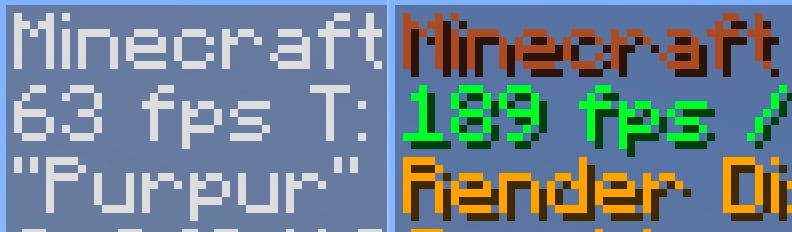
Compared to vanilla without mods, it offers a substantial performance boost and runs exceptionally well on my M1 Mac.
### Qol?
Absolutely! Everyone appreciates comfort, right? This modpack includes numerous useful mods that will make you never want to play without them again.
– [CustomHud](https://modrinth.com/mod/customhud) – I love seeing IRL time when playing the game. This is the best vanilla-looking HUD mod that lets me see it.
– [Shulker Box Tooltip](https://modrinth.com/mod/shulkerboxtooltip) – You never remember what inside shulker boxes. So why not to preview them.
– [Auto Elytra](https://modrinth.com/mod/auto-elytra) – Automatically switch chestplate to elytra and vice versa.
– [Controlify](https://modrinth.com/mod/controlify) – Controller support with many great features.
– [Chat Patches](https://modrinth.com/mod/chatpatches) – This mod makes chat great again.
– [Durability Viewer](https://modrinth.com/mod/durabilityviewer) – Useful for seeing the exact durability left with your items.
– [Inventory Profiles Next](https://modrinth.com/mod/inventory-profiles-next) – ADHD inventory sorting. But also has many awesome inventory management features.
– [Chest Tracker](https://modrinth.com/mod/chest-tracker) – Helps you find in which chest your certain items are located.
– [ChatWalk](https://modrinth.com/mod/chatwalk) – Useful when you need to travel straight for a long distance but are too lazy to press the W button all the time (though not the main purpose of this mod).
– [Xaero’s World Map](https://modrinth.com/mod/xaeros-world-map) – The best world map and waypoints mod ever existed.
– [Ok Zoomer](https://modrinth.com/mod/ok-zoomer) – My personal favorite zooming mod. This mod is literally the only reason why I use Quilt over Fabric 🙂
– [Screenshot Viewer](https://modrinth.com/mod/screenshot-viewer) – Great way to preview screenshots right in-game. Handy on Steam Deck where I can’t open filesystem.
– And so much more…
### You mentioned it works well on the Steam Deck?
Sure thing! Here’s a short gameplay video on my deck:
https://github.com/fopwoc/minecraft-modpacks/assets/21304354/8e327b8c-762a-4343-b4f6-ae9a0ccd2e5d