Water of Youth
Make your pets never ages with this DataPack.
You can turn entities into baby or adult form at will.
Craft the new _**Potion of Youth**_ or _**Potion of Age**_ and throw it to an entity in order to make it a baby again or an adult instantly.
Entities sprayed with the _Potion of Youth_ will **remain** in its **baby** form (won’t age) until a _Potion of Age_ is used on them.
—
**BETA:** The recipes are prototypes, I would like to know your opinions and suggestions.
WATER BUCKET. RELEASE!
**To hurl water right out of your bucket, drop it while crouching in midair.**
Be warned as there remains a bit of challenge in clutching that you’ll need to get used to. My advice is to look **directly** beneath you and pray that the velocity of the resulting projectile is enough to outspeed your fall and that it lands in the center of a block.
You can launch these projectiles to peeve off mobs and other players too! I will not be held accountable for any angry mobs that shall ensue as a result.
(Note: Jac- err.. Steve yelling “RELEASE!!” as shown in the clip is cut from this mod and irrelevant in the showcase)
A Watched Pot

A watched pot never boils. A watched furnace never… ticks?
**A Watched Pot** is a fully configurable mod for both Neoforge/Forge and Fabric/Quilt that either stops blocks from ticking when they’re looked at or restricts them to only tick when they *are* looked at, based on a block tag.
Requires Fabric API on Fabric/Quilt.
## Usage
**On Forge**, A Watched Pot can be configured through Forge’s normal server configuration systems. There are currently two configuration options:
* The mod can use either a whitelist or a blacklist, which can be toggled via the `use_whitelist` option. If the option is enabled, only blocks in the `watchedpot:whitelist` block tag will be affected. If it’s disabled (which it is by default), all blocks will be affected *except those in the `watchedpot:blacklist` tag*.
* The mod’s behavior can be inverted via the `invert_behavior` option. If enabled, only blocks that are looked at will tick (of those affected); if disabled, all blocks will tick *unless* they are looked at.
By default, both options are set to false – that is, no block will tick while a player is looking at it.
To recap:
* `use_whitelist=true, invert_behavior=false` – blocks in the whitelist tag will not tick if they are looked at; all other blocks remain unchanged.
* `use_whitelist=false, invert_behavior=false` – all blocks will not tick if they are looked at, unless they are in the blacklist tag (in which case they remain unchanged).
* `use_whitelist=true, invert_behavior=true` – blocks in the whitelist tag will only tick if they are looked at; all other blocks remain unchanged.
* `use_whitelist=false, invert_behavior=true` – all blocks will only tick if they are looked at, unless they are in the blacklist tag (in which case, again, they remain unchanged).
**On Fabric**, the same options can be set via gamerules (`watchedpot_useWhitelist` and `watchedpot_invertBehavior`) to avoid an extra config dependency. This is unfortunately not quite as robust but it keeps the mod lightweight on both platforms. If you need to set default values (such as for a modpack) you can emulate that behavior with a KubeJS server_script, like so:
“`js
// For 1.18.2 change the line below to onEvent(‘server.load’, event => {
ServerEvents.loaded(event => {
if (event.server.persistentData.gameRules) return
event.server.gameRules.set(“watchedpot_useWhitelist”, true)
event.server.gameRules.set(“watchedpot_invertBehavior”, false)
event.server.persistentData.gameRules = true
})
“`
You can also use datapacks to achieve the same effect with a .mcfunction running the `/gamerule` command. See the Minecraft Wiki) for information on that.
Wash Dyed Items

Undo your dye mistakes — and refresh your style.
Ever dyed your armor or blocks the wrong color? Wash Dyed Items lets you easily remove dye colors and restore items to their original state — no commands, no hassle.
## Wash Off Dye from:
leather armor
Bundles
Harness
Wool items
Shulker boxes
Candles
Simply drop use a crafting recipe to clean it.
Get your base item back and reuse your dyes freely.
## Perfect For
Builders who change palettes often.
Survival players who hate wasting dyes.
Servers that want small, useful quality-of-life features.
# Compatibility
Works as both a Datapack and a Fabric/Quilt Mod.
Fully compatible with Minecraft 1.20+.
ightweight no external dependencies.
Simple. Clean. Satisfying.
Bring a touch of realism and forgiveness to Minecraft crafting.
Wart Decay
This mod does one simple thing. Makes wart blocks decay as if they were leaves.

FABRIC – Requires MidnightLib

Requires Statement

Warranty
**Tired of your tools snapping mid-mining session?**
The **Warranty** enchantment gives your gear a second (or third!) life—literally.
## 🔹 What It Does
The Warranty enchantment prevents items from breaking when their durability reaches 0. Instead, the item is fully repaired and one level of Warranty is consumed. This cycle continues until all levels are used.
– 📈 Each level of Warranty = 1 extra full durability bar
– 🔄 Automatically repairs items on breaking
– 🧱 Works on all damageable items
– ⚖️ Cheaper to obtain than Unbreaking, but it does run out
## 🧩 Compatibility
– Minecraft 1.21.5
– Compatible with most other datapacks and vanilla features
– **WARNING** not compatible with other New Life Enchants without our compatiblity Datapack.
## Server Hosting (ad)
You are looking for an easy way to play with your friends?
Get a powerful server and support us ❤ by clicking on the sign below!

https://vyperhosting.com/r/testnalpaca37
Warpstones
# 🌍 Warpstones


## 📖 Description
Place Warpstones at key locations to create fast-travel points in your world. Designed for both survival and multiplayer gameplay, this mod offers a simple and balanced way to move around quickly!
### Feactures
– Custom Name (with name tags)
– Glowing (with glowstone dust)
– Compass Linking
I recommend use a Lodestone Recipe Backport to use a iron ingot instead of netherite ingot.
## 🛠️ Recipe

## ⌨️ Commands
Destroy all Warpstones:
“`mcfunction
/function warpstones:destroy_all_warpstones
“`
Give:
“`mcfunction
/loot give @s loot warpstones:warpstone
“`
## 🪪 License
AGPL-3.0-or-later
## 👾 Bugs/Issues
Please report any problem/bug/issues in the Discord Server.
## 💌 Donate
– Donate on Ko-Fi
– Donate on PayPal
## 🎁 Server Hosting
Creating your own server can be a very lengthy, tedious and costly process.
But with BisectHosting, you get your own server in just a couple of clicks! With their 24/7 support and fast-response time, no issues shall stand in your way!
Interested? Then we’ve got a deal for you!
https://bisecthosting.com/lullaby

Warp Point
**A Vanilla and Survival friendly way to set a Warp point and teleport to it, featuring immersive particles, sounds and effects!**
## Setting the Warp Point
Sneaking for 2.5 seconds while holding an Eye of Ender in your main hand will set the Warp Point to your current location.
– Be careful, taking damage will cancel this process!
– Unless you are in creative mode, setting a Warp Point will consume one Eye of Ender from your inventory.
– There can only be one active Warp Point – Creating another will override the previous.
## Teleporting to the Warp Point
Sneaking for 10 seconds while holding an Enderpearl in your main hand will teleport you to the Active Warp Point.
– After about 5 seconds, some nausea kicks, increasing with the remaining duration!
– Be careful, taking damage will cancel this process!
– Unless you are in creative mode, teleporting to a Warp Point will consume an Enderpearl from your inventory.
Commands
/function warppoint:help
– Will show you this list.
/function warppoint:set
– Sets a new Warp Point, overriding the previous.
/function warppoint:teleport
– Teleport to the currently active Warp Point.
/function warppoint:lock
– Disables the ability to set a new Warp Point in Survival or Adventure Mode.
Useful in Multiplayer, when you don’t want other players to change its location.
/function warppoint:unlock
– Allows players in Survival or Adventure Mode to set a new Warp Point again.
/function warppoint:delete
– Deletes the Current Warp Point.
/function warppoint:uninstall
– Uninstalls the WarpPoint Datapack.
## Installing as Datapack
As with any datapack, use **/reload** after placing **Warp Point.zip** in the datapacks folder of your world to activate it.
## Feedback
Feel free to give me bug reports, feature ideas or other feedback on my Discord Server.
Warping Wonders

## 📖 Description
**Warping Wonders** allows for a more immersive player teleportation utilizing already existing items. Using a compass which is linked to a lodestone players can teleport back to the lodestone. A clock teleports players back to their spawnpoint (bed, respawn anchor) and the recovery compass can bring players back to their last death location. The latter two always get consumed when using them. In addition to that Portal Horns can be crafted which function as a TPA replacement. The latest addition to the data pack is a Waypoint Hub system which lets players set up a network of points of interest where they can teleport to. All teleport actions function across all dimensions. Ridden Entites (Camel, Strider, Donkey, Mule, Horse, Llama and Horses) as well as leashed Entities (including Boats) will be teleported alongside players.
**With v2.5+ Admins/OPs can configure almost anything in-game using config menus.**
Command to open the Config Menu
“`
/function warping_wonders
“`
Admin Tag
The Admin Tag allows for teleporting and editing any Waypoint regardless of being the owner or not.
Will either be set automatically when opening the Config Menu or can be set with:
“`
/tag add/remove wawo.admin
“`
## 🧭 Item Overview
Compass
Compasses can teleport you to their linked Lodestones, and several additional variants can also be crafted.
Recovery Compass
You can use a Recovery Compass to teleport to where you last died, and there are also a bunch of other variants you can craft.
Clock
Using a Clock teleports you back to your respawn point — usually your Bed or Respawn Anchor.
Portal Horn
Tooting a Portal Horn brings up a menu to invite another player to teleport to you. They’ll get a chat message where they can choose to accept.
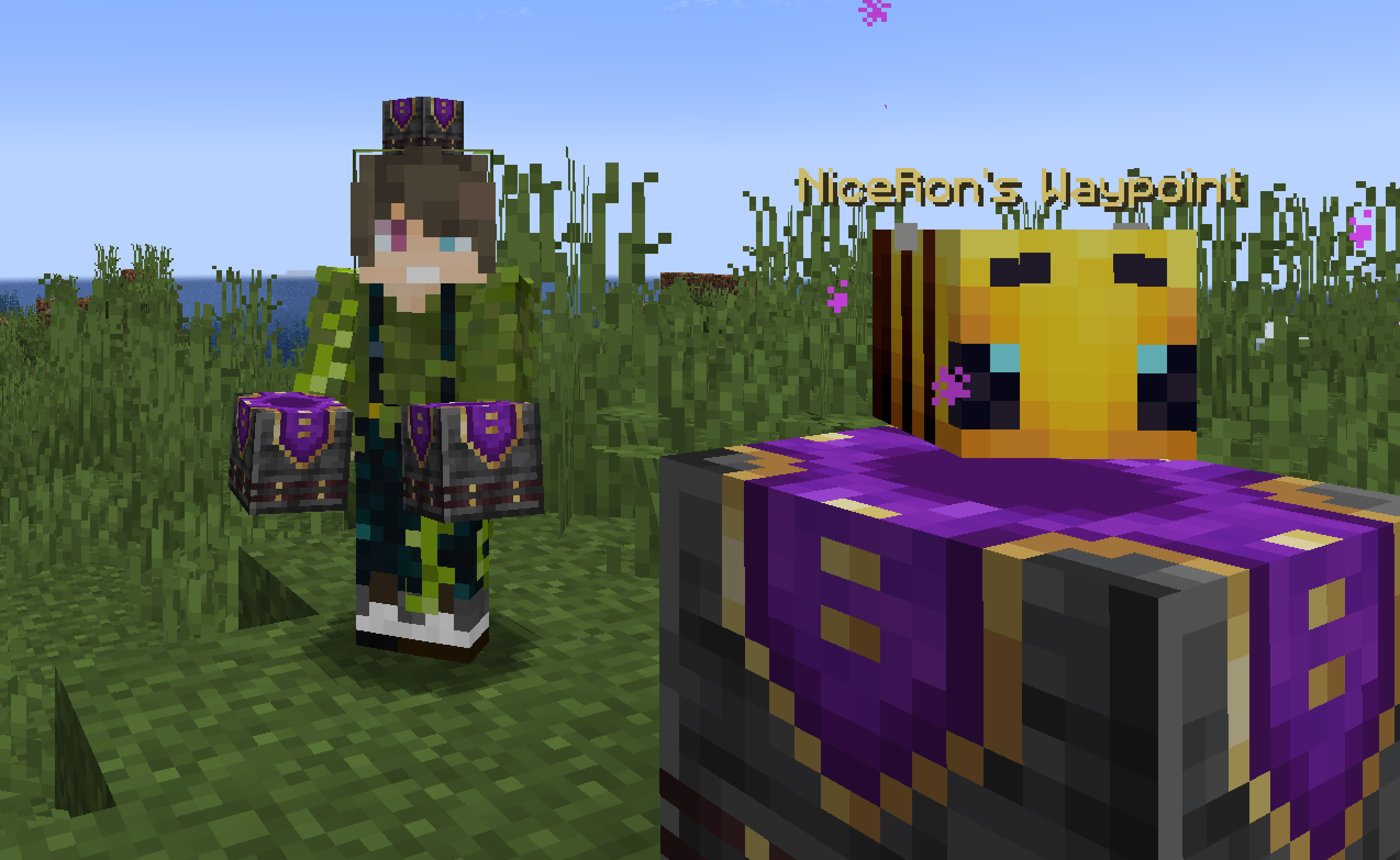
Waypoint Hub
Waypoint Hubs can be crafted and placed to create fixed teleport locations that connect to other Waypoint Hubs. Multiple variants are available, each crafted with a different base block so they can blend seamlessly into any build.
– Menus only display destinations the player can access (public or their own private waypoints).
– Pickaxes are the default tool for mining/breaking Waypoint Hubs.
– Private Waypoints display a lock icon above their name.
– Left- or right-clicking the icon of a Waypoint Hub you placed with a renamed Name Tag changes its name.
– Left- or right-clicking with a renamed Book adds/changes a description for the Waypoint Hub to the menu tooltip lore.
– Left- or right-clicking with a renamed Paper grants/revokes access permission for a player to teleport to the Waypoint regardless of it being locked (“trust / “untrust “)
– Left- or right-clicking with a Dye changes the waypoint’s text color.
– Left- or right-clicking with a Waypoint Lock toggles its accessibility (private/public).
– Left-clicking the icon without an item (Name Tag, Dye, etc.) cycles through available icons/heads.
– Right-clicking the icon without an item opens the waypoint menu.
– Placing a Wool block beneath the hub disables teleportation announcements for that hub.
Waypoint Lock
Waypoint Locks can be crafted to switch a Waypoint Hub’s visibility between private and public.
## 🛠️ How to, Instructions & Commands
The datapack usually just needs to be installed. There is nothing else you have to do. It just works out of the box.
For **PaperMC users**, it is recommended to set the `paper.maxChatCommandInputSize` property to a value between 512 and 1024. More information can be found in the PaperMC Docs. Also make sure to have `allow-non-player-entities-on-scoreboards` enabled in your paper configs.
**The data pack version also double functions as a resource pack. So in order to be able to see them, just place the data pack .zip also in your resource folder and activate it like any other resource pack.**
## 📝 Translations
Want to play in your own language? You can help us out by contributing on our **Crowdin Page**! Once a translation for a language is finished, it’ll be added to the data pack for you to enjoy.
## ✍️ Feedback, Questions & Suggestions
We’re here to help! If you happen to have questions, suggestions or just encountered a bug, then feel free to hop on our discord server to ask for help in our **Data Pack Section**. Click to join the server
## 🎮 Explorer’s Eden SMP
Join **A Realm Recrafted**, our Minecraft SMP! Enjoy a world featuring all of our (actively maintained) data packs, as well as some exclusive ones. It’s completely free without any microtransactions. Come build, explore, and craft with us today!

Warping Carrots (Teleport to Friends)
# Warping Carrots



Teleport to your Friends with ease! Intended for small servers (up to 10 Friends) where you play Together! It tries to offer a more Survival-Friendly and Balanced approach compared to having access to an `/tpa` command.
## How does it work?
### Ender Warp
Every Player can open an Ender Warp by right clicking with the Ender Warp Item. It can be crafted with a Gold Ingot and an Ender Pearl (Shape does not matter):
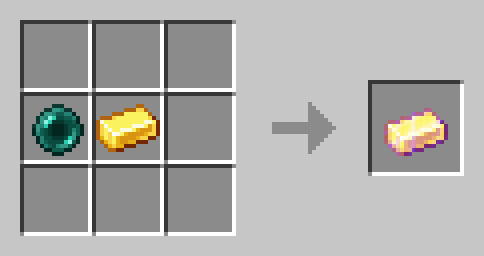
There can only be one Ender Warp open at all times. Ender warps automatically close after 60 seconds. When someone opens an Ender Warp the previously open one gets closed.
### Warping Carrot
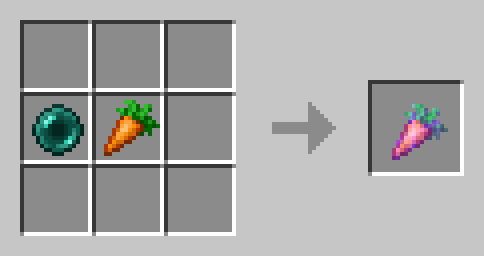
Eat Warping Carrots to teleport to the player who is currently opening an Ender Warp. It will damage you as much as an Ender Pearl. Warping Carrots are crafted with an Ender Pearl and a Carrot (Shape does not matter):
### Golden Warping Carrot
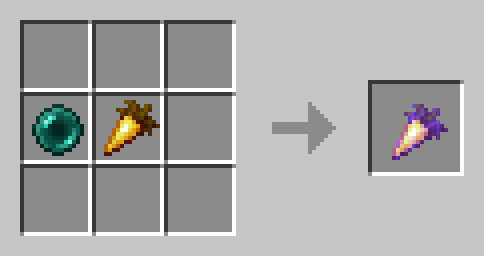
The Golden Warping Carrot has the same functionality as the Warping Carrot, but will not deal Damage when Teleporting.
## ⚙️ Compatibility
Do not use an “Unlock all achievements” datapack after having installed this datapack!
## ❗Issues and Suggestions
Report issues immediately on my Discord.

