Waypoint Block
# Waypoint Block

—
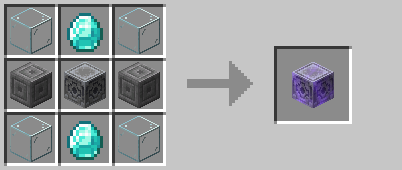
This datapack (or mod) adds placeable blocks that show markers on the player locator bar, no texture pack required!
—
## Crafting
WayGL
# WayGL
**Tired of all those pesky X11/Xorg bugs happening because you’re using wayland? Well fear no more, I have quite the solution for you.**
WayGL will force GLFW to create a wayland window ~~(at the cost of sacrificing your window icon)~~ (NO LONGER AT THE COST OF YOUR ICON!!!) on supported systems (Linux using wayland display server).
WayGL makes use of runtime GLFW platform switching, if your on a supported platform, GLFW will be set to use Wayland. Like this, you don’t have to worry about compiling GLFW specifically for wayland.
Say goodbye to those Xwayland bugs/compatability issues!
## 1.17.x – 1.18.x – 1.19.x Support tested on LWJGL 3.3.2 compatibility not guaranteed on other versions
LWJGL version can be changed in instance settings in prism launcher
– Instance > Edit > Version > LWJGL 3 > Change Version > 3.3.2 > Ok
### ***Icons courtesy of moehreag***
WayFix

# WayFix
 
Fixes multiple issues regarding Wayland compatibility for Minecraft.
**Recommended to be used with glfw-wayland.**
**With the Cursor Fix.**
**And kdotool** ***(only if on KDE Plasma)***.
## Features
– Auto Scale GUI
– Auto-scales the GUI scale depending on your display’s scaling. (e.g. 2 GUI Scale on 1920×1080 at 100% → 4 GUI Scale on 3840×2160 at 200%)
– Inject Minecraft Icon at Startup
– Injects the Minecraft Icon at Startup instead of defaulting to the normal Wayland icon.
– Key Modifiers Fix
– Fixes issues where keyboard combinations like ‘CTRL + A’ or ‘CTRL + C’ are sent as characters in chat instead of being recognized as key combinations.
– **Fullscreen**
– Select Monitor
– Select which monitor you want to fullscreen Minecraft to.
### Note
By default Minecraft sometimes full-screens on the wrong monitor due to Wayland window limitations (unable to get X and Y position).
This is automatically **fixed only on KDE Plasma** without specifying the monitor by installing **kdotool**.
Wayfinder

_”From there to here, and here to there, funny things are everywhere.” – Dr. Seuss_

### Wayfinder is a brand new mod that adds a new way to explore Minecraft like never before
_**REQUIRES GECKOLIB**_
## Meet The ‘Wayfinder’
Spoiler
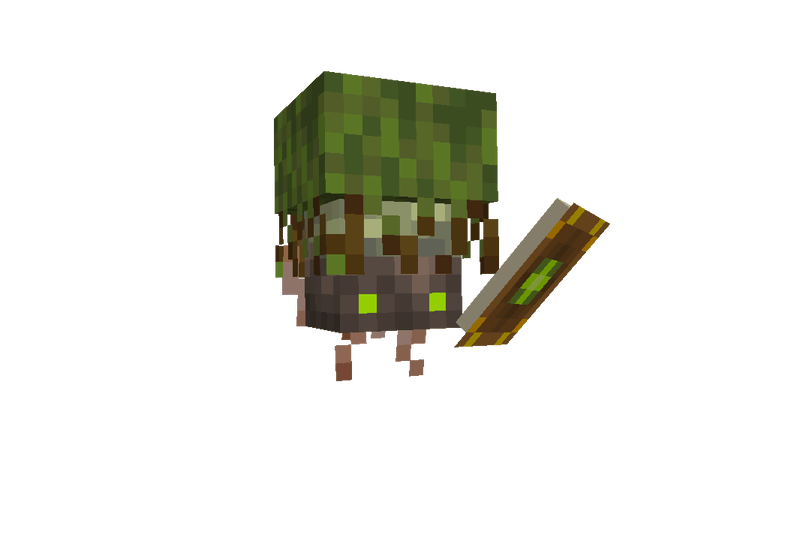
This new, unique mob will assist players in finding their dream biomes in a lore-friendly vanilla-styled gameplay that provides more character and an exploration journey.
## GETTING STARTED:
Wayfinder shrines can be found in Villages, and the player needs to offer up a few emeralds to summon a Wayfinder. Each player can also have their own Wayfinder, and when they aren’t helping you find biomes, they can act just like any other ‘pet’ except this little being is definitely an ancient deity of some sort, so don’t treat them like one.
## HOW TO USE:
Right-click your new Wayfinder friend, and on the right side of the GUI, you will see all the biomes in the current dimension you are in. Click on the biome you want to search for and click ‘Search’. If the Wayfinder cannot find the biome within a 10,000 block radius, it will shake its head no, and you will need to pick another biome to find. Once the Wayfinder finds a biome you want within its radius, it will begin journeying to the biome. If the Wayfinder gets too far away from its owner during a journey, it will teleport back to the owner. If you want to cancel the trip, right-click your Wayfinder and click the ‘Cancel’ button. Wayfinders do have a short cooldown in-between biome searching.
## PROTECTING YOUR WAYFINDER:
Wayfinders are targeted by PROJECTILE BASED MOBS such as, but not limited to, Skeletons, Pillagers, Witches, and more. If the Wayfinder detects one of these mobs nearby, it will go into a panic state; the player must kill the nearby mobs for the Wayfinder to continue its journey. If the Wayfinder gets hurt, it will put up a shield that will block the following two instances of damage. Once the shield is broken, the Wayfinder will be vulnerable to death.
You can feed a Wayfinder ‘Glowberries’ to heal its health.
## RESUMMONING YOUR WAYFINDER:
If your Wayfinder dies, you can resummon them at a Shrine; however, it will cost 2x more than the previous Emerald amount. The starting summon value is 1, so resummoning once will cost two emeralds, then 4, 6, 12, 24, etc., up to a max of 64 emeralds. But you won’t let that happen… right?
## FUTURE PLANS & UPDATES
-Skins! We want to let you customize your Wayfinder and give it that extra flair!
-New exploration mechanics such as Glowberry charges to increase the biome distance search range
-New journey completion rewards, such as a new music disc or hero of the village, for completing long journeys!
-Tweaking movement for the Wayfinder
-And so much more!
**THIS MOD IS CURRENTLY IN BETA SO BUGS MAY HAPPEN | PLEASE REPORT ALL BUGS TO GITHUB**

Wayfarer

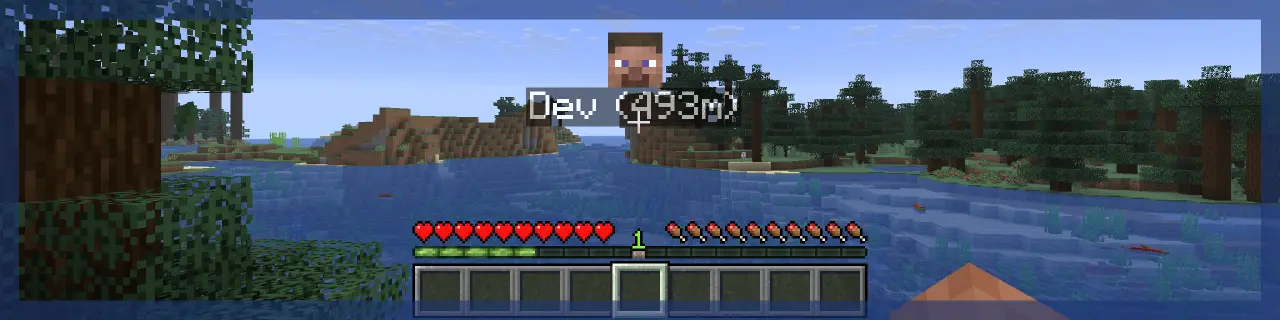

 
> **Wayfarer** implements a waypoint rendering system and aims to improve the locator bar, all in a way that can be utilized by other developers in their projects!
> **Client-side**, the mod handles waypoint rendering in-world and on the locator bar. There are many customization options to tweak waypoint visuals.
> **Server-side**, the mod handles server-to-client waypoint data and synchronization to tell the client what to render. Not all projects need this, client-side mods can just utilize the waypoint renderer directly!

> That’s alright; Wayfarer **is** still useful on its own! Its standalone features include:
> ## Improved Locator Bar
> – Wayfarer adds a **hold** keybind to manually toggle the locator bar.
> – In survival, locator bar icons render over the experience bar instead of replacing it with the locator bar, so you can still see your experience!
> – Head icons are shown for players on the locator bar.
> – Instead of icons getting smaller as they get far away, they become more translucent.
> ## Try These Mods:
> 

You can find an **API Reference** guide and some examples on how to integrate with **Wayfarer** on the **Wiki**.
## Join us. Thrive.

Way of the Crafter
# Way of the Crafter
Datapack that adds a crafting manual to the game, which when read grants the player all recipes!
## Recipe

## Roadmap
If you have any ideas or encounter any bugs, feel free to raise an issue or PR on the GitHub page.
Way Much Faster Oxidize
# What it dose?
Ever feel that copper oxidation is too slow? Want to use oxidized copper as a building material but lack the time?
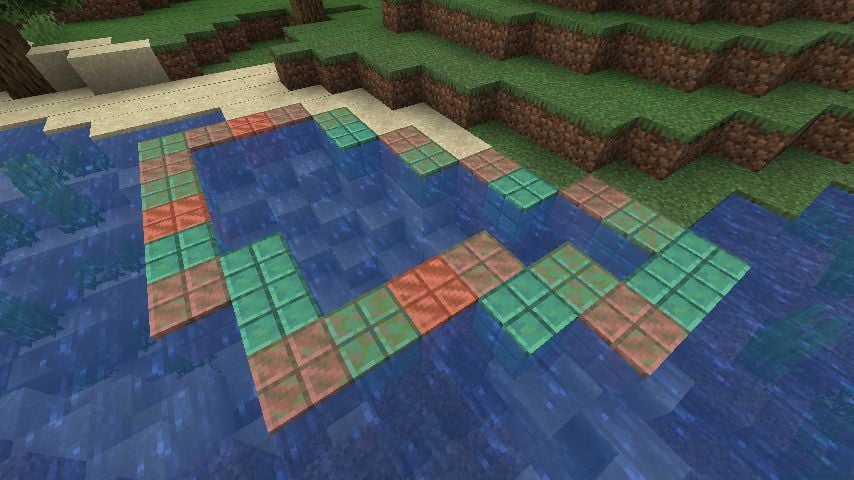
This mod provides a completely new oxidation mechanism for copper: **water**.
When a copper block comes in contact with water, it oxidizes more rapidly, regardless of whether there are other copper blocks around.
Waxed Not Waxed
# Waxed Not Waxed
Adds a simple indicator to know if a copper block is waxed or not!
## Preview


## Toggling
The indicator can be toggled with the `z` key
## Requirements
Fabric Language Kotlin >=1.7.1+kotlin.1.6.10
Waxed Icons
This is a simple QOL mod that adds a small icon on waxed blocks! This is done using Trimmed’s client-tags, so if you want to add items to render the icon all you need to do is create a resource pack with `assets/waxedicons/trimmed/tags/item/renders_waxed_icon.json` and add the items to it like you would with a regular tag.
Requires Trimmed (naturally)
Waxable Coral
Does one thing. Adds. Waxed. Coral. And a method to obtain it. Just right click on any coral block with a honeycomb and you’re done! it can be picked up and moved and doesn’t dry out when out of water.
Supports Waxed Icons
Built-in Compat:
1.19+ –> Nothing known atm, let me know of any mods you’d like compat with!
1.18.2 –> Upgrade Aquatic