Weather Changer
# Weather Changer
Client side weather changer for Minecraft
## Overview
Changes the weather on client side (only visible to you) to clear, rain, or thunder, this mod does not affect the server or send any packets to the server.
Supports forge and fabric, requires the Fabric API when using fabric
### In-Game Command Usage
`/clientweather `
The command alias `/cweather` may also be used as a shortcut.
### Keybindings
To set the keybindings you can do so in the minecraft keybinding settings.
| Description | Default |
|———————————————————————————-|———|
| Disable the client weather (weather will display the server weather like normal) | Unbound |
| Set the client weather mod to clear | Unbound |
| Set the client weather mod to rain | Unbound |
| Set the client weather mod to thunder | Unbound |
For supported mod loaders and minecraft versions see [release history](#release-history)
## Release History
| Version | MC Version | Mod loaders | Git Tag | Supported |
|———|—————|—————|————————————————————————|———–|
| v1.2.2 | 1.21 | fabric, forge | 1.2.2 | Yes |
| v1.2.1 | 1.21 | fabric, forge | 1.2.1 | Yes |
| v1.2.0 | 1.21 | fabric | 1.2.0 | No |
| v1.1.0 | 1.21 | fabric | 1.1.0 | No |
| v1.0.1 | 1.20.1-1.20.6 | fabric, forge | 1.0.1 | Yes |
| v1.0.0 | 1.20.1-1.20.4 | fabric, forge | 1.0.0 | No |
### Pre-release (v0) versions
| Version | MC Version | Mod loaders | Git Tag | Supported |
|———|—————|————-|————————————————————————|———–|
| v0.3.0 | 1.20.1-1.20.4 | fabric | 0.3.0 | No |
| v0.2.0 | 1.19.3 | fabric | 0.2.0 | No |
| v0.1.0 | 1.19.1-1.19.2 | fabric | 0.1.0 | No |
## Minecraft Versions
| Version | Status |
|———|———————————|
| 1.21 | Supported |
| 1.20.6 | Supported |
| 1.20.5 | Supported |
| 1.20.4 | Supported |
| 1.20.3 | Supported |
| 1.20.2 | Supported |
| 1.20.1 | Supported |
| 1.20 | Not Supported (available in v0) |
| 1.19.4 | Not Supported (available in v0) |
| 1.19.3 | Not Supported (available in v0) |
| 1.19.2 | Not Supported (available in v0) |
| 1.19.1 | Not Supported (available in v0) |
*Older versions may be added on request*
——————————————
*Licensed under the GNU Lesser General Public License v3.0 license.*
WearThat
# Wearthat
Why shouldn’t you be able to wear that?


WearThat allows you wear any item in any armor slot. You heard me right. Any item. That includes tools, blocks, weapons, other armor pieces, etc. They even render!
This mod should theoretically work client side but only the rendering will work, It is required on server in order for people to actually equip any item normally.
Wearing a Banner and Going on an Expedition│戴著旗幟出征
**⚠️ This data pack requires the server-side mod Item Components.│該資料包需要伺服器端模組物品組件。 ⚠️**
# Introduce│介紹
Why can illagers wear banners but I can’t? With this data pack, the banner can be worn on the head like a helmet.│為甚麼災厄村民可以戴著旗幟而我卻不行?有了這個資料包,旗幟就和頭盔一樣可以戴在頭上。
Wearable Backpacks
# Wearable Backpacks
.. is a Minecraft mod which adds backpacks. But wait! It’s not like anything you’ve seen before! Or maybe it is, since this project is a direct continuation of the mod with the same name, now on Fabric and Modrinth. In it you’ll find beautifully designed and balanced alternative backpack option unlike any other.

## What’s so great?
– **There can be only one!**
Other mods allow you to carry multiple backpacks in your inventory. WBs doesn’t. This design, as well as the resulting implementation has been carried over from its predecessor. But what the mod is lacking in convenience, it’s trying to make up in charm and configurability.

– **Armor up, or storage up?**
With the default settings, backpacks will function as armor, taking up the chest armor equipment slot, protecting from as well as taking damage just like leather armor. This way, you have to choose between more protection or more storage. This can be turned off though, in case you don’t like it.
– **Play with friends, share backpacks!**
Having a backpack on your back looks cool and all, but if only you could do something with that beauty. Well, lucky you! Other players (hopefully, without ill intentions) can open your backpack and borrow a pick and some torches on a mining trip. This of course only works as long as your back is facing towards them.

– **Dying is FUN!**
Sick of losing all your valuables when you make a small little misstep into the nearest pool of lava? Don’t worry, the items inside your backpack will be… mostly safe. While the backpack itself is not immune to explosions or being broken by other players, after death it will gently place itself down near your point of failure, ready to be retrieved.
– **Dyeing is fun~!**
Backpacks can be colored using Minecraft’s fantastic dyeing system. Unlike some silly mods that only allow the 16 base colors, with our pretties you can mix and match your dyes to customize them in any way you like!

– **Configuration Nation**
Not sure if WBs will fit your play style? Don’t worry! This mod is meant to be incredibly configurable with its easy-to-use in-game config menu. This allows backpacks to be balanced, regardless of whether they’re used in a personal hand-picked pack, a huge kitchen sink modpack or a deadly hardcore-massacre-of-doom experience with sprinkles on top.
## Usage
Think of Wearable Backpacks backpacks as portable, wearable chests. After you’ve crafted one, simply place it on the ground and fill it with whatever you’d like to take with you. Next, **sneak** and **break** the backpack to equip it. You might notice that breaking the backpack normally, without equipping it, takes a little longer.
Now that the backpack is where it belongs (your back), you can **unequip** it again by **sneaking** and **right-clicking** the ground with an **empty hand** – specifically, the top of a solid block.
By turning on a config option, it’s also possible to open the backpack using a keybind, which you can find in the controls menu (default: `B`).
### Crafting Recipe

### Additional Features
– As already mentioned above, this mod has many, easy to use configuration options.
– When backpacks are equipped as armor, they may also be enchanted just like armor.
– Some mobs may rarely spawn with backpacks equipped, containing random loot.
## For Modpack / Map Creators
– Custom backpack size can be set using NBT tag `backpack:{size:[x,y]}`.
– Custom armor value can be set using NBT tag `backpack:{armor:x}`.
– Default backpack loot table `wearablebackpacks:backpack/default` can be overridden.
– Backpack spawn settings can be modified: Edit chance, loot table and color.
– Custom entities can be configured to spawn with backpacks!
## Credits
### Authors
– Sunconure11
– DanikingRD
– ChloeDawn (contributions and initial port to Fabric)
– asiekierka (large help with porting older version of the mod)
– copygirl (original author)
### Contributors
– IwoPlaza
(copygirl/WearableBackpacks#82)
– ichttt
(copygirl/WearableBackpacks#119)
### Localization
In the order of their changes being submitted, here are the lovely people who provided their translation superpowers to make **WBs** available in other languages:
– **German** (de_DE): Vexatos
– **Chinese** (zh_CN): 3TUSK
– **Dutch** (nl_NL): TDarkShadow
– **Russian** (ru_RU): kirill3345, dangranos, raspopov
– **Korean** (ko_KR): tinywolf3
– **Portuguese** (pt_BR): wenlfs, eduardogomesv, DaDodger
– **Spanish** (es_MX): Dorzar
– **Italian** (it_IT): Insane-96
– **Danish** (da_DK): Zerotiger
– **Slovenian** (sl_SI): SFort
– **Polish** (pl_PL): Pabilo8
– **Slovak** (sk_SK): rufo123
### Special thanks to …
– **asiekierka** for being an amazing friend in general, letting copygirl use Charset as a reference and updating the mod to 1.11, so he’s getting a co-author mention. ❤
– The **Penguins’ Retreat** server for encouraging copygirl to rework / finish earlier versions of the mod.
*In the event that this mod becomes self-aware, we are not responsible for any damage it causes.*
Wearable Items+

## Description
Wearable Items+ is a Data Pack/Mod that makes possible to wear a list of items/block on your helmet slot fully in survival mode through a simple craft recipe.
## Important notes
– Do not put your block on ground if is placeable or it will lose its properties
– If you remove the data pack, the items already made will NOT lose its properties
– No Resource Packs needed
– Only works in 1.21.2 or above
– Only the basic Decorated Pot works
## How it works
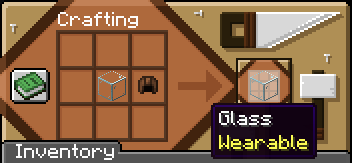
You only need to choose your item on the list below and put it on a craft grid with a leather cap (helmet) being a shapeless craft. After that, the item should show a “Wearable” tag.
## Items list (Go gallery for images)
GENERAL (47)
– Amethyst Bud [all sizes]
– Amethyst Cluster
– Anvil [any durability]
– Azalea
– Barrel
– Big Dripleaf
– Bone
– Bush
– Cactus Flower
– Chest
– Cod
– Composter
– Crafter
– Decorated Pot
– Dispenser
– Dragon Egg
– Dropper
– Emerald
– End Rod
– Ender Chest
– Feather
– Firefly Bush
– Flowering Azalea
– Ghast Tear
– Gold Nugget
– Honey block
– Ice
– Iron Nugget
– Jack o’Lantern
– Lead
– Lightning Rod
– Mangrove Propagule
– Mangrove Roots
– Nether Star
– Observer
– Pointed Dripstone
– Respawn Anchor
– Restone Torch
– Scaffolding
– Slime Block
– Spore Blossom
– Spyglass
– Sunflower
DYEABLE AND FROM WOOD (99)
– Sign [all woodtype]
– Leaves [all types]
– Hanging Sign [all woodtype]
– Glass [all colors + Tinted Glass]
– Glass Pane [all colors]
– Fence Gate [all woodtype]
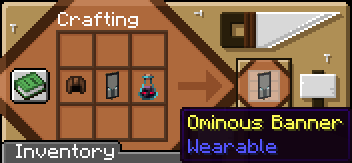
– Banners [all colors + Ominous Banner]
COPPER (8)
– Copper Grate [all oxidized and waxed stages]
CREATIVE EXCLUSIVES (3)
– Monster Spawner
– Trial Spawner
– Vault
## Ominous Banner
Ominous Banner is the only item that needs an additional item to craft, it being a Ominous Bottle of any level.
## See More:
CURSEFORGE
PLANET MINECRAFT
Pouches!
# **Pouches!**
This data pack is a simple concept. You add extra string to a bundle, it becomes a pouch. It looks exactly identical, except that you can wear it!
It takes over the leggings slot, turning it into an extra storage slot.
# **The download**
I’ve included both the resourcepack and datapack in the datapack download. So uhh you can copy the thing onto ur resourcepack folder incase you ever lose the rp.
_Do also note: Recoloring *may* be a little broken when your gamemode is set to creative from what I’ve tested. No clue why._
Weapon Enhancement│武器強化
# Function│功能
– Attacking with an axe, hoe, shovel, or pickaxe will only deal 1 point of damage to that weapon.│使用斧、鋤、鏟、鎬攻擊時只會消耗其1點耐久度。
– Attacking with a mace will also deactivate the shield for 5 seconds.│使用重錘來攻擊也能停用盾牌5秒。
Weaker Spiderwebs


Requires the library mod Collective.
This mod is part of The Vanilla Experience modpack and Serilum’s RPG Bundle mod.
Weaker Spiderwebs is a minimalistic configurable mod which breaks spider webs/cobwebs with a delay when players walk through.
Configurable: ( how do I configure? )
breakSpiderwebDelay (default = 500, min 0, max 10000): The delay in ms after walking in a spiderweb until it breaks.
The effect in action:
Show Spoiler

——————
You may freely use this mod in any modpack, as long as the download remains hosted within the Modrinth ecosystem.
Serilum.com contains an overview and more information on all mods available.
Comments are disabled as I’m unable to keep track of all the separate pages on each mod.
For issues, ideas, suggestions or anything else there is the Github repo. Thanks!
Waystone Crypts
This mod adds adds crypts into Minecraft that contain waystones. If you are wondering where the mod logo was created, I used the help of blockbench which you can use as well for free!
This is a Fabric, Quilt, Forge, and Neoforge Mod
Report bugs here.
Features:
This is a mod which adds vanilla friendly crypts (currently only two variant(s)) in the game which can spawn randomly throughout cave systems in the overworld. These crypts have a 50% chance to contain waystones. Supports both the Wraith Waystones mod or the Waystones mod.
It is also should be compatible with any other structure mod. Make sure to leave a comment if it isn’t so I can try and fix it!
No expansions planned for now, feel free to add your suggestions.
Images:
Located in the gallery tab.
Sponsored by BisectHosting
Need a server to play with friends? Not familiar with setting up servers? BisectHosting provides servers that are setup instantly, DDOS protected, and provides support for all your favorite mods and modpacks.

Click on the image above and use the code Ner07 for 25% off your first month for any BisectHosting game server.
That is Ner07 with a Zero and not the letter O.
Waypoints
Waypoints Teleport – Minecraft Waypoint & Fast Travel Datapack (1.21.6+)

Waypoints Teleport is a lightweight Minecraft waypoint datapack that adds a survival-friendly fast travel and teleport system to your world. Save, manage, and instantly travel between custom locations across all dimensions using a clean dialog-based interface — no client-side mods required.
Perfect for survival worlds, SMP servers, multiplayer communities, and long-term exploration maps.
Craft and obtain a Waypoint Rod to unlock your personal teleport network.
Features

- ✔ Create and manage up to 20 custom waypoints per player
- ✔ Cross-dimension teleportation (Overworld, Nether, End)
- ✔ Survival-balanced XP cost system (configurable)
- ✔ Built-in teleport cooldown to prevent spam
- ✔ Fully multiplayer compatible (server-side storage)
- ✔ No resource pack required
- ✔ Vanilla datapack – no Fabric or Forge needed
- ✔ Designed for Minecraft Java Edition 1.21.6+
Requirements
- Minecraft Version: 1.21.6 or later (Java Edition)
- Type: Vanilla Datapack
- Single Player/Server: Works on both
Getting Started
Obtaining the Waypoint Rod
Crafting Recipe:

The Waypoint Rod acts as your portable fast travel controller. Right-click to open your waypoint management menu.
- Right-click the Waypoint Rod to open the main menu
- Choose from 5 options:
- Create Waypoint – Save your current location
- My Waypoints – View all saved locations
- Teleport – Fast travel to a selected waypoint
- Remove – Delete an existing waypoint
- Help & Info – View system details
Teleporting (Fast Travel System)
- Open the Teleport menu
- Select a waypoint from the dialog interface
- Instantly fast travel to that location
- Cost: 2 XP Levels per teleport (configurable)
- Cooldown: 10 seconds between teleports
Creating Waypoints
Click “Create Waypoint” and enter a custom name (up to 24 characters). If left blank, the system auto-generates names such as “Waypoint 1”, “Waypoint 2”, etc.
- Max Waypoints: 20 per player (configurable)
- Storage: Permanently saved server-side
- Distance: Unlimited cross-dimension support
Commands
| Command |
Effect |
/trigger wp_menu set 1 |
Open the Waypoints menu |
/trigger wp_list set 1 |
Show your waypoints in chat (legacy) |
/trigger wp_list set -1 |
Show your waypoints in dialog |
/trigger wp_create set 1 |
Create a new waypoint |
/trigger wp_tp set -1 |
Open Teleport dialog |
/trigger wp_remove set -1 |
Open Remove dialog |
/function waypoints:admin/config |
Open admin configuration panel |
/function waypoints:admin/reset_player @s |
Reset a specific player’s saved waypoints |
/function waypoints:admin/uninstall |
Safely uninstall the waypoint datapack |
System Configuration
Customize the Minecraft waypoint and fast travel system:
- XP cost per teleport
- Teleport cooldown duration
- Maximum waypoints per player
/function waypoints:admin/config
Dynamic Dialog System
Each waypoint displays:
- Custom name (or auto-generated fallback)
- X, Y, Z coordinates
- Dimension (Overworld, Nether, End)
Teleportation Mechanics
Teleport instantly to any saved waypoint. The system:
- Checks for sufficient XP before teleporting
- Applies cooldown to prevent teleport spam
- Provides visual and audio feedback
- Displays waypoint confirmation in chat
Server-Side Storage System
All waypoints are stored per-player and persist through world reloads, server restarts, and re-joins. Multiplayer safe and fully isolated per player.
Limits & Balance
- Max Waypoints: 20 per player (default)
- Teleport Cost: 2 XP Levels (default)
- Cooldown: 10 seconds
- Name Length: 24 characters maximum
- Waypoint Distance: Unlimited
Need to adjust XP cost?
- Modify values via settings menu
/function waypoints:admin/config
Technical Details
- Type: Vanilla Minecraft Datapack
- Pack Format: 80+ (Minecraft 1.21.6+)
- Performance Impact: Minimal (only active during interaction)
- Command Usage: ~15 execute commands per tick
Search Keywords: Minecraft waypoint datapack, Minecraft fast travel system, teleport datapack 1.21, survival teleport mod, SMP waypoint system, vanilla teleport datapack, multiplayer waypoint teleport.