What Durability?


Requires the library mod Collective.
What Durability? removes all durability from items, allowing players to use them infinitely. This is similar to other games such as Terraria and Stardew Valley. You probably wouldn’t use this in a general playthrough, but it can be used for RPG modpacks where the main goal isn’t to gather resources, but to accomplish a certain objective. Works for all modded items.
You can use any tool infinitely:
Show Spoiler

——————
You may freely use this mod in any modpack, as long as the download remains hosted within the Modrinth ecosystem.
Serilum.com contains an overview and more information on all mods available.
Comments are disabled as I’m unable to keep track of all the separate pages on each mod.
For issues, ideas, suggestions or anything else there is the Github repo. Thanks!
We no speak Umbrellarino
# We No Speak Umbrellarino
A mod that adds umbrella! It is crafted from 2 carpets, 1 netherite ingot, and 2 iron ingots. It is used to slow down falling (similar to that of Slow Falling Potion). You can open and close it but if you tried to jump while having it open, it will make you jump lower.

## Special Thanks
@ami-wishes for helping with the Mixinless version of this
Well Fed!
# Well Fed!
This is a simple datapack inspired by Terraria which grants the following buffs whilst your hunger is 15 or higher:

– 8% Attack Damage
– 8% Movement Speed
– 16% Attack Speed
– 16% Mining Speed
– +2 Armor
– +0.8 Armor Toughness
## You can also customise the values
– **/scoreboard players set aolu-wf aolu_wf_threshold x**
– x is a value between 0 and 20. This is the hunger threshold
– Default value is 15
– **/scoreboard players set aolu-wf aolu_wf_mult x**
– x is a value above 0. This is what all of the bonuses scale off of
– Default Value is 8
– **Attack damage** and **Movement speed** is a direct % conversion
– **Attack Speed** and **Mining Speed** is equal to double the direct % conversion
– **Armor** is equal to 1/4 of the value
– **Armor Toughness** is equal to 1/10 of the value
**ALTERNATIVELY** you can just directly edit the values in the datapack
Welcome Players
# Welcome players upon their first time joining!
This datapack lets server owners and modpack creators to welcome players to their projects!
Modpack creators, use the mod version of this.
_You are able to use this in ANY modpack or server!_
**To make a custom message, change mode 4 of welcome.mcfunction. You must also change load.mcfunction “scoreboard players set wpmode wpconfig 4” to set effect.**
—
Use “scoreboard players set wpmode wpconfig 1-4” to change how the welcome message looks!
Look at **Gallery** to find screenshots of each mode.
Any issues? Find me on Discord as optim00se
Welcome Message
Requires the library mod Collective.
Welcome Message is a server utility mod designed to make sending a welcome message to players logging into the server easy. There are three configurable messages which can be sent whenever someone joins the world. Each message can have a different colour and be completely clickable with an optional URL input. Any message config can also be left empty to prevent it from being sent.
By default the messages are only sent to players joining a dedicated server, e.g. not a singleplayer world. This can however be toggled in the config.
Configurable: ( how do I configure? )
onlyRunOnDedicatedServers (default = true): If the mod should only run on dedicated servers. When enabled it’s not sent when in a singleplayer world.
sendEmptyLineBeforeFirstMessage (default = true): Whether an empty line should be send before to first message to separate the welcome from other chat messages that might be sent.
messageOneText (default = “Welcome to the server!”): The first message a player will receive when joining the world. Can be left empty.
messageOneColourIndex (default = 2, min 0, max 15): 0: black, 1: dark_blue, 2: dark_green, 3: dark_aqua, 4: dark_red, 5: dark_purple, 6: gold, 7: gray, 8: dark_gray, 9: blue, 10: green, 11: aqua, 12: red, 13: light_purple, 14: yellow, 15: white
messageOneOptionalURL (default = “”): If a link is entered here, the complete message will be clickable.
messageTwoText (default = “Downloaded from CurseForge! This is a clickable link.”): The second message a player will receive when joining the world. Can be left empty.
messageTwoColourIndex (default = 14, min 0, max 15): 0: black, 1: dark_blue, 2: dark_green, 3: dark_aqua, 4: dark_red, 5: dark_purple, 6: gold, 7: gray, 8: dark_gray, 9: blue, 10: green, 11: aqua, 12: red, 13: light_purple, 14: yellow, 15: white
messageTwoOptionalURL (default = “https://curseforge.com/members/serilum/projects”): If a link is entered here, the complete message will be clickable.
messageThreeText (default = “You should probably edit this in the config :): The third message a player will receive when joining the world. Can be left empty.
messageThreeColourIndex (default = 15, min 0, max 15): 0: black, 1: dark_blue, 2: dark_green, 3: dark_aqua, 4: dark_red, 5: dark_purple, 6: gold, 7: gray, 8: dark_gray, 9: blue, 10: green, 11: aqua, 12: red, 13: light_purple, 14: yellow, 15: white
messageThreeOptionalURL (default = “”): If a link is entered here, the complete message will be clickable.

——————
You may freely use this mod in any modpack, as long as the download remains hosted within the Modrinth ecosystem.
Serilum.com contains an overview and more information on all mods available.
Comments are disabled as I’m unable to keep track of all the separate pages on each mod.
For issues, ideas, suggestions or anything else there is the Github repo. Thanks!
Weird Equipment
# Weird Equipment
## A small Minecraft mod that adds somewhat strange (but useful!) equipment.
### LambDynamicLights and Cloth Config are recommended for full functionality.
### On Forge, use OptiFine or RyoamicLights (LambDynamicLights Port) instead.
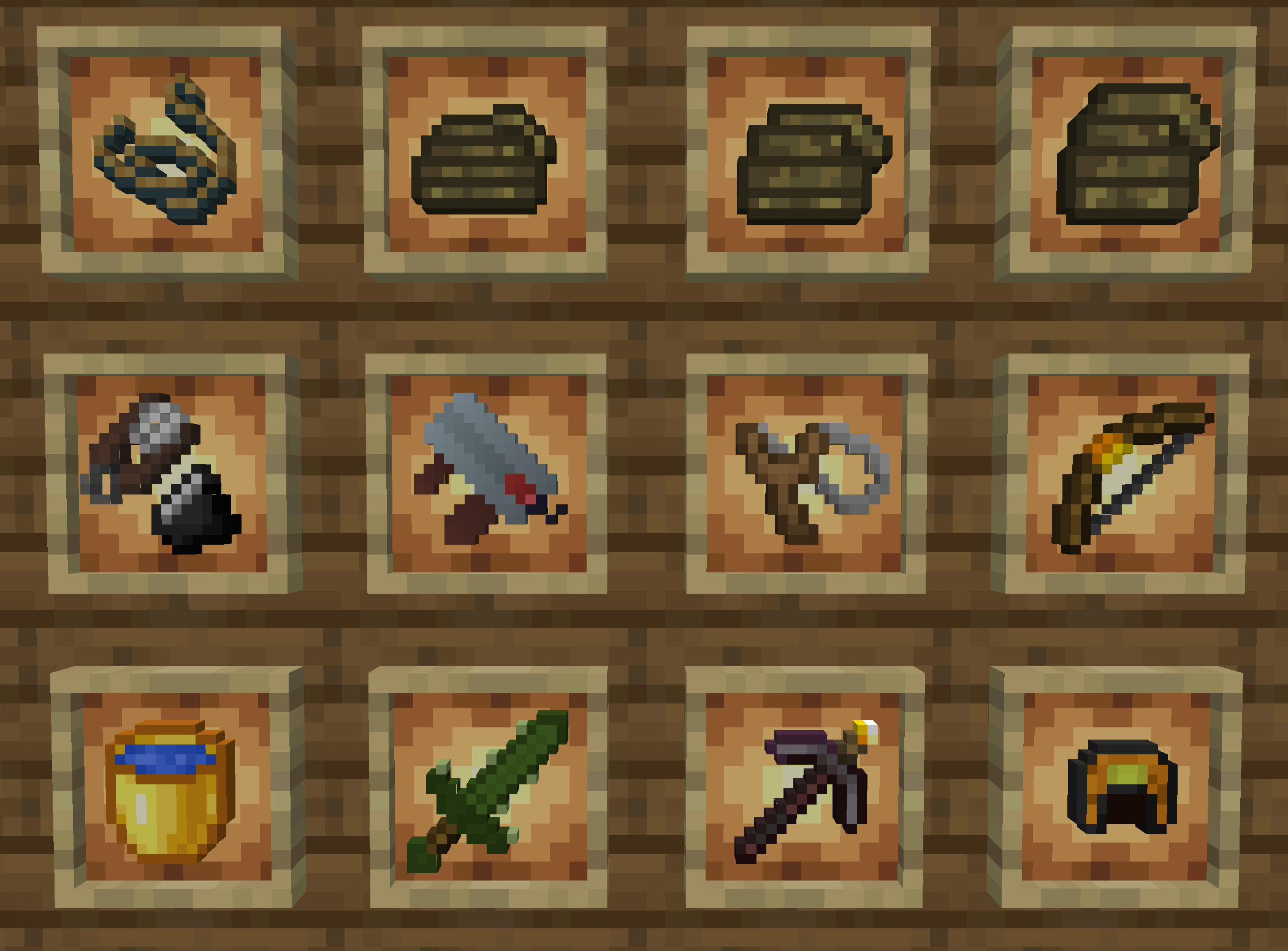
### Currently the mod is in progress, but includes:
* Torch Bow: A bow that shoots torches, which are placed upon landing.
* Ropes: Can be hung off walls or ceilings to make climbing up places easier
* Rope Coils: A thrown item that places ropes where it lands.
* Bottomless Water Bucket: A bucket of water that can never be emptied.
* Large Lava Bucket: Holds 9 buckets worth of lava.
* Self-Slingshot: A slingshot that shoots the character in the opposite direction of where you’re looking.
* Cactus Sword: A powerful early-game sword that slightly damages you with every hit
* Jack o’Helmet: A helmet that provides ambient light but very little protection – no more holding torches in your offhand!
* Flint & Shears: Does this one really need an explanation? (Not responsible for any accidental forest fires)
* Diamond Shears: A pair of shears with 1000 durability.
* Netherite Torch Pickaxe: A netherite pickaxe with a torch core attached to it. Right-clicking places torches at the cost of 5 durability.
* Dirt Sword: Does no damage, but try right-clicking on a zombie with it!
Weird and powerful weapons
# Weird and powerful weapons
**Today Weird and powerful weapons have just 1 item but I want to add more items**
To give you an item do
“`
/function totem/give/
“`
To have the custom textures you can download this RESSOURCES PACK
## Totem of protection
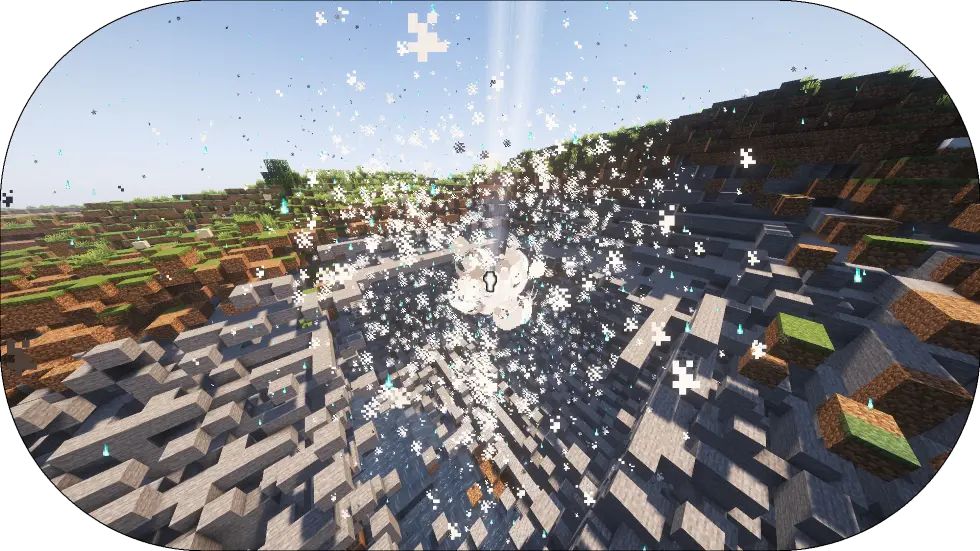
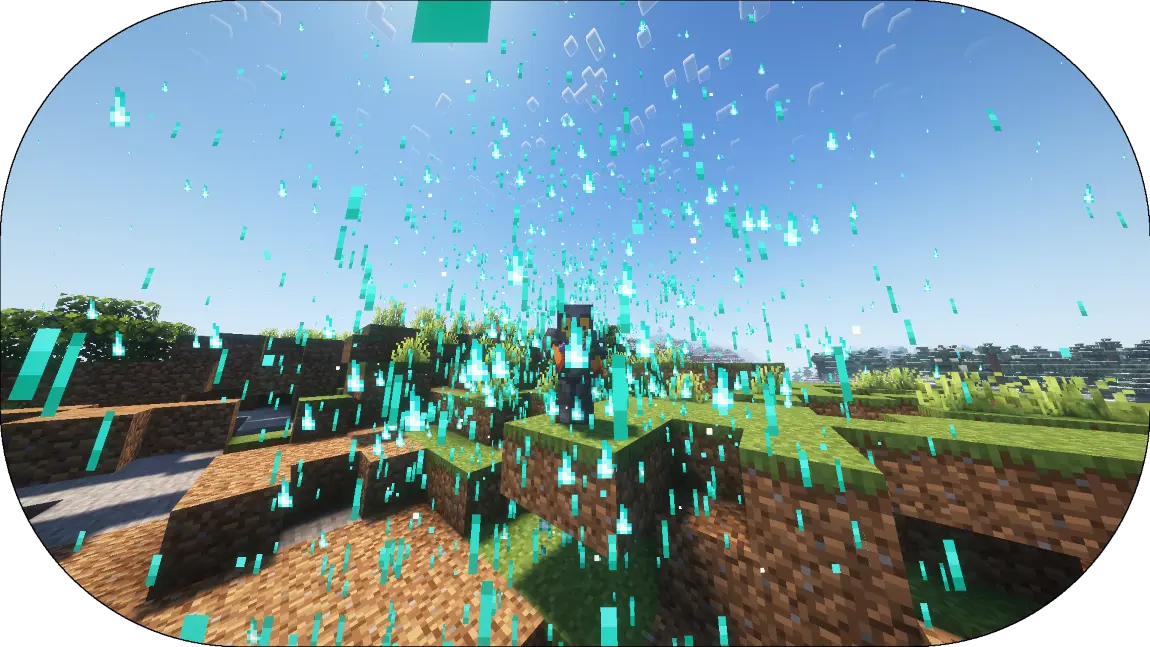
Add a new Totem of undying that explose when the player hold his right-click
——————————————————————
Totem of protection have a loading time before he start to Explose
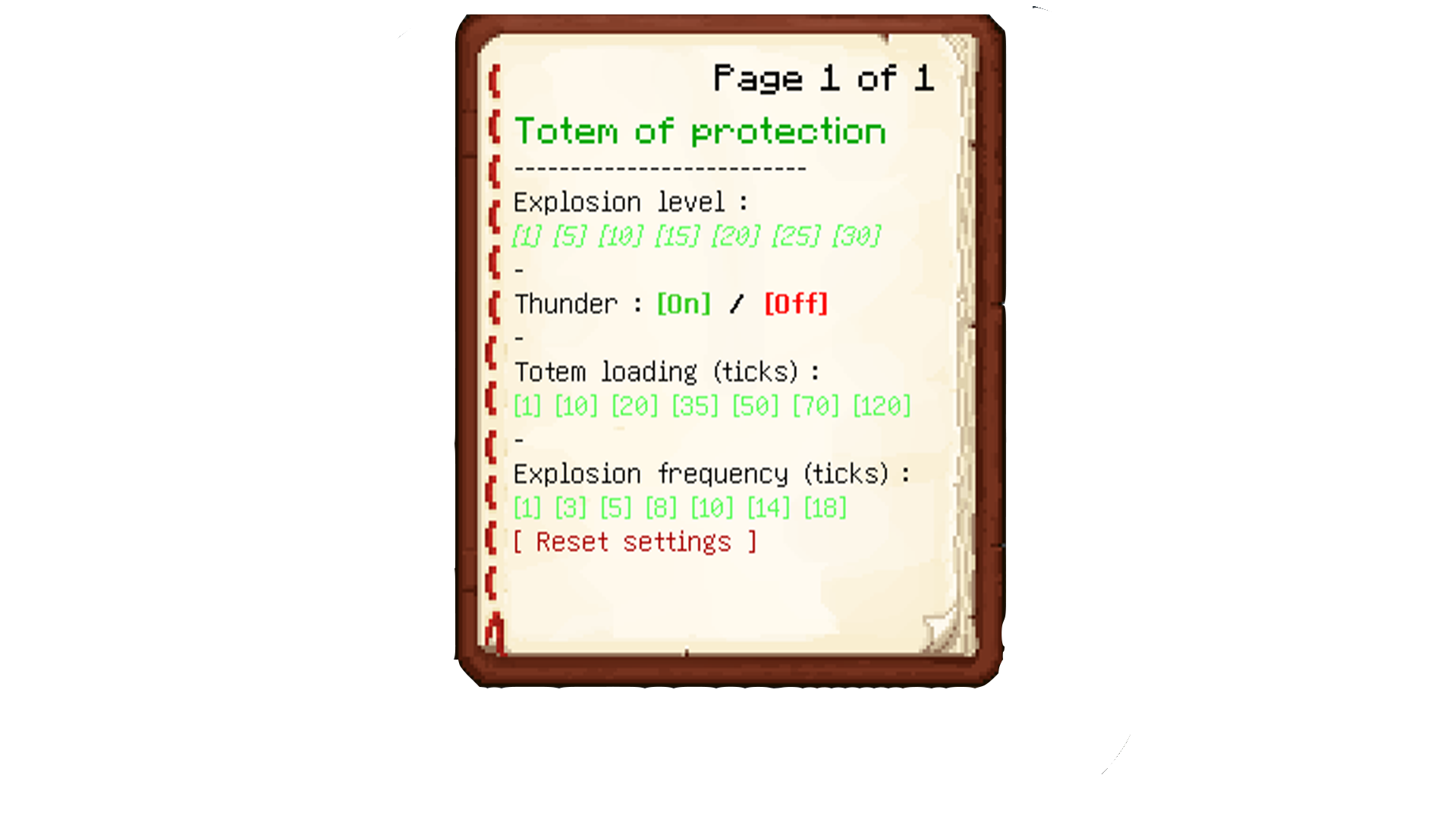
## Config menu
To config the datapack do
“`
/function totem:config_book
“`
WorldEdit Colored Tools

So one day a friend of mine came to me with an idea of making many items that by themselves do nothing. He is a builder and uses WorldEdit brushes a lot, so he wanted these items to be able to assign brushes to them. Due to their different textures, they can be easily distinguishable.
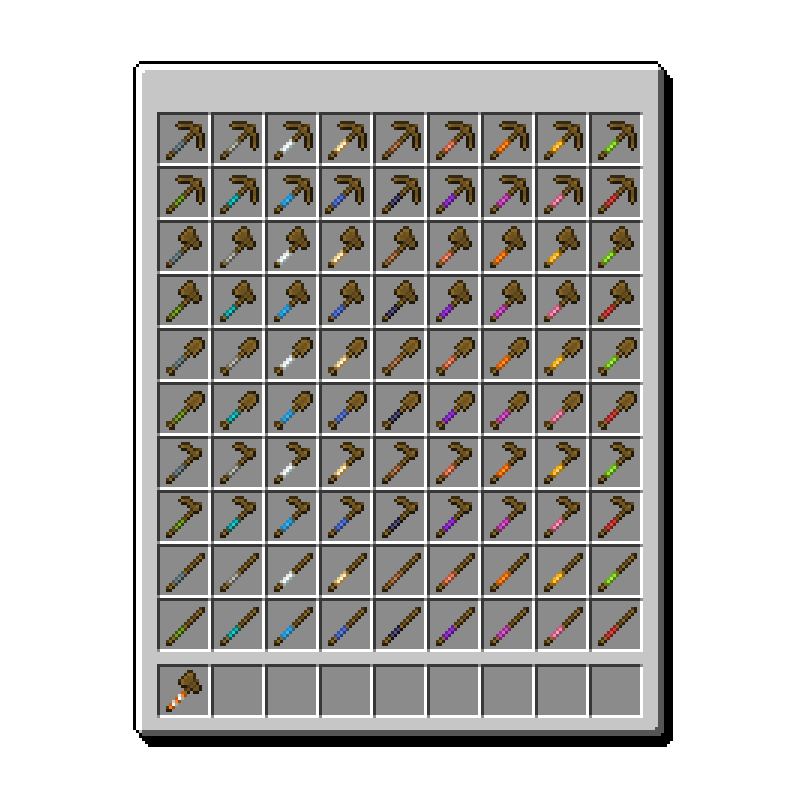
P.S. While these items look like tools, they’re only made to be used as brushes, so they can’t be crafted and don’t work like their vanilla alternatives. They are non-stackable and can’t be damaged.
Uhm, I should tell a little bit more about these items, shouldn’t I?
Okay.
**This mod adds these UNIQUE items:**
# More wooden pickaxes!!!
## Gray Wooden Pickaxe
This item does nothing
## Light Gray Wooden Pickaxe
This item does nothing
## White Wooden Pickaxe
This item does nothing
## Candle Wooden Pickaxe
This item does nothing
## Brown Wooden Pickaxe
This item does nothing
## Copper Wooden Pickaxe
This item does nothing
## Orange Wooden Pickaxe
This item does nothing
## Yellow Wooden Pickaxe
This item does nothing
## Lime Wooden Pickaxe
This item does nothing
## Green Wooden Pickaxe
This item does nothing
## Cyan Wooden Pickaxe
This item does nothing
## Light Blue Wooden Pickaxe
This item does nothing
## Blue Wooden Pickaxe
This item does nothing
## Black Wooden Pickaxe
This item does nothing
## Purple Wooden Pickaxe
This item does nothing
## Violet Wooden Pickaxe
This item does nothing
## Pink Wooden Pickaxe
This item does nothing
## Red Wooden Pickaxe
This item does nothing
# More wooden axes!!!
## Gray Wooden Axe
This item does nothing
## Light Gray Wooden Axe
This item does nothing
## White Wooden Axe
This item does nothing
## Candle Wooden Axe
This item does nothing
## Brown Wooden Axe
This item does nothing
## Copper Wooden Axe
This item does nothing
## Orange Wooden Axe
This item does nothing
## Yellow Wooden Axe
This item does nothing
## Lime Wooden Axe
This item does nothing
## Green Wooden Axe
This item does nothing
## Cyan Wooden Axe
This item does nothing
## Light Blue Wooden Axe
This item does nothing
## Blue Wooden Axe
This item does nothing
## Black Wooden Axe
This item does nothing
## Purple Wooden Axe
This item does nothing
## Violet Wooden Axe
This item does nothing
## Pink Wooden Axe
This item does nothing
## Red Wooden Axe
This item does nothing
# More wooden shovels!!!
## Gray Wooden Shovel
This item does nothing
## Light Gray Wooden Shovel
This item does nothing
## White Wooden Shovel
This item does nothing
## Candle Wooden Shovel
This item does nothing
## Brown Wooden Shovel
This item does nothing
## Copper Wooden Shovel
This item does nothing
## Orange Wooden Shovel
This item does nothing
## Yellow Wooden Shovel
This item does nothing
## Lime Wooden Shovel
This item does nothing
## Green Wooden Shovel
This item does nothing
## Cyan Wooden Shovel
This item does nothing
## Light Blue Wooden Shovel
This item does nothing
## Blue Wooden Shovel
This item does nothing
## Black Wooden Shovel
This item does nothing
## Purple Wooden Shovel
This item does nothing
## Violet Wooden Shovel
This item does nothing
## Pink Wooden Shovel
This item does nothing
## Red Wooden Shovel
This item does nothing
# More wooden hoes!!!
## Gray Wooden Hoe
This item does nothing
## Light Gray Wooden Hoe
This item does nothing
## White Wooden Hoe
This item does nothing
## Candle Wooden Hoe
This item does nothing
## Brown Wooden Hoe
This item does nothing
## Copper Wooden Hoe
This item does nothing
## Orange Wooden Hoe
This item does nothing
## Yellow Wooden Hoe
This item does nothing
## Lime Wooden Hoe
This item does nothing
## Green Wooden Hoe
This item does nothing
## Cyan Wooden Hoe
This item does nothing
## Light Blue Wooden Hoe
This item does nothing
## Blue Wooden Hoe
This item does nothing
## Black Wooden Hoe
This item does nothing
## Purple Wooden Hoe
This item does nothing
## Violet Wooden Hoe
This item does nothing
## Pink Wooden Hoe
This item does nothing
## Red Wooden Hoe
This item does nothing
# More sticks!!!
## Gray Stick
This item does nothing
## Light Gray Stick
This item does nothing
## White Stick
This item does nothing
## Candle Stick
This item does nothing
## Brown Stick
This item does nothing
## Copper Stick
This item does nothing
## Orange Stick
This item does nothing
## Yellow Stick
This item does nothing
## Lime Stick
This item does nothing
## Green Stick
This item does nothing
## Cyan Stick
This item does nothing
## Light Blue Stick
This item does nothing
## Blue Stick
This item does nothing
## Black Stick
This item does nothing
## Purple Stick
This item does nothing
## Violet Stick
This item does nothing
## Pink Stick
This item does nothing
## Red Stick
This item does nothing
# A Wand!!!
This item does nothing
Webcam
# Webcam
Mod and plugin that allows players to broadcast their webcams
## Downloads
– Fabric / Quilt
– NeoForge
– Bukkit / Spigot / Paper
– Velocity
## ⚠️ Warning
This plugin requires special setup on server to work.
If you are a server administrator, please read the section `Setup on server` first
## Features
– High-quality webcam broadcasting
– H.264 video codec
– Video transmission via UDP using custom protocol
– AES encryption
– Bitrate control
– Video resolution control
– Different display shapes
– Display size and position configuration
– Display on player model face
– Display distance limit
– Webcam broadcast and view permissions
– Advanced client configuration (Mod Menu & Cloth Config API required)
– Ability to hide selected players’ webcams
– Velocity proxy support
– Compatibility with ReplayMod & Flashback
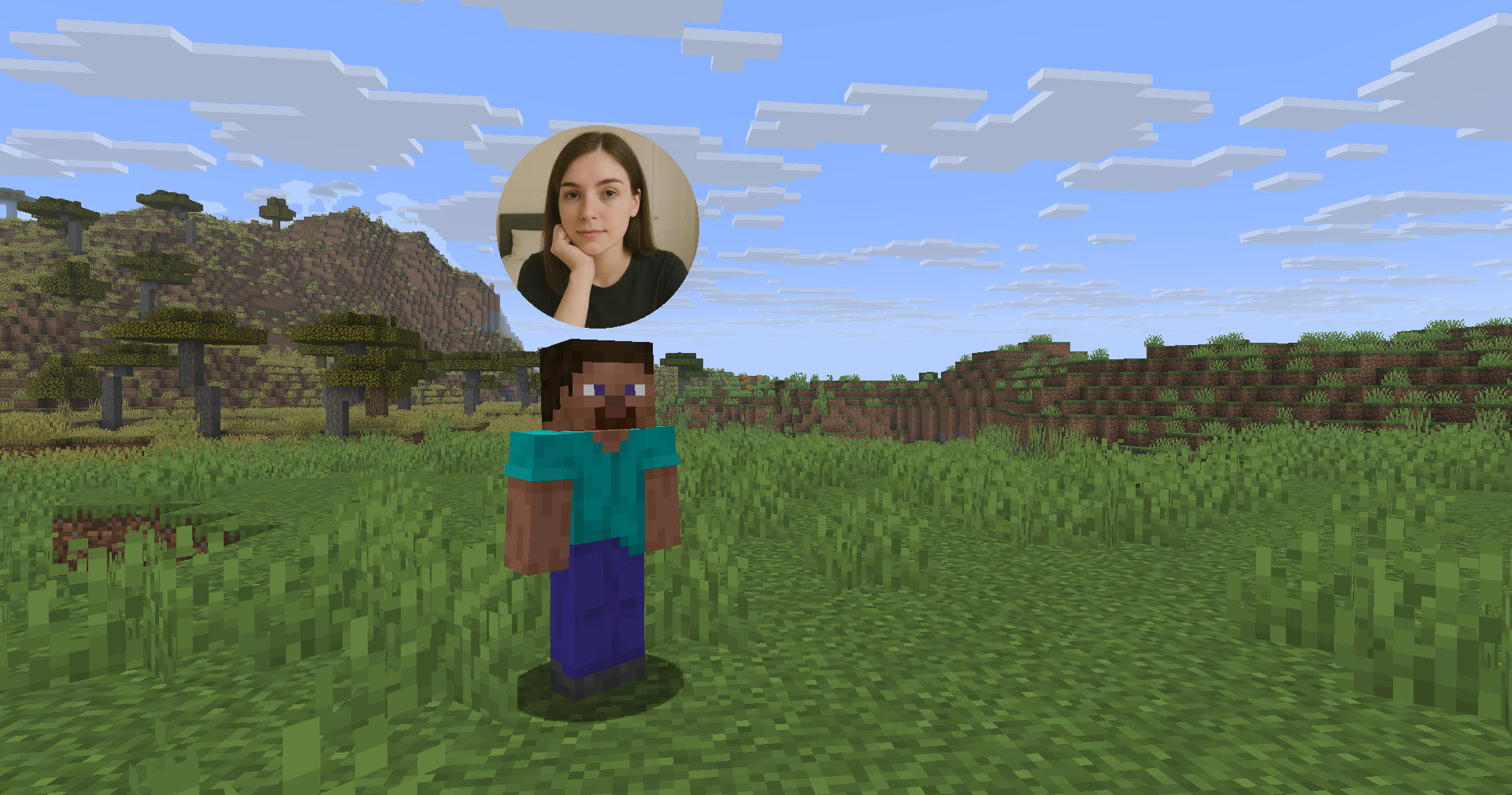
## Client Usage
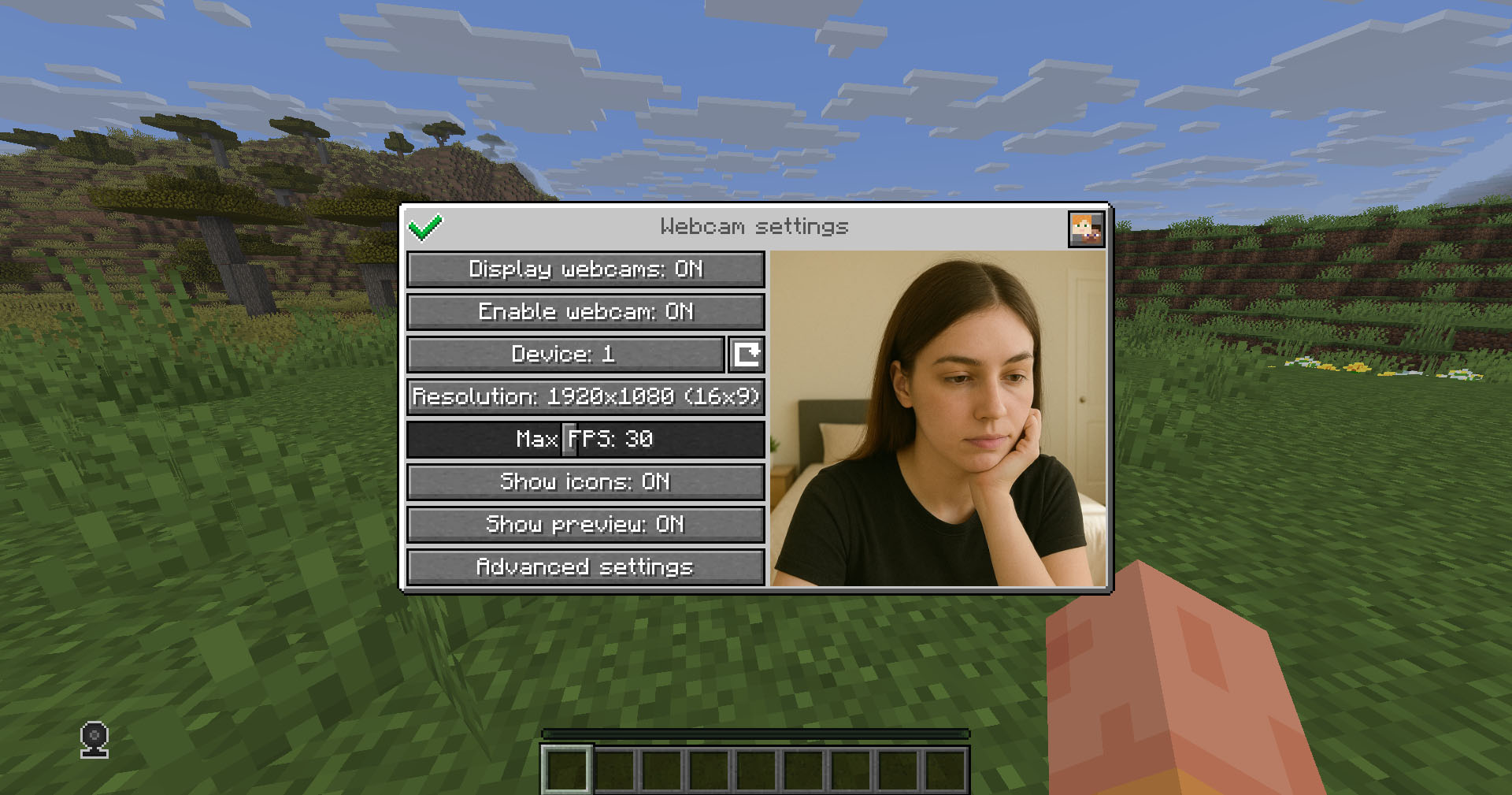
Put the mod in the `mods` directory (with the Fabric API if you are using Fabric). The settings menu can be opened by hotkey (`C` by default)
## Icons
| Icon | Description |
|:——————————————————–:|——————————–|
|  | Your webcam is enabled |
|  | Your webcam is disabled |
|  | Connecting to Webcam server |
|  | Not connected to Webcam server |
## Encryption
Webcam connection is encrypted, but we don’t guarantee the security of it. Use at your own risk!
## Setup on server
Webcam plugin uses UDP socket to transfer video packets.
So you need to open a UDP port in your server’s firewall and panel (if present) to make Webcam server work. This is port `25454/udp` by default. You can change the port in server config
If you are using Velocity, see `Setup on proxy`
### Server config
Location:
– Fabric / Quilt / NeoForge: `config/webcam/server.json`
– Bukkit / Spigot / Paper: `plugins/webcam/server.json`
Here are the default values with their descriptions:
“`
{
“port”: 25454, // Webcam UDP server port. This must not clash with any other used UDP port (like Simple Voice Chat port)
“bind_address”: “”, // Address to bind the Webcam server to. Leave blank to use the wildcard (0.0.0.0) address. F.e. use “127.0.0.1” to accept only local connections
“host”: “”, // The hostname that clients should use to connect to the Webcam server. Leave blank to use the address, that player is connected to Minecraft with. Can be a simple address or an address with port. This will be ignored, if the server is proxied
“keep_alive_period”: 1000, // Period of sending keep alive packets is milliseconds
“permission_check_period”: 60, // Period of checking webcam.broadcast and webcam.view permissions in ticks
“max_display_distance”: 100.0, // The distance in blocks from player, in which other players can see his webcam
“display_on_face”: false, // Whether to display webcam on player model face or above his head
“display_shape”: “round”, // Shape of webcams displayed above players’ head. Possible values: “round”, “square”
“display_offset_y”: 1.3, // Y offset of webcams displayed above players’ head
“display_size”: 1.2, // Size of webcams displayed above players’ head
“hide_nicknames”: true, // Whether to hide player’s nickname if his webcam is enabled
“display_self_webcam”: true, // Whether to show the player’s webcam to himself
“synced”: { // These settings are synchronized with clients
“image_dimension”: 360, // Side dimension of square webcam images
“mtu”: 1100, // Maximum Transmission Unit of packets. You can lower this, if image on webcam starts look glitchy or not arrives at all
“bitrate”: 500 // Target video bitrate (kbps)
},
“messages”: { // Custom transtalions for messages, that are sent to players in different situations. May contain placeholders – %s
“incompatible_mod_version”: “Incompatible Webcam version. Your – %s, server’s – %s” // The message that will be sent to player if he has incompatible Webcam mod version. You can set this to empty to disable sending this message
}
}
“`
### Commands
– `/webcamconfig [new_value]` – command to read/update config values. Requires `webcam.command.config` permission or OP.
### Permissions
– `webcam.command.config` – permission to modify Webcam server config (default: OP Level)
– `webcam.broadcast` – permission to broadcast webcam (default: true)
– `webcam.view` – permission to view webcams (default: true)
## Setup on proxy
Webcam has Velocity plugin that proxies Webcam servers on the backend MC servers and allows to connect to different Webcam servers through the single port.
So it acts like a UDP proxy.
If you running proxy and backend servers on the same machine, you need to configure different ports for them. See `Setup on server/Server config` and `Setup on proxy/Proxy config`
### Proxy config
Server config is located in `plugins/webcam/config.properties`
Here are the default values with their descriptions:
“`
#Webcam proxy config
# Webcam UDP server port. This must not clash with any other used UDP port (like Simple Voice Chat port)
port=25454
# Address to bind the Webcam server to. Leave blank to use the wildcard (0.0.0.0) address. F.e. use “127.0.0.1” to accept only local connections
bind_address=
# The hostname that clients should use to connect to the Webcam server. Leave blank to use the address, that player is connected to Minecraft with. Can be a simple address or an address with port. This will override configured values on backend server’s
host=
“`
## License
This mod is licensed under **No Unauthorized Distribution License**, which full text can be found at https://github.com/DimasKama/Webcam/blob/master/LICENSE.md
### Summary
– **Modpacks:** You can use this mod in modpacks, but you must not include its files directly. Instead, list it as a dependency (mod reference) that points to an official download source.
– **For Devs:** You’re allowed to create addons or integrate support for the mod, but you must not copy any of its code. Instead, make it an external dependency that gets downloaded from an official source.
– **Redistribution Limits:** You cannot re-upload or share the mod’s code or compiled files publicly without the author’s explicit permission. Forking for personal use is okay, but distributing a compiled fork is not allowed.
– **Personal Use:** You may use and modify the mod for personal use, but any changes must remain private and not be shared publicly.
– **Official Download Requirement:** Any dependency or modpack reference must point to the official download sources provided by the author.
Survival Weather Control
### DESCRIPTION
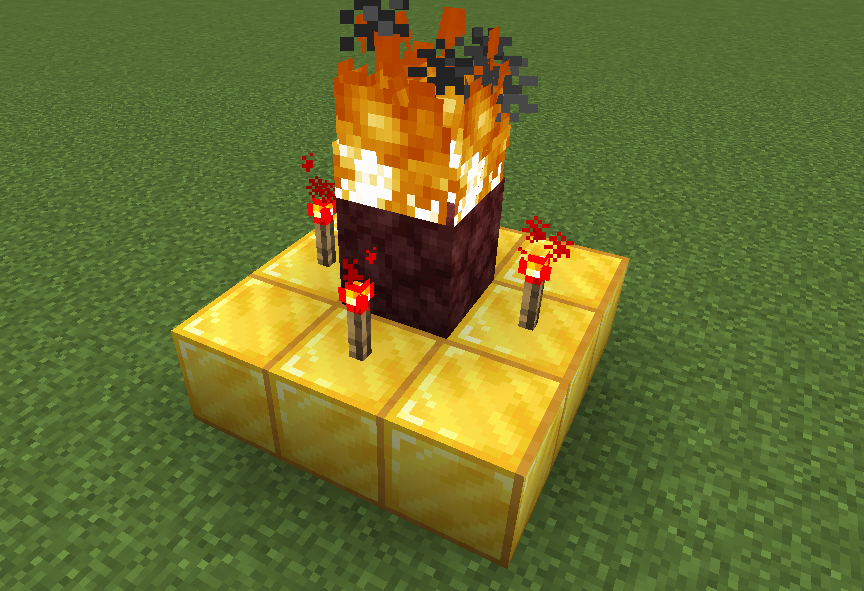
This data pack allows you to summon a thunderstorm using the classic altar used to summon herobrine! To do it, simply build the altar (place 9 gold blocks in a 3×3 arrangement with a lit netherrack block in the center surrounded by 4 redstone torches) and walk in the fire to “sacrifice” your health.
### INSTALLATION GUIDE
– go to your saves folder located here on Windows:
“`
C:Users(your name)AppDataRoaming.minecraftsaves
“`
put the zipped file in the data packs folder, and either restart your world or execute /reload
### OTHER THINGS TO NOTE
– gold blocks will turn into copper blocks upon usage
– for feedback, bug reports, or other help, join the discord server from the links section of this page!