## 📖 Description
This datapack adds commands to make building way easier!
Explore the seamless functionality in both single-player and multiplayer modes.
## Commands
Operator permission is **required** to use this datapack/mod.
## How to use:
Use “`/function we:give/wand“` to get the selector item.
When you have selected two positions named **#1** and **#2**, you can start using the tools.
Use “`/function we:give/brush“` to get the brush item.
Instructions are on the item description.
Use “`/function we:misc/outline“` to enable/disable the outline particles that appear when you select two positions.
Use “`/function we:misc/phasing“` to enable/disable the player being able to phase through blocks when flying.
## Copy-Paste info
You must have an area already copied to use the **paste** function.
Pasted areas will be pasted facing up and south-east. You can also use F3. Make sure that the X, Y, and Z axis lines are all facing away from you. The build is also facing that way.
World Cutters
icon by Purpledragonnuke
What if stone cutters could actually cut stone?
… or wood, or dirt, or grass, or ores, or…
Really, why not just make stone cutters annihilate anything in their path? Put them on a flying machine and set them on a path of destruction…
WorldComment
## World Comment (Sub*note*ica)
Post comments associated with locations from your in-game world. An idea similar to [Danmaku](https://en.wikipedia.org/wiki/Danmaku_subtitling) in videos, or Subnautica’s well-received feedback system.
**It takes some additional configuration to be able to attach screenshots to comments – See [Instructions on Configuration](https://github.com/zbx1425/world-comment/wiki/Configurations)**.
This mod is inspired by the feedback tool in *Subnautica*. Players can take a screenshot and leave a comment to send feedback to the production team, the feedback will be sent in association with location information and the production team can see a map of the location with an overall rating. Also, the visual style of the comment “posts” is inspired by *Death Stranding*.
And it also got me thinking about the idea of [Danmaku](https://en.wikipedia.org/wiki/Danmaku_subtitling); they have the advantage over normal comments in that they relate to the content of the video at a given time, enhancing the viewing experience for the viewer. In this way, something similar could be done for Danmaku in the game world of Minecraft.
In addition, in order to ensure the normal operation under the multi-server cluster configuration of [Teacon 2023](https://www.teacon.cn/2023), a Redis-based synchronization function has been added, so that the comments in each sub-server can be synchronized with each other and saved in a persistent manner.
World Border is a minimalistic configurable mod which allows the creation of a configurable world border, limiting the world size. This can prevent infinitely large file sizes or keep a community of players closer together. You can also loop around the world when hitting a world border, configurable in the config. This will teleport you to the negative coordinate if you hit the positive border and vice versa. Makes for infinitely looping worlds while still limiting the size.
Configurable:( how do I configure? ) enableCustomOverworldBorder (default = true): When enabled, uses the overworldBorderCoords to set the border. enableCustomNetherBorder (default = false): When enabled, uses the netherBorderCoords to set the border. enableCustomEndBorder (default = true): When enabled, uses the endBorderCoords to set the border.
shouldLoopToOppositeBorder (default = true): When enabled, instead of teleporting the player inside near where they were, teleports them from the positive to the negative x/z coord and vice versa. distanceTeleportedBack (default = 10, min 0, max 1000): The amount of blocks the player is teleported inside after hitting the border.
nearBorderMessage (default = “You’re getting close to the world border!”): The message which will be sent to the player when they are within ‘distanceTeleportedBack’ to the world border. hitBorderMessage (default = “You’ve hit the world border, and were teleported inside!”): The message which will be sent to the player when they hit the world border. loopBorderMessage (default = “You’ve hit the world border, and have looped around the world!”): The message sent to the player when they hit the border and ‘shouldLoopToOppositeBorder’ is enabled.
overworldBorderPositiveX (default = 5000, min 0, max 100000): The overworld border located at the positive x coordinate. overworldBorderNegativeX (default = -5000, min -100000, max 0): The overworld border located at the negative x coordinate. overworldBorderPositiveZ (default = 5000, min 0, max 100000): The overworld border located at the positive z coordinate. overworldBorderNegativeZ (default = -5000, min -100000, max 0): The overworld border located at the negative z coordinate.
netherBorderPositiveX (default = 625, min 0, max 100000): The nether border located at the positive x coordinate. netherBorderNegativeX (default = -625, min -100000, max 0): The nether border located at the negative x coordinate. netherBorderPositiveZ (default = 625, min 0, max 100000): The nether border located at the positive z coordinate. netherBorderNegativeZ (default = -625, min -100000, max 0): The nether border located at the negative z coordinate.
endBorderPositiveX (default = 5000, min 0, max 100000): The end border located at the positive x coordinate. endBorderNegativeX (default = -5000, min -100000, max 0): The end nether border located at the negative x coordinate. endBorderPositiveZ (default = 5000, min 0, max 100000): The end nether border located at the positive z coordinate. endBorderNegativeZ (default = -5000, min -100000, max 0): The end nether border located at the negative z coordinate.
When getting close to the border, players will receive the following message:
The message when hitting the world border and enableLoop enabled. On hitting the border with enableLoop disabled, players will receive a message and be teleported 10 blocks inside the border.
Looping works like this: Looping in the nether uses clever code to not end up in lava or on the nether roof.
——————
You may freely use this mod in any modpack, as long as the download remains hosted within the Modrinth ecosystem.
Serilum.com contains an overview and more information on all mods available.
Comments are disabled as I’m unable to keep track of all the separate pages on each mod. For issues, ideas, suggestions or anything else there is the Github repo. Thanks!
World Altitude Control
# WAC World Altitude Control 世界高度控制
> 这个mod不能解决高度不能超过mc数据结构限制的问题,因为这会摧毁兼容性!
> This mod doesn’t solve the problem that the height can’t exceed the mc data structure limit because it would destroy compatibility
这个Mod用于控制Minecraft维度高度,可在配置文件或在HutoolCore的Web编辑器中进行配置。
This mod is used to control the height of Minecraft dimensions and can be configured in the configuration file or in HutoolCore’s web editor.
它的原理是Minecraft在创建ServerLevel(ServerWorld)时修改ServerLevel(ServerWorld)的高度配置。
It works by Minecraft modifying the height configuration of the ServerLevel (ServerWorld) when it is created.
以下为对参数的解释:
The following is an explanation of the parameters (note in Chinese):
|参数|注释|
|——-|——-|
|id|世界ID|
|logical_height|玩家使用紫颂果或下界传送门可以到达的总高度。不会影响超过该限制高度的既有传送门。取值为0到4064的闭区间,且不能大于 height。|
|min_y|该维度中可以存在方块的最低高度。数值必须在-2032至2031之间且为16的整数倍(也就是说,-2032是最小有效值,2016是最大有效值)。|
|height|该维度中可以存在方块的总高度。数值必须在16至4064之间且为16的整数倍。维度中可以存在方块的最大高度值为min_y与height值之和减去1,不能超过2031。|
原版与使用HutoolCoreWebConfig的配置文件样式:
The original and the profile style using HutoolCoreWebConfig:
**Abandoned. Contributions are welcome for continuing this project. Ask via Discord if wanted.**
Adds animated Windmills & Watermills to Minecraft! See the video below for a more detailed demonstration. (See the Gallery for credits.)
– **NOTE:** If you wish to use this on all created/current worlds, use the Mod version. If you only want this pack on certain worlds, then stick with the Datapack version.
Working Trains
A datapack that adds working trains to Minecraft! See the video below for a more detailed demonstration. (See the Gallery for credits.)
– **NOTE:** If you wish to use this on all created/current worlds, use the Mod version. If you only want this pack on certain worlds, then stick with the Datapack version.
Working Ferris Wheels
**Abandoned. Contributions are welcome for continuing this project. Ask via Discord if wanted.**
A datapack that adds functional and rideable Ferris Wheels to Minecraft! See the video below for a more detailed demonstration. (See the Gallery for credits.)
– **NOTE:** If you wish to use this on all created/current worlds, use the Mod version. If you only want this pack on certain worlds, then stick with the Datapack version.
Working Elevators
A datapack that adds working elevators to Minecraft! See the video below for a more detailed demonstration. (See the Gallery for credits.)
– **NOTE:** If you wish to use this on all created/current worlds, use the Mod version. If you only want this pack on certain worlds, then stick with the Datapack version.
– **2ND NOTE:** Elevators currently do not function below Y0. There is no ETA for a fix currently.
Wooled Boots
# Pad your boots with wool, prevent Sculk and Warden Detection. Fully compatible with the official 1.19+ Warden!
Think these boots make the Deep Dark too easy? Download Warden Walkers for something more balanced: https://www.curseforge.com/minecraft/mc-mods/warden-walkers
## These Boots Silence the Vibrations of:
– Stepping
– Falling and hitting the ground
– Throwing a projectile (A projectile hitting something will still be detected, but it will be traced to the projectile rather than you)
## Tiers:
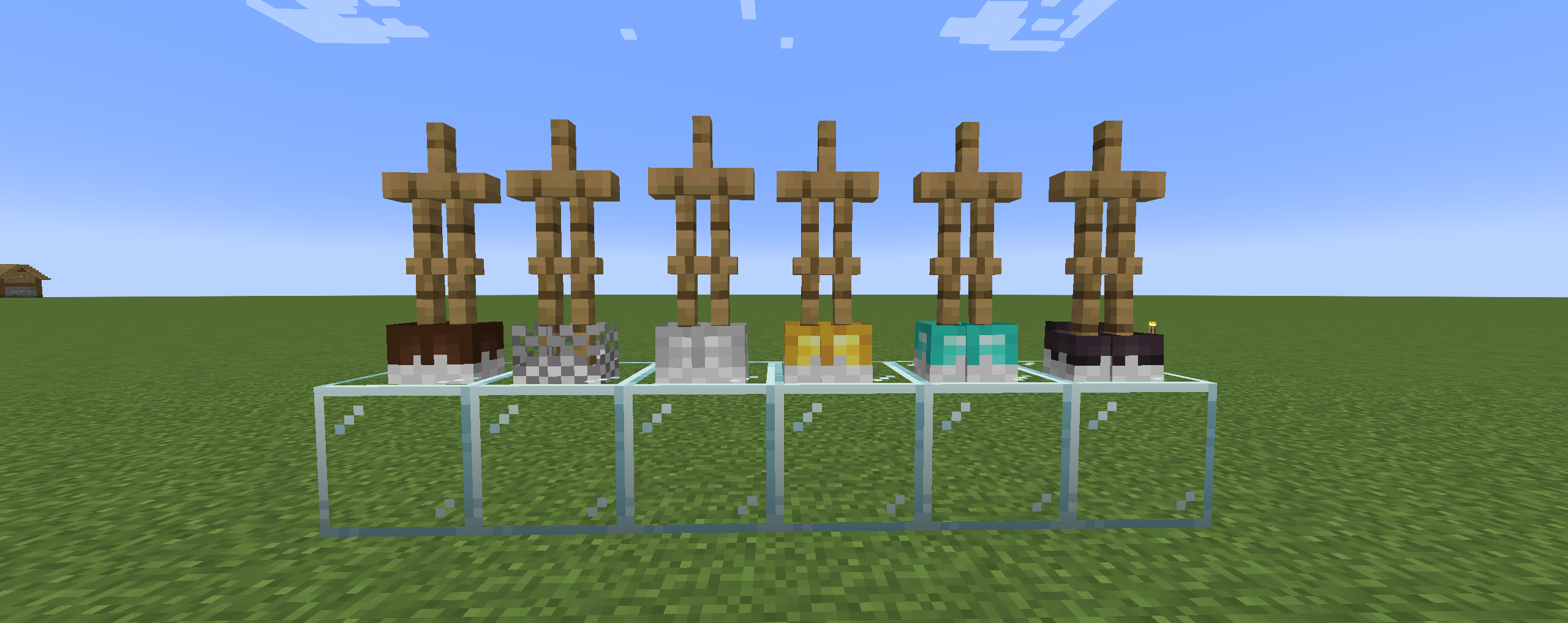
Leather | Chainmail | Iron | Golden | Diamond | Netherite
## Wooled Boots in Action
Video 1: https://youtu.be/RF9UrxMB-UQ?si=AngQynWrY_Md3t5u&t=89
Video 2: https://www.youtube.com/watch?v=uOxwtL4bgzc
Play this mod with your friends! Use code “jackbusters” for 25% off Minecraft Server Hosting.
## Warden Mod Support
Some mods, which add the Warden, are compatible with Wooled Boots. These mods include:
– The Wild Mod by lukebattle04 (and the FrozenBlock Modding Team)