WYG – What’d Ya Got

—




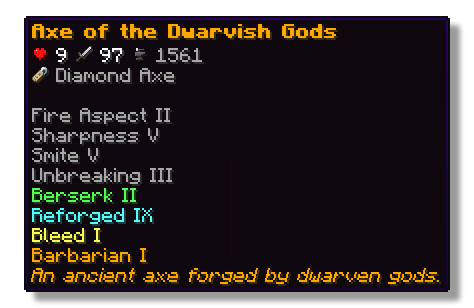
This plugin lets players show off whatever they’re holding right in chat! Just type a simple placeholder in your message, and your item pops up for everyone to see. Others can hover over it to check out its name, enchantments, and all the details just like in your inventory.
## Features
– ✅ Show off main hand, off-hand and armor
– ✅ Use a simple command or placeholders in chat
– ✅ Quickly see what item a player is showing off with icons in the chat
– ✅ See all details of an item when hovering above the name in chat
– ✅ Fully configurable
## Permissions
– **wyg.use** – Allows usage of WYG commands
– **wyg.hand** – Allows showing items in main hand
– **wyg.offhand** – Allows showing items in offhand
– **wyg.helmet** – Allows showing helmet
– **wyg.chestplate** – Allows showing chestplate
– **wyg.leggings** – Allows showing leggings
– **wyg.boots** – Allows showing boots
– **wyg.equipment.others** – Allows showing other players’ equipment
– **wyg.reload** – Allows reloading the WYG configuration (default: op)
## Configuration
You can find the configuration files in the plugins/WYG folder. The main configuration file is config.yml.
config.yml
“`yml
# ═══════════════════════════════════════════════════════════════════════════════
#
# █████ ███ █████ █████ █████ █████████
# ▒▒███ ▒██ ▒▒███ ▒▒███ ▒▒███ ███▒▒▒▒▒███
# ▒███ ▒███ ▒███ ▒▒███ ███ ███ ▒▒▒
# ▒███ ▒███ ▒███ ▒▒█████ ▒███
# ▒▒███ █████ ███ ▒▒███ ▒███ █████
# ▒▒▒█████▒█████▒ ▒███ ▒▒███ ▒▒███
# ▒▒███ ▒▒███ █████ ▒▒█████████
# ▒▒▒ ▒▒▒ ▒▒▒▒▒ ▒▒▒▒▒▒▒▒▒
#
# ═══════════════════════════════════════════════════════════════════════════════
#
# WYG – What’d Ya Got!
# The first item display plugin featuring 1.21+ sprites
#
# • Advanced placeholders
# • Fully translatable
# • Advanced formatting with MiniMessage
#
# Documentation:
# • All Placeholders: https://docs.zetaplugins.com/wyg/config/config
# • Formatting: https://docs.advntr.dev/minimessage/format.html
# • Sprites: https://mcasset.cloud/1.21.10/assets/minecraft/textures
#
# ═══════════════════════════════════════════════════════════════════════════════
# ═══════════════════════════════════════════════════════════════════════════════
# Share Message Settings
# ═══════════════════════════════════════════════════════════════════════════════
# Configure the message displayed when running /wyg
#
# Relevant Placeholders:
# – The player’s name
# – The player’s head sprite
# - – The formatted item (uses item-display config below)
#
# Examples:
# “ shared - ”
# “ shared - ”
# “ shared - ”
# “ → - ”
share-message:
format: “ shared - ”
# ═══════════════════════════════════════════════════════════════════════════════
# Item Display Settings
# ═══════════════════════════════════════════════════════════════════════════════
# Configure how items are displayed in chat
#
# Available Placeholders:
# – The item sprite/icon
# - – The item name
#
# You can also use custom sprites here:
# – A heart icon
# – A checkmark icon
#
# Examples:
# “[ - ]”
# “[ - ]
”
# “
# “ - ”
# “ - ”
item-display:
format: “ - ”
# ═══════════════════════════════════════════════════════════════════════════════
# Hover Tooltip Configuration
# ═══════════════════════════════════════════════════════════════════════════════
# You are entering advanced territory! Everything here is already setup to
# replicate Minecraft’s default tooltips!
hover-text:
enabled: true
# ─────────────────────────────────────────────────────────────────────────────
# Tooltip Layout
# ─────────────────────────────────────────────────────────────────────────────
# Define the order and formatting of tooltip elements
#
# Available Placeholders:
# – Item name (single line)
# – Stack size (skipped if amount is 1)
# – All enchantments (multi-line, skipped if none)
# – All lore lines (multi-line, skipped if none)
# – All attributes with slot headers (multi-line, skipped if none)
# – Attack damage across all slots (skipped if none)
# – Attack speed across all slots (skipped if none)
# – Armor across all slots (skipped if none)
# – Armor toughness across all slots (skipped if none)
# – Knockback resistance across all slots (skipped if none)
# – Durability display (skipped if item has no durability)
# – Base material name (skipped based on render-if-same-as-name setting)
#
# Custom Sprites:
# You can use anywhere in the layout!
# Examples:
# “ ”
# “ Enchanted!”
#
# Notes:
# • Empty lines (“”) create spacing between sections
# • Empty lines are automatically skipped if no content surrounds them
# • Any placeholder can be wrapped in MiniMessage formatting
#
# Examples:
# “”
# “”
# “ ”
layout:
– “”
– “”
– “”
– “”
– “”
– “”
– “”
# ─────────────────────────────────────────────────────────────────────────────
# Item Name Configuration
# ─────────────────────────────────────────────────────────────────────────────
# Configure how the base item name (material name) is displayed
#
# Available Placeholders:
# – The material’s translatable name
#
# Note: This is different from which shows the item’s custom display name
#
# render-if-same-as-name: Whether to show when it’s identical to
# (i.e., when the item hasn’t been renamed)
item-name:
format: “”
render-if-same-as-name: false
# ─────────────────────────────────────────────────────────────────────────────
# Enchantment Format
# ─────────────────────────────────────────────────────────────────────────────
# Format for individual enchantment lines
#
# Available Placeholders:
# – The enchantment name (translatable)
# – The enchantment level (translatable)
#
# You can add sprite icons here too:
# “ ”
enchantment-format: “”
# ─────────────────────────────────────────────────────────────────────────────
# Stack Size Format
# ─────────────────────────────────────────────────────────────────────────────
# Format for stack size display
#
# Available Placeholders:
# – The stack amount
stack-format: “Stack Size: ”
# ─────────────────────────────────────────────────────────────────────────────
# Durability Format
# ─────────────────────────────────────────────────────────────────────────────
# Format for durability display
#
# Available Placeholders:
# – Current durability (max – damage)
# – Maximum durability
durability-format: “Durability: /”
# ─────────────────────────────────────────────────────────────────────────────
# Attribute Display Settings
# ─────────────────────────────────────────────────────────────────────────────
# Configure how item attributes are displayed in tooltips
attributes:
# Slot Header Format
# Format for slot headers (e.g., “When in Main Hand:”)
#
# Available Placeholders:
# – The slot name
#
# Note: Set to empty string (“”) to hide slot headers entirely
slot-header-format: “”
# Individual Attribute Formats
# Configure display for each attribute type
#
# Available Placeholders:
# – The numeric value
# – The attribute name
#
# You can add custom sprites to attributes:
# “ ”
#
# Note: Default colors match vanilla Minecraft
# • dark_green – Offensive stats (damage, attack speed)
# • blue – Defensive stats (armor, toughness, knockback resistance)
formats:
attack_damage: “ ”
attack_speed: “ ”
armor: “+ ”
armor_toughness: “+ ”
knockback_resistance: “+% ”
“`
## Support
If you need help with the setup of the plugin, or found a bug, you can join our discord here.

—

WelcomeTitlePlugin
A plugin that sends the title when a player joins the server.
## Installation method
1. Download and go to plugins folder
2. Reload the server or restart the server to enable the plugin.
3. [Optional] Change the message in config.yml.
## Links
GitHub (Source): https://github.com/raicdev/WelcomeTitlePlugin
Support: [email protected] or github issues
## Commands
/wt help : You can see help for this plugin.
/wt version : You can see the version of this plugin.
/wt reload : Reload the settings for this plugin.
## Permissions
wt.commands.reload : Allows reloading of settings.
wt.commands.standard : Allows you to see help and version.
wt.commands.show : Allows the title to be displayed.
wruJoin
👀 Click to view plugin preview

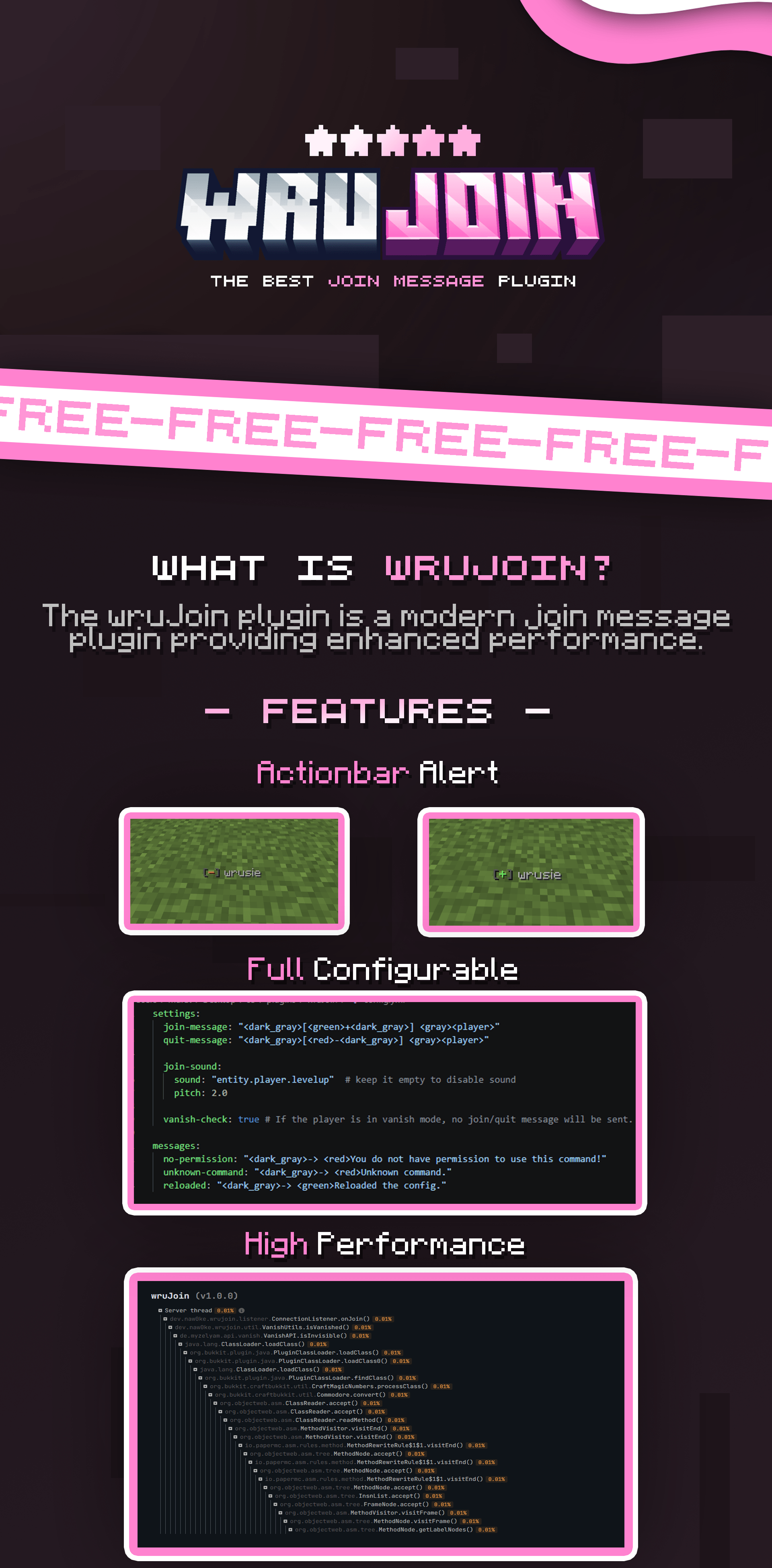
⚙️ Click to view config preview
“`yaml
settings:
join-message:
type: ACTIONBAR # types: ACTIONBAR, CHAT
message: “[+] ”
quit-message:
type: ACTIONBAR
message: “[–] ”
title:
enabled: true
title: “<#D36E97>Welcome, !”
subtitle: “<#FFA8CB> have a good time!”
sound:
enabled: true
sound: “entity.player.levelup”
pitch: 2.0
vanish-check: true # If the player is in vanish mode, no join/quit message will be sent.
messages:
no-permission: “-> You do not have permission to use this command!”
unknown-command: “-> Unknown command.”
reloaded: “-> Reloaded the config.”
“`
# 🎀 wruJoin
**Modern & Powerful Join Message Solution for PaperMC**
`wruJoin` is a high-performance plugin designed for PaperMC and its forks.
It gives server owners complete control over player join and leave notifications with a modern, professional touch.
—
## ✨ Key Features
* 🎨 **Full Customization:** Powered by MiniMessage for stunning text formatting.
* 🌈 **Modern Colors:** Native support for **HEX (RGB)** and **Gradients**.
* ⚡ **High Performance:** Optimized to ensure zero impact on your server’s TPS.
* 🔄 **Instant Reload:** Update your configuration on-the-fly without restarting.
* 📺 **Join Titles:** Fully configurable title and subtitle that appears when a player joins.
* 🔊 **Join Sounds:** Fully configurable sound effects that are triggered when a player joins.
* 🕵️ **Vanish Support:** Fully compatible with **SuperVanish** and **PremiumVanish**. Automatically handles fake join/leave messages when administrators vanish or reappear.
—
## 🛠️ Requirements
Ensure your server environment meets the following specifications:
| Requirement | Version |
|:——————–|:—————————————-|
| ☕ **Java** | 21 or higher |
| 🖥️ **Platform** | Paper and other forks (`1.21 – 1.21.x`) |
| 🧩 **Dependencies** | SuperVanish or PremiumVanish (Optional) |
—
## ⌨️ Commands & Permissions
| Command | Description | Permission |
|:——————|:——————————————-|:—————-|
| `/wrujoin` | Displays plugin information and help menu. | `wrujoin.admin` |
| `/wrujoin reload` | Reloads the configuration files. | `wrujoin.admin` |
—
## 🎨 Configuration (MiniMessage)
Stop using outdated `&` color codes! `wruJoin` uses modern formatting for a more professional look.
> **Example:** Use `<#03fcb1>Welcome back, !` for clean Hex colors, or try `Welcome!` for beautiful text transitions.
📖 Check the MiniMessage Documentation for more details.
—
## 📦 Installation
1. Download the `.jar` file and place it in your server’s `plugins` folder.
2. Start your server to generate the default configuration.
3. Edit `plugins/wruJoin/config.yml` to your liking.
4. Run `/wrujoin reload` to apply your changes instantly.
—–
## 📊 Statistics

WRaids
# Wraids – say NO to raid farms!
If you want to prevent players from using raid farms on your server, this is for you!
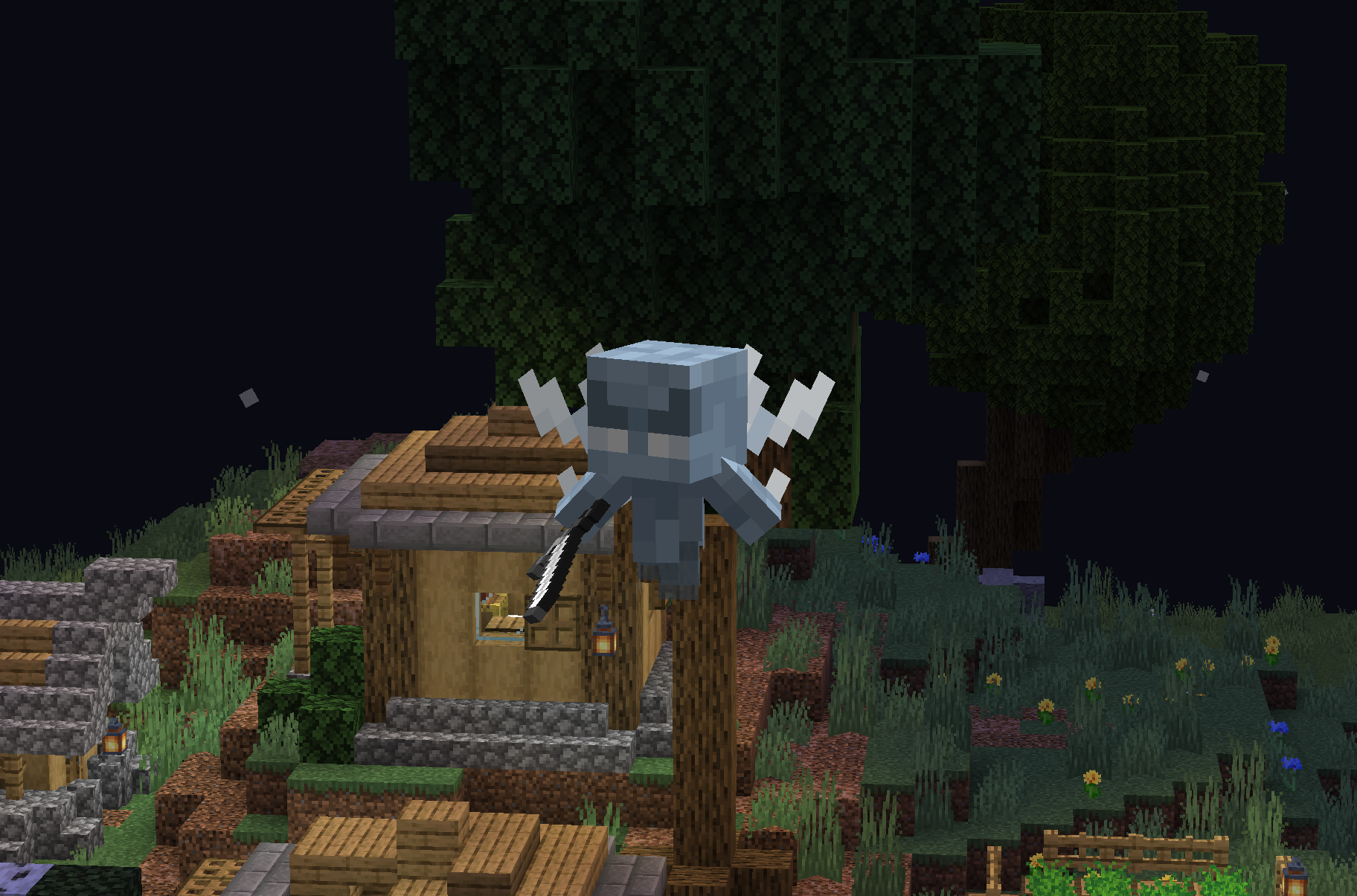
This plugin spawns a Vex on every new raid wave to prevent the player from standing AFK on the raid farm.
WorldwideChat

### What is WorldwideChat?
WorldwideChat is a plugin that lets you communicate with people who may not speak your language. It utilizes various translation APIs to translate different parts of Minecraft on the fly.
This was made in response to the lack of existing translation plugins, and as a former server owner myself this would have come in handy at times.
_If you want to support my work, please feel free to donate at the link above 🙂 Anything is much appreciated!_
**_(Note that you MUST have at least JDK 11 installed for this plugin to function. Additionally, if you are on 1.13-1.15, please always use WorldwideChat-spigot.jar REGARDLESS of if you are actually using paper or not.)_**
**Feel free to try the plugin for yourself at the following IP address:**
Test Server IP
152.67.252.19 (New and Improved)

Features
– Amazon Translate, Azure Translate, ChatGPT, DeepL Translate, Google Translate, Libre Translate, Ollama, and Systran Translate support.
– Translate chat, signs, entities, items, and written books with an interactive GUI.
– Translation globally, for other players, or just you.
– The plugin itself has been translated into more than 30 languages.
– A cache that stores the most used phrases by players on your server, improving speed and reliability in the event of slow API response times.
– A blacklist to avoid translating certain phrases/words.
– Rate limits so your players don’t fill up a quota too quickly.
– Persistent translation options saved per player across server reboots and reloads.
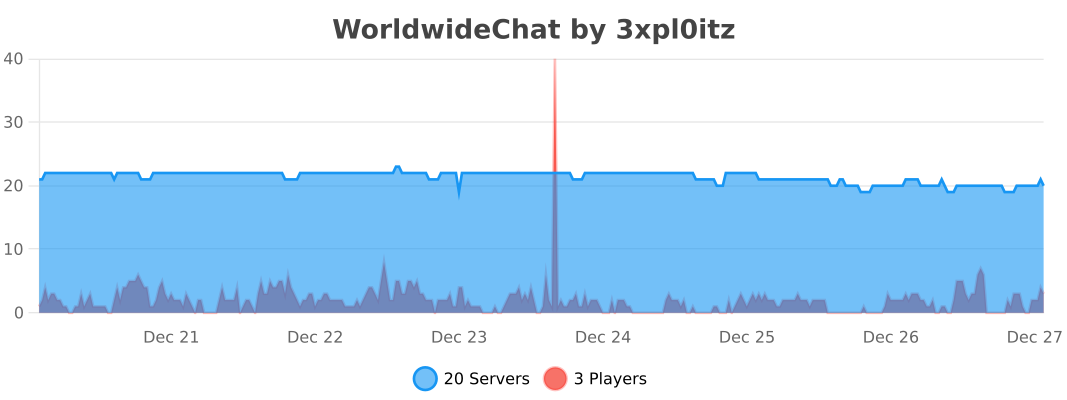
– Stat tracker to keep track of how your players use this plugin.
– A configuration GUI to easily change config.yml.
– MySQL/MariaDB, PostgreSQL, and MongoDB support.
– Citizens (NPC Dialogue) + DecentHolograms Support.

Github Wiki
https://github.com/dominicfeliton/WorldwideChat/wiki/Commands-&-Permissions

YouTube Tutorial
Please avoid posting bad ratings before asking questions. If you have problems or bugs with the plugin you can either file an issue on Github, or post on the plugin discussion page. Enjoy!
WorldTP
# WorldTP
## The simplest world management plugin.
**Teleport, list, and delete worlds with clean commands — fast, lightweight, and easy to use.**
_Usage:_
> – /wtp tp
> – /wtp tp
> – /wtp list
> – /wtp delete
**No bloat. Just simple world control.**
*Currently only available on versions 1.19-1.21+.* _More version support available if needed (join the discord)_
WorldTag
# Detailed Introduction to Minecraft WorldTag Plugin

WorldTag is a lightweight identification plugin specially developed for Minecraft servers. Its core positioning is to realize the associated visualization of players’ names and their current worlds, while balancing practicality, convenience and server performance optimization. It does not rely on any redundant dependency plugins, supports the deployment of Minecraft servers of all scales, provides server administrators with an efficient and flexible world identification management solution, and enhances the interactive experience between players.
## Where can I use WorldTag?


## Detailed Explanation of Core Features
As a dedicated plugin focusing on world identification display, WorldTag abandons redundant functions and focuses on the accurate implementation of core needs. Every function is optimized and designed to balance ease of use and stability.
### 1. Automatic Mounting of Player Name World Tags
The core function of the plugin is to automatically add an identification tag corresponding to the current world before players’ names, realizing intuitive visualization of players’ locations. Whenever players switch between different worlds on the server, the tags will be updated in real time without manual operation by administrators. This allows all online players to quickly identify the current world location of target players, facilitating cross-world interaction guidance between players, helping administrators quickly locate players’ scenarios, and improving server management efficiency.
### 2. Customizable Adaptation of Tag Text and Color
The plugin supports highly flexible tag customization. Server administrators can freely configure the display text and color parameters of each world tag according to their server’s operation style and world themes (such as Survival World, Creative World, Dungeon World, etc.). Through simple configuration operations, the tag text can be accurately matched with the server’s world names. Meanwhile, color parameters can be used to distinguish different world types, enhancing the recognition of tags, making world tags not only practical but also consistent with the overall visual style of the server.
### 3. Comprehensive Fault-Tolerance Adaptation Mechanism
To ensure the stable operation of the plugin, WorldTag has built-in intelligent fault-tolerance logic with special optimization for abnormal configuration file scenarios. When the plugin reads the configuration file, if it cannot recognize the target world folder on the server (such as abnormal folder naming, path changes, missing world files, etc.), it will automatically trigger the fault-tolerance mechanism and display the corresponding world tag as [Unknown]. This design can effectively avoid plugin errors, crashes or display disorders caused by configuration abnormalities, ensuring the plugin runs normally in various complex configuration environments.
## Core Advantages of the Plugin
### Lightweight Design with Low Resource Consumption
The plugin adopts a streamlined development logic, eliminating all non-core redundant code for an extremely compact size. It occupies minimal server resources during operation and does not impose any additional burden on server performance indicators such as TPS. It supports various deployment scenarios including small private servers and large public servers, and runs smoothly even on servers with limited resource configurations.
### Zero Dependencies for Easy Deployment
WorldTag does not require the installation of any extra dependency plugins or libraries. After downloading the plugin file, you can directly put it into the server plugin directory to complete deployment, without complex configuration and debugging. This greatly reduces the deployment cost and operation difficulty for server administrators. Both novice administrators and senior operation and maintenance personnel can quickly install and enable the plugin to implement world tag functions rapidly.
## Applicable Scenarios and Summary
WorldTag is suitable for all Minecraft servers with a multi-world architecture, whether it is a comprehensive server with coexisting modes such as Survival, Creative and Adventure, or a dedicated server focusing on specific gameplay. The plugin can realize standardized display of world identifications. Its features of lightweight, zero dependencies and high fault tolerance perfectly solve the pain points of inconvenient player world positioning and unclear identification in multi-world servers, while balancing server performance and management convenience.
In conclusion, WorldTag is a “small yet sophisticated” dedicated identification plugin. Guided by core functions and based on stability, it can add practical world identification functions to the server without complex operations. It not only improves the interactive experience of players but also helps administrators optimize server management efficiency, making it an ideal auxiliary plugin for multi-world Minecraft servers.
## Where can we get WorldTag?

WorldSystem
 A plugin to give every player his own world
1.18 – 1.21.5 Support
***
About
WorldSystem is a plugin where every player can get a world.
There they can do anything they want without creating stress in a single world.
The world owner can also add other players and manage their permissions on his world.
When a player creates a new world you can also set a template which will then be cloned.
Features
Features with (option) need to be enabled in the config.yml
- Every player can create a world
- Players can manage their world
- Worlds can be preconfigured
- Worlds unload if the player disconnects
- Supports different languages
- Removes worlds that are not in use (option)
- PlaceholderAPI support
- GUI Permission system for the world owners
- Generate worlds async (needs Chunky) (option in v2.4.40)
- Set world templates
- … and much more
How to help make this resource better
- Contributing code
- Creating useful issues
- Helping other users
- Leaving a good review
Info
Many answers about optimization and installation are available on the wiki.
WorldSlim
# WorldSlim
Reduce Minecraft world file size by automatically cleaning chunks that players barely visit. Three layers of defense catch what vanilla autosave would otherwise commit to disk.
—
## What it does
Modern Minecraft (1.18+) keeps chunks loaded much longer than a player’s view distance, and autosave writes them all to disk regardless of activity. WorldSlim hooks every layer of that pipeline:
1. **ChunkUnloadListener** — when a chunk does unload, intercept the save if `InhabitedTime` is low.
2. **AutosaveShield** *(new in 2.0)* — every 2 seconds, pre-emptively clear the dirty flag on loaded low-`InhabitedTime` chunks so autosave skips them.
3. **ChunkCleaner** — periodically rewrite region files, removing chunks that slipped through the first two layers.
Player activity (placing blocks, attacking mobs, opening containers, picking up / dropping items) marks chunks as “force-save” so they survive cleanup.
—
## Highlights
– **Three-layer architecture** — unload + autosave + region rewrite. Aggressive without being unsafe.
– **File-based ChunkRegistry** — managed/force-save state stored in `plugins/WorldSlim/data/`, survives server restarts and Leaf/Moonrise’s chunk-PDC strip. Crash-safe (lost marks degrade to “leave it alone”).
– **Aggressive mode** *(`cleanup.aggressive: true`)* — restores the pre-1.0.6 cleanup logic, achieves 90%+ cleanup rate on fresh servers. Off by default to protect builds on established worlds.
– **Diagnostics** — `/worldslim diagnose` for runtime counters, `/worldslim scan` for raw-NBT inspection of any region file, `/worldslim chunk` for full decision-tree of the chunk you’re standing in.
– **Daily-rotating file logger** at `plugins/WorldSlim/logs/`, configurable level.
– **Config migration** *(new in 2.0.1)* — new fields auto-injected on upgrade, preserving your edits and comments.
– **Async + bounded** — every disk operation runs off the main thread, with a 5-second timeout that safely skips when the server is busy.
—
## Compatibility
| Server | PDC Persistence | Registry | AutosaveShield |
|——–|—————–|———-|—————-|
| Paper 1.21.x | Yes | Yes | Yes |
| Purpur 1.21.x | Yes | Yes | Yes |
| Folia 1.21.x | Yes | Yes | Partial |
| Leaves 1.21.x | Yes | Yes | Yes |
| Leaf 1.21.x | Stripped | **Load-bearing** | Limited |
Requires Minecraft 1.21.x and Java 21.
—
## Commands
| Command | Description |
|———|————-|
| `/worldslim status` | Show plugin status and active configuration |
| `/worldslim stats` | Total chunks scanned/cleaned and space saved |
| `/worldslim chunk` | Full decision tree for the chunk you’re standing in |
| `/worldslim cleanup` | Run a cleanup pass immediately |
| `/worldslim diagnose [here]` | Runtime diagnostic snapshot. Append `here` for current-chunk details |
| `/worldslim scan` | Parse the current region file’s raw NBT and report what tags survived |
| `/worldslim reload` | Reload `config.yml` (also runs config migration) |
| `/worldslim reset` | Reset cleanup statistics |
Aliased to `/ws`. Permission: `worldslim.admin` for mutating commands; `worldslim.use` for the read-only ones.
—
## Quick start
1. Drop the jar in `plugins/`, restart.
2. Default config is conservative (preserves any chunks that look pre-existing). Works without configuration on most servers.
3. **On a fresh server** — set `cleanup.aggressive: true` for the best cleanup rate.
4. **On an established server with builds** — leave `aggressive: false` (default) and let the registry track new chunks going forward.
—
## Configuration highlights
“`yaml
# Chunk lifetime threshold. Below this, chunks may be cleaned.
# Default 1200 ticks = 60 seconds.
min-inhabited-time: 1200
cleanup:
interval-minutes: 30
run-on-startup: false
# Pre-1.0.6 cleanup behavior. Highly recommended for fresh servers.
aggressive: false
autosave-shield:
enabled: true
interval-ticks: 40 # 2s
logging:
file-enabled: true
level: INFO # DEBUG / INFO / WARN / ERROR
worlds:
enabled: [] # if non-empty, ONLY these worlds are managed
disabled: [] # always-skipped worlds
“`
Full default config (with all comments) is generated on first run.
—
## Reporting issues
Please include:
– `/worldslim diagnose` screenshot
– Latest log from `plugins/WorldSlim/logs/`
– Server type and version
WorldsColors
**🌎 WorldsColors** brings visual clarity and style to your Minecraft server by automatically coloring player nicknames depending on the dimension they are in.
Make Nether inhabitants glow in intimidating red, let Overworld adventurers keep a clean look, and give End explorers a soft, mystical pink — all fully automated and seamless.
**✨ Key Features**
Instant dimension-based coloring
Player name colors update immediately when entering or leaving a dimension.
Everywhere you need it
Colors are shown in chat, the TAB player list, and above player heads.
100% server-side
No client-side installation required — players can join with a vanilla client.
Highly compatible
Designed to work smoothly with other mods that modify chat or TAB lists.
Fully customizable
Configure colors for any dimension using a simple and flexible config file.
**🔧 Commands**
/worldscolor reload
Reload the configuration instantly without restarting the server.