xBossBar

# xBossBar 〽️
**xBossBar** is a powerful and customizable bossbar management plugin for Minecraft servers. It allows server administrators to create, manage, and display bossbars with personalized colors, styles, titles, and per-player visibility.
### Key Features 💫
– **BossBar Management** – Create, remove, and edit bossbars with ease.
– **Custom Titles** – Set unique titles for each bossbar.
– **Colors & Styles** – Multiple colors and styles including segmented and solid bars.
– **Per-Player Bars** – Show bossbars to specific players or all players.
– **Progress Control** – Dynamically set bossbar progress in-game.
– **API Support** – Fully featured API to integrate bossbars with other plugins or custom systems.
– **User-Friendly** – Simple and clear commands for fast management.
### Useful Links 🔗
– GitHub Repository – Access the source code, latest releases, and submit **Issues** for bug reports, feature requests, or questions.
– Wiki Documentation – Guides for commands, configuration, placeholders, and API usage.
### Support ❓
For technical issues, unexpected behavior, or enhancement suggestions, please submit an **Issue** on the GitHub repository. This ensures your feedback is tracked and addressed efficiently.
—
xBossBar is designed to provide a **robust, flexible, and professional bossbar management solution**, allowing Minecraft server owners to enhance gameplay with visually engaging and fully customizable bossbars.
XaeroSupport

Please join my Discord to get
updates and for me to fully assist you with bugs,
questions, or suggestions.
Discord: **click here**

## XaeroSupport
Adds XaeroMinimap and XaeroWorldMap support to your Minecraft server!
## Definitions
**Xaero Server-Specifics**:
– How filled out your maps are on a specific world. (The loaded/filled in chunks when you open your map for a specific world.)
– Waypoints.
**Backend Server**:
– A Minecraft server behind a Minecraft proxy that is also not a Minecraft proxy.
**Minecraft Proxy**:
– Such as:
– Velocity and forks.
– BungeeCord and forks.
**Server Id**:
– A unique identifier (that is a number) that tells players’ Xaero mods (on the client) that your server is your server.
## FAQ
**Q**: Does this affect performance?
**A** (Simple): No.
**A** (Full): Most plugins won’t affect performance, even if they are bigger plugins. What effects performance is how the plugins do operations with your server. This plugin does no operations, it is all just packets and it only sends packets when a player joins.
**Q**: Is this a `1:1` (`1 to 1`) replacement of the Xaero **mods** (server-side), but as a **plugin**?
**A** (Simple): No, but eventually yes.
**A** (Full): Right now, all this does is add support for `Xaero Server-Specifics` (look in the `Definitions` to define). Eventually, I will add more `1:1` functionality from the Xaero mods.
**Q**: Why would I use this if it is not a `1:1` replacement?
**A** (Full): Well, keep in mind that eventually it will be. But, in the mean time, this is extremely useful for `Minecraft Proxies` because it makes it so each of your `Backend Servers` can have their own `Xaero Server-Specifics` (look in the `Definitions` to define) — this is very helpful due to how Xaero stores these in your game’s files.
**Q**: What would happen if I don’t use this, or something like this and I have players who use Xaero’s mod join my server?
**A** (Full): Xaero used to keep `Xaero Server-Specifics` defined per world/server name. Which is an issue if you have multiple servers you join with the same name (i.e. if you have all your server’s named `Minecraft Server` — which is the default). Xaero recently added functionality to look at the IP that players used to join your server to differentiate the `Xaero Server-Specifics`, but this only works if you have an updated mod and if your server isn’t behind a `Minecraft Proxy`. **If the players’ mod thinks you are on the same server/world *when you are not*, it will overwrite/reset the map data it already has filled out, or even delete or add some way points. This plugin fixes that.**

– No more need for Paper forks!
– Some paper forks (such as `Leaf` and `DivineMC`) add exactly what this plugin does directly into your server software, this plugin adds it as a plugin so you don’t need to rely on `Leaf` or `DivineMC` to be stable.
– Easy set up! (Drag and drop!)
– It automatically generates a `Server Id` for your server.
XaeroShare

A simple client side mod **or** server-side plugin (only one side needs it) that allows you to share Xaero’s Minimap waypoints to specific players instead of being forced into sharing it with all players currently online the server.
# Mod (Fabric)
This is the client side variant of this mod, you install it on your client and you can use it on any server even if that server 100% vanilla* since we piggyback on how waypoints are shared via chat.
*: [Note 1]
## Usage
Currently the mod can be activated using the default hotkey (`Right Alt`); however, this can always be changed via settings.
## Current features
* Sharing waypoints with single and or multiple players
* Automatic delay between sending waypoints to avoid spamming commands
* Commands to share location / waypoints
## Demo
## Detection
The mod has no way of detecting it when it’s just passively installed in the background (excluding exploits such as sign translation) but when it sends waypoints it uses the `/msg` command which on it’s own is a good enough sign that the waypoints aren’t being sent manually as the waypoint share format is too messy to type out manually (and there’s no docs); however, when xaeroshare sends a waypoint it’ll automatically add `:xaeroshare` on the end allowing for servers to detect them for whatever use (this is what the plugin uses to ignore messages from the mod)
# Commands
## `/locationshare`
Syntax: `/locationshare “Location Name” “minecraft:overworld” 1 2 3 Player1 Player2 Player3 […]`
## `/waypointshare`
Syntax: `/waypointshare “Waypoint Name” “minecraft:overworld” Player1 Player2 Player3 […]`
# Plugin (PaperMC & Forks)
The mod has a server side version where the plugin can be installed on the server and anybody on the server (even if they don’t have the mod installed) can select the players who they want to share their waypoint with.
## Usage
The plugin intercepts the regular Xaero’s Minimap share messages and pops up a screen for the player using Paper’s Dialog API with a list of players that the user can then select and submit or they can choose to ignore the menu entirely and continue with the vanilla sending behaviour.
## Current features
* Sharing waypoints with single and or multiple players
* Automatic interception of Xaero’s Minimap messages
* Transparent (Appears to clients as if the message was never intercepted[Note 1])
* 100% data preservation (The share format isn’t documented so I had to make some assumptions that may turn out to be wrong, but the plugin just copies the mods output directly)
## Demo
# Notes
1: Since we are pretty much lying to the server and clients about what / who is sending the message chat reporting and messaging signing might have some issues with it. If you encounter issues try (or ask the server admin to try) disabling `enforce-secure-profile` in `server.properties`.
x10k Management Core
# x10k Management Core
### Lastest version: Stable 1.6.1 (01/03/2026)
Hi, I started this plugin as a hobby, so it has lots of features that will enhance the survival gameplay, all in one plugin, so you don’t need to install 4 or more plugins.
Everything is extremely configurable; you can enable and disable almost every command, customize the messages, prefixes, and more!
For now we have:
– **Homes & warps** system and cmds
– **Tpa & ping** system and cmds
– **Graves & back** system and cmds
– **Warps & rank** system and cmds
– **Notifications** system and cmds
– **Msg and reply** system and cmds
– **Clearlag & combat** system and cmds
– **Ban & warn** system and cmds
– **Admin commands** (feed, fly, heal, vanish, gamemode (aliases), etc.)
Also, here are the placeholders (this is a Beta feature, so expect changes):
“`
%xmc_rank% – Displays the highest rank name of the player
%xmc_rank_prefix% – Displays the formatted prefix of the player’s highest rank (including colors and gradients)
%xmc_warnings% – Displays the total amount of active warnings the player has
%xmc_afk% – Displays “AFK” if the player is currently away from keyboard, otherwise empty
“`
Extra links and more info:
> **Permissions and commands** (lastest update: 22/02/2026)
xTpa
# ⚡ xTpa | The Premium Teleportation Suite

**xTpa** is a professional-grade teleportation plugin for Minecraft servers that prioritizes user experience, visual feedback, and server performance. Say goodbye to boring, text-only teleport requests and welcome a new era of interactive player movement.
—
## 🚀 Why choose xTpa?
Unlike standard teleport plugins that only provide simple chat messages, **xTpa** focuses on **immersive feedback**. With integrated sounds, titles, and action bars, your players will never miss a request again.
### ✨ Key Features at a Glance:
* **🎨 Advanced Visuals:** Uses **Titles**, **Subtitles**, and **ActionBars** to grab the player’s attention immediately when a request arrives.
* **🎵 Audio Feedback:** Every action has a soul! Fully configurable sounds for receiving requests, starting the countdown, and successful arrival.
* **🛡️ Combat-Safe Teleport:** Prevents players from escaping combat or dangerous situations by detecting movement during the teleport countdown.
* **🌈 HEX & Legacy Colors:** Supports the full range of modern HEX colors (`&#RRGGBB`) and legacy formatting codes.
* **⚡ Optimized Performance:** Written with high-concurrency in mind to ensure your server’s TPS stays at a solid 20.
* **🔗 PlaceholderAPI Support:** Fully integrated placeholders like `%xtpa_player%` and `%xtpa_time%` for customized messages.
—
## 🛠️ Detailed Commands & Permissions
| Command | Usage | Description | Permission |
| :— | :— | :— | :— |
| `/tpa` | `/tpa ` | Send a teleportation request to a player. | *None (Default)* |
| `/tpaccept` | `/tpaccept` | Accept the most recent teleport request. | *None (Default)* |
| `/tpdeny` | `/tpdeny` | Decline the current pending request. | *None (Default)* |
| `/xtpa` | `/xtpa reload` | Reload the plugin configuration and messages. | `xtpa.admin` |
### 🔑 Special Permissions
* `xtpa.bypass.cooldown`: Allows the player to send requests without waiting for the cooldown.
* `xtpa.bypass.delay`: Allows instant teleportation without the countdown wait.
—
## ⚙️ Full Configuration Preview
Here is the complete `config.yml` which allows you to customize every single aspect of the plugin to your liking.
“`yaml
# _____
# __ _/__ _ __ __ _
# / / / // ‘_ / _` |
# > < / / | |_) | (_| |
# /_/_\/ | .__/ __,_|
# |_/
# Official Support: https://xplugins.es/discord
# Documentation: https://xplugins.es/plugins/xtpa
# General plugin settings
settings:
tpa-timeout-seconds: 60 # How long a request stays active before expiring
cooldown-seconds: 15 # Time a player must wait between sending requests
teleport-delay-seconds: 3 # Seconds to wait before the teleport happens
teleport-move-cancel: true # If true, teleport cancels if the player moves
center-messages: false # Aesthetic option to center chat messages
# Sound System
# Use standard Spigot sound names (e.g., ENTITY_ENDERMAN_TELEPORT)
sounds:
received-tpa:
enabled: true
sound: "ENTITY_EXPERIENCE_ORB_PICKUP"
volume: 1.0
pitch: 1.0
teleport-start:
enabled: true
sound: "BLOCK_NOTE_BLOCK_HARP"
volume: 0.5
pitch: 1.5
teleport-success:
enabled: true
sound: "ENTITY_ENDERMAN_TELEPORT"
volume: 1.0
pitch: 1.0
# Visual Feedback (Titles & ActionBars)
visuals:
title:
enabled: false
title: "&#FAEDCB ℹ Request Received!"
subtitle: "&f%xtpa_player% wants to teleport to you"
fade-in: 10
stay: 60
fade-out: 10
actionbar:
enabled: true
message: "&fHey! &#FAEDCB&n%xtpa_player%&f has sent you a TPA! Check your chat."
# Message System (Supports HEX Colors)
messages:
prefix: ""
no-permission: "&c ✘ Error! &fYou do not have permission to use this."
player-not-found: "&c ✘ &fThat player is offline or does not exist."
cooldown: "&#FF5252 ✘ Error! &fWait &e%xtpa_time%s &fbefore sending another request."
self-tpa: "&#FF5252 ✘ Error! &fYou cannot teleport to yourself."
tpa-sent: "&#A0FF91 ✔ Success! &fRequest sent to &e%xtpa_player%&f."
tpa-no-pending: "&#FAEDCB ℹ Info! &fYou have no pending requests."
tpa-expired: "&#FAEDCB ℹ Info! &fThe teleport request has expired."
tpa-denied-target: "&#A0FF91 ✔ Success! &fYou denied the request."
tpa-denied-sender: "&#FF5252 ✘ Error! &fPlayer &e%xtpa_player% &fdenied your request."
tpa-accepted-target: "&#A0FF91 ✔ Success! &fRequest accepted."
tpa-accepted-sender: "&#A0FF91 ✔ Success! &e%xtpa_player% &faccepted your request."
teleport-starting-sender: "&#A0FF91 ✔ Success! &fTeleporting you to &e%xtpa_player%&f."
teleport-delay-notice-sender: "&#FAEDCB ℹ Info! &fTeleporting in %xtpa_time% seconds. Do not move!"
teleport-cancelled-moved: "&#FF5252 ✘ Error! &fMovement detected! Teleport cancelled."
teleport-cancelled-quit: "&#FF5252 ✘ Error! &fPlayer disconnected. Teleport cancelled."
teleport-success-sender: "&#A0FF91 ✔ Success! &fYou have arrived safely."
# Interactive Chat Request
received-request:
line1: "&#FAEDCB ℹ Info! &fPlayer &#FAEDCB%xtpa_player% &fwants to teleport to you."
line2-accept: "&fType &a/tpaccept &fTo accept."
line3-deny: "&fType &c/tpdeny &fTo decline."
line4: "&#FAEDCB ℹ Info! &fThe request expires in %xtpa_time% seconds."
hover-accept: "&#A0FF91 Click here to ACCEPT!"
hover-deny: "&c Click here to DENY!"
```
---
## 📥 Installation
1. **Download** the latest `.jar` file from Modrinth.
2. **Drop** the file into your server's `plugins/` folder.
3. **Restart** or **Reload** your server.
4. **Configure** the `config.yml` to your heart's content!
---
## 🌐 Community & Support
Join our growing community of developers and server owners!


---
*Created by the team at xPlugins. Quality matters.*
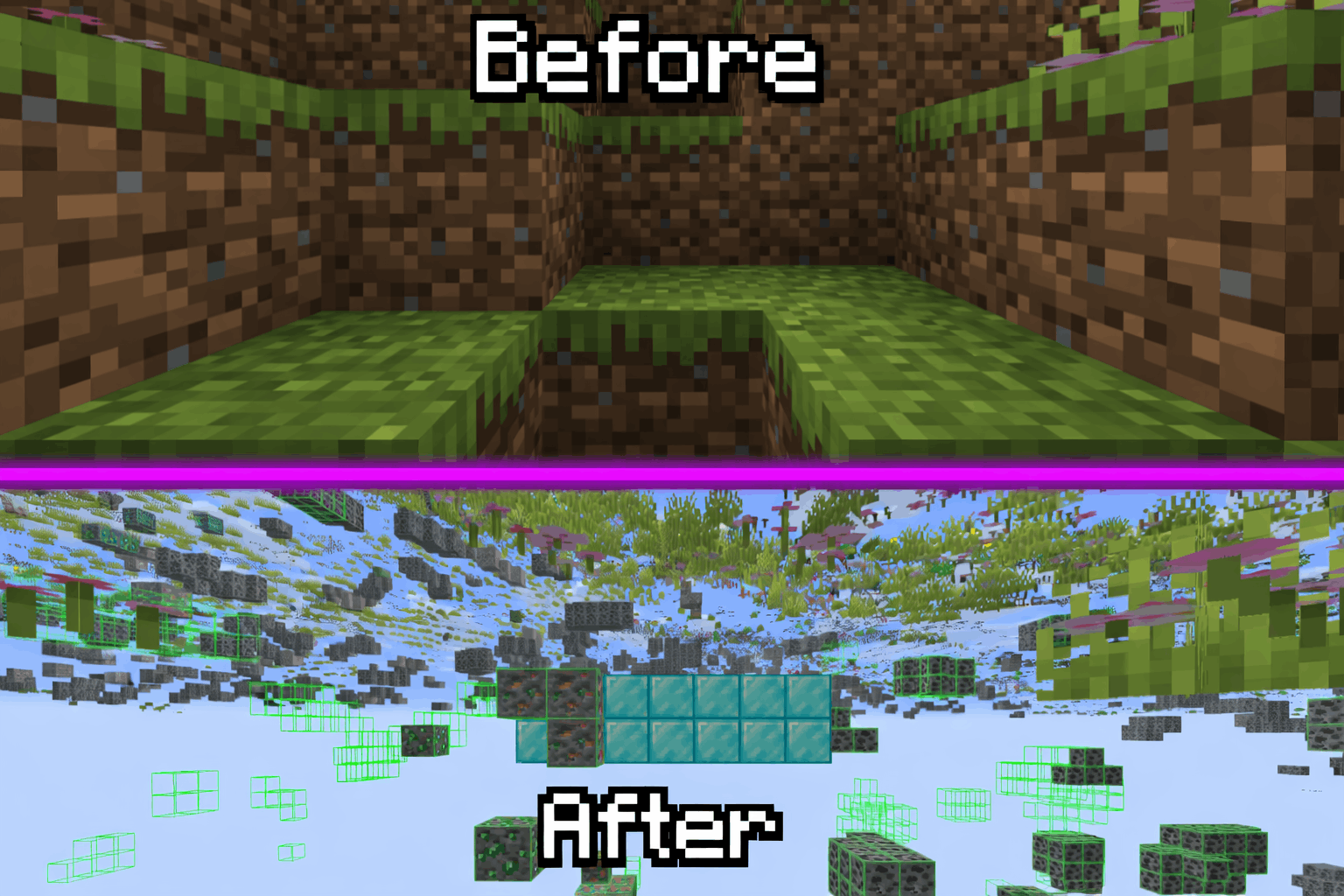
X to Xray

Tired Of Using X-Ray Resourcepacks? Then Try X To Xray!
Why You Should Use X To Xray
1. > Allows You To Have Good Customisation In Ouer Built In Config Menu! Toggling Ores And Other Blocks Has Never Been Easyer!
2. > Use Our Built In VeinMiner To Never Have Spending Much Time Mining!
3. > We Support Many Modloaders: Fabric , Forge And NEO-Forge
## How To Use!
1. > Download The Mod And An Version Of Fabric API
2. > Put Both In Your Mods Folder (If You Use Normal Minecraft Launcher!)
3. > Launch Minecraft And Start X-Raying!
4. > Make Sure To Favorite The Mod!
## Screenshots:
> 
### Supportet Versions:
> **26.1** , **26.1.1** And **26.1.2**
**_We Are Trying To Support Other Versions Too!_**
xSetSpawn
# 🌍 xSetSpawn – The Ultimate Global Spawn Management
—
**xSetSpawn** is a modern, lightweight, and highly customizable solution for managing your Minecraft server’s spawn point. Now more global than ever, v1.0.3 introduces a full multi-language system and advanced stability features to give your players the most immersive experience possible.

—
## 🔥 Why choose xSetSpawn?
Unlike standard essentials plugins, **xSetSpawn** gives you granular control over the *feel* of your server’s hub. It’s designed for server owners who care about presentation, performance, and international reach.
### 🚀 Key Features
* **🌍 Global Multi-Language System:** Ship your server in **English**, **Spanish**, or **Portuguese (BR)** out of the box. Switch languages on the fly with a single config setting.
* **✨ Immersive Visuals:** Greet your players with customizable on-screen Titles, Subtitles, and ActionBars. All visual texts are now fully localizable per language!
* **🎨 Modern HEX Support:** Full support for **HEX Colors** (`&#RRGGBB`) in all messages, prefixes, and titles for that premium server aesthetic.
* **🧪 Advanced Stability:** Built-in startup error handling and a robust internal refactor to ensure your plugin always enables correctly.
* **⏱️ Smart Cooldown System:** Prevent command spam with customizable delays. Includes a bypass permission for VIPs or Staff.
* **🚪 Auto-Routing:** Force players to spawn on join or respawn to maintain your server flow.
—
## 🛠️ How it Works
1. **Position:** Walk to your desired location. Camera angle (pitch/yaw) is saved!
2. **Set:** Type `/setspawn`. The location is instantly recorded in `data/data.yml`.
3. **Localize:** Pick your language in `config.yml` (e.g., `lang: es`).
4. **Reload:** Use `/xspawn reload` to apply changes instantly without a restart.
5. **Play:** Your players are greeted with beautiful visuals and sounds upon arrival!
—
## 📜 Commands & Permissions
| Command | Description | Permission |
| :— | :— | :— |
| `/spawn` | Teleport to the server’s spawn point. | `xspawn.use` |
| `/setspawn` | Define the spawn location at your position. | `xspawn.admin` |
| `/xspawn reload` | Reload config and language files instantly. | `xspawn.admin` |
*(Note: `xspawn.bypass` allows instant teleportation).*
—
## ⚙️ Configuration (v1.0.3 Snippet)
The new configuration is cleaner and focused on logic, while all text moved to the `lang/` folder:
“`yaml
# __ __ _____
# / / / ____|
# / | (___ _ __ __ _ __ __ _ __
# / ___ | ‘_ / _` | / / / | ‘_
# /_/_ ____) | | |_) | | (_| | V V / | | | |
# |_____/ | .__/ __,_| _/_/ |_| |_|
# | |
# |_| By xPlugins
settings:
# Plugin language. Options: en, es, br
lang: en
# Require permissions to use /spawn?
require-permission: true
# Cooldown System
cooldown:
enabled: true
seconds: 5
bypass-permission: “xspawn.bypass”
# Auto-Teleport
teleport-on-join: true
teleport-on-respawn: true
visuals:
sound:
enabled: true
name: “ENTITY_PLAYER_LEVELUP”
particles:
enabled: true
name: “TOTEM”
titles:
enabled: true
fade-in: 10
stay: 40
fade-out: 10
# All messages and titles are now in lang/messages_.yml
“`
> xPlugins 2026
xRtp
**🚀 xRtp – Smart & Secure Random Teleport**

> **xRtp** is a powerful, optimized, and fully configurable Random Teleport plugin designed for modern Minecraft servers. Built for professional performance, absolute safety, and extreme customization.
 
—
> ## ✨ Main Features (v1.0.2 Update)
> ### 🚀 Zero-Lag Search Engine
Our new algorithm checks up to **10 coordinates per tick** only within **pre-generated chunks**. This ensures almost instant teleportation with **zero TPS drops** and zero lag, as it prevents generating new terrain.
> ### 🎛 Menu Engine 2.0 (Full Customization)
Total control over your `menu.yml`. Toggle the **auto-filler** or design your layout slot-by-slot using **slot lists** (e.g., `slots: [0,1,8,9]`) to create unique borders and designs.
> ### ⚡ Interactive Menu Actions
Turn menu items into functional buttons. Supports several action types:
– `CLOSE`: Closes the inventory.
– `MESSAGE`: Sends custom messages to the player.
– `COMMAND`: Executes a player command (e.g., `/spawn`).
– `CONSOLE`: Executes a command from the console on the player’s behalf.
> ### 📊 Enhanced Visuals & BossBars
Includes a fully customizable **BossBar** with dynamic progress titles that show the remaining time (`%time%s`) during the teleport delay.
—
> ## 📂 Included Files
– `config.yml` → General settings, optimization toggles, permissions, safety system.
– `menu.yml` → GUI Engine 2.0 layout and menu customization.
– `lang.yml` → Fully customizable messages, BossBar, and translations.
– `Config ES/` → **Bonus!** Includes a pre-configured Spanish VIP setup.
—
> ## 🔐 Permissions
| Permission | Description |
|————|————-|
| `xrtp.admin` | Reload the configuration using `/rtp reload` |
| `xrtp.bypass` | Bypass teleport cooldown |
| (Optional) | General use permission can be disabled in config |
—
> ## ⚙️ Configuration Highlights
✔ **Use Pre-generated Chunks** (Anti-lag system)
✔ Cancel teleport on movement
✔ Adjustable cooldown duration
✔ Custom slot-by-slot menu filling
✔ Interactive buttons with placeholders
✔ Advanced BossBar with progress titles
✔ Maximum attempts to find a safe location
—

—
> ## 🎯 Perfect For
Survival • SMP • Skyblock • Factions • Lobby • Etc
—
> ### 💻 Developer API
xRtp includes a **powerful and easy-to-use API** so other plugins can interact with it. You can execute RTPs manually, check cooldowns, and hook into events to modify or cancel teleports.
> #### How to use it
First, verify that xRtp is loaded and get the instance:
“`java
if (Bukkit.getPluginManager().getPlugin(“xRtp”) == null) {
// xRtp is not installed
return;
}
XRtpAPI api = XRtpAPI.getInstance();
X-ray Fix

# X-ray Fix
X-ray Fix is a high-performance Minecraft server plugin designed to defeat both visual X-ray mods and seed-based X-ray exploits. It works by decoupling ore generation from the world seed and using advanced packet-level obfuscation to hide underground blocks from clients.
—
## Features
– **Seed-Based X-ray Protection** — Ores are stripped and re-placed using a private server secret. Even if a player knows the world seed, they cannot predict ore locations.
– **Visual X-ray Protection** — Sends fake block data (random ores and stone) to the client for all hidden underground blocks.
– **Multi-Dimension Support** — Custom obfuscation rules and fake material pools for both the Overworld and the Nether.
– **Folia Compatible** — Fully thread-safe and compatible with both Folia and traditional Paper servers.
– **Performance Optimized** — Uses `ChunkSnapshot` for efficient scanning and batched `sendMultiBlockChange` updates, ensuring zero impact on server MSPT.
—
## How It Works
### Ore Stripping & Replacement
When a chunk is generated (or loaded for the first time after installation), X-ray Fix scans it and removes all naturally generated ores. New ore positions are then calculated using a PRNG seeded with the chunk coordinates combined with a private server-side secret — making placement consistent for the server, but completely unpredictable for players.
### Packet Obfuscation
When a chunk is sent to a player, X-ray Fix identifies all blocks that are hidden (not exposed to air or transparent blocks) and replaces them in the outgoing packet with random selections from a configurable pool of fake materials. Players never see the real blocks until they’re actually exposed.
### Dynamic Revealing
When a block is broken, placed, or blown up, X-ray Fix instantly sends high-priority multi-block change packets for all 6 adjacent neighbors — ensuring newly exposed blocks are revealed immediately with no visual glitches.
—
## Requirements
– **Server:** Spigot, Bukkit, Paper, Purpur, Pufferfish, or Folia (1.21.1+)
– **Java:** 21+
– **ProtocolLib** (Required)
—
## Installation
1. Download and drop the JAR into your server’s `plugins` folder.
2. Start the server to generate `config.yml`.
3. *(Optional)* Set a custom `secret` in `config.yml`. If left empty, one will be auto-generated.
4. Adjust `max_y` and `fake_materials` to suit your needs.
5. Restart the server and you’re protected.
X-Mas: Upgradeable Christmas Tree Event

**With this plugin you can plant your Christmas tree and upgrade it. Look for some gifts under it!**
[UPDATED VERSION]
– Added support for 1.20+ MC versions.
– Added Java 21 requirement.
– Updated all dependencies and libraries to 2024 versions.
– Fixed and replaced deprecated methods.
– Skulls system fixed, it will now use the latest Paper API
– Added missing autocomplete to all commands.
– Added a reload command /xmas reload
– Added a way to add custom items as gifts with the /xmas addhand command
**If you want to know more – read below!**
**Stages**
Christmas Tree has 4 different stages.
Each stage has lower gift cooldown.
**Stage 1: Sapling**

It’s looks like a normal one, but there are a bit of magic above it! On this level there are no gifts by default(Configurable) so we need our tree to grow!
**Stage 2: Small Tree**

From this stage tree starts to spawn gifts! (You can see one on the pic) It’s has same ambient effect(but much bigger) and redstone lights!
**Stage 3: Big Tree**

It’s almost final! Leaves are decorated with gold (fire) lights! And It’s also has snowy ambient effect!
And here goes the final!
**Stage 4: Magic Tree**

Final tree stage that decorated with multicolored lights and magic-stars ambient!
**Time to open gifts!**

**How to**
To spawn Magic Tree you need to craft Christmas Crystal and than use it on normal spruce sapling!
**Crafting**

**Uprading**
You can upgrade tree by using required resources on it (Like bonemeal) To see what resources you need to use – right click the tree.
You will see an fancy list like this:

**Configuration**
**Resources**
Each level requires special resources to get it. That can be changed in config file. Also you can change gift-spawning cooldown for each level. Max tree count also can be set on config file.
**Drops and gift skins**
All theese things can easy be edited in config.
**Ends of Holidays**
At the end of holidays (by default 10.01.2014 but can be changed in config) players will get a possibility to ungrow tree to get all resources back (Also configurable)
**Locales**
Plugin support custom translations! (See locales folder) There are 3 locale by default (En, Ru and Ru_Santa)
To define your one – copy the file and set it on main config.
**Commands and Permissions**
The plugin has only one command – /xmas
To use it you need xmas.admin permission
P.S. There is built-in help you can read by using /xmas help command
**Griefing**
Trees are protected from griefing by water, lava, flint and steel, explosions and pistons.
**Videos?**
Thanks to all YouTubers, we now have a bunch of reviews and tutorials here!
Merry Christmas and Happy New Year!