XPlayerKits

It’s a plugin that allows you to create kits for your players.
This plugin was created due to the lack of an optimized solution for this feature.
It uses very little RAM and is highly customizable.
|  |
|  |
|  |
|
| — | — | — |

**Unlike other plugins that load the data of every single player registered on your server (wasting precious resources), XPlayerKits takes a smarter approach.**
It only loads player data when they actually join, and keeps just the essential information cached. This means **significantly lower RAM usage** without sacrificing performance.
On top of that, XPlayerKits comes with **built-in SQLite support right out of the box**, giving you a reliable and lightweight database solution. No more dealing with the limitations and issues of storing player data in messy YML files.

### Features
– **Migration:** Migrate data and kits from another plugin to save resources and avoid inventory exploits.
– **Kit placeholder requirements:** Use a system to check placeholder conditions.
– **Fully editable inventory:** Customize the kit inventory with an item name system for icons.
– **Claim/Deny actions:** Set actions when claiming or denying a kit, such as commands or sounds.
– **In-game GUI:** Edit kits directly in-game, including properties, icons, and content.
– **One-Time Kits:** Create kits that can only be claimed once, stored in player data.
– **First Join Kit:** Deliver a kit to players the first time they join your server.
– **Database support:** MongoDB, MySQL, and SQLite are supported (Recommended: MongoDB).

### Commands
– `/xkits editor` – Opens the editor for quick kit creation.
– `/xkits kits` – Opens the kit selection menu.
– `/xkits open [rotation/category]` – Opens the kit selection with category or rotation kits.
– `/xkits preview [player]` – Opens preview menu.
– `/xkits give ` – Give kits directly to players without checks.
– `/xkits claim ` – Give kits to players with checks.
– `/xkits reset ` – Reset a player’s data for a specific kit.
– `/xkits resetall ` – Reset all data for a player.
– `/xkits delete ` – Delete a kit.
– `/xkits migrate playerkits2_yml/playerkits2_mysql` – Migrate data from other plugins.
– `/xkits migratekits playerkits2` – Migrate kits from other plugins.

### Permissions
– `xkits.admin` – Allows players to use the `/xkits editor` and `/xkits slots` commands.
– `xkits.preview` – Allows players to use `/xkits preview`.
– `xkits.countdown.bypass` – Allows players to bypass kit countdowns.
– `xkits.onetime.bypass` – Allows players to bypass one-time restrictions.

### Placeholders
– `%xplayerkits_cooldown_%` – Show the time to next claim.
– `%xplayerkits_claimed_onetime_%` – Return yes or no if the kit of player is claimed.
– `%xplayerkits_claimed_cooldown_%` – Return yes or no if the kit of player is in cooldown.

### Actions
| Action | Description | Example |
|————————-|———————————————–|———————————————————–|
| console | Executes a command from the console. | `console:say test` |
| command | Executes a command as the player. | `command:dm open main` |
| sound | Plays a sound to the player. | `sound:ENTITY_ENDERMAN_TELEPORT;1.0f;1.0f` |
| playsound_resource_pack | Plays a sound from a resource pack. | `playsound_resource_pack:ENTITY_ENDERMAN_TELEPORT;1.0f;1.0f` |
| message | Sends a chat message to the player. | `message:You can’t claim this kit.` |
| center_message | Sends a centered message to the player. | `center_message:You can’t claim this kit.` |
| mini_message | Sends a MiniMessage formatted message. | `mini_message:You can’t claim this kit.` |
| broadcast | Sends a message to all players. | `broadcast:You can’t claim this kit.` |
| titles | Sends a title and subtitle to the player. | `titles:
Kit Claimed!;<subtitle>Enjoy your rewards!`|<br />
| wait_ticks | Waits before executing the next action. | `wait_ticks:40` |</p>
<p align="center">
<img decoding="async" src="https://i.imgur.com/OosO7SC.jpeg" alt="links">
</p>
<p>| <a href="https://discord.gg/4R9teKVcbM" target="_blank"><img decoding="async" src="https://i.imgur.com/5mATCrI.jpeg" alt="Discord" /></a> | <a href="https://www.patreon.com/c/insideranh" target="_blank"><img decoding="async" src="https://i.imgur.com/G31oZIG.jpeg" alt="Patreon" /></a> | <a href="https://www.insideranh.dev/docs/xplayerkits" target="_blank"><img decoding="async" src="https://i.imgur.com/zdRGBIY.jpeg" alt="Wiki" /></a> |<br />
| — | — | — |</p>
</article>
<article>
<h1>xPickaxes</h1>
<p># ⛏️ xPickaxes</p>
<p>**xPickaxes** is a professional Spigot/Paper plugin that adds fully customizable pickaxes with area mining, an intuitive GUI, permission-based access, and special effects — all configurable without touching a single line of Java.</p>
<p>> Compatible with **Minecraft 1.19 – 1.21+** (Paper & Spigot)</p>
<p>—</p>
<p>## ✨ Features</p>
<p>– **Area Mining** — Mine 3×3, 5×5, 7×7, or 9×9 areas with a single block break<br />
– **In-game GUI** — Right-click any custom pickaxe to open a clean configuration menu<br />
– **Special Effects**<br />
– 🔥 **Auto-Smelting** — Ores are smelted directly into ingots<br />
– ✨ **Fortune Boost** — Increased drops on all mined blocks<br />
– ⛏ **Vein Miner** — Mines entire connected ore veins at once (up to 64 blocks)<br />
– 🔍 **Ore Highlight** — Visual glow effect on nearby ores *(framework ready)*<br />
– **Per-player Settings** — Each player can toggle area mining and effects individually<br />
– **Permission System** — Fine-grained control over which players access which pickaxes and effects<br />
– **Custom Area Sizes** — Players can choose their preferred area size from the GUI<br />
– **Blacklist Support** — Prevent area mining on specific blocks (bedrock, command blocks, etc.)<br />
– **WorldGuard Compatible** — Respects protected regions<br />
– **Sound & Particle Effects** — Satisfying feedback on area mines (toggleable)<br />
– **Fully Config-Driven** — Add or edit pickaxe types entirely from `config.yml`</p>
<p>—</p>
<p>## 📦 Pickaxe Tiers</p>
<p>| Tier | Area | Material | Effects | Permission |<br />
|——|——|———-|———|————|<br />
| **Novice** | 3×3 | Iron Pickaxe | — | `xpickaxes.pickaxe.novice` |<br />
| **Adept** | 5×5 | Golden Pickaxe | Fortune Boost | `xpickaxes.pickaxe.adept` |<br />
| **Master** | 7×7 | Diamond Pickaxe | Fortune + Auto-Smelting | `xpickaxes.pickaxe.master` |<br />
| **Titan** | 9×9 | Netherite Pickaxe | Fortune + Auto-Smelting + Vein Miner | `xpickaxes.pickaxe.titan` |</p>
<p>All tiers are fully editable or removable in `config.yml`. You can also add your own!</p>
<p>—</p>
<p>## 🎮 Commands</p>
<p>| Command | Description | Permission |<br />
|———|————-|————|<br />
| `/xpickaxe give <type> [player]` | Give a custom pickaxe | `xpickaxes.give` |<br />
| `/xpickaxe list` | List all available pickaxe types | `xpickaxes.use` |<br />
| `/xpickaxe menu` | Open the GUI for your held pickaxe | `xpickaxes.use` |<br />
| `/xpickaxe reload` | Reload the plugin config | `xpickaxes.reload` |<br />
| `/xpickaxe help` | Show help | — |</p>
<p>**Aliases:** `/xpick`, `/xp`</p>
<p>—</p>
<p>## 🔑 Permissions</p>
<p>| Permission | Default | Description |<br />
|————|———|————-|<br />
| `xpickaxes.use` | Everyone | Use custom pickaxes |<br />
| `xpickaxes.give` | OP | Give custom pickaxes |<br />
| `xpickaxes.reload` | OP | Reload the plugin |<br />
| `xpickaxes.admin` | OP | Full admin access (includes give + reload) |<br />
| `xpickaxes.pickaxe.novice` | Everyone | Access to Novice pickaxe |<br />
| `xpickaxes.pickaxe.adept` | OP | Access to Adept pickaxe |<br />
| `xpickaxes.pickaxe.master` | OP | Access to Master pickaxe |<br />
| `xpickaxes.pickaxe.titan` | OP | Access to Titan pickaxe |<br />
| `xpickaxes.effect.autosmelting` | OP | Use Auto-Smelting effect |<br />
| `xpickaxes.effect.veinminer` | OP | Use Vein Miner effect |<br />
| `xpickaxes.effect.fortune` | OP | Use Fortune Boost effect |<br />
| `xpickaxes.effect.xray` | OP | Use Ore Highlight effect |</p>
<p>—</p>
<p>## 🖥️ GUI Overview</p>
<p>**Right-click** any xPickaxes custom pickaxe (or run `/xpickaxe menu`) to open the configuration panel:</p>
<p>“`<br />
┌─────────────────────────────────────────────────────┐<br />
│ [Pickaxe] [Pickaxe Configuration] │<br />
│ │<br />
│ [Toggle Area] [Compass] [3×3][5×5][7×7][9×9][✗]│<br />
│ │<br />
│ [★] [Effect1] [Effect2] [Effect3] [Effect4] │<br />
│ │<br />
│ [ℹ Info] │<br />
│ [✖ Close] │<br />
└─────────────────────────────────────────────────────┘<br />
“`</p>
<p>– **Toggle Area Mining** — Enable/disable area mining for this session<br />
– **Area Size** — Select 3×3, 5×5, 7×7, or 9×9 (or reset to pickaxe default)<br />
– **Effects** — Toggle each special effect independently (respects permissions)</p>
<p>—</p>
<p>## ⚙️ Configuration</p>
<p>All pickaxe types, effects, messages, and behavior is defined in `config.yml`. Here’s an example of adding a custom pickaxe:</p>
<p>“`yaml<br />
pickaxes:<br />
my_custom_pick:<br />
enabled: true<br />
display-name: “&5✦ Void Pickaxe”<br />
lore:<br />
– “&7Area Mining: &e11x11”<br />
– “”<br />
– “&8▸ Right-click to configure”<br />
material: NETHERITE_PICKAXE<br />
area-size: 11<br />
durability-multiplier: 4.0<br />
enchantments:<br />
EFFICIENCY: 5<br />
UNBREAKING: 3<br />
FORTUNE: 3<br />
effects:<br />
– FORTUNE<br />
– AUTOSMELTING<br />
– VEINMINER<br />
permission: myplugin.voidpickaxe<br />
give-command-enabled: true<br />
custom-model-data: 0<br />
“`</p>
<p>### Auto-Smelt Mappings</p>
<p>Add custom smelting recipes in `config.yml`:</p>
<p>“`yaml<br />
smelt-map:<br />
IRON_ORE: IRON_INGOT<br />
GOLD_ORE: GOLD_INGOT<br />
SAND: GLASS<br />
# Add your own!<br />
“`</p>
<p>—</p>
<p>## 🔧 Installation</p>
<p>1. Download `xPickaxes-1.0.0.jar`<br />
2. Drop it into your `plugins/` folder<br />
3. Restart or reload your server<br />
4. Edit `plugins/xPickaxes/config.yml` to customize<br />
5. Run `/xpickaxe reload` to apply changes live</p>
<p>**Requirements:**<br />
– Java 17+<br />
– Paper or Spigot 1.19+</p>
</article>
<article>
<h1>XPHearts</h1>
<p># **About**</p>
<p>[](https://modrinth.com/plugin/xphearts) [](https://www.curseforge.com/minecraft/bukkit-plugins/xphearts)<br />
[](https://ko-fi.com/J3J71G0IUZ)</p>
<p>XPHearts is a plugin that automatically adjust maximum hearts/health depending on your experience level. You can configure the amount of experience level needed in the configuration file.</p>
<p>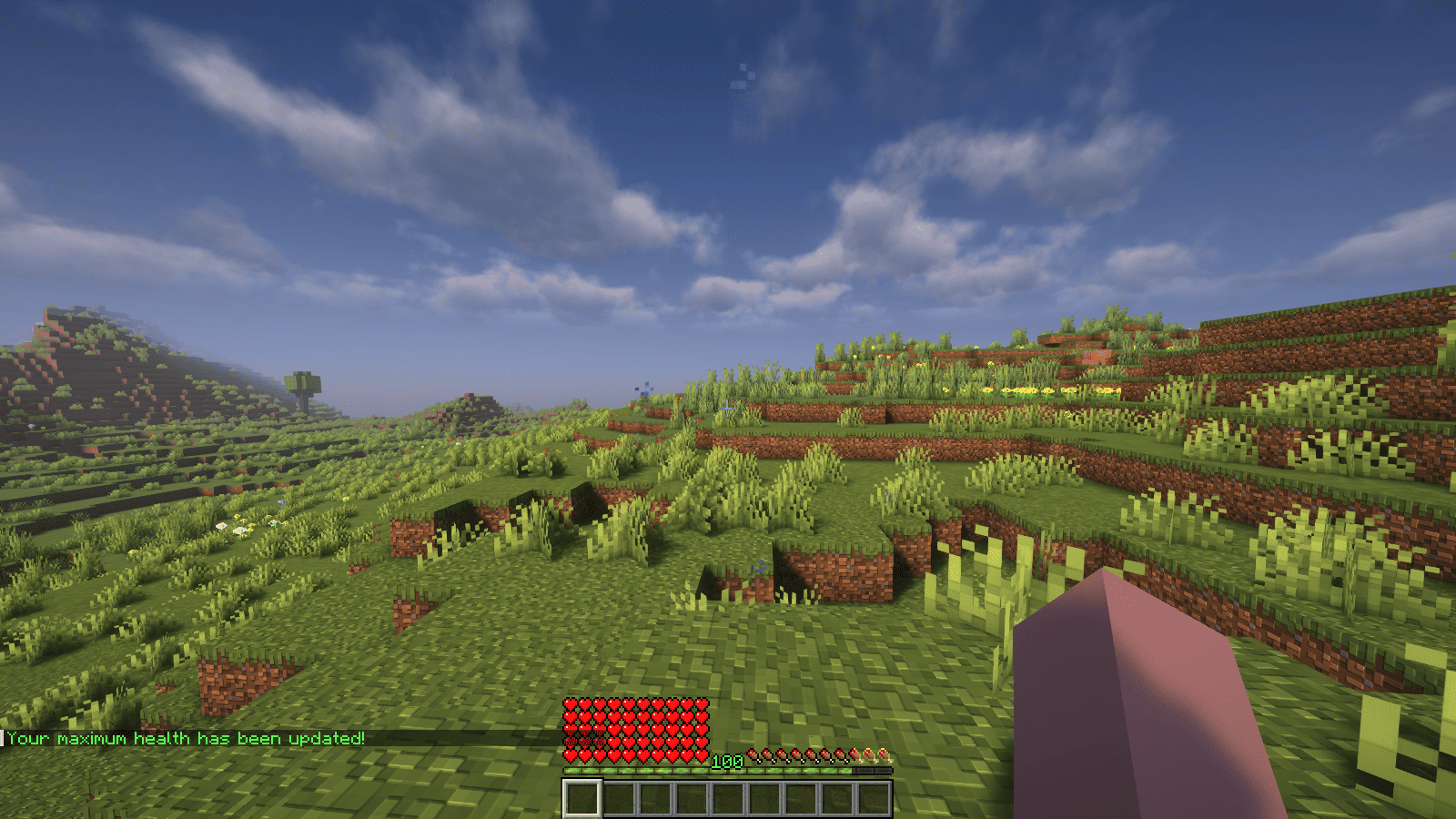<br />
</p>
<p>### Features</p>
<p>– Automatically adjust the player’s maximum hearts/health when they reach the experience level specified in the configuration.<br />
– Easy to understand config.<br />
– Lightweight.</p>
<p></p>
<p>### Commands<br />
| Command | Description | Permission |<br />
|—————-|————————————-|—————–|<br />
| `/xh` | Get the information about the plugin. | `xh.use` |<br />
| `/xh reload` | Reloads the config file. | `xh.admin` |<br />
| Command aliases| **xh, xpheart, xphearts** |</p>
<p></p>
<p>### Issues and Suggestions<br />
Suggest and report issues on [Github](https://github.com/seyviyer2/XPHearts/issues).</p>
</article>
<article>
<h1>XpGet</h1>
<p># XpGet</p>
<p>A plugin that allows you to convert your experience into experience bottles when you have empty glass bottles.<br />
Supports both fixed amounts and automatic maximum calculation.<br />
Features a GUI interface for more convenient conversion.</p>
<p># 📸 Screenshots</p>
<p></p>
<p>## ⚙️ Command</p>
<p>| Command | Description |<br />
|——————————|———————————————————————–|<br />
| `/xpget` | Open GUI menu for experience conversion |<br />
| `/xpget [amount | max]` | Converts the specified amount of experience or the maximum possible |<br />
| `/xpget reload` | Reloads the configuration |</p>
<p>### Examples:<br />
– `/xpget 10` — create 10 experience bottles (if enough experience and bottles)<br />
– `/xpget max` — create the maximum possible number of bottles</p>
<p>## 🧾 Permissions</p>
<p>| Permission | Default | Description |<br />
|—————-|—————|—————————————————–|<br />
| `xpget.use` | ✅ true | Allows usage of the `/xpget` command |<br />
| `xpget.reload` | op | Allows usage of the `/xpget reload` command |</p>
<p>## ⚙️ Configuration</p>
<p>“`yaml<br />
# XPGet Configuration<br />
exp-per-bottle: 7 # How much experience is needed to fill one bottle</p>
<p># You can add your own items, available actions: [close], [cmd]<br />
gui:<br />
size: 27<br />
title: “<gold>Experience Conversion</gold>”</p>
<p> divider:<br />
enabled: true<br />
material: “GRAY_STAINED_GLASS_PANE”<br />
name: “<gray>”</p>
<p> close:<br />
slot: 22<br />
material: “BARRIER”<br />
name: “<red>Close”<br />
actions:<br />
– “[close]”</p>
<p># main-menu:<br />
# slot: 0<br />
# material: “STONE”<br />
# name: “Main Menu”<br />
# lore:<br />
# – “<yellow>Click to go to main menu”<br />
# actions:<br />
# – “[close]”<br />
# – “[cmd] menu”</p>
<p> items:<br />
one:<br />
slot: 11<br />
material: “EXPERIENCE_BOTTLE”<br />
amount: 1<br />
name: “<green>1 Experience Bottle”<br />
lore:<br />
– “<gray>Click to convert”<br />
– “”<br />
– “<yellow>Required:”<br />
– “<gray>• <white>{exp} experience</white>”<br />
– “<gray>• <white>1 empty bottle</white>”</p>
<p> stack:<br />
slot: 13<br />
material: “EXPERIENCE_BOTTLE”<br />
amount: 64<br />
name: “<yellow>64 Experience Bottles”<br />
lore:<br />
– “<gray>Click to convert”<br />
– “”<br />
– “<yellow>Required:”<br />
– “<gray>• <white>{exp} experience</white>”<br />
– “<gray>• <white>64 empty bottles</white>”</p>
<p> max:<br />
slot: 15<br />
material: “ENCHANTED_BOOK”<br />
amount: 1<br />
name: “<gold>Maximum”<br />
lore:<br />
– “<gray>Click to convert”<br />
– “<gray>to the maximum possible number of bottles”<br />
– “”<br />
– “<yellow>Will be spent:”<br />
– “<gray>• <white>{exp} experience</white>”<br />
– “<gray>• <white>{max_bottles} empty bottles</white>”</p>
<p>messages:<br />
player-only: “<red>This command is for players only!”<br />
no-permission: “<red>You don’t have permission to use this command!”</p>
<p> usage: |<br />
<gold>Usage:<br />
<yellow>/xpget [amount|max]<br />
<gold>Examples:<br />
<yellow>/xpget 10 <gray>– convert experience into 10 bottles<br />
<yellow>/xpget max <gray>– convert the maximum possible amount<br />
<gold>Note: You can convert any number of bottles</p>
<p> config-reloaded: “<green>Configuration successfully reloaded!”</p>
<p> invalid-amount: “<red>Invalid amount! Use a number or ‘max'”</p>
<p> not-enough-exp: “<red>Not enough experience! Needed: <yellow>{required}</yellow> experience, you have: <yellow>{current}</yellow>”<br />
not-enough-empty: “<red>Not enough empty bottles! Needed: <yellow>{needed}</yellow>, you have: <yellow>{current}</yellow>”<br />
not-enough-space: “<red>Not enough inventory space! Space available for: <yellow>{available}</yellow> bottles”</p>
<p> no-empty-bottles: “<red>You have no empty bottles!”<br />
not-enough-exp-for-one: “<red>You don’t have enough experience to create even one bottle!”<br />
not-enough-space-even: “<red>Not enough inventory space even considering bottle replacement!”</p>
<p> success-specific: “<green>Successfully converted <yellow>{amount}</yellow> experience bottles!”<br />
success-max: “<green>Successfully converted <yellow>{actual}</yellow> experience bottles!”<br />
“`</p>
<p>## 📦 Installation</p>
<p>1. Download the **latest release**<br />
2. Place it in the /plugins folder<br />
3. Restart the server<br />
4. Configure `config.yml` if needed and use `/xpget reload`<br />
5. You’re ready to use it: use `/xpget` in-game</p>
</article>
<article>
<h1>xpDisplay</h1>
<p># xpDisplay<br />
<br />
</p>
<p>## 🤔 What’s this plugin?<br />
You may not know how much experience you’ve received, and you might wish you could find out.</p>
<p>Now, it’s possible to see exactly how many experience orbs you’ve collected.</p>
<p>This plugin adds a feature that allows you to view the amount of experience orbs you’ve received.<br />
## ⭐ Features<br />
> v1.0.0-252601-R</p>
<p>– when player gains experiences, actionbar will be shown how much they gained.<br />
and when item that has mending repaired<br />
– version of plugin has been changed to 1.0.0-252601-R instead of 1.x-xpy1xxx.a1x<br />
– added config file that you can change actionbar message only “EXP Gained/Mending Repaired”</p>
<p>## 📸 Screenshots<br />
### **_when player received experience orbs._**<br />
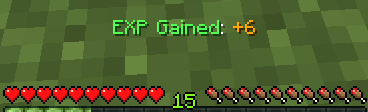</p>
<p>### **_when player held item that has mending._**<br />
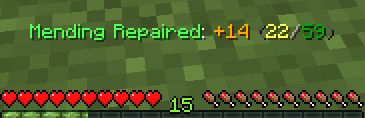</p>
<p>## 📋 Usage<br />
Using this plugin is very simple!</p>
<p>Install it in your plugins folder (ex. D:example_serverplugins).<br />
Then start your server. If your server is already running, just reload it!</p>
<p>It will work as-is. but now you cannot configure the plugin however you can suggest me [here!](https://github.com/TaeKunGzZ/xpDisplay/issues)</p>
<p>Need help? Come check out [my Discord Server](https://discord.gg/vUU9jCampF).</p>
<p>## 📋 For Developer<br />
If you want to see my code, you can see [here!](https://github.com/TaeKunGzZ/xpDisplay)</p>
<p>## 📋 Compatibility<br />
– I’ve tested it on **Purpur**, so I recommend using **Purpur** or **Paper**.<br />
– I do not recommend using **Spigot**.</p>
</article>
<article>
<h1>XpBottle</h1>
<p></p>
<p><br />
<br />
[](https://discord.com/invite/ydn5S7FC7q)<br />
—<br />
– 🧪 **XP Bottle Creation**: Convert XP into bottles using the `/xpbottle` command.<br />
– 💰 **Tax System**: Configurable tax on XP conversion to prevent abuse.<br />
– ⏳ **Cooldown System**: Prevent command spamming with configurable cooldowns.<br />
– 🔐 **Protected Bottles**: Bottles can be protected from dropping on death.<br />
– 🎨 **Customizable Bottles**: Customize bottle appearance, including material, name, lore, and glow effect.<br />
– 🔒 **Permission-Based Limits**: Different XP limits based on permissions.<br />
– 🔊 **Sound Effects**: Play sounds on bottle creation and redemption.<br />
– 🔧 **ItemsAdder Integration**: Support for custom items via ItemsAdder.<br />
– 👑 **Admin Commands**: Admins can give bottles to players and reload config.<br />
– 🌍 **Multi-Language Support**: Configurable messages.<br />
—<br />
</p>
<p>| Command | Description | Permission |<br />
| —————————————————- | ——————————————————– | ———- |<br />
| `/xpbottle <amount> <xp>` | Create bottles with a specified amount and XP per bottle | None |<br />
| `/xpbottle help` | Display the help message | None |<br />
| `/xpbottle admin reload` | Reload the configuration and messages | `xp.admin` |<br />
| `/xpbottle admin give <player> <amount> <xp|level>` | Give a bottle to a player | `xp.admin` |<br />
| `/xpbottle admin help` | Display the admin help message | `xp.admin` |</p>
<p>Aliases: `/xp`</p>
<p>—<br />
</p>
<p>| Permission | Description | Default |<br />
| ————- | —————————— | ——- |<br />
| `xp.default` | Allows basic use of XP bottles | true |<br />
| `xp.resident` | Allows higher XP limits | op |<br />
| `xp.admin` | Allows admin commands | op |</p>
<p>—<br />
</p>
<p>In bottle lore and messages:</p>
<p>| Placeholder | Description |<br />
| ———– | —————————————– |<br />
| `%exp%` | Amount of XP in the bottle |<br />
| `%signer%` | Name of the player who created the bottle |<br />
| `%xp%` | Player’s current XP |<br />
| `%cost%` | Cost in XP for the action |<br />
| `%amount%` | Number of bottles |<br />
| `%time%` | Remaining cooldown time |<br />
| `%player%` | Target player name |</p>
<p>—<br />
</p>
<p>The plugin uses `config.yml` for configuration:<br />
## Preview<br />
“`yaml<br />
max-bottle-amount: 1000000 # Maximum bottles per command<br />
min-bottle-amount: 50 # Minimum XP per bottle<br />
conversion-tax: 0.05 # Tax percentage (5%)<br />
cooldown-seconds: 10 # Cooldown in seconds<br />
bottle:<br />
use-itemsadder: false # Use ItemsAdder for custom items<br />
itemsadder-id: “exp_bottle”<br />
material: EXPERIENCE_BOTTLE<br />
name: “#F2EC27&lʙᴏᴛᴛʟᴇ ᴅ’ᴇxᴘᴇʀɪᴇɴᴄᴇ”<br />
lore:<br />
– “”<br />
– “&7xᴘ : &f%exp%”<br />
– “&7ᴘʀᴏᴘʀɪᴇᴛᴀɪʀᴇ : &f%signer%”<br />
– “”<br />
– “#F2EC27ᴄʟɪᴄᴋ ᴅʀᴏɪᴛ &7| &7utiliser la bouteille”<br />
glow: false<br />
reject-crafting: true<br />
reject-villager-trading: true<br />
withdraw-sound:<br />
sound: “ENTITY_COW_DEATH”<br />
enabled: false<br />
redeem-sound:<br />
sound: “ENTITY_PLAYER_LEVELUP”<br />
enabled: true<br />
drop-bottle:<br />
enabled: false<br />
protected-bottles: true<br />
use-perm-based-exp: false<br />
permission:<br />
default:<br />
max-bottle-amount: 1000<br />
min-bottle-amount: 50<br />
resident:<br />
max-bottle-amount: 5000<br />
min-bottle-amount: 50<br />
“`<br />
</p>
<p>– **ItemsAdder**: Enable custom bottle items using ItemsAdder.<br />
– **Permissions Plugins**: Supports permission-based XP limits.</p>
</article>
<article>
<h1>XpAnvils</h1>
<p> XPAnvils is a lightweight plugin that allows server admins to set the max XP cost for anvil usage.</p>
<p>Minecraft typically limits anvil combinations to a 40-level cost. With XPAnvils, you can take this restriction away — make it 80, 100, or more!</p>
<p> Features<br />
Set the max anvil XP price via command:<br />
/xpanvil set <level><br />
Example: /xpanvil set 80</p>
<p>Prevents expensive enchantment combinations from being broken due to the vanilla cap.</p>
<p>Convenient to use, no config file needed.</p>
<p>Ships on Minecraft 1.21.5 and Paper servers.</p>
<p>Use Case<br />
Want to allow combining high-level enchanted items without being interrupted by XP level limits? This plugin is ideal for survival, semi-vanilla, and RPG servers where progression and equipment enchantments matter.</p>
</article>
<article>
<h1>XP2HP</h1>
<p># ✨ XP2HP – Level Up Your Life ✨</p>
<p>> A modern, configurable, and **Folia-compatible** plugin that turns XP into power. </p>
<p>—</p>
<p>## 🧠 What Is XP2HP?<br />
**XP2HP** is a lightweight, plug-and-play plugin that transforms a player’s **experience level into real power**. As players gain XP, their **maximum health and key attributes** scale with them—offering a dynamic and immersive RPG-like progression system for any Minecraft server.</p>
<p>Perfect for **Survival**, **RPG**, **Adventure**, or even **competitive PVP** servers looking to spice up vanilla mechanics with meaningful progression.</p>
<p>—</p>
<p>## 🔥 Core Features<br />
– ✅ **Folia-Compatible** – Built specifically for Paper Forks like Folia (1.21.4+)<br />
– ❤️ **Max Health Scaling** – Configurable health per level from 0 to 400<br />
– 🛡️ **Stat Boosting** – Boost core attributes like:<br />
– Attack Damage<br />
– Armor<br />
– Movement Speed<br />
– and more.<br />
– ⚙️ **Fully Configurable** – Toggle health messages, healing behavior, level caps, and more<br />
– 📈 **No Commands Needed** – Works silently in the background<br />
– 🧪 **Smooth Respawn & Death Handling** – Stats reset and re-apply reliably with no XP exploits</p>
<p>—</p>
<p>## 🧾 Example Use Cases<br />
– 🔄 Encourage XP farming and leveling as part of your economy<br />
– 🎯 Make high-level players genuinely feel stronger<br />
– ⚔️ Create custom PVE events where scaling health matters</p>
<p>—</p>
<p>## 📦 Installation<br />
1. Download the latest `.jar`<br />
2. Drop it into your `/plugins` folder<br />
3. Restart your server ✅</p>
<p>—</p>
<p>## 🧪 Compatibility<br />
| Server Type | Supported? |<br />
|————-|——————–|<br />
| Paper | ✅ |<br />
| Purpur | ✅ |<br />
| Folia | ✅ |<br />
| Spigot | ⚠️ Not guaranteed |<br />
| Bukkit | ❌ Not supported |</p>
<p>—</p>
<p>## 💡 Why Choose XP2HP?<br />
This isn’t just another level plugin—it’s **precisely tuned** for performance, future support, and RPG potential. Whether you’re building a world of elite heroes or rewarding grinders, XP2HP turns vanilla mechanics into something special.</p>
<p>> *”Level up your world—literally.”*</p>
<p>—</p>
<p>## 🛠️ About the Developer<br />
🎉 This is one of our top **official plugin releases**! The Team is constantly developing, and is constantly doing updates, fixing bugs, and take community feedback seriously.</p>
<p>If you like XP2HP, please leave a review or follow. It means a lot to us💖</p>
<p>—</p>
<p>## 📬 Need Help or Have Ideas?<br />
> Join the Discord Server, you can @ us on Discord or open an issue. We’re open to suggestions, feature requests, and feedback!</p>
<p>—</p>
<p>Thanks for checking out **XP2HP** – I hope it becomes a core part of your server’s gameplay experience. 💖</p>
</article>
<article>
<h1>XP Stacker</h1>
<p>🎉 **XPStacker: Let Your Server Breathe!** 🎉<br />
Is your server slowing down because of all the scattered XP orbs? 🐢 XPStacker offers a sleek and effective solution to this problem. This lightweight plugin automatically merges nearby XP orbs into a single one, significantly reducing server load while providing a smoother experience for players.</p>
<p>✨ **Key Features:**</p>
<p>– **Lag Reduction:** 💨 Drastically reduces server lag by merging hundreds of scattered XP orbs into a single orb.</p>
<p>– **Automatic Merging:** 🤝 New XP orbs automatically merge with nearby ones. No player action is required.</p>
<p>– **Configurable Radius:** ⚙️ Easily adjust the merge radius of XP orbs in the config.yml file.</p>
<p>– **Lightweight and Stable:** 🔋 Operates with minimal resource usage and does not affect your server’s other features.</p>
<p>Add XPStacker to your server now and let your players collect XP without any lag! 💎</p>
<p>✨ **Check Out Our Other Plugins!** ✨<br />
If you enjoy the **XPStacker** plugin, don’t forget to check out our other high-quality plugins for your server!</p>
<p>– **BuildByBit**: https://builtbybit.com/creators/fisfiskoray.600970<br />
– **PolyMart:** https://polymart.org/user/57522/fisfiskoray<br />
– **Modrinth:** https://modrinth.com/user/FisFisKoray</p>
</article>
<article>
<h1>XP-Sender</h1>
<p># XPTransfer</p>
<p>**XPTransfer** is a lightweight and powerful Minecraft plugin for Paper/Spigot that allows players to transfer their experience points to others seamlessly.</p>
<p>## Features<br />
– **Easy XP Sharing**: Send your XP points to any online player with a simple command.<br />
– **Precise Calculation**: Unlike many other plugins, XPTransfer uses a custom calculation logic to ensure XP levels and bars are updated accurately without vanilla glitches.<br />
– **Multi-language Support**: Fully customizable messages. Comes with English (`en_us`) and Japanese (`ja_jp`) pre-configured.<br />
– **Customizable Permissions**: Define which players or groups can use the transfer feature via `config.yml`.<br />
– **User Friendly**: Includes Tab-Completion for player names to make sending XP faster and error-free.<br />
– **Color Support**: Visual feedback with vibrant colors in chat messages.</p>
<p>## Commands<br />
– `/sendxp <player> <amount>` – Sends the specified amount of XP points to the target player.<br />
– `/sendxp reload` – Reloads the configuration files (Requires OP).</p>
<p>## Permissions<br />
– Default Command: `group.default` (Configurable in `config.yml`)<br />
– Reload Command: Requires OP permissions.</p>
<p>## Configuration<br />
The plugin generates a `config.yml` and a `message/` folder. You can easily switch languages or change the required permission there.</p>
<p>—</p>
<p># XPTransfer (日本語説明)</p>
<p>**XPTransfer** は、プレイヤー間で経験値をスムーズに譲渡できるようにする、軽量で強力なPaper/Spigot用プラグインです。</p>
<p>## 主な機能<br />
– **簡単エクスペリエンス共有**: シンプルなコマンドで、自分の経験値をオンラインの他プレイヤーに送ることができます。<br />
– **正確な計算ロジック**: バニラの経験値計算の不具合を回避し、レベルと経験値バーが正確に更新されるカスタムロジックを搭載しています。<br />
– **多言語対応**: すべてのメッセージを自由にカスタマイズ可能。標準で英語 (`en_us`) と日本語 (`ja_jp`) に対応しています。<br />
– **権限設定**: `config.yml` から、どのプレイヤーやグループが経験値を送れるかを自由に変更できます。<br />
– **ユーザーフレンドリー**: プレイヤー名のタブ補完に対応しており、入力ミスを防ぎ素早く操作できます。<br />
– **カラーメッセージ**: チャットメッセージに色を付け、視覚的に分かりやすいフィードバックを提供します。</p>
<p>## コマンド<br />
– `/sendxp <プレイヤー名> <数値>` – 指定した経験値ポイントを対象のプレイヤーに送ります。<br />
– `/sendxp reload` – 設定ファイルを再読み込みします(OP権限が必要です)。</p>
<p>## 権限<br />
– 通常コマンド: `group.default` (`config.yml` で変更可能)<br />
– 再読み込み: OP権限が必要です。</p>
<p>## 設定方法<br />
プラグイン導入時に生成される `config.yml` と `message/` フォルダ内のファイルで、使用言語や権限、メッセージ内容を簡単にカスタマイズできます。</p>
</article>
</main>
<script type="speculationrules">
{"prefetch":[{"source":"document","where":{"and":[{"href_matches":"/*"},{"not":{"href_matches":["/wp-*.php","/wp-admin/*","/wp-content/uploads/*","/wp-content/*","/wp-content/plugins/*","/wp-content/themes/minecraft/*","/*\\?(.+)"]}},{"not":{"selector_matches":"a[rel~=\"nofollow\"]"}},{"not":{"selector_matches":".no-prefetch, .no-prefetch a"}}]},"eagerness":"conservative"}]}
</script>
<div class="gtranslate_wrapper" id="gt-wrapper-48026611"></div><script id="gt_widget_script_48026611-js-before">
window.gtranslateSettings = /* document.write */ window.gtranslateSettings || {};window.gtranslateSettings['48026611'] = {"default_language":"en","languages":["ar","az","bn","bg","hr","cs","da","nl","en","fi","fr","de","el","hu","id","it","ja","kk","ko","fa","pl","pt","ro","ru","sl","es","sv","th","uk","uz","vi"],"url_structure":"sub_directory","flag_style":"2d","wrapper_selector":"#gt-wrapper-48026611","alt_flags":[],"custom_domains":{"ru":"minecraft.vpesports.games"},"float_switcher_open_direction":"top","switcher_horizontal_position":"left","switcher_vertical_position":"bottom","flags_location":"\/wp-content\/plugins\/gtranslate\/flags\/"};
//# sourceURL=gt_widget_script_48026611-js-before
</script><script src="https://minecraft.vpesports.com/wp-content/plugins/gtranslate/js/float.js?ver=3.1.1" data-no-optimize="1" data-no-minify="1" data-gt-orig-url="/mod-category/purpur/page/14/" data-gt-orig-domain="minecraft.vpesports.com" data-gt-widget-id="48026611" defer></script><script id="wp-emoji-settings" type="application/json">
{"baseUrl":"https://s.w.org/images/core/emoji/17.0.2/72x72/","ext":".png","svgUrl":"https://s.w.org/images/core/emoji/17.0.2/svg/","svgExt":".svg","source":{"concatemoji":"https://minecraft.vpesports.com/wp-includes/js/wp-emoji-release.min.js?ver=7.0"}}
</script>
<script type="module">
/*! This file is auto-generated */
const a=JSON.parse(document.getElementById("wp-emoji-settings").textContent),o=(window._wpemojiSettings=a,"wpEmojiSettingsSupports"),s=["flag","emoji"];function i(e){try{var t={supportTests:e,timestamp:(new Date).valueOf()};sessionStorage.setItem(o,JSON.stringify(t))}catch(e){}}function c(e,t,n){e.clearRect(0,0,e.canvas.width,e.canvas.height),e.fillText(t,0,0);t=new Uint32Array(e.getImageData(0,0,e.canvas.width,e.canvas.height).data);e.clearRect(0,0,e.canvas.width,e.canvas.height),e.fillText(n,0,0);const a=new Uint32Array(e.getImageData(0,0,e.canvas.width,e.canvas.height).data);return t.every((e,t)=>e===a[t])}function p(e,t){e.clearRect(0,0,e.canvas.width,e.canvas.height),e.fillText(t,0,0);var n=e.getImageData(16,16,1,1);for(let e=0;e<n.data.length;e++)if(0!==n.data[e])return!1;return!0}function u(e,t,n,a){switch(t){case"flag":return n(e,"\ud83c\udff3\ufe0f\u200d\u26a7\ufe0f","\ud83c\udff3\ufe0f\u200b\u26a7\ufe0f")?!1:!n(e,"\ud83c\udde8\ud83c\uddf6","\ud83c\udde8\u200b\ud83c\uddf6")&&!n(e,"\ud83c\udff4\udb40\udc67\udb40\udc62\udb40\udc65\udb40\udc6e\udb40\udc67\udb40\udc7f","\ud83c\udff4\u200b\udb40\udc67\u200b\udb40\udc62\u200b\udb40\udc65\u200b\udb40\udc6e\u200b\udb40\udc67\u200b\udb40\udc7f");case"emoji":return!a(e,"\ud83e\u1fac8")}return!1}function f(e,t,n,a){let r;const o=(r="undefined"!=typeof WorkerGlobalScope&&self instanceof WorkerGlobalScope?new OffscreenCanvas(300,150):document.createElement("canvas")).getContext("2d",{willReadFrequently:!0}),s=(o.textBaseline="top",o.font="600 32px Arial",{});return e.forEach(e=>{s[e]=t(o,e,n,a)}),s}function r(e){var t=document.createElement("script");t.src=e,t.defer=!0,document.head.appendChild(t)}a.supports={everything:!0,everythingExceptFlag:!0},new Promise(t=>{let n=function(){try{var e=JSON.parse(sessionStorage.getItem(o));if("object"==typeof e&&"number"==typeof e.timestamp&&(new Date).valueOf()<e.timestamp+604800&&"object"==typeof e.supportTests)return e.supportTests}catch(e){}return null}();if(!n){if("undefined"!=typeof Worker&&"undefined"!=typeof OffscreenCanvas&&"undefined"!=typeof URL&&URL.createObjectURL&&"undefined"!=typeof Blob)try{var e="postMessage("+f.toString()+"("+[JSON.stringify(s),u.toString(),c.toString(),p.toString()].join(",")+"));",a=new Blob([e],{type:"text/javascript"});const r=new Worker(URL.createObjectURL(a),{name:"wpTestEmojiSupports"});return void(r.onmessage=e=>{i(n=e.data),r.terminate(),t(n)})}catch(e){}i(n=f(s,u,c,p))}t(n)}).then(e=>{for(const n in e)a.supports[n]=e[n],a.supports.everything=a.supports.everything&&a.supports[n],"flag"!==n&&(a.supports.everythingExceptFlag=a.supports.everythingExceptFlag&&a.supports[n]);var t;a.supports.everythingExceptFlag=a.supports.everythingExceptFlag&&!a.supports.flag,a.supports.everything||((t=a.source||{}).concatemoji?r(t.concatemoji):t.wpemoji&&t.twemoji&&(r(t.twemoji),r(t.wpemoji)))});
//# sourceURL=https://minecraft.vpesports.com/wp-includes/js/wp-emoji-loader.min.js
</script>
</body>
</html>