Lightingless


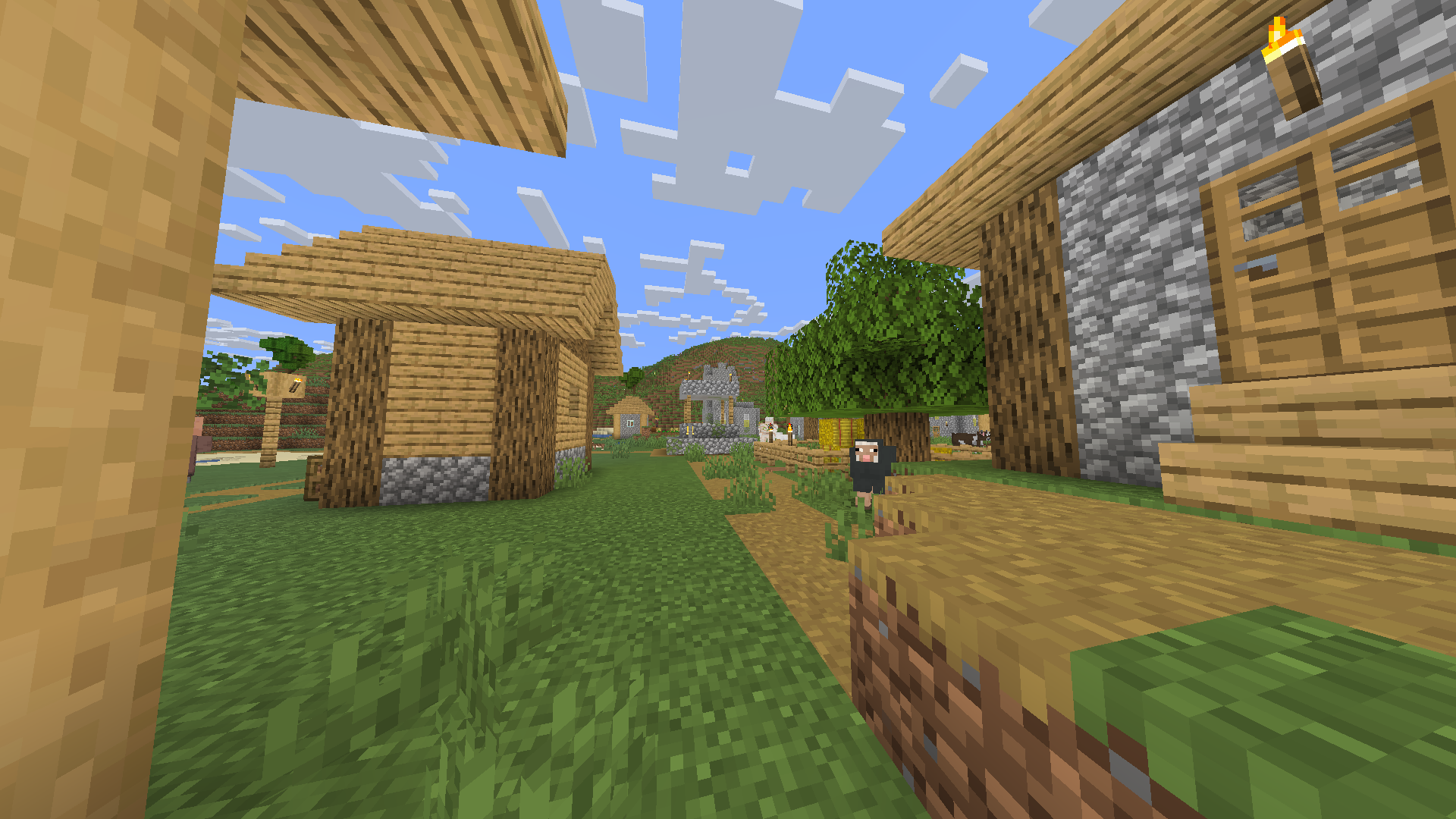
## Removes the shading engine
every texture has a little gamma however it does still have support for dark areas/night
## Probably the worlds smallest shader!
it makes the game like some youtuber shaders
ex. MumboJumbo
LIGHT Shaders
## LIGHT Shaders
As light as light, as beautiful as painting.
Make you have both high FPS and good image quality.
—
### Gallery
!
(https://cdn.modrinth.com/data/UuwCHIS3/images/00b5c65dd6fc249bd5a505a704a12016d0903857.png)
—
### Features
#### FPS in your hands.
Optimized based on Chocapic13’s Shaders,
Removed some unnecessary features,
Some bugs have also been fixed,
Let you have an excellent FPS.
#### Crisp and bright picture.
Removed some features of Chocapic13’s Shaders,
But it’s not one-size-fits-all like some shaders,
Instead, it retains excellent picture manifestation:
– Water reflections
– Water surface ripples
– Good shadows
– Outstanding performance in different weather
– Clouds that move with the wind
– TAA anti-aliasing (optional)
– and more…
And added a few features of it own.
#### Exclusive Atmosphere.
Gives you a unique atmosphere.
#### Excellent field of view brightness.
Doesn’t make you feel so dark in the Nether instead of you can’t see anything like the usual shaders.
—
### Requirements
– Iris Shaders, Oculus Shaders or OptiFine.
– OpenGL 1.2 support.
– An ordinary GPU. (even extremely below average)
—
### *If you want to support my work, you can subscribe my [Patreon](https://www.patreon.com/Author87668/join) membership.*
LiDAR-S


EN 🌐
# ABOUT:
When you press SHIFT, LiDAR creates a 3D image of your world that you can walk around in. Your task is to scan your entire world . . .
### GIF:

## LINKS:
– [YouTube](https://www.youtube.com/@lolip_p)
– [Discord](https://discord.gg/Cz2sCWz5Wh) (Discuss, Bug Reports, Etc.)
– [Telegram](https://t.me/LoLip_p_Community)
## INSTALL THE SHADERS
– Download Client Which Supports Installing Shaders Such As Optifine And Iris
– Download The Shaders
– Copy Shaders to /.minecraft/shaderpacks
– Launch Minecraft, Go To Options –> Video Settings –> Shaders
– Choose **LiDAR-S**
RU 🐻
# О:
Когда вы нажимаете SHIFT, LiDAR создает 3D-изображение вашего мира, по которому вы можете передвигаться. Ваша задача — сканировать весь мир…
### GIF:

## ССЫЛКИ:
– [YouTube](https://www.youtube.com/@lolip_p)
– [Discord](https://discord.gg/Cz2sCWz5Wh) (обсуждения, сообщения об ошибках и т. д.)
– [Telegram](https://t.me/LoLip_p_Community)
## УСТАНОВКА ШЕЙДЕРОВ
– Загрузите клиент, поддерживающий установку шейдеров, такой как Optifine и Iris.
– Загрузите шейдеры.
– Скопируйте шейдеры в папку /.minecraft/shaderpacks.
– Запустите Minecraft, перейдите в «Настройки» –> «Настройки видео» –> «Шейдеры».
– Выберите **LiDAR-S**.
CH 🐉
# 关于:
按下SHIFT键时,LiDAR会生成可自由穿行的三维世界图像。你的任务是扫描整个世界……
### 动态图:

## 相关链接:
– [YouTube](https://www.youtube.com/@lolip_p)
– [Discord](https://discord.gg/Cz2sCWz5Wh) (讨论区、错误报告等)
– [Telegram](https://t.me/LoLip_p_Community)
## 着色器安装指南
– 下载支持安装着色器的客户端(如Optifine或Iris)
– 下载着色器资源包
– 将着色器文件复制至 /.minecraft/shaderpacks 目录
– 启动Minecraft,进入选项 → 视频设置 → 着色器
– 选择 **LiDAR-S**
DE 🍺
# ÜBER:
Wenn Sie die Umschalttaste drücken, erstellt LiDAR ein 3D-Bild Ihrer Umgebung, in dem Sie sich frei bewegen können. Ihre Aufgabe ist es, Ihre gesamte Umgebung zu scannen . . .
### GIF:

## LINKS:
– [YouTube](https://www.youtube.com/@lolip_p)
– [Discord](https://discord.gg/Cz2sCWz5Wh) (Diskussionen, Fehlerberichte usw.)
– [Telegram](https://t.me/LoLip_p_Community)
## INSTALLIEREN DER SHADER
– Client herunterladen, der die Installation von Shadern wie Optifine und Iris unterstützt.
– Shader herunterladen.
– Shader in den Ordner „/.minecraft/shaderpacks” kopieren.
– Minecraft starten, zu „Optionen” –> „Videoeinstellungen” –> „Shader” gehen.
– **LiDAR-S** auswählen.
Lethal Shaders
# Lethal Shaders
Lethal Shaders is a simple shaderpack which aims to recreate the artstyle of [Lethal Company](https://store.steampowered.com/app/1966720/Lethal_Company/) in Minecraft.
This shaderpack looks best at moody brightness settings.
Legacy Console Edition Shaders
# **What is it?**
Simple and performant shader that aims to replicate the look of legacy console editions.
This shader is a basic post-processing effect applied to the game without any fancy techniques like shadows, reflections, etc. So it should be able to run on basically every computer (if supported).
There’s no tweakable settings for Optifine / Iris in the shader menu, but the values are easy to change and edit it inside of the shader code. In the shader code (final.fsh), there’s variables like contrast, gamma, vibrance, and other variables that are tweaked to look like the legacy console editions of the game.
# **Why would you install this shader?**
You would install this shader if you miss the old nostalgic look of Minecraft in the old legacy console editions (Xbox 360, Xbox One, Ps3, Ps4, etc.). This would be if you don’t currently have a copy of these old versions of the game, and you miss playing the old game.
If you have played or watched clips and videos of the legacy console editions of Minecraft, you may have noticed the different look of the game. This is because the old legacy console editions had a different approach into how the colors and post-processing was applied, making the game look brigther in some way.
# **How to install?**
When downloaded, cut & paste the shader zip file into a folder “%AppData%” (Depends on the operating software, these instructions go for Windows 10 or Windows 11). When in the file, look for a .minecraft folder. In there, look for a folder labeled “shaderpacks”. If not there, create it. Paste the shader file in there and you’re are good to go! Make sure you have Iris or Optifine installed and running too.
Lechat’s shaders
# Lechat’s Shader Pack
A performance-focused Minecraft shader pack with multiple quality profiles, dynamic lighting, and customizable water effects. Designed for flexibility across a wide range of hardware configurations.
—
## _Please note that the project is in beta version, graphics may not be what you expect, and some bugs can remain !_
Feel free to contact me on Discord (@lechat_v2) if you encounter any bugs !
## Overview
This shader pack delivers a balanced visual experience with five distinct performance profiles. From minimal-impact POTATO mode for low-end systems to feature-rich ULTRA mode for high-end setups, each profile is carefully tuned to provide optimal visuals without sacrificing playability.
Key highlights include profile-based fog and water systems, dynamic day/night lighting cycles, and extensive customization through the shaders.properties configuration file.
—
## Features
### Technical Features
– **Multiple Performance Profiles**: Five preset configurations (POTATO, LOW, MEDIUM, HIGH, ULTRA) tailored to different hardware capabilities
– **Profile-Based Fog Settings**: Each profile has optimized fog parameters, with POTATO mode offering a clean no-fog aesthetic
– **Profile-Based Water Features**: Adjustable wave height and reflection intensity scaled per profile
– **Customizable Settings**: Fine-tune your experience via the shaders.properties configuration file
– **Optimized Codebase**: Fixed syntax errors and optimized lighting calculations for stable performance
– **Balanced Brightness**: Consistent lighting levels across all performance profiles
### Visual Features
– **Dynamic Lighting**: Realistic day/night cycles with smooth transitions
– **Water Effects**: Animated waves with adjustable height and reflective surfaces
– **Atmospheric Effects**: Configurable atmospheric scattering per profile
– **Underwater Rendering**: Fixed underwater view with improved visibility
– **Tone Mapping**: Realistic color grading for natural-looking scenes
– **Clean Aesthetic**: Bloom disabled intentionally for a crisp, uncluttered look
—
## Performance Profiles
| Profile | Description | Best For |
|———|————-|———-|
| **POTATO** | Minimal effects, no fog, basic water, maximum performance | Low-end PCs, laptops, integrated graphics |
| **LOW** | Light effects, light fog, basic waves | Entry-level GPUs, older hardware |
| **MEDIUM** | Standard effects, moderate fog, standard waves | Mid-range systems, balanced performance |
| **HIGH** | Enhanced effects, normal fog, high waves with refraction | High-end GPUs, detailed visuals |
| **ULTRA** | Maximum effects, reduced fog for clarity, extreme waves, all features | Top-tier hardware, screenshot-quality visuals |
### Profile Details
**POTATO**
– Disabled fog for maximum visibility and performance
– Basic water rendering without wave animation
– Minimal post-processing overhead
– Ideal for achieving high frame rates on limited hardware
**LOW**
– Light atmospheric fog for depth
– Simple wave animations
– Reduced effect complexity
– Good balance for budget GPUs
**MEDIUM**
– Standard atmospheric scattering
– Moderate wave height and reflection
– Full feature set at reduced intensity
– Recommended for most modern systems
**HIGH**
– Enhanced atmospheric effects
– High wave height with water refraction
– Improved reflection quality
– Suitable for dedicated gaming GPUs
**ULTRA**
– Maximum visual fidelity
– Reduced fog density for crystal-clear long-distance views
– Extreme wave height (2.0x) with full reflection intensity (1.0)
– All advanced features enabled
– Requires high-end graphics hardware
—
## Water Effects
The shader pack features a sophisticated water rendering system with profile-scaled parameters:
### Wave Height Scaling
– **POTATO**: 0.5x (minimal animation)
– **LOW**: 0.6x (basic movement)
– **MEDIUM**: 1.0x (standard waves)
– **HIGH**: 1.5x (pronounced waves)
– **ULTRA**: 2.0x (extreme wave height)
### Reflection Intensity
– Adjustable from 0.3 (subtle) to 1.0 (maximum reflectivity)
– Profile-tuned for optimal visual balance
– Dynamic based on viewing angle and lighting conditions
### Additional Water Features
– **Underwater View Fixes**: Improved visibility and color correction when submerged
– **Smooth Transitions**: Seamless blending between above and below water
– **Surface Reflections**: Environment mapping for realistic water surfaces
– **Refraction Effects**: Light bending at water surfaces (HIGH and ULTRA profiles)
—
## Installation
1. Download the shader pack ZIP file
2. Place the ZIP file in your Minecraft shaderpacks folder:
– Windows: `%appdata%/.minecraft/shaderpacks/`
– macOS: `~/Library/Application Support/minecraft/shaderpacks/`
– Linux: `~/.minecraft/shaderpacks/`
3. Launch Minecraft with OptiFine or Iris/Oculus installed
4. Navigate to **Options > Video Settings > Shaders**
5. Select the shader pack from the list
6. Click **Done** to apply
### Requirements
– Minecraft 1.16.5 or newer (recommended)
– OptiFine HD U G5 or newer, OR
– Iris Shaders / Oculus (for Fabric/Forge mod loaders)
– OpenGL 4.0 compatible graphics card (minimum)
—
## Configuration
### In-Game Settings
Access shader settings through:
**Options > Video Settings > Shaders > Shader Options**
Select your desired performance profile from the dropdown menu. Changes apply immediately without requiring a game restart.
### Advanced Configuration
For advanced users, edit the `shaders.properties` file located in the shader pack directory:
“`
shaderpacks/
Lechats-Shaders/
shaders/
shaders.properties <-- Edit this file
```
#### Key Configuration Options
| Setting | Description | Range |
|---------|-------------|-------|
| `WAVE_HEIGHT` | Controls water wave amplitude | 0.5 - 2.0 |
| `REFLECTION_INTENSITY` | Water surface reflectivity | 0.3 - 1.0 |
| `FOG_DENSITY` | Atmospheric fog thickness | 0.0 - 1.0 |
| `TONEMAP_TYPE` | Color grading algorithm | Various |
### Tips for Best Performance
- Start with the **POTATO** or **LOW** profile and increase settings gradually
- Monitor your frame rate using the F3 debug screen
- Reduce render distance before lowering shader quality
- Close background applications for improved performance
- Update your graphics drivers to the latest version
---
## Troubleshooting
**Low Frame Rates**
- Switch to a lower performance profile
- Reduce Minecraft render distance
- Disable V-Sync in video settings
**Visual Artifacts**
- Ensure your graphics drivers are up to date
- Try switching between OptiFine and Iris/Oculus
- Reset shader settings to defaults
**Water Not Rendering Correctly**
- Verify you are using a compatible Minecraft version
- Check that your GPU supports the required OpenGL version
- Try resetting the shader pack configuration
---
## License
This shader pack is provided as-is for personal use in Minecraft. Redistribution or modification should respect the original licensing terms of any included code libraries.
LBD Shaders
   
—

### 📋 About
LBD Shders is a shaderpack which is ideal for learning OptiFine GLSL due to its good structure. And maybe a few cool effects will be added too.
—
### ⚙️ Compatibility
This pack works with OptiFine as well as Iris and has no major compatibility issues.
—
📦 Features
- Color Sources
- Albedo (colotex0)
- Depth (depthtex0)
- Shadowtex (shadowtex0)
- Post Processing Effects
- 1-Bit (everything reduced to 10 colors)
- Pseudo Thermal (luminiscense to color spectrum)
- Colorgrading
- Coordinate-specific Tests
- Drawing circle on the screen
- Vignette
Technology used
#include#defineshaders.properties- defining functions
- defining
lang
Lantern-shader
# LanternShader
A lightweight shader pack~
—
#### About:
This is a shader pack featuring beautiful color palettes and pixelated shadows.
It is lightweight enough to have minimal performance impact, allowing it to run smoothly even on some integrated graphics cards.

Kiwi Shader
This is a Shader that i specifically made to be fast and have pixel Shadows. It breaks many things like blindness so i dont recommend you use it except you want the same as me.
It also has reflections and pbr support.
Kefir’s Flashlight
# Advanced Flashlight & True Darkness
Turn Minecraft into an atmospheric horror experience. This shader pack completely replaces the vanilla lighting engine with a highly realistic, customizable flashlight system.
Unlike standard lighting mods that just place a light block where you look, this shader simulates a volumetric light beam projecting from your camera into 3D space. It interacts with fog, fades naturally over distance, and creates a genuine sense of dread.
## ⚙️ Fully Customizable
Access the Shader Options menu to tweak every aspect of the light
* Beam Geometry: Adjust the Core Size, Halo Width, and Intensity of each layer. Make a tight laser pointer or a wide floodlight.
* Volumetric Density: Control how visible the beam is in the air.
* Range & Falloff: Set the maximum distance of the light.
* Color of light: Precisely adjust color for each layer.
* Horror Settings: Toggle Flickering for a spooky effect, or adjust the Ambient Brightness to control how dark the shadows are.
macOS / Linux Friendly: _Written in modern GLSL 330 Core, ensuring full compatibility with M1/M2/M3 Macs and modern Linux drivers._
## 🔓 License
This project is Open Source (MIT). You are free to use this in your modpacks, adventure maps, or modify the code for your own projects.
