Night Vision Shaders
# Night Vision Shaders
A shaderpack/resourcepack that aims on giving brightness everywhere while keeping the game aesthetic. It
makes the game brighter, so you see well in caves, in the nether, underwater and everywhere else. But it also
keeps slight light difference so that the aesthetic is not destroyed.
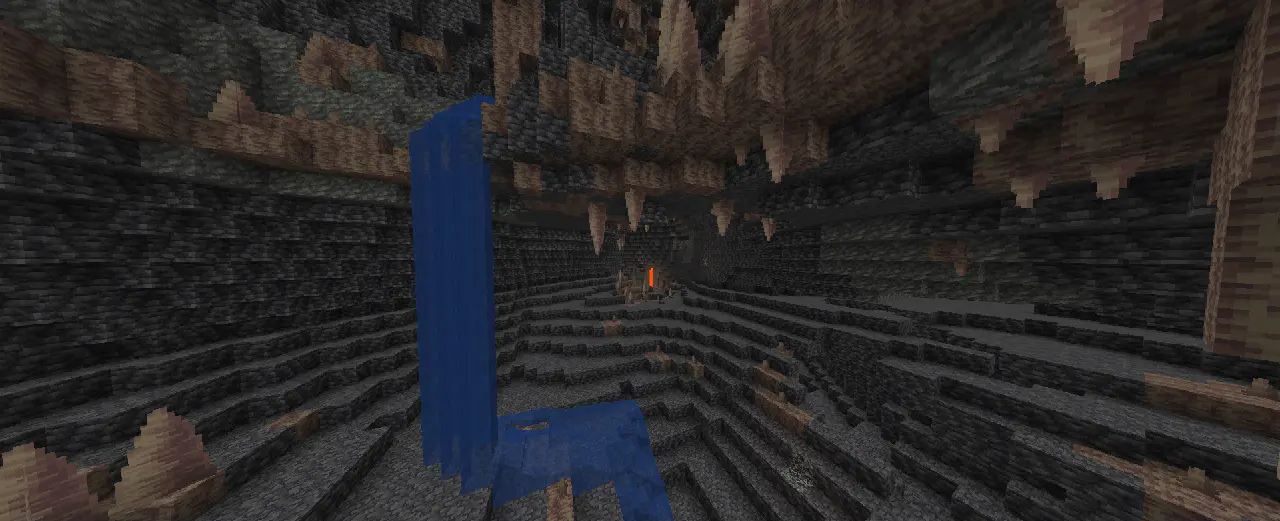
If you like this pack consider supporting the development by [buying me a coffee](https://ko-fi.com/T6T41BS1C9).
### Enabling the resourcepack
You can simply enable it as resourcepack (Copy the `.zip` into the `resourcepack` directory).
If you are using Sodium or Iris, the [Sodium Core Shader Support](https://modrinth.com/mod/sodium-core-shader-support) mod is required.
The pack does not work with Optifine!
### Features
While making the game brighter it also keeps the game aesthetic:
– fog is not completely removed, it just starts further away
– light sources still emit light
– blocks still cast shadow, but less dark
– it works with Sodium (requires [Sodium Core Shader Support](https://modrinth.com/mod/sodium-core-shader-support) mod)
Negative Colors
## Negative Colors
**Invert all colors in Minecraft for a unique, surreal look.**
Features:
**Color inversion
**
Compatibility:
Needs OptiFine or similar mod
MotionFlow
MotionFlow 是一个专注于动态模糊(Motion Blur)效果的轻量 Minecraft 光影包。
它不会改变游戏原本的整体光照、色彩风格或阴影表现,而是专门通过运动模糊来提升玩家在奔跑、移动、转头和快速视角变化时的视觉流畅感。
这个光影尤其适合用于录制视频。在部分 AMD 显卡或采集环境下,Minecraft 实际游玩时可能已经很流畅,但录制出来的画面在运动过程中仍然会显得不够顺滑。MotionFlow 可以很好地缓解这种观感问题,让成片看起来更自然、更连贯,也更有速度感。
## 特点
– 仅专注于动态模糊效果
– 不追求改变原版光照风格
– 提升运动时的主观流畅感
– 特别适合录制视频时使用
– 轻量、直接、开箱即用
## 兼容性
– 当前版本支持 Iris
– 安装并启用后即可使用
## 注意
MotionFlow 提升的是视觉上的运动流畅感,而不是实际 FPS。
—
MotionFlow is a lightweight Minecraft shaderpack focused entirely on motion blur.
Instead of changing the game’s lighting, colors, or shadow style, it is designed specifically to improve the visual smoothness of movement, sprinting, camera turns, and fast motion.
This shaderpack is especially useful for video recording. On some AMD GPU setups or capture workflows, Minecraft may feel smooth while playing, but recorded footage can still appear less fluid during motion. MotionFlow helps reduce that issue, making the final video look smoother, more natural, and more cohesive.
## Features
1. Focused purely on motion blur
1. Does not aim to overhaul the vanilla lighting style
1. Improves perceived smoothness during movement
1. Especially useful for recording gameplay footage
1. Lightweight and easy to use
## Compatibility
– Currently supports Iris
– Just install Iris and enable the shaderpack
## Note
MotionFlow improves perceived motion smoothness, not actual FPS.
MotionBlur+
# MotionBlur+
**MotionBlur+ is a lightweight, high-performance shader for Minecraft 1.8, designed specifically for PvP, Bedwars, and other fast-paced gameplay. Unlike heavy shader packs, it focuses solely on motion blur, making movements smoother and easier to track without adding unnecessary visual effects that can reduce FPS.**
[](https://www.youtube.com/@GlacierServicesMC)
**Key Features:**
– Smooth motion blur: Makes fast actions easier to follow in PvP.
– Low performance impact: Optimized for competitive gameplay.
– 1.8 PvP-friendly: Works perfectly with popular PvP servers and modes.
– Lightweight and simple: No extra fancy effects—just motion blur for clarity.
MotionBlur+ is ideal for players who want better visual feedback during fights, content creators recording gameplay, or anyone who wants a subtle motion blur effect without sacrificing performance.
**Partnered**
[](https://fastclient.net/gamesofdev)
**OFFER!!**

Motion Blur FX
# Motion Blur FX
**Motion Blur FX** is designed to deliver stunning motion blur effects without compromising performance. Tailor the intensity of the motion blur to suit your system’s capabilities, ensuring a smooth experience no matter your setup.
### Important Note:
Motion blur effects can be disorienting for some users, particularly those sensitive to visual motion. If you find yourself feeling uncomfortable, please lower the motion blur strength or disable the effect entirely for a more pleasant experience.
**Compatible with:** Iris and Optifine
—
### Optional Features:
– **Motion Blur:** Enhance your visuals with dynamic motion blur.
– **Saturation:** Infuse your world with vibrant colors for an eye-catching look.
—
### Compatibility:
– **Tested on:** Minecraft versions 1.12.+ to 1.21.x
– **Works with:** Nvidia, AMD, and Intel graphics cards
—
### You Can:
– Use this shader pack for captivating screenshots and videos.
– Modify it for personal use.
– Publish your heavily modified versions.*
– Share it in modpacks or servers.
### You Cannot:
– Share it without my permission.
—
### Installation Guide:
**For Optifine:**
1. Download and install Optifine from the official website.
2. Download the Motion Blur FX shader pack.
3. Move the shader pack .zip file to the `shaderpacks` folder in your `.minecraft` directory.
4. Select the shader in Minecraft under “Options” > “Video Settings” > “Shaders.”
**For Iris (Fabric):**
1. Install Fabric using the Fabric Installer.
2. Add Fabric API and Iris Shaders to your mods folder.
3. Download the Motion Blur FX shader pack.
4. Move the shader pack .zip file to the `shaderpacks` folder in your `.minecraft` directory.
5. Select the shader in Minecraft under “Options” > “Video Settings” > “Shaders.”
—
### Contact:
For inquiries or support, please reach out to: [email protected]
—
### Preview:
Check out these videos to see **Motion Blur FX** in action!
Monophonic Shaderpack
# Description
Welcome to Monophonic! It is a shaderpack that aims for good performance and compatibility for gameplay!
(PSST, you should use this shaderpack while listening to this upcoming song, presave it its awesome and its also mine! Yes I am promoting my song… Yes I am desperate.) [Awesome Song To Listen 2 While using Monophonic](http://tunelink.to/Jub5v)
# Compatibility
It is compatible with Iris only (Optifine won’t work!!) and works well with AMD and NVIDIA GPUs, Intel iGPUs should theoretically work fine, but no intel user has tested this shaderpack yet.
**Nether and End support are limited at the moment, so don’t expect full compatibility.**
# License
For the most, I use the all rights reserved license, but I really wouldn’t recommend using my code (I did not intend it for the use of being edited). If you’d like to edit anyway, you can ask me here! https://discord.gg/6nyR6CKHbg
# Features
* Screen Space Shadows
* Saturation, Contrast & Vibrance Sliders
* Waving Foliage
* Vanilla Clouds Support
* Resource Pack Water Normals Support
* Custom Fog
(More Coming Soon)
Mode 13h: MS-DOSify!
[](https://github.com/Hand-Lock/mode-13h/blob/main/LICENSE)
# Mode 13h: MS-DOSify!
*An **Iris** shader pack for Minecraft that recreates the look of late-90s **MS-DOS** 3D graphics with deliberate retro accuracy.*

**Mode 13h: MS-DOSify!** is not just a generic “pixelation” shader. It aims to reproduce the actual visual limitations and quirks that gave old DOS-era 3D games their unmistakable look: low resolution, affine texture warping, limited color depth, stepped lighting, billboarded sprites, and carefully tuned fog.
It has currently only been **tested on Minecraft `1.20.1`**, but it **should also work on other versions**.
> **Recommended render resolution: `1280 x 800`**
> The shader pack is designed to **downscale by 4x** to an internal **`320 x 200`** image, matching classic **Mode 13h** output.
> For the most authentic look, stretch the final image to **`4:3`** to reproduce the era’s **non-square pixels**.
## 🧾 Why This Exists
A lot of “retro” shaders stop at chunky pixels and call it a day.
**Mode 13h** goes further. It tries to recreate the specific rendering artifacts that defined old DOS-era 3D, including the quirks modern graphics usually try to hide or eliminate. The goal is not just to look old — it is to feel like an actual late-90s PC pushing textured 3D slightly beyond its comfort zone.

## ✨ Features
### 📺 Authentic low-resolution output
– The image is downscaled to a **Mode 13h-style `320 x 200`** internal resolution.
– This gives the shader pack the crunchy image structure typical of classic DOS graphics.
### 🧱 Affine texture mapping
– Textures use **affine mapping** instead of perspective-correct mapping.
– This recreates the classic **texture wobble and warping** seen in older software-rendered 3D games.
### 🎨 Retro palette reduction
– Colors are quantized to a **256-color** style output.
– An optional **`6 x 6 x 6`** palette provides a more limited **216-color** look.
### 💡 Stepped lighting
– Lighting is **quantized** into configurable brightness steps.
– Setting it to **16** steps gives something closer to vanilla Minecraft’s light progression while keeping the retro feel.
### 🌫️ Tuned fog
– Fog is adjusted to better match the mood and readability of old-school 3D visuals.
– It helps sell distance the way older games often did.
### 🪧 Billboarded sprites
– Many blocks and decorations render as **2D billboards** that always face the player.
– This mimics the sprite-based tricks commonly used in older 3D games.
## ⚙️ Configuration
The shader includes a **configuration menu** with several options so you can fine-tune the effect to your taste.
You can adjust things such as:
– **Fog tuning parameters**
– **Affine mapping parameters**
– **Color reduction mode**, including switching between **256-color** and **216-color**
– **Add-on compatibility toggles**, which can be enabled or disabled individually
– **Resolution reduction**
– And other settings for dialing in the exact retro look you want
## 🔧 Technical Notes
– Built for **Iris** and compatible with **Oculus**
– Currently only **tested with Minecraft `1.20.1`**, though it should work on other versions as well
– Targets **OpenGL `4.1`**, so it can also run on **macOS**
## 🧩 Add-ons
**Mode 13h** also has optional companion add-ons that expand the billboarding system.
> **Important:** Add-ons are **not included** with the shader pack. They must be **downloaded separately**.
### 🪧 Flatter Signs
[**Flatter Signs**](https://modrinth.com/mod/flatter-signs) is a mod that changes signs into **cross/hatch models**, allowing Mode 13h to billboard them like flowers or grass.
Without the shader pack, those signs simply render as flat cross/hatch objects. With **Mode 13h** enabled, they become proper DOS-style billboarded signs.
### 🧱 Billy-Boarding *(WIP)*
**Billy-Boarding** is a resource pack that changes the **`.json` block models** of selected blocks so they become **cross/hatch-based** and therefore compatible with the shader’s billboarding system.
If you install these add-ons, you can enable or disable their dedicated support from the **shader configuration screen**.
## 🌌 Recommended with a Stylized Sky
For the best overall presentation, it is recommended to pair **Mode 13h** with a **stylized skybox**.
At the moment, the recommended choice is [**Anime Sky**](https://modrinth.com/resourcepack/anime-sky).
A bespoke skybox made specifically for **Mode 13h** may come in the future.
## ❌ What It Is Not
– Not just a simple “pixelation” filter
– Not a generic CRT-style retro effect
– Not a clean or modernized take on retro visuals
**Mode 13h** intentionally embraces visual instability, harsh quantization, and awkward old rendering tricks — because that is the whole point.
## 🖇️ Credits
– **Shader pack & idea:** *HandLock_*
> *“If the textures don’t wobble, it’s not old enough.”*
Mist Shaders

[](https://www.youtube.com/@GamesofDevYT)
[](https://glacier.dpdns.org)
**ABOUT**
Mist Shaders keeps Minecraft looking true to vanilla, preserving all textures, water, and blocks exactly as they are. What sets it apart is the subtle glowing tone applied across the world, giving every scene a gentle, luminous quality without changing the game’s original style. It’s perfect for players who want a calm, immersive, and visually enhanced experience while still enjoying the classic Minecraft look.
**Mist Shaders – Features**
– Vanilla Look: Keeps all blocks, water, and textures exactly like Minecraft’s default.
– Glowing Tone: Adds a gentle, soft glow across the entire world.
– Calm & Immersive: Enhances the atmosphere without altering gameplay or colors drastically.
– Smooth Visuals: Creates a subtle, visually pleasing effect for landscapes, skies, and environments.
– Lightweight: Runs smoothly without heavy performance impact.
**How to report BUGS!!**
Our GlacierDevelopment Discord server is Live you can report bugs and Chat with other GlacierShaders users, report bugs, get help with issues, and join exciting giveaways — all in one place!
[](https://discord.gg/TpsGTtTnSm)
**OFFER!!**

missing textures
# Missing Textures shader
This shader makes every block in the game have the pink/black squares missing texture.
It also has settings to customize it:
– r g b values for the pink parts
– missing sun/moon texture
– keep terrain colors
– keep original colors
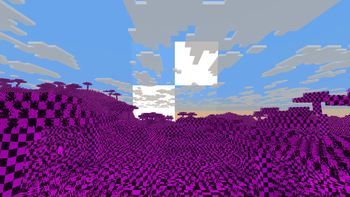
The shader should be compatible with every version of Optifine and Iris
Mini Shaders
### ABOUT
A beautifully optimized Minecraft shader featuring crystal-clear reflections, smooth wavy water movement, vibrant natural lighting, and a soft atmospheric glow. The shader enhances lakes and rivers with realistic reflective surfaces while keeping the world bright, immersive, and performance-friendly for smooth gameplay.
[](https://www.youtube.com/@GlacierServicesMC)
### How to report BUGS!!
Our GlacierDevelopment Discord server is Live you can report bugs and Chat with other GlacierShaders users, report bugs, get help with issues, and join exciting giveaways — all in one place!
[](https://discord.gg/TpsGTtTnSm)
### OFFER!!
