[](https://ko-fi.com/jbritain)
[](https://discord.gg/b9SHNcvs6c)
Shader development is hard and takes a lot of time. If you enjoy my shaders, please consider supporting my work!
# Ebin Resurrected
Ebin Resurrected is a vibrant and performant Minecraft shaderpack.
[Ebin](https://github.com/BruceKnowsHow/Ebin-Shaders) began with the goal of being fast, beautiful, configurable, feature-rich, and having a base of well-written code. It was developed by [BruceKnowsHow](https://github.com/BruceKnowsHow) from 2016-2020. [jbritain](https://github.com/jbritain) resumed development of the shader in 2024 under the name ‘Ebin Resurrected’. This is a fork of Ebin which brings compatibility with modern versions of Minecraft, and significantly improves upon aspects of the shader, such as PBR.
## Community
If you would like to discuss Ebin Resurrected, or other Minecraft shaderpacks, join my [Discord server](https://discord.gg/b9SHNcvs6c). Alternatively, in the [shaderLABS](https://discord.gg/RpzWN9S) discord, you can head over to `#ebin-resurrected-jbritain`.
## Features
– Multicoloured Blocklight
– Sunlight Shadows / Shading
– PCSS ‘Variable Penumbra’ Shadows with transparency.
– Bloom / Glow
– Procedural 2D/3D Clouds
– Procedural Water Waves
– Deferred Shading Pipeline – Everything is correctly shaded, even behind semi-transparent blocks
– Terrain Deformation – “Animal Crossing” and “Acid” deformations
### LabPBR Compliant
– Rough Screen Space Reflections – accurate specular reflections on all blocks.
– Normal Mapped Lighting.
– Terrain Parallax (POM).
– Material Ambient Occlusion.
– Hardcoded Metal Support.
– Porosity – materials look ‘wet’ in the rain.
## Planned Features
– Distant Horizons support
– End skybox
## Compatibility
### Minecraft
– Optifine and Iris are both supported, however some features only work on Iris. Older Optifine or Iris versions may have issues, as the shader is developed on the latest versions of either.
– Minecraft 1.17.1 is the earliest tested version. The shader may work on older versions but this is not guaranteed.
### Hardware
– OpenGL 4 compatible hardware is required. This boils down to Nvidia GeForce 400, AMD Radeon HD 5000, Intel HD 3rd gen **or later**. Any modern device should work fine.
– The Raspberry Pi is not supported as it does not support OpenGL 4.
– Intel GPUs are untested and you may encounter issues. If you do encounter issues, please report them, as Intel is intended to be supported.
### Operating System
– MacOS is **NOT SUPPORTED**.
## If you run into problems
Having problems? Join my [Discord Server](https://discord.gg/b9SHNcvs6c) and create a thread in `#support`. Alternatively, if you are experiencing a problem with Ebin you consider to be a bug, create a new [issue](https://github.com/jbritain/Ebin-Shaders-Resurrected/issues). Please read the issue guidelines before creating one and make sure somebody else hasn’t raised the same issue already. **You are likely to get a faster response on Discord**.
## Team
– [jbritain](https://github.com/jbritain): Maintainer
– [BruceKnowsHow](https://github.com/BruceKnowsHow): Original Developer (no longer involved in the shader)
## Thanks
– [The shaderLABS Discord](https://discord.gg/RpzWN9S) members, for answering the many questions I’ve had in my time developing shaders, some of which were even constructive. Particularly:
– Balint
– Jessie
– Null
– TimeTravelBeard
– Quadro
– BuilderB0y
– NinjaMike
– CyanEmber
– [Capt Tatsu](https://bitslablab.com/), whose shader, [BSL](https://bitslablab.com/bslshaders/) I ported the multicoloured blocklight and FXAA code from.
– [Sonic Ether](https://www.facebook.com/SonicEther/), creator of SEUS and inspiration for Ebin
– [daxnitro](http://www.minecraftforum.net/forums/mapping-and-modding/minecraft-mods/1272365), original creator of the Shaders Mod
– [karyonix](http://www.minecraftforum.net/forums/mapping-and-modding/minecraft-mods/1286604), longtime maintainer of the Shaders Mod
– [sp614x](https://twitter.com/sp614x), Ebin would not be possible without #include.
– [IMS](https://github.com/IMS212), for maintaining Iris and Sodium, which are really cool mods.
– [chocapic13](http://www.minecraftforum.net/forums/mapping-and-modding/minecraft-mods/1293898) & [Sildur](http://www.minecraftforum.net/forums/mapping-and-modding/minecraft-mods/1291396), various code references and help over the years
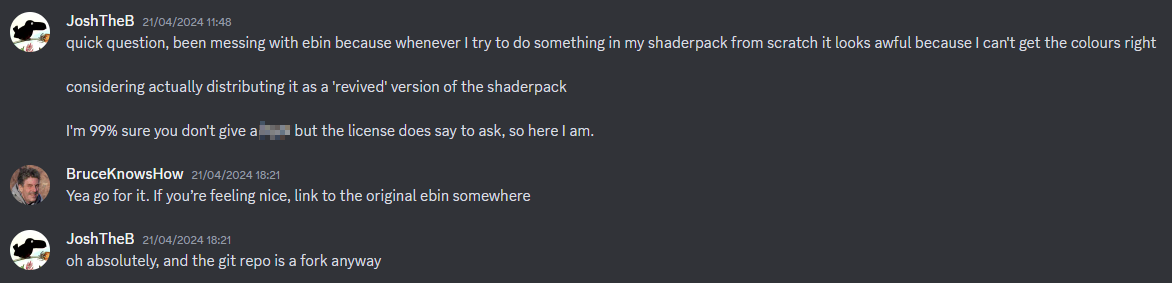
## Evidence of written permission from BruceKnowsHow to distribute this shaderpack
DrDestens Minecraft Shaders
# DrDestens MinecraftShaders
DrDestens MinecraftShaders is a shaderpack for Minecraft: Java Edition. It features water effects with reflections, ambient occlusion, bloom, realistic depth of field, motion blur, TAA and many other things. The shaderpack supports the LabPBR and OldPBR/SeusPBR standard, and you can use it with PBR texturepacks for added detail.
## Feature Overview
– Screen Space Reflections
– Depth of Field
– Screen Space Ambient Occlusion (SSAO)
– Temporal Anti-Aliasing (TAA)
– Physically Based Rendering
– Various Water Effects
– Godrays
– Bloom
– Motion Blur
– Realistic DoF Chromatic Aberration
– Custom sky gradient
– Improved Fog with Sunsets
– Improved Dynamic Lighting
– Directional Lightmaps
– Outline
– Custom Block Selection Outline
## Full Feature List
### Lighting
– PBR
Enables Physically Based Rendering
Make sure you enable Normal and Specular mapsm in the OptiFine shader options
– PBR Format – *LabPBR 1.3, SeusPBR / OldPBR*
– **Physically Based Rendering**
– Height as AO
Uses the Height information for Ambient occlusion
– Normal Mapping Fix
With newer OptiFine versions this might not be necessary
Enable this if normal maps do not show on entities or handheld objects
– Use Hardcoded Metals
If disabled, the shader will use the color for the reflectance data
LabPBR only
– Subsurface Scattering
– Parallax Occlusion Mapping
Adds additional detail to blocks using the height map
Low performance impact
Can create artifacts at screen borders
– POM Depth
Specifies how deep the POM goes
Higher values will create artifacts
– POM Distortion
Exaggerates the height map
Helps create more depth with small POM Depth values
Creates artifacts when used with high POM Depth values
– Smooth POM
Smooths out the height map
Significantly reduces artifacts
– Skylight AO
Specifies the amount of ambient occlusion on skylight
– Blocklight AO
Specifies the amount of ambient occlusion on blocklight
– Skylight Gamma
Higher = Darker
Lower = Brighter
– Blocklight Gamma
Higher = Darker
Lower = Brighter
– Minimum Light
Restricts blocklight to never go below this value
Prevents caves from being pitch black (unless you set it to zero that is)
– **Lightmap Colors**
– Nether Ambient Brightness
– End Ambient Brightness
– End Ambient Saturation
– Skylight Day *(RGB Color Picker)*
– Skylight Night *(RGB Color Picker)*
– Blocklight *(RGB Color Picker)*
Select blocklight color (torches, glowstone, etc.)
If “Complex Blocklight” is enabled, this color will **NOT** be used
– Complex Blocklight
Allows you to select two colors for blocklight
One for dark parts, one for bright parts
– Blend Curve
Higher: Emphasize “Bright” color
Lower: Emphasize “Dark” color
50 = linear transition
– Complex Blocklight Dark *(RGB Color Picker)*
– Complex Blocklight Bright *(RGB Color Picker)*
### Depth Of Field
– Depth of Field
Blurs non-focused objects, like a real camera
– Bokeh Samples
Quality of the blur
Higher is better
Significantly affects performance
– DoF Intensity
Intensity of the Depth of Field effect
Low performance impact
– Maximum Blur – *High, Unlimited*
Limits the strength of the DoF blur
Helps reduce artifacts when using lower sample counts and is better for gameplay
– DoF Downsampling Amount
Amount of Downsampling that takes place for the Depth of Field effect
Reduces DoF artifacts, increases pixelation artifacts
No/Low performance impact
– Far Blur Only
Only blurs far away things
– Sample Rejection
Improved DoF Quality by (mostly) removing color bleeding
Can have a significant performance impact
– Focus Delay
Sets how long the focus takes to adjust
### Reflections
– Reflection Mode – *OFF, Sky, Flipped Image, Raytraced*
– Raytracing Quality
Number of raytracing iterations
Lower is faster
– Thickness Estimation Modifier – *Infinite*
Increase this if the reflection blind spots annoy you
Influences assumption about how thick a pixel is
No performance impact
– Fade Edges
– Reflection Threshold
PBR only
Sets the minimum required reflectiveness in order for SSR to enable
Higher values may introduce reflection cutoffs
– Screen Space Refraction
Distorts things seen through water
– Refraction Strength
– Glass Reflections
Adds reflections to tinted glass blocks
### Water
– Waving Water
”Physical” Waves
Moves the water surface
– Wave Height
– Wave Normals – *OFF, Noise, Sine*
– Normals Strength
Fake Waves, pretending to be real ones
Added detail
– Normals Scale
– Water Absorption Density
– Water Absorption Bias
Adds a constant to the water fog distance
Can help in making water more visible
– Water Texture
Enables the vanilla water texture
– **Water Color Options**
– Water Absorption *(RGB Color Picker)*
– Absorption Color Multiplier
– TAA
Temporal Anti-Aliasing
Smooths edges at the cost of a slightly blurrier image
Might cause problems with OptiFine’s high-res screenshot feature
– **TAA Options**
– TAA Blending Constant
Controls the opacity of the current frame
Set this value lower for smoother TAA
– TAA Sharpening
Changes the strength of the sharpening effect
– Bloom
Creates a glow around bright objects
Looks nice 😉
– Bloom Strength
– Motion Blur
– Motion Blur Intensity
– SSAO
Screen Space Ambient Occlusion
Makes cavities dark
High performance impact
– SSAO Quality – *Low, Medium, High*
– SSAO Strength
### Atmospherics
– Fog – *OFF, Normal, Border*
– Fog Amount
– Morning Fog
Increases fog amount during sunsets
Only works with fog in “Normal” mode
Requires fog and sunsets to be enabled
– Morning Fog Strength
– Cave Fog
– Cave Fog Brightness
– Godrays
– **Godray Colors**
– Godray Sun *(RGB Color Picker)*
– Godray Moon *(RGB Color Picker)*
– Godray Strength
– Godray Radius
– Godray Samples
– **Sky Colors**
– Sky Noon *(RGB Color Picker)*
– Sky Sunset *(RGB Color Picker)*
– Sky Midnight *(RGB Color Picker)*
– End Sky Upper *(RGB Color Picker)*
– End Sky Lower *(RGB Color Picker)*
– Sun Angle
– Outline – *OFF, White, Black, Rainbow*
– Outline Distance
– Block Selection Outline – *Black, White, Rainbow*
**Only works with newer OptiFine versions (G7 or higher)**
– Block Selection Outline Opacity
– Wavy Blocks
– Wavy Leaves
– World Curvature
– World Radius
– Hand Invisibility Effect
Distorts handheld objects when invisible
– White World
– Directional Lightmaps
Applies normal mapping to dynamic lights
Requires a ressource pack with PBR support
– Directional Lightmap Strength
– Dynamic Light Brightness
Changes the brightness of light from emissive blocks
### Optimisation
– Flat Vertices
Disable when using custom models with smooth surfaces
## Agreement
**You are allowed to**
– Use my shaderpack in your videos / screenshots
**You are not allowed to**
– Redistribute my shaderpack: If you want to provide a download link you **must** link to my Modrinth / Curseforge page
– Use monetized URL shorteners linking to downloads of my shaderpack
– Publish edits of my shaderpack without my permission
Dirt RT
A path tracing shaderpack for vulkanite mod,better than demo pack
use SVGF to denoise,support bloom,Tyndall effect,auto exposure
**YOU NEED TO LOAD A PBR RESOURSEPACK AND USE VULKANITE 0.0.4 TO MAKE THE SHADER WORK CORRECTLY**
**WARNING:Make sure that your resourcepack fit your game version. Otherwise, you will get a black world!!!**
Despatra’s CRT
Designed to look like you’re playing Minecraft on a CRT Features bloom, a reflective digital CRT rim, and customizable resolution
Derivative Shader
Derivative Shader is a graphic enhancement shader designed to transform your game with high-quality, vibrant, and realistic visuals. It elevates your gaming experience to a new level of beauty and realism through its array of powerful features and immersive elements.
### **What’s inside Derivative Shader?**
Derivative Shader offers three distinct presets: Default, Survival, and Film.
Default: The most popular choice. It delivers stunning graphics and beautiful effects without requiring high-end hardware.
Survival: Specially tuned to increase brightness, allowing players to navigate through the darkness with ease—no more getting lost in the shadows.
Film: The ultimate visual experience. This preset demands high performance to deliver ultra-detailed graphics. It includes Cinema mode and Motion Blur, making your game look as realistic as a live-action movie.
### **What sets Derivative apart from other Shaders?**
**Dynamic Weather: Rain now features realistic interaction effects on both ground surfaces and water bodies**

**The clouds change when Rain and Sun!** 
**Cinematic Experience: Integrated Cinematic bars and professional-grade Motion Blur for a smooth, realistic feel**

**Detailed Environments: Highly realistic and detailed underwater effects**

### **Is Derivative Shader demanding?**
Yes, it is. Since Derivative Shader prioritizes high-end graphics and extreme detail, it is very resource-intensive. It is not recommended for low-end devices or hardware that does not meet the necessary performance standards.
### **Best use cases for Derivative Shader?**
Derivative Shader is perfectly suited for worlds featuring massive structures or grand architecture. It is the ideal choice for players who want to fully experience the epic scale and magnificent atmosphere of their creations.
### **Disclaimer**
I am not the creator or owner of this Shader. I am simply sharing it for the Mondrith community to enjoy. If you encounter any bugs or issues, please contact the developer via this link :[https://texture-packs.com/shaders/derivative/](https://texture-packs.com/shaders/derivative/)
DERCODE
**RECODERS: DureXXX / M1zora / Sone4ka / Frs0n**
Shader Profile System Broken pls use High profile
# **About**
**DERCODE is a recode based on the Derivative shader that adds various effects and improvements**
**It also fixes various bugs from the original Derivative shader**
**At the moment, the shader has BAD-optimization due to poorly implemented PT functions**
**This project started development in late 2024 based on the Bliss shader, but was later moved to Derivative because older Bliss builds did not allow implementing the features that were achieved here**
**The shader will continue to receive updates in the future, and it may eventually be rewritten from scratch instead of being just a recode**
# ABOUT:
**This shader can be useful for mod, model, and texture pack developers. It supports various modes that display Wireframe, Normal Maps, Depth, PBR, Position, etc. in a single shader, and they all have labels.**
When I first started working with shaders, I didn’t quite understand how these modes looked visually during debugging. Therefore, I hope to help beginners assemble a convenient ready-made shader in one place.
### About
Complementary Shaders is a shader pack for Minecraft Java Edition with exceptional attention to detail, high standards of quality, and top tier optimisation. It offers a ton of high quality effects, two default visual style choices, custom effects for almost every block in the game, profiles ranging from Potato to Ultra and it’s designed to never be obstructive during gameplay. It started as an edit of BSL Shaders in 2018, and it received countless major updates including a complete rewrite to meet the standards of our community. Complementary Shaders is dedicated to be shaped by user feedback over anything else, and it still receives regular updates to this day.
“Unbound” is one of the two default styles Complementary Shaders r5 comes with. It is the less restricted style of Complementary that aims for a more realistic image. [**Learn more about the two styles here.**](https://www.complementary.dev/shaders/#style-section)
### Choose Your Style
Complementary Shaders comes with two distinct visual style options. The only difference between these two styles is the default settings. The Unbound style is designed for people looking for a more realistic experience, while the Reimagined style is made to reimagine Minecraft while preserving its unique visual elements. Please note that you can still customize everything after you download either style. You can switch to blocky clouds on the Unbound style, or use realistic water on the Reimagined style. All settings are located in Shader Options.
### Installation
**New:** You can just download the [**Complementary Installer**](https://www.complementary.dev/shaders/#download-section) and click Install to automatically do all the steps below.
**-** First you need to install the [**Iris**](https://irisshaders.dev/download) mod to be able to load shaderpacks.
**-** Then you need to launch the game, and get to the Shaderpacks/Shaders menu in Video Settings.
**-** Open the shaderpacks folder by clicking the button in the menu.
**-** Download Complementary Shaders and put it in the shaderpacks folder. (Please don’t unzip the file)
**-** Get back in the game, and choose Complementary in the shaderpacks menu. (Refresh the menu if it doesn’t appear)
### Other
**-** Check out the [**Complementary Development Website**](https://www.complementary.dev/) for more information.
**-** Join the [**Complementary Discord**](https://discord.gg/ck5htDSQPv) community if you have any questions, or just want to talk.
**-** If you would like to support the development of Complementary, you can do so on [**Patreon**](https://www.patreon.com/emingt).
BVS – Best Vanilla Shader
EN 🌐
# ABOUT:
**Hi, I’m LoLip_p! I created this shader by saving vanilla Minecraft. I also tried to make flexible settings so that you can disable or enable the available functions to your liking. Support the author on [Patreon](https://patreon.com/lolip_p).**
**A fast version of the shader is also available: [**BVSF**](https://modrinth.com/shader/bvsf)!**
## THE SHADER HAS:
– Support [Better Clouds](https://modrinth.com/mod/better-clouds)
– Support [Distant Horizons](https://modrinth.com/mod/distanthorizons)
– PBR support _(LabPBR)_
– Depth of Field
– Motion Blur
– Shading _(Shading the edges that do not fall under the sun’s rays)_
– Shadows
– FXAA _(anti-aliasing)_
– SSR _(Screen Space Reflection)_
– Auto Exposure
– Color Correction
– Support 7 language: _EN RU UA FR DE CH BR_
## INSTALL THE SHADERS
– Download Client Which Supports Installing Shaders Such As Optifine And Iris
– Download The Shaders
– Copy Shaders to /.minecraft/shaderpacks
– Launch Minecraft, Go To Options –> Video Settings –> Shaders
– Choose **BVS – Best Vanilla Shader**
## DEMO VIDEO
RU 🐻
# О:
**Привет, я LoLip_p! Я создал этот шейдер, сохранив классическую версию Minecraft. Я также постарался сделать настройки гибкими, чтобы вы могли отключать или включать доступные функции по своему усмотрению.**
**Также доступна быстрая версия шейдера: [**BVSF**](https://modrinth.com/shader/bvsf)!**
## ШЕЙДЕР ИМЕЕТ:
– Поддержка [Better Clouds](https://modrinth.com/mod/better-clouds)
– Поддержка [Distant Horizons](https://modrinth.com/mod/distanthorizons)
– Поддержка PBR _(LabPBR)_
– Глубина резкости
– Размытие движения
– Затенение _(Затенение краев, не попадающих под лучи солнца)_
– Тени
– FXAA _(сглаживание)_
– SSR _(Отражение в пространстве экрана)_
– Автоматическая экспозиция
– Коррекция цвета
– Поддержка 7 языков: _EN RU UA FR DE CH BR_
# ÜBER:
**Hallo, ich bin LoLip_p! Ich habe diesen Shader erstellt, indem ich Vanilla Minecraft gespeichert habe. Außerdem habe ich versucht, flexible Einstellungen zu erstellen, damit Sie die verfügbaren Funktionen nach Belieben deaktivieren oder aktivieren können.**
**Eine schnelle Version des Shaders ist ebenfalls verfügbar: [**BVSF**](https://modrinth.com/shader/bvsf)!**
## DER SHADER VERFÜGT ÜBER:
– Unterstützung für [Better Clouds](https://modrinth.com/mod/better-clouds)
– Unterstützung für [Distant Horizons](https://modrinth.com/mod/distanthorizons)
– PBR-Unterstützung _(LabPBR)_
– Tiefenschärfe
– Bewegungsunschärfe
– Schattierung _(Schattierung der Kanten, die nicht unter die Sonnenstrahlen fallen)_
– Schatten
– FXAA _(Anti-Aliasing)_
– SSR _(Screen Space Reflection)_
– Automatische Belichtung
– Farbkorrektur
– Unterstützung von 7 Sprachen: _EN RU UA FR DE CH BR_
## INSTALLIEREN SIE DIE SHADER
– Client herunterladen, der die Installation von Shadern wie Optifine und Iris unterstützt
– Shader herunterladen
– Shader nach /.minecraft/shaderpacks kopieren
– Minecraft starten, zu Optionen –> Videoeinstellungen –> Shader gehen
– **BVS – Best Vanilla Shader** auswählen
## DEMO VIDEO
BR 🎭
# SOBRE:
**Olá, sou o LoLip_p! Criei este shader salvando o Minecraft vanilla. Também tentei criar configurações flexíveis para que você possa desativar ou ativar as funções disponíveis de acordo com sua preferência.**
**Uma versão rápida do shader também está disponível: [**BVSF**](https://modrinth.com/shader/bvsf)!**
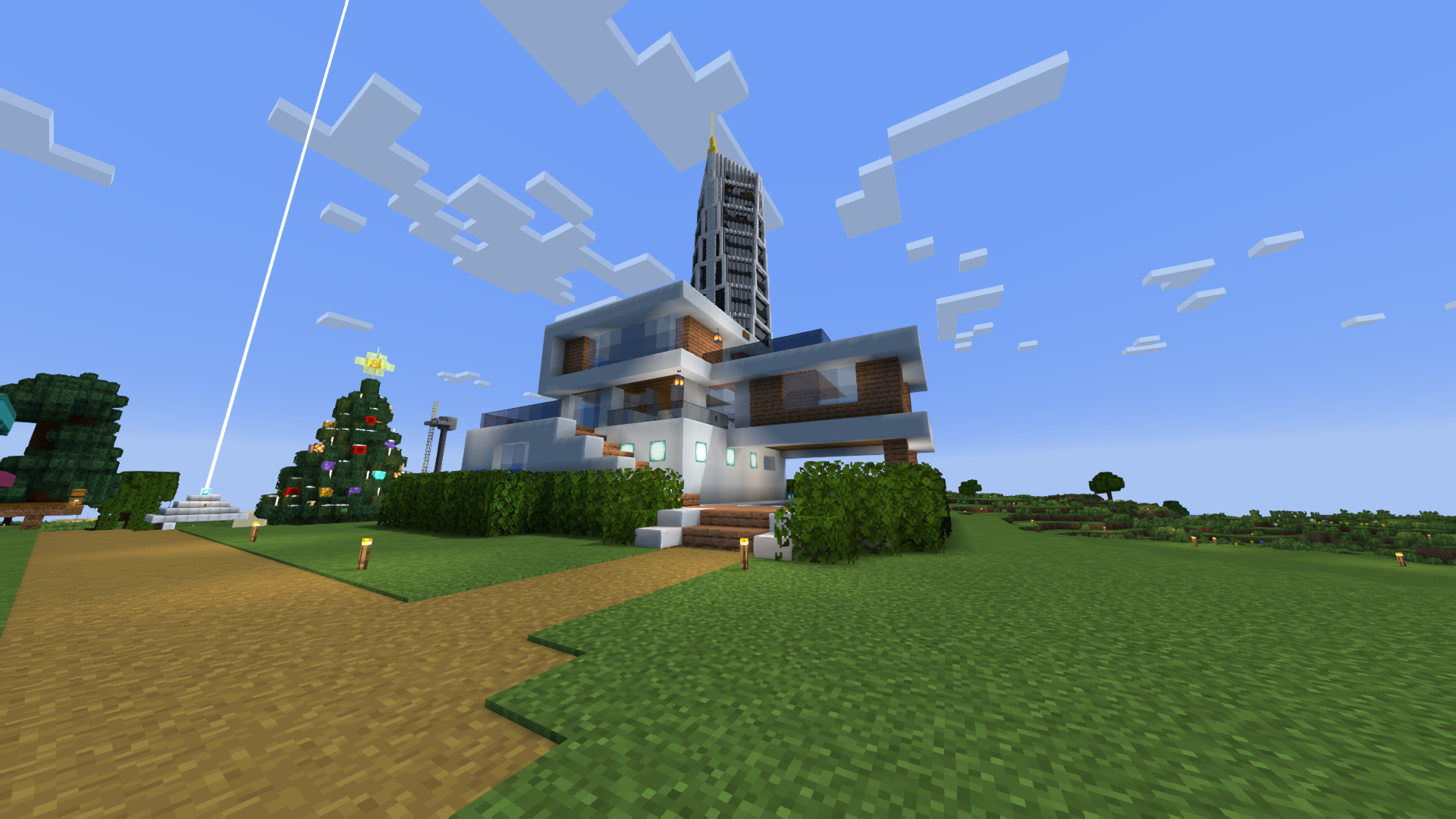
### CAPTURA DE TELA:
## O SHADER TEM:
– Suporte a [Better Clouds](https://modrinth.com/mod/better-clouds)
– Suporte a [Distant Horizons](https://modrinth.com/mod/distanthorizons)
– Suporte PBR _(LabPBR)_
– Profundidade de campo
– Desfoque de movimento
– Sombreamento _(Sombreamento das bordas que não são atingidas pelos raios solares)_
– Sombras
– FXAA _(anti-aliasing)_
– SSR _(Reflexão no espaço da tela)_
– Exposição automática
– Correção de cor
– Suporte a 7 idiomas: _EN RU UA FR DE CH BR_
## INSTALE OS SHADERS
– Baixe o cliente que suporta a instalação de shaders como Optifine e Iris
– Baixe os shaders
– Copie os shaders para /.minecraft/shaderpacks
– Inicie o Minecraft, vá para Opções –> Configurações de vídeo –> Shaders
– Escolha **BVS – Best Vanilla Shader**
## VÍDEO DE DEMONSTRAÇÃO
FR 🥐
# À PROPOS:
**Bonjour, je m’appelle LoLip_p ! J’ai créé ce shader en enregistrant Minecraft vanilla. J’ai également essayé de rendre les paramètres flexibles afin que vous puissiez désactiver ou activer les fonctions disponibles à votre guise.**
**Une version rapide du shader est également disponible : [**BVSF**](https://modrinth.com/shader/bvsf)!**
## LE SHADER DISPOSE DE:
– Prise en charge [Better Clouds](https://modrinth.com/mod/better-clouds)
– Prise en charge [Distant Horizons](https://modrinth.com/mod/distanthorizons)
– Prise en charge PBR _(LabPBR)_
– Profondeur de champ
– Flou de mouvement
– Ombrage _(Ombrage des bords qui ne sont pas exposés aux rayons du soleil)_
– Ombres
– FXAA _(anti-aliasing)_
– SSR _(Screen Space Reflection)_
– Exposition automatique
– Correction des couleurs
– Prise en charge de 7 langues : _EN RU UA FR DE CH BR_
## INSTALLER LES SHADERS
– Téléchargez le client qui prend en charge l’installation de shaders tels que Optifine et Iris
– Téléchargez les shaders
– Copiez les shaders dans /.minecraft/shaderpacks
– Lancez Minecraft, allez dans Options –> Paramètres vidéo –> Shaders
– Choisissez **BVS – Best Vanilla Shader**
## VIDÉO DE DÉMONSTRATION
UA 🕊️
# О:
**Привіт, я LoLip_p! Я створив цей шейдер, зберігши класичну версію Minecraft. Я також постарався зробити налаштування гнучкими, щоб ви могли відключати або вмикати доступні функції на свій розсуд.**
**Також доступна швидка версія шейдера: [**BVSF**](https://modrinth.com/shader/bvsf)!**
## ШЕЙДЕР МАЄ:
– Підтримка [Better Clouds](https://modrinth.com/mod/better-clouds)
– Підтримка [Distant Horizons](https://modrinth.com/mod/distanthorizons)
– Підтримка PBR _(LabPBR)_
– Глибина різкості
– Розмиття руху
– Затінення _(Затінення країв, що не потрапляють під промені сонця)_
– Тіні
– FXAA _(згладжування)_
– SSR _(Відбиття в просторі екрану)_
– Автоматична експозиція
– Корекція кольору
– Підтримка 7 мов: _EN RU UA FR DE CH BR_
## УСТАНОВКА ШЕЙДЕРА
– Завантажте клієнт, що підтримує встановлення шейдерів, таких як Optifine та Iris
– Завантажте шейдери
– Скопіюйте шейдери в /.minecraft/shaderpacks
– Запустіть Minecraft, перейдіть в «Налаштування» –> «Налаштування відео» –> «Шейдери»
– Виберіть **BVS – Best Vanilla Shader**
## ДЕМО ВІДЕО
BSL Shaders – Classic
**Notice: BSL Classic is now discontinued. A config file with classic’s look is available [here](https://www.patreon.com/posts/classic-settings-146997444).**
[](https://modrinth.com/shader/bsl-shaders)
[](https://modrinth.com/resourcepack/bsl-minipacks)
## ABOUT
BSL Shaders – Classic is a shaderpack made exclusively for Minecraft: Java Edition. It’s oriented towards vanilla aesthetics. This shader includes realtime shadows, volumetric light, ambient occlusion, bloom, customizable clouds and water, and built in anti-aliasing. Additional effects are available, such as depth of field, motion blur, specular and normal mapping, celshading, world curvature, and more.
## QUICK LINKS
– [**capttatsu.com**](https://capttatsu.com/bslshaders/) is this project’s official site, read the detailed description, FAQs and changelog here.
– Follow me on [**Bluesky**](https://bsky.app/profile/capttatsu.com) and/or [**X/Twitter**](https://twitter.com/capttatsu) to get news on my shaderpack.
– [**Join my discord server**](https://discord.com/invite/ZJd7jjA) for discussion, question, feature request, and bug report.
– Like my shaderpack? Consider supporting on [**Patreon**](https://www.patreon.com/capttatsu).
## AGREEMENT
You’re allowed to…
– Use this shaderpack for taking screenshots and videos.
– Modify the shaderpack for personal use.
– Publish your heavily modified version of the pack.*
– Redistribute the shaderpack for modpack / server with my permission.*
You’re not allowed to…
– Redistribute the shaderpack without my permission.
– Claim (and rename) my shaderpack (or its code) as your own.
– Use monetized URL shorteners to my site or files.
*My shader and myself (the author) should be credited clearly, add link to my site if possible.
## INSTALLATION
– Download and install Optifine or Iris
– Download the shaderpack
– Put the shaderpack inside .minecraftshaderpacks
– Launch Minecraft
– Open Options, Video Settings, Shaders
– Choose BSL Shaders