Lumina Shader – Event Horizon
Lumina Shaders is a complete visual overhaul for Minecraft, specifically engineered for users with high-performance hardware who refuse to compromise on realism.
Why Lumina?
Unlike basic edits, Lumina introduces custom-coded features that provide a distinct cinematic identity:
Procedural Atmospheric Flicker: A custom time-based light flickering effect for immersive environments.
Cinematic Grain System: A dynamic noise generator that enhances the filmic texture of the game.
Artistic Post-Processing: Unique desaturation and vignette curves designed for Lumina’s visual style.
Optimized Lighting: Fine-tuned shadows and global illumination for high-end setups.
📜 Credits & License
Developed by Benjiaa.
IMPORTANT: This shader is based on Complementary Shaders by EminGT. Special thanks for his incredible work.
Original Project: https://modrinth.com/shader/complementary-reimagined
Support the Project If you enjoy Lumina Shaders, consider supporting my work! You can find dev logs and early previews here:
👉 Support benjiaa on Ko-fi: https://ko-fi.com/lumina_dev/goal?g=0
💬 Join our community on Discord: https://discord.gg/JK6rTQ9T
Youtube Channel: www.youtube.com/@LuminaShadersDev
LSD Sshader
LSD Shader v1.3 is a Minecraft Java shader inspired by the visual phenomena commonly associated with LSD experiences, creating an intense, psychedelic, and surreal atmosphere in-game. Instead of preserving the classic “vanilla” look, it transforms the world into a pulsing, colorful vision filled with dynamic distortions and fluid color transitions.
**Features:**
– Psychedelic color shifting and dynamic saturation changes.
– Waving, “breathing” landscapes that feel alive.
– Intense neon lighting with a surreal glow.
– Hallucinatory-style screen distortions.
– Dynamic lighting effects that enhance motion and depth.
– Configurable intensity settings for a customizable experience.
This shader is purely visual and does not alter gameplay mechanics — its goal is to deliver a bold, trippy experience for players who want something completely different from the standard Minecraft aesthetic.
Incremental shaders
Incremental Shaders improves various visual aspects of the game through small, progressive enhancements; delivering cleaner lighting, richer colors, and better overall clarity while preserving the original look and feel.
-Shadows with distortion to reduce aliasing
-Day/night cycle with proper darkening and blue-shifted night vision
-Distance fog that gets thicker at night
-Waving grass, flowers, and leaves (fades out at distance)
-ACES tone mapping with a cool blue tint
-Rain and thunderstorm effects (darker, desaturated, foggier)
-Torch flicker
-Vignette
FeathC2
### Details
Feath Shader is a lightweight yet visually powerful shader pack designed to enhance your Minecraft experience with balanced realism and high performance. Whether you’re exploring vast landscapes or building detailed structures, Feath Shader adds an immersive layer of beauty without compromising on FPS.
✨ Features:
Realistic Reflections → Smooth and accurate reflections on water, glass, and reflective blocks.
Rain Puddles → Dynamic wet surfaces that bring rainy weather to life with puddles forming naturally.
Lighting Enhancements → Soft, natural light with realistic shadows, bloom, and improved torchlight effects.
Atmosphere & Sky → Improved atmosphere rendering with more depth, fog, and vibrant skies.
Color Adjustments & Grading → Balanced tones and cinematic color grading for a polished, professional look.
Feath Shader is made to be lightweight, stable, and visually consistent, perfect for players who want beautiful graphics without sacrificing smooth gameplay.
Dirt RT
A path tracing shaderpack for vulkanite mod,better than demo pack
github:[Dirt RT](https://github.com/sjrsjz/Dirt-RT)
use SVGF to denoise,support bloom,Tyndall effect,auto exposure
**YOU NEED TO LOAD A PBR RESOURSEPACK AND USE VULKANITE 0.0.4 TO MAKE THE SHADER WORK CORRECTLY**
**WARNING:Make sure that your resourcepack fit your game version. Otherwise, you will get a black world!!!**
DERCODE
**RECODERS: DureXXX / M1zora / Sone4ka / Frs0n**
Shader Profile System Broken pls use High profile
# **About**
**DERCODE is a recode based on the Derivative shader that adds various effects and improvements**
**It also fixes various bugs from the original Derivative shader**
**At the moment, the shader has BAD-optimization due to poorly implemented PT functions**
**This project started development in late 2024 based on the Bliss shader, but was later moved to Derivative because older Bliss builds did not allow implementing the features that were achieved here**
**The shader will continue to receive updates in the future, and it may eventually be rewritten from scratch instead of being just a recode**

Everything related to RECODE will be documented in the changelogs.
## Shader profiles
Low, Medium, High, Film, Derivative, Survival
## **Performance**
optimization on HIGH profile DERCODE 1.6
MC 1.21.11 only SODIUM + IRIS + FullHD + 8RAM
gtx1650 laptop 4VRAM 22chunks = 100-130 fps
## **Links**
My Discord server link
there will be news, polls, etc and also feel free to report bugs there : [DerivativeRECODE](https://discord.gg/UavqfqAwzv)
CurseForge link
Changelogs e.t.c : [CurseForge](https://www.curseforge.com/minecraft/shaders/dercode)
CH Motion
**This Simple, Super light weight motion blur pack adds a beautiful, smooth and satisfying motion blur to your game!**
_This motion blur pack makes use of Nvidia’s Motion Blur as a Post-Processing Effect
which optimizes graphic load and gives some amazing effects._
**Pros**
+ Cool effects
+ Easy for the eye
+ Light weight, Any device could run this
+ Looks beautiful
**Cons**
– Non, It’s perfect 🙂
Beyond Vanilla
# Beyond Vanilla – Minecraft Shader Pack
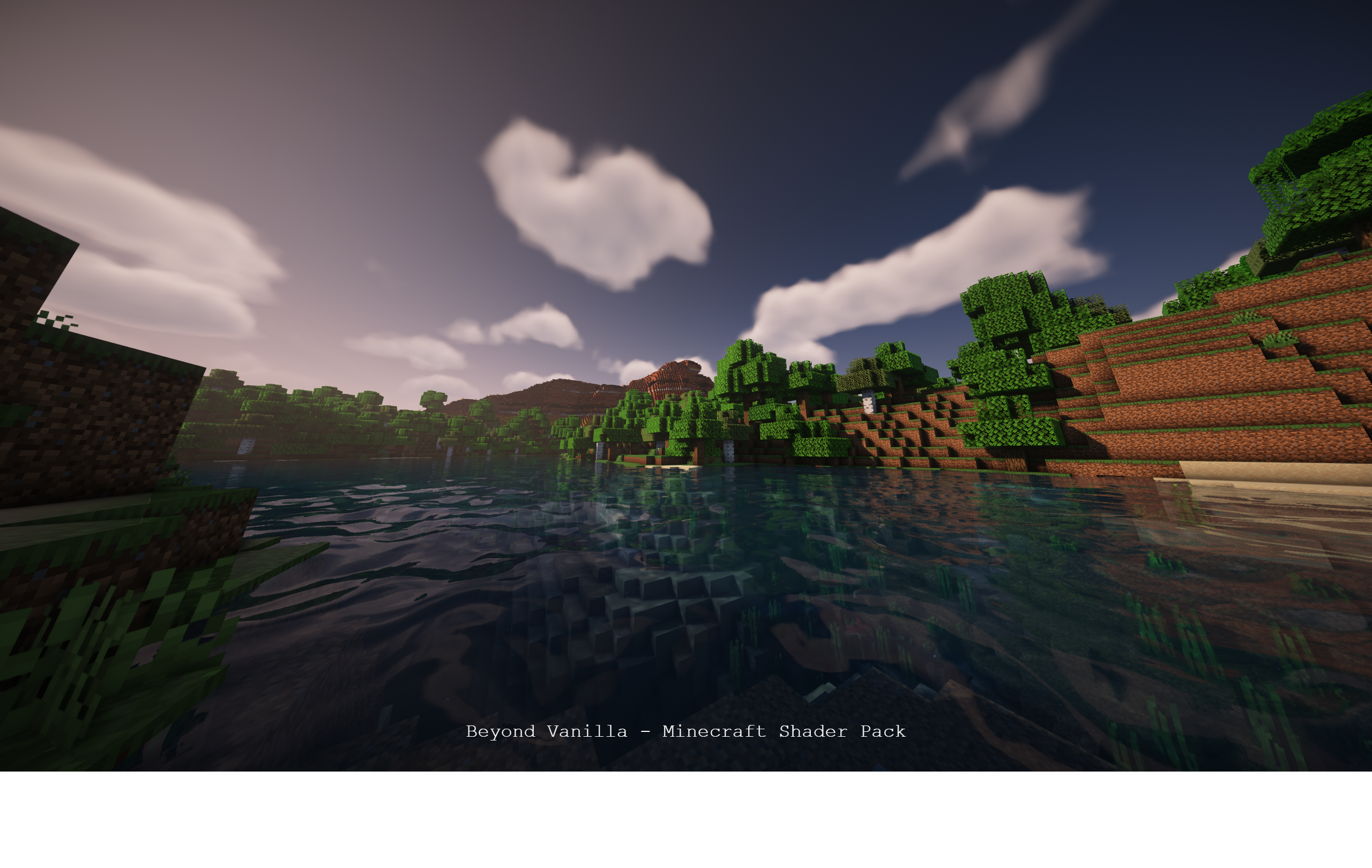
Welcome to an immersive visual experience! Beyond Vanilla is a shader pack designed to take your Minecraft adventures to the next level.
## Installation Guide:
### Links:
– Modrinth: [Download Here](https://modrinth.com/shader/beyond-vanilla)
– Forge: (Coming Soon)
– GitHub: [Project Repository](https://github.com/hotsu0p/beyond-vanilla)
### Have an issue or feature request?
Open an issue [here](https://github.com/hotsu0p/beyond-vanilla/issues).
1. **Download:**
– Visit the green “Releases” tab and download the latest release.
– Extract the contents of the ZIP file.
2. **Installation:**
– Open your Minecraft launcher.
– Navigate to the “shaderpacks” folder inside the “shaderpacks” directory in your Minecraft game folder (usually located in `%appdata%/.minecraft/shaderpacks`).
– Move the extracted folder into the “shaderpacks” directory.
3. **Launch Minecraft:**
– Select the profile with the installed shader pack.
– Start the game.
### Shader Features:
– Experience a stunning visual upgrade with enhancements to lighting, shadows, and atmospheric effects.
– Immerse yourself in the game with carefully crafted details.
### Compatibility:
– Tested on Iris and Sodium 1.1.6.
– Optimized for mid to low-tier devices.
– Not tested on Optifine.
– Compatible with Nvidia GPUs (tested on a 4070 Ti).
– Not tested on AMD or Mac platforms.
### Upcoming Enhancements:
– [✅] More screenshots for a comprehensive preview.
– [✅] Enhanced sky in the end.
– [✅] Improved portal visuals.
– [✅] Sun and moon enhancements.
– [✅] Uploaded to Modrinth for wider availability.
– [] Fix more bugs
– [] Performance improvements for smoother gameplay.
– [] Additional features to elevate your gaming experience.
– [] Add a feature from the commuity..
– [] Quality of life features
– [] Glass blur
– [] Revamped GUI for a polished interface.
– [] Add more to the todo
### Partner!!
Are you interested in supporting me and the development of beyond vinilla? If so, I suggest trying out BisectHosting. As a new customer, use the hotsuop to receive a 25% discount on your first month of a gaming server. With 24/7 support and rapid response times, you can expect outstanding service for all your gaming needs.

### Credits:
– **Hotsuop:** Creator of the base shader.
– **CaptTatsu:**: For creating BSL Shaders, which this is based off of.
If you contribute to the repository, your name could be featured here!
Alpha Piscium
# Alpha Piscium
High-quality realistic Minecraft shaderpack featuring global illumination, volumetric clouds, atmospheric scattering, and stunning visual effects.
Official Website link: https://alphapiscium.org/
Discord server link: https://discord.gg/E2Uq2MmHgq

## Features
– **Real-time Global Illumination**
– [*Reservoir-based SpatioTemporal Importance Resampling*](https://arxiv.org/pdf/2301.11376) (ReSTIR) based Screen-Space Global Illumination
– [*ReBLUR*](https://doi.org/10.1007/978-1-4842-7185-8_49) based denoising
– Realistic, real-time, and fast **Atmospheric Scattering**
– [*Unreal Engine Sky Atmosphere Rendering Technique*](https://sebh.github.io/publications/egsr2020.pdf)
– [*Epipolar Sampling*](https://gdcvault.com/play/1018227/Practical-Implementation-of-Light-Scattering)
– Real-time **Volumetric Clouds**
– [*Nubis*](https://www.guerrilla-games.com/read/nubis-evolved)
– High-quality adaptive **Shadows**
– [*Rectilinear Texture Warping*](https://www.cspaul.com/publications/Rosen.2012.I3D.pdf) (RTWSM)
## Installation
1. Download the Alpha Piscium shaders for Minecraft from [Modrinth](https://modrinth.com/shader/alpha-piscium) or [GitHub Release](https://github.com/Luna5ama/Alpha-Piscium/releases).
2. Install [Iris](https://www.irisshaders.dev/download) shader loader.
3. Open the Minecraft launcher and choose the Iris profile you just created with the version you’re playing.
4. Launch Minecraft.
5. Go to **Options** → **Video Settings** → **Shader Packs**, then click **Open Shader Pack Folder**.
6. Move the downloaded ZIP file into this folder (`.minecraft/shaderpacks`).
7. In-game, select the newly installed pack from the shaders list. (If you select a shader pack using Iris, its filename will turn yellow.)
8. Click **Done** or **Apply** and the shader will be loaded.
## FAQ
– **No lighting at night**: Please use PBR resource packs. For vanilla style, SPBR is recommended. Otherwise, try Patrix.
– **Can’t load shaderpack**: Please use Iris with version 1.7 or higher.
– **Everything goes dark when turning back**: This is due to the limitations of screenspace techniques. There isn’t a perfect way to fix this.
– **Intel GPU**: Alpha Piscium uses cutting-edge graphics technology. Unfortunately, Intel doesn’t maintain their OpenGL driver well, so Intel GPUs are not supported.
– **AMD GPU**: Check if your GPU driver is newer than 22.7.1. If older, please update your driver.
– **Other loading errors**: Press Ctrl+D in Iris’s shaderpack selection screen, then reload the shaderpack. Make an [issue](https://github.com/Luna5ama/Alpha-Piscium/issues) with the error message and the relevant files in `.minecraft/patched_shaders` as shown in the error message.
## Roadmap
### 1.8 Diffuse GI
– Diffuse GI improvement
– Denoiser overhaul
– ReSTIR Diffuse “GI”
– Shadow/SSS blur fix
– Optimize PCSS for both quality and performance
### 1.9 Specular GI
– Add specular GI
### 1.10 Voxy support
– Add voxy support
– Epipolar sampling screen space shadow
– Address shadow map light leaks
### 1.11 More Volumetrics
– Clouds in sky lighting
– Fog
– Cloud shadows
### 1.12 Parallax Mapping
– Add steep/smooth parallax mapping
– Add parallax mapping shadow
### 1.13 More Cloud?
– Improve cirrus cloud modeling
– Mid altitude clouds (altocumulus)
## License
Files under the `scripts` directory are licensed under the MIT License. All other files are licensed under the GNU General Public License v3.0.