XinXinBotApi
## 兼容核心
插件只在下列核心进行测试,正常使用,其它服务端核心未知,请自行测试。
1.8.8版本:Paper、Spigot
1.12.2版本:CatServer、spigot
1.16.5版本:CatServer、spigot
1.19.2版本:paper、Spigot
1.20.2版本:mohist、arclight
## 插件简介
此插件可以通过WebSocket对接 OneBot 以及 Mirai 机器人框架
对接 Mirai 机器人请自行安装 mirai-api-http 插件
推荐使用 Mirai 机器人框架,若实在不会搭建可以使用 OneBot标准 的机器人
此插件因只作为一个前置Api使用所以只有一个绑定功能且默认关闭
为什么是对接而不是把机器人直接写入插件?
如果是直接将机器人写入插件可能会导致多服服主或多端服主头疼
因为这样你可能需要准备更多的QQ号
但如果是直接接入框架本身的话
首先你也能正常使用框架本身的插件并且还能对接服务器
## 插件功能
此插件使用 WebSocket 进行QQ消息操作
所以必须通过指令连接一次 WebSocket 才能正常使用
在配置文件中可以开启自动连接,但需要提前开启 OneBot 或 Mirai 机器人
绑定信息支持 MySQL 储存,若不开启则为本地文件储存
此插件作为单独使用的话只有一个绑定玩家功能
而这个绑定功能也没有任何实质性作用
但是可以通过其他附属插件达到想要的作用
## 指令权限&介绍
管理员指令介绍(所需权限:`XinxinBotApi.admin`)
`/xbot bind <玩家ID>` —— 手动绑定一个QQ
`/xbot unbind ` —— 删除一个QQ的绑定账号
`/xbot connect` —— 连接WebSocket
`/xbot close` —— 断开WebSocket
`/xbot reload` —— 重载插件
## 图片展示
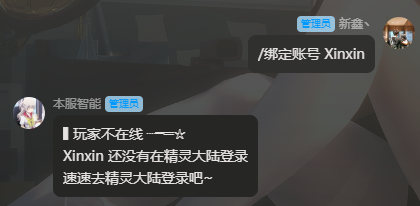
Api自带绑定功能(需要在配置文件手动开启SetBind项)
## 开发文档 & 安装教程
若将此插件作为开发前置即可让MC充满各种可能性
或许在这之前你开发群服互联插件会去找各种Api
现在你只需要把本插件添加为你的依赖
使用本插件作为前置开发请在 `Plugin.yml` 里加入 `depend: XinxinBotApi`
从而让本插件在你插件之前加载

## 附属插件
绑定礼包 | 查询信息 | 进服验证 | 图片信息 | 群服注册 | 互联指令 | 我的精灵
(一个一个改链接太麻烦了,在新鑫论坛搜索XinxinBot则可以浏览所有附属)
! 附属插件统计可能并不完全,更多附属插件自行开发或找他人定制
## 版权声明
本插件所用所有代码均为原创,不存在借用/抄袭等行为
本插件为非盈利性插件,免费发布,严禁销售和转卖
若需要开发任何与此插件相关的附属插件可以联系作者
### 转载声明
转载至https://bbs.mcxin.cn/archives/216
已得到原作者授权

欢迎加入新鑫咕咕交流群:1124109145

XinghaiMC-Report
# XinghaiMC-Report
## Introduction
A simple and clear reporting plugin.
## Command
/report Player Reason
– Report Player
/handle
– View list of reported players
/handle ID
– Report processing complete.
## Permissions
xinghaimc.report
– Permissions used for reports
xinghaimc.report.handle
– Permissions used to handle reports
## Download
Github Releases (recommended)
Github Actions
MineBBS
Xiaoklunar Shulker
# XiaoklunarShulker
Two quality-of-life features for shulkers: **open them directly from your inventory** and optionally **vacuum overflow pickups into shulkers you’re carrying**.
—
## 1) Open Shulkers Directly From Inventory
Right-click a **shulker box item** inside your inventory to open it.
**Highlights**
– Opens from inventory (no placement required)
– Prevents **shulker-in-shulker** nesting exploits
– Plays open/close sounds
– You can switch to another shulker while one is open
*(auto-closes the current one, then opens the clicked one)*
**Permission**
– `xiaoklunarshulker.open`
—
## 2) Shulker Vacuum (Overflow Pickup Helper)
When enabled: if an item pickup would **overflow** your inventory, the plugin tries to store the overflow into **shulkers in your inventory**.
**Safety**
– Automatically disabled while a shulker GUI session is open
**Commands**
– `/shulkervacuumstart` Enable vacuum overflow storing
– `/shulkervacuumstop` Disable vacuum overflow storing
– `/shulkervacuumstatus` Show current vacuum status
**Permission**
– `xiaoklunarshulker.vacuum.toggle`
—
## Permissions
| Permission | Description |
|—|—|
| `xiaoklunarshulker.open` | Allows opening shulkers directly from inventory |
| `xiaoklunarshulker.vacuum.toggle` | Allows toggling the shulker vacuum feature |
Xiaoklunar Ghast Speed
## XiaoklunarGhastSpeed
### What this plugin is
A **craft-only** Paper plugin that lets players craft **speed harnesses** for **Happy Ghasts**, then apply a configured speed boost by equipping the harness on the ghast.
—
## Features
### ✅ Craftable Speed Harness Tiers
Adds 5 tier recipes that extend the vanilla Harness recipe by filling the **bottom row** with one material:
* **Gold Ingots** → **Speed I**
* **Iron Ingots** → **Speed II**
* **Emeralds** → **Speed III**
* **Diamonds** → **Speed IV**
* **Netherite Ingots** → **Speed V**
**Harness color** is determined by the **wool color** used in the middle of the recipe.
—
### ✅ Ultimate Speed Harness (Special Craft)
Adds a shapeless “ultimate” craft:
**Requires:**
* 1× Speed I harness
* 1× Speed II harness
* 1× Speed III harness
* 1× Speed IV harness
* 1× Speed V harness
* **4× Phantom Membrane**
**Output:**
* Harness with lore: **`ᴜʟᴛɪᴍᴀᴛᴇ ꜱᴘᴇᴇᴅ`**
* Internally treated as **tier 7**
—
### ✅ Applies Speed to Happy Ghasts
* **Right-click a Happy Ghast** while holding a speed harness to apply the tier speed.
* If the harness has **no tier**, the plugin **removes** any previously applied boost and restores base speed.
—
### ✅ Restores Speed When Harness Is Removed
* If the harness is **sheared off** the Happy Ghast, the plugin restores the ghast’s **original speed values**.
—
### ✅ Configurable Speed Values
You can adjust the actual speed values per tier in:
`plugins/XiaoklunarGhastSpeed/config.yml`
Example defaults:
“`yml
speeds:
1: 0.10
2: 0.15
3: 0.20
4: 0.25
5: 0.30
7: 0.475
“`
—
### ✅ Visual styling
* Harnesses have a **glint** (hidden enchant) and show lore in **small caps**.
* Tier harness lore shows **Roman numerals** like vanilla enchants (Speed I–V).
* Ultimate shows **`ᴜʟᴛɪᴍᴀᴛᴇ ꜱᴘᴇᴇᴅ`**.
Xiaoklunar Fly
# ✨ Xiaoklunar Fly (ElytraFlight)
> **Xiaoklunar Fly** is a premium-style Elytra flight plugin that gives players **creative-like flight** without removing balance or immersion.
> Perfect for servers that want flight to feel **powerful, fair, and non-cheaty**.
This plugin is ideal for:
* 💰 Monetizing flight permissions
* 🌍 Controlled flight in specific worlds (spawn, hub, RPG zones)
* ⚖️ Balanced survival gameplay using Elytra durability
—
## 🚀 What Does Xiaoklunar Fly Do?
> Xiaoklunar Fly allows players to toggle **creative-style flight** using `/elytrafly`,
> **only if all required conditions are met**.
Once enabled, the plugin **checks every second** that the player:
* Is in an **allowed world**
* Has an **Elytra equipped**
* Has the **required permission**
* Is **actively flying**
> If **any** requirement fails, flight is **immediately disabled** and the player is notified.
This behavior is similar in spirit to plugins like **EssentialsX.Flight**, but designed specifically around **Elytra-based balance and monetization**.
—
## ⭐ Core Features
### 🪽 Creative-Like Flight (Not Vanilla Gliding)
> Players fly **exactly like creative mode**.
* No awkward Elytra gliding mechanics
* Smooth, controllable, and intuitive movement
—
### 🔐 Permission-Based (Perfect for Monetization)
> Xiaoklunar Fly uses **one configurable permission node**.
* Sell access via **ranks, crates, or stores**
* Fully compatible with **LuckPerms** and other permission plugins
> 💡 **Example:**
> Sell **“Elytra Flight Access”** as a premium perk.
—
### 🌍 World-Restricted Flight
> You decide **where flight is allowed**.
Examples:
* Only in **spawn**
* Only in **hub**
* Or **every world** for full freedom
> Flight is **automatically disabled** when a player leaves an allowed world.
—
### 🛡️ Elytra Required (No Elytra = No Flight)
> Elytra is **required at all times**.
* Must be worn in the chest slot
* Removing it instantly stops flight
* Keeps Elytra meaningful and relevant
—
### 🔧 Configurable Elytra Durability Damage
> Elytra takes durability damage **every second while flying**.
* Damage applies **only while the player is actively flying**
* Fully configurable in `config.yml`
This ensures:
* Flight feels powerful
* Elytra still has a **real cost**
* No infinite free flight abuse
—
### ⏱️ Constant Safety Checks (Every Second)
> The plugin continuously verifies:
* World validity
* Elytra equipped
* Permission still present
* Player still flying
This guarantees:
* ❌ No exploits
* ❌ No bypassing restrictions
* ✅ Clean, predictable behavior
—
### 🧾 Clean & Stylish Messaging
> Fully branded as **Xiaoklunar Fly**.
* All messages use **small-caps font** for a premium look
* Color-code friendly
* Messages trigger **only once per stop reason** (no spam)
—
## 🧑💻 How Players Use It
> Using Xiaoklunar Fly is simple:
1. Equip an **Elytra**
2. Be in an **allowed world**
3. Have the **permission**
4. Run:
“`text
/elytrafly
“`
> Flight toggles **ON / OFF instantly**.
—
## ⚙️ Example Configuration
“`yaml
allowedWorlds:
– “spawn”
– “hub”
permissionNode: “xiaoklunar.fly”
elytraDamagePerSecond: 1
“`
> Adjust worlds, permissions, and Elytra damage to fit your server’s balance.
—
## 🧠 Why This Plugin Is Perfect
* ✅ Feels like creative flight
* ✅ Still balanced and survival-friendly
* ✅ Excellent for server monetization
* ✅ Lightweight and stable
Xiaoklunar Auction House
# Auction
A clean, GUI-first Auction House plugin for **Paper 1.21+** using **Vault** for economy.
Designed to be lightweight, permission-minimal, and easy for both players and developers.
—
## Requirements
– **Paper**: 1.21+
– **Vault** (plugin)
– **A Vault-compatible economy plugin** (e.g., EssentialsX)
> Vault does **not** store balances. You must install an economy provider.
—
## Commands
### `/ah`
Opens the global Auction House GUI.
### `/ah sell `
Lists the item currently in the player’s hand for sale.
– Item must not be `AIR`
– Item must not be blocked by config
– Price must be within configured limits
– Listing limit enforced (normal vs premium)
### `/ah storage`
Opens **Auction Storage**, showing:
– Active listings (click to cancel)
– Cancelled / expired returns (click to claim)
– Delivery overflow items (when inventory was full on purchase)
### `/ah resell`
Relists eligible stored items (premium feature + cooldown).
### `/ah `
Opens a view showing **only listings by that exact seller name**.
– Case-sensitive matching
– Does not validate whether the name belongs to a real player
– If no listings exist, GUI opens empty
### `/ah search [maxPrice]`
Searches auction listings by keyword.
– No `minecraft:` namespace required
– Matches:
– Material key/name (e.g., `iron_ingot`)
– Display name (custom items like “Bulldozer” / “Drill”)
Examples:
– `/ah search iron`
– `/ah search net`
– `/ah search note block 500` *(premium price filter)*
—
## Premium Features
Permission:
– `auctionhouse.premium`
Premium unlocks:
– Increased listing limit (default: 20 vs 10)
– `/ah resell` and “Relist All” button
– Advanced search price filter (max price argument)
– Cooldown on relist (default: 60s)
Relist spam protection:
– “Wait X seconds” message is throttled to **max once per second** per player.
—
## GUI Overview
### Auction House GUI
– Paginated
– Edge glass border
– Buttons:
– **Refresh** (nether star)
– **Storage** (chest)
– **Prev/Next page** arrows (hidden when not usable)
Listing lore formatting:
– Seller name: **Yellow**
– Price: **Green**
– Expires in: **Red**
– Lore is **non-italic**
### Confirm Purchase GUI
– Click listing → confirm screen:
– Green: Buy
– Red: Cancel (returns to `/ah`)
Purchase logic:
– Checks balance **before** opening confirmation
– On successful buy:
– Money is withdrawn
– Item delivered to inventory
– If inventory full → moved to storage as delivery overflow
### Auction Storage GUI
– Title: **Auction Storage**
– Shows:
– Active listings (cancelable)
– Cancelled returns
– Expired returns
– Overflow deliveries
– Back arrow returns to main `/ah`
Status display:
– Cancelled: red
– Expired: red
– Delivery: yellow
—
## Sounds
– Successful listing: “ding” sound
– Listing denied (limit reached / not allowed): villager “no”
– Successful purchase: villager “yes”
– Seller receives notification + sound on successful sale
—
## Configuration
Key config options include:
– Listing limits for normal/premium
– Maximum sell price
– Premium relist cooldown
– Blocked item list
– GUI sound toggles (if present in your build)
*(Exact keys depend on your current shipped config.yml.)*
—
## Installation
1. Drop into `plugins/`:
– Vault
– Economy plugin (e.g., EssentialsX)
– Xiaoklunar Auction
2. Start server
3. Configure `config.yml`
4. Assign premium permission (optional)
– Example (LuckPerms):
“`
/lp group premium permission set auctionhouse.premium true
“`
—
## Troubleshooting
### Vault installed but economy not working
Vault needs an economy provider (EssentialsX, etc.). Check console for economy registration logs.
### “Invalid plugin.yml”
YAML must use spaces (no tabs) and usage strings should be quoted.
Have fun
xHubBlocks
# 🧱 xHubBlocks V2
### The Ultimate Lobby Practice Plugin
**Infinite blocks. Auto-despawn. Database support.**
  
__UPDATE COMING SOON!__
—
## 👋 Overview
**xHubBlocks** is a lightweight but powerful plugin designed for Hubs and Lobbies. It gives your players an infinite stack of blocks to practice bridging, clutching, or building while waiting in the lobby.
The best part? **The blocks disappear automatically** after a configurable time, keeping your lobby clean and lag-free.
### 🔥 What’s New in V2?
We have completely rewritten the core to include professional features:
* **Persistent Data:** Blocks placed statistics are now saved forever.
* **Database Support:** Built-in support for **H2** (local, no setup) and **MySQL** (for networks).
* **Developer API:** Hook your own plugins into xHubBlocks.
* **High Performance:** Powered by HikariCP for database connections.
—
## ✨ Features
* **♾️ Infinite Items:** Players get a stack of blocks that never runs out.
* **✨ Auto-Despawn:** Blocks vanish after X seconds with a satisfying particle effect.
* **🔒 Secure:** Prevents players from dropping the block or moving it in their inventory.
* **🎨 Fully Configurable:** Customize the material, name, lore, slot, and messages.
* **📊 PlaceholderAPI:** Display stats on scoreboards or holograms.
* **⚡ Legacy Support:** Works flawlessly from **1.8.8** up to the latest versions.
—
## 💾 Database & Storage
xHubBlocks V2 supports two storage types defined in `config.yml`:
1. **H2 (Default):** Zero configuration required. Stores data in a local file. Perfect for single servers.
2. **MySQL:** Connect to an external database. Ideal for networks or if you want to display stats on a website.
“`yaml
storage:
type: H2 # Or MYSQL
mysql:
host: “localhost”
port: 3306
database: “xhubblocks”
# …
“`
## 🏀Images


—
## 🚀 Commands & Permissions
*The commands are editable.*
| Command | Permission | Description |
| :— | :— | :— |
| `/xhubblocks` | `xhubblocks.admin` | View plugin info and help. |
| `/xhubblocks reload` | `xhubblocks.reload` | Reload the configuration file. |
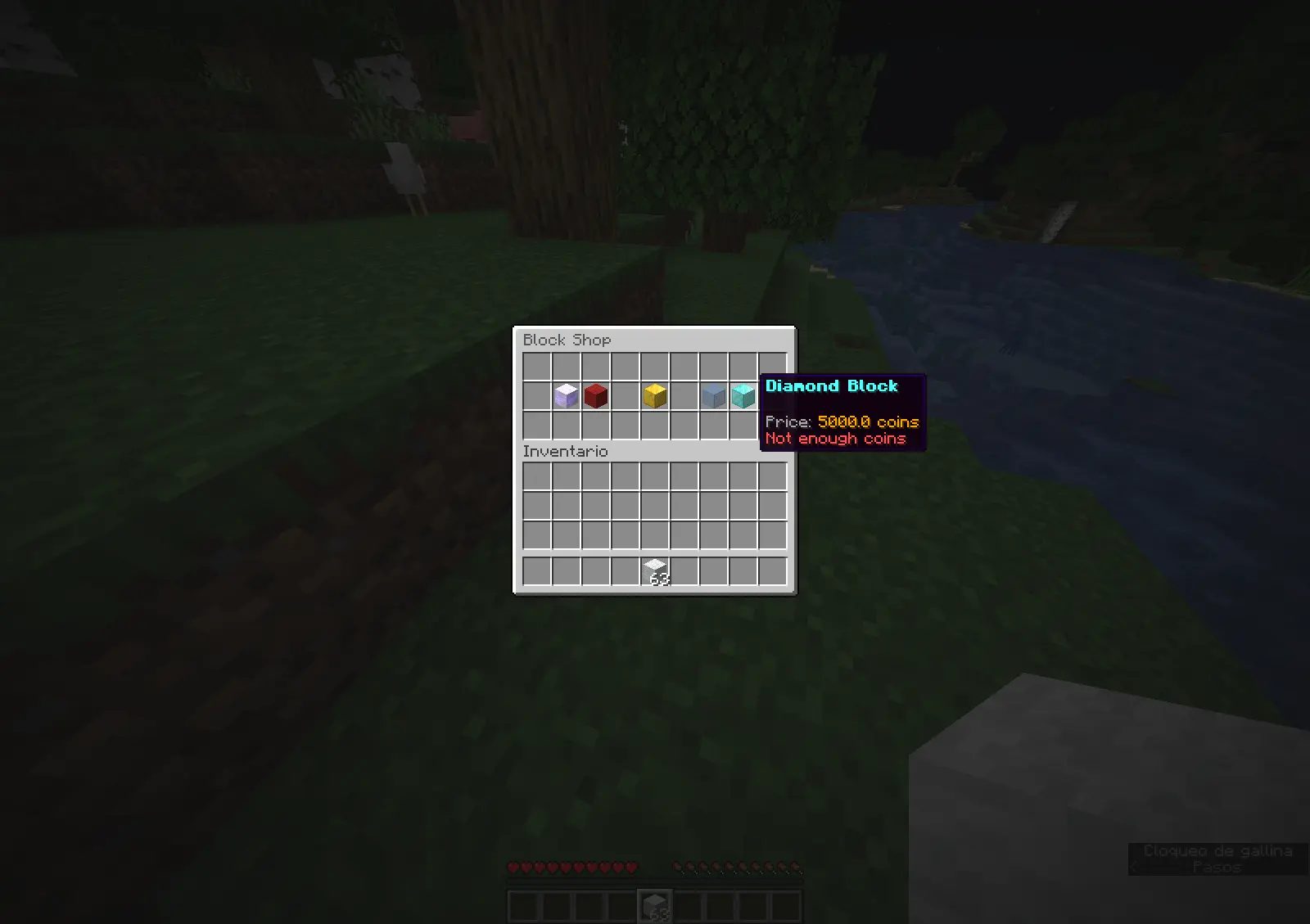
| `/blocks shop` | `editable` | Block store. |
—
## 📊 Placeholders
Requires **PlaceholderAPI**.
* `%xhubblocks_placed_player%` – Total blocks placed by the player (Saved in DB).
* `%xhubblocks_placed_session%` – Blocks placed in the current session.
* `%xhubblocks_placed_total%` – Total blocks placed by everyone on the server.
—
## 👨💻 Developer API
Want to use xHubBlocks stats in your own plugin? It’s easy.
**1. Get the instance:**
“`java
if (Bukkit.getPluginManager().getPlugin(“xHubBlocks”) != null) {
xHubBlocksAPI api = xHubBlocksAPI.getApi();
// Get stats
int total = api.getPlayerTotalPlaced(player.getUniqueId());
}
“`
**2. Maven/Gradle:**
You can add the plugin as a dependency to your project.
—
## 📥 Installation
1. Download `xHubBlocks.jar`.
2. Drop it into your server’s `plugins` folder.
3. Restart your server.
4. (Optional) Edit `config.yml` to change the block style or database settings.
5. Enjoy!

Created with ❤️ by xPlugins
xHub
# 🛡️ xHub Core (Beta)
### The Ultimate All-in-One Lobby Solution | 1.20+




**xHub** is a high-performance, premium core designed to replace multiple lobby plugins.
It now includes advanced features like Parkour, Cosmetics, Developer API, and dynamic permissions.
Discord Support • Website

—
## ✨ Key Features (v1.0.1)
* **🏃 Parkour System:** Automatic checkpoints, rewards, void detection, and Double Jump.
* **🎩 Cosmetics:** Particle trails and hats with a GUI menu.
* **💻 Developer API:** `xHubAPI` class for easy integration with other plugins.
* **🎨 Full RGB/Hex Support:** Use `&#RRGGBB` colors anywhere.
* **📂 Modular Menu System:** Create unlimited GUI menus using YAML files.
* **📊 Animated Boards:** Flicker-free Scoreboard and Tablist (PAPI supported).
* **🎒 Hotbar Manager:** Custom items on join (Compass, PvP Sword, Cosmetics).
* **📢 Chat Manager:** Formatting with Rank support (`[Admin] Player: Hello`).
* **🤖 Discord Logs:** Built-in Webhooks for Join/Quit events.
—
## 🚀 Installation
1. Download `xHub-1.0.0.jar`.
2. Place it in your server’s `plugins` folder.
3. **(Required)** Install PlaceholderAPI for variables.
4. **(Optional)** Install Vault for economy rewards.
5. Restart the server.
—
## 📂 Directory Structure
“`text
plugins/xHub/
├── config.yml <-- Main settings
└── menus/ <-- Drop your menu files here
├── principal.yml <-- Main Menu
├── selector.yml <-- Server Selector
├── socials.yml <-- Social Media
└── cosmetics.yml <-- Cosmetics Menu
```
---
## 📜 Commands & Permissions
| Command | Permission | Description |
| :--- | :--- | :--- |
| `/xhub setlobby` | `xhub.admin` | Sets the spawn point. |
| `/xhub spawn` | `xhub.spawn` | Teleports you to the lobby spawn. |
| `/xhub reload` | `xhub.admin` | Reloads all configs and menus. |
| `/xhub menu ` | `xhub.menu` | Opens a specific menu. |
| `/xhub cosmetic` | `xhub.cosmetic` | Manage cosmetic effects. |
> **Note:** Permissions can be disabled in `config.yml` by setting them to `false`.
—
## 👨💻 Developer API
xHub exports a static API class for developers to hook into the core:
“`java
// Teleport a player to the Hub
xHubAPI.teleportToSpawn(player);
// Check if player is doing parkour
if (xHubAPI.isInParkour(player)) {
// do something
}
// Activate a cosmetic trail
xHubAPI.setTrail(player, “FLAME”);
“`
—
## 🛠️ Default Configuration
Below is the full generated `config.yml` file explaining every feature.
“`yaml
# _
# __ __ / /_ _| |__
# / // /_/ / | | | ‘_
# > Developed with ❤️ by **xPlugins.
Copyright** © 2026 xPlugins. All rights reserved.
Xhomes
### Xhomes – Your Personal Home Management Plugin for Minecraft
**Xhomes** is an essential plugin designed to enhance your Minecraft experience by allowing players to seamlessly set, manage, and teleport to personal homes. With its user-friendly GUI and intuitive functionality, Xhomes simplifies home management and provides an engaging way to navigate the game world.
## Key Features:
– **Set Home**: Easily set your home location using the command `/sethome [homename]`, enabling quick travel back to your favorite spots.
– **Home GUI**: Access a visually appealing GUI to view and select homes, featuring slots filled with blue beds for a straightforward teleportation interface.
– **Teleportation Countdown**: Enjoy a 5-second countdown before teleportation, accompanied by the message: “Teleporting in 5 seconds, don’t move!” to build anticipation.
– **Movement Cancellation**: Teleportation is canceled if the player moves during the countdown, ensuring safe and accurate arrival at the desired location.
– **Delete Home**: Remove homes easily with the command `/delhome [homename]`.
– **Configurable Limits and Tiers**: Server owners can configure the maximum number of homes players can set based on their permission tier:
– **Tier 1 (xhomes.hometier1)**: 2 homes
– **Tier 2 (xhomes.hometier2)**: 4 homes
– **Tier 3 (xhomes.hometier3)**: 6 homes
– **Tier 4 (xhomes.hometier4)**: 8 homes
These limits are fully configurable in the `config.yml` file.
– **Admin-Friendly Management**: Xhomes provides robust tools for server owners to oversee home settings and permissions, offering fine-grained controls for authorized players.
### LuckPerms Permissions:
– `/sethome`: `xhomes.sethome`
– `/delhome`: `xhomes.delhome`
– `/home`: `xhomes.home`
– Tier 1: `xhomes.hometier1` (2 homes)
– Tier 2: `xhomes.hometier2` (4 homes)
– Tier 3: `xhomes.hometier3` (6 homes)
– Tier 4: `xhomes.hometier4` (8 homes)
Elevate your Minecraft gameplay with **Xhomes**—your all-in-one home management solution!
### Source Code
Check out the source code on GitHub: Xhomes Repository
xHeadTurns
# 💀 xHeadTurns
### Advanced Floating Heads, Holograms & Animations



![Version]()
—
## 📝 Overview
**xHeadTurns** is the ultimate solution for decorating your server lobbies, hubs, and spawn areas. Bring your server to life with fully interactive **Floating Heads** that support custom textures, real-time rotation, scaling, and dynamic holographic displays.
Now with a **Full In-Game Editor**, you can modify every property of your heads without ever touching a configuration file.
## ✨ Key Features
* **🎮 Full In-Game Editor:** Modify scale, speed, textures, and hologram lines in real-time with `/xhte`.
* **🎨 Custom Textures:** Support for **Base64** values (Minecraft-Heads) and **Player Names**.
* **🔄 Dynamic Rotation:** Fully customizable rotation speed and manual angle (Yaw/Pitch) control.
* **💬 Advanced Holograms:**
* Multi-line support with **HEX Colors** (e.g., `&#a7c7e7`).
* **PlaceholderAPI** support (updates based on the nearest player).
* Customizable backgrounds (RGB + Opacity), billboards, and shadows.
* **✨ Particle Animations:** Styles like `HELIX` and `SPHERE` with custom particle types.
* **⚡ Interactivity:** Execute **Console** or **Player** commands on click with per-head cooldowns.
* **🌍 Multi-Language:** 100% translatable (English and Spanish included).
—
## 🛠️ Commands & Permissions
| Command | Description | Permission |
| :— | :— | :— |
| `/xht help` | Shows the help menu with all commands. | `xheadturns.help` |
| `/xht list` | Opens a GUI with all active floating heads. | `xheadturns.list` |
| `/xhtc ` | Spawns a head at your target location. | `xheadturns.create` |
| `/xhtd ` | Deletes a specific floating head. | `xheadturns.delete` |
| `/xhtm ` | Moves a head to your current target location. | `xheadturns.move` |
| `/xhte ` | **Advanced Editor:** Edit any property in-game. | `xheadturns.edit` |
| `/xht reload` | Reloads configurations and head data. | `xheadturns.reload` |
—
## ⚙️ Advanced Editing Examples
Using the new **Editor System**, you can customize your heads on the fly:
“`bash
# Change the scale of a head
/xhte MyHead head scale 2.0
# Add a new line to a hologram
/xhte MyHead hologram add &fVisit our &b/store
# Change hologram background to a semi-transparent blue
/xhte MyHead hologram background 0,0,255 100
# Update head texture to a player’s skin
/xhte MyHead head texture Dream
“`
> ## 🚀 Installation
1. Download the xHeadTurns .jar.
2. Upload it to your /plugins/ folder.
3. Requirement: Ensure you have PlaceholderAPI installed for dynamic names.
– Restart the server.
> Use /xhtc to start creating your first floating heads!
> ## 🤝 Support & Community
Need help? Found a bug? Join our Discord server!
Plugin developed with ❤️ by xPlugins x WillfryDev
Copyright © 2026 xPlugins. All rights reserved.