Item Scroller
## Description
A client-side mod that adds several more convenient ways of moving items inside inventory screens. This is done by scrolling the mouse wheel over item slots (optionally while holding some modifier keys) or by holding down modifier keys and then left- or right-click dragging over the slots.
There are also special features for faster villager trading and crafting.
Available for Ornithe (1.12.2 [and more versions at some point]), LiteLoader (1.12.x), Rift (1.13.2), Fabric (1.14+) and Forge (1.8 – 1.14.4).
More background and details…
The mod has a few configurable modifier keys (depending on the mod/MC version, in modern versions by default `Shift`, `Ctrl` and `Alt`) to move entire stacks, all matching items, or all items at once. It also has special handling for Villagers to ease the annoying clicking around while trading. As of version `0.11.0`, it also has special crafting inventory handling (with a 18-slot internal “recipe memory”).
The basic item scrolling feature is similar to what NEI (and some other mods) also did/do. But I wanted more control and more ways to move items, so I made this mod to have all those modes that I find useful, in one distinct, client-side mod (so it also works on vanilla servers all the same).
There are config options to individually enable or disable more or less any of the modes. There are also options to reverse the scroll directions, or to change what for example “scrolling up” means. All the configs are accessible via the in-game config menu.
Note: All recent Item Scroller versions (starting from version 0.13.0) require the malilib library mod:
https://modrinth.com/mod/malilib
## Key combinations
Some of the default hotkeys
– `I + C` – In the modern (Rift, Fabric, LiteLoader, Ornithe) versions, the default hotkey to open the in-game config screen is `I + C`
– `Mouse wheel scroll` alone: Move one item at a time from or to the slot hovered over
– `Shift + scroll`: Move matching, entire stacks one by one. The stack hovered over is moved last.
– `Ctrl + scroll`: Move all matching stacks to or from the other inventory.
– `Alt + click`: Move all matching stacks to or from the other inventory. (Same as `Ctrl + scroll`.)
– `Ctrl + Shift + scroll`: Move everything to or from the other inventory
– `Alt + Shift + click`: Move everything to or from the other inventory. (Same as `Control + Shift + scroll`.)
– `Shift + left click and hold + drag`: Move all the stacks that are dragged over
– `Shift + right click and hold + drag`: Move all but the last item from all the stacks that are dragged over
– `Ctrl + left or right click and hold + drag`: Move only one item from all the stacks that are dragged over.
– `Shift + click` on an empty slot with items in the cursor: Move all matching items to that inventory
– `Shift + click` outside the inventory with items in the cursor: Drop all matching items from the entire inventory
– `Ctrl + Drop key + left or right click and hold + drag`: Drop one item from all dragged-over slots
– `Shift + Drop key + right click and hold + drag`: Drop all but one item from all dragged-over slots
– `Shift + Drop key + left click and hold + drag`: Drop all items from all the dragged-over slots
– `W/S + Shift/Control + click (and drag)`: Move items up (W) or down (S) in the inventory
Note: Before version 0.6.1, the Shift + right click and hold + drag functionality required one empty slot in the source inventory for an intermediate click action.
## Villager GUIs
Villager screen special features
Villager GUI has special handling (if enabled in the configs). It is only used when you hover over the output slot.
– `Hold shift and scroll down`: Fill the recipe/trade input slots
– `Hold shift and scroll up`: Move the output items to the player inventory as usual
– When the output slot is empty: hold `Shift and scroll up` to move the input items to the player inventory
So basically you can just hold shift and scroll down/up repeatedly to trade items fast & easy.
In the 1.12.2 and 1.16.5+ versions you can right click the trade buttons to fully trade that one trade. You can also `middle click` or `Shift + middle click` to mark trades as favorites or “global favorites” (= not per individual villager), which moves those trades to the top of the list, and it also allows you to use the hotkey to trade all favorites at once. If a given villager has any non-global favorites, then that takes precedence and the global favorites are not used for that villager (until the per-villager favorites are all unmarked).
## Crafting features
About the crafting features
There are some (quick) crafting helpers features. Most notably the `massCraft` and `craftEverything` hotkeys.
For any of these to work, you need to store a crafting recipe to Item Scroller’s own “recipe storage”. By default you open the recipe view by holding `A` inside an inventory screen. You add recipes by holding open the recipe view with `A`, and then middle clicking on the output item on a crafting grid. You can clear a stored recipe by middle clicking on an empty crafting output slot.
Note that the crafting system needs the crafting inventory and slots to be added to the config, so by default it only works for the vanilla player crafting and crafting table inventories.
Note that the `massCraft` feature is pretty laggy and unreliable due to the massive amount of continuous slot clicks it does, and when the server to client syncs happen in the middle of the slot click cpam, that can lead to outdated inventory state on the client, which basically means that mass craft can craft the wrong items (partial recipes).
So in general I would recommend avoiding the `massCraft` feature unless you absolutely need to use it. And if you do, then you would probably want to use Andrews’ “item scroller craft fix” fork instead ([found here](https://github.com/Andrews54757/itemscroller-crafting-fix/releases)), as it implements the vanilla recipe book item transfer fo mass crafting. That makes it vastly more reliable and less laggy. I will add it to the base mod at some point after I rewrite the entire mod from scratch…
If you only need to craft a “moderate amount” of items, like one inventory of nuggets into ingots or similar, then the `craftEverything` hotkey is what you want. It crafts everything possible once. It doesn’t repeat or loop, so it also shouldn’t craft the wrong things as nothing “external” will update the inventory state during that one operation. It doesn’t nicely work for “expanding” recipes however, such as logs to planks, because it doesn’t throw any items out, so the inventory will fill up midway if you try to craft an entire inventory of logs to planks for example.
Graphite

Graphite
A Vulkan-based renderer for Minecraft: Java Edition 1.8.9
—
## Overview
Graphite is a Fabric mod that replaces Minecraft’s default OpenGL renderer with a fully rewritten Vulkan 1.3 renderer.
This is not a wrapper or translation layer. It is a complete rewrite of the rendering system, built to better match modern GPU architectures and reduce CPU overhead.
—
## Why Graphite?
– Replaces the legacy OpenGL 2.1 renderer with Vulkan 1.3
– Lower CPU overhead and better frame pacing
– Designed for modern GPUs and drivers
– Opens the door for more advanced rendering techniques
—
## Installation
### Requirements
– Ornithe modloader
### Steps
1. Install Ornithe
2. Download the latest Graphite release from this repository
3. Place the jar file into your `.minecraft/mods` folder
4. Launch the game
—
## Links
– Download: https://modrinth.com/mod/graphite
– Discord: https://discord.gg/gMHVnMBEMh
—
## Notes
– This project is experimental and still in development
– Expect bugs, crashes, and incomplete features
– Please report issues with logs attached
—
## Licensing
This project includes code derived from Sodium.
Both Graphite and Sodium are licensed under Polyform Shield 1.0.0.
– Graphite license applies to original code in Graphite
– Sodium license applies to any reused or adapted portions from Sodium
– Graphite’s modifications and additions are licensed under the same terms as Sodium, but those protections apply to us as well
An exception to this is the `vulkan-api` module, which is licensed under a custom license.
Glass Config API
An API heavily inspired by [Cloth Config](https://modrinth.com/mod/cloth-config) for beta 1.7.3, which makes it extremely easy to add configuration to your mod.
For players, this adds an autogenerated config screen to [ModMenu Beta](https://modrinth.com/mod/modmenu-beta) for easy editing of config files. This won’t do anything without any mods that use this.
This has a relatively flexible API which can be used to add custom configuration screens, values, and save/load logic. There’s also built-in support for multiplayer syncing, hot-reloading of configs, and descriptions, which are saved inside the JSON file.
FPS Limit Fix
# FPS Limit Fix
Improved FPS limiting for Minecraft Beta 1.7.3 running on the [Ornithe Toolchain](https://ornithemc.net/).
## Details
Changes the `Power Saver` limit from `40` to `60` instead, as this is a more common refresh rate.
Ensures the `Balanced` limit of `120` FPS is actually adhered to, instead of resulting in no limiting.
Additionally, the built-in FPS limiter is replaced with a vastly superior implementation provided by LWJGL.
Enchantment Level Language Patch
**For Forge 1.14.x users:** [MixinBootstrap](https://modrinth.com/mod/mixinbootstrap)
(or any alternative Mixin loader) is required.
**For Forge 1.13.x users:** [ModernMixins](https://modrinth.com/mod/modernmixins)
(or any alternative Mixin loader) is required.
**Telemetry Settings:** You can adjust the telemetry level by creating/editing `config/enchlevel-langpatch-telemetry.txt`.
See our [Privacy Policy](https://telemetry.langpatch.mc.7c7.icu/privacy) for more information.
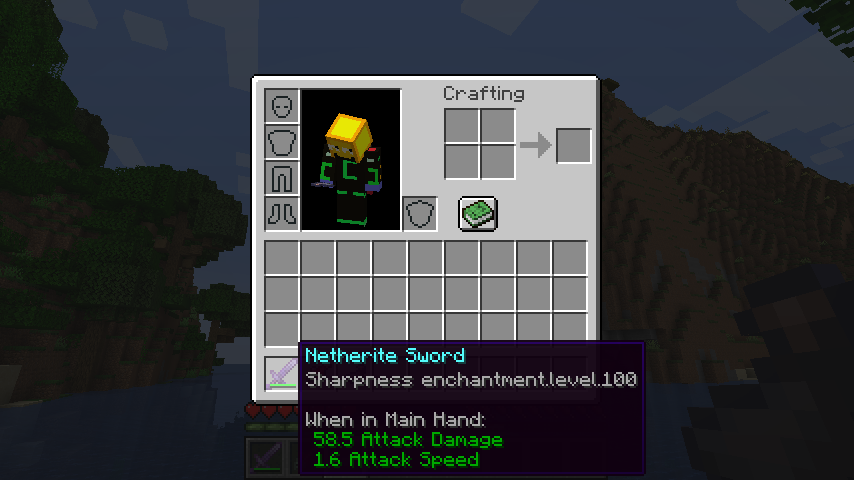
Without the patch:
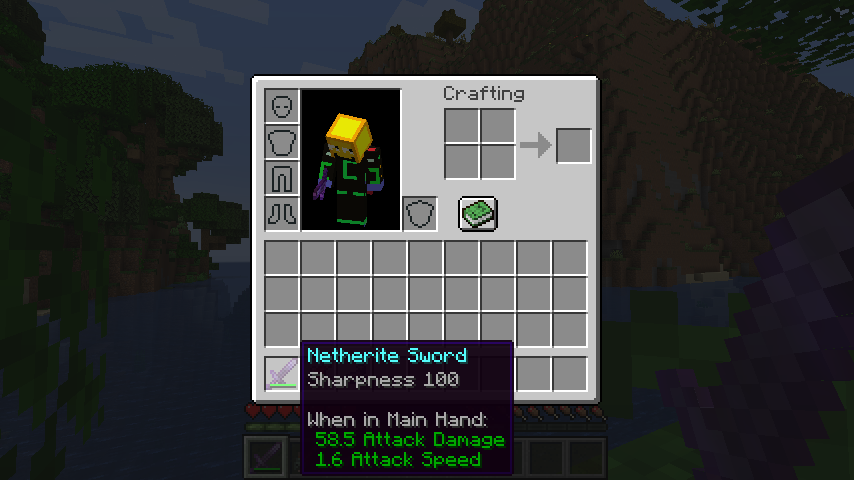
With the patch:
## Common alternative formats
* Want pure arabic numerals (e.g. Sharpness 5)? [Download Stub Mod](https://cdn.modrinth.com/data/Lf4kDKU9/versions/1EKfo2Mc/lpstub-all_arabic-20251209.2.jar)
* Want roman numerals (e.g. Sharpness XXV)? [Download Stub Mod](https://cdn.modrinth.com/data/Lf4kDKU9/versions/1EKfo2Mc/lpstub-roman-20251209.2.jar)
These stub mods should be loaded *with* LangPatch itself.
## I18n API
This mod supports a limited configuration of enchantment level and potion effect level formatting through language files.
### Template Keys
* **`enchantment.level.x`** & **`potion.potency.x`**:
Modify the templates for enchantment levels and potion effect levels, respectively.
* **Default value:** `”%s”`
### Format Types
* **`langpatch.conf.enchantment.default.type`** & **`langpatch.conf.potion.default.type`**:
Modify the format of enchantment levels and potion effect levels, respectively.
| Value | Format | Example |
| :— | :— | :— |
| `simplified`, `chinese`, `zh_normal` | Lowercase Chinese numerals | 一百二十三 |
| `traditional`, `zh_upper` | Uppercase Chinese numerals (traditional) | 壹佰貳拾叄 |
| `numeral`, `number`, `numeric`, `arabic`, `default` | Arabic numerals (default) | 123 |
| `roman` | Roman numerals | CXXIII |
| `skip`, `ignore` | No change (e.g., for only replacing other text) | — |
### Override
* **`langpatch.conf.enchantment.override`** & **`langpatch.conf.potion.override`**:
Whether to override existing translations. Acceptable values are `”true”` or `”false”`.
* If set to `”true”`, existing translations will be replaced. See the implementation of the “pure arabic numeral” pack above.
## For Developers
LangPatch, as is named, allows developers to make dynamic changes to in-game translations without directly modifying lang files.
To introduce LangPatch API as a dependency:
“`groovy
repositories {
// Our new maven
maven { url ‘https://mvn.7c7.icu’ }
}
dependencies {
compileOnly “xland.mcmod:enchlevel-langpatch:3.1.0”
}
“`
Online javadoc can be found [here](https://teddyxlandlee.github.io/enchlevel-langpatch/javadoc).
e4mc Retro

**e4mc Retro** is a backport of [e4mc](https://modrinth.com/mod/e4mc) mod, allowing you to open your Minecraft LAN world to anyone over the internet — even on older Minecraft versions.
## What is e4mc?
e4mc is a reverse tunneling reverse proxy for Minecraft. In simpler terms, it’s a software that allows you to temporarily expose a local Minecraft server to the internet.
## How do I use it?
Simply install the mod, and Open to LAN as normal. A public domain will appear alongside the local port. Others can simply connect to the public domain to connect to your LAN server.
COSTAR
A simple mod that addresses a questionable design decision in minecraft for versions 1.9-1.12 (fixed in 1.12.1-pre1) that affects fabric: the `root.tick.level.entities.blockEntities` directive in the piechart uses `Class#getSimpleName` for the profiler location, leading to fabric having different names from vanilla (and different names in dev than in prod) due to the fact that fabric remaps almost all symbols in the game jar to an intermediary layer. To fix this vanilla parity issue, I just switch out the name with its unmapped equivalent.
See the gallery for an example of what this looks like.
Brigo
[](https://modrinth.com/mod/brigo)
[](https://www.curseforge.com/minecraft/mc-mods/brigo)
[](https://github.com/xhyrom/brigo)


[](https://ko-fi.com/xhyrom)
**Brigo** brings modern Brigadier-style command suggestions and autocomplete to legacy Minecraft versions.
## What is brigo?
Brigo is a mod that brings Brigadier-style command suggestions, syntax highlighting, and argument previews to older Minecraft versions.
It works on the **client side** to improve the command UI on most servers, but can also be installed **server-side** to provide deeper integration, such as custom command trees and better suggestion accuracy.
## How do I use it?
Brigo works out of the box on most legacy servers, but installing it on both client and server provides the best experience.
AxolotlClient Waypoints
# AxolotlClient Waypoints
A minimap/worldmap and waypoints mod designed for modern versions.
This means that new features are likely to only get added to the latest version of minecraft.
Features:
– Minimap
– Integrates into AxolotlClient’s HUD system if it is present.
– World and level(/dimension)-specific waypoints
– Worldmap
Certain aspects of the mod can be disabled by servers:
– Whether the minimap is enabled
– Whether caves may be seen on the world map or the minimap
– Whether caves may be seen on the world map in dimensions with roofs (Nether)
This can either be done by
– Installing this mod on the server-side as well as on the client-side.
It will then generate a config file for these options on the server and send them to the client. You can edit the config file and then use the `/axolotlclient_waypoints reload` command to load the edited config or modify it using `/axolotlclient_waypoints modify_config `. After running either command the values will be sent to all connected players again.
– Making use of system message properties for [xaero’s minimap/world map](https://modrinth.com/mod/xaeros-minimap):
– `§f§a§i§r§x§a§e§r§o` to disable caves on both the minimap & worldmap
– `§x§a§e§r§o§w§m§n§e§t§h§e§r§i§s§f§a§i§r` to allow caves on the world map in dimensions with roofs
– `§n§o§m§i§n§i§m§a§p` to disable the minimap
– `§r§e§s§e§t§x§a§e§r§o` to reset all values
Note however that if the mod is installed on the server the use of xaero’s properties will be disabled.
**Disclaimer**: Despite the system described above this mod does not have capabilities to disable itself on servers that do not allow usage of minimaps. It is your responsibility to adhere to server rules.
AxolotlClient Rendering
# AxolotlClient Rendering
This library allows for shader-based rendering of some rounded shapes (e.g. rectangles), static SVGs and TrueType fonts.
For SVGs the Apache Batik library is included, for fonts Freetype¹ is used.
### For Players
This is a library, you should not need to install it manually. (Unless someone declared their dependencies wrong or forgot to include it)
### For Mod Developers
##### Inclusion in your project
This library is published at https://maven.axolotlclient.com.
“`gradle
dependencies {
modImplementation(include(“io.github.axolotlclient.rendering:AxolotlClient-rendering:VERSION+MINECRAFT_VERSION”))
}
“`
Note: you may omit the `include` statement if you do not want to embed this library into your mod. Make sure to declare your dependencies correctly for launchers to download the library in that case.
> Tip: replace `modImplementation` with `modApi` if you’re writing a library that uses this one!
##### General Usage
Most methods of this library are accessible using Minecraft’s `GuiGraphics` class via the injected `GuiGraphicsExtension` interface.
On 1.8.9, since there is no `GuiGraphics` class you should obtain a `GuiGraphicsExtension` using `DrawUtil.get()`.
All methods exposed via this way are prefixed with `axolotlclient_rendering`.
Fonts can be loaded using `Font.read(…)`. If you’re using a variant font
this will automatically read the variants and make use of them appropriately,
however the font features supported by FreeType directly are rather limited.
If a specific feature is provided by a separate font file (for example an *italic* or
**bold** variant) they can be added using `Font#addSubFont`, specifying in which conditions it should be used
(some tags and values can be found as static definitions in the `Font` class).
### Projects that use this library
– [AxolotlClientConfig](https://codeberg.org/AxolotlClient/AxolotlClientConfig)
– [AxolotlClient](https://modrinth.com/mod/axolotlclient)
> Your project makes use of this library and you would like it to appear here? Let us know!
### FAQ
-
I’m using this library on 1.20.1 and the font looks bad
A: Because Minecraft 1.20.1 uses lwjgl 3.3.1 which did not have Freetype bindings yet this library uses STB_Truetype, which does not support hinting (there may also be other bugs we don’t know about).
-
But doesn’t 1.8.9 use lwjgl2 which is also below 3.3.2?
A: Indeed, however with legacy-lwjgl3 we can run it on lwjgl 3.3.6 where we do have bindings to Freetype.
-
Wouldn’t it be possible to use a newer lwjgl on 1.20.1 as well?
A: Yes, but this is more difficult, increases the jar size even further and will produce incompatibilities with mods like sodium which check for which lwjgl version they’re running on.
¹See FAQ, answer #1