MinecraftCapes | Wear any cape, cost free
MinecraftCapes is a client side mod which allows you to wear any cape you wish in-game, cost free. Getting our mod working correctly is easy, just follow the steps below.
We have over 1,000,000 users enjoying their free capes. You can upload any cape you like, or make your own!
When you install the mod, you can also see anyone elses capes, no server mod or plugins required!
Don’t bother paying for capes or “cloaks” from clients or other services which exploit children, instead use our mod and have any cape you want FOR FREE!

## **Website, Gallery and Cape Creators can be found here:**
[https://minecraftcapes.net/](https://minecraftcapes.net/)
## **How to install**
1. Download and install Fabric, Forge or NeoForge
2. Download the mod and place it in the .minecraft/mods folder.
3. Register an account and upload a cape to [https://minecraftcapes.net](https://minecraftcapes.net)
**You have your cape!**
## **Features**
– Pixel Capes
– HD Capes
– Animated Capes
– Enchanted Cape
– Dinnerbone Feature
– Deadmau5 Feature
# **Still feeling a little stuck?**
You can [join our discord](https://minecraftcapes.co.uk/discord). We will help you with any crashes.
Legacy Keys
# Loop Keys
 _64h.png?raw=true)     
This is a mod that improves the keybind selection screen in older versions of Minecraft.
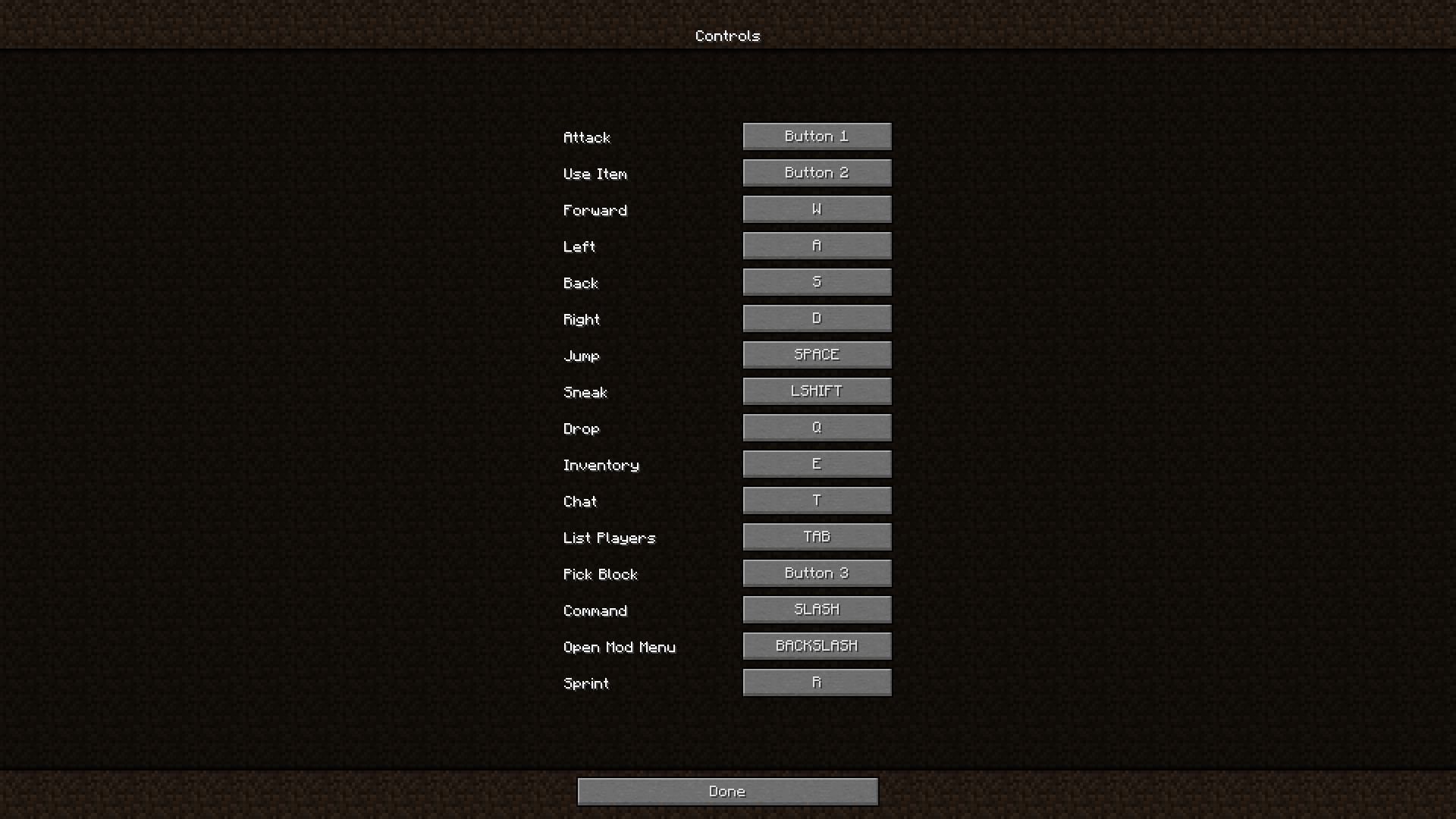
###### *^ the player has [Sprint](https://modrinth.com/project/sprint) installed*
## 🏳️🌈-Pridecraft
Have you ever thought that your game is too boring and straight? Well, that’s no more! Get [Pridepack](https://pridecraft.gay/pridepack) *(or [it’s variations](https://git.pridecraft.gay))* today!
Litematica
## Description
Litematica is a modern schematic mod primarily targeting light mod loaders like LiteLoader on MC 1.12.x, Rift on MC 1.13.x and Fabric on MC 1.14+.
There is also a Forge version, but currently only for MC 1.12.2. For later MC versions there are currently only third party ports such as [Forgematica](https://modrinth.com/mod/forgematica).
Litematica has all the main features (plus a bunch more) of the old [Schematica](https://legacy.curseforge.com/minecraft/mc-mods/schematica) mod, except for the printer, which is not planned for Litematica itself, but instead is left to extension mods (see: [aria1th printer](https://modrinth.com/mod/litematica-printer-easyplace-extension) or [the other printer](https://modrinth.com/mod/litematica-printer)).
## Compatibility with shaders
**Litematica’s rendering doesn’t currently work properly with shaders (even with Iris) in 1.21.3+. So when you need to use Litematica (schematic rendering), disable shaders.**
In older MC versions the rendering works better with shaders, at least with Iris, but also depending on the shader pack. Some shader packs break the rendering pretty badly, but some used to work pretty nicely. Optifine in general is/was a lot more problematic, pretty much you can’t use shaders at all with Optifine if you use Litematica. The general recommendation is to use Sodium (and Iris) instead of Optifine.
## Hotkeys
The default hotkey to open the Litematica main menu is `M`.
Note: If you use a non-QWERTY keyboard layout, then the keys may be different, such as `M` becoming `,` on AZERTY.
Other common default hotkeys:
– `M + C` – The direct hotkey to open the **c**onfig menu
– `M + R` – Toggle ON/OFF ALL **r**endering from Litematica
– `M + G` – Toggle ON/OFF just schematic rendering (“**g**host blocks” – all HUDs for example will still render)
– `M + T` – Toggle ON/OFF the “**t**ool item” (which is by default a stick) functionality
– `M + P` – Directly open the Schematic **P**lacements menu/list
– `M + V` – Open the Schematic **V**erifier menu
– `Numpad minus` – Open the placement configuration menu for the currently selected placement
– `Numpad multiply` – Open the Area Editor menu
– `Page Up/Down` – Change the selected layer in the render layers settings
– `M + Page Up/Down` – Change the render layers mode
– `Ctrl + scroll` (holding the tool) – Cycle the “tool mode” (there is also a button for this in the lower left corner of the main menu)
– `Alt + scroll` (holding the tool) – Nudge/move the selected placement or area selection box or corner (depending on the tool mode) in the direction the player is looking at
– `Ctrl + M` – Toggle or cycle the “sub-mode” or main setting of some of the “tool modes”, such as `pasteReplaceBehavior` in Paste mode, the `Corners` vs. `Expand` behavior in Area Selection mode, or the `Area` vs. `Placement` behavior of the Delete mode
## Warning for multiplayer
The Easy Place mode feature may get you banned on some servers!
The Easy Place feature will always be clicking on the target position’s air block, and this can easily be detected by anti-cheat systems. So this can result in at least two things: The block placement will just be rejected and you just get client-side ghost blocks, or some anti-cheat system flags that as cheating and auto-bans you from the server. So before using Easy Place, find out of it’s allowed on the server!
## If you have Optifine…
In general I don’t recommend using Optifine (with Litematica, or otherwise) due to the various rendering issues it causes. Instead I would recommend using Sodium and/or Iris if you want shaders.
If you have Optifine installed, then there are some options that you most likely will need to disable in Optifine, or otherwise it will break the schematic rendering:
– If you get glitchy weird triangles, then in 1.16+ first try updating to the latest Litematica version. If that doesn’t work, then set shaders to `OFF` (**not** `Internal`) and restart the game.
– `Render Regions` probably needs to be disabled to prevent weird rendering issues (the schematic partially rendering in weird places)
– `Fast Render` might also need to be disabled if there are still some weird HUD/GUI rendering issues
## Documentation
There is a [wiki](https://github.com/maruohon/litematica/wiki). The wiki is still being worked on, and it will probably have a new address at some point (or rather there will be a new wiki in a new location with a lot more coverage).
### Other/older documentation and explanations, some FAQ answers
Here is a Reddit post that explains the very basics of the mod:
– https://old.reddit.com/r/Minecraft/comments/cqdmkk/anyone_can_help_me_how_do_i_make_schematics_with/exeug78/
Litematica – Easy Place support on servers
– https://old.reddit.com/r/litematica/comments/1c7j79l/easy_place_on_server/l0hzmkt/
Misc explanations on Reddit or my Discord server
Schematic format conversions:
– https://old.reddit.com/r/Minecraft/comments/oabwea/schem_files_work_in_litematica_but_schematic/h3ju3sy/
Litematica Normal selection mode with sub-regions:
– https://old.reddit.com/r/feedthebeast/comments/r9n9mi/litematicas_addselectionbox_keybind_wont_work/
– https://old.reddit.com/r/feedthebeast/comments/r9n9mi/litematicas_addselectionbox_keybind_wont_work/hnpe9yg/
Litematica – hiding an area selection:
– https://github.com/maruohon/litematica/discussions/755#discussioncomment-6772682
– https://old.reddit.com/r/fabricmc/comments/yw9r5y/litematica_1192_issues/ixr7l5h/
Litematica – can’t create new selection sub-regions (in Simple mode):
– https://www.curseforge.com/minecraft/mc-mods/litematica?comment=2694
Litematica – Normal/Multi-Region area selection tutorial:
– https://github.com/maruohon/litematica/issues/716#issuecomment-1596121219
Litematica – Easy Place on a server with FabricCarpet but no CarpetExtra:
– https://discord.com/channels/169369095538606080/566649314001158165/1235158483792433214
– https://discord.com/channels/169369095538606080/566649314001158165/1221223833889935420
Litematica – easy/fast selections tutorial:
– https://discord.com/channels/169369095538606080/566649314001158165/1187372903377936435
Litematica – schematic formats:
– https://discord.com/channels/169369095538606080/183172448919748608/1180841121845354516
– https://discord.com/channels/169369095538606080/566649314001158165/1176569283271213098
– https://discord.com/channels/169369095538606080/566649314001158165/1097540707931127938
– https://discord.com/channels/169369095538606080/169369095538606080/1081089742944337941
– https://discord.com/channels/169369095538606080/566649314001158165/1097564948999184394
– https://github.com/maruohon/litematica/issues/812#issuecomment-1924300257
Litematica – saving and pasting with block entity data:
– https://discord.com/channels/169369095538606080/566649314001158165/1193304174838960200
Litematica – Material Lists variants:
– https://www.reddit.com/r/litematica/comments/15yz2bo/material_list_not_showing_up/jxfiwvh/
Litematica – Manual Origin issue:
– https://github.com/maruohon/litematica/issues/751#issuecomment-1671611897
Litematica – placing stairs correctly:
– https://github.com/maruohon/litematica/issues/797#issuecomment-1848386879
Litematica – performance tips with large schematics:
– https://discord.com/channels/169369095538606080/566649314001158165/1186744945399320647
Litematica – large schematics, bad performance or crashes, what to do:
– https://discord.com/channels/169369095538606080/566649314001158165/1122755969651318894
Litematica – how to only show one block type at a time:
– https://discord.com/channels/169369095538606080/566649314001158165/1133702185121755258
Litematica not working/keys not working:
– https://discord.com/channels/169369095538606080/566649314001158165/1196124302634922075
Litematica “only render one block”:
– https://discord.com/channels/169369095538606080/566649314001158165/1061881509579075684
Litematica – finding the schematics directory/game directory:
– https://old.reddit.com/r/litematica/comments/1co6vh4/downloading_schematics_on_different_versions_of/l3c21l9/
– https://old.reddit.com/r/litematica/comments/13es48n/how_to_import_schematics_on_mac/kb8bu5d/
Litematica – using sub-regions:
– https://github.com/maruohon/litematica/discussions/647
Litematica – pasting redstone on servers:
– https://discord.com/channels/169369095538606080/566649314001158165/1063578995347685446
– https://legacy.curseforge.com/minecraft/mc-mods/litematica?comment=2838
– https://discord.com/channels/169369095538606080/566649314001158165/1227276878830764183
Litematica – pasting inventory contents on servers, feat. Litemoretica:
– https://old.reddit.com/r/litematica/comments/1cg186f/items_wont_transfer/
Litematica – paste task not running + somewhat comprehensive mspt and profiling quick howto:
– https://github.com/maruohon/litematica/issues/656
Litematica – schematic placement explained:
– https://github.com/maruohon/litematica/issues/703#issuecomment-1553132401
Litematica – material list:
– https://discord.com/channels/169369095538606080/566649314001158165/1071408321417973780
Litematica – performance tips with large schematics:
– https://discord.com/channels/169369095538606080/566649314001158165/1198321606536200324
Litematica – no schematics directory in the .minecraft directory:
– https://www.reddit.com/r/fabricmc/comments/jn8u5d/how_do_i_add_a_schematic_for_litematic_to_load/jhk6941/
Litematica “not working” (not in Controls) -> F3, malilib keys, Mod Menu:
– https://discord.com/channels/169369095538606080/169369095538606080/1197972330958295110
World Edit pasting:
– https://old.reddit.com/r/technicalminecraft/comments/j9ipu1/how_can_i_load_a_schem_file_that_i_downloaded/g8k49xj/
MacOS how to go up one directory:
– https://discord.com/channels/169369095538606080/1135325334565298237/1186539038572822618
## Youtube tutorials
Here are some of the better Youtube tutorial videos I’ve come across.
Youtube tutorials
Librarian
# Librarian
Librarian is a mod for Fabric that improves the saved hotbar system by adding new features and increasing the overall
capacity with a page system. It is the successor to Hotbars+, a mod by the same author.
## Features
### Infinite saved hotbar capacity
Never run out of space in your hotbars again. Librarian introduces a page system which allows you to store as many items
as you could possibly ever want or need.

Since this system is vanilla-compatible, you won’t need to worry about having to convert or do any transfers should you
decide to not use the mod anymore.
### Better saved hotbar performance
Got a lot of data in your saved hotbars? Not a problem. Librarian optimizes the way the game loads and saved hotbars to
run entirely in the background, completely eliminating some notorious lagspikes many have experienced while working with
saved hotbars in the process.

### Accidental overwrite protection
A common problem people experience with the saved hotbar system is the potential to unintentionally overwrite existing
hotbars by pressing the wrong key, losing many items by complete accident in the process. Librarian tries to help
prevent this from happening by comparing the data of the items being saved to that of the items already saved. If it
doesn’t exactly match, a prompt will come up asking for confirmation before continuing, potentially saving you and your
items.

### Renamable saved hotbars
To help facilitate distribution and organization, Librarian introduces a new vanilla-compatible hotbar metadata system
which allows you to rename your saved hotbars to literally anything you want along with other bits of metadata like a
description and even a list of authors. Names and descriptions support both chat color codes and also
[MiniMessage](https://docs.advntr.dev/minimessage/format.html).

All metadata can be customized in-game with the client-side command `/librarian meta`*, but users can also rename their
hotbar page by simply clicking the text in the creative inventory menu.
* – Some versions (such as pre-1.14.4) do not currently have client-side command libraries available, so with these
versions you will have to apply the changes manually with an NBT editor. I personally recommend using NBTExplorer for
this purpose.
### Multi-version support
To account for those holding out on specifics game versions, Librarian supports a wide range of Minecraft versions as
recent as 26.1.1 and as old as 1.12.2 (with the help of [Legacy Fabric](https://legacyfabric.net/) and
[Ornithe](https://ornithemc.net/)). I am committed to supporting as many versions as reasonably possible. The foundation
of Librarian, while similar to its predecessor, is written with the goal of not relying on any particular
version-specific code. This helps make it more future-proof in the long run.
Currently supported versions:
* 1.12.2 (Legacy Fabric or Ornithe)
* 1.13.2 (Legacy Fabric or Ornithe)
* 1.14.4 (Regular Fabric or Ornithe)
* 1.15.2
* 1.16.5
* 1.17.1
* 1.18.2
* 1.19
* 1.19.2
* 1.19.4
* 1.20.1
* 1.20.2
* 1.20.4
* 1.20.6
* 1.21.1
* 1.21.3
* 1.21.4
* 1.21.5
* 1.21.8
* 1.21.10
* 1.21.11
* 26.1.x
## Installing
Download the mod JAR and copy it to your ‘mods’ folder. Depending on the version of Minecraft you are running, you may
need to install some extra mods as well. Here is a table explaining exactly that for each case:
| Version | Loader | Required Mod(s) | Optional Mod(s) |
|———|—————|—————————-|—————————————————|
| 1.12.2 | Legacy Fabric | Legacy Fabric API |
| 1.12.2 | Ornithe | Ornithe Standard Libraries |
| 1.13.2 | Legacy Fabric | None |
| 1.13.2 | Ornithe | Ornithe Standard Libraries |
| 1.14.4 | Fabric | Fabric API | Cotton Client Commands (for client-side commands) |
| 1.14.4 | Ornithe | Ornithe Standard Libraries |
| 1.15.2 | Fabric | Fabric API | Cotton Client Commands (for client-side commands) |
| 1.16.5 | Fabric | Fabric API |
| 1.17.1 | Fabric | Fabric API |
| 1.18.2 | Fabric | Fabric API |
| 1.19 | Fabric | Fabric API |
| 1.19.2 | Fabric | Fabric API |
| 1.19.4 | Fabric | Fabric API |
| 1.20.1 | Fabric | Fabric API |
| 1.20.2 | Fabric | Fabric API |
| 1.20.4 | Fabric | Fabric API |
| 1.20.6 | Fabric | Fabric API |
| 1.21.1 | Fabric | Fabric API |
| 1.21.3 | Fabric | Fabric API |
| 1.21.4 | Fabric | Fabric API |
| 1.21.5 | Fabric | Fabric API |
| 1.21.8 | Fabric | Fabric API |
| 1.21.10 | Fabric | Fabric API |
| 1.21.11 | Fabric | Fabric API |
| 26.1.x | Fabric | Fabric API |
LegacyVoiceChat
# LegacyVoiceChat
**LegacyVoiceChat** adds proximity voice chat to legacy — including **Ornithe**, **StationAPI**, **Better than Adventure!**, **Project Poseidon**, **Risugami Modloader** and **More!**.
## ⚠️ WARNING
> **LegacyVoiceChat is currently a WIP mod.**
> Expect bugs, UI changes, and protocol changes at any time.
## Features
### Proximity Voice Chat
– 3D positional audio
– Directional sound based on player orientation
– Dynamic volume fading with distance
### Audio Device Management
– Choose custom **input** and **output** devices
– **Push-to-Talk** or **Voice Activation** modes
– Adjustable mic sensitivity
### Groups / Parties
– Create or join voice groups
– Talk privately with teammates (ignores distance)
### Mute & Deafen
– Mute specific players or yourself
– Deafen to silence all incoming voice
Looking for the raw jar file for MultiMc or Prism Launcher? [Click Here](https://legacyvoicechat.com/)
### Server Notes
Make sure to port forward “`25566 UDP“` or change the port in the server config
Legacy OptiFabric
**for mcsr**: use [mods.tildejustin.dev](https://mods.tildejustin.dev/)
If you’re looking for OptiFabric for 1.14 to 1.15.2 for regular Fabric instead of Ornithe, check out [OptiFabric Origins](https://modrinth.com/mod/optifabric-origins)
## Legacy OptiFabric
OptiFabric for Legacy Fabric (1.3.1-1.13.2) and Ornithe (b1.7.3-1.14.4)
– Legacy Fabric installer and official MultiMC instances: https://legacyfabric.net/downloads.html
– Ornithe installer (can generate MultiMC instances): https://ornithemc.net
– Legal speedrunning MultiMC instances for Ornithe and Legacy Fabric (vanilla LWJGL, no extra libraries or mods): [Minecraft-Java-Edition-Speedrunning/legacy-fabric-instance-generator/releases](https://github.com/Minecraft-Java-Edition-Speedrunning/legacy-fabric-instance-generator/releases)
based on the work of [RedLime’s OptiFabric-Pre1.14](https://github.com/RedLime/OptiFabric-Pre1.14), a fork of [hYdos’s OptiFabric 1.8.9](https://github.com/hYdos/OptiFabric) which
in turn is a derivative of [modmuss’ original OptiFabric](https://github.com/modmuss50/OptiFabric)
## installing
this mod requires an optifine jar in the mods folder alongside optifabric. for 1.7.2 and onwards this can be sourced
from [OptiFine’s official website](https://optifine.net/downloads), and older versions these can be retrieved either
from [SpeedyCube64’s Pre-1.9 Optifine Archive](https://github.com/speedycube64/Complete_OptiFine_Archive_Pre_1.9) or on
the [OptiFine history thread](https://www.minecraftforum.net/forums/mapping-and-modding-java-edition/minecraft-mods/1286605-b1-4-1-9-optifine-history).
## how it works
this mod uses [Minecraft-Java-Edition-Speedrunning/fabric-asm](https://github.com/Minecraft-Java-Edition-Speedrunning/fabric-asm), a minor derivative
of [Cat Core’s Fabric-ASM/no-guava](https://github.com/thecatcore/Fabric-ASM/tree/no-guava) which itself is an updated version
of [Chocohead’s fabric-asm](https://github.com/Chocohead/Fabric-ASM). fabric asm allows more extreme asm modification and the fork used has no dependency on guava or apache
commons, which older minecraft versions don’t provide.
### steps
1. the mod looks for an optifine installer or mod jar or zip in the current mods folder
2. if it finds an installer jar it runs the extract task in its own throwaway classloader
3. the optifine mod jar is a set of classes that need to replace the ones that minecraft provides
4. optifine’s replacement classes change the name of some lambda methods, so it take a good guess at the old name (using the original minecraft jar)
5. remap optifine to intermediary
6. move the patched classes out as they won’t do much good on the classpath twice
7. add optifine to the classpath
8. register the patching tweaker for every class that needs replacing
9. replace the target class with the class that was extracted, also do some more fixes to it, and make it public (due to access issues)
10. hope it works
## notes
– this mod does not really work in dev or named environments. In Legacy Fabric’s case the yarn builds are corrupted in some versions so this cannot work atm, feather is better but still has issues.
– the accessWideners are created based on the output of tiny remapper’s checkPackageAccess option, but they are unlikely to ever be 100% complete. if you have a crash that has to do with and invalid access, report it and it may be able to be fixed.
## class excluder
this is a kind of hidden feature that is occasionally useful to remove files when remapping the jar. to do this, it reads the `optifabric-excluded-classes.json` file
in `.minecraft/config/` if it exists, and expects the file to contain a mapping of versions (field names) to an array of removable classes (or textures or anything else, it’s just
a filename).
an example file contents to revert the removal of the profiler for 1.3.2 light is provided below. if the optifine version you are trying to make an excluder extry for has already
been loaded before in your instance, delete its folder in the `.optifine` folder in `.minecraft` to force a recache.
“`json
{
“OptiFine_1.3.2_L_B2”: [
“ik.class”
]
}
“`
Legacy Fabric API
Legacy Fabric API is the core library for the most common hooks and inter compatibility measures utilized by mods using the Legacy Fabric toolchain.
More information and full installation instructions can be found on the [Legacy Fabric website](https://legacyfabric.net) and support can be found on the Legacy Fabric discord server.
**This is SEPARATE from the [Fabric loader](https://github.com/Legacy-Fabric/fabric-installer)! You need both for most mods!**
Join our discord server for help: [https://discord.gg/yBTpRXe](https://discord.gg/yBTpRXe)
Join us on #legacyfabric on irc.esper.net
LAN Properties

[](https://modrinth.com/mod/lan-properties)
[](https://curseforge.com/minecraft/mc-mods/lan-properties)
[](https://github.com/xhyrom/lan-properties)




[](https://ko-fi.com/xhyrom)
**LAN Properties** enhances the vanilla “Open to LAN” interface to provide full control over all server settings, just like in server.properties on a dedicated server.
## What is LAN Properties?
LAN Properties is a mod that gives you access to all server.properties settings when opening your world to LAN, just like on a dedicated server.
## How do I use it?
Simply install the mod and click “Open to LAN” as normal. There will be a configuration button that lets you customize all server settings.
### Hybrid Mode
LAN Properties introduces an additional property called **`hybrid-mode`**.
When `online-mode` is disabled but `hybrid-mode` is enabled, the server attempts to authenticate players in a “best of both worlds” approach:
– **If an account with the player’s username exists** → The server fetches the official UUID from Mojang’s session servers.
– **If the session servers are unreachable or the username does not belong to a valid account** → The server falls back to using an offline UUID.
This ensures that premium (online) players always keep their correct UUID, while still allowing offline players to join when needed.
Ksyxis
# Ksyxis
Speed up your world loading by removing unneeded chunks.
## Language
– **English** ([Extended Version](https://github.com/VidTu/Ksyxis/blob/main/docs/README.md))
– [Русский](https://github.com/VidTu/Ksyxis/blob/main/docs/README_ru.md)
## Downloads
– [Modrinth](https://modrinth.com/mod/ksyxis)
– [CurseForge](https://curseforge.com/minecraft/mc-mods/ksyxis)
– [GitHub Releases](https://github.com/VidTu/Ksyxis/releases)
## Dependencies
– Fabric, Forge, NeoForge, Quilt, Legacy Fabric, or Ornithe
– Minecraft (1.8 or newer)
– **Forge 1.8-1.14.4 only**: Any Mixin provider, at your choice (such as
[MixinBootstrap](https://modrinth.com/mod/mixinbootstrap),
[MixinBooter](https://modrinth.com/mod/mixinbooter),
[UniMixins](https://modrinth.com/mod/unimixins), or any other)
## About
Depending on your game version, Minecraft loads some
[chunks](https://minecraft.wiki/w/Chunks) when you create your world.
Sometimes, these chunks are always loaded in the background. Either
way, whether these chunks being loaded is a one-time performance slowdown,
or a constant performance penalty, most players don’t need any of these
chunks. This mod completely disables unneeded chunks in the game.
*Note*: Unneeded chunks are sometimes used by farms and
technical contraptions. If you’ll need these chunks, you
can always delete the mod later to re-enable these chunks.

## Versions
| Version | Effect | Note |
|—————|—————|————————————————————————————————————————————————|
| 1.21.9+ | Insignificant | A 7×7 area of chunks won’t be loaded around the player when they join, and a fake 500ms world creation delay in single-player will be removed. |
| 1.20.5-1.21.8 | Low | A 5×5 area of spawn chunks won’t be loaded constantly in the background. |
| 1.8-1.20.4 | Extreme | A 21×21 area of spawn chunks won’t be loaded constantly in the background. |
## FAQ
**Q**: I need help, have some questions, or have some other feedback.
**A**: You can join the [Discord server](https://discord.gg/Q6saSVSuYQ).
**Q**: Where can I download this mod?
**A**: [Modrinth](https://modrinth.com/mod/ksyxis),
[CurseForge](https://curseforge.com/minecraft/mc-mods/ksyxis),
or [GitHub Releases](https://github.com/VidTu/Ksyxis/releases).
You can also find unstable builds at
[GitHub Actions](https://github.com/VidTu/Ksyxis/actions).
You will need a GitHub account to download these.
**Q**: Which mod loaders are supported?
**A**: Fabric, Forge, NeoForge, Quilt, Legacy Fabric, and Ornithe.
**Q**: Which Minecraft versions are supported?
**A**: Minecraft versions 1.8 and newer.
**Q**: Why support so many Minecraft versions?
**A**: Because I can.
**Q**: Do I need Fabric API or Quilt Standard Libraries?
**A**: Not necessarily.
**Q**: Where are the Fabric, Forge, NeoForge, Quilt, etc. versions?
**A**: All in the same file.
**Q**: Is this mod client-side or server-side?
**A**: This mod works on the server and on the client in singleplayer.
It has no effect on the client when playing multiplayer.
**Q**: Is this mod stable for use?
**A**: Should be fine. If it breaks something,
just delete it and your worlds will be fine.
**Q**: I’ve found a bug.
**A**: Report it [here](https://github.com/VidTu/Ksyxis/issues). If you are not
sure whether this is a bug or a simple question, you can join the
[Discord](https://discord.gg/Q6saSVSuYQ). Report security vulnerabilities
[here](https://github.com/VidTu/Ksyxis/security).
**Q**: Can I use this in my modpack?
**A**: Sure. Credit (e.g., a link to the mod’s GitHub page) is appreciated but
is not required. Monetization and redistribution are allowed as per the
[MIT License](https://github.com/VidTu/Ksyxis/blob/main/LICENSE).
**Q**: This mod doesn’t speed up anything.
**A**: The effect may not be noticeable on high-end PCs. This mod
is designed primarily for low-end devices. Nevertheless, there is
[a video](https://www.youtube.com/watch?v=PXWdDoVU1C4).
**Q**: How to force-load chunks if the spawn chunks have been removed?
**A**: If you really need to force-load chunks, load individual
chunks with the `/forceload` command in 1.13 or newer. For older
versions, you can search for some mod that force-loads chunks.
**Q**: It says *Ksyxis: No Mixin found*.
**A**: If you’re using Forge 1.15.2 or older, you may need to install
[MixinBootstrap](https://modrinth.com/mod/mixinbootstrap),
[MixinBooter](https://modrinth.com/mod/mixinbooter),
[UniMixins](https://modrinth.com/mod/unimixins), or any other
Mixin provider of your choice. If you’re using Forge 1.16
or newer, or any version of Fabric/NeoForge/Quilt/Ornithe,
you don’t need to install anything, and this is a bug.
See [README](https://github.com/VidTu/Ksyxis/blob/main/docs/README.md#for-developers)
on GitHub for FAQ on mod’s technical aspects.
## License
This project is provided under the MIT License.
Check out [LICENSE](https://github.com/VidTu/Ksyxis/blob/main/LICENSE)
for more information.
## Credits
This mod is developed primarily by [VidTu](https://github.com/VidTu),
but it wouldn’t be possible without
[contributors](https://github.com/VidTu/Ksyxis/graphs/contributors) and
some [technologies](https://github.com/VidTu/Ksyxis/blob/main/docs/README.md#credits)
used.
## Development
See [README](https://github.com/VidTu/Ksyxis/blob/main/docs/README.md#development)
on GitHub for details about developing this mod.
Kit Tunes
If you love music, you will love this mod too!
# Features in all versions
– Toast notifications whenever a song starts playing
– Show you how long music will play for, and let you pause/play it at will!
– Show the time left until the next song will play
– Log the music that plays, both locally, to [Last.FM](https://last.fm), and [ListenBrainz](https://listenbrainz.org/)
# Per-version features
Some additional features are even added in older Minecraft versions to give them music parity with modern Minecraft.
## Minecraft Beta 1.7.3
– Play music from all Minecraft versions
– Play special music in the menu, and in the nether
## But why scrobble with Kit Tunes?
Scrobbling is a way of logging your music history on the internet on a public profile! It’s great because you can share your history with others and even see what songs you were listening to yesterday, or a year ago!
# Installation Instructions
### Minecraft Beta 1.7.3
– OSL is required
– Use Mod Menu to configure the mod & view playing music
### Minecraft 1.17.0 – 1.18.1
– Fabric API is required
– Use Mod Menu to configure the mod & view playing music
### Minecraft 1.18.2+
– QSL (Quilt Standard Libraries) is required
– Use Mod Menu to configure the mod & view playing music