ZN Lite (Reborn)
# EN:
A FULLY REDESIGNED build for optimizing local and multiplayer gameplay in Minecraft
Perfect for low-end PCs or anyone looking to boost performance
Also ideal for playing on private RP servers, like SMP (see “Also”)
### Why Choose Us?
ZN Lite stands out from other builds because it doesn’t include unnecessary mods that most users don’t need, such as voice chat, minimaps, and other system-intensive features. This is why our build is perfect for low- and mid-range PCs. The Lite version contains only the most essential mods and libraries needed for smooth gameplay, no clutter, no system-heavy mods.
# **RU:**
ПОЛНОСТЬЮ ПЕРЕРАБОТАННАЯ сборка для оптимизации локальной и мультиплеерной игры в Minecraft
Отлично подходит для слабых ПК или для тех, кто просто хочет повысить производительность
Также подходит для игры на приватных RP серверах, по типу СП (смотри “Также”)
### Почему именно мы?
ZN lite отличается от других сборок тем, что не содержит лишних и ненужных большинству пользователей модов, таких как голосовой чат, миникарты и прочих модов, нагружающих систему – именно поэтому наша сборка подходит для слабых и средних ПК. В lite версии только крайне важные и нужные моды и библиотеки для них, никакого хлама и модов нагружающих систему
# AlsoТакже
Для игры на подобных серверах рекомендуем нашу сборку Vanila, которая уже включает в себя сборку Lite, а также не мало полезных модов для комфортной игры
Telegram [ZN Packs](https://t.me/znpacks)
My [Twitch](https://www.twitch.tv/davvkashow)
ZN lite (only Optimization)
# EN:
Is a pack of mods for optimizing local and multiplayer play in Minecraft
Great for weak PCs or for those who just want to increase performance
Also suitable for playing on private RP servers, like SP (Check “Also”)
### Why us?
ZN lite differs from other assemblies in that it does not contain superfluous and unnecessary mods for most users, such as voice chat, minimaps and other mods that load the system – which is why our assembly is suitable for weak and medium PCs. In the light version, only extremely important and necessary mods and libraries for them, no junk and mods that load the system
# RU:
Сборка для оптимизации локальной и мультиплеерной игры в Minecraft
Отлично подходит для слабых ПК или для тех, кто просто хочет повысить производительность
Также подходит для игры на приватных RP серверах, по типу СП (смотри “Также”)
### Почему именно мы?
– ZN lite отличается от других сборок тем, что не содержит лишних и ненужных большинству пользователей модов, таких как голосовой чат, миникарты и прочих модов, нагружающих систему – именно поэтому наша сборка подходит для слабых и средних ПК. В lite версии только крайне важные и нужные моды и библиотеки для них, никакого хлама и модов нагружающих систему
# ALSO! ТАКЖЕ!
### EN:
> Before playing on such projects, it is recommended to additionally install such mods as SimpleVoiceChatPlasmoVoice, EmoteCraft, and more, for a more comfortable game on the server
>
> OR INSTALL [ZN Vanila RP](https://modrinth.com/modpack/zn-vanila-rp)
### RU:
> Перед игрой на таких проектах рекомендуется дополнительно установить такие моды как SimpleVoiceChatPlasmoVoice, EmoteCraft и др, для более комфортной игры на сервере
>
>ЛИБО УСТАНОВИТЬ НАШУ СБОРКУ [ZN Vanila RP](https://modrinth.com/modpack/zn-vanila-rp)
Player Manager
# PlayerManager
**A powerful SMP player data management plugin by Open-Source Group**
[](https://modrinth.com/plugin/playermanager)
[](https://www.minecraft.net)
[](https://mit-license.org/)
—
## Overview
PlayerManager is the ultimate solution for SMP servers that need flexible player data management. Allow players to **start fresh** without creating new accounts, and give admins **complete control** over player progression, inventories, advancements, and more!
## 📥 Installation
1. Download the latest version from [Modrinth](https://modrinth.com/project/playermanager)
2. Place `PlayerManager.jar` in your server’s `plugins` folder
3. Restart your server
4. Configure permissions in your permission plugin (LuckPerms, PermissionsEx, etc.)
5. Enjoy
—
## Main Feature in Detail
### Complete Player Reset
When you use `/pm reset `:
1. Clears inventory and ender chest
2. Resets health, food, and XP to default
3. Removes all advancements
4. Resets all statistics
5. Sets gamemode to survival
6. Teleports player to world spawn
7. Kicks player with a message
8. Player can rejoin and start completely fresh
—
## 🛠️ Requirements
– **Minecraft Version**: 1.21+
– **Server Software**: Spigot, Paper, Purpur, or any Spigot-based server
– **Java Version**: 17+
—
## 🐛 Bug Reports & Feature Requests
Found a bug or have a feature idea?
– **GitHub Issues**: [Report Here](https://github.com/mrzmiless/playermanager/issues)
—
## 📜 License
This project is licensed under the MIT License – see the [LICENSE](https://mit-license.org/) file for details.
—
## 💖 Credits
**Made with ❤️ by [zmiless](https://github.com/mrzmiless) – Open-Source Group**
—
## Links
– **GitHub**: [Source Code](https://github.com/mrzmiless/playermanager)
## Show Your Support
If you like this plugin, please:
– Star the repository on GitHub
– Download it on Modrinth
– Share it with your friends!
zMBlockLimiter
🔷 ZMBlockLimiter
🚀 ZMBlockLimiter is an ultra-lightweight and highly optimized plugin designed to limit specific blocks per chunk, helping to reduce lag, control automatic farms, and keep your server stable and fast on Paper, Spigot, Pufferfish, and Purpur.
💡 Built with real servers in mind, including existing worlds and advanced economies. Forget heavy scans and TPS spikes: smart control without impacting performance.
✨ Main Features
– 🌍 Per-chunk limits, not per player → prevents exploits and overload.
– 🏗️ Fully compatible with existing worlds, no unnecessary resets.
– ⚡ Optimized for Paper / Spigot / Pufferfish / Purpur.
– 🔒 No bypass: rules apply to all players equally.
– 🕹️ Lazy and controlled scanning system with low TPS impact.
– 📝 Clear, simple, and well-documented configuration.
– ⚙️ Ideal for intense survival gameplay and large automatic farms.
⚙️ How It Works
– Blocks are counted per chunk (16×16).
– ❌ No constant full-world scans.
– ✔️ Smart and gradual counting:
– When chunks load
– When blocks are placed or broken
– ➕ Add new blocks to the configuration and use /zmblocklimiter rescan to safely recalculate counters without freezing the server.

🧾 Commands
– /zmblocklimiter reload 🔄
Reloads the configuration (no scans)
– /zmblocklimiter rescan 🧹
Re-scans chunks to safely recalculate counters
🔐 Permissions
– zmblocklimiter.admin → Full command access
– zmblocklimiter.reload → Allows /zmblocklimiter reload
– zmblocklimiter.rescan → Allows /zmblocklimiter rescan
📌 Recommended Use Cases
– 🚜 Limiting hoppers, dispensers, and technical blocks
– 🌾 Controlling automatic farms
– ⚡ Reducing lag in overloaded chunks
– 🏰 Survival servers with many players
– 🛡️ Admins who want control without heavy plugins
🧠 Plugin Philosophy
ZMBlockLimiter does not try to patch lag —
it aims to prevent it at the root with a simple, clear, and efficient approach.
📦 Compatibility
– Minecraft 1.21+
– Paper
– Spigot
– Pufferfish / Purpur
🌐 Support / Spanish available
👤 Developed by zMarkitos_
ZLP
# ZLP – Модпак для игры на zlp.onl приватке!

**RU:** Вас приветствует ItsRecovery, и я вам представляю модпак для комфортной игры на нашем любимом сервере!
### 🚀 Цель модпака:
Спойлер
**Скачать** -> **Запустить** -> **Зайти на сервер** – вот чего я придерживаюсь, чтобы игроки тратили меньше времени и без всяких проблем зашли на сервер, не задавая **лишних** вопросов 😉
### 🔗 Связь с автором:
Спойлер
Если у вас есть предложения для добавления или изменения сборки, то пишите мне в личные сообщения в Telegram:
### [@itsrec0very](https://t.me/itsrec0very)
> ВНИМАНИЕ! Если вы хотите начать играть на сервере, необходимо установить отдельно мод **Bastion**, без него на сервер **ВАС НЕ ПУСТИТ**. Скачать его можно в приватном Telegram-канале сервера!
**EN:** You are welcomed ItsRecovery, and I present to you a modpack for a comfortable game on our favorite server!
### 🚀 Modpack’s aim:
Spoiler
**Download** -> **Run** -> **Log in to the server** – this is what I stick to, so that players spend less time and log in to the server without any problems, without asking **unnecessary** questions 😉
### 🔗 Link to author:
Spoiler
If you have suggestions for additions or changes to the build, private message me on Telegram:
### [@itsrec0very](https://t.me/itsrec0very)
> WARNING! If you want to start playing on the server, you need to install separately mod **Bastion**, without it on the server **YOU WON’T GET**. You can download it in the private Telegram-channel server!
ZlAutoGive
## ✨ Overview
ZlAutoGive is a **powerful, lightweight, and fully configurable plugin** that automatically gives players the **vanilla drops** of blocks directly to their inventory! Perfect for servers that want to streamline resource collection while keeping the **vanilla Minecraft experience intact**.
With ZlAutoGive, you can:
* 💎 Automatically get blocks and items from mining or harvesting **without losing vanilla mechanics**.
* 🍏 Receive **apple drops from oak leaves** with the same probability as vanilla.
* 🛠 Respect **Silk Touch & Fortune enchantments** on your tools.
* 🎛 Apply **multipliers per permission group** (e.g., VIP, MVP) to increase drops.
* 📦 Handle **full inventories gracefully**, dropping items to the ground with a clear warning message.
* ⚡ Enable or disable the system dynamically, reload config/messages, and customize **prefixes & colors**.
—
## 🧩 Features
* ✅ Automatic vanilla drops
* ✅ Silk Touch & Fortune support
* ✅ Multipliers per permission (`zlautogive.multiplier.X`)
* ✅ Configurable messages with **colors** (`&x`, `&#hex`, `&`)
* ✅ Inventory full handling with item drop + warning message
* ✅ Works for **Minecraft 1.18 and above**
* ✅ Lightweight & server-friendly
—
## ⚙ Configuration
ZlAutoGive comes with:
* `config.yml` – Enable/disable system, set multipliers per permission.
* `messages.yml` – Customize all messages, including prefix, help, and inventory full warnings.
**Example config snippet:**
“`yaml
system-enabled: true
multipliers:
vip: 3
mvp: 5
“`
**Example message:**
“`yaml
inventory-full: “%prefix%&cYour inventory is full! Dropped &b%amount%x &f%item%”
“`
—
## 📝 Commands
| Command | Permission | Description |
| ——————– | ———————– | —————————————— |
| `/zlautogive on` | `zlautogive.admin` / OP | Enable the system (applies after restart) |
| `/zlautogive off` | `zlautogive.admin` / OP | Disable the system (applies after restart) |
| `/zlautogive reload` | `zlautogive.admin` / OP | Reload config and messages |
| `/zlautogive` | Any with permission | Show help message |
—
## 🎨 Customization
* Full **color support**: `&`, `&x`, `&#hex`
* **Prefix customization** in `messages.yml`
* Control multipliers per **LuckPerms groups**
—
## 💡 Why use ZlAutoGive?
* Saves players time without breaking vanilla Minecraft.
* Perfect for **semi-vanilla, survival, and minigame servers**.
* Fully **configurable and permission-based**, giving you complete control.
* Lightweight and **optimized for 1.18+ servers**.
—
## 🚀 Installation
1. Place `ZlAutoGive.jar` in your `/plugins` folder.
2. Start your server once to generate config/messages.
3. Configure multipliers and messages to your liking.
4. Reload with `/zlautogive reload` or restart the server.
—
## 📣 Support & Credits
* Developed by **Zeralyth Studios**
* For support or suggestions, contact your server dev team or reach out to Zeralyth Studios.
—
### 🎉 Enjoy streamlined mining & harvesting while keeping Minecraft fully vanilla! 🍀💎
zItemStacker
[](https://minestrator.com/a/GROUPEZ)
zItemStacker
Allows you to stack your items
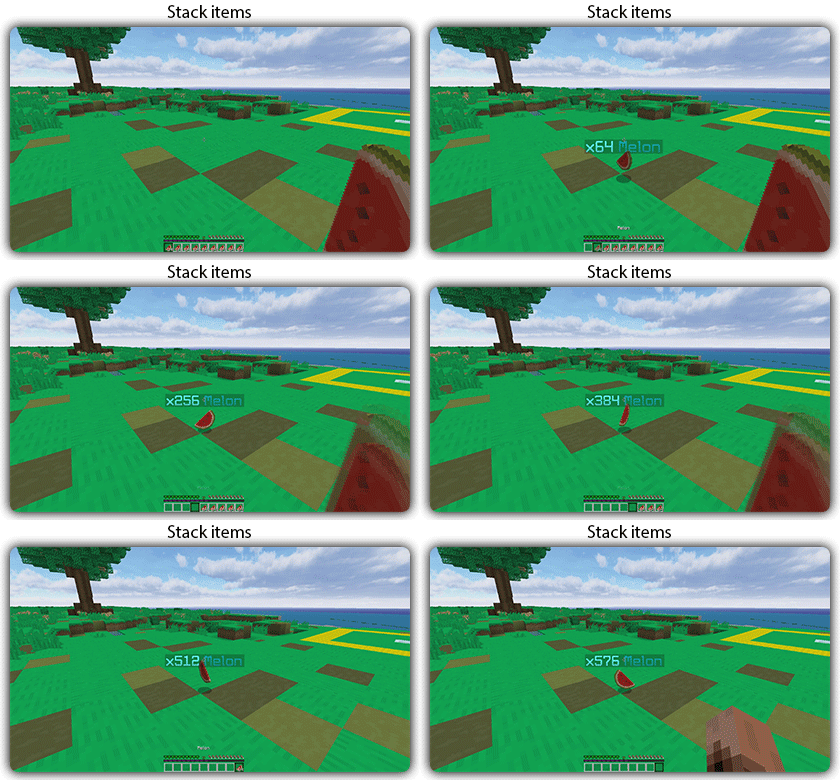
## Features:
– You can whitelist items to be taken into account by the plugin.
– You can blacklist the items that should not be taken into account by the plugin.
## Commands:
– /zitemstacker reload – reload lang and config file
– /zitemstacker version – show plugin version
Source code: https://github.com/Maxlego08/zItemStacker
Support: http://discord.groupez.dev/
Ziptastic (Server)
This modpack includes a carefully selected set of mods designed to enhance performance and the overall vanilla experience of your server. These mods ensure smooth performance, reduced lag, and lower CPU/RAM usage, which is particularly beneficial for lower-end hardware. In addition to performance improvements, the pack aims to preserve the essence of the vanilla game, maintaining its core mechanics and feel. One of the standout features is the inclusion of data packs, which brings addtional features and crafting recipes while not feeling modded or overwhelming! Overall, this mod pack provides a balanced blend of performance enhancements and features, making it a must-have for small server owners seeking an optimized yet authentic gaming experience for their community.
### Notable Features:
– Compatability with [Armor Poser](https://modrinth.com/mod/armor-poser), [ItemSwapper](https://modrinth.com/plugin/itemswapper), ~~& [Carpet](https://modrinth.com/mod/carpet)~~
– Mobs with held items despawn (Renamed mobs won’t despawn)
– Bedrock client compatability
– Players *allegedly* immune to chat reports
– Auto backups
– Vanilla-friendly datapacks
– AND MORE!!
“`
Crossed out features are not yet available in the latest version.
“`
### Need client improvements?
Use my client-side modpack ([Ziptastic](https://modrinth.com/modpack/ziptastic)) while playing on your server for the perfect experience!
Version Naming
### [Simply Optimized](https://modrinth.com/modpack/sop) has an amazing version naming scheme. So, I decided to use it too! (With all credit going to them.)
**Format:** MC-x.y.z | **Example:** 1.21.1-1.0.0
– MC is the Minecraft version
– x increases if mods/datapacks are added/removed
– y increases if configs/shaders/resourcepacks are added/modifed/removed
– z increases if mods/datapacks are updated or bugs are fixed
x.y.z starts at 1.0.0 for each new MC update. Ziptastic (Server) updates will primarily focus on the latest Minecraft release.
Ziptastic
This modpack includes a carefully selected set of mods designed to enhance performance and the overall vanilla experience of the game. These mods ensure that the game runs smoothly, reducing lag and improving frame rates, which is particularly beneficial for players with lower-end hardware. In addition to performance improvements, the pack aims to preserve the essence of the vanilla game, maintaining its core mechanics and feel. One of the standout features is the inclusion of OptiFine parity, which brings compatibility with shaders, more resourcepacks, and Fabric mods! Overall, this mod pack provides a balanced blend of performance enhancements and visual upgrades, making it a must-have for players seeking an optimized yet authentic gaming experience.
### Notable Features:
– Parity with *most* OptiFine features
– Automatically saves screenshots to clipboard
– Better advancements & statistics screens
– ~~Draggable resourcepack & server lists~~
– ~~In-game screenshot & skin manager~~
– Per-sound volume control in your inventory
– Press **F7** to view light levels
– Shulker box preview while hovering item
– Host your LAN worlds to the public automatically
– AND MORE!!
“`
Crossed out features are not yet available in the latest version.
“`
Version Naming
### [Simply Optimized](https://modrinth.com/modpack/sop) has an amazing version naming scheme. So, I decided to use it too! (With all credit going to them.)
**Format:** MC-x.y.z | **Example:** 1.20.4-1.0.0
– MC is the Minecraft version
– x increases if mods/datapacks are added/removed
– y increases if configs/shaders/resourcepacks are added/modifed/removed
– z increases if mods/datapacks are updated or bugs are fixed
x.y.z starts at 1.0.0 for each new MC update. Ziptastic updates will primarily focus on the latest Minecraft release.
ZInvisItemFrames
# ZInvisItemFrames
Allow players to craft and place invisible item frames. Folia-compatible invisible item frame plugin.
## Features
– Craft invisible item frames
– Customizable crafting recipe. (Can choose ANY ITEM for the recipe)
– Empty invisible frames can have a glowing outline (configurable)
– MiniMessage support for all text formatting
## Compatibility
– Paper 1.20.1 -> 1.21.4
– Folia-compatible
– Java 17+
## Dependencies
– [MCKotlin](https://modrinth.com/plugin/mckotlin)
## Crafting Recipe
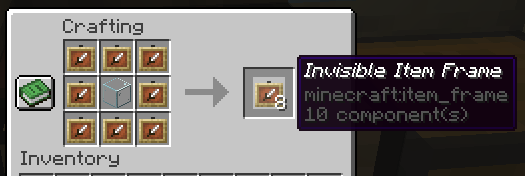
The default crafting recipe is 8 item_frame (or glow_item_frame) in a circle with one custom item in the middle.
You can change the middle-item with `/ziif item`.
You can also configure how many invisible item frames are crafted from the recipe.
## Commands
– `/ziif help` – Show help information
– `/ziif item` – Set the recipe item to the item in your hand
– `/ziif reload` – Reload the configuration
– `/ziif give [–glow]` – Give invisible item frames to a player
## Permissions
– `zinvisitemframes.craft.item_frame` – Allow crafting invisible item frames
– `zinvisitemframes.craft.glow_item_frame` – Allow crafting invisible glow item frames
– `zinvisitemframes.place.item_frame` – Allow placing invisible item frames
– `zinvisitemframes.place.glow_item_frame` – Allow placing invisible glow item frames
– `zinvisitemframes.admin` – Access to all plugin commands
## Installation
1. Download the latest version of ZInvisItemFrames from [Modrinth](https://modrinth.com/plugin/zInvisItemFrames/versions).
2. Download the appropriate version of MCKotlin from [Modrinth](https://modrinth.com/plugin/mckotlin)
3. Place the downloaded `.jar` files into your server’s `plugins/` folder.
4. Restart your server.
5. Configure the plugin to your liking by editing the `.yml` files in the `plugins/ZInvisItemFrames/` folder.
## Configuration
“`yaml
recipe:
item: [] # Set with `/ziif item` command
quantity: 8 # How many frames are crafted per recipe
check-permission: # Whether to check permissions for crafting/placing invis frames
craft: false
place: false
empty-frame:
glow: true # Whether empty frames should glow
visible: true # Whether empty invis frames should be visible
name:
invisible_item_frame: “Invisible Item Frame”
invisible_glow_item_frame: “Invisible Glow Item Frame”
“`