XK’s Lazy Crafting
Skipping multi-step crafting:
Such as [logs→planks→sticks→ladders] now [logs→ladders]
The number of crafting has been accurately calculated
跳过多步骤合成,一步到位,数量经过精确计算
Replace unstackable materials to stackable materials to Increaseing crafting speed
Such as dispenser and chest minecart
用可堆叠的原料代替不可堆叠的原料让合成速度更高
X Journey
**TX-Journey Modpack**
Experience the perfect blend of** survival** and** adventure **with TX-Journey, a modpack that retains the classic vanilla flavor while introducing exciting new features. Build your world, craft your dreams, and embark on a journey where every step outside your base reveals a world full of mystery waiting to be explored.
From your daily activities to epic boss battles, TX-Journey offers something for everyone. Upgrade the classic Minecraft enchantments, and discover endless possibilities with countless new features to explore.
XItemsRemover
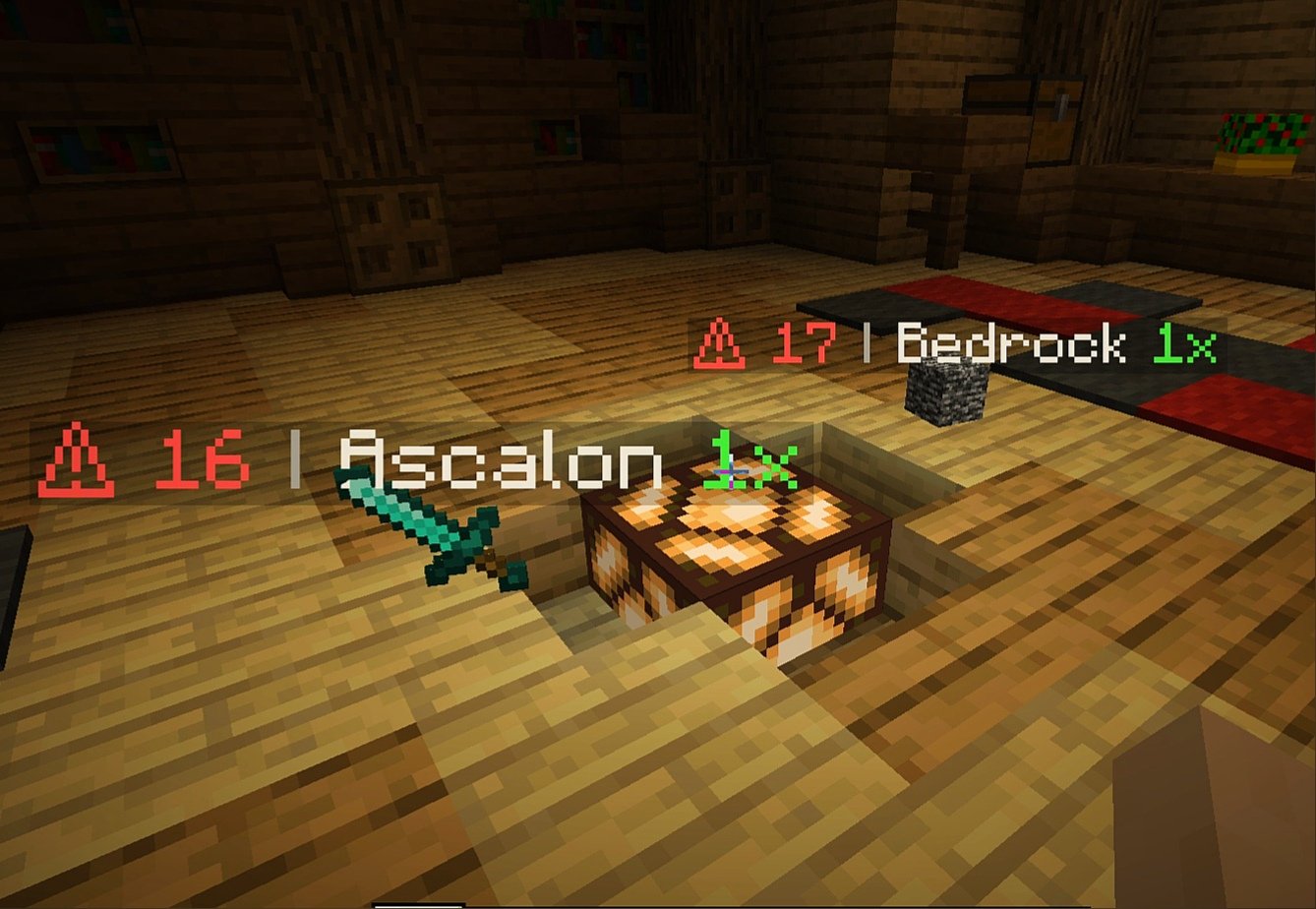
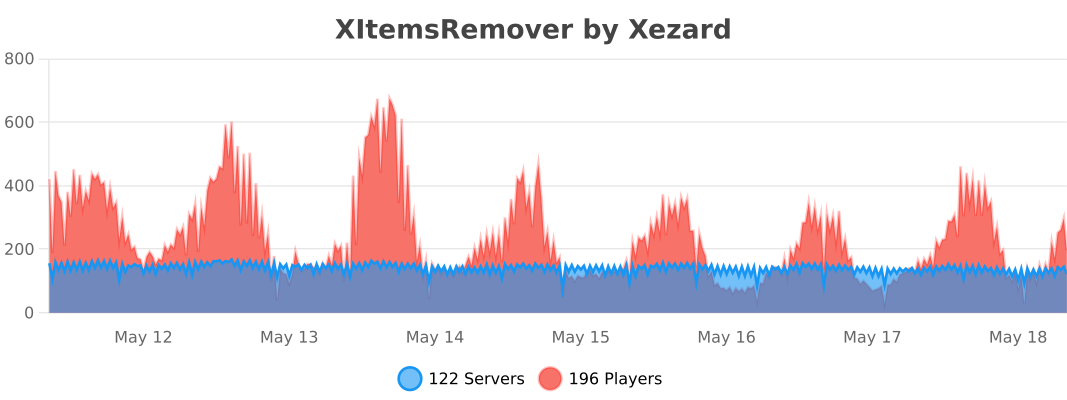
XItemsRemover – is a small plugin that automatically removes dropped items with a timer displayed on these items until they are removed. The time until deletion is configured in the plugin configuration.
IMPORTANT
If you have items with displayed name ‘AIR‘ – specify ‘api-version’ in plugin.yml with version of your server!
For example, if your server version is 1.16.5, add the following line to plugin.yml of XItemsRemover:
api-version: 1.16
### Configuration
“`
Items:
# Format:
# ‘‘: “”
# Available placeholders:
# {time} – time remaining before remove (in seconds)
# {display_name} – display name of itemstack (if empty – used localized material name}
# {amount} – itemstack amount
Display-name-formats:
‘1’: “§c⚠ {time} §7| §f{display_name} §a{amount}x”
’10’: “§c{time}”
Remove-timer:
# Timer for removing an item in seconds
Default: 30
After-player-death: 180
Async: true
# Section for specifying a unique timer or display name
# for certain materials
# Format:
# :
# : 15
# :
# :
#: false
# If you only need to edit one parameter
# (name or time) you can just delete the line with the second.
# If you need the plugin not to track a certain type of materials, then set ‘tracked: false’
Custom-materials:
COBBLESTONE:
Timer: 15
Display-name-formats:
’15’: “Cobblestone :D”
STONE:
Timer: 10
GRASS:
Display-name-formats:
’30’: “Grazz”
SAND:
Tracked: false
# Worlds in which plugin does not work
Restricted-worlds:
– “restricted_world”
“`
### Commands and permissions
Command | Permission
————- | ————-
‘**/itemsremover**’ [Alias: ‘**/ir**’] – prints all plugin commands. | items.remover.commands.help
‘**/itemsremover help**’ – prints all plugin commands. | items.remover.commands.help
‘**/itemsremover reload**’ – reloads plugin configurations. | items.remover.commands.reload
Xisuma’s Hermitcraft Pack
Xisuma’s collection of mods and configurations to enhance the vanilla game!
As seen in his video series from the Hermitcraft Server, these mods will improve your minecraft experience.
This is a **client-side** only modpack.
If you want the best server-side experience use the [Hermitcraft Server Pack](https://modrinth.com/modpack/hermitcraft).
Xiques’ Minecraft PLUS
# About this pack
This mod pack is heavily inspired by [DB’s Minecraft PLUS](https://modrinth.com/modpack/dbs-minecraft-plus) (hence the name)
## Promo
A vanilla-ish Minecraft that you used to, but adds extra grain of salt.
## Description
I added more mods in to make the world of Minecraft more lively than it used to be! (eg. Revamp of old dungeons and structures, Newly added structures)
**Enjoy exploring your** **_new world_** !

## Need a Server?
get yours at [Scalacube](https://scalacube.com/p/_hosting_server_minecraft/4647710)

Resource pack: [Vanilla Tweaks](https://vanillatweaks.net/)
XiOptimized
Minecraft 1.19.2 but with Xisuma’s mods (doesn’t include mods which could be considered cheats) and a couple other Quality of Life mods.
[SpeedInject](https://modrinth.com/modpack/speedinject)
xHub
# 🛡️ xHub Core (Beta)
### The Ultimate All-in-One Lobby Solution | 1.20+




**xHub** is a high-performance, premium core designed to replace multiple lobby plugins.
It now includes advanced features like Parkour, Cosmetics, Developer API, and dynamic permissions.
[Discord Support](https://discord.gg/xplugins) • [Website](https://xplugins.es)

—
## ✨ Key Features (v1.0.1)
* **🏃 Parkour System:** Automatic checkpoints, rewards, void detection, and Double Jump.
* **🎩 Cosmetics:** Particle trails and hats with a GUI menu.
* **💻 Developer API:** `xHubAPI` class for easy integration with other plugins.
* **🎨 Full RGB/Hex Support:** Use `&#RRGGBB` colors anywhere.
* **📂 Modular Menu System:** Create unlimited GUI menus using YAML files.
* **📊 Animated Boards:** Flicker-free Scoreboard and Tablist (PAPI supported).
* **🎒 Hotbar Manager:** Custom items on join (Compass, PvP Sword, Cosmetics).
* **📢 Chat Manager:** Formatting with Rank support (`[Admin] Player: Hello`).
* **🤖 Discord Logs:** Built-in Webhooks for Join/Quit events.
—
## 🚀 Installation
1. Download `xHub-1.0.0.jar`.
2. Place it in your server’s `plugins` folder.
3. **(Required)** Install [PlaceholderAPI](https://papi.extendedclip.com/) for variables.
4. **(Optional)** Install [Vault](https://www.spigotmc.org/resources/vault.34315/) for economy rewards.
5. Restart the server.
—
## 📂 Directory Structure
“`text
plugins/xHub/
├── config.yml <-- Main settings
└── menus/ <-- Drop your menu files here
├── principal.yml <-- Main Menu
├── selector.yml <-- Server Selector
├── socials.yml <-- Social Media
└── cosmetics.yml <-- Cosmetics Menu
```
---
## 📜 Commands & Permissions
| Command | Permission | Description |
| :--- | :--- | :--- |
| `/xhub setlobby` | `xhub.admin` | Sets the spawn point. |
| `/xhub spawn` | `xhub.spawn` | Teleports you to the lobby spawn. |
| `/xhub reload` | `xhub.admin` | Reloads all configs and menus. |
| `/xhub menu ` | `xhub.menu` | Opens a specific menu. |
| `/xhub cosmetic` | `xhub.cosmetic` | Manage cosmetic effects. |
> **Note:** Permissions can be disabled in `config.yml` by setting them to `false`.
—
## 👨💻 Developer API
xHub exports a static API class for developers to hook into the core:
“`java
// Teleport a player to the Hub
xHubAPI.teleportToSpawn(player);
// Check if player is doing parkour
if (xHubAPI.isInParkour(player)) {
// do something
}
// Activate a cosmetic trail
xHubAPI.setTrail(player, “FLAME”);
“`
—
## 🛠️ Default Configuration
Below is the full generated `config.yml` file explaining every feature.
“`yaml
# _
# __ __ / /_ _| |__
# / // /_/ / | | | ‘_
# > Developed with ❤️ by **xPlugins.
Copyright** © 2026 xPlugins. All rights reserved.
XGamemode

### “*You’re not switching modes, you’re switching dimensions.*”
~~*2000 Downloads?! Thanks!*~~
# 1 Feature
## 1.1 Offline Player
You can change the gamemode of a player, **even he (or she) was offline**.
## 1.2 Permissions
Allow permission group plugins (_like Luckperms_) to manage **which gamemodes can be switched to** and **which gamemodes cannot be switched to**.
_e.g. Allow to switch to survival mode but not to any other mode._
## 1.3 Alias
**/gamemode** is simplified to **/gm** and **/g**.
_(of course you can still use /gamemode)_
## 1.4 Cross-Server Storage
Support **MySQL** and **SQLite** storage backends. Player gamemodes are saved and synchronized across multiple servers in a network.
## 1.5 Folia Support
**Fully compatible with Folia servers** — using region-based scheduling for optimal performance.
## 1.6 Lightweight
The Plugin size is only **~25 KB** and has **almost no impact** on server performance!
# 2 Caution
## 2.1 Shortcut Keys
If you need to use shortcut keys such as **F3+F4**, please install another plugin **F3NPerm**.
## 2.2 Versions
**1.8.X +**
**All Bukkit based server** (Paper, Spigot, Purpur, Folia, etc.)
# 3 Commands
“`markdown
– /xgamemode
– /xgamemode reload
– /gm
– /gm
– /gm -all
– /gm -online
– /gm -offline
/g = /gm = /gamemode
/xg = /xgm = /xgamemode
“`
# 4 Permission Node
“`markdown
– xgamemode.survival
– xgamemode.creative
– xgamemode.adventure
– xgamemode.spectator
– xgamemode.others.survival
– xgamemode.others.creative
– xgamemode.others.adventure
– xgamemode.others.spectator
– xgamemode.reload
– xgamemode.admin
“`
# 5 Custom Config
## 5.1 Basic Settings
“`yaml
lang: en-US
“`
**Language** setting
“`yaml
default_gamemode: survival
“`
If a **new player joined your server**, **which gamemode should he (she) be**?
**survival**, **creative**, **adventure**, **spectator**
“`yaml
show_logo: true
“`
Show logo or not when plugin enabled.
**true**, **false**
“`yaml
debug: false
“`
Enable debug logging for troubleshooting.
**true**, **false**
## 5.2 Storage Configuration
“`yaml
storage:
type: yaml
“`
**Storage backend type**: **yaml**, **sqlite**, **mysql**
### SQLite Example
“`yaml
storage:
type: sqlite
# No additional config needed — data.db will be created automatically
“`
### MySQL Example
“`yaml
storage:
type: mysql
mysql:
host: localhost
port: 3306
database: minecraft
username: root
password: your_password
“`
## 5.3 Custom Messages
“`yaml
messages:
en-US: # Original en-US Language by Wind_Blood
reloaded: “&aXGamemode Reloaded!”
# ……
custom_lang: # Add Your Custom Language!
reloaded: “Thank you for using XGamemode!”
# ……
“`
**Customizable Messages**. You can add **your own new language** here!
## 5.4 An Example config.yml
“`yaml
lang: msgForMyServer
default_gamemode: survival
show_logo: false
debug: false
storage:
type: yaml
messages:
msgForMyServer:
reloaded: “很明显作者是中国人 会说中文很正常 然后我也不知道为什么我要在一堆英文里写一段中文 挺好笑的 哈哈哈 对了 看到我就是缘分 XGamemode 官方 QQ 反馈交流群:点击链接加入群聊【XGamemode 反馈群】:https://qm.qq.com/q/rpTk5LK7w4 欢迎加”
usage: “&cUsage: /gm [player/-all/-online/-offline]”
console_usage: “&cUsage: /gm ”
invalid_gamemode: “&cInvalid Gamemode!”
invalid_player: “&cInvalid Player!”
gamemode_self: “&aYour Gamemode Changed to {mode}!”
gamemode_all: “&aChanged All Player’s Gamemode to {mode}!”
gamemode_online: “&aAll Online Player’s Gamemode Changed to {mode}!”
gamemode_offline: “&aAll Offline Player’s Gamemode Changed to {mode}!”
no_permission: “&cYOU ARE NOT ALLOWED TO DO THAT!”
gamemode_other: “&a{player}’s Gamemode Changed to {mode}!”
gamemode_other_offline: “&a{player} (Offline)’s Gamemode Changed to {mode}!”
“`
# 6 Developer API (Async)
## Get Instance
“`java
Main plugin = Main.getInstance();
“`
## Get Player Gamemode
“`java
plugin.getPlayerMode(playerUUID).thenAccept(mode -> {
if (mode != null) {
// mode is GameMode.SURVIVAL, CREATIVE, ADVENTURE, or SPECTATOR
// Player is online or has saved data
} else {
// Player not found or no saved gamemode yet
}
});
“`
## Set Player Gamemode
“`java
plugin.setPlayerMode(playerUUID, GameMode.SURVIVAL).thenAccept(success -> {
if (success) {
// Gamemode changed and saved successfully
// Works for both online and offline players
} else {
// Failed to save (database error, etc.)
}
});
“`
## Listen to Gamemode Changes
“`java
@EventHandler
public void onGamemodeChange(GamemodeChangeEvent event) {
Player player = event.getPlayer(); // Online player only
GameMode oldMode = event.getOldMode();
GameMode newMode = event.getNewMode();
}
“`
> **Note:** All APIs are **fully async** and thread-safe. The `GamemodeChangeEvent` is only fired for **online players** when their mode is actually changed. The `getPlayerMode()` method returns `null` if the player has no saved gamemode data.
# 7 Reprint Post
www.minebbs.com/resources/xgamemode.11041
hangar.papermc.io/Wind_Blood/XGamemode
modrinth.com/plugin/xgamemode
# 8 Feedback
Just e-mail me with **[email protected]**. Thanks!
Xetamoria – Thrive & Survive
Xetamoria – Thrive & Survive is a modpack created to go with my video “Top 8 Adventure Mods”
**Modlist (Shown in video):**
Antique Atlas 4,
Artifacts,
Bosses of Mass Destruction,
Dungeons & Taverns,
Tool Trims,
Traveler’s Backpack,
Utility Belt,
William Wythers’ Expanded Ecosphere
**Modlist (Not shown in video):**
Axiom,
Fantastic Remastered Structure,
ReplayMod,
Sodium,
Sodium Extra,
Nvidium,
WorldEdit
**This modpack will probably not recieve much support from release, so I highly recommend unlocking the pack and updating yourself to keep the pack updated to new versions**
Xetamoria – Explore
Xetamoria – Explore is based around all (well, most) of the mods I have covered over on my YouTube channel, finely placed into a modpack for you to enjoy!
🙂
Mods included:
**Appleskin,**
**Beautify,**
**Better Third Person,**
**BetterEnd,**
**BetterNether,**
**Chipped,**
**Deeper and Darker,**
**End Remastered,**
**Friends & Foes (With beekeeper addon),**
**Handcrafted,**
**Mod Menu (For easy mod configuration),**
**Phillips Ruins,**
**Pufferfish’s Skills,**
**Regions Unexplored,**
**Terralith,**
**The Bumblezone,**
**The Graveyard,**
**Traveler’s Backpacks,**
**Vanilla Sky Villages,
Wilder Wild,
Yung’s Better Desert Temples,
Yung’s Better Dungeons,
Yung’s Better Jungle Temples,
Yung’s Better Mineshafts,
Yung’s Better Nether Fortresses,
Yung’s Better Ocean Monuments,
Yung’s Better Strongholds,
Yung’s Better Witch Huts,
Yung’s Bridges,
Yung’s Extras,**
**Bosses of Mass Destruction**
_**And many more! check the “mods” screen ingame to view them all!**_
If you encounter any bugs/issues with the pack (crashes, incompatibilities, etc) let me know in my discord server!