Aurora Fantasy


What is Aurora Fantasy? Aurora Fantasy is a Minecraft shader pack designed to make your world look magical and cinematic without making your computer lag. It focuses on beautiful fantasy lighting, vibrant colors, and stunning night skies featuring the Northern Lights (Auroras).
Whether you have a high-end PC or a simple laptop, this shader is optimized to give you a “Fantasy” atmosphere while keeping your gameplay smooth and fast.

> 🛠️**Profiles Fix**: Resolved internal issues within HIGH and EXTREME presets.
> ☁️ **Cloud Rendering**: Fixed a bug where clouds were not appearing when using HIGH or EXTREME profiles.
> ☀️ **Solar Layering**: Fixed the visual glitch where the sun would incorrectly appear above the clouds.
> 🌐 **Distant Render Fix**: Corrected an issue in the Distant Render Mod where stars could appear on the ground.

– 🌌 **Ethereal Nights** – Watch the mesmerizing Aurora Borealis and realistic stars transform the night sky.
– ☁️ **Atmospheric Clouds** – Dynamic clouds and soft fog that add depth and life to the horizon.
– 💧 **Living Water** – Realistic waves and water reflections with white foam where the water hits the land.
– 💎 **Modern Reflections** – High-quality reflections (SSR) on water and wet surfaces for a polished look.
– 🌧️ **Dynamic Weather Effects** – Surfaces appear wet during rain, featuring simulated puddle reflections and animated ripple effects.
– 🏜️ **Immersive Weather** – Experience realistic dust and sandstorms in desert biomes during rain.
– 🚀 **Extreme Optimization** – Built to run on a wide range of devices, from “Potato” PCs to Gaming rigs.
– 🌍 **Ultra-Distance Support** – Compatibility for large-scale rendering mods. (Must be enabled in shader settings).
– 🎮 **Graphics Profiles** – Choose between MEDIUM, HIGH, or EXTREME.

– **Fantasy Aesthetic**: Unlike realistic shaders, this pack is tuned for a magical, dream-like vibe.
– **Elevated Vanilla Experience**: It enhances the game’s beauty and lighting while staying true to the core Minecraft atmosphere you love.
– **Advanced Rain Surfaces**: Includes custom-coded wetness effects where reflections and ripples appear on the ground during rain, simulating a dynamic, stormy environment.
– **Better Sun & Moon**: Say goodbye to square suns! Enjoy high-quality circular shapes with smooth horizon fading.
– **Advanced Mod Integration**: Fully compatible with mods that increase render distance (like Distant Horizons) via a simple toggle in the settings—perfect for massive, cinematic views.
– **Simple Profiles**: Choose from 3 easy presets (Medium, High, Extreme) to find your perfect balance of speed and beauty.

**Minimum** (Medium Profile):
> GPU: Intel HD 630 / GT 710
>
> RAM: 4GB (2GB Allocated)
**Recommended** (High Profile):
> GPU: GTX 1050 Ti / RX 570+
>
> CPU: i5-4000 / Ryzen 3 1200+
>
> RAM: 8GB (4GB Allocated)
> ⚠️ **Note on EXTREME Profile**: This preset is not covered by the recommended specs above. To run the EXTREME profile smoothly, you will need significantly more powerful hardware than what is listed in the Recommended section.

**Original Creator**: KDXavier
**Based on**: MakeUp – Ultra Fast
**Modified by**: in2bubble
**Origina GitHup source**
**License**: GNU Lesser General Public License v3.0
AstraLex Shaders

# ABOUT THE SHADERS
AstraLex Shaders is a shaderpack for Minecraft: Java Edition with very high
customization. This shader includes:
* Realtime Shadows
* Water / Clouds
* Volumetric Light
* Ambient Occlusion
* Bloom
* Dof / Chromatic Aberration / Distance Blur
* MotionBlur
* Aces ToneMap
* TAA/FXAA…
Additional effects are available, such as:
* Celshading
* Constellations
* Shooting Stars
* Drawing Child Birds
* Planet / Majora’s Mask Moon
* Nebula
* Reticle
* Entities Flash
* CRT Effects
* Refractions for Biome
* Realist Rain Drops on Screen
and many more !
# AGREEMENT
You’re allowed to…
* Use this shaderpack for taking screenshots and videos.
* Modify the shaderpack for personal use.
* Redistribute the shaderpack for modpack / server with my permission.
* You can only share the direct link of the archive
You’re not allowed to…
* Redistribute the shaderpack without my permission.
* Distribute shaders link other than Curseforge/Modrinth link.
* Claim (and rename) the shaderpack (or its code) as your own.
* Use monetized URL shorteners to my site or files.
*My shader and myself (the author) should be credited clearly, add link to my site if possible.
# INSTALLATION
* Download and install Optifine or Iris
* Download the shaderpack
* Put the shaderpack inside .minecraftshaderpacks
* Launch Minecraft
* Open Options, Video Settings, Shaders
* Choose AstraLex Shaders
# QUICK LINKS
* AstraLex Shaders – Official site.
* shaderLABS Discord – Discuss everything about Minecraft shaders here.
AstralCore

### ABOUT
**Astral Core Shaders is a pink-themed edit of Complementary Unbound made by EMIN GT. It is designed for players who love pink aesthetics and want a more vibrant and magical version of Minecraft’s lighting and atmosphere. Astral Core adds a soft, dreamy vibe while maintaining the high-quality effects of the original shader.**
### Features
**Astral Core keeps most core features of Complementary Unbound but introduces a complete pink color theme across the sky, lighting, clouds, and overall ambience. It’s perfect for those who want a relaxing, colorful, and visually unique experience without straying too far from the original visual fidelity.**
### BUGS
**Found a bug? You can report it by creating a ticket under the bug category in our Discord server. Your feedback helps us improve Astral Core and fix issues faster. Every report means a lot to us and truly makes our day better!**

**OFFER!!**

### Showcase Video
### License
**Astral Core Shaders follows the Complementary Shader License. It is published under the same license and fully complies with all the original rules and conditions set by the Complementary team. Proper credits and usage guidelines are strictly maintained.**
ASCII Shader
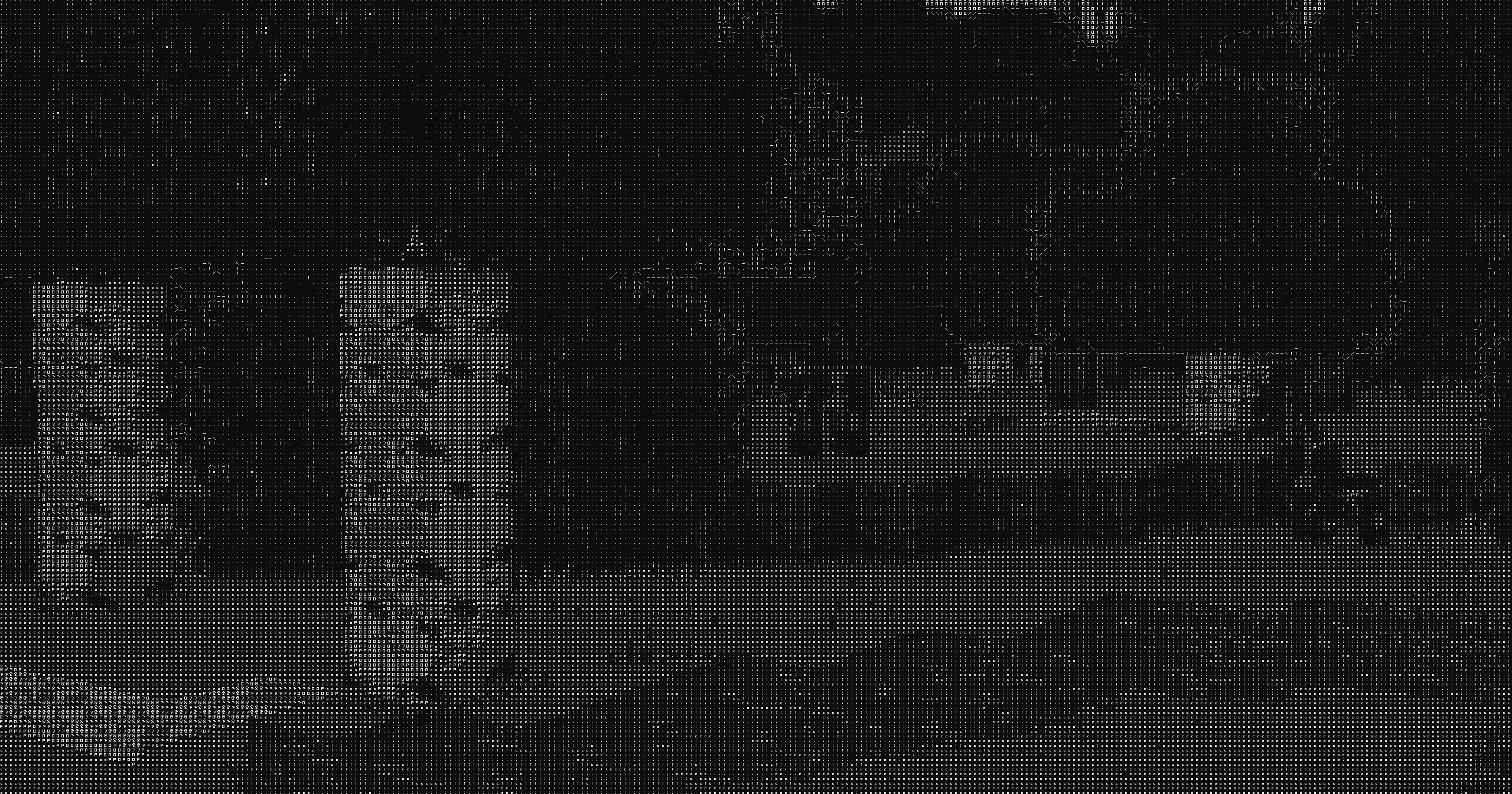
## ASCII Shader intends to make Minecraft render only with ASCII characters!
Current features include:
– Color Customisation for, background, dark, and light colors
– Using the in world colors as the text color
– Post proccesing effects like bloom, sharpness, and tonemapping
– Line detection including multiple line detecting modes and performance settings
– Premade color profiles
There is maybe something I want to add to the customizability this (for now at least) should be enough!
If you find any bugs or incompatibilities, you can always report them, it helps me and others out.
### Installation
First you need to install either OptiFine or the Iris mod to be able to load shaderpacks. (Choose Iris if you are unsure)
Then you need to launch the game, and get to the Shaderpacks/Shaders menu in Video Settings.
Open the shaderpacks folder by clicking the button in the menu.
Download the ASCII Shader and put it in the shaderpacks folder.
Get back in the game, and choose ASCII_Shader in the shaderpacks menu. (Refresh the menu if it doesn’t appear)
Ascii like shader
# ASCII Minecraft Shader
Inspired by Acerola’s video on ASCII art rendering, this shader project aims to recreate the iconic Minecraft visual style using ASCII characters. By translating the game’s visuals into ASCII art, the shader produces a unique and nostalgic aesthetic.
## Features
– **ASCII Rendering**: Converts the Minecraft world into a grid of ASCII characters.
– **Bitmap Font Texture**: Utilizes a bitmap font texture to map characters onto the screen.
– **Color and Black & White Modes**: Supports both colored and black & white rendering modes.
– **Edge Detection**: Integrates edge detection techniques for enhanced visual detail.
## Black & White Mode
In this mode, the shader renders the Minecraft world using only black and white ASCII characters, providing a classic and minimalist look.


## Color Mode
The color mode maintains the vibrant colors of Minecraft while still using ASCII characters to depict the scene, offering a modern twist on the retro aesthetic.


## Implementation Details
– **Fragment Shader**: The core of the shader is implemented in GLSL, where each pixel is mapped to an ASCII character based on its brightness or color value.
– **Bitmap Font Texture**: A 128×128 texture is used to store the bitmap font, with each character occupying an 8×8 pixel block.
– **Edge Detection**: Combines a Difference of Gaussians filter with a thresholded Sobel edge detection filter to enhance the details and edges of the scene before converting to ASCII.
# Github:
https://github.com/5weetdev/Ascii-shader
Feel free to contribute
ARTShade

## ABOUT
**This shaderpack is currently a Work In Progress
and aims to bring a stylized, bright fantasy atmosphere.**
### Main Features:
– **Massive Cloud Rework** & high-fidelity graphic upgrade.
– **Dynamic Wind Gusts** affecting grass, plants, and foliage.
– **Stylized Water** featuring custom sparkles and toon shading.
– **Centralized Weather System** (unified wind speed and angle controls).
– **Stylized Bloom & Glow** with full support for emissives and underwater effects.
– **Dynamic Rim Lighting** reacting to the sun, moon, and world light sources.
– **Procedural Speculars** for realistic metallic and polished block surfaces.
– **Dynamic Wet Ground** reflections during rain.
– **Multiple Visual Presets**: Bright Fantasy, Dark Fantasy, Realistic, and Cartoon.
– **Mod Compatibility**: support for Voxy and RenoDX (HDR).
Join my Discord for updates and community chat : https://discord.gg/h95y7sTR4q
Please be patient, the shaderpack is in progress. I take note of all feedback.
Arc
A shader for Iris & Optifine that aims to providing realistic visuals with very minimal performance loss. Almost every effect/feature can be fine-tuned for the ideal balance between performance and quality. This project is still in beta but will be reaching initial release very soon!
### Features
– HDR
– Full PBR support
– Dynamic, direct, colored block lighting
– Volumetric fog/lighting
– Automatic exposure
– Screen-space reflections
– Water waves & refraction
– Supports distorted and cascaded shadow mapping.
– Depth-of-Field
– Bloom
Also contains special support for PhysicsMod ocean waves & snow!
### Resource Packs
Supports LabPBR and OldPBR texture formats; The default setting for materials is “vanilla”, which hard-codes a limited set of PBR material values for the original Minecraft textures.
The recommended resource pack is Patrix; when used make sure to set the shader setting for Material Format to “Patrix”, as it uses a special combination of OldPBR and LabPBR formats.
### Compatibility & Support
For best results use Iris 1.6 or later; however most features should work with Optifine or Oculus. If you have any suggestions or requests, you can reach out to me on the ShaderLabs Discord.
Aragorn’s Light Shader
# ARAGORN’S LIGHT SHADER
This is a simple, lightweight shader based on Iris that adds realistic anti aliasing shadows and realistic water and clouds. It is not resource-heavy and is ideal for most users.
IMPORTANT: Kindly disable clouds through ‘Options > Video Settings’ as the shader includes a custom cloud engine.
Anti Aliasing (TAA, FXAA)
# ABOUT:
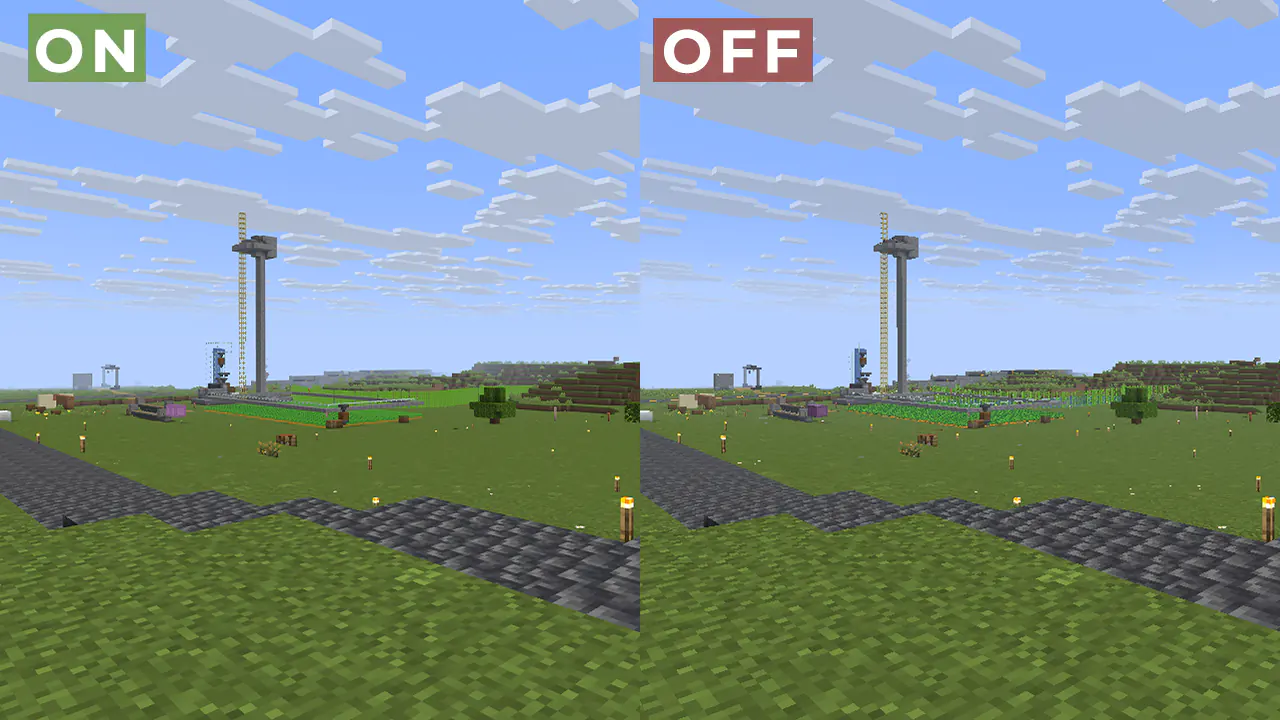
Fix aliasing on textures and object boundaries. It is designed to smooth out visual artifacts. It has two modes: FXAA and TAA. The first mode is faster, while the second is more accurate. There is also support for Distant Horizons.
### Example 1: OFF/ON
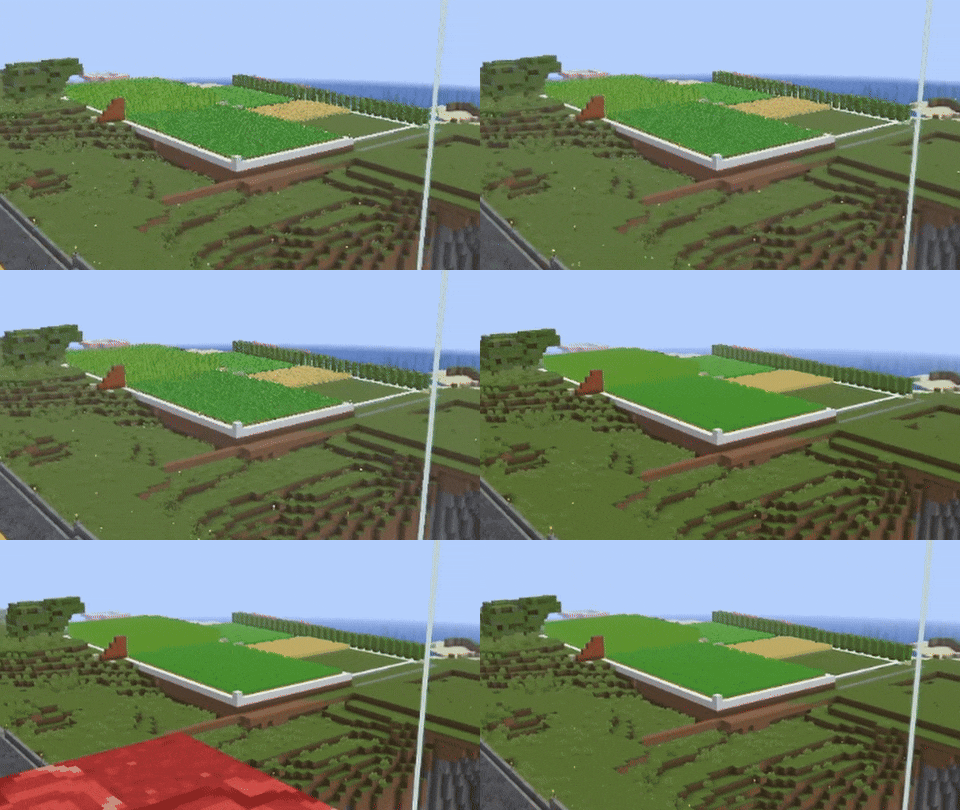
#### When turned off, the image ripples and everything twitches, when turned on, the artifacts disappear.
### Example 2:
## FAQ:
How is it different from other projects?
Fog support for all versions, new method FXAA and better performance than TAA Project.
What is the difference between FXAA and TAA?
FXAA is a simple and fast post-filter that blurs sharp edges, while TAA uses data from previous frames to produce a smoother image, especially when there is movement.
###### Part of the code, namely the implementation of TAA, was taken from TAA Project, so the license is MPL-2.0.
Animtr
A customizable Minecraft shaderpack that transforms the game into a polished anime aesthetic. eatures crisp white sticker borders with soft edges, vibrant pastel color grading, and smooth toon shading with configurable cel levels. It includes material-dependent palette corrections for water, sand, and dirt, plus optional glow effects for glowing entities and ore blocks. You can toggle on extra detail to preserve texture clarity, or enable Candy Mode for biome-specifc color boosts on foliage and water. Everything is adjustable from border thickness and opacity to hand-drawn grain and warmth—fully configurable from Minecraft’s shader settings menu.