(I know the video seems laggy, but the shader shouldnt have too much of an impact on your game’s performance. It’s just that the software I used to record it wasn’t too great)
**Features:**
– Warm golden sunlight with realistic sunrise and sunset color shifts
– Rich orange torchlight for a cozy indoor atmosphere
– Animated water with depth-based coloring
– Soft directional shadows with distortion for better quality
– Distance fog for atmosphere
– Subtle vignette for a cinematic feel
Cosinus Shader
Sinus, but with cosine!
Contains all options from the original shader (defaults are in bold):
Spoiler
Setting | Values | Description
——- | —— | ———–
Direction | **-Y**, Y, -X, X | Direction.
Only in water | **Off**, On | Only in water.
Height | 0.0, 0.1, …, 1.0, 2.0, …, 29, 30.0 | Y coordinate of the effect position.
Speed | 0, 1, …, 68, 69 | Speed.
Frequency | 0.0, 1.0, …, 59.0, 60.0 | Amount of waves on the screen.
Complementary Shaders – Unbound

### About
Complementary Shaders is a shader pack for Minecraft Java Edition with exceptional attention to detail, high standards of quality, and top tier optimisation. It offers a ton of high quality effects, two default visual style choices, custom effects for almost every block in the game, profiles ranging from Potato to Ultra and it’s designed to never be obstructive during gameplay. It started as an edit of BSL Shaders in 2018, and it received countless major updates including a complete rewrite to meet the standards of our community. Complementary Shaders is dedicated to be shaped by user feedback over anything else, and it still receives regular updates to this day.
“Unbound” is one of the two default styles Complementary Shaders r5 comes with. It is the less restricted style of Complementary that aims for a more realistic image. **Learn more about the two styles here.**
### Choose Your Style
Complementary Shaders comes with two distinct visual style options. The only difference between these two styles is the default settings. The Unbound style is designed for people looking for a more realistic experience, while the Reimagined style is made to reimagine Minecraft while preserving its unique visual elements. Please note that you can still customize everything after you download either style. You can switch to blocky clouds on the Unbound style, or use realistic water on the Reimagined style. All settings are located in Shader Options.
### Installation
**New:** You can just download the **Complementary Installer** and click Install to automatically do all the steps below.
**-** First you need to install the **Iris** mod to be able to load shaderpacks.
**-** Then you need to launch the game, and get to the Shaderpacks/Shaders menu in Video Settings.
**-** Open the shaderpacks folder by clicking the button in the menu.
**-** Download Complementary Shaders and put it in the shaderpacks folder. (Please don’t unzip the file)
**-** Get back in the game, and choose Complementary in the shaderpacks menu. (Refresh the menu if it doesn’t appear)
### Other
**-** Check out the **Complementary Development Website** for more information.
**-** Join the **Complementary Discord** community if you have any questions, or just want to talk.
**-** If you would like to support the development of Complementary, you can do so on **Patreon**.
Comic Shaders
# Comic Shaders
A shader pack that emulates the look of classic comic books. Most of the effects in the pack are customizable in the in-game settings menu to achieve your desired appearance.
I highly recommend using the texture pack Bare Bones in conjunction with the shader pack.
With this lightweight shader you can turn your world black and white.
Important Notes:
-The colors are inverted when starting the Shader for the first time, please look into the shader settings
-for better results, turn the brightness down to 0%
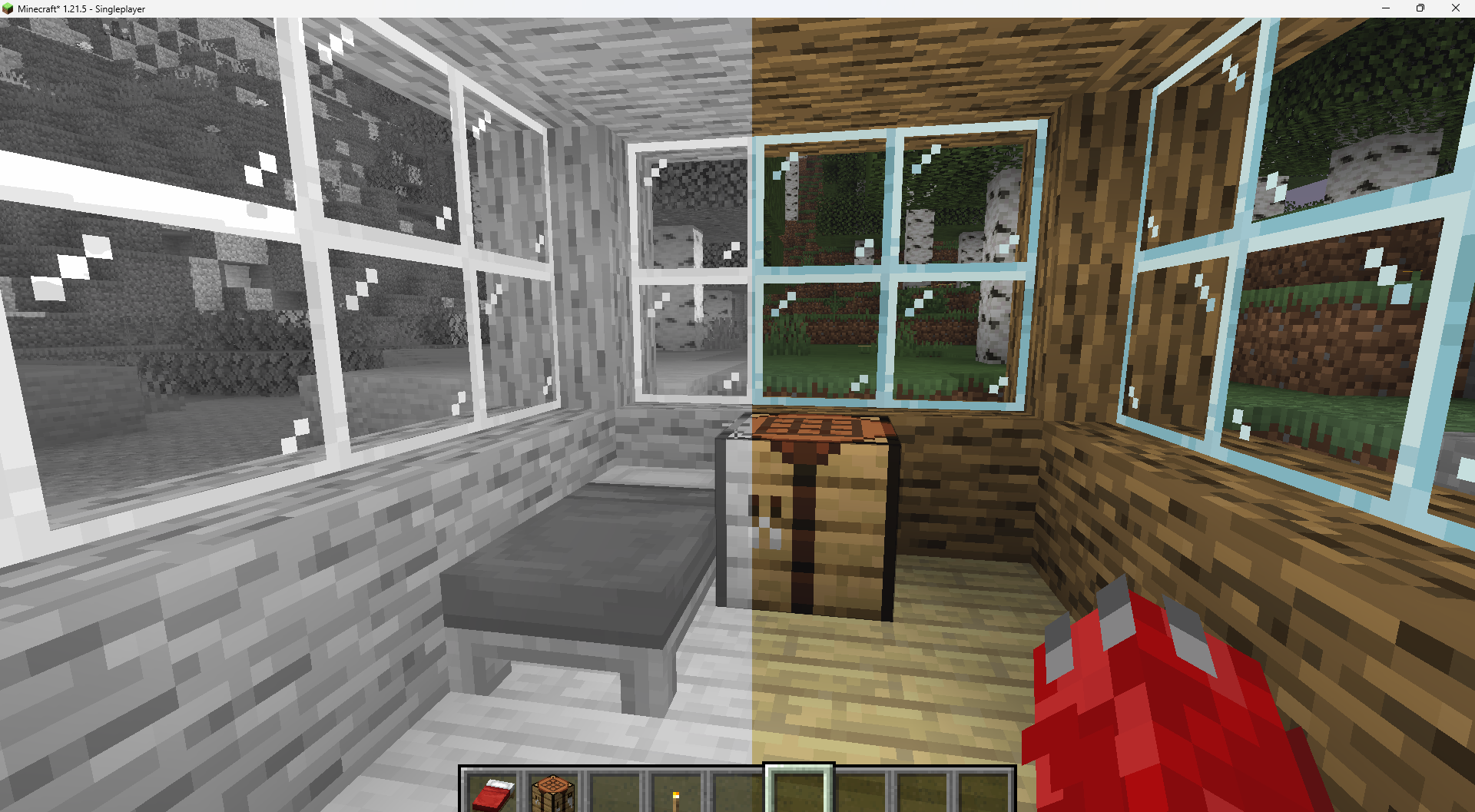
Features:
-turn world black and white
-optimised for PCs with a bad performance
-holding an item like a torch emmits light around the player
-shadows and fog
-colored lighting
-red light around player if hurt (can be deactivated)
Configurable Settings:
-inverted = if true, the colors are inverted
-coloredGlassShadows = if true, the shadows of colored glass are colored
-blacknwhite = if true, the world is black and white
-graytorchlight = if true, items like torches emmit a gray light, else, they give of a orange light
-redRadiusIfHurt = if true, red light appears around the player if hurt
Color Cone

**Color Cone** is a real-time color vision simulation shader designed to accurately reproduce how different types of color perception and color blindness affect visual output.
—
### 👁️ Supported Vision Modes
The shader includes simulation for:
* **Normal Vision**
* **Deuteranopia (No Green Cone)**
* **Protanopia (No Red Cone)**
* **Tritanopia (No Blue Cone)**
* **Deuteranomaly (Weak Green Cone)**
* **Protanomaly (Weak Red Cone)**
* **Tritanomaly (Weak Blue Cone)**
* **Achromatopsia (No Cone Cells)**
* **Blue Cone Monochromacy**
Each mode transforms the rendered image to reflect the perceptual characteristics of the selected vision type.
—
# Red Green Blue – Test
## Deuteranopia (No Green Cone)

## Protanopia (No Red Cone)

## Tritanopia (No Blue Cone)

## Achromatopsia (No Cone Cells)

—
### ⚙️ How It Works
* Applies cone response transformation matrices
* Adjusts RGB channel sensitivity per vision profile
* Simulates full dichromacy, anomalous trichromacy, and monochromacy
* Runs efficiently in real time
—
### 🎯 Use Cases
* Accessibility testing
* Inclusive game & UI design
* Educational visualization
* Visual research & experimentation
—
### 🚀 Key Features
* Single shader, multiple vision profiles
* Fast and lightweight implementation
* Easy integration into rendering pipelines
* Accurate perceptual approximation
Color Cone helps developers, designers, and researchers better understand how visuals are perceived across different types of color vision.
CMS – Cloud Mask Shaders
This shaderpack turns clouds completely white, and everything else, black. It is used to mask out clouds in Photoshop.
ClearVision Shader
ClearVision Shader enhances Minecraft with crystal clear visibility similar to night vision in all dimensions (Overworld, Nether, End).
It is optimized for every device — from low-end (potato) to high-end — ensuring smooth and stable FPS.
Fully compatible with Minecraft 1.21 – 1.21.11 using OptiFine and Iris.
> Clarity is a shader pack that removes all shadows and fog in your game, making everything bright and easy to see in water and lava. With Clarity, you’ll always see clearly, no matter where you are in Minecraft! See the demonstration and screenshots [here](/shader/clarityshader/gallery). Its some sort of FullBright mod but then in shader variant.
### It’s perfect for:
– Exploring dark caves
– Traveling at night
– Finding your way in the nether
### Features:
– Removes Block Shadows
– Removes Entity Shadows
– Removes Particle Shadows
– Removes Fog
– Clear Sight Under lava and Water
– Change Snow and Rain Opacity
– Chage water opacity
– Vibrance setting
– Exposure setting
– Stars can be set to on or off
– Clouds can be set to dimmed, hidden and bright
– Anti Aliasing (SMAA)
– Works with Distant Horizons Mod
### Has Distant Horizons & Voxy Support!
Problems that need to be fixed
None 🙂
Work in progress
Chunks fading in and horizon fog. (These will all be togglable in the shader’s settings)
_Sidenote: This project was previously named FullBright2 but this was changed on 23/12/2025 12:00 GMT+1_