Your Items Are Safe


Requires the library mod Collective.
This mod is part of The Vanilla Experience modpack and Serilum’s Quality of Life Bundle mod.
Your Items Are Safe is a mod which can function as an alternative to the existing gravestone mods, by using only vanilla blocks. When a player dies, it will keep their items from despawning. It does this by creating an armor stand with equiped gear and a chest with the items from the inventory. A sign will be placed on the chest with the player’s name. If the inventory does not fit into one chest, another one above it is generated. The armor stand stands above the chest. All features can be turned on/off via the config. If a player dies in the void, the chest will be placed above the death coordinates.
To keep it balanced the chests and armor stand can only be created if the player has enough wood in its inventory. A chest requires either 2 logs, 8 planks or an actual chest. The armor stand requires 1 log or 3 planks. The mod searches for logs first, then planks, then chests. If it can’t find the raw material needed, the chest and armor stand is not generated. If you’d like to always generate them, even without raw materials, this can be set in the config file as well.
The mod also contains the functionality to generate a player head and put it on the armor stand. This makes it easier to identify which player has died where. If the player had a helmet equiped, it is placed inside the chest. Enabled by default. But again, this can be disabled in the config.
Configurable: ( how do I configure? )
mustHaveItemsInInventoryForCreation (default = true): When enabled and a player dies without any items in their inventory, no chest or armor stand is generated.
addPlayerHeadToArmorStand (default = true): If a player head should be added to the armor stand. If a helmet is worn, this will be placed into the chest.
createArmorStand (default = true): Whether an armor stand should be created on death. If disabled, the player’s gear will be placed inside the chest.
createSignWithPlayerName (default = true): Whether a sign should be placed on the chest with the name of the player who died there.
needChestMaterials (default = true): Whether materials are needed for the chest which spawns on death. This can be the actual chest or the costs in raw materials.
needArmorStandMaterials (default = true): Whether materials are needed for the armor stand to spawn on death. This can be the actual armor stand or the costs in raw materials.
needSignMaterials (default = false): Whether materials are needed for the creation of the sign when ‘createSignWithPlayerName’ is enabled.
ignoreStoneMaterialNeed (default = true): Only relevant if ‘needChestAndArmorStandMaterials’ is enabled. An armor stand needs 1 stone slab to be created, but I think it’s alright to ignore that requirement. If enabled, no stone is needed in the inventory on death.
createChestAboveVoid (default = true): If a chest should be placed right above the minimum build height when a player dies in the void.
createVoidPlatform (default = true): If a 3×3 platform should be created below the chest above the void. ‘createChestAboveVoid’ must be enabled.
sendMessageOnCreationFailure (default = true): If a message should be sent if the chest or armor stand can’t be created due to missing materials.
sendMessageOnCreationSuccess (default = true): If a message should be sent on successful creation of the chest(s) and armor stand.
sendDeathCoordinatesInChat (default = true): If the player’s death coordinates should be sent in the chat below the ‘sendMessageOnCreationFailure’/’sendMessageOnCreationSuccess’ message.
creationFailureMessage (default = “Your items are not safe due to having insufficient materials. Missing: %plankamount% planks.”): The message sent on creation failure with ‘sendMessageOnCreationFailure’ enabled. Possible replacement values: %plankamount%, %stoneamount%.
creationSuccessMessage (default = “Your items are safe at your death location.”): The message sent on creation success with ‘sendMessageOnCreationSuccess’ enabled.
Some examples:
An armor stand and chest generated after death:

Two chests generated after death, because the inventory didn’t fit in a single one:

One chest and an armor stand created after death:
Show Spoiler

The previous death results in the following:
Show Spoiler

Here the player has no wood in its inventory. The chest/armor stand is not generated:
Show Spoiler

The player does have some planks in its inventory, but not enough. This is shown in the chat via a message:
Show Spoiler

The inventory is completely full, so 2 chests are needed to store everything. Luckily the player has more than 19 planks:
Show Spoiler

When a player dies in the void, the chest is placed on the initial position above it with a cobblestone platform.

Death coordinates are sent in the chat. Can be disabled in the config.

——————
You may freely use this mod in any modpack, as long as the download remains hosted within the Modrinth ecosystem.
Serilum.com contains an overview and more information on all mods available.
Comments are disabled as I’m unable to keep track of all the separate pages on each mod.
For issues, ideas, suggestions or anything else there is the Github repo. Thanks!
Your Dog Stats
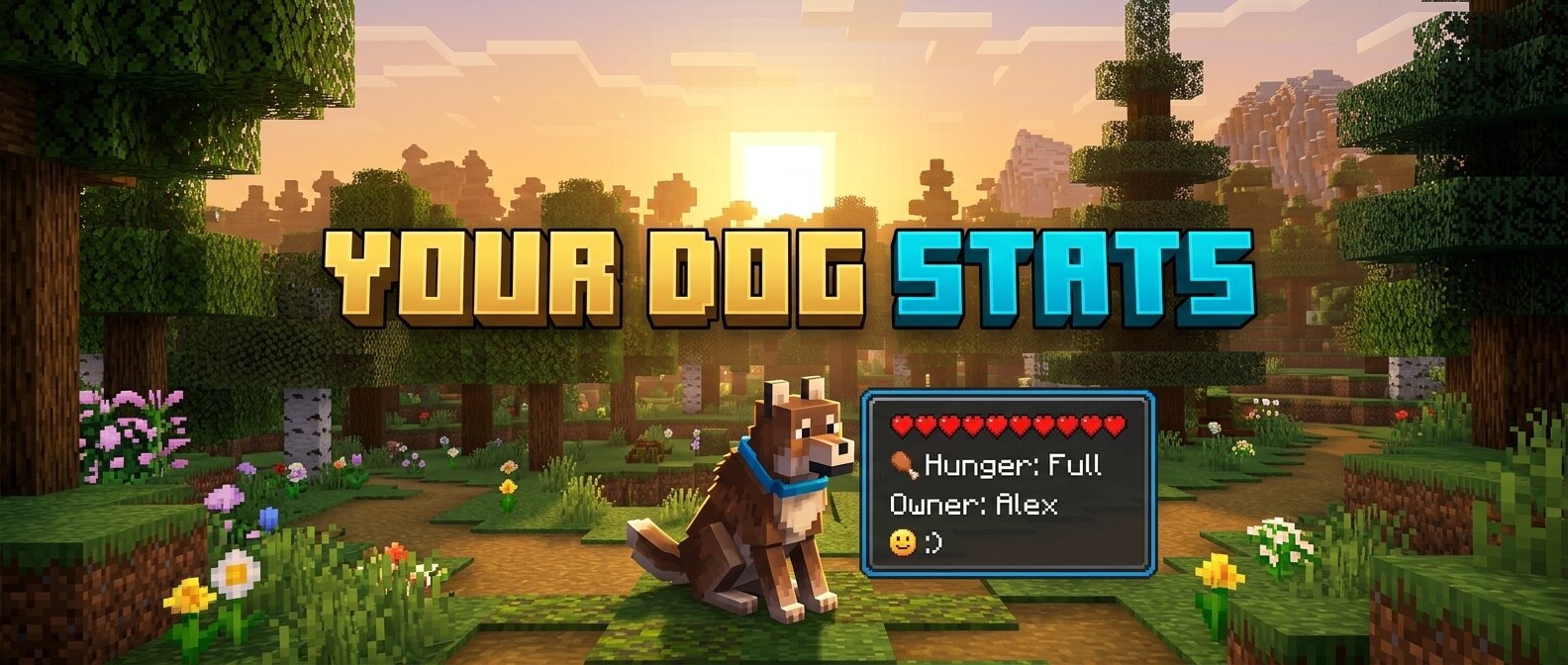
**Your Dog Stats** is a premium Minecraft mod (1.16.5 Forge) that adds an immersive, real-time HUD overlay for your tamed wolves. No more guessing how your dog is feeling or how much health they have left!
## 🐾 Features
– **Owner Tracking:** Always know who the dog belongs to.
– **Dynamic Health Bar:** A beautifully rendered health bar that changes color from Green (Healthy) to Red (Critical).
– **Hunger Status:** Simulated hunger tracking. Since wolves heal when fed, this keeps you informed of when they need a snack!
– **Mood Indicators:** Interactive emoji-based mood tracking:
– `:) Happy` – Your dog is feeling great!
– `:| Neutral` – Your dog is doing okay.
– `>:( Angry` – Something has upset your companion!
– `Relaxed` – When your dog is sitting comfortably.
– **Activity State:** See at a glance if your dog is set to `Sitting` or `Following`.
– **Age Identification:** Clearly distinguishes between `Puppies` and `Adults`.
– **Premium Aesthetics:**
– **Smooth Animations:** HUD fades in and out gracefully when you look at a dog.
– **Dynamic Borders:** The HUD border color automatically updates to match the dog’s collar color!
– **Sleek UI:** Dark, semi-transparent design that doesn’t obstruct your view.
## 🛠️ Requirements
– Minecraft 1.16.5
– Forge (36.2.20 or newer recommended)
## 📥 Installation
1. Download the latest `.jar` file.
2. Place it into your Minecraft `mods` folder.
3. Launch the game and enjoy your new companion stats!
—
*Created with ❤️ for dog lovers.*
Your Best Road
Have you ever built roads in Minecraft? And noticed how bad they look? So, I present to you my mod!
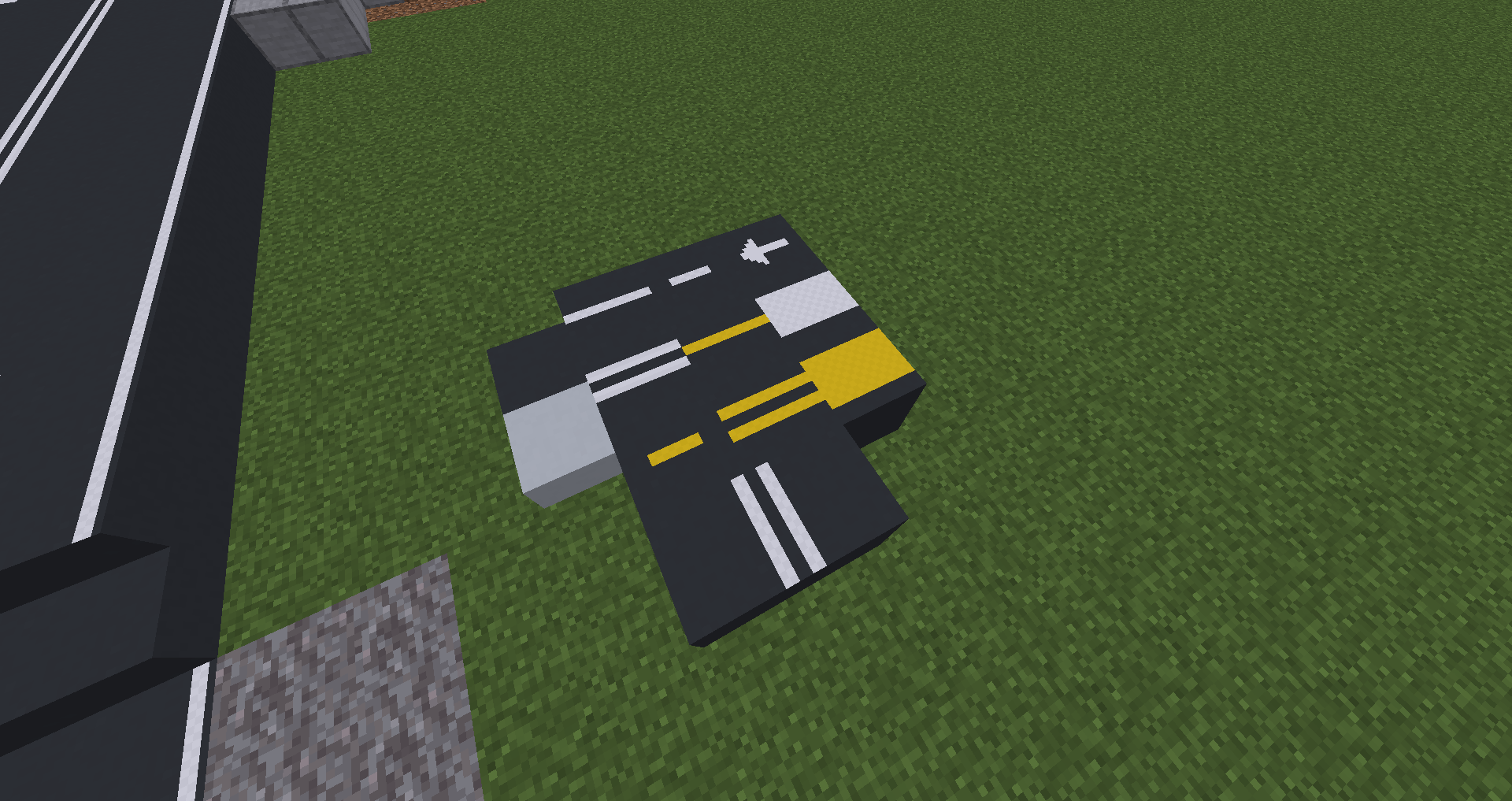
It will add realistic road blocks to Minecraft! No need suffer anymore.
adds pedestrian crossing blocks, broken line, solid line, 2solid line, sideline, pointer.
If you find any errors in the mod, you can write to the email [email protected]
Youkai’s Homecoming
[Discord](https://discord.gg/BCHNhsDMXz)
### Required Dependency:
– Farmer’s Delight
# 📖 Introduction.
Youkai’s Homecoming is an add-on mod for Farmer’s Delight. Mainly add new crops and food.
# 📦 New Additions.
## New crops:
– Red beans: Can be found in birch forests, bamboo jungle, and sunflower plains. Plantable only on clay, mud, or coarse dirt.
– Soybeans: Can be found in the dark forest, jungle, and swamp.
– Coffea: Can be found in all kinds of jungles. Plantable only on podzol, mud, or soul soil.
– Tea: Can be found in flower forest, meadow, and groves.
– Udumbara: can be found in swamp. Grows under moonlight and shrinks under sunlight. Flowers for very short period of time only under full moon.
## New Foods:
100+ food including:
– Japanese cuisine such as mochi, miso soup, tricolor dango and tobiko gunkan.
Placeable dishes and feasts
– Coffee: A new drink that has a Caffeine effect and sober effect preventing phantoms from spawning, but also prevents sleeping and drinking another sober drink.
– Tea: Each type of tea has a different effects, but all of them gives sober effect as well.
– Sake: Alcoholic drinks that makes your screen wabble but gives strong effects
– Tofu burger, bamboo water restaurant, and other foods added to the Touhou Project fan fiction.
## New Mobs:
– Lamprey: spawned in oceans and rivers except for the warm ocean. Cooked ones have night vision effect.
– Rumia: spanwed inside youkai nest. Will start a danmaku battle with you if you try to attack her.
## Other:
Plates of food can be placed, please hold shift and right-click.
#💬 Author’s statement
Future update will include more Touhou related contents, and adding some curios with interesting effects
You Shall Not Spawn!


Disable unwanted mobs from spawning using JSON configuration.
Supports Forge, Fabric, and Quilt
⭐ Features ⭐
Add the ID of the entity you want to remove in config/ysns/disabled_entities.json5 to completely remove entities from spawning.
Whether per dimension or globally (by using "!.*"), you can control the spawn rate of an entity in the config/ysns/per_dimension_entities.json5 config.
Need to disable multiple entities from 1 mod? Or is there a pattern in them? Then no need to repeat yourself!
With regular expressions, you can disable multiple entities in a single entry, disable all entities from a mod, and a lot more! Simply start the entry with "!" and then write your regular expression.
The config files have comments explaining and giving examples of what you need to add to make the mod work! If you need extra help, feel free to hop in my Discord in the #elocins-projects channel.
FAQ
- Can I use this in my modpack?
Of course! It was designed for modpack creators to remove undesired entities that may unbalance the game or create issues.
- Can I still make the entities spawn?
In the case of using the disabled_entities config, no. Once a mob is added to the blacklist, there is no way to spawn it by any method. Both natural or through eggs/commands. This mod is meant to completely remove undesired entities.
In the case of the per_dimension config, it works via chance, so at 0.0 they won’t spawn at all. But at 0.5 it’ll have a 50% chance of spawning.
Everything happens on the server’s side. Though it is recommended to leave the mod and config for clients too, for the case they want to play a single-player world. You should always leave this mod in the server pack alongside its config.
- What if I add an entity to the blacklist that was already spawned?
Spawned entities will still exist, so it’s up to you if you want to kill them or not. For this reason, it’s recommended to configure the mod before creating a world.
- What if I misspell an entity’s ID in the config file?
Nothing will happen. Adding invalid IDs won’t cause issues, but obviously, the entity won’t be blacklisted as it technically doesn’t exist. The same thing would happen if the mod isn’t present, but it will be if it’s added later and the ID is valid.
You Received a Crit from the Arrow│你受到了箭矢的暴擊
# Function│功能
Arrows fired by AI mobs with bows or crossbows will now be crit arrows.│現在AI生物透過弓或弩所射出的箭矢都會是暴擊箭矢。
You Need Hydration
-You Need Hydration is a drinking mod centered around visual custom configuration, elevating compatibility with other mods and allowing you to create your own exclusive setup.
-All configurations support datapack import and export, and are fully compatible with global datapack mods,Paxi,and OpenLoader.
-It introduces dirty and clean water mechanics—dirty water bowls and bottles can be purified using a heat source.
Although the mod currently features only a few simple items, it will be gradually expanded in the future with more drinking-related elements.
Mod code is written by AI.
You May Rest Now
[Report Issues](https://github.com/JamCoreModding/you-may-rest-now) • [Chat on Discord](https://discord.jamalam.tech) • [CurseForge](https://curseforge.com/minecraft/mc-mods/you-may-rest-now) • [Modrinth](https://modrinth.com/mod/you-may-rest-now)
You May Rest Now modifies the vanilla ‘You may not rest now, there are monsters nearby’ mechanic to
allow sleeping, assuming that any nearby monsters can not reach you. It it also configurable to
completely disable the mechanic.
## How to Configure
You May Rest Now can be configured via an in-game configuration screen which can be accessed in Mod
Menu (Fabric/Quilt) or the mods screen (Forge/NeoForge).
There are 3 options for the mode:
1. `VANILLA`: use the default vanilla behavior (only able to sleep if no monsters are nearby)
2. `DENY_IF_PATHFINDABLE`: allow sleeping only if nearby monsters cannot reach you.
3. `DISABLE`: always allow sleeping no matter what monsters are nearby.
[](https://bisecthosting.com/jamalam)
You Died
## You Died
This mod adds a Dark Souls inspired death screen.

#### Bugs/Ideas/Requests?
Post bugs/ideas/requests on my Github issue tracker.
#### Modpacks?
You are free to use this mod in modpacks.
You Die You Lose a Heart (Discontinued)
You Die You Lose a Heart
Whenever you die you lose a heart, if you lose all of them you will be forced to go into spectator mode. This is similar to normal hardcore in Minecraft but somewhat forgiving.
Limit the maximum amount of hearts with /gamerule maxHearts (by default set to 20 hearts) and whether players can even get hearts with /gamerule canRestoreHearts true/false (by default set to true)

You can replenish hearts by eating enchanted golden apples. This gives enchanted golden apples actual use outside of pvp.

