World Remembers Living Legends
**World Remembers: Living Legends** makes your Minecraft world feel like it has a memory.
Instead of being just another waypoint mod, Living Legends watches what happens in your world and turns important moments into persistent named places: battlefields, death sites, boss arenas, pet memorials, first discoveries, strange landmarks, and other locations shaped by your story.
Every survival world, SMP, adventure map, or modpack can slowly become its own legend.
## What does it do?
As players explore, fight, die, discover, travel, and survive, the mod can create remembered places from those events.
A dangerous cave where players keep dying may become a grim death site.
A field filled with battles may earn its own name.
The place where a boss fell can become a legendary site.
A loyal pet can leave behind a warm memorial.
A strange structure, biome, portal, or landmark can become part of the world’s history.
These places can be discovered, viewed in the **World Journal**, shown with atmospheric title overlays, and optionally displayed through supported map mods.
## Main features
– Automatically creates named places from meaningful world events
– Adds a **World Journal** item and GUI for browsing remembered locations
– Shows cinematic location titles when entering discovered places
– Sends atmospheric lore-style chat notifications when new places are created
– Supports many place types, including:
– Death Sites
– Battlefields
– Slaughter Fields
– First Discoveries
– Boss Sites
– Pet Memorials
– Named Mob Memorials
– General Landmarks
## Choosing your naming style
Living Legends lets you choose the tone of generated place names through the mod config.
The main option is `naming_style`.
Example value: `naming_style = “vanilla_adventure”`
Available styles:
– `vanilla_adventure` – classic Minecraft adventure names, good as the default choice
– `neutral_server` – clear and simple names for public servers
– `dark_fantasy` – grim, mysterious, heavier fantasy names
– `cozy_survival` – warmer names for relaxed survival worlds
– `epic_mythology` – legendary, mythic, chronicle-like names
– `funny_community` – lighter names with mild humor for SMP communities
After changing the style, reload the server or restart the game so the new setting is applied.
Important: already existing places keep their current names. The selected style affects newly generated places. If you want old places to use the new style too, use the mod commands to regenerate names.
– Supports commands for listing, inspecting, creating, renaming, deleting, restoring, teleporting, exporting, and importing places
– Includes configurable naming, spacing, notifications, discovery behavior, and generation rules
– Designed for both singleplayer and servers
– Built with data-driven compatibility support for modded worlds
## Map compatibility
Living Legends can integrate with popular map mods while keeping its own identity as a world-memory system.
### JourneyMap
JourneyMap has the richest integration:
– Discovered places can appear as personal fantasy-style map labels
– Labels are shown only for places discovered by that player
– Labels use atmospheric visual themes based on the type of place
– The World Journal can set a personal destination marker
– Destination markers can disappear automatically when you approach them
– Renamed or deleted places update related map markers
### Xaero and FTB Chunks
Xaero and FTB Chunks are supported as destination providers:
– Set a personal destination from the World Journal
– Remove the destination when you no longer need it
– Use map markers without cluttering the map with permanent labels
## Content mod compatibility in 1.1.0
Version **1.1.0** adds a large built-in compatibility foundation for modded worlds.
Supported compatibility data includes:
– The Aether
– Deeper and Darker
– Bosses of Mass Destruction
– Terralith
– Incendium
– Dungeons and Taverns
– When Dungeons Arise
– Towns and Towers
– Regions Unexplored
– Explorify
– Illager Invasion
Additional loader-specific compatibility includes:
– L_Ender’s Cataclysm
– The Twilight Forest
– BetterEnd
– BetterNether
– AdventureZ
– VoidZ
– Mythic Metals
Compatibility entries are optional data hints. Missing mods do not become required dependencies.
## Why use it?
Minecraft worlds naturally create stories, but the game usually forgets them.
Living Legends helps preserve those stories. It gives names to the places where things happened, making exploration feel more personal, atmospheric, and connected to the history of your world.
It is especially useful for:
– Survival worlds
– SMP servers
– Roleplay communities
– Adventure-focused modpacks
– Fantasy and exploration modpacks
– Players who want their world to feel alive and remembered
## Supported versions
– Minecraft 1.21.1
– Fabric
– NeoForge
## Version 1.1.0 highlight
This release expands Living Legends with major map compatibility, a large content compatibility pass, improved naming polish, updated public documentation, and fixes for repeated generated-name issues.
More compatibility packs, polish, and future version support are planned.
World Pregen
# 🗺️ World Pregen
**World Pregen** is a datapack that allows you to automatically pre-generates a map and prevents lag caused by generation while you are playing.
### Commands to know
– ▶️ `/function wp:[dimension]/[size]` > Start pre-generation
– Dimension name: overworld, the_end, the_nether
– Size options: 2k, 4k, 6k, 8k, 10k, 20k (2k → 1000/-1000)
– ⏸️ `/function wp:pause` > Pause pre-generatino
World Pre Generator
## Version 5.X.X
For older versions of the mod, check the wiki.
This Mod can pre generate the Minecraft dimensions per command.
The Mod is only needed on the server side, but can also be used on the client side.
—
You need a server to play with friends? You don’t know how to set up one? Just rent an already configured server!

Click on the picture above, select a plan (with recommended at least 6 GB),
use my code **agent** to get **25%** off your first month and enjoy playing with your friends!
—
## Support
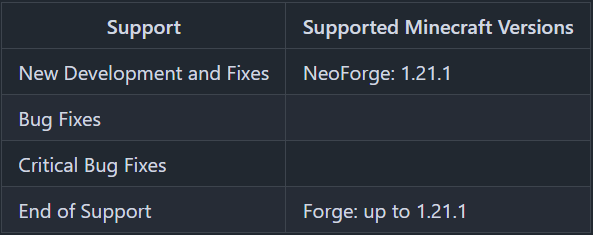
Minecraft versions, for which the mod is not released, are not supported.
You can find a text version here.
## Hints
The pre generation tasks are executed one after the other.
The pre generations are continued after restarts.
Chunks already generated are skipped on pre-generation, if the forced flag is not true.
If you run semi-parallel pre generation, you should set “max-tick-time” in the “server.properties”-file to -1 to prevent crashes, because the tick time gets too long.
In semi-parallel pre generation mode, multiple tasks for pre generation are started in parallel, but the execution is done the Minecraft way. As of 1.20.1, this means, that only one chunk can be generated at a time.
## Server Config
The config file can be found in the “serverconfig” folder in the “world” folder and is named “world_pre_generator-server.toml”. The name of the world folder is set for servers in the “server.properties” file and for clients it is the name of the world/save game in the world list, and it can be found in the “saves” folder in the “.minecraft” folder.
* **send_feedback**
Shall a pre generation feedback send to all online players?
* **generation**
Parameters for generation
* **type**
Type of generation
SERIAL: Every chunk one after another is generated.
SEMI_PARALLEL: Multiple chunk generation tasks are created, but the generation is still serial (speed up the chunk generation).
* **semi_parallel_task_count**
How many chunk generation tasks shall be start in parallel?
If the value is “0”, the number of processor cores is used.
* **delays**
Delays of the print and save tasks
* **print**
Time between 2 status prints
* **save**
Time between 2 saving events
## Commands
* `/pregen list` – Lists all running pre generation tasks.
* `/pregen gen start []` – Creates a pre generation task with the specified centre, radius and dimension. Optional, the force flag (true, false) can be set. If it is set to true, all chunks are loaded. If it is set to false, already generated chunks are skipped. If the force flag is absent, it is set to false.
* **block**: The center coordinates and the radius are in blocks.
If you want to generate a 4000×4000 (2000 in the positive and negative direction) from the center of the world, the command would be:
`/pregen gen minecraft:overworld start block 0 0 2000`
If you want to generate a 4002×4002 (2001 in the positive and negative direction) from x = 100, z = 150 of the world, the command would be:
`/pregen gen minecraft:overworld start block 100 150 2001`
Hint: In the pregeneration list it will show up, with the following center and radius data, because the block data are calculated to chunk data and back:
x = “round down”(100 / 16) * 16 = 96
z = “round down”(150 / 16) * 16 = 144
radius = “round up”(2001 / 16) * 16 = 2016
* **chunk**: The center coordinates and the radius are in chunks.
If you want to generate a 4000×4000 (2000 in the positive and negative direction) from the center of the world, the command would be:
`/pregen gen minecraft:overworld start chunk 0 0 125`
If you want to generate a 4002×4002 (2001 in the positive and negative direction) from x = 100, z = 150 of the world.
“chunk x” = “round down”(100 / 16) = 6
“chunk z” = “round down”(150 / 16) = 9
“chunk radius” = “round up”(2001 / 16) = 126
The command would be:
`/pregen gen minecraft:overworld start chunk 6 9 126`
* `/pregen gen resume` – Resumes the pre generation task of the dimension.
* `/pregen gen pause` – Pauses the pre generation task of the dimension.
* `/pregen gen cancel` – Cancels the pre generation task of the dimension.
* `/pregen clear` – Cancels all pre generation tasks.
* `/pregen sendFeedback` – Shows, if the progression feedback is enabled or disabled.
* `/pregen sendFeedback ` – Enables or disables progression feedback depending on isFeedbackEnabled. Generation start and finish feedback are not affected of that.
## Progression State
The progress state computed is in chunks.
You get the following information in the generation messages: “A B/C (D%) E chunks/s”
* **Dimension (A)**
* **Chunk generated (B)**
* **Total chunks to generate (C)**
* **Percentage of chunks for which generation is finished (D)**
* **Rate of Chunks per second generated between this and the last message (E)**
—
Thanks for the logo to Muse31.
You can use this mod in non-commercial modpacks without asking.
You can find more mods from me on CurseForge and Modrinth.

World Play Time
#

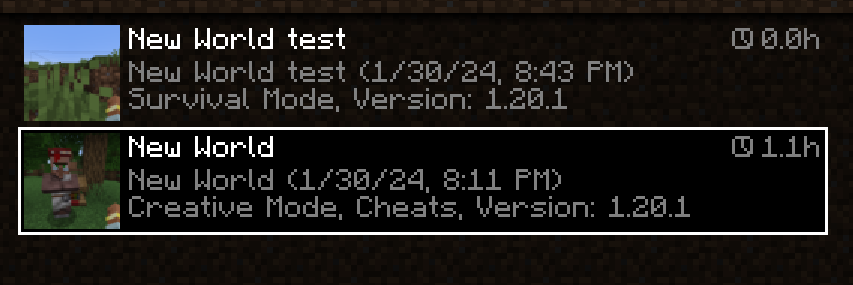
*World Play Time* is a mod that displays the *amount of time* you’ve spent on a given Minecraft world in the world selection screen, in the top-right corner of each world entry.
It does this by checking the “Play Time” statistic for the world, so playtime will be displayed for existing worlds that were created without the mod as well.
The mod is *client-side* only, and does nothing on the server-side.
#

Would you like to support me, or the mod?
Here is how you can do that:
– Donate on **Ko-Fi**!
– Use my promo code *khajiitos* on **BisectHosting** for 25% off!
– Contribute code, let me know of issues or add a star on the mod’s **GitHub page**!
*Thanks a lot!*
#

Whether you’re looking for a server for your modpack, or just to mess around with your friends – **BisectHosting** is one of the most reliable and affordable options you can get! It makes installing modpacks just a couple of clicks. 25% off with code ***khajiitos***!

World of Wonder

World of Wonder
—
**World of Wonder** adds a new biome, the Dandelion Fields. This mystical biome has giant dandelions, as well as a new creature: the Dandy Lion!
Dande Lions are very similar to wolves. They can be tamed with small flowers, bred with larger flowers, and healed with bonemeal!
—

World of Lush Caves
IMPORTANT: Click the world-type button until you see “generator.wolc”,
otherwise it WILL NOT WORK.
This is a Minecraft Datapack that replaces the normal Minecraft worldgen with a lush cave-only worldgen.
Sometimes you will spawn on Bedrock if there’s no air beneath you to teleport you to.
It was partially made with my (see github credits) custom world generator:
https://github.com/c3l3rN0/MC-Biome-Selector
World of Flags
## **WORLD OF FLAGS**
This is a decorative mod that adds national symbols of various countries to the game. With this mod, you can add more details to your city. The mod includes numerous items. The list of countries will be updated over time. This mod is available in English, Russian, Spanish (Mexico), German. Now in this mod are available flags of Russia, Germany, Austria, Netherlands, EU and Ukraine.
## **CONTENT**
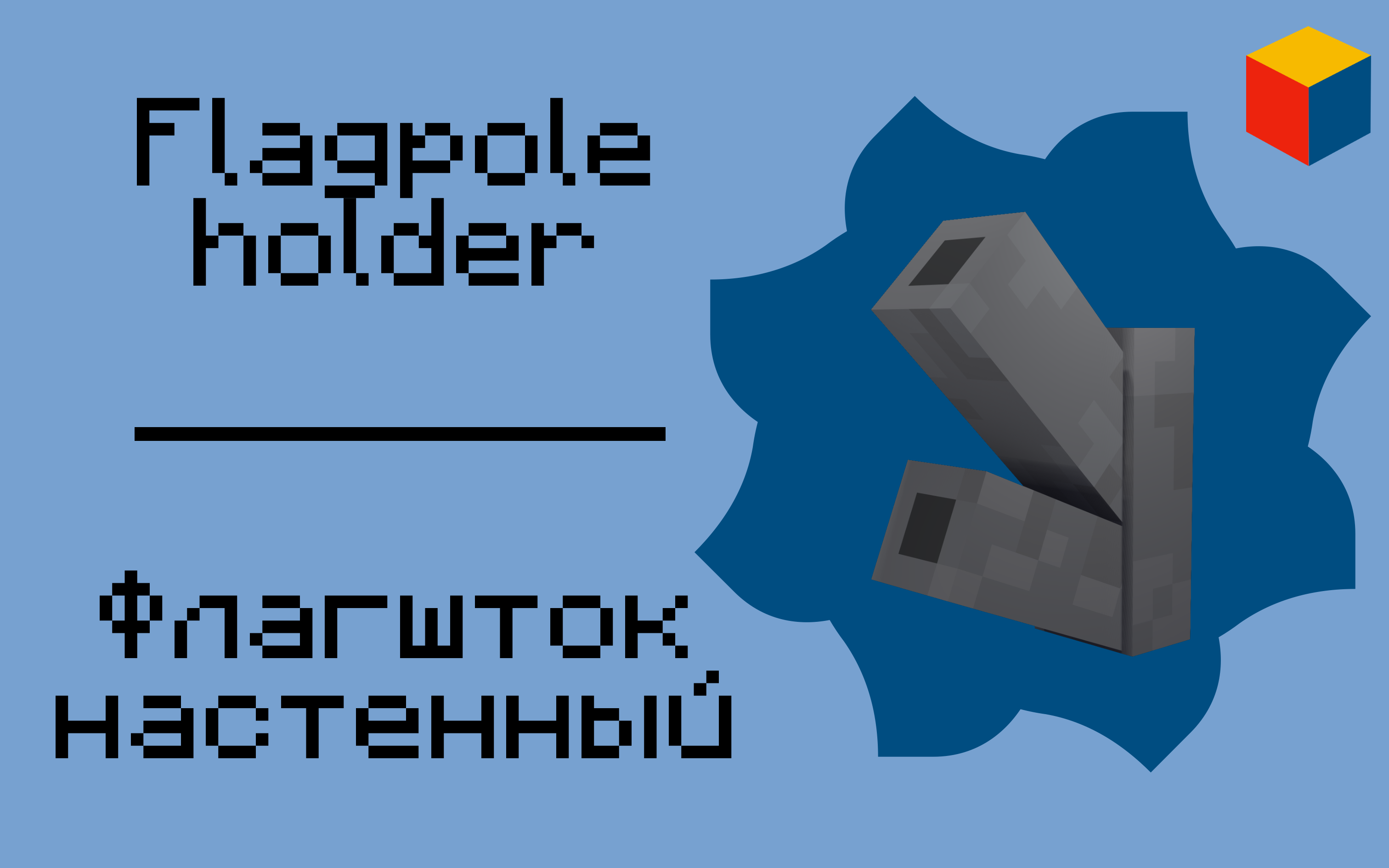
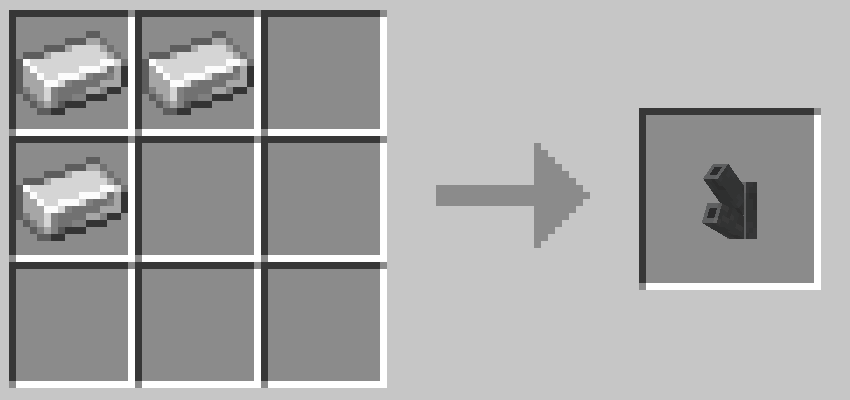
The mod adds a wall-mounted flagpole to the game. It attaches to the wall, and by right-clicking on it, the flag will be placed at the top. To place the flag at the bottom, you need to left-click on the flagpole. For this to work, you need to switch to survival mode.
The mod also adds passports from different countries.
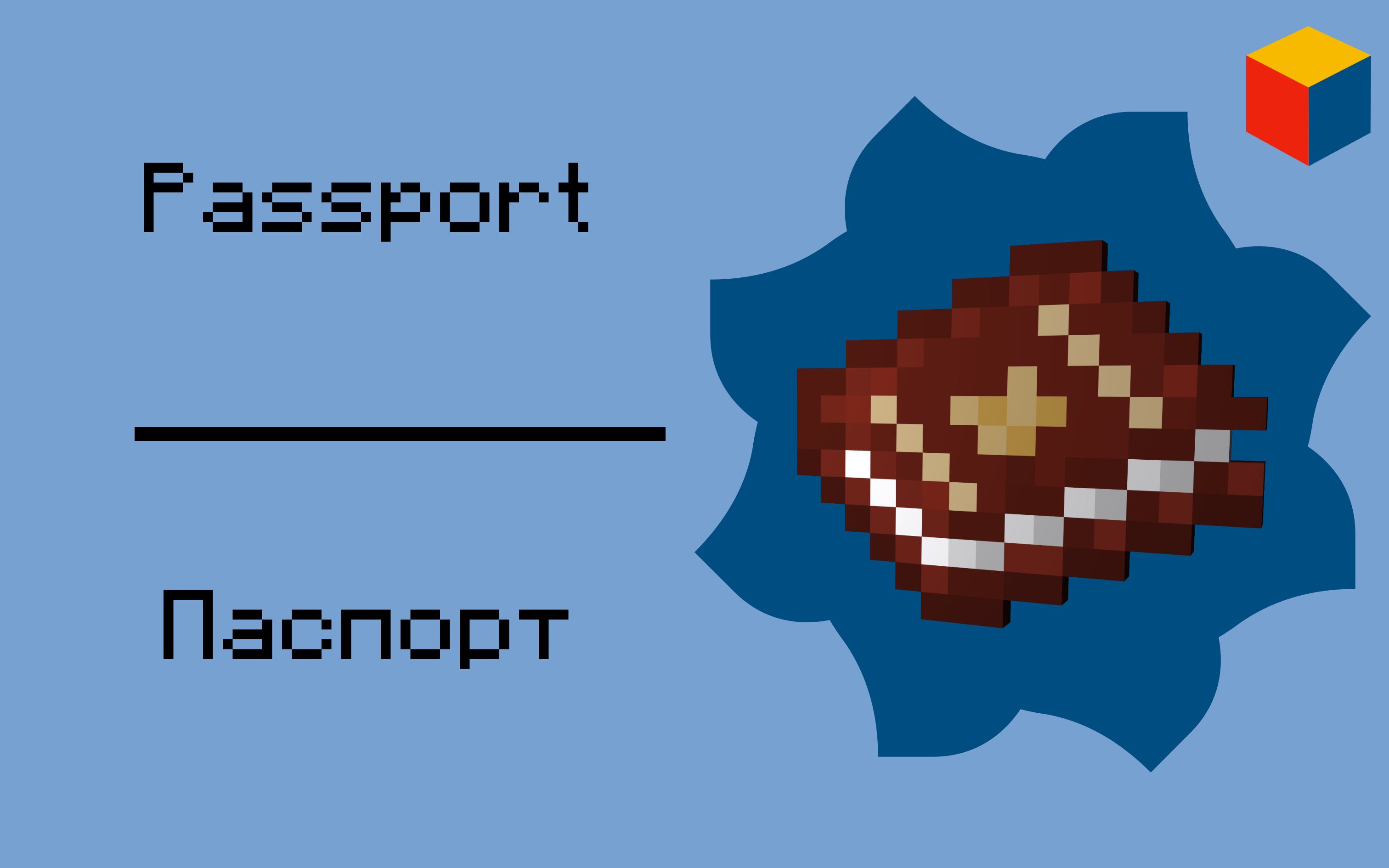
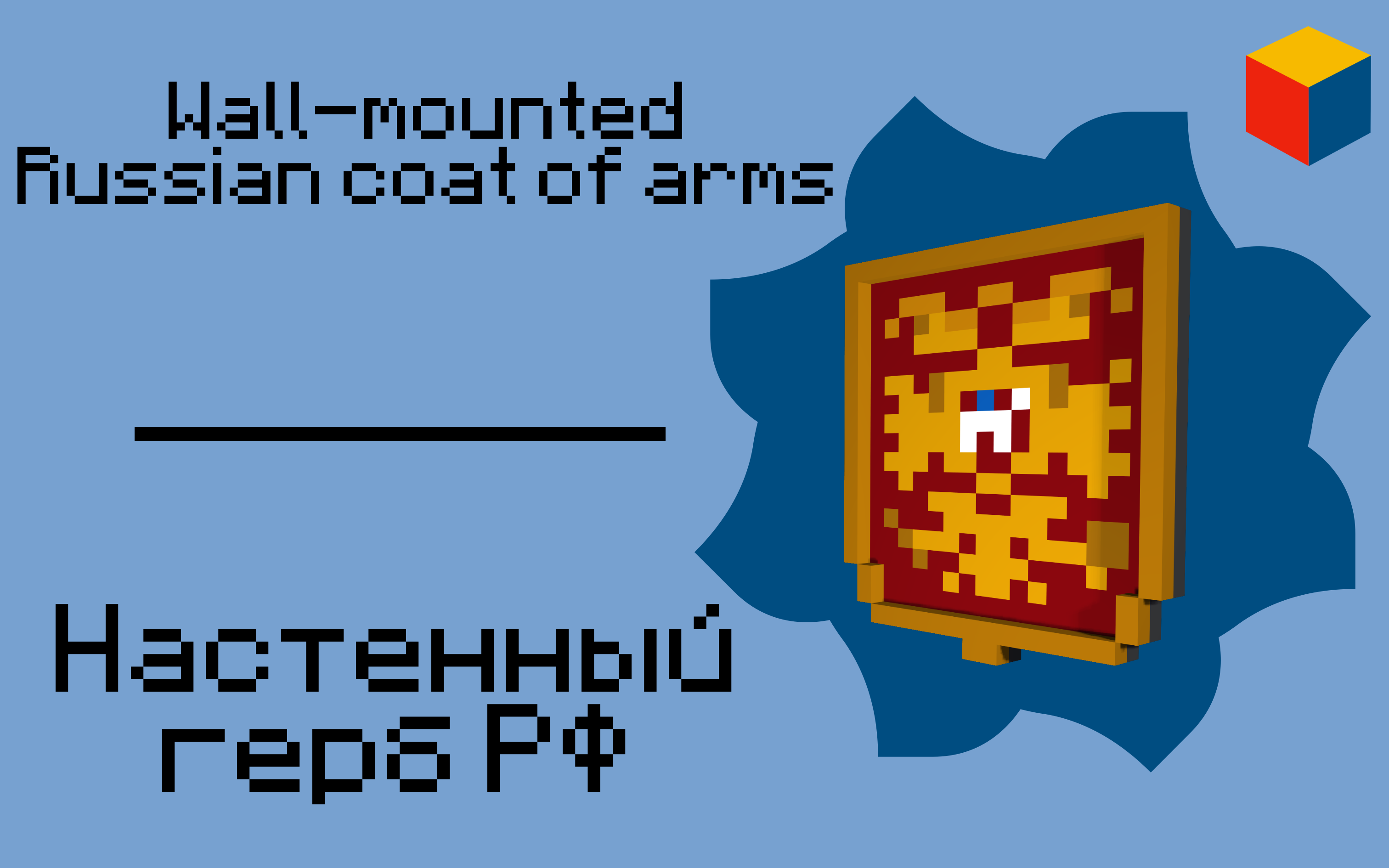
For every country will be added special item or block. For every country this item will be different. On photo example of special item for Russia.
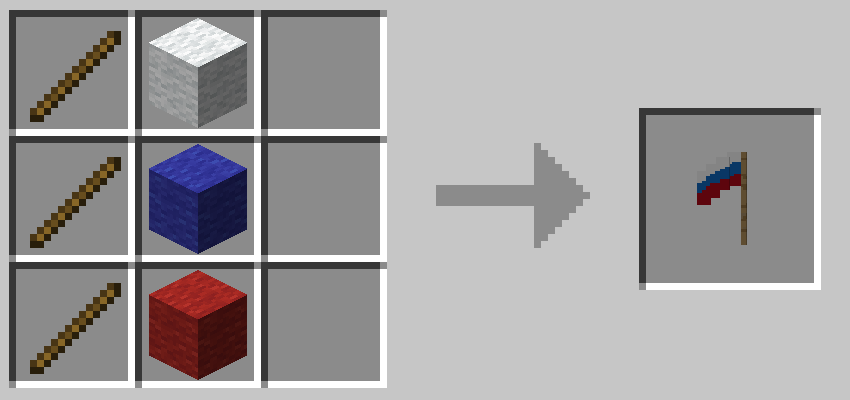
## **CRAFTS**
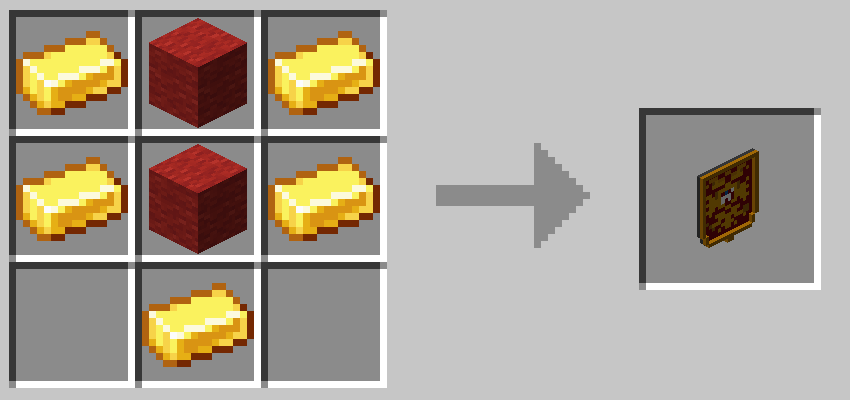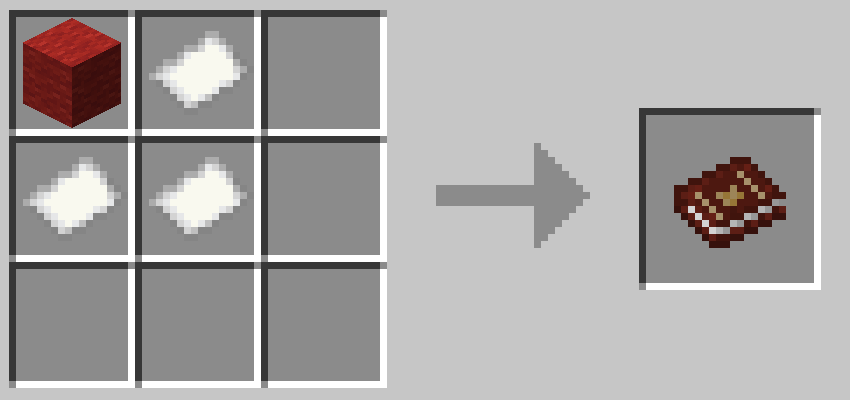
World Folders
# World Folders
World Folders is a mod that lets you neatly sort your worlds into in-game folders!
## Description
To help make navigating through your worlds list easier, this mod lets you create folders and put mods into them. You can create folders with names and colors and put worlds into them through the Edit World screen.
When not searching for a specific world, you will only see the list of folders and can click on them to see their contents.
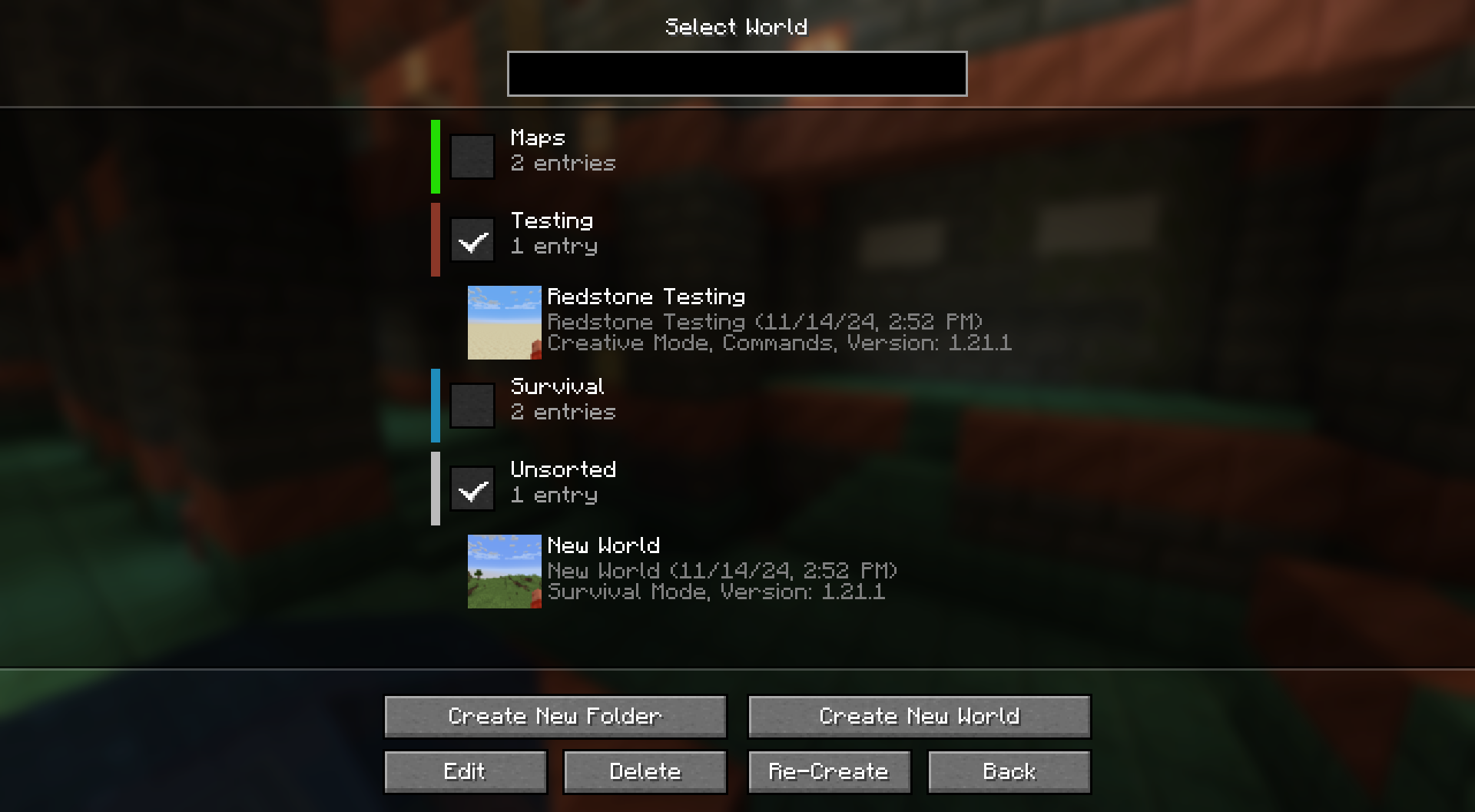
These folders only exist in-game, your worlds are not actually moved into folders on the system level. This means you can add/remove the mod without any issues.
World Flags




Disclaimer: The Banners are selected on how good they are able to be re-created ingame. The Selection of Flags holds no political meaning. The eventual Goal is to add every flag to this Datapack to have a collection available for everyone.
This Datapack adds more than 50 handy Recipes to quickly craft Flags of different Countries.
## 📃 List of All Recipes
Europe
### Armenia 🇦🇲
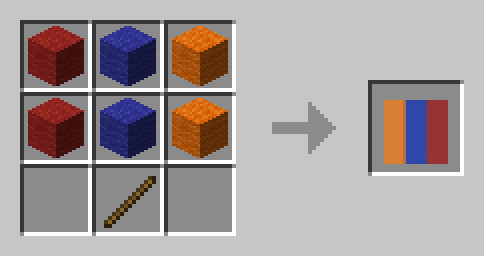
### Austria 🇦🇹
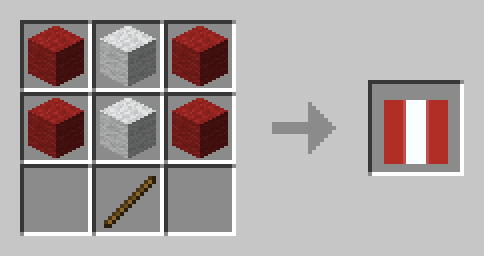
### Bulgaria 🇧🇬
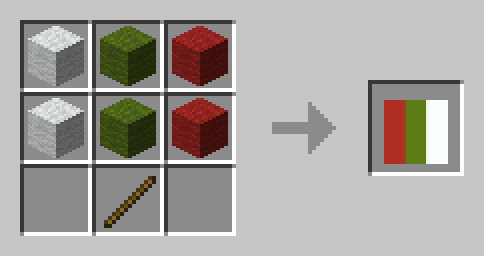
### Belarus 🇧🇾
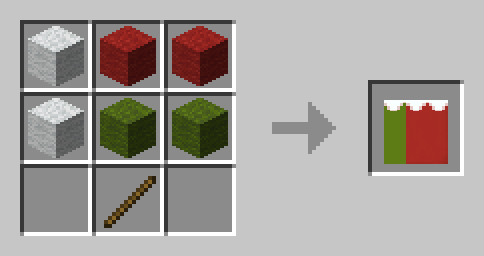
### Belgium 🇧🇪
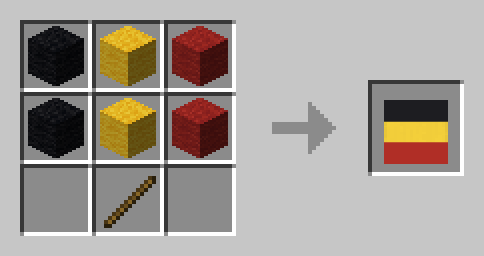
### Czechia 🇨🇿
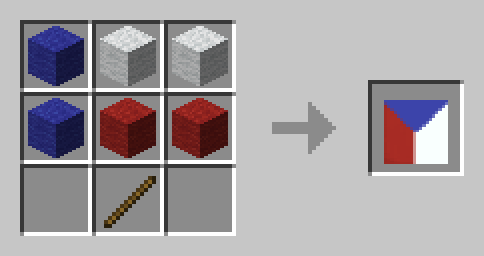
### Denmark 🇩🇰
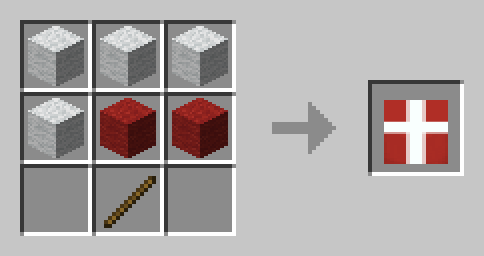
### England 🏴
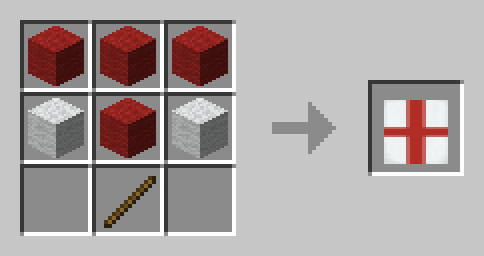
### Estonia 🇪🇪
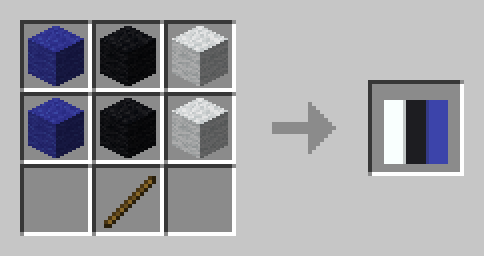
### Finland 🇫🇮
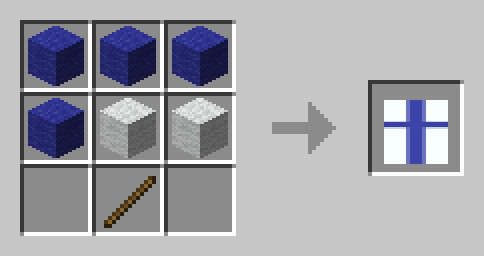
### France 🇫🇷
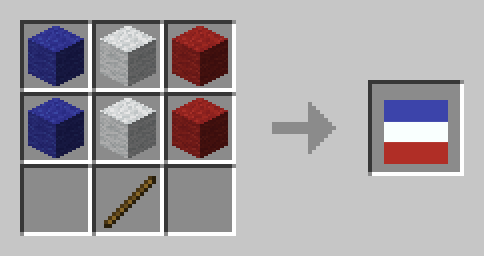
### Germany 🇩🇪
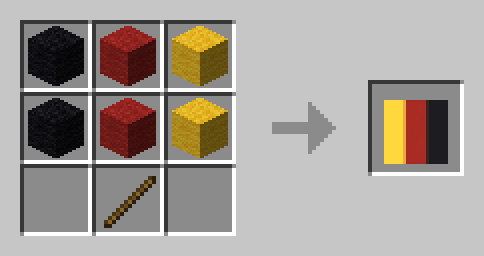
### Greece 🇬🇷
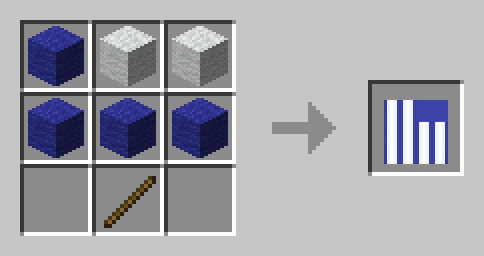
### Ireland 🇮🇪
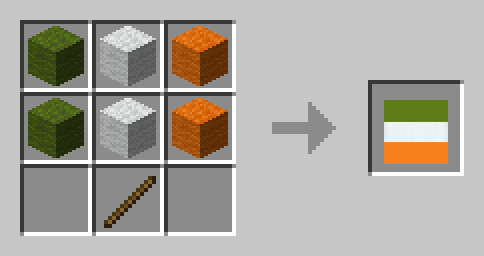
### Italy 🇮🇹
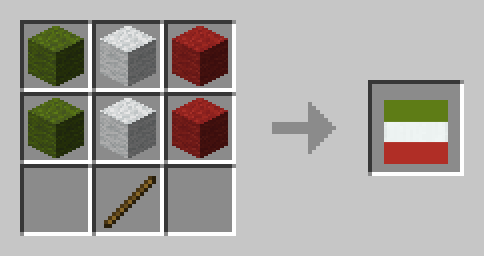
### Liechtenstein 🇱🇮
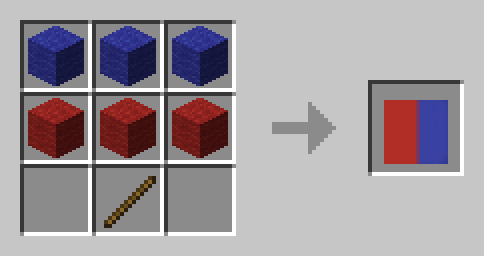
### Luxembourg 🇱🇺
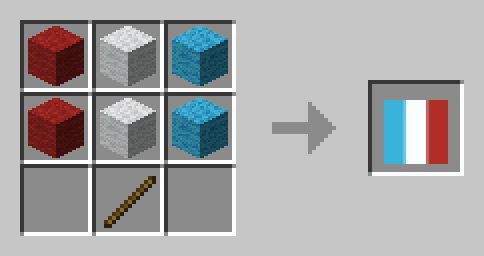
### North Macedonia 🇲🇰
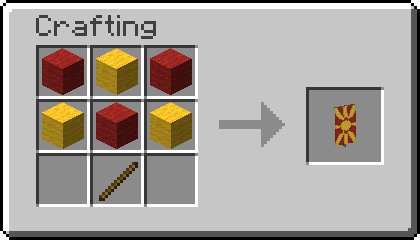
### Poland 🇵🇱
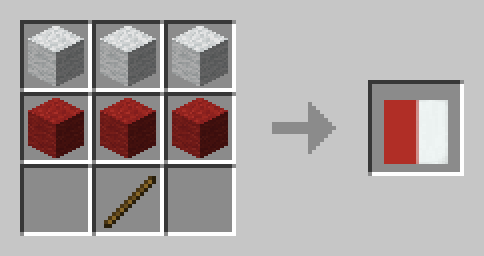
### Romania 🇷🇴
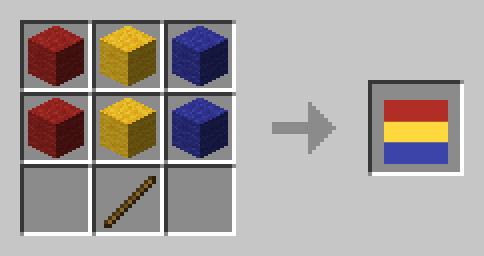
### Russia 🇷🇺
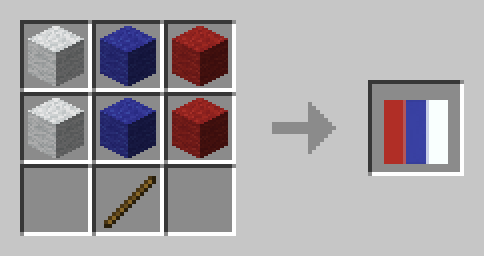
### Scotland 🏴
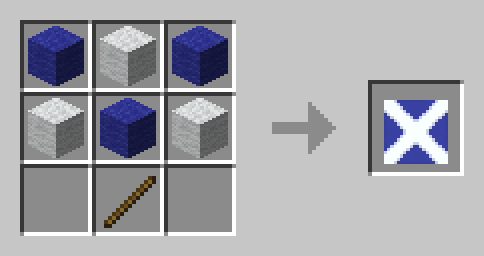
### Spain 🇪🇸
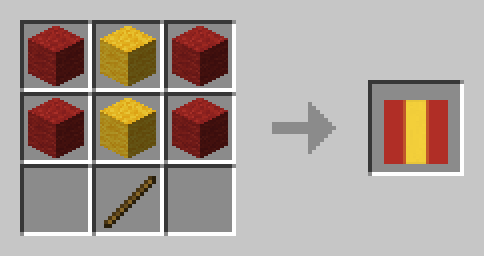
### Sweden 🇸🇪
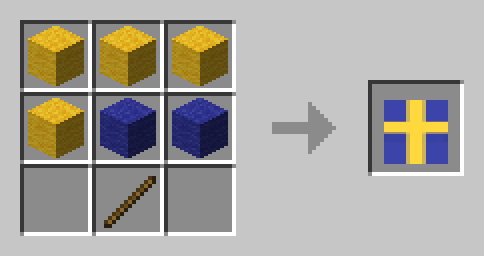
### Switzerland 🇨🇭
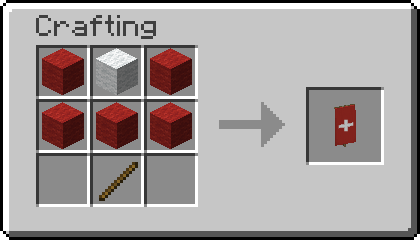
### United Kingdom 🇬🇧
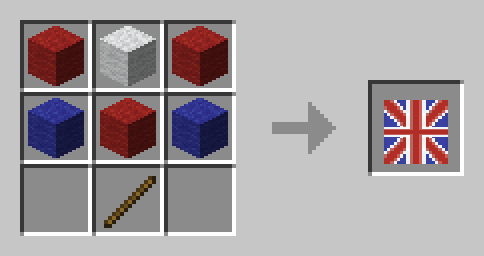
### Ukraine 🇺🇦
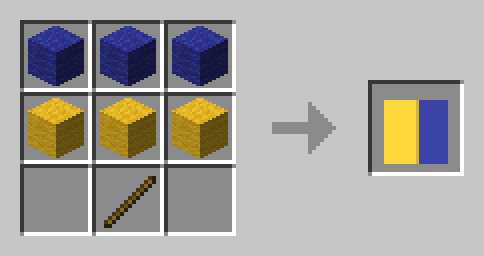
North America
### Bahamas 🇧🇸
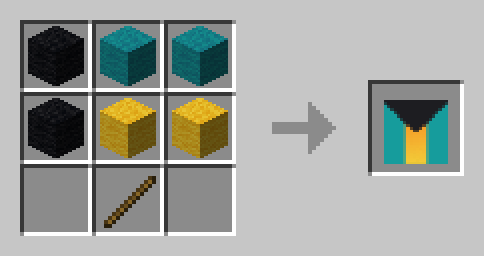
### Canada 🇨🇦
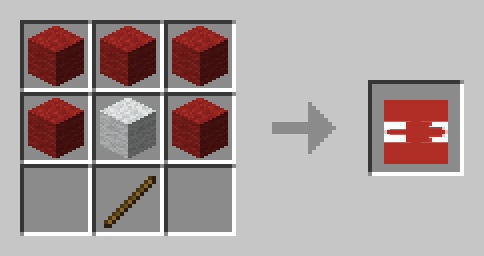
### Cuba 🇨🇺
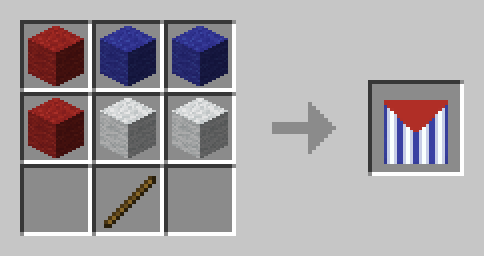
### Jamaica 🇯🇲
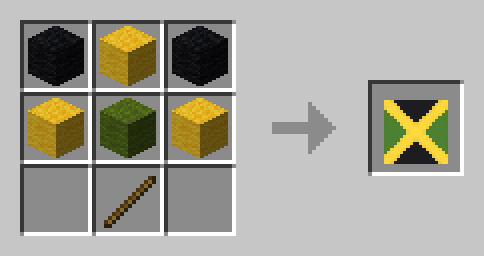
### Puerto Rico 🇵🇷
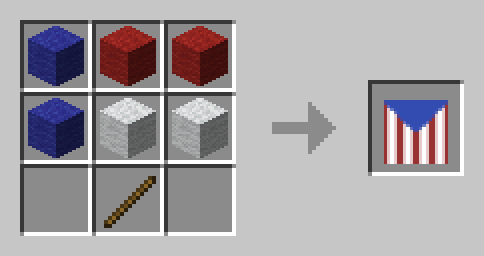
### United States 🇺🇸
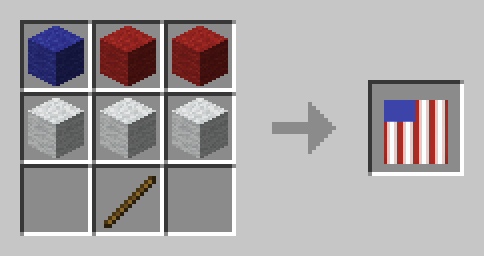
South America
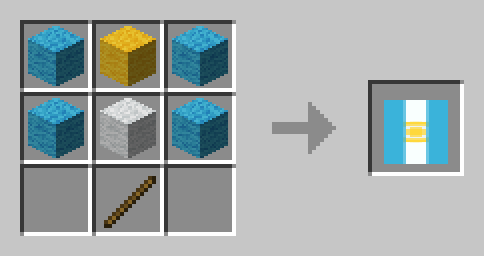
### Argentina 🇦🇷
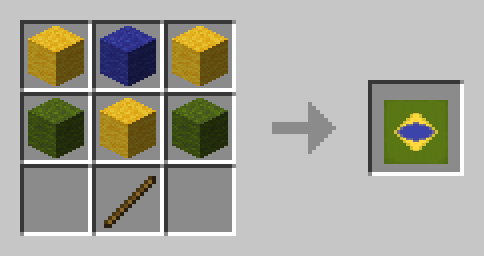
### Brazil 🇧🇷
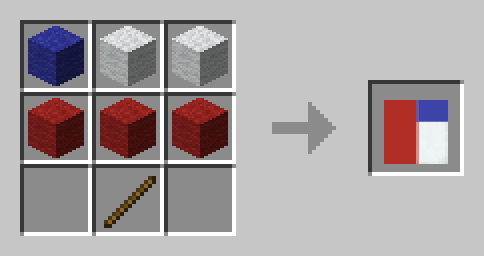
### Chile 🇨🇱
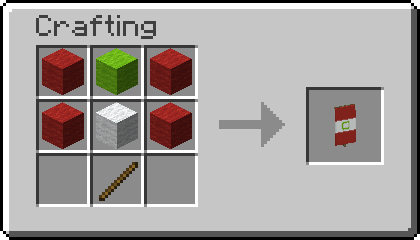
### Peru
Asia
### Azerbaijan 🇦🇿
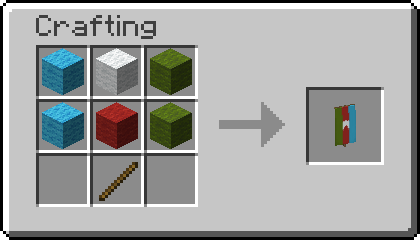
### Bangladesh 🇧🇩
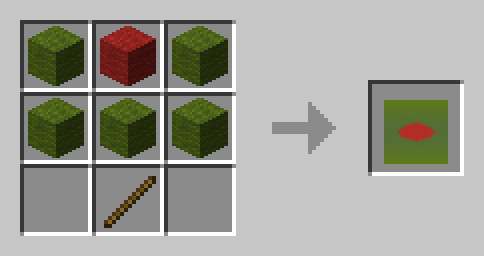
### Bahrain 🇧🇭
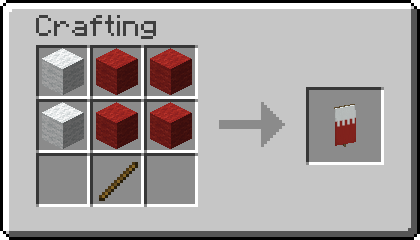
### Bhutan 🇧🇹
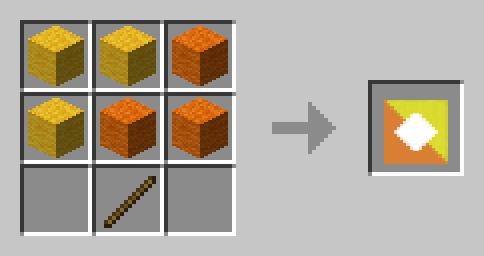
### India 🇮🇳
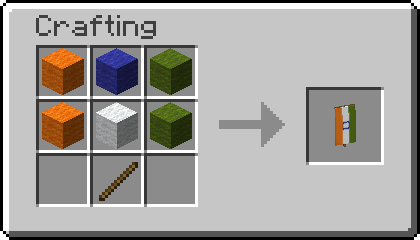
### Indonesia 🇮🇩
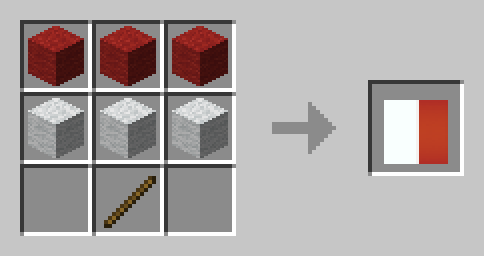
### Iran 🇮🇷
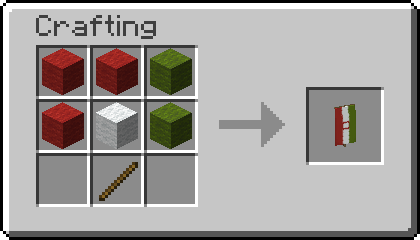
### Iraq 🇮🇶
It is currently mirrored even though not protocol, might be changed eventually.
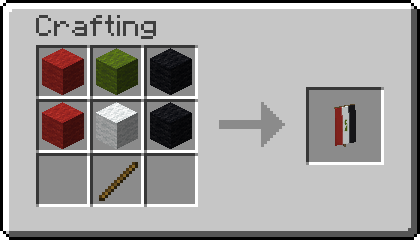
### Japan 🇯🇵
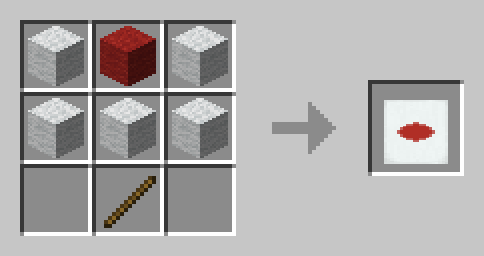
### Pakistan 🇵🇰
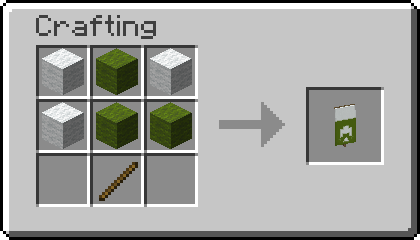
### Philippines 🇵🇭
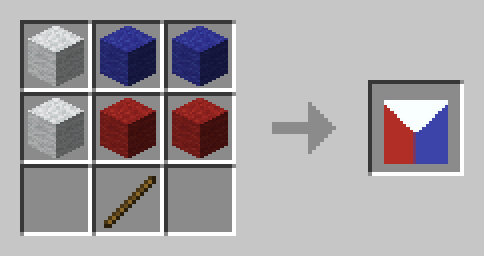
### Russia 🇷🇺

### Syria 🇸🇾
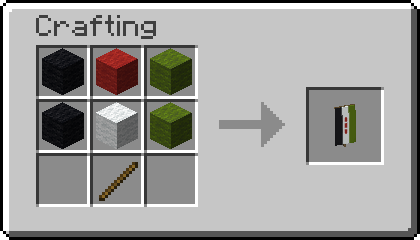
### Yemen 🇾🇪
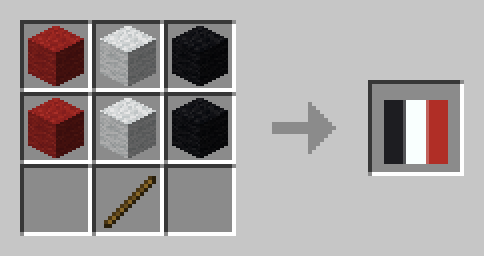
Africa
### Algeria 🇩🇿
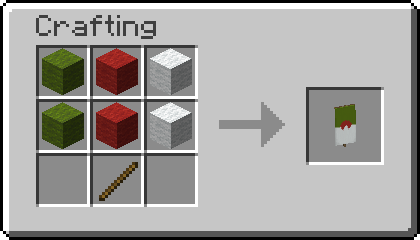
### Benin 🇧🇯
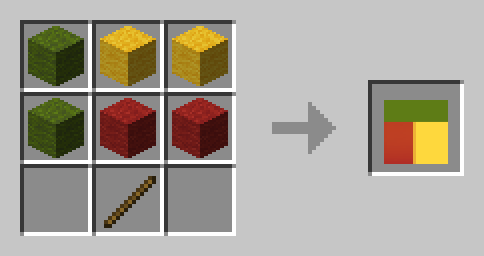
### Burundi 🇧🇮
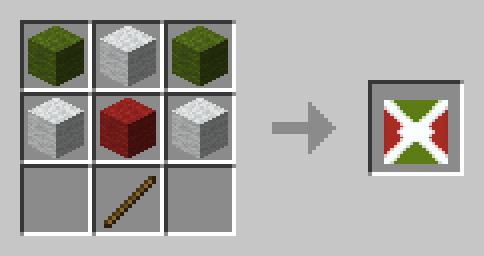
### Djibouti 🇩🇯
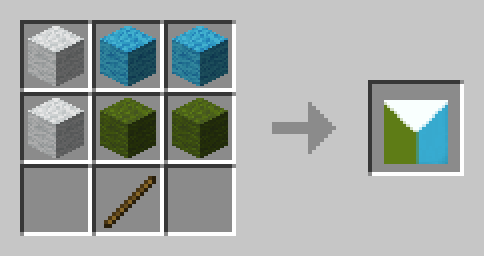
### Egypt 🇪🇬
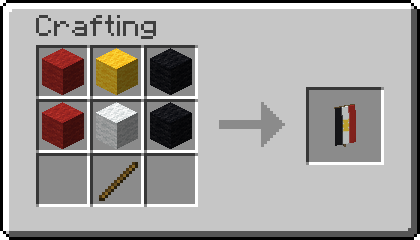
### Gabon 🇬🇦
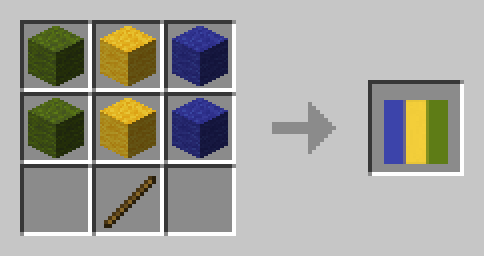
### Guinea-Bissau 🇬🇼
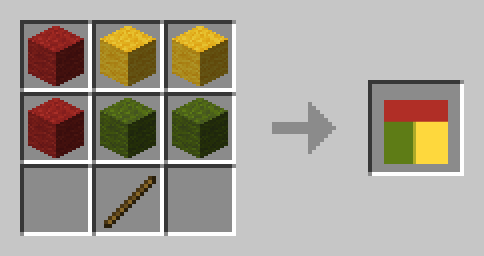
### Madagascar 🇲🇬
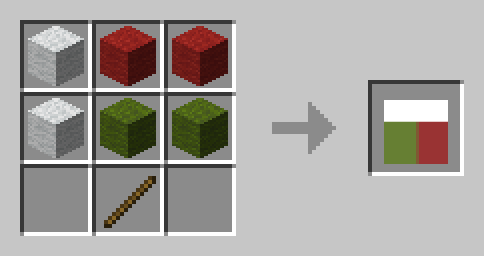
### Niger 🇳🇪
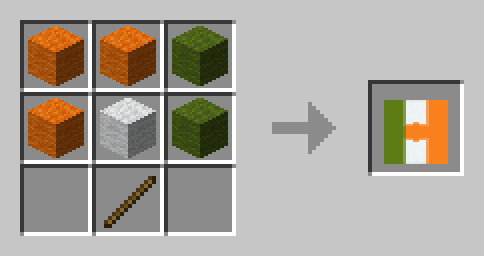
### Nigeria 🇳🇬
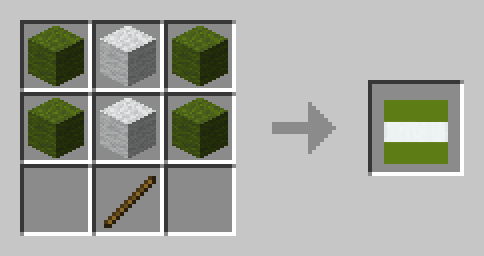
### Sierra Leone 🇸🇱
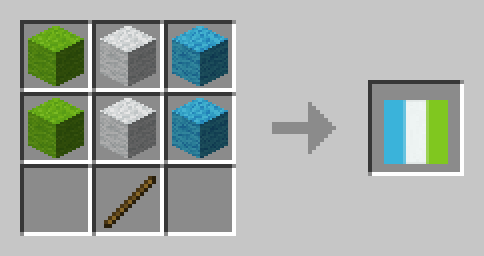
Oceania
### Palau 🇵🇼
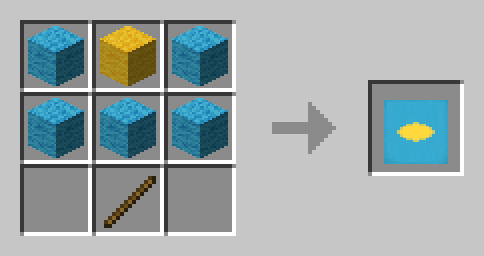
## 📗 How to add all Recipes to the Recipe Book?
### Without Commands
Craft the **World Flags Knowledge Book**. Right click it to consume it and gain all the recipes without a command.
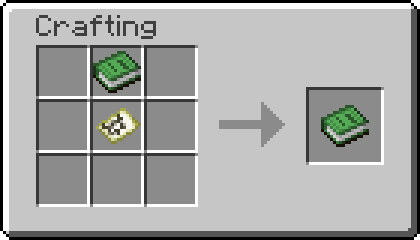
To craft Knowledge Books, you will need “Craftable Knowledge Book”.
### With Commands
You can add all recipes to the Recipe Book by using the command `/function world_flags:unlock_all_recipes`. If you want to give all players all Recipes, use `/execute as @a run function world_flags:unlock_all_recipes` instead.
## 🤝 Special Thanks & Attributions
Thanks to all the Members of Planet Minecraft who inspired many of the more complex Banner Designs!
## 🛠️ Installation
### Datapack Installation Guide
Copy the .zip archive into the “.minecraft/saves/__yourworldname__/datapacks” folder, where __yourworldname__ is the name of your world.
### Mod installation Guide
Copy the .jar archive into the folder your Mod Loader of choice provides.
## ❗Issues and Suggestions
Please report issues on My Discord.
## 🔁 Optional Dependencies
– Craftable Knowledge Book (recommended)
World Expansion
**🧊The project is frozen!🧊**
# World Expansion
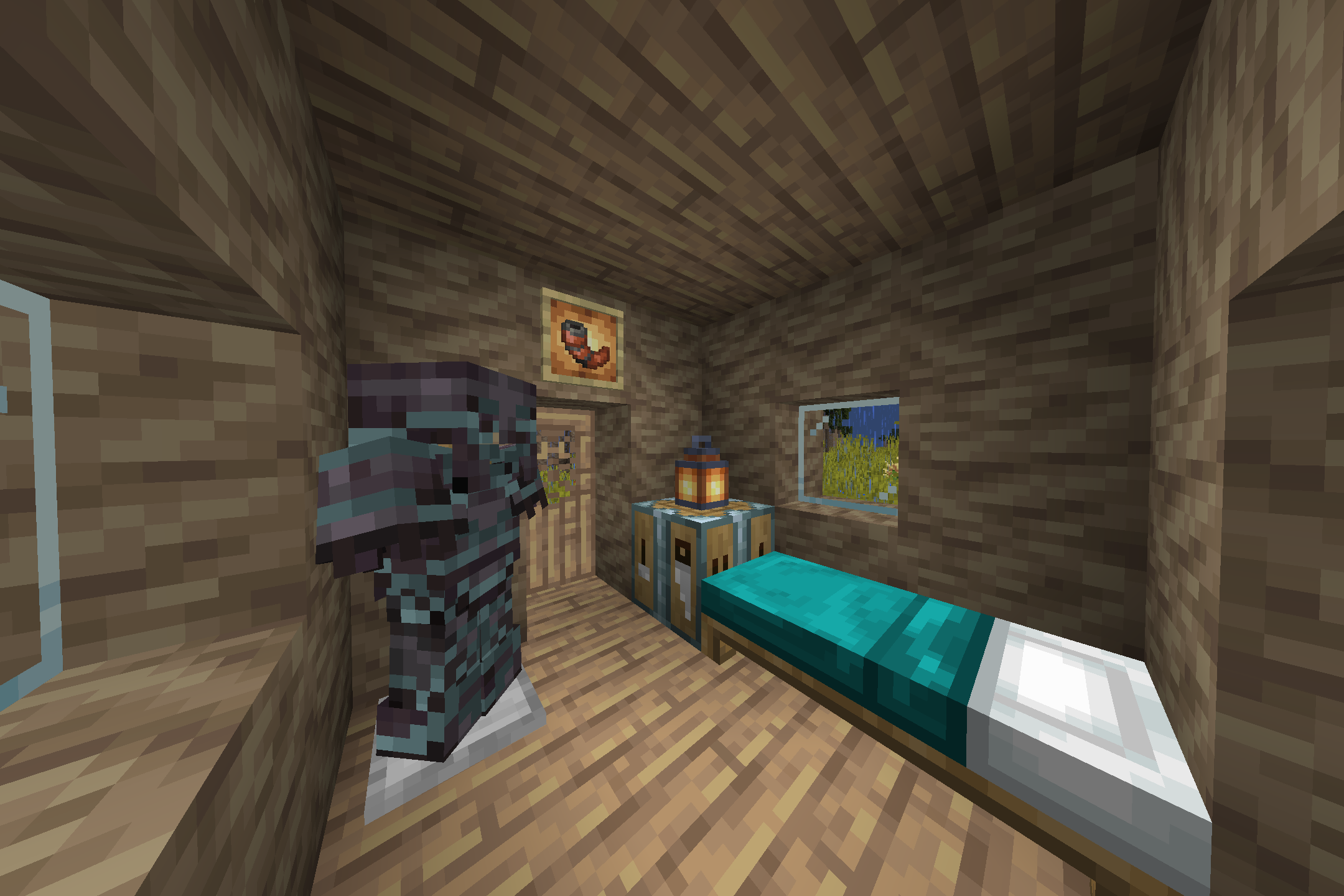
_This is a mod that will diversify your stay in warm (and dry😲) Savanna by **adding new blocks, items, and buildings** (some can be found outside of the Savanna🤔)! In addition, World Expansion **adds as 3 new Savanna biomes!** Dry Savanna (it’s uncomfortable there🙁), Politania (someone will say that it’s a Desert😅) and **THE MOST STYLISH – THE BAOBAB VALLEY** (yes, yes, Baobabs🤠)! Explore new lands, mine new resources here, and also look for new buildings here!_
# Found bugs?
_There should be no bugs🐛, because we are trying very hard to work out every detail (which no one may notice🌚). But if they are still found, then be sure to write about it on GitHub or in the Discord (links are attached in the information about the project)!_
# As a result
_If you liked this description with strange emoji😜 and screenshots from the game, then be sure to try this mod!
Also go to our Discord server🗿_