Xtabay’s Villager Creator
This datapack will help you create custom villagers very easily. Meant for server administrators or map creators. Trades are infinite and unblockable.
**Get the Villager Creator Kit**
/function vg.xtabay:give/villager_creator_kit
USE.
**Villager Creator Stick**
Put all the items you want your villager to trade in a chest in this order, from left to right: 1st buy item, 2nd buy item, sell item. This means every 3 slots are used for a single trade row, up to a maximum of 9 trades per chest. Every trade must have this structure: [Required Item] [Required Item](optional) [Offered Item], if they don’t have this structure, the items will be ignored and the trade won’t be added.
Once you’re done filling a chest with this structure, right click it with a Villager Creator Stick and the villager will be created.
All villagers created by Villager Creator have 40 heart containers, are leatherworkers and snow villagers by default. They’re also riding a block display so they can’t move or be moved.
**Add Trade Stick**
Put a chest next to a villager created with the Villager Creator datapack and repeat the same process as with the Villager Creator Stick but using the Add Trade Stick this time. Once done, all the trades in the chest will be added to the nearest villager and the chest will be deleted.
**Villager’s Properties Stick**
This stick allows you to fully customize your villagers.
These are the values you can modify:
– Profession
– Type
– Name (custom name, styling, color, visibility)
– Invulnerability
– Health
– Silent
**Villager Eraser Stick**
Kill any villager created by the Villager Creator datapack by right clicking it.
Xander’s Sodium Options: Continued
# Xander’s Sodium Options: Continued
**A community continuation of Xander’s Sodium Options**, replacing the Sodium options GUI with a Vanilla-style alternative powered by [YetAnotherConfigLib](https://modrinth.com/mod/yacl).
> Originally created by [isXander](https://github.com/isXander). This version supports Minecraft 1.21.6+. Looking for older versions? Check the [original mod page](https://modrinth.com/mod/xanders-sodium-options).
It has a wide range of support for various mods which integrate with Sodium, such as:
– [Iris](https://modrinth.com/mod/iris)
– [Sodium Extra](https://modrinth.com/mod/sodium-extra)
– [More Culling](https://modrinth.com/mod/moreculling)
– [Cull Less Leaves](https://modrinth.com/mod/cull-less-leaves)
– [EntityViewDistance](https://modrinth.com/mod/entity-view-distance)
Any other mods which integrate with Sodium’s GUI will *likely work* as well. If you encounter any issues, please [report them here](https://github.com/soradotwav/xanders-sodium-options/issues)
### Keyboard Controls
– `Ctrl+Tab` / `Ctrl+Shift+Tab`: Switch between category tabs.
– `Tab` / `Shift+Tab`: Move focus between controls and action buttons.
– Arrow keys: Navigate through option rows and category tabs when those widgets are focused.
– `Enter` or `Space`: Activate the focused control, including the `Reset` button.
– `Esc`: Return to the previous screen.
### Screenshots


Thank you to [Zakku0w0](https://ko-fi.com/zakku0w0/) for the Ko-fi icon art.
xPixel’s Enhanced Craft [REVAMPED]
**Version 2.1 is here!** A complete **revamp** from the previous version of these modpack. A complete overhaul of the overworld dimension.
### Important Notice:
We will start to transtion to **NeoForge** starting **v2.1** since it offers **more content** and things to do inside the modpack giving not just **exploring** but **building** and specially **Cooking!!**
We’ve added **Farmers Delight, Pam’s Harvest Craft Mods, [Lets Do] Mods, Rechiseled** and other more stuffs.
**RAM Allocation:**
Minimum: 4GB
Recommended: 6GB
**Explore the infinite but limited world that Minecraft has to offer with addition.**

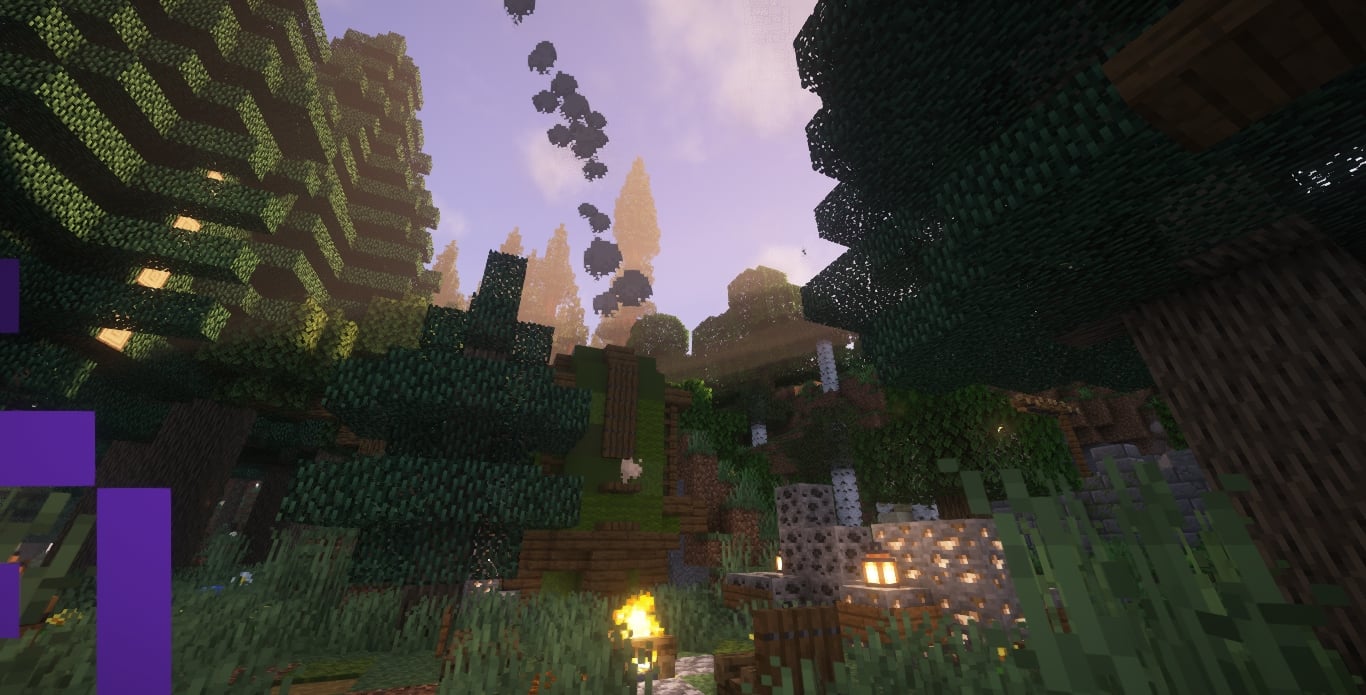
Better TnT Explosive Sulfur Cubes
(Let me know of any bugs & suggestions on discord: maxipetri05)
# TnT Sulfur Cubes!!!
– Give a TnT to Sulfur Cubes and Unleash Mayhem! if they’re going fast enough they will explode on Impact! (on xyz axis)
(dont watch on full screen, quality is bugged)
## Features :
– If they’re slowed back down they wont explode on impact.
– Leashed Sulfur Cubes with TnT wont explode if they Impact Vertically!!(Y axis) So you can bring them to your friendly ghasts safely!
– Light Them up on Fire and you’ll have 1 second to react before they Explode! So make sure you can punch them away fast enough!
– Customise The Explosion (if you have op) with: **_/trigger xsexplosivesulfurcubes.settings_**

**Explosion Power:** controls the explosion power of the basic impact speed (0-4).
**Explosion Power Override:** controls the explosion power of the basic impact speed (Any Number, -1 will mean that it will use **Explosion Power:** instead).
**Minimum Impact Speed:** controls the minimum speed required to trigger the basic explosion on impact.
**Safe Fall Distance:** controls how far it can fall vertically without exploding, even if its going fast enough.

**Ticks on Fire Before Exploding:** Number of ticks the cube will be on Fire Before it Explodes, Caused by the Fire.

**Strong Explosion Power:** controls the explosion power of the Strong impact speed (-1 means it will use the Basic >**Explosion Power**< Values for the Strong Explosion)
**Minimum Strong Impact Speed:** controls the minimum speed required to trigger the Strong explosion on Strong impact.
Xray Snitch
Are you running a server and want to spend less time trying to detect or prevent Xray? Including this mod in your modpack makes that possible.
—
### What this mod does
– This mod is registering an empty argument, making it required on clients if your server has it installed. Players who try to remove it from their modpack can’t join your server.
– When players join your server, the client checks for Xray **texture packs** and sends a message to the server if one is present (`/config/xray_snitch/`).
### What this mod doesn’t do
– Automatically ban people based on Xray texturepacks
– Provide an easy way to find xraying users in-game
—
### Limitations
– **Detection is limited to texture packs** and isn’t perfect. Most results are true positives, but there can and will be false positives. Never take no detection from this mod as a proof for not using Xray.
– Dedicated troublemakers with knowledge of Java can decompile this mod and create an evil twin, suppressing the results.
XPlus PerioTable Modpack (NeoForge)

XPlus PerioTable Modpack (Neoforge) is a modpack aimed at **improving the vanilla game experience**. This modpack’s ultimate goal is to **improve the vanilla survival experience** as much as possible **without changing the game’s mechanism**, and it includes features like **FPS/MSPT optimization**, compatibility, and **survival utilities**.
**Sinytra Connector** enables XPlus PerioTable Modpack (NeoForge) to **load Fabric mods**, which means **you can use Tweakeroo, Litematica, MiniHUD and other Fabric utility mods** on this **NeoForge** modpack.
—
**Check out the Fabric version of this modpack: [XPlus PerioTable Modpack (Fabric)](https://modrinth.com/modpack/xplus-2.0-modpack-global)**
XPlus PerioTable Modpack (Fabric) supports Minecraft 1.16.5-latest game version, which provides more utilities and optimization.
—
### ⭐Ultra Optimization
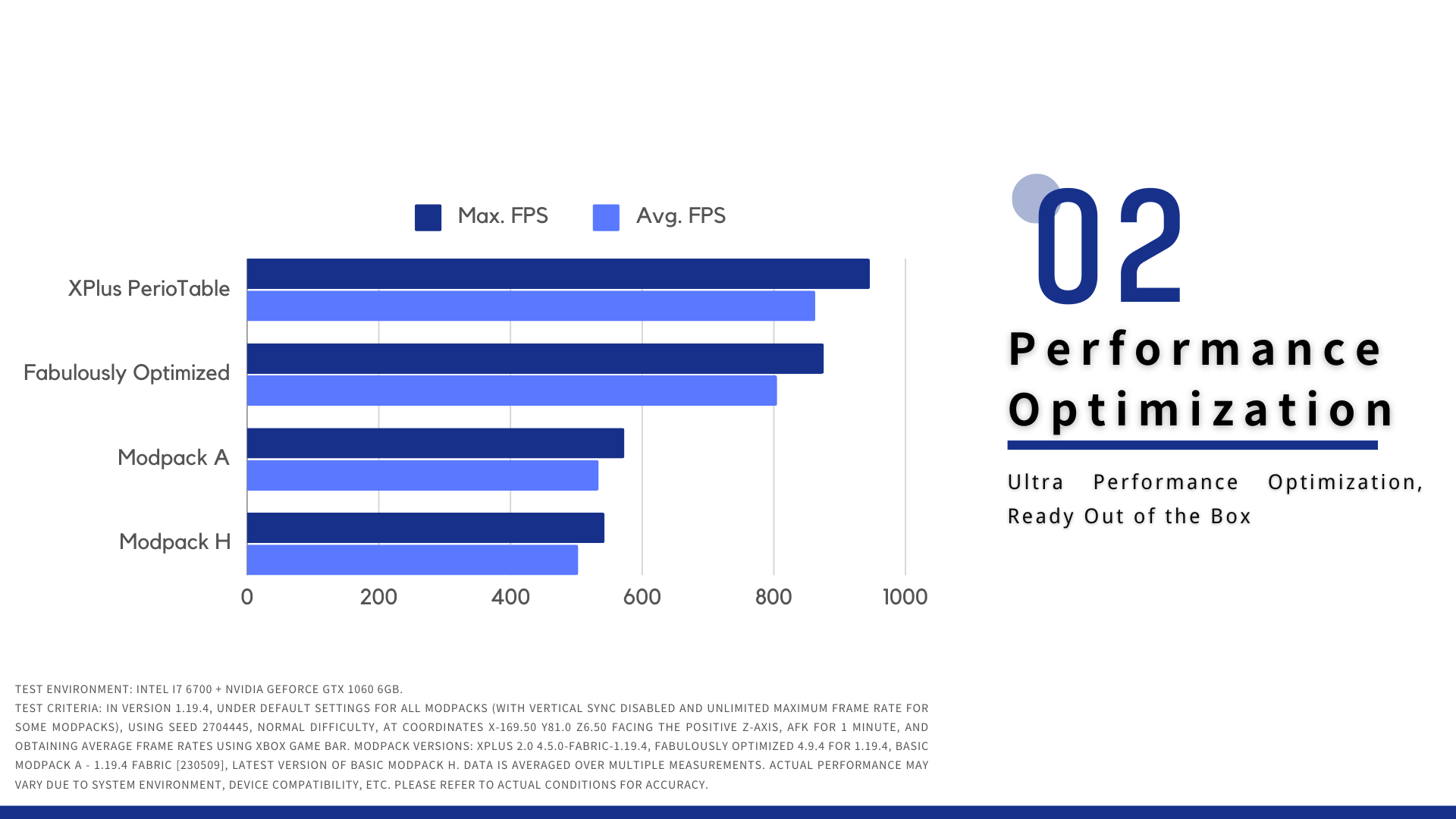
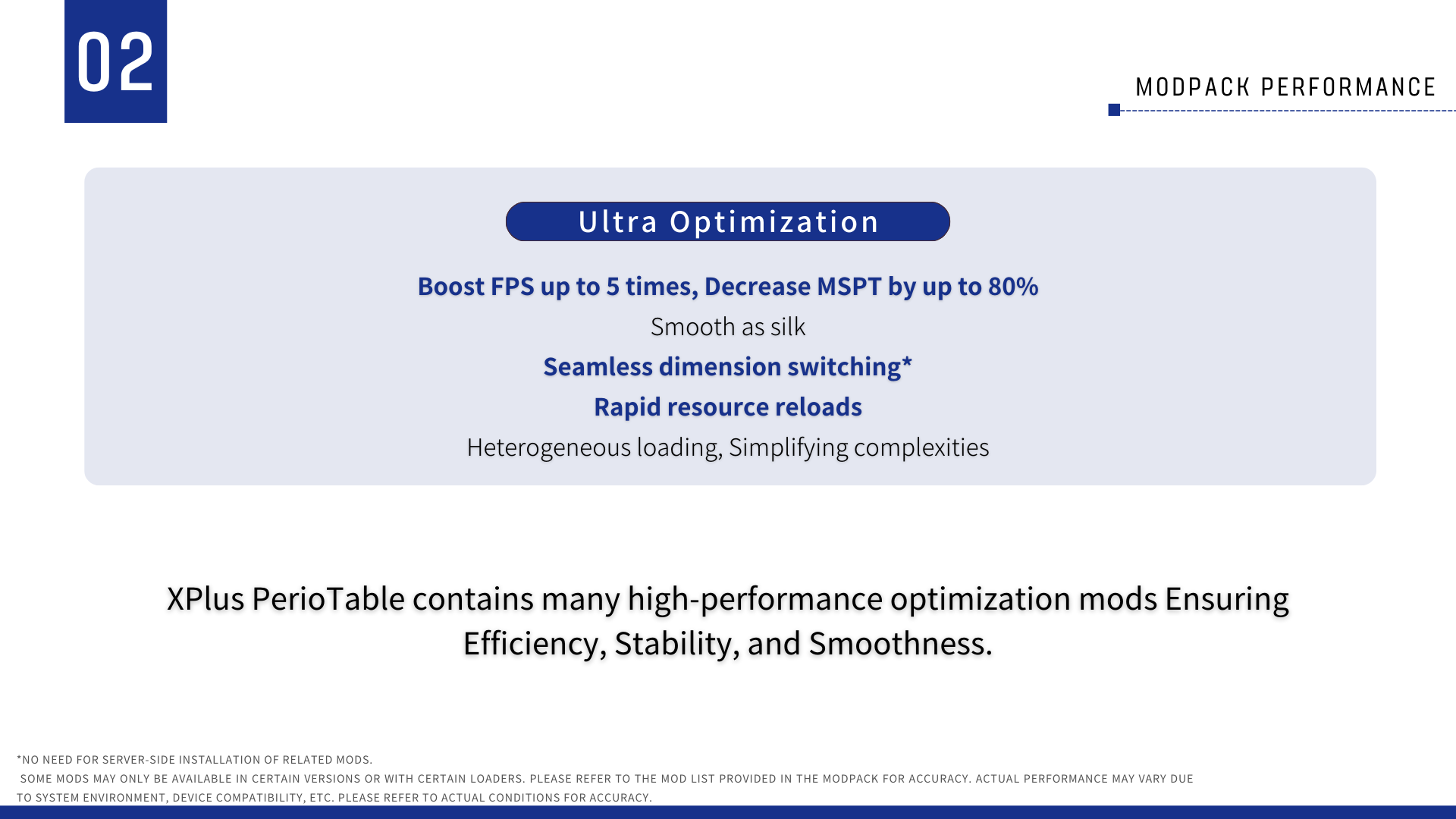
XPlus PerioTable Modpack (Neoforge) contains many high-performance optimization mods, ensuring efficiency, stability, and smoothness. The mods selected are carefully tested to safe in your world and multiple-player game.
With optimization mods like Sodium, ModernFix, etc., whether you are playing on a modern high-performance PC, or an entry-level device from the previous generation, XPlus PerioTable Modpack can significantly enhance its performance.
### ✨ OptiFine Resourcepack Support
With sodium and Iris Shader’s ultra optimization, XPlus PerioTable Modpack still supports most of OptiFine ResourcePack features, **enabling most of the “OptiFine Only” resourcepack to be loaded correctly.**
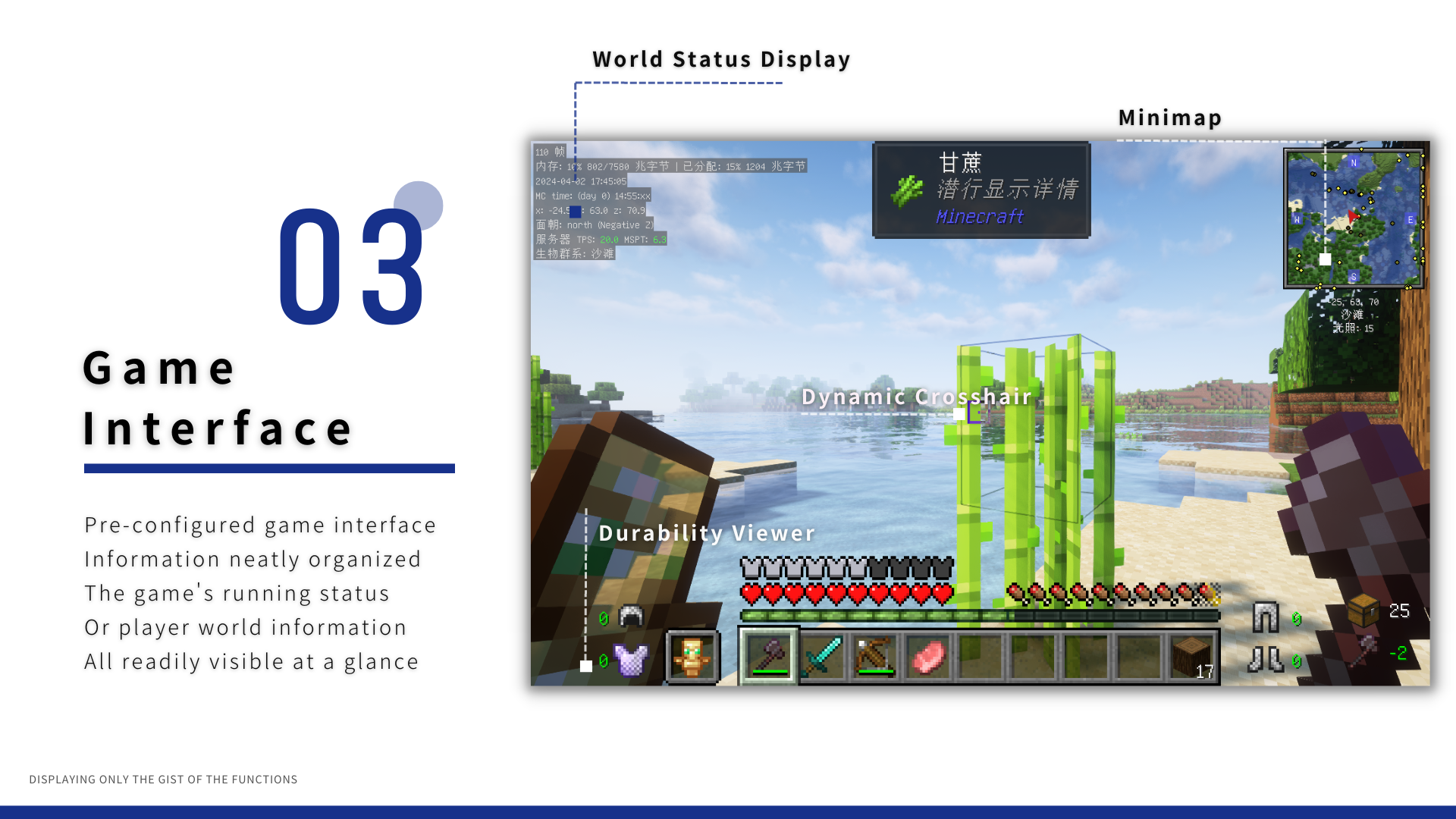
### 👓 Game Interface
### 🔨 Game utilities and Vanilla toolchain
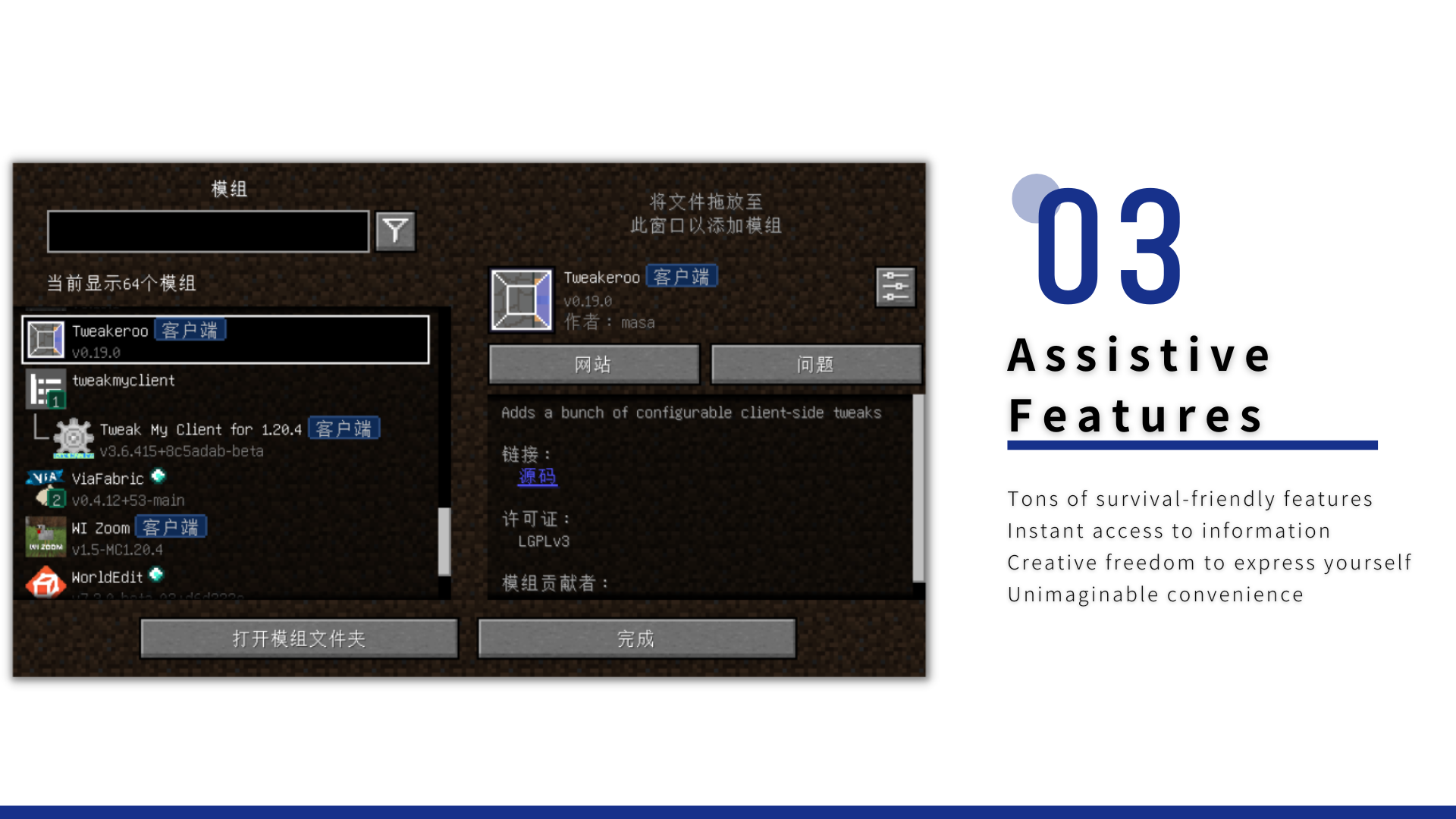
– **Tweakeroo, Litematica, Minimap, AppleSkin**, provide Tons of **survival utilities**.
– Auto Fish, freeing your hands. Advancement information displaying mod.
– ModernUI includes a powerful text layout engine and powerful Graphical User Interface, which significantly enhances the game’s UI appearance.
### 🤔FAQ
**Q:** Does the modpack support multiple-player game?
**A:** XPlus PerioTable Modpack supports most of servers, which allows vanilla client to login.
**Q:** What mods does it have?
**A:** Switch to the [Versions](https://modrinth.com/modpack/xplus-periotable-modpack-neoforge/versions) Tab, click on the version and scroll down.
### 🧾 User Agreement and Disclaimer
You unconditionally agree to the [XPlus Series Modpack User Agreement and Disclaimer](https://github.com/Wudji/XPlus-2.0-Modpack/blob/main/LICENSE) by downloading and using this modpack.
[【Simplified Chinese】](https://www.mcmod.cn/modpack/467.html)
XP Vial

# 🧪 About
**XP Vial** adds magical glass bottles that allow you to safely store and retrieve your experience points.
This mod is designed to be lightweight and highly configurable in order to enhance any existing gameplay experience of your choosing and to not interfere with any of your other modifications.
For more details, refer to the image gallery, the wiki below, or the following quick summary:
– ‘Xp Vial’ item
– Can store player’s collected xp points
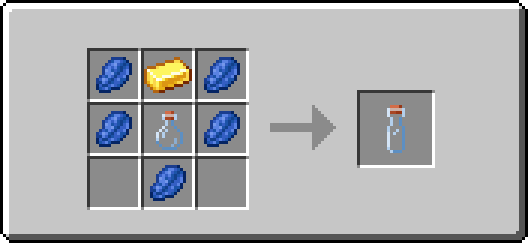
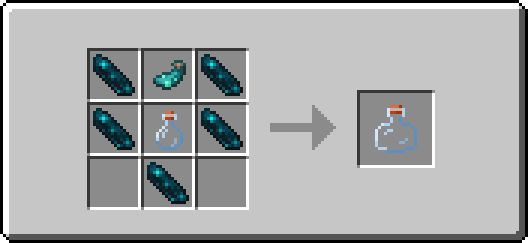
– Three different sizes (500 Xp, 1500 Xp, 3000 Xp)
– ‘Orb Vial’ item
– Special XP Vial item
– Stores player’s collected xp points as experience orbs
– Useful for repairing items with mending
– Items play interactive sounds
– Items have detailed and dynamic texture models (see gallery)
– Highly configurable for individual players and admins through config menus (see below)
– Powered by datapack, configurable through own datapacks
## 🌐 Wiki
If you are looking for a wiki of sorts or just a more detailed walkthrough of the content of this mod, then you can find quick and easy introductions to all the added features of this project below.
If you find no answers to your questions here or want to suggest improvements for the project, then feel free to leave a comment on the CurseForge site ([here](https://www.curseforge.com/minecraft/mc-mods/xp-vial)).
XP Vial
### Description:
XP vials are able to store a limited amount of your collected experience points, preventing you from losing them upon death.
### Usage:
**Right-click** to retrieve stored experience points. Whenever possible, the retrieved amount will match the number of missing experience points needed to reach the next level.
**Shift+Right-click** to store collected experience points. The vial stores the experience points of the player by removing one level at a time.
One can hold down the required buttons for each action to perform the task continuously. Additionally, all vials can be used in both mainhand and offhand.
The fill level of each vial is displayed roughly through the item’s different texture models and denoted exactly in the item’s tooltip.
Small Xp Vial | Medium XP Vial | Large XP Vial
:————————-:|:————————-:|:————————-:
 |  | 
### Recipes:

Orb Vial
### Description:
An orb vial is a special variant of an XP vial. It is able to store a limited amount of your collected experience points, preventing you from losing them upon death, and allows you to retrieve experience points in the form of experience orbs.
This enables you to repair items enchanted with mending on the spot and without having to carry large amounts of experience bottles!
### Usage:
**Right-click** to retrieve stored experience points. The retrieved amount will match the minimum of the vial’s remaining fill level and a constant of 100 experience points. The retrieved experience points are then combined into one experience orb that is summoned at the player’s position.
**Shift+Right-click** to store collected experience points. The vial stores the experience points of the player by removing one level at a time.
One can hold down the required buttons for each action to perform the task continuously. Additionally, the vial can be used in both mainhand and offhand.
The fill level of the vial is displayed roughly through the item’s different texture models and denoted exactly in the item’s tooltip.

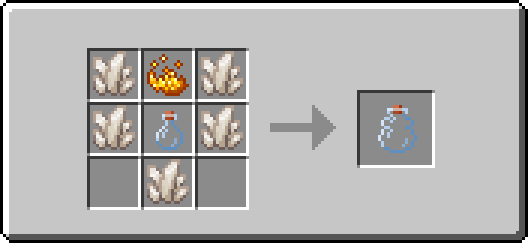
### Recipe:
## 🔧 Configuration
If you’re looking for a detailed description of the configuration options and how to access them, you’ll find brief introductions to all available menus and their default values, grouped by privilege class, below.
Admin
### Access method:
Run the following command: **/function xp_vial:.menu/admin**
### Features:
– Toggle sound events of all items
– Set the use cooldown of the “XP Vial” item
– Set the use cooldown of the “Orb Vial” item
Player
### Access method:
Run the following command: **/trigger XP_VIAL.CONFIG_MENU**
### Features:
– Toggle sound events of all items
# 📬 Remarks
Please keep in mind that at any given time vast amounts of the mod may be edited or completely overhauled! These changes should not, but may leave existing worlds on older versions corrupted. Creating backups before updating to a new version is advised!
I want to reiterate that this is simply a passion project. It may occur that for longer periods no updates or bug fixes are being developed/released simply because I do not want to.
XP Tome
### Functionality
This mod adds a single item – the XP Tome. With the XP Tome you can store and retrieve XP. It can store up to 1395 XP by default (can be configured), which equals to having 30 levels on the XP bar.
### Usage
– Sneak + right-click to store XP
– Right-click to retrieve XP
### Recipe

### Config/Item Components
Note: For item components, “true” means the component is on the item, and “false” means it isn’t.
Note: If you want to change the default item components of the XP Tome you can still use the config file, however that comes with caveats explained therein. Consider creating a Data Pack and override the XP Tome’s recipe with the components set as you wish. [Here’s an example recipe.](https://gist.github.com/bl4ckscor3/074fc98a3206a01c8ff239923174543d) More info about [data packs](https://minecraft.wiki/w/Data_pack) and [recipes](https://minecraft.wiki/w/Recipe) on the wiki!
– *max_xp* – The maximum amount of XP points that the XP Tome can hold. The default value (1395) represents having 30 levels on the XP bar.
– *retrieval_percentage* – The percentage of XP that the book will give back, as a sort of cost of using it. Example: If this config value is set to 0.75, and an XP Tome has 100 XP stored, attempting to retrieve these 100 XP will give back 75 XP. Note: This will not be 100% accurate, as Minecraft’s XP does not use decimals.
– *retrieve_until_next_level* – Setting this to true will remove only as much XP from the book at a time as is needed for the player to reach their next level.
– *retrieve_xp_orbs* – Setting this to true will remove XP from the book in XP orb form. This is useful if you want to use XP from the book for tools enchanted with Mending.
– *store_until_previous_level* – Setting this to true will store only as much XP from the player’s XP bar until reaching the previous level, meaning only one level at maximum will be added to the book’s storage at a time.
The configuration file for Minecraft versions 1.14.4-1.20.1 can be found in the serverconfig folder of your world.
### Further Info
This mod was created by me, following a request by Shivaxi. It is based off of [XP Book](https://www.curseforge.com/minecraft/mc-mods/xp-book) and was recreated due to a duplication bug in the original mod, as well as a bug which causes the enchanting table to reset each time the book is used. As this mod uses the same modid and item id as the original, the two mods can not be installed at the same time and switching between them will not lose you any items. I did not take any code or assets from the original mod.
You are allowed to use this mod in any modpack.
Skelun’s XP Reward System

_It’s unfair for players who likes to chill and gather materials to not get any XP while tryharders are building a thousand mob farms getting loads of experience to enchant everything._
_This is why I created this Mod/Datapack_
## ✨ NEW WAYS TO EARN XP


—
## 📝 RULES
* To receive XP by **Mining**, **Cutting**, **Digging** or **Farming** you must be using the appropriate tool;
* You receive less XP for “**Ice Boating**” or for using the “**Rail Bug**”;
* You receive less XP for **Traveling** if you are using something that speeds you up;
* You receive less XP for certain enchantments in specific conditions (e.g.: having *Depth Strider* and walking underwater).
## 🛠️ Mod Support
It supports any _*”Right-Click Harvest”*_ mod or data pack.
It supports any mod or data pack that allows you to break multiple blocks, like _*”vein mine”*_ or _*”timber”*_.
I have not included support for any modded tool, but if you want any, just ask!
## 📖 Settings
As of `version 2.6.1` you can now change some settings in-game.
> You need to be in creative mode (and if in a server, be an OP)
Type this command in chat to give yourself a written book:
“`/function sklps:config“`
It allows you to change some settings once you open it.
—
#### 🔢 *Detailed Information on the numbers I used:* [**Google Sheets File**](https://docs.google.com/spreadsheets/d/1ja2UrwOSQU-HuBbu5GjIAst3xkR4ZdJTHHQBmAlbfy0/edit?usp=sharing)
—
💖 Feel free to give any feedback, trash talk or ask for anything.
**You can contact me on [PlanetMinecraft](https://www.planetminecraft.com/member/skelun/)**
**Or [create an issue on Github](https://github.com/Skelun/xp-reward-system/issues)**

Psitadditions – XP Plus
**Experience Plus** is a datapack allowing you to collect, store and manage your experience using new blocks, items and game mechanics. What’s better than being able to securely store your experience!
## **- New Blocks:**
**Added unique blocks and 3d models**
– Experience Crystal –
_Animated block dedicated to storing experience_
– Experience crystal Filler –
_Animated block dedicated to the transfer of the player’s xp to the crystal_
– Experience crystal Drainer –
_Animated block dedicated to the transfer of the crystal xp to the player_
– Experience Player Pad –
_Block allowing you to activate the transfer of experience_
– **Experience Crystal Setup:**
_Use all Xp Plus custom blocks for create the Experience Crystal Setup and transfert your experience_
## **- New enchantments:**
**Compatible with vanilla enchantments**
– Experience Bottler –
_Allows you to bottle experience recovering on entities_
– Experience Sword I-II-III –
_Increases the amount of experience gained from killing mobs_
– Experience Pickaxe I-II-III –
_Increases the amount of experience gained from mining blocks_
_Obtainable with the enchantment table and trade with villagers_
## **- New advancement page**
– Find 6 new achievements and challenges to complete
### **More information**
This datapack is **Multiplayer friendly** !
Minecraft versions supporteds: 1.21.1
**IMPORTANT:** [Psitadditions resource pack](https://modrinth.com/resourcepack/psitadditions-resource-pack) is required for 3D models and custom items ! ! !
