Yappadium
Yappadium is a Performance modpack based around a steady FPS and TPS count
The Combined mods have been carefully selected to be safe in your worlds and provide noticeable speed benefits on any device.
Yappadium includes features that allow you to experience Minecraft just as you remember it, no extra mods are included in the modpack
**IMPORTANT MESSAGES FOR THE (NEO) FORGE VERSION**
– **DO NO**T update Nvidum (NeoForge), This wil crash you’re game.
– **DO NOT** download Sodium Extra’s, this will crash you’re game.
– If you want to play with the Create mod, please download the Create version for Yappadium or **delete Radium** from the modlist.
My PC specifications are:
CPU: AMD Ryzen 5 9600X 6-Core z
GPU: NVIDIA GeForce RTX 5060 Ti 16GB Version
**I will regularly update this modpack to newer versions if most of the mods are up to date!**
Yan from FF14
The beloved Yan from FF14 is here!
Yan is an incredibly strong sheep that looks cute and likes to wipe the party by one-shotting everyone with its head.
Yan can be summoned via command (/summon m6syan:yan), or by right clicking a large slime (size>2) with a sheep spawn egg to transform the slime into a yan (spawn egg can be obtained from creative tab or other mods such as EvilCraft).
Yan has 284HP(142 Hearts), 60Atk(30 Hearts) and its attack can disable shields. Yan will target the nearest hostile mob first, then the nearest player if there are no hostile mobs around.
Yan can be bred and lured with wheat just like normal sheep, they will not attack when player is holding an itemstack of wheat, but that doesn’t mean they would become friendly (or perhaps, bumping someone is their way to express love).
YAML Config
[](https://redirect.daqem.com?to=https%3A%2F%2Fbisecthosting.com%2FDAQEM%3Fr%3DYAMLConfigModrinth)
[](https://ko-fi.com/daqem)
## YAML Config: A Minecraft Configuration Mod
### Overview
YAML Config is a powerful Minecraft configuration mod that enables mod developers to create and manage configuration settings using the YAML file format. It offers a user-friendly GUI, extensive support for data types, and robust networking for client-server synchronization.
### Features
* **YAML File Format:** YAML Config utilizes the YAML file format, known for its readability and ease of use.
* **GUI Interface:** A well-designed GUI allows players to easily navigate and edit their configuration settings.
* **Extensive Data Type Support:** The mod supports a wide range of data types, including:
* **Primitive Types:** `boolean`, `int`, `float`, `double`, `String`, `ResourceLocation`, `Registry`
* **Collections:** `List`, `Map`
* **Date and Time:** `LocalDateTime`
* **Server-Client Synchronization:** Changes made to configurations on the server are automatically synchronized to clients, ensuring consistency across the gameplay experience.
* **Modpack Support:** The mod is designed to work seamlessly with existing modpacks, offering a flexible and expandable configuration system.
* **Validation and Error Handling:** The mod includes robust validation and error handling, ensuring that configurations meet the expected requirements.
### Installation and Usage
#### Installation
1. **Download the mod:** Download the latest version of YAML Config from the mod’s official website, CurseForge, or Modrinth.
2. **Place the mod file:** Move the downloaded JAR file into the “mods” folder within your Minecraft directory.
3. **Launch Minecraft:** Start Minecraft and join a world.
#### Usage
1. **Open the Configs Screen:** Press “F12” on your keyboard to open the Configs screen.
2. **Navigate to the Config:** The Configs Screen displays a list of available configurations. Select the mod whose configuration you want to modify.
3. **Edit Config Entries:** The Config Screen displays the available settings. Each entry includes:
* **Title:** The name of the setting.
* **Input Field:** A field for editing the value.
* **Reset Button:** A button for resetting the value back to its default.
4. **Save Changes:** Click the “Save Changes” button to save your modifications. The mod will automatically save the changes to the configuration file and synchronize them with other players on the server (if applicable).
### Development
#### Creating Configurations
**1. Define a Config Class:**
* Create a new Java class within your mod’s codebase that represents your mod’s configuration.
“`java
public class MyModConfig {
public static IConfig config;
public static IConfigEntry debug;
public static void init() {
ConfigBuilder builder = new ConfigBuilder(MyMod.MOD_ID, “mymod-config”, ConfigExtension.YAML, ConfigType.CLIENT);
}
}
“`
**2. Define Config Entries:**
* Use the `ConfigBuilder` class to define the settings for your configuration.
* Choose the appropriate data type for each entry using the `define*` methods.
“`java
// Example of defining a boolean entry:
debug = builder.defineBoolean(“debug”, false);
// Example of defining an integer entry with range:
intEntry = builder.defineInteger(“intEntry”, 10, 0, 100); // Min 0, Max 100
// Example of defining a string entry with pattern:
stringEntry = builder.defineString(“stringEntry”, “test”, “test\d+”);
// Example of defining a registry entry:
registryEntry = builder.defineRegistry(“registryEntry”, Blocks.GRASS_BLOCK, BuiltInRegistries.BLOCK);
// Example of defining a list:
stringListEntry = builder.defineStringList(“stringListEntry”, List.of(“test1”, “test2”, “test3”), 3, 10); // Min 3, Max 10
// Example of defining a map:
integerMapEntry = builder.defineIntegerMap(“integerMapEntry”, Map.of(“test1”, 1, “test2”, 2, “test3”, 3), 3, 10); // Min 3, Max 10
“`
**3. Build the Configuration:**
* Call the `build()` method on the `ConfigBuilder` to create your configuration.
* Store the configuration in a static field for easy access within your mod’s code.
“`java
public MyModConfig() {
ConfigBuilder builder = new ConfigBuilder(“mymod”, “mymod-config”, ConfigExtension.YAML, ConfigType.CLIENT);
// … define config entries
config = builder.build();
}
“`
**4. Access Config Values in Your Code:**
* Use the `get()` method to retrieve the current value of a config entry.
* Use the `set()` method to modify the value of a config entry.
“`java
// Example:
boolean debugEnabled = MyModConfig.debug.get(); // Retrieve the current value of the “debug” setting
if (debugEnabled) {
// Perform debug-related actions
}
MyModConfig.intEntry.set(25); // Set the value of the “intEntry” to 25
“`
#### Config Type
* **`ConfigType.CLIENT`:** Client-side configurations are specific to the client who has installed the mod. They are not shared with other players on the server.
* **`ConfigType.SERVER`:** Server-side configurations are specific to dedicated servers. They will not be used on single player worlds and are not synced to the players on the server.
* **`ConfigType.COMMON`:** Common configurations are shared between both clients and the server. They can be edited on the server by editing the config file directly and restarting the server or by editing the values using the in-game GUI and saving the changes.
#### Using Custom Data Types
* Use the `IConfigEntryType` interface to register custom data types with the YAML Config mod.
* Implement a custom serializer for handling the serialization and deserialization of your custom data type.
#### Modpack Configuration
* If you are creating a modpack, you can use YAML Config to define the configuration settings for your modpack.
* Place the configuration file for your modpack in the “config” folder within your modpack’s directory.
#### Examples
“`java
// Example: Basic client-side configuration
public class MyModConfig {
public static IConfig config;
public static IConfigEntry debug;
public static IConfigEntry testInt;
public static void init() {
ConfigBuilder builder = new ConfigBuilder(“mymod”, “mymod-config”, ConfigExtension.YAML, ConfigType.CLIENT);
debug = builder.defineBoolean(“debug”, false) // default false.
.withComments(“Whether debug mode is enabled for the mod.”);
testInt = builder.defineInteger(“testInt”, 10, 0, 100); // default 10, min 0 and max 100.
config = builder.build();
}
}
“`
Yamato Gun
Item to be added:
– Bullet
– YG-1 (Gun)
– YG-2
– YG-3
– Sakai Gun
This mod requires Fabric API (Fabric) and MCPitanLib
Adds a simple gun to kill enemies. You can kill mobs more easily.
This mod is in development and currently adds 2 guns and ammo.
Shoot on left-click.
Shooting on right-click will increase attack power.
It can be reloaded with R and cannot be refilled unless ammo is in inventory.
It supports from 1.18 to 1.20.1.
Check REI/JEI for the recipe.
We plan to add more guns in the future.
YALAM (Yet Another Looking At Mod)
# YALAM
YALAM (Yet Another Looking At Mod) will show you what you are looking at. Block, Entity, Health, Mod source, Tool requirement.
This was specifically made for a custom modpack I’m putting together for personal use, Cobblemon+Create+Addons, because WTHIT kept crashing due to me running Neoforge/Fabric Compatibility.. I figured my use case was niche enough but now my modpack compiles.
Development was intended for 1.21.1 but Modrinth showed a bunch. You can try for newer version but I won’t support. If you find a crash report a bug.
Disclaimer: AI was used to aid in this project.
Y Is There AutoJump


I ported this from Al132’s No Default Auto-Jump which is MIT licensed and can be found at https://www.curseforge.com/minecraft/mc-mods/no-default-auto-jump it was really easy to port forward to 1.16.1. Al is a coding GOD.

What it does is on first run of a client where the mod exists, it turns off the autojump feature. The player can turn it back on later if they like.



If you want a server setup using Y is there Autojump with zero effort, get a server with BisectHosting and receive 25% off your first month as a new customer using the code kreezxil
XunLib
## **Overview**
XunLib is a lightweight yet powerful utility library designed to simplify mod development by handling repetitive tasks and offering robust, reusable systems. From inventory management to spatial tools, it provides flexible APIs to minimize boilerplate.
### **Features**
🔧 **Inventory Utilities**
– Insert/extract items, validate stacks, and check container states.
– Armor slot validation for materials/types.
– Convert grid positions to slot indices.
🎯 **Fuzzy Item Matching**
– Compare items by count, enchantments, or custom properties.
– Configurable ignore rules (e.g., ignore durability or Data components).
🧪 **Smart Effect Application**
– Intelligently extend/upgrade existing effects or apply new ones.
🌈 **Color & Spatial Tools**
– Convert between RGB/HSL/HSV and blend colors dynamically.
– Generate shapes (discs, spheres, hollow cubes) and check spatial bounds.
✨ **Registration System**
– Adding custom items, blocks, and entities in the common module to ease multi-loader development.
Xtra stuf
This mod has many new features, some may seem hard to figure out. here are some instructions for hard features.
Mars dimension. in order to go to mars, you need to make a portal out of mars block. you craft it with red sand in the middle and corners of the crafting grid, the rest filled in with iron ingots. you make it like a nether portal, but ignite it with the mars portal igniter made with red sand and flint and steel. in mars, you will find iron oxide, volcanic basalt, and mars bases. the iron oxide can be crafted with iron nugget + bottle of water (not water bottle) the bottle of water is crafted with 2 glass on top of each other. iron oxide can be converted to iron nuggets with sandpaper + iron oxide. sandpaper is made with paper and sand on top of the paper. volcanic basalt can be made into slabs, stairs and walls.
2. Biomes. The biomes naturaly generate around the world. the pine forest is the most commen. it is like a tall tree spruce biome, but the trees are a new tree type, pine, they can be crafted into planks, slabs, stairs, door, trapdoor, and fence. i forgot to make wooden tool and stick craftable with it. Biome 2: Orange tree feilds. this biome generates with orange trees and grass. the oranges drop from the leaves. the oranges can be eaten or crafted into with orange + bottle of water. Biome 3: Glowing plains. this biome is less serious, the ground is glow block, and dirt is glowstone. In mars, there is mars biome and mars basalt plains. in the garbage dimension there is landfill.
3. Garbage dimension. garbage is crafted with paper, stick, dirt. 4 garbage makes a garbage block, used to make a garbage portal. be careful to not break the garbage block be cause it drops junk. to ignite the portal use the garbage portal igniter crafted with flint and steel and garbage. the garbage dimension is garbage block and trash water. it is just like water but flows slower.
4. Ores and materials there are 2 new ores and 5 new materials. first uranium its a bit rare and the armour gives you blast protection and the pickact mines a 3×3 area. the sword gives poison 1 for 60 ticks. next, tin. tin is another ore. it can be used to craft bronze with 1 copper and one tin ingot. bronze can be used to craft a sword, pickaxe, and trumpet. the bronze tools are almost as good as diamond. next, stone armour is now a thing. it is crafted with stone, andisite, diorite, and granite, not cobblestone. Next, great material. the tools and armour are overpowered. you craft it with netherite, diamond and iron. it has a sword, axe, pickaxe, and armour.
5. Plants. Many new plants generate all over the world. some plants, like corn, raspberrys, and tomatos can be eaten. corn when you eat it drops a corn husk, which can be crafted into bonemeal. other plants are decorative. the mushroom piles drop mushrooms.
6. mobs. at the time of writing this, the only new mob is a duck. they are a bit buggy.
7. this may change. new things are always being added.
Xtra Arrows
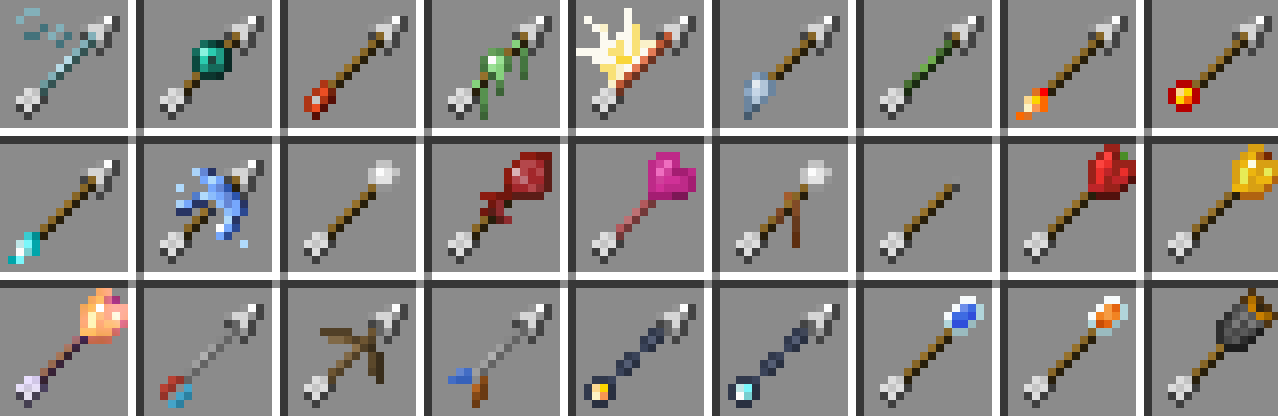
## The Arrows
**There are currently 95 new arrows. These arrows come in 27 new types and 5 tiers.**
## Server Hosting Discount
**Follow the link below and use code “JACKBUSTERS” at checkout for 25% off server hosting.**
[](https://bisecthosting.com/jackbusters?r=Xtra-Arrows-Modrinth)
## Media
Xtones Reworked
# Xtones Reworked
Xtones Reworked is a mod for Minecraft 1.19.2 and above that adds various of modern, futuristic, and fantasy style decorative building blocks and a lamp.
This mod will add 512 different building blocks which can be used for building and decoration.. You will find all 34 of the original varieties of blocks with there 15 sub variaties, wich are also found in the original Xtones mod.
You can craft the base blocks like Agon or Kryp over a basic recipe and than alter them to different variants with either dye recipes or with the stonecutter.
It is is a port of the Mod Xtones from TehNut. The code was rewritten from scratch and the existing textures were kept.
## Note
I won’t continue Forge Support and concentrate on Neoforged, but I will start to support a fabric project for this mod.