ZedYakh – Ultra FPS Boost
**THIS PROJECT WILL NO LONGER RECIVE ANY UPDATES**, you can use other modpacks such as my friend’s modpack: ‘[Echo Performance](https://modrinth.com/modpack/echoperformance)’
## این پروژه دیگه بروزرسانی نمیشه. میتونید از مودپک های دیگه استفاده کنید
### پیشنهاد من:
## [Echo Performance](https://modrinth.com/modpack/echoperformance)
⠀⠀⠀
⠀⠀⠀⠀
⠀⠀⠀⠀⠀⠀⠀⠀⠀⠀⠀⠀⠀⠀⠀⠀⠀
⠀⠀⠀
⠀⠀⠀⠀⠀⠀⠀⠀⠀⠀⠀⠀
⠀
⠀⠀
Old description:
**What is ZedYakh**
——————————————————————
ZedYakh means **AntiFreeze** in Farsi. I chose this name because I’ve included the most effective FPS boost mods to make the game run as smoothly as possible!
## What’s different with other FPS boost modpacks?
This modpack is designed for the lowest-end PCs, focusing solely on FPS mods without any unnecessary additions. The primary goal was to make chunk loading smooth, minimizing any huge FPS drops.
**FAQ**
> Q: Can I use other Mods with this Modpack?
>
> A: Yes you can use almost any mods with this modpack without any issue.
> (But in version 2.0.0 for minecraft 1.21 , don’t use Lithium mod, it cause you to crash)
——————————————————————————————
> Q: Is this Modpack without any bugs?
>
> A: I have tested this modpack, but if you encounter any problems or bugs, feel free to comment. I always strive to fix bugs and I’ll never give up – Inshallah.
——————————————————-
> Q: Will you update or backport to other versions?
>
> A: Yes, i will

**ضدیخ چیست؟**
————–
ضدیخ در معنا به همون معنای آنتی فریز هست که من داخلش از بهترین مودای افپیاسی استفاده کردم که بهتون بیشترین افپیاس ممکنه رو بده و بازی رو در روان ترین حالت براتون اجرا کنه
**تفاوتش با بقیه مودپک های افزایش افپیاس چیه؟**
————————————————-
این مودپک برای ضعیف ترین سیستم ها ساخته شده و از بهترین و موثرترین مودهای افپیاسی استفاده شده که بتونین ماینکرفت رو خیلی راحت اجرا کنین و به همین دلیل مود اضافه ای هم داخل مودپک قرار داده نشده
درواقع در این مودپک چانک لود کردن یکی از اهداف اصلی بود که شما الان با این مودپک چانک هاتونو میتونین به روان ترین حالت ممکنه اونم با کمترین افت فریم لود کنین
سوالات متداول
> پرسش: آیا میتونم مودهای دیگه ای با این مودپک استفاده کنم؟
>
> پاسخ: بله شما میتونین اکثر مودها رو با این مودپک باز کنین و مشکلی براتون رخ نده
> (البته در نسخه 2.0.0 برای ماینکرفت 1.21 از مود لیتیوم استفاده نکنید، چون مسبب کرش میشه)
> پرسش: آیا این مودپک بدون باگ هست؟
>
> پاسخ: من این مودپک رو تست کردم ولی باز شما اگه مشکلی دیدین میتونین کامنت بزارین
> من دائما درحال رفع مشکلات هستم و ازین کار دست نخواهم کشید – انشالله
> پرسش: آیا برای نسخه جدید تر یا قدیمی تر نسخه ای منتشر میکنید
>
> پاسخ: من در آینده برای نسخه های قدیمی تر مودپک رو منتشر میکنم، اما نه همه نسخه ها. این برای نسخه های جدید هم صدق می کند
> برای مثال من برای نسخه 1.21.1 مودپک رو منتشر نخواهم کرد چون تغییر خاصی تو این نسخه رخ نداده، اما برای نسخه هایی که تغییراتی در آنها رخ داده باشه مودپک رو منتشر خواهم کرد چه نسخه های قدیمی و چه نسخه های آینده
>

[](https://www.curseforge.com/minecraft/modpacks/zedyakh-ultra-fps-boost) [](https://tlmods.org/en/modpacks/zedyakh-ultra-fps-boost/) [](https://discord.gg/pq4qmbNUv6) [](https://www.youtube.com/@SIRSYP)
Zecoar Modpack

# **Zecoar Modpack**
**Minecraft vanilla Fabric modpack**
| Minecraft Ver.| Latest Ver. | Java Ver.(Recommend) | Update? |
| :-: | :-: | :-: | :-: |
| 1.20.1 | 1.0.0 | Java 17 | No |
| 1.20.6 | 1.0.1 | Java 21 | No |
| 1.21 | 1.1.3 | Java 21 | No |
| 1.21.1 | 1.0.1 | Java 21 | No |
| 1.21.3 | 1.0.3 | Java 21 | No |
| 1.21.4 | 1.0.3 | Java 21 | No |
| 1.21.5 | 1.0.2 | Java 24 | No |
| 1.21.6 | 1.0.3 | Java 24 | No |
| 1.21.7 | 1.0.2 | Java 24 | No |
| 1.21.8 | 1.0.4 | Java 24 | No |
| 1.21.9 | 1.0.0 | Java 24 | No |
| 1.21.10 | 1.0.1 | Java 24 | No |
| 1.21.11 | 1.0.2 | Java 24 | Yes |
| 26.1.2 | 0.1.0 | Java 25 | Yes |


**Dedicated to players who enjoy playing the vanilla Minecraft**
#
**Switch Resourcepacks**
Don’t like Rainbowpixel? Don’t worry. We have in-built another three resoucepacks —— CozyUI+, OreUI Reaction and Unique Dark Refined.
If you want to switch resourcepacks, you need disable current resoucepacks, than you can enable the resourcepack which you want to use.
**Configuration Requirements**
_*Attention: Distant Horizon defaults to off, the enabled shaderpacks is Complementary Reimgained._
Lowest | Disable Shader, Distant Horizons Off
GPU: Intel Iris Xe Graphics
Memory: 16 GB
Storge: 500 MB
Lowest | Enable Shader, Distant Horizons Off
GPU: NVIDIA GeForce GTX 1660 Super
Memory: 16 GB
Storge: 500 MB
Recommend | Disable Shader (Distant Horizons: 32 Chunks, CPU Usage Rate Minimal, Quality: Normal)
GPU: NVIDIA GeForce RTX 2060
Memory: 16 GB
Storge: 1 GB
Recommend | Enable Shader (Distant Horizons: 64 Chunks, CPU Usage Rate Lowest, Quality: Normal)
GPU: NVIDIA GeForce RTX 2070 Super
Memory: 16 GB
Storge: 1 GB
(Configuration may not be accurate, subject to actual situation; I don’t know configuration requirements of AMD, because I don’t use AMD)
**Inside version name explain**
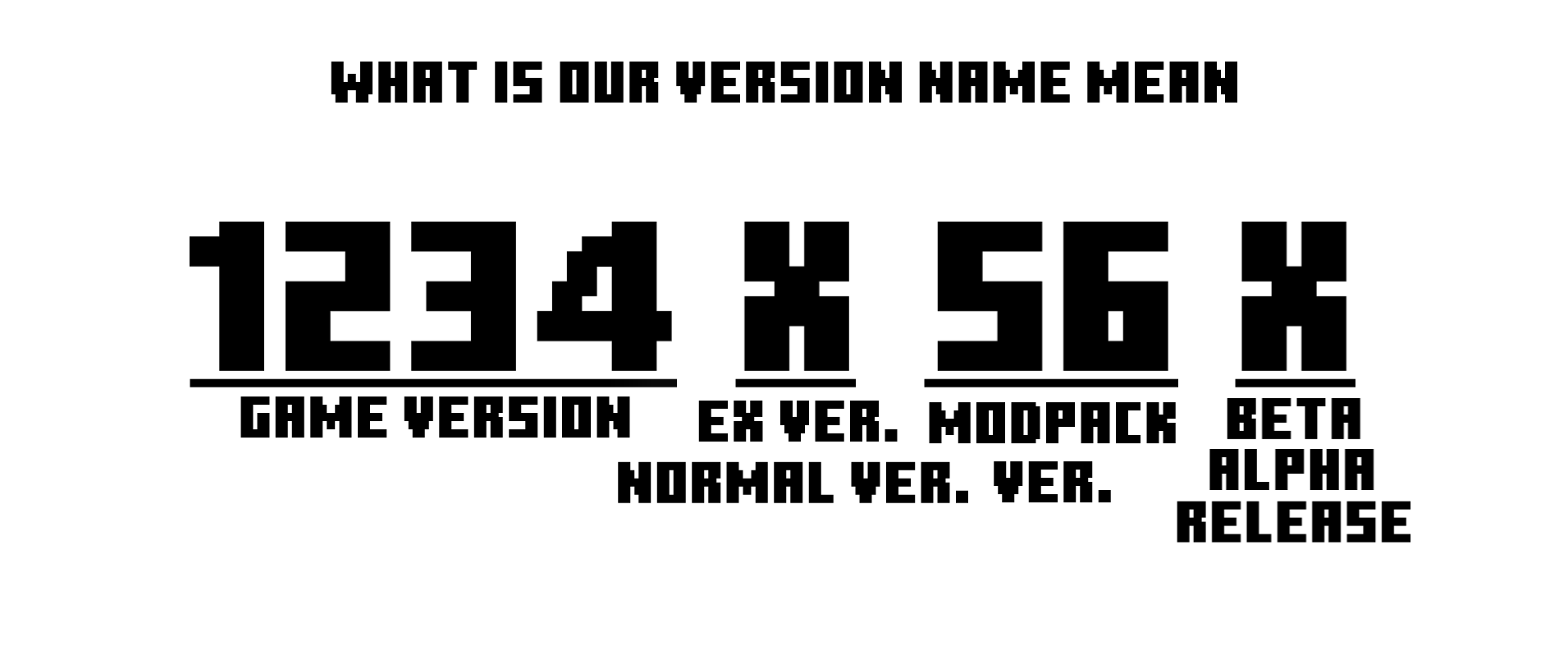
Lastest letter:
R-Release
B-Beta
A-Alpha
Middle letter:
B-Normal
**Notes**
1. If you add a mod yourself, it may cause the game to crash, so before adding it, make sure it does not conflict with the mods in the modpack.
2. The shaderpack “[Complementary Reimgained](https://modrinth.com/shader/complementary-reimagined)” is belong to EminGT.Any problem about this shaderpack is entirely under the responsibility of the author of Zecoar Modpack.
3. The shaderpack “Complementary Reimgained” require high graphics card, low configuration users please use the shaderpacks which import by users.
4. If you are a MC server owner,welcome to use my modpack as a server client, you can also ask me to customize the client(base on Zecoar Modpack).
**More interesting things**
Vanilla modpack too boring? We have another modpack, [Click to know more](https://modrinth.com/modpack/iwlow)
**Feedback**
If you encounter problems when playing this modpack, please feedback the problem to `Issue` on Github.
——————————————————————————————————————————————————

# **Zecoar 整合包**
**《我的世界》原版 Fabric 整合包**
| 我的世界版本 | 最新版本 | Java 版本(推荐) | 还更新吗 |
| :-: | :-: | :-: | :-: |
| 1.20.1 | 1.0.0 | Java 17 | 否 |
| 1.20.6 | 1.0.1 | Java 21 | 否 |
| 1.21 | 1.1.3 | Java 21 | 否 |
| 1.21.1 | 1.0.1 | Java 21 | 否 |
| 1.21.3 | 1.0.3 | Java 21 | 否 |
| 1.21.4 | 1.0.3 | Java 21 | 否 |
| 1.21.5 | 1.0.2 | Java 24 | 否 |
| 1.21.6 | 1.0.3 | Java 24 | 否 |
| 1.21.7 | 1.0.2 | Java 24 | 否 |
| 1.21.8 | 1.0.4 | Java 24 | 否 |
| 1.21.9 | 1.0.0 | Java 24 | 否 |
| 1.21.10 | 1.0.1 | Java 24 | 否 |
| 1.21.11 | 1.0.2 | Java 24 | 是 |
| 26.1.2 | 0.1.0 | Java 25 | 是 |


#
**切换材质包**
我们内置了四款材质包 —— CozyUI+、 OreUI Reaction、Unique Dark Refined和彩虹像素
若你想要切换材质包,先禁用当前材质包,然后再启用你想用的材质包。
**配置要求**
_*注意: 遥远的地平线默认关闭,启用的光影是互补重新构想。_
最低 | 关闭光影、遥远的地平线
GPU: Intel Iris Xe Graphics
内存: 16 GB
存储空间: 500 MB
最低 | 开启光影,关闭遥远的地平线
GPU: NVIDIA GeForce GTX 1660 Super
内存: 16 GB
存储空间: 500 MB
推荐 | 关闭光影 (遥远的地平线: 32 区块, CPU使用率最小化, 质量: 普通)
GPU: NVIDIA GeForce RTX 1660 Super
内存: 16 GB
存储空间: 1 GB
推荐 | 开启光影 (遥远的地平线: 64 区块, 低CPU使用率, 质量: 普通)
GPU: NVIDIA GeForce RTX 2070 Super
内存: 16 GB
存储空间: 1 GB
(配置可能不准,以实际情况为准;我不知道AMD的配置要求,因为我不用AMD)
**内部版本名称解释**

最后一位字母:
R-正式版
B-测试版
A-早期测试版
中间一位字母:
B-普通版
**备注**
1. 如果您自行添加模组,可能会导致游戏崩溃,所以在添加之前,确保它不会与整合包内的模组冲突。
2. 光影“[互补重新构想](https://modrinth.com/shader/complementary-reimagined)”属于EminGT。关于此光影的任何问题都完全由Zecoar Modpack的作者负责。
3. 光影“互补重新构想”要求高配置显卡,低配置用户请自行导入低配光影。
4. 如果你是一个服务器拥有者,欢迎使用我的整合包作为服务器客户端,你也可以找我定制服务器客户端(基于Zecoar Modpack)。
5. 如果你下载了该整合包,可以通过PCL2导入。
**更多有趣的东西**
原版整合包太枯燥?我们有另一个整合包。[点击以了解详情](https://modrinth.com/modpack/iwlow)
**反馈**
如在游玩本整合包时遇到问题 请将问题反馈至Github的`Issue`栏目
Zech’s Essentials
🚧 Description is Work-in-Progress for version 5.0.0 🚧
# About
“This modpack is aimed to make vanilla experience better, it doesn’t change any game mechanics – aimed for singleplayer and survival servers (if the server allows included mods)”
# Shaders
– I recommend using [Complementary shaders](https://www.complementary.dev/), either the Reimagined or Version 4, the option is yours
# Mod List (64)
Table of all mods used from Modrinth
| Mod name | Description (by mod author) |
| ——– | ————————— |
| [3D Skin Layers](https://modrinth.com/mod/zV5r3pPn) | Render the player skin layer in 3d! |
| [AdvancementInfo](https://modrinth.com/mod/G1epq3jN) | Show more information about advancement requirements |
| [Animatica](https://modrinth.com/mod/PRN43VSY) | A mod implementing the OptiFine/MCPatcher animated texture format |
| [Quilted Fabric API (QFAPI) / Quilt Standard Libraries (QSL)](https://modrinth.com/mod/qvIfYCYJ) | The standard libraries of the Quilt ecosystem. Essential for your modding experience on Quilt! |
| [AppleSkin](https://modrinth.com/mod/EsAfCjCV) | Food/hunger-related HUD improvements |
| [Architectury API](https://modrinth.com/mod/lhGA9TYQ) | An intermediary api aimed to ease developing multiplatform mods. |
| [Auth Me](https://modrinth.com/mod/yjgIrBjZ) | Authenticate yourself and re-validate your session |
| [bad packets](https://modrinth.com/mod/ftdbN0KK) | Bad Packets allows packet messaging between different modding platforms. |
| [Balm](https://modrinth.com/mod/MBAkmtvl) | Abstraction Layer (but not really)™ for Blay’s multiplatform mods |
| [Cloth Config API](https://modrinth.com/mod/9s6osm5g) | Configuration Library for Minecraft Mods |
| [Beenfo](https://modrinth.com/mod/Bta0Pt47) | Show number of bees and honey level in hives and nests |
| [Better Mount HUD](https://modrinth.com/mod/kqJFAPU9) | Improves the ingame HUD while riding a mount |
| [Better Taskbar](https://modrinth.com/mod/gPEcet33) | Show state on taskbar |
| [Borderless Mining](https://modrinth.com/mod/kYq5qkSL) | Changes Fullscreen to use a borderless window. |
| [Custom Entity Models](https://modrinth.com/mod/YOQCucah) | Custom Entity Models suport on Fabric |
| [ClickThrough](https://modrinth.com/mod/Z5b0cAlD) | Click through signs and item frames to chests |
| [Client Tweaks](https://modrinth.com/mod/vPNqo58Q) | There, I fixed Minecraft for you. Various optional tweaks to improve Minecraft Quality of Life. |
| [Crafting Tweaks](https://modrinth.com/mod/DMu0oBKf) | Allows you to rotate, balance or clear the crafting matrix by the press of a button, in any (supported) crafting window. |
| [DashLoader](https://modrinth.com/mod/ZfQ3kTvR) | Launch at the speed of light. |
| [oωo (owo-lib)](https://modrinth.com/mod/ccKDOlHs) | A general utility, GUI and config library for modding on Fabric and Quilt |
| [DeathLog](https://modrinth.com/mod/TPAYeAOc) | Keeps track of the many embarrassing times you died |
| [YetAnotherConfigLib](https://modrinth.com/mod/1eAoo2KR) | A builder-based configuration library for Minecraft. |
| [Debugify](https://modrinth.com/mod/QwxR6Gcd) | Fixes Minecraft bugs found on the bug tracker |
| [Detail Armor Bar](https://modrinth.com/mod/hAt6ty93) | More detail about armor in Armor bar! |
| [Durability Viewer](https://modrinth.com/mod/LTM1f0yY) | Armor and Tool durability HUD |
| [Dynamic FPS](https://modrinth.com/mod/LQ3K71Q1) | Improve performance when Minecraft is in the background. |
| [EasierVillagerTrading](https://modrinth.com/mod/ChscgScW) | Fewer clicks to trade with villagers |
| [Entity Texture Features](https://modrinth.com/mod/BVzZfTc1) | Emissive, Random & Custom texture support for entities in resourcepacks just like Optifine but for Fabric |
| [FabricSkyboxes](https://modrinth.com/mod/YBz7DOs8) | Allows resource packs to define custom skyboxes. |
| [Falling Leaves](https://modrinth.com/mod/WhbRG4iK) | Adds a neat little particle effect to leaf blocks |
| [FerriteCore](https://modrinth.com/mod/uXXizFIs) | Memory usage optimizations |
| [Horse Stats Vanilla](https://modrinth.com/mod/l4qoXLzx) | This client-side mod displays the statistics (health, speed, jump height) of horses in their inventory. |
| [Sodium](https://modrinth.com/mod/AANobbMI) | Modern rendering engine and client-side optimization mod for Minecraft |
| [Indium](https://modrinth.com/mod/Orvt0mRa) | Sodium addon providing support for the Fabric Rendering API, based on Indigo |
| [Iris Shaders](https://modrinth.com/mod/YL57xq9U) | A modern shaders mod for Minecraft intended to be compatible with existing OptiFine shader packs |
| [JourneyMap](https://modrinth.com/mod/lfHFW1mp) | Real-time mapping in game or in a web browser as you explore. |
| [LambdaBetterGrass](https://modrinth.com/mod/2Uev7LdA) | A Minecraft mod which adds better grass and snow to the game. |
| [LambDynamicLights](https://modrinth.com/mod/yBW8D80W) | A dynamic lights mod for Fabric. |
| [Language Reload](https://modrinth.com/mod/uLbm7CG6) | Reduces load times and adds fallbacks for languages |
| [LazyDFU](https://modrinth.com/mod/hvFnDODi) | Makes the game boot faster by deferring non-essential initialization |
| [Light Overlay](https://modrinth.com/mod/YfOlc91N) | A simple mod to provide users with NEI-like light level overlay. |
| [Lithium](https://modrinth.com/mod/gvQqBUqZ) | No-compromises game logic/server optimization mod |
| [MidnightControls](https://modrinth.com/mod/bXX9h73M) | Adds controller support and enhanced controls overall. |
| [Mod Menu](https://modrinth.com/mod/mOgUt4GM) | Adds a mod menu to view the list of mods you have installed. |
| [Mouse Wheelie](https://modrinth.com/mod/u5Ic2U1u) | A “small” clientside mod featuring item scrolling, inventory sorting, item refilling and more! |
| [Not Enough Animations](https://modrinth.com/mod/MPCX6s5C) | Bringing first-person animations to the third-person |
| [Ok Zoomer](https://modrinth.com/mod/aXf2OSFU) | Adds a highly-configurable zoom key for Quilt. The zoom is yours! |
| [MixinTrace](https://modrinth.com/mod/sGmHWmeL) | Adds a list of mixins in the stack trace to crash reports |
| [Reese’s Sodium Options](https://modrinth.com/mod/Bh37bMuy) | Alternative Options Menu for Sodium |
| [Roughly Enough Items (REI)](https://modrinth.com/mod/nfn13YXA) | Clean and Customizable. Alternative to Just Enough Items/JEI. |
| [Screenshot to Clipboard](https://modrinth.com/mod/1KiJRrTg) | Screenshots taken are copied to the clipboard. |
| [Smooth Boot (Fabric)](https://modrinth.com/mod/FWumhS4T) | Improve Minecraft CPU scheduling |
| [Sodium Extra](https://modrinth.com/mod/PtjYWJkn) | Features that shouldn’t be in Sodium. |
| [Starlight (Fabric)](https://modrinth.com/mod/H8CaAYZC) | Rewrites the light engine to fix lighting performance and lighting errors |
| [Visuality](https://modrinth.com/mod/rI0hvYcd) | Little visual improvements by adding a bunch of new particles. |
| [Your Options Shall Be Respected (YOSBR)](https://modrinth.com/mod/WwbubTsV) | Your options shall be respected. |
| [CraftPresence](https://modrinth.com/mod/DFqQfIBR) | Completely Customize the way others see you play in Discord! |
| [Prism](https://modrinth.com/mod/1OE8wbN0) | A library all about color! Provides lots of color-related functionality for dependent mods. |
| [Iceberg](https://modrinth.com/mod/5faXoLqX) | A modding library that contains new events, helpers, and utilities to make modder’s lives easier. |
| [Item Borders](https://modrinth.com/mod/b1fMg6sH) | Add colored borders to inventory slots to make your rare items stand out! |
| [Item Highlighter](https://modrinth.com/mod/cVNW5lr6) | Highlights newly picked-up items. Simple and convenient. |
| [Equipment Compare](https://modrinth.com/mod/CYSUVOdj) | Makes it easier to compare equipment by showing a tooltip for what you’re already wearing. |
| [Amecs](https://modrinth.com/mod/rcLriA4v) | Improves your keys & controls setup by providing modifier keys and making multi-functional keys a thing. |
| [Forge Config API Port](https://modrinth.com/mod/ohNO6lps) | Yes, you’re reading that correctly. This is the whole Forge Config API ported to Fabric. |
—
*last updated on Feb 23, 2023*
Zech’s Creations
# Zech’s Creations
Zech’s Creations is a modpack centered around the Create mod, designed for Minecraft 1.21.1.
It features the most popular add-ons for the Create mod, along with some additional Vanilla+ experience mods and optimization mods (like Sodium).
## Create Add-ons:
* [Create Crafts & Additions](https://modrinth.com/mod/createaddition)
* [Create Goggles](https://modrinth.com/mod/create-goggles)
* [Create Slice & Dice](https://modrinth.com/mod/slice-and-dice)
* [Create: Bells & Whistles](https://modrinth.com/mod/bellsandwhistles)
* [Create: Copycats+](https://modrinth.com/mod/copycats)
* [Create: Enchantment Industry](https://modrinth.com/mod/create-enchantment-industry)
*More Create add-ons will be integrated as they update to Minecraft 1.21.x.*
To see all included mods, please refer to the latest version’s modlist.
Zębatkowo
# PL
# 🔩 Zębatkowo — Modpack Serwera
> **Modpack przeznaczony wyłącznie dla zamkniętej grupy z serwera Discord Zębatkowo.**
> Jeśli tu trafiłeś bez zaproszenia — nic tu po tobie! ⚙️
## O modpacku
Zębatkowo to modpack survivalowy zbudowany wokół moda **Create** i jego dodatków.
Skupiamy się na mechanicznym budownictwie, automatyzacji i eksploracji w klimacie steampunkowego rzemiosła.
Paczka jest aktywnie utrzymywana i aktualizowana pod potrzeby naszej społeczności.
## Wymagania
– **Minecraft**: 1.21.1
– **Modloader**: Neoforge
– **RAM**: minimum 4 GB przydzielone do gry
## Kontakt i wsparcie
Wszystkie pytania, błędy i sugestie zgłaszaj wyłącznie przez **kanały na Discordzie**.
Nie udzielamy wsparcia poza serwerem.
—
*Modpack jest własnością społeczności Zębatkowo i nie jest przeznaczony do publicznej dystrybucji.*
# EN
# 🔩 Zębatkowo — Server Modpack
> **This modpack is intended exclusively for the closed group on the Zębatkowo Discord server.**
> If you’ve ended up here without an invitation — you’re in the wrong place! ⚙️
## About the modpack
Zębatkowo is a survival modpack built around the **Create** mod and its add-ons.
We focus on mechanical construction, automation and exploration in a steampunk crafting atmosphere.
The pack is actively maintained and updated to meet the needs of our community.
## Requirements
– **Minecraft**: 1.21.1
– **Modloader**: Neoforge
– **RAM**: minimum 4 GB allocated to the game
## Contact and support
Please report all queries, bugs and suggestions exclusively via **Discord channels**.
We do not provide support outside the server.
—
*The modpack is the property of the Zębatkowo community and is not intended for public distribution.*
Zearkcraft

This mod is a **WORK IN PROGRESS**, things will be added and removed as my friends and I continue to play the modpack. **Expect bugs, crashes, and oddities!**
### **What is Zearkcraft?**
Zearkcraft is a Forge 1.20.1 modpack (250 mods) curated towards exploration, building, and technology. The intention of the mod is to overhaul the entire vanilla experience and blend multiple modpack genres with an overwhelming amount of pathways any player can take.
### **Why did you make this modpack?**
I wanted to make a modpack that has a bundle of avenues one can take that isn’t too intense and soul crushing. I’ve played many mod packs with my friends (specifically RPG focused) and just like every minecraft phase, most of the fun and interest just fizzles out after a week or two of playing because we’ve grinded our hearts out on a specific end goal. In vanilla minecraft, you have an end goal but it isn’t really pushing you to focus on it unless _YOU_ want to. Really, this modpack is just an amalgamation of how my ADHD brain focuses on things. Also, I guess I’m just a control freak and want to have control of every single aspect of how the game works.
### **Why so many mods?**
The simple answer is this: I have friends who want very specific mods so I decided to add a little bit of everything but emphasized the building and exploration aspects as that’s what I believe the heart of Minecraft is.
### **Key Mods**
**Technology**
– Create (+ Addons)
– Applied Energistics 2 (+ Addons)
**Exploration**
– CTOV
– Epic Dungeons
– When Dungeons Arise
– Katters’ Structures
– Moog’s Mods (MES, MNS, MSS, MVS)
– All of YUNG’s Mods
– Dungeons & Taverns
– Better Archeology
– Aquamirae
– Spleunkery
– Deeper and Darker
– Incendium
– Nullscape
**Environment**
– Tectonic
– Terralith
– Bushier Flowers
– Immersive Weathering
– Serene Seasons
– More Little Decorations
**Entities**
– Alex’s Mobs
– Critters and Companions
– Spawn
– Ribbits
– Creeper Overhaul
– Enderman Overhaul
– Mutant Mobs
– Herobrine (Harmless)
**Building**
– Beautify!
– Amendments
– Handcrafted
– Supplementaries (+ Squared)
– Extra Carpets
– Macaw’s Mods (with BOP additions)
– Excessive Building
– [Let’s Do] Candlelight
– [Let’s Do] Beach Party
**Farming, Cooking, Fishing, Etc.**
– Farmer’s Delight (+ Addons)
– Terraqueous
– Floralis
– Exline’s Fishing
– [Let’s Do] Bakery
– [Let’s Do] HerbalBrews
– [Let’s Do] Vinery
– [Let’s Do] NetherVinery
– [Let’s Do] Brewery
**Combat, Weapons, Armor, & Tools**
– Better Combat
– Epic Empires
– Epic Knights
– Epic Samurais
– Simply Swords
– Gliders
– Exposure
**QoL**
– Quark
– Viner
– HT’s TreeChop
– Corpse
– Shoulder Surfing Reloaded
– Storage Lables
– Lootr
– Waystones
– Healing Campfire
– Infinite Trading
– Do a Barrel Roll
– EMI
– Inventory Essentials
– AppleSkis
– Xaero’s World Map
– Xaero’s Minimap (Disabled by Default)
**Graphics, Audio, & User Interface**
– Embeddium
– Oculus
– Distant Horizons
– Ambient Sounds
– Quality Sounds
– Sound Physics Remastered
– Dynamic Crosshair
– Unique Dark (Interface)
– Custom Menu/Loading Screen (via FancyMenu + Drippy)
– Fresh Animations (Resource Pack)
– Fresh Moves (Resource Pack)
– [Bliss Shaders (via GitHub for DH Support)](https://github.com/X0nk/Bliss-Shader)
– Complementary Shaders (Reimagined & Unbound)
### **Side Notes:**
– This mod is a **WORK IN PROGRESS**, things will be added and removed as my friends and I continue to play the modpack.
– Most mods have compat/integration with each other and the world generation.
– Several performance mods have been installed to increase compatibility between hardware and increase client and server performance.
– I reccomend allocating a minimum of 8GBs of RAM towards Forge.
– I’ve tested this modpack on my M2 Pro Mac (16GBs) and have experienced fairly good performance.
– I always strive to be open minded as this is my first offical modpack. I’m learning as I go and feedback is always loved and wanted! 🙂
### **Known Issues:**
– Frame drops in larger villages **(Improved in 2.0 Update)**
– ~~Double Doors sometimes do not open together (usually in world generated structures).~~ **FIXED!**
– Player transparency issues when using shaders.
– Bliss Shaders incompatible on macO
– Complementary Shaders give around 40-50 FPS on macOS (M2 Pro w/16GBs)
### **Goals/Plans**
– A wiki is in development to help get the player started and have easier access to additional mod resources and video tutorials.
– A server-pack is about 90% finished. In testing phase.
– Increase server-side performance and lower tick rate.
### **External Attributions:**
– Bliss Shaders (with DH Support): [GitHub](https://github.com/X0nk/Bliss-Shader)
### **Special Thanks**
– All of the mod creators, I wouldn’t have been able to achieve my vision without the hard work from all of you! <3
- Chocapic13 for creating Bliss Shaders.
Zborka
**Modpack for playing with friends**
Thanks for a good mod “**Project Vibrant Journeys**” by *OrderedChaosDev* — [LINK](https://www.curseforge.com/minecraft/mc-mods/project-vibrant-journeys)
This modpack combines adventure mods, as well as mods where you need to craft different things diligently.
With the help of Decocraft, you can decorate your home as you want, or an interesting DivineRPG, Botania, Mekanism with many additions containing RF energy. A few dragons with Ice and fire and big bosses in the form of Wither storm. An interesting open world having Project Vibrant Journeys mod. Even under water there is something to find, Aquamirae mod. Well, I will not spoiler, come and see for yourself what is in the modpack!
—
All major mods:
Decocraft
Ice and fire
Wither Storm
Aquamirae
DivineRPG
Botania
Mekanism
NuclearCraft
Extreme Reactors 2
BloodMagic
BiomesYouGo
Thermal Series
Refined Storage
Computer Craft Tweaked
Project Vibrant Journeys
–<[Zareh's Optimizeds]>–
—
## **🌟 About the Modpack**
–<[Minecraft: Zareh’s Optimized]>– is a meticulously crafted **client-side** modpack designed to **maximize performance, enhance graphics, and refine gameplay mechanics** while preserving the core essence of Minecraft. Whether you’re running the game on a high-end PC or an older machine, this modpack ensures that you get a **fluid, visually stunning, and optimized** Minecraft experience without unnecessary bloat.
This is not your typical modpack filled with heavy gameplay overhauls—**it is fully compatible with vanilla servers and does not require server-side installations**. You can hop onto your favorite servers or single-player worlds without any concerns, enjoying all the enhancements that –<[Minecraft: Zareh’s Optimized]>– provides while others continue to play normally.
Our focus is on **improving FPS, reducing memory usage, enhancing graphics, and introducing quality-of-life features** that make the game feel smoother and more immersive. With the perfect balance between **aesthetic upgrades and performance boosts**, this modpack is the ideal choice for players who want to experience **Minecraft at its best** without altering the fundamental gameplay mechanics.
This Is the Version:

—

## **🚀 Why Choose –<[Minecraft: Zareh’s Optimized]>-?**
### **🔥 Extreme Performance Optimization**
Minecraft is notorious for being **poorly optimized**, even on high-end machines. To combat this, –<[Minecraft: Zareh’s Optimized]>– includes a suite of **powerful performance-enhancing mods** that dramatically improve FPS, reduce lag, and optimize world loading without sacrificing visuals. Some of these essential mods include:
✅ **Sodium & Lithium** – A powerful alternative to OptiFine, significantly improving graphics performance and game stability.
✅ **Phosphor & Starlight** – Optimizes the lighting engine, eliminating stutters and lag caused by chunk updates.
✅ **FerriteCore** – Reduces memory consumption, allowing the game to run more efficiently, especially on lower-end systems.
✅ **MemoryLeakFix & Smooth Boot** – Helps fix RAM leaks and reduces startup time for a seamless experience.
With these optimizations, you can expect **higher frame rates, smoother chunk loading, and significantly reduced RAM usage**, making Minecraft more playable on any setup.
### **🎨 Stunning Visual Enhancements**
While performance is the priority, that doesn’t mean we ignore visuals! This modpack includes a curated selection of **resource packs and shaders** that enhance the **lighting, textures, and atmospheric effects** without causing significant FPS drops.
✨ **Resource Packs:**
– High-quality **HD textures** that maintain the original aesthetic of Minecraft.
– Enhanced **UI and item textures** for better readability and immersion.
– Optimized **block and entity models** that improve realism without overloading your system.
🌄 **Shaders:**
– Multiple shader pack options **optimized for different PC specifications**.
– **Dynamic lighting, realistic shadows, and atmospheric fog** that add depth to the world.
– A perfect blend of **beauty and performance**, ensuring smooth gameplay even with shaders enabled.
### **🛠️ Quality-of-Life Upgrades**
Aside from visual and performance enhancements, –<[Minecraft: Zareh’s Optimized]>– introduces a set of **gameplay refinements** that make playing more enjoyable without altering the core mechanics. These include:
✔️ **Minimap & Waypoints** – Never get lost again! Easily track your position and set waypoints.
✔️ **Improved HUD & UI Enhancements** – A more informative and clean interface for better control.
✔️ **Better Controls & Hotkeys** – Improved keybindings and settings for a more intuitive experience.
✔️ **Minor Tweaks & Bug Fixes** – Small adjustments that make the game feel smoother and more polished.
### **🌍 Multiplayer & Server Compatibility**
A major advantage of –<[Minecraft: Zareh’s Optimized]>– is that it is **entirely client-side**, meaning you can use it **on any server** without needing special permissions or modifications. Whether you’re playing on a **vanilla SMP, a modded server, or even competitive PvP**, this modpack will work seamlessly.
✅ **No unfair gameplay advantages** – This is not a cheat or exploit-based modpack.
✅ **Compatible with Vanilla and Modded Servers** – Works without conflicts or requiring additional server modifications.
✅ **Lightweight and Flexible** – Can be customized further based on personal preferences.
—
###
### **1️⃣ What makes –<[Minecraft: Zareh’s Optimized]>– different from other modpacks?**
Unlike most modpacks that introduce heavy game-changing features, –<[Minecraft: Zareh’s Optimized]>– focuses purely on **performance, visual quality, and gameplay fluidity** without modifying core mechanics. It is a **client-side modpack**, meaning you can join any server without needing server-side modifications.
### **2️⃣ Will this modpack work on low-end PCs?**
Absolutely! This modpack is specifically **optimized for all hardware configurations**, from low-end systems to high-end gaming rigs. Mods like **Sodium, Lithium, and FerriteCore** drastically reduce memory consumption and CPU/GPU load, making Minecraft much more playable on weaker machines.
### **3️⃣ Does this modpack support OptiFine?**
No, OptiFine is not included because **Sodium + Iris (for shaders) provide better optimization and performance than OptiFine**. However, you can manually install OptiFine if you prefer using it.
### **4️⃣ Can I add my own mods to this modpack?**
Yes! This modpack is designed to be **flexible**. You can easily add or remove mods to tailor the experience to your liking. However, be aware that adding heavy mods could impact performance.
### **5️⃣ How do I install the modpack?**
**Installing –<[Minecraft: Zareh’s Optimized]>– is simple:**
1. Install **Fabric** or **Forge** (depending on the version provided).
2. Copy all the mods into your `mods` folder inside `.minecraft`.
3. Apply the resource packs and shaders from the Minecraft settings menu.
4. Adjust graphics settings based on your PC’s performance.
5. Launch the game and enjoy a **smooth, visually enhanced Minecraft experience!**
### **6️⃣ Is this modpack safe to use?**
Yes! Every mod included in this pack has been tested and verified to be **safe, clean, and widely used by the community**. There are no hacks, cheats, or malicious software.
### **7️⃣ Can I use this modpack in multiplayer?**
Yes! Since all mods are **client-side**, you can use them on any server **without violating server rules**. You will get all the benefits of enhanced performance, visuals, and gameplay improvements while still playing fairly with others.
—
This modpack was created with passion and precision to **bring out the best in Minecraft without altering its core gameplay**. Whether you’re a casual builder, a PvP enthusiast, or a survival adventurer, **-<[Minecraft: Zareh’s Optimized]>– is the ultimate way to experience Minecraft at its peak performance.**
Enjoy smooth, stunning, and seamless Minecraft like never before! 🚀🔥

Zap
# Zap


A small collection of Fabric mods designed to optimize the server side of Minecraft.
Inspired by Fabulously Optimized!
## 🌃 Featuring
– [Debugify](https://modrinth.com/mod/debugify), by [isXander](https://modrinth.com/user/isxander)
– [FerriteCore](https://modrinth.com/mod/ferrite-core), by [malte0811](https://modrinth.com/user/malte0811)
– [Krypton](https://modrinth.com/mod/krypton), by [astei](https://modrinth.com/user/astei)
– [Lithium](https://modrinth.com/mod/lithium), by [2No2Name](https://modrinth.com/user/2No2Name)
– [MemoryLeakFix](https://modrinth.com/mod/memoryleakfix), by [fxmorin](https://modrinth.com/user/fxmorin)
– [No Chat Reports](https://modrinth.com/mod/no-chat-reports), by [Aizistral](https://modrinth.com/user/Aizistral)
– [ServerCore](https://modrinth.com/mod/servercore), by [Wesley1808](https://modrinth.com/user/Wesley1808)
– [Your Options Shall Be Respected](https://modrinth.com/mod/yosbr), by [shedaniel](https://modrinth.com/user/shedaniel)
## Install instructions
There are various ways you can install Zap in your server:
1. Using mrpack-install
[mrpack-install](https://github.com/nothub/mrpack-install) is a new tool which allows for easy server modpack installations.
**To install Zap:**
1. [Install mrpack-install in your server](https://github.com/nothub/mrpack-install/releases/latest).
2. Run this command on your server’s command line: `mrpack-install yT9inLnJ`
3. Zap should now be installed in your server!
**To update Zap:**
1. Run this command on your server’s command line: `mrpack-install update`
2. Zap should now be updated!
2. Install through launcher, and move to server folder
Install Zap using any launcher of your choice.
After that, simply move the `mods` folder from the downloaded modpack to your server folder.
3. Use packwiz-installer to install and auto-update on launch
**It is _essential_ to have server backups if you use this method!!**
[packwiz-installer](https://github.com/packwiz/packwiz-installer) is a useful tool that lets you automatically install and update a modpack through the `pack.toml` file of that pack.
Some server hosts may let you set a command that runs before the server actually starts. It’s called a _pre-launch command_. I can’t exactly help if you are using an external server provider as I do not know where they let you do that stuff, you will have to figure that out on your own.
First, you need to [install `packwiz-installer-bootstrap`](https://github.com/packwiz/packwiz-installer-bootstrap/releases). After that, move it to the same folder as your server’s Fabric loader jar. This will usually be the root of the server.
“`
java -jar packwiz-installer-bootstrap.jar -g -s server https://codeberg.org/RaptaG/Zap/raw/branch/main/modpack/pack.toml
“`
If you are running this server through a batch file or something like that, you can add this command before your server’s launch command and it should work just fine.
You can also refer to [packwiz’s wiki](https://packwiz.infra.link/tutorials/installing/packwiz-installer/#using-a-modpack-with-a-server)
4. With Superpack
You can use a useful tool by Gaming32 called Superpack to download this modpack’s content and extract it to a folder. Here are the [Superpack releases](https://github.com/Gaming32/Superpack/releases).
###### Thanks to Devin for allowing me to use some of his instructions from [Adrenaserver](https://modrinth.com/modpack/adrenaserver)!
## ❓ FAQ
– **Q:** Backports? Support for non-latest versions?
> **A:** Zap aims for the latest Minecraft stable release. Therefore there’ll be no backports nor support for non-latest versions of the game.
– **Q:** How does version numbering work?
> **A:** The format is **x**.**y**.**z**. **x** changes with every new major Minecraft release, **y** with every new minor Minecraft release and **z** with every modpack update within the minor MC release.
– **Q:** Why is chat reporting disabled on my server?
> **A:** To protect the players’ privacy and accounts from inaccurate bans, chat reporting is disabled by Zap as a whole. For more information refer to the [FO FAQ regarding chat reporting](https://fabulously-optimized.gitbook.io/modpack/readme/chat-reporting-faq).
## 👥 Credits
Thanks to:
– [robotkoer](https://modrinth.com/user/robotkoer), for making the amazing Fabulously Optimized modpack
– **Every single developer** of all the mods and included in Zap
– [comp500](https://modrinth.com/user/comp500), for creating the amazing [packwiz](https://packwiz.infra.link) tool, which I use to maintain Zap
– [Modrinth](https://modrinth.com), for making this pack possible to be published to a greater Minecraft modding audience
– [Codeberg](https://codeberg.org), for hosting an open source, [Forgejo](https://forgejo.org) based git service where I host Zap
## 📜 License
This modpack is open source and licensed under the GNU LGPLv3 License.
Please refer [to the source code](https://codeberg.org/RaptaG/Zap) for more legal info.
Zaldasan’s Awasome vanilla
My vanilla+ is designed for people wanting expirience of basic minecraft with just few modifcations
Such as
– Jade
– JEI
– McCrayfishes Furniture Mod
– Handcrafted
– Farmer`s Delight
– And more!
Its also designed to work with multiplayer in mind!
VR support soon