BuildCraft Transport
The transport submodule as provided by [BuildCraft](https://modrinth.com/mod/buildcraft).
This submodule adds BuildCraft’s pipe system – designed to be low-level, simple, and allow a high degree of flexibility and control over the flow of your **items**, **liquids** and **energy** (MJ/RF, depending on version).
The functionality of the pipe system includes, depending on version:
* being able to control the maximum flow rate of liquids and power,
* being able to route items by type and color tagging,
* being able to perform round-robin extraction and insertion,
* being able to use **Gates** to react to events and control pipe behaviour,
* being able to use facades, different types of stones, and pipe staining for decorative and compact building purposes.
Note that the [BuildCraft](https://modrinth.com/mod/buildcraft) project contains the complete mod in single-JAR format – but not all versions are available in this format; likewise, not all versions are available in this multi-JAR submodule format.
Licensing information is provided in the full version’s description above.
BuildCraft Silicon
The silicon submodule as provided by [BuildCraft](https://modrinth.com/mod/buildcraft).
This submodule provides higher-technology construction blocks powered by specialized Lasers, such as:
* the Advanced Crafting Table, a powerful auto-crafting block,
* the Assembly Table and the Integration Table, used as a more advanced step in crafting high-tech BuildCraft blocks and items.
Note that the [BuildCraft](https://modrinth.com/mod/buildcraft) project contains the complete mod in single-JAR format – but not all versions are available in this format; likewise, not all versions are available in this multi-JAR submodule format.
Licensing information is provided in the full version’s description above.
BuildCraft Factory
The factory submodule as provided by [BuildCraft](https://modrinth.com/mod/buildcraft).
This submodule adds single-block, smaller-scale machines, such as the following:
* **Mining Well** – 1×1 vertical mining block,
* **Pump** – liquid extraction block,
* **Auto Workbench** – low-tier automatic crafting block,
* **Tank**,
* **Flood Gate**,
* **Chute**,
* **Distiller** and **Heat Exchanger**.
Note that the [BuildCraft](https://modrinth.com/mod/buildcraft) project contains the complete mod in single-JAR format – but not all versions are available in this format; likewise, not all versions are available in this multi-JAR submodule format.
Licensing information is provided in the full version’s description above.
BuildCraft Energy
The energy submodule as provided by [BuildCraft](https://modrinth.com/mod/buildcraft).
This submodule provides content such as:
* Oil fields in world generation,
* MJ/RF-generating engines:
* the low-power Redstone Engine, usable only with specialized low-power consumers,
* the soild fuel-based Stirling Engine,
* the liquid fuel-based Combustion Engine.
Note that the [BuildCraft](https://modrinth.com/mod/buildcraft) project contains the complete mod in single-JAR format – but not all versions are available in this format; likewise, not all versions are available in this multi-JAR submodule format.
Licensing information is provided in the full version’s description above.
BuildCraft Core
The core/library submodule as provided by [BuildCraft](https://modrinth.com/mod/buildcraft).
This submodule provides shared code used by other BuildCraft submodules, as well as some blocks/items shared between them (crafting component items, area marker blocks, etc). Notably, the mod’s Wrench item is provided by this submodule, which is often well-supported by other mods.
Note that the [BuildCraft](https://modrinth.com/mod/buildcraft) project contains the complete mod in single-JAR format – but not all versions are available in this format; likewise, not all versions are available in this multi-JAR submodule format.
Licensing information is provided in the full version’s description above.
BuildCraft Builders
The builders submodule as provided by [BuildCraft](https://modrinth.com/mod/buildcraft).
This submodule adds BuildCraft’s Builders – blocks which allow the construction of user-provided schematics within a world using resources gathered from that world. To create a Schematic, the Architect Table is utilized. Schematics created in this way can be imported and exported using the Blueprint Library and shared with others online.
Note that the Builders only really became fully stable in a multiplayer context with more recent versions for Minecraft 1.7.10.
Note that the [BuildCraft](https://modrinth.com/mod/buildcraft) project contains the complete mod in single-JAR format – but not all versions are available in this format; likewise, not all versions are available in this multi-JAR submodule format.
Licensing information is provided in the full version’s description above.
BuildCraft
BuildCraft – the all-encompassing transport/mining/building/power mod of the pre-1.6 era. Originally created by SpaceToad, it has received contributions from the who’s who of notable modders and is now maintained by AlexIIL.
Source code for really old versions is available here: https://sourceforge.net/projects/buildcraft/
Not all versions are features as part of this project! Some are available in modular form only, as part of the projects below. For this and licensing information, refer to the table below:
| Versions | License | Packaging |
| – | – | – |
| 1.4.1 ~ 1.5_01.3 | Public domain (1) | Non-modular only |
| 1.5_01.4 | Public domain (1) | Modular only |
| 1.6.5.1 ~ 2.2.4 | Unclear (2) | Modular only |
| 2.2.5 ~ 2.2.14 | MMPLv1 (3) | Modular only |
| 3.0.0 ~ 3.1.5 | MMPLv1 (3) | Modular only |
| 3.2.0 ~ 6.4.x, 7.0.0 | MMPLv1 | Non-modular only |
| 7.0.1 ~ 7.1.x, 7.2.x | MMPLv1 | Both |
| 7.99.0 ~ 7.99.4 | MMPLv1 + MPLv2 (4) | Non-modular only |
| 7.99.5 ~ 7.99.19 | MMPLv1 + MPLv2 (4) | Both |
| 7.99.20 onwards | MMPLv1 + MPLv2 (4) | Both (5) |
* (MMPLv1) – [Minecraft Mod Public License](https://raw.githubusercontent.com/BuildCraft/BuildCraft/refs/heads/8.0.x-1.12.2/LICENSE)
* (MPLv2) – [Mozilla Public License Version 2.0](https://www.mozilla.org/en-US/MPL/2.0/)
* (1) – Retroactively re-licensed by SpaceToad in 2016.
* (2) – Mostly public domain as per (1), but include contributions by hawkye and plashal whose licensing status is unknown.
* (3) – These may also be mostly public domain, however the source code history for these versions is lost.
* (4) – All licenses listed apply.
* (5) – All versions after 7.99.20 include the compat module inside the `all` file
This project is the non-modular, or “combined” version of BuildCraft, with every module *except* Compat. If you want to download only specific modules then you’ll need to go to these module projects:
* [Core](https://modrinth.com/mod/buildcraft-core) containing the wrench, gears, wooden engine, and a few other things that the other modules make use of. You always need this!
* [Builders](https://modrinth.com/mod/buildcraft-builders) has the Architect Table, Builder, Filler, and a few related things for building in-world.
* [Energy](https://modrinth.com/mod/buildcraft-energy) has Oil and Fuel, as well as Stirling and Combustion engines.
* [Factory](https://modrinth.com/mod/buildcraft-factory) containing the pump, tank, mining well, autoworkbench, etc.
* [Transport](https://modrinth.com/mod/buildcraft-transport) containing pipes!
* [Silicon](https://modrinth.com/mod/buildcraft-silicon) contains logic gates, a laser system and laser tables to make more advanced items.
* [Robotics](https://modrinth.com/mod/buildcraft-robotics) contains robots!
The following modules are separate from BuildCraft itself before 7.99.20, and as such serve the role of add-ons:
* [Compat](https://modrinth.com/mod/buildcraft-compat) for enhanced compatibility with other mods.
There’s also a separate [Lib](https://modrinth.com/mod/buildcraft-lib) module, containing only code used by the rest of buildcraft. You only need to download it if another mod requires it but you don’t have Core/All.
Broken Generation
Broken Generation adds a new generation to the game, which consists of “steps” of 8 blocks.
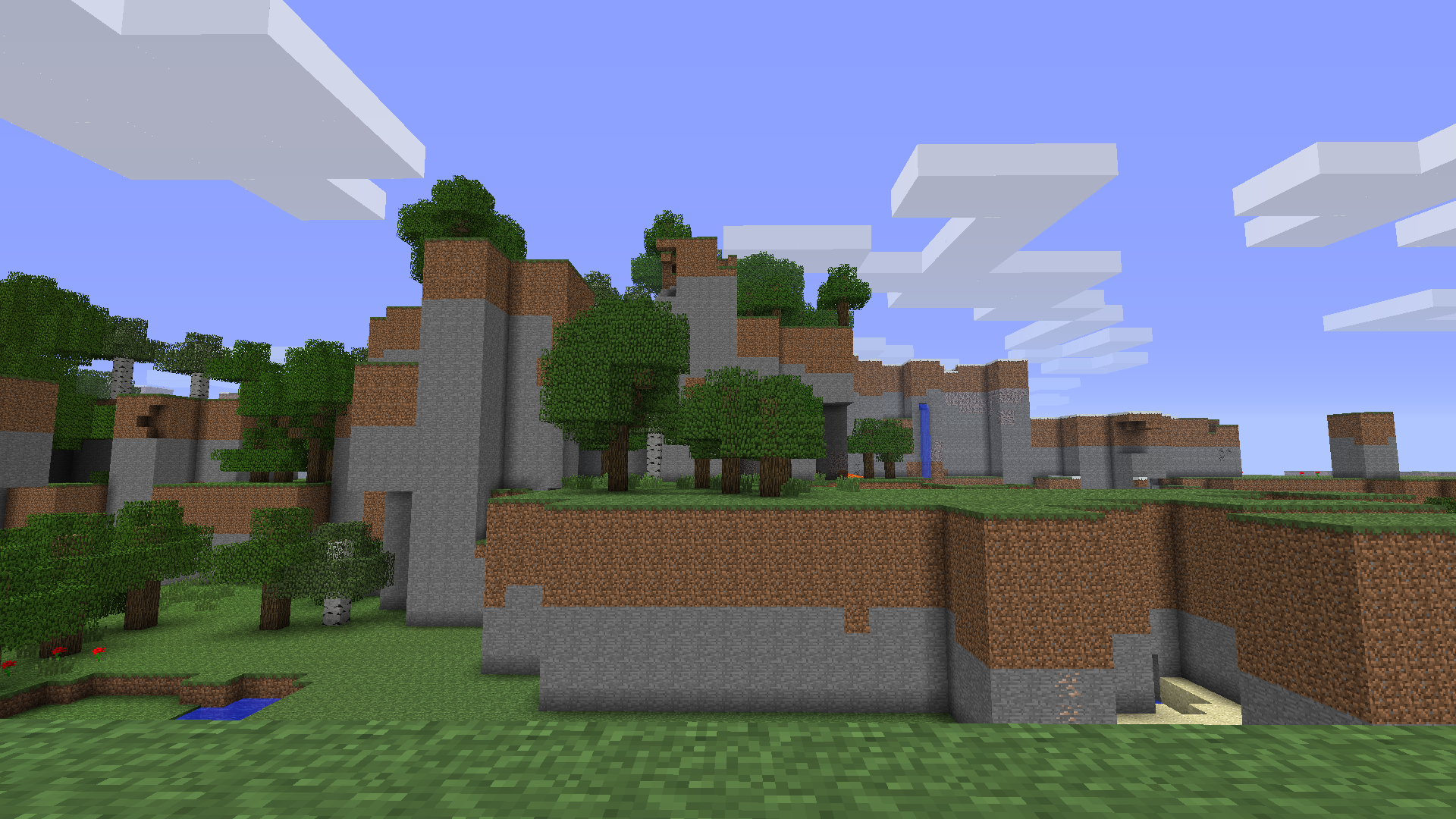
Here you can see caves and other features of normal generation
This mod doesn’t require anything to work, like Risugami’s Modloader.
This mod don’t remove:
– Caves
– Trees
– Mobs spawning
– Water
– Ores
– Cactuses
– Cane
The game with this mod generates regular lakes and lakes 8 blocks deep:

This mod may be ported to newer versions in the future, such as 1.5.2, 1.7.10, 1.12.2 and more.
This mod changes the GenerateTerrain function:
“`
double var15 = this.field_4180_q[((var10 + 1) * var9 + var11 + 0) * var8 + var12 + 0];
double var17 = this.field_4180_q[((var10 + 1) * var9 + var11 + 0) * var8 + var12 + 0];
double var19 = this.field_4180_q[((var10 + 1) * var9 + var11 + 0) * var8 + var12 + 0];
double var21 = this.field_4180_q[((var10 + 1) * var9 + var11 + 0) * var8 + var12 + 0];
double var23 = (this.field_4180_q[((var10 + 1) * var9 + var11 + 0) * var8 + var12 + 0] – var15) * var13;
double var25 = (this.field_4180_q[((var10 + 1) * var9 + var11 + 0) * var8 + var12 + 0] – var17) * var13;
double var27 = (this.field_4180_q[((var10 + 1) * var9 + var11 + 0) * var8 + var12 + 0] – var19) * var13;
double var29 = (this.field_4180_q[((var10 + 1) * var9 + var11 + 0) * var8 + var12 + 0] – var21) * var13;
“`
With normal generation, this passage would look like this:
“`
double var15 = this.field_4180_q[((var10 + 0) * var9 + var11 + 0) * var8 + var12 + 0];
double var17 = this.field_4180_q[((var10 + 0) * var9 + var11 + 1) * var8 + var12 + 0];
double var19 = this.field_4180_q[((var10 + 1) * var9 + var11 + 0) * var8 + var12 + 0];
double var21 = this.field_4180_q[((var10 + 1) * var9 + var11 + 1) * var8 + var12 + 0];
double var23 = (this.field_4180_q[((var10 + 0) * var9 + var11 + 0) * var8 + var12 + 1] – var15) * var13;
double var25 = (this.field_4180_q[((var10 + 0) * var9 + var11 + 1) * var8 + var12 + 1] – var17) * var13;
double var27 = (this.field_4180_q[((var10 + 1) * var9 + var11 + 0) * var8 + var12 + 1] – var19) * var13;
double var29 = (this.field_4180_q[((var10 + 1) * var9 + var11 + 1) * var8 + var12 + 1] – var21) * var13;
“`
Block Helper
# Block Helper
A direct WAILA port for old versions of Minecraft, with almost the same API and many, many additional fixes!
## Download
[**Download on CurseForge**](https://www.curseforge.com/minecraft/mc-mods/block-helper)
[**Download on Modrinth**](https://modrinth.com/mod/block-helper) (More versions are available here)
### Fixers
Some Minecraft versions have bugs. That’s normal. In order to fix some of them, you can install the following fixers:
– [Class Loader Fixer](https://modrinth.com/mod/class-loader-fixer)
– [Font Fixer](https://modrinth.com/mod/font-fixer)
## Old source code
This repository hosts the source code for BlockHelper versions 2.x and onwards.
The source code for older versions (0.x and 1.x), has moved [here](https://github.com/ThexXTURBOXx/BlockHelper-old).
## Installation
### Forge (all versions) / ModLoaderMP (≤ 1.2.3)
#### Client
Just drop the mod into the `mods` folder. Done! 🙂
#### Server
If you are running a server on MC 1.3.x or newer, just copy the Block Helper jar file into the `mods` folder.
On older versions, you need to download the dedicated server build of the mod.
It can be found under “Additional files” both on Modrinth and CurseForge.
In MC b1.5_02 and older, you need to copy all the files from this jar into the server jar.
In all newer versions, it is sufficient to just copy the jar file into the `mods` folder.
#### MCPC+/Cauldron/Bukkit
If you are running a server on MC 1.3.x or newer, just copy the Block Helper jar file into the `mods` folder.
On older versions, you need to download the dedicated Bukkit/MCPC+ build of the mod.
It can be found under “Additional files” both on Modrinth and CurseForge.
In MC b1.7.3 and older, you need to copy all the files from this jar into the Bukkit jar.
In all newer versions, it is sufficient to just copy the jar file into the `mods` folder.
### Fabric
Drop the mod into the `mods` folder and install [Apron](https://github.com/BetterThanUpdates/Apron) or [BetaLoader](https://github.com/paulevsGitch/BetaLoader) (for b1.7.3)
or [Fabricated Forge](https://github.com/arthurbambou/Fabricated-Legacy-Forge) (for 1.3.2+).
## Features
### Mod Compatibility
Next to Vanilla blocks, integration modules for the following mods are in place (list updated only irregularly!):
– Advanced Machines
– Advanced Solar Panels
– Applied Energistics 1
– Barrels
– BuildCraft 2 and 3
– ChickenChunks
– Ender Storage
– Equivalent Exchange 1, 2 and 3
– Factorization
– Falling Meteors
– Flora & Soma / Natura
– Forestry
– Forge Multipart
– GregTech
– IC²
– Immibis’s Microblocks
– IndustrialCraft
– InfiCraft
– NEI
– Pam’s Mods
– Project Zulu
– Railcraft
– Red Power
– Thaumcraft
– Thermal Expansion
– Total Panels
– Twilight Forest
Some of these mods still host downloads to this day.
If you cannot find downloads for some of these,
chances are that they are still downloadable via [MCModArchive](https://mcmodarchive.femtopedia.de/).
### API
Block Helper features WAILA’s API (with minimal changes) from version 2.x onwards.
Since there are many resources online on how to use the API, I will keep this as simple as possible here and just list a few “good” examples:
– [Block Helper’s own plugins](https://github.com/ThexXTURBOXx/BlockHelper/tree/1.5.2/src/main/java/mcp/mobius/waila/addons)
– [BlockHelperAddons](https://github.com/VintageModsReforged/BlockHelperAddons)
Just try to follow these examples and you will succeed. To safely register your plugin, use the code snippet from the
JavaDoc of the `mod_BlockHelper#registerPlugin` function.
### Other features
Yes, Block Helper has a few additional features and integrations you probably have not seen before 🙂
On the Modrinth and CurseForge page, there are a few images of most of these features in action!
_Please note that not every feature is available for every Minecraft version due to modding limitations._
#### NEI/AMI/HMI integration
– Two new keybinds (default: NUM3 and NUM4), which show all the recipes for or using the
block currently looked at
– Show the mod an item is from in the item’s tooltip [this also works without NEI/AMI/HMI in Apron]
– Another keybind specific for NEI (default: I), which shows all the applicable enchantments for the
currently highlighted item in the inventory
#### World Overlays
Just like NEI in MC 1.4.7 and onwards, Block Helper features a light level overlay and chunk border overlay. The default
keybinds for these are F7 and F9, respectively.
## Source Code
Block Helper is being developed for:
– [a1.2.6](https://github.com/ThexXTURBOXx/BlockHelper/tree/a1.2.6)
– [b1.1_01/b1.1_02](https://github.com/ThexXTURBOXx/BlockHelper/tree/b1.1_02)
– [b1.2_02](https://github.com/ThexXTURBOXx/BlockHelper/tree/b1.2_02)
– [b1.3_01](https://github.com/ThexXTURBOXx/BlockHelper/tree/b1.3_01)
– [b1.4_01](https://github.com/ThexXTURBOXx/BlockHelper/tree/b1.4_01)
– [b1.5/b1.5_01](https://github.com/ThexXTURBOXx/BlockHelper/tree/b1.5_01)
– [b1.6.5/b1.6.6](https://github.com/ThexXTURBOXx/BlockHelper/tree/b1.6.6)
– [b1.7-b1.7.3](https://github.com/ThexXTURBOXx/BlockHelper/tree/b1.7.3)
– [b1.8/b1.8.1](https://github.com/ThexXTURBOXx/BlockHelper/tree/b1.8.1)
– [b1.9p5](https://github.com/ThexXTURBOXx/BlockHelper/tree/b1.9p5)
– [1.0/1.0.1](https://github.com/ThexXTURBOXx/BlockHelper/tree/1.0)
– [1.1](https://github.com/ThexXTURBOXx/BlockHelper/tree/1.1)
– [1.2.3](https://github.com/ThexXTURBOXx/BlockHelper/tree/1.2.3)
– [1.2.4/1.2.5](https://github.com/ThexXTURBOXx/BlockHelper/tree/1.2.5)
– [1.3.2](https://github.com/ThexXTURBOXx/BlockHelper/tree/1.3.2)
– [1.4](https://github.com/ThexXTURBOXx/BlockHelper/tree/1.4)
– [1.4.1/1.4.2](https://github.com/ThexXTURBOXx/BlockHelper/tree/1.4.2)
– [1.4.3](https://github.com/ThexXTURBOXx/BlockHelper/tree/1.4.3)
– [1.4.4/1.4.5](https://github.com/ThexXTURBOXx/BlockHelper/tree/1.4.5)
– [1.4.6/1.4.7](https://github.com/ThexXTURBOXx/BlockHelper/tree/1.4.7)
– [1.5.x](https://github.com/ThexXTURBOXx/BlockHelper/tree/1.5.2)
Better Than Wolves

Better Than Wolves is a “total conversion”. This differs from most mods that you are probably used to in that it changes many of the rules of play to provide a richer experience, rather than just adding in new stuff. What makes it special however, is that it always attempts to do so in a way that retains the original spirit of the game, perhaps even more so than the newer official releases.
It focuses both on challenging survival play, and player creativity in terms of never providing “magic block” solutions to in game problems. Instead, it provides basic tools and leaves it to the player to figure out how to use them to get the job done.
In short, Better Than Wolves is a vision of what Mincraft could have been, designed by a very serious player, for other like minded individuals.
All credit goes towards the creator, FlowerChild. And to the BTW Community.
**VERSIONS 4.84+ DO NOT USE A MODLOADER!!!**
**PERMISSION** : FlowerChild officially declared BTW open source CC BY 4.0 and allowed redistribution. — https://sargunster.com/btwforum/viewtopic.php?t=9863 —
**TO BE UPLOADED**: Versions 3.63, 3.72, 4.85 when Modrinth allows uploading out of order to not mess up the changelog
**NOTE: Better Than Wolves IS NO LONGER ACTIVELY DEVELOPED.**
It has been superseded by Better Than Wolves: Community Edition
MCF: https://www.minecraftforum.net/forums/mapping-and-modding-java-edition/minecraft-mods/3117153-better-than-wolves-community-edition-v2-0-4-may
Github: https://github.com/BTW-Community/BTW-Public