UniLib
# UniLib
A common set of Utilities, designed for over 50 versions of Minecraft!
[](https://opensource.org/licenses/MIT)
[](https://app.codacy.com/gl/CDAGaming/UniLib/dashboard?utm_source=gl&utm_medium=referral&utm_content=&utm_campaign=Badge_grade)
[](https://gitlab.com/CDAGaming/UniLib/commits/main)
[](https://www.curseforge.com/minecraft/mc-mods/unilib)
[](https://www.curseforge.com/minecraft/mc-mods/unilib)
[](https://modrinth.com/mod/unilib)
[](https://modrinth.com/mod/unilib)
## General Notes
* This mod identifies as a **Client Side-only** mod
* This means it **will not run** on the Server’s side.
* Fabric and Quilt mod loaders will simply ignore the
mod, while other mod loaders may crash.
* Some versions of the mod for Minecraft 1.14.x and above require
the [Fabric API](https://modrinth.com/mod/fabric-api)
and the [Fabric mod loader](https://fabricmc.net/use/installer)
* Some versions of the mod for Minecraft 1.13.x require
the [Rift API](https://www.curseforge.com/minecraft/mc-mods/rift)
and the [Rift mod loader](https://github.com/DimensionalDevelopment/Rift/releases)
* Some versions of the mod for Minecraft 1.1.0 and below
require [Risugami’s ModLoader](https://mcarchive.net/mods/modloader)
## Features
This library mod offers various API utilities that have been developed over the years,
initially part of [CraftPresence](https://gitlab.com/CDAGaming/CraftPresence),
that have been designed to work on over 50 versions of Minecraft, from the earliest Alphas to the latest Releases.
These APIs range from utilities that can help with Rendering/UI design, Update Checker and Translation ease-of-access,
as well as the APIs provided through the sibling-project, [UniCore](https://github.com/CDAGaming/UniCore)
## Disclaimers & Additional Info
### Minecraft Issues + Additional Build Info
Despite best efforts, issues can occur due to the state of the Minecraft Codebase.
These issues can hinder certain portions of the backend in addition to cause certain parts of the mod to not work.
With this in mind, please note the following:
* **Minecraft 1.16 and above**
* As more parts of the game become data-driven, some modded data is no longer able to be automatically retrieved
without first being in the world.
* **Minecraft 1.15 and below**
* `MC-112292`: When interacting with the `RenderUtils#drawItemStack` method, used in the v2 Item Renderer, blocks
using certain renderers may fail to display properly.
* Additionally, on 1.15.x exclusively, z-level issues may occur on Screens using this method
* **Miscellaneous Issues**
* Due to obfuscation issues in earlier versions of Minecraft, incorrect data may appear when using certain parts of
the mod.
Additionally, some settings or API calls may perform differently under certain MC versions.
### Support
Need some assistance with one of my mods or wish to provide feedback?
I can be contacted via the following methods:
* [Email](mailto:[email protected])
* [CurseForge](https://www.curseforge.com/minecraft/mc-mods/unilib)
* [Discord :: ](https://discord.com/invite/BdKkbpP)
Additionally, codebase documentation for this mod is
available [here](https://cdagaming.gitlab.io/unilib-documentation/) with further guides available
on [the wiki](https://gitlab.com/CDAGaming/UniLib/-/wikis/Home)
#### Licensing
This Mod is under the MIT License as well as the Apache 2.0 License
This project currently makes usage of the following dependencies internally:
* [UniCore](https://github.com/CDAGaming/UniCore) by [CDAGaming](https://github.com/CDAGaming)
* [Classgraph](https://github.com/classgraph/classgraph) by [lukehutch](https://github.com/lukehutch)
* [Lenni Reflect](https://github.com/Lenni0451/Reflect) by [Lenni0451](https://github.com/Lenni0451)
Sprintable
# Sprintable
Add sprint to minecraft beta 1.7.3

## THIS IS JARMOD
**BECAUSE I DONT KNOW HOW TO DEV AN OLD MODLOADER MOD!**
## Function:
Added sprint to the beta 1.7.3
Added keybind in the GameSettings
Added double tap forward key to sprint
Added FOV change when sprinting
**Jarmod installation guide:**
unzip the mod content to minecraft.jar and delete the META_INF if you want to use it with forge/modloader please install this mod after installation of forge/modloader.
Skylands Portal
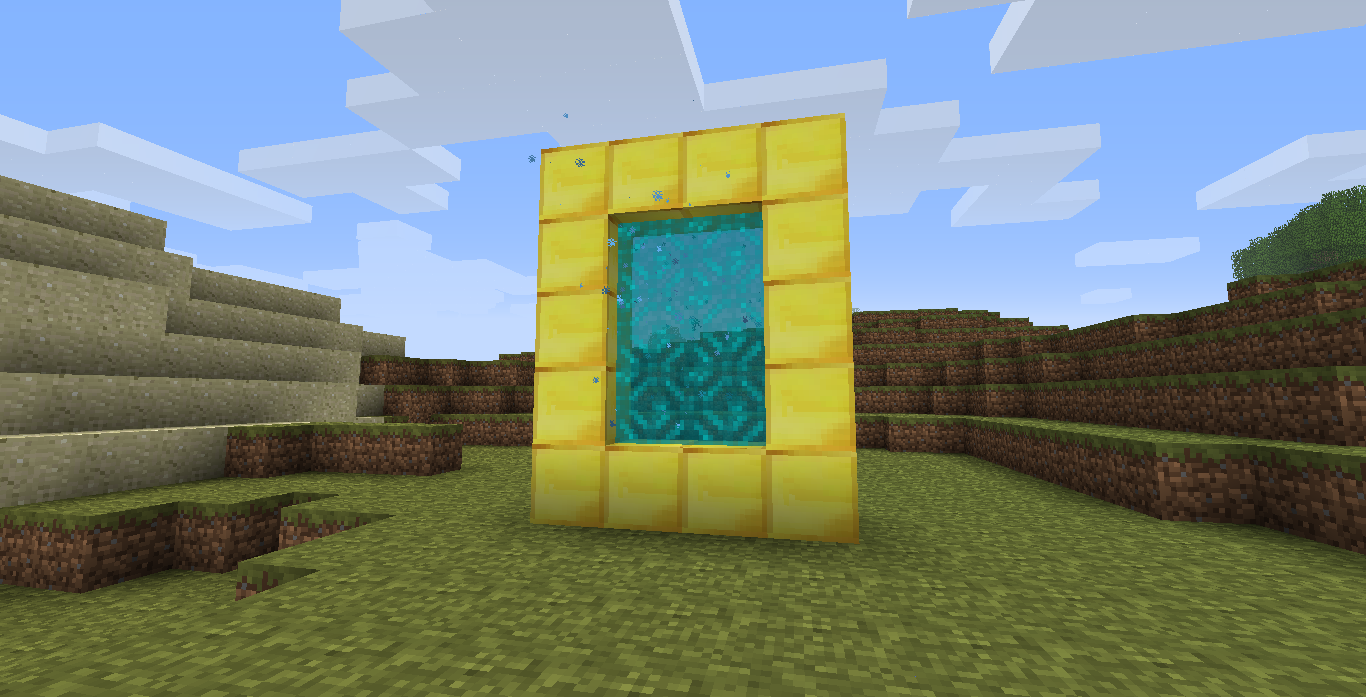
This is a simple mod that adds a portal allowing players to travel to the Skylands dimension. It integrates seamlessly with the game and provides an alternate world above the clouds for exploration and building.
## Items
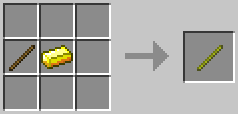
The Golden Stick is crafted using 1 Stick and 1 Gold Ingot in a shapeless recipe.
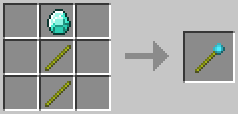
The Magic Wand of Skylands is crafted using 2 Golden Sticks and 1 Diamond. It is the item used to light the Skylands portal, and it can only be used once.
## Requirements
### Babric
* [StationAPI](https://modrinth.com/mod/stationapi)
* [Glass Config API](https://modrinth.com/mod/glass-config-api)
* [Mod Menu Babric](https://modrinth.com/mod/modmenu-babric) (Optional, for in-game configuration)
### Risugami’s ModLoader
#### for b1.8.1
* [ModLoader](https://mcarchive.net/mods/modloader?gvsn=b1.8.1)
* [ShockAhPI r9](https://mcarchive.net/mods/shockahpi?gvsn=b1.8.1)
* [ShockAhPI r9 fix](https://github.com/ItsElix99/Skylands-Portal/raw/refs/heads/b1.8.1-ml/ShockAhPI%20r9%20fix.zip)
* [GuiAPI](https://mcarchive.net/mods/guiapi?gvsn=b1.8.1) (Optional, for in-game configuration)
#### for b1.7.3
* [ModLoader](https://mcarchive.net/mods/modloader?gvsn=b1.7.3)
* [ShockAhPI r5.1](https://mcarchive.net/mods/shockahpi?gvsn=b1.7.3)
* [GuiAPI](https://mcarchive.net/mods/guiapi?gvsn=b1.7.3) (Optional, for in-game configuration)
#### for b1.6.6
* [ModLoader](https://mcarchive.net/mods/modloader?gvsn=b1.6.6)
* [GuiAPI](https://mcarchive.net/mods/guiapi?gvsn=b1.6.6) (Optional, for in-game configuration)
Bedrock
– Adds Bedrock to rd-132211 (Frist Minecraft version)
– Bedrock spawns at the very bottom of the world (As in newer versions)
By default Bedrock can’t be broken But if you set _AllowBreakBedrock_ to true in _BedrockConfig.txt_ You can break Bedrock
RubyDungPlus
### btw this is a jar mod!
this mod overhauls the rd-132128
### adds :
– 5 Saves instead of one
– settings menu
– blockid system
– Seperate textures instead of storing everything in an atlas
– and more!
### following blocks
1. dirt
2. planks
3. log
4. slab(double slab too)
5. tree sapling
6. gravel
7. Dynamite
### Controlls :
– WASD : move
– Q/E : select block
– U : settings
– G : unfocus mouse
– esc : exit game
### notes for when this project will be fully released
– as this mod is in early development a lot of things can still change.
– after release the project ~~will~~ MAY become open-source.
(Old MC) Commands
# (Old MC) Commands
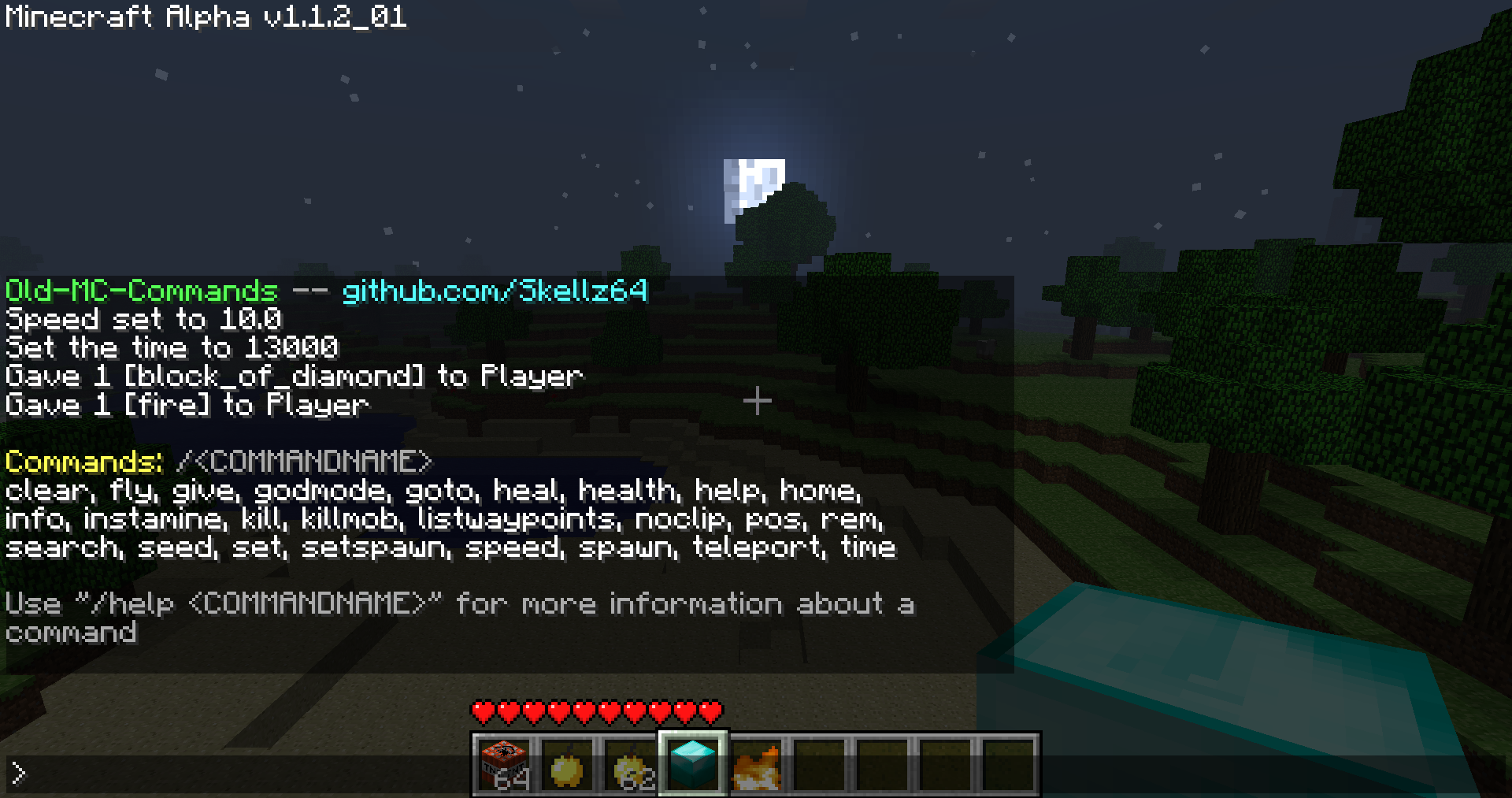
This is a jarmod that allows you to use commands (single player) for Minecraft Alpha and Infdev.
Works for Minecraft inf-20100630-1, a1.0.9, a1.1.2_01, and a1.2.6 **(see downloads)**
**will expand to versions ranging from inf-227 to a1.2.6, after addressing various bugs and recommendations**
# Features
**This mod is inspired by Mojang and Simo_415.** SPC by Simo_415 first begins development in a1.2.6, so my goal was to add commands in versions prior to this.
The interface leans more towards SPC, due to the nature of older versions. The differences are intended to make the mod easier to use for both old and new players.
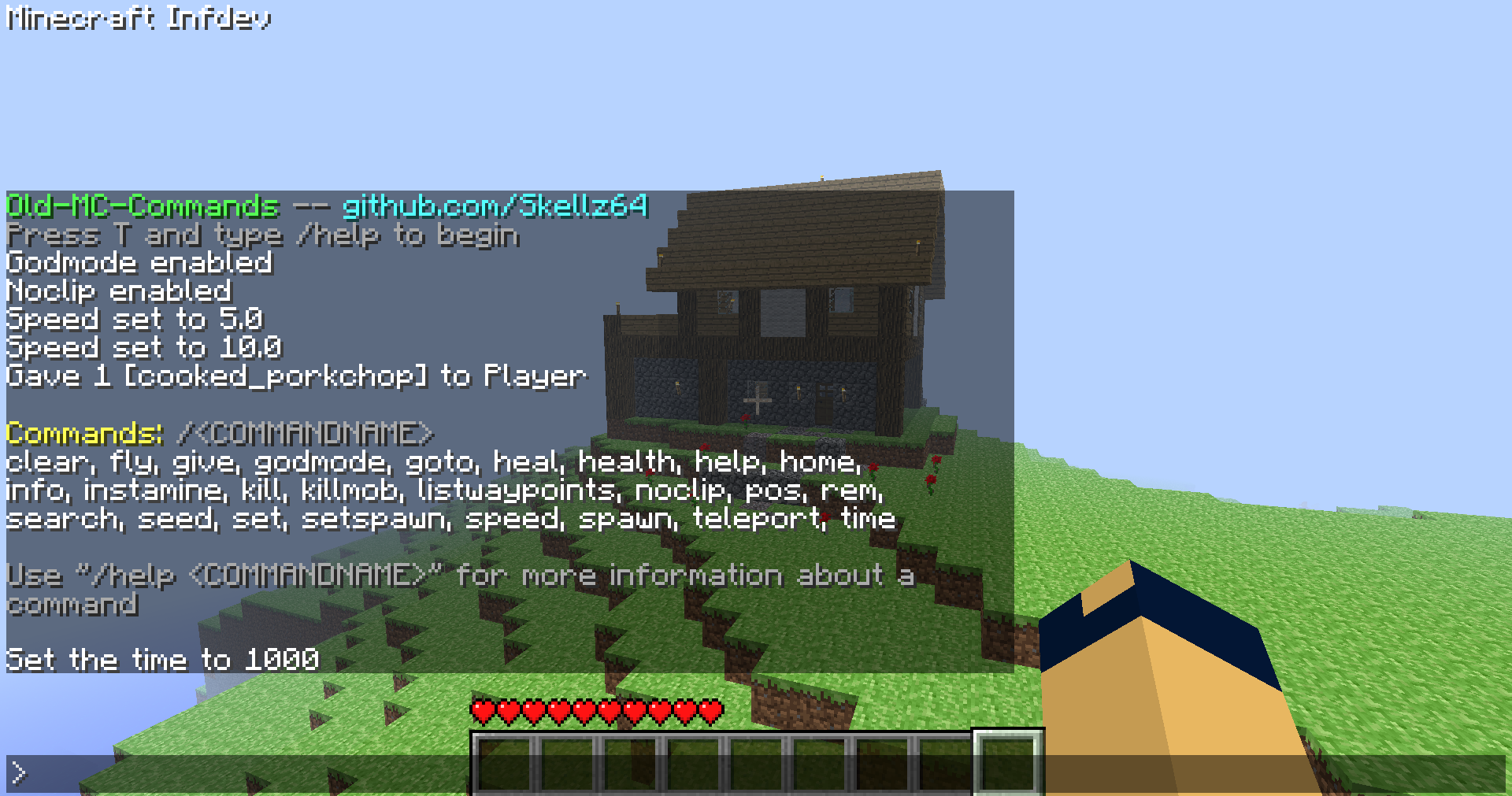
**Commands: clear, fly, give, godmode, goto, heal, health, help, home, info, instamine, kill, killmob, listwaypoints, noclip, pos, rem, search, seed, set, setspawn, speed, spawn, teleport, time**
**A full video showcasing the mod:**
You can activate the interface by pressing T and typing / followed by a command name. Using /help will help you to get started. From there, /help "COMMANDNAME" will give you a command’s description, syntax, and an example. The UI should be able to guide you, without needing to look elsewhere for how to use the mod. Especially for players that have used any kind of MC command-line in the past.
That being said, I know of many highly specific details/problems I can’t summarize in a reasonable manner. I will address these as they are presented to me, so please report to my [github page](https://github.com/Skellz64/Old-MC-Commands) for issues…
**If you need commands past a1.2.6 use SPC, archived downloads for it are on [MCArchive](https://mcarchive.net/mods/singleplayercommands?gvsn=)**
# Compatibility
**The compatibility of the mod varies with different versions.**
**a1.0.17_04 to a1.2.6:** Activate the chat in single player with command functionality *(Minecraft.java, EntityPlayerSP.java, NEW CommandClass.java)*
**pre-a1.0.17_04:** A bug in world generation breaks the teleport command, nbt saving is a private variable and missing features *(Add World.java, and NBTTagCompound.java)*
**pre-a1.0.10:** Multiplayer features like chat, fonts, and gui either don’t exist or are early in development *(Add Gui.java, GuiChat.java, GuiIngame.java, and FontRenderer.java)*
The total class count is 9 in the oldest version, inf-630. My advice for users is to not use multiple mods unless you know what you are doing.
# Downloads
The current 4 versions were picked due to their popularity, stability, and relevance to my mod as a whole.
**The downloads are named “Commands_v1.0_” followed by “(version name)” ensure that you are downloading the correct version**
**Note: ONLY read my zip file names for versions.** To upload mods, Modrinth requires default MC launcher versions and mod loader fields to be filled out. *(ex: inf-630 is shown to support inf-618 and risugami’s modloader, which is false)*
# How to install
Install [Java 8](https://www.oracle.com/java/technologies/javase/javase8-archive-downloads.html), most mods for older versions use Java 8. So it’s always a good idea to have it.
This is a jarmod so I recommend using **MultiMC**, **PrismLauncher**, or **Betacraft v2.0**. These launchers allow for jarmods to be easily setup older versions. They all have similar ways of adding jarmods… Edit your instance in said launcher, locate the add to Minecraft.jar button, and open the downloaded commands.zip.
For **Betacraft v1.0**, it’s more complex as you will need to jarmod the version yourself. You will also need a zip explorer (I like [WinRAR](https://www.win-rar.com/download.html?&L=0) for Windows)
– after downloading commands.zip for prefered version, search and open your hidden %appdata% folder
– open the .betacraft folder
– open the versions folder
– highlight and right click on the version.jar you are using (ex: a1.1.2_01.jar)
– after right click, you can choose Open with WinRAR
– with the jar open, also open the downloaded commands.zip
– move the .class files (and folders) from the commands.zip to the opened version.jar.
– Press OK , done! You successfully replaced game files with my modded game files!
– Relaunch Betacraft v1.0 and play
# Extras
Any issues can be addressed on [Github](https://github.com/Skellz64/Old-MC-Commands).
You can also join the [Modification Station](https://discord.gg/8Qky5XY) discord server, a community dedicated to modding old minecraft!
Once you join the server, you can find my mod post by clicking on the mods tab and searching commands. This is where you can contact me directly with questions *(i.e. doesn’t warrant a ticket on Github)*
**Thanks for downloading my mod!**
Natos Atlas

A world map mod for **Minecraft Beta 1.7.3**, currently available for **StAPI**, **ModLoader**, and **BTA**.
## Features
– World map viewer
– Slime chunk viewer
– Waypoint system (with an option to support REI’s Minimap mod)
## Planned features
– A minimap system
– Better cave rendering
– Official multiplayer support
## Preview
### Map Modes


### Waypoints


### Map Controls


### Map Overlays
Mystcraft

# Mystcraft
In the [Myst series](https://dni.fandom.com/wiki/Myst_(Series)), there are special books that describe wild and varied new worlds, called [Ages](https://dni.fandom.com/wiki/Age). These Ages can be written with a special language, and the books they are written in can be used to visit those Ages. Some ages can be beautiful and safe, while others can be inherently unstable and dangerous.
Mystcraft brings the ability to write Ages to Minecraft, allowing players to create and explore wild new worlds for adventure, settlement, or material gain. When playing with such powerful forces, powerful dangers will also be present. Players must always ensure they have a way home, and must endure harsh conditions in unstable ages or learn how to write safer ages to inhabit.
## Mechanics
Listed below are some of the mechanics in Mystcraft, but more the [Mystcraft Wiki](http://wiki.mystcraft.xcompwiz.com/Main_Page) will contain more comprehensive documentation.
### Linking
Right clicking on a Descriptive or Linking book will bring up a book GUI.
You can get to this screen by right clicking a stand or lectern or right clicking with a book in-hand.
There is a black rectangle on the right page. This is the “Linking Panel”. You can click on this panel to link to the destination Age.
If a book is used from the hand, the user will then drop the book on the ground (as an entity which can be picked up). **Note that this is a one way trip. Without a Linking Book _made before you leave_, it will be impossible to return.**
On Entities, Stands, or Lecterns there is a slot from which you can pick up the book. If a Stand or Lectern is empty there will be a slot where you can place an item appropriate for the container.
### Descriptive Books
Descriptive Books (Age Books) are crafted using a book and a feather (no shape). They can be used to link to a new Age. Note again that this is a one way trip.
Descriptive Books are assigned a unique identifier when crafted that correlates to the dimension id they link to.
To avoid dropping the book on the ground use a Linkbook stand or Lectern to hold the book.
### Linking Books
Linking Books are crafted simply with a book. A Linking Book remembers the current location, direction, and Age (dimension) of the creator allowing travel to that place. This book can be used the same way as an Descriptive Book and will follow the same mechanics (drops to the ground as player travels). Also a one way trip by itself.
It is possible to make linking books to The Nether and The End, as well as other non-Mystcraft dimensions.
### Book Entities
The books that fall to the ground can be picked up by sneak + use (default: shift + right clicking) them. Plain “use” (right click) will bring up a linking panel, letting you pick it up or use it. If a book is left on the ground it will slowly decay (the book flashes as it takes damage). It is also possible to burn or otherwise damage books in this state.
### Linkbook Stands
Linkbook Stands allow you to place a book on them and use the book from the stand without having to pick the book back up. Right-clicking an empty stand with a book in your hand places the book. Right-clicking a stand that already has a book brings up the linking panel. Breaking the stand causes it to drop the book.
### Lecterns
Lecterns are alternates to stands designed to sit on top of a single block of wood planks, or similar base.
There is floating text above books in the world and text in the item tooltip which display the name of the Age to which the book links. Note that this is a config option, and in `v0.9.05` and later it defaults to off. For it to be on, both the server and client must have it turned on. With a server setting of “off”, books can be hidden (useful for adventure maps, or competitive survival worlds).
### Writing Desks
Writing Desks allow you to view the symbols in a Descriptive Book and rename books. If a Descriptive Book is renamed then the Age is renamed and all subsequent Linking Books made in that age will default to the new name (any previously made ones keep their identifiers). Desks allow for actual writing mechanics (selecting symbols for Ages; See below). In the future they will also allow changing the symbols that describe an age.
### Notebook
The only book entity added so far that doesn’t do something magical. Used to track the symbols you have learned. They have a special slot on the writing desk and will automatically store the symbols from any descriptive book placed in the desk at the same time. It is impossible to actually ‘write’ an age without one, though the only way to add symbols is to learn them by randomly generating ages (using underspecified books).
### Ages
Ages are other worlds (similar to “dimensions”). The mechanics of the Age are determined by the Symbols written into its Descriptive Book (symbols may be automatically added on linking if there are not enough or logic is missing). Some possible world types are Standard Terrain, Cave, and Flat Worlds. The randomly generated Ages have from one to three biomes, and may include unusual or special features.
Note that it is impossible to legitimately go from an Age to either the End or the Nether via their usual portals. Some mods (such as Twilight Forest) may choose to deny their portals from Ages as well. This is a property of the portal mechanics in use, not Mystcraft.
### Star Fissures
Star Fissures are natural links to the Overworld. If an Age has a Star Fissure it will generate near the Age spawn point.
### Instability Effects
Some ages may be unstable. See [the wiki](http://wiki.mystcraft.xcompwiz.com/Main_Page) for a full description of instability.
Improperly written Ages or Ages with certain symbols will be unstable. There are several effects that can come from this, for example:
– **Decay Blocks** may spawn in unstable Ages and slowly eat the age. Black decay will spread horizontally and eat downward, causing blocks above them to cascade downward. It can be removed with a shovel. Colored decays eats blocks and spreads into them, with no cascading fall. Most of them can be removed with a pick-axe, though it is very difficult to keep up with the rate of spread. White decay also cause damage to **any entity (including yourself, or mobs) that walks on it**, and generally cannot be removed (the tool is still a pick-axe, but it spreads too quickly.)
– **Potion effects** can also be seen in unstable Ages. Most of these happen when you are exposed to the sky, and will fade in a few seconds if you get under shelter.
– **Meteors** can fall from the sky, causing about what you’d expect in terms of destruction.
Instability Effects can be disabled individually in the configuration file.
### Writing
The Age will automatically select symbols to fill in logic it is missing. Doing so adds a small amount of instability to the Age.
The Age will also sometimes add some extra stuff. This won’t cause instability (unless the symbol inherently adds instability, like the Dense Ores symbol).
If any two symbols add the same critical logic (two terrain generator symbols, for example) then the second will be used and a large amount of instability will be added.
If too many biomes are specified (for the biome controller sin use) then a large amount of instability is added for every extra biome and the extras are ignored.
### Portals
The Mystcraft crystal blocks can be arranged into portals. These portals can be any shape and/or size. A book receptacle can be made from 8 crystal blocks in a crafting grid (outer edges) and placed against the crystal portal frame. Putting a book into the receptacle causes a portal to form that links as if the book. All entities that can collide with blocks will link in this way. “Disarm” books will not link items, and will empty the inventory of any entity that links.
## Videos
### Direwolf20’s Mod Spotlight [0.9.2.02]
Minecraft Sigma MCS
# Mod Info
Minecraft Sigma (MCS) is a total conversion mod for beta 1.7.3. Deceivingly simple features which create immersive gameplay. Challenging survival that breeds creative solutions, encourages exploration, while preserving the sandbox nature.

[Official Wiki](https://mcs-website-murex.vercel.app/wiki)
# Major Additions include:
– Cauldron brewing for potions.
– Arcane magic and spell creation.
– Nether Expansion!
– Double world height using same world format!
– Alpha monoliths form past 3000 blocks!
– New ore distribution.
– Ice boat drifting (Not too fast)
– Animal taming.
– Sponge in the oceans.
– Armor stands.
– Slime blocks for bouncing items and entities.
– Dynamite for rocket jumping.
– Mob AI upgrade.
– Backported ravines.
– Implemented my version of beacons (No GUI, just multiblock with mob spawn prevention, potentially more effects in futurte).
– Walking speed bonuses on certain materials to make road building practical.
– Hundreds of bug fixes and QoL
# Recent features
– Stone age survival.
– doubled world height to 256 (compatible with old worlds)
– Expanded nether.
– Added arcane sorcery system.
Join Discord to discuss the mod or get test snapshots:
https://discord.gg/4GySNencr4
# INSTALLATION
1. Download and install Java 8.
2. Download and install MultiMC or PrismLauncher.
3. Create a new b1.7.3 instance.
4. Download the latest MCS mod zip file from releases.
5. In Launcher, Select Edit > Version > Add to Minecraft jar > choose mcs-[version].zip
6. Play!
### DO NOT install other mods alongside MCS as they are not compatible!
# Survival Tips
– Check achievements, they can give you hints!
– Dig gravel or loot zombies for flint.
– Craft stone tools from flint.
– Hunt spiders for string.
– String is needed for stone pickaxe, and bed.
– Dig clay and place it in the sun to dry.
– Build furnace from bricks.
– Tame animals with different foods.
– Mix and match armor for defence bonuses.
– Store armor on stands.
– Control and right click to place down tools.
– Use inventory shortcuts like number keys, dragging, control click.
– Build roads for faster walking
– Construct beacons for powerful effects.
– Mine Nether ores to discover potion brewing and sorcery
– don’t let your guard down at night
– your items linger for 20 minutes in loaded chunks so you have time to prepare for the trip back; late game you can use black sand to point in the direction of your corpse.

# Notable Recipes
Spoiler
Recipe: Bed x1
Ingredients:
– String
– Cloth
– Planks
Recipe: Cauldron and Arcane Table
Ingredients:
– Dormant rock
Potions: mix items and find out
Recipe: Saddle x1
Ingredients:
– Leather
Recipe: Bucket Empty x1
Ingredients:
– Ingot Gold
Recipe: Web x1
Ingredients:
– String
Recipe: Dynamite x4
Ingredients:
– Redstone x1
– Gunpowder x1
– Gunpowder x1
– String x1
Recipe: Tnt x1
Ingredients:
– Dynamite
– Paper
Recipe: Apple Gold x1
Ingredients:
– Ingot Gold
– Apple Red
Recipe: Compass x1
Ingredients:
– Ingot Iron
– Redstone
Recipe: Lapis Bricks x2
Ingredients:
– Lapis
– Clay
Recipe: Seared Bricks x4
Ingredients:
– Seared Stone
Recipe: Grout x2
Ingredients:
– Soul Sand
– Gravel
– Clay
Recipe: Brick Block x2
Ingredients:
– Brick
– Clay
Recipe: White Stone x1
Ingredients:
– Cobblestone
– Bonemeal
Recipe: Beacon x1
Ingredients:
– Glass
– Glow Stone
– Obsidian
Recipe: Stone Bricks x4
Ingredients:
– Stone
Recipe: Iron Grate x6
Ingredients:
– Ingot Iron
Recipe: Slime Block x1
Ingredients:
– Slime Ball
Recipe: Slime Ball x4
Ingredients:
– Slime Block
Recipe: Barrel x1
Ingredients:
– Wood Logs
Recipe: Armor Stand x1
Ingredients:
– Fence
– Stone Slab
# Useful Java args
-XX:+UseConcMarkSweepGC -XX:-UseAdaptiveSizePolicy -Xss1024K
You should allocate 1 gigabyte of RAM, old minecraft does not need much.
# WARNING
Not compatible with other mods! No multiplayer yet. This is a hobby project of mine, althought I try to add content and bugfixes regularly, there is no guaranteed plan.
# Credits
Mojang – the game itself and assets;
RetroMCP – the tool I used to decompile, reobfuscate and build this mod;
Birevan – Light Color modification;
FloweChild – Piston packing code, game design ideas such as material walk speed, gloom, textures for barrel and creeper oysters.
Bestsoft100 – help with dynamic block mining delay;
alexchompski – light sensor, observer, spells textures, snowball idea.
Krzysztof Pikes – new music
_This project modifies obfuscated class files from Minecraft Beta 1.7.3, which is © Mojang AB and not open source.
The author claims no ownership over the original Minecraft code.
This mod is provided for educational and archival purposes only.
No part of this project may be used commercially. Redistribution of Minecraft code remains subject to Mojang’s end-user license agreement (EULA)._
Mine Mine no Mi
Mine Mine no Mi is a mod inspired by the famous One Piece manga, written and illustrated by Eiichiro Oda. It aims to be an adventure oriented mod based around exploration
### This mod’s main features are:
– 72 Devil Fruits, each fruit comes with a bunch of different abilities to use, with a over 500 abilities (and counting)
– Different classes, factions and fighting styles to choose from, each slightly changing the outcome of the playthrough
– Mobs like marines, pirates, bandits or other factions, different types of animals, all using custom-made AIs.
– New structures to raid and loot, such as pirate ships or marine bases
– Quests, Challenges and other open world activities for players to do while in singleplayer or multiplayer
– Over 100 elements to choose from when customizing your crew’s Jolly Roger
– Over 100 config options to customize your experience in detail with support for both clients and servers.