Vulkan [16x]
Vulkan 16x is an awesome PvP pack with volcano-inspired colours. Every texture was designed to look good without becoming distracting during fights, making it perfect for fights. Despite the very colourful colour palette, the textures remain easy on the eyes and work well for long sessions. If you want a pack that combines strong visuals with PvP performance, Vulkan 16x delivers a stylish experience that feels great to use in every fight.
VT villager variations for Fresh Animations


Makes the Vanilla Tweaks villager variations recourcepack work for Fresh Animations!
Original recourcepacks!:
– **[**VanillaTweaks**](https://vanillatweaks.net/)**
– [**Fresh Animations**](https://modrinth.com/resourcepack/fresh-animations)
## Order of recourcepacks
Place [this pack](https://modrinth.com/resourcepack/vt-villagervariations-for-freshanimations) _above_ [**Fresh Animations**](https://modrinth.com/resourcepack/fresh-animations)
> Having this pack + FA is only needed, having the original VT pack is not required.
[MTR/NTE] SVRZ pack
The resourcepack adds fictional trams from the VRZ company. Adds trams such as: “Svarog”, “Yarilo”, and “Perun”.
Models by FAKTOR
**Requires MTR 3 and NTE 4.1 and above**
__________________________________________________________________________________________________
Ресурспак добавляет вымышленные трамваи ВРЗ. Добавляет трамваи: “Сварог”, “Ярило” и “Перун”.
Модели за авторством Фактора
**Требуется МТР 3 и НТЕ 4.1 или выше!**
VR Hand Fixes
Vivecraft does not support custom 3D Models and to fix that, I’ve made this VR Hand Fixes Resource Pack for 1.20.1 I do know that Vivecraft has an option for the items to be place in the hand properly like the Thirdperson Camera, but it does looks we rid to me, so that lead to this Resource Pack.
After a few weeks on thinking how it works, I finally gotten a prototye of it working with one mod, but now it is working with multiple mods. And you don’t need ETF/EMF for this to work, just Minecraft, Vivecraft and a supported mod in this Resource Pack.
If anyone finds any issues, please let me know on the Offical Modrinth Discord Server!
Voxel Trains IR
## About
Voxel Trains is one of the largest [Immersive Railroading](https://www.modrinth.com/mod/immersive-railroading) content packs, it adds about 80 trains from many different countries, including Switzerland, Germany, the Netherlands, Portugal, the US, and more.
You can track our current progress both on [our Discord](https://discord.gg/6RafZxJzTU) and on [our Trello](https://trello.com/b/EIGfPwbC/voxel-trains).
## Important
– If none of our trains are appearing in game, make sure you’ve activated the pack in the resource packs menu.
– If your train items are broken, try turning off OptiFine’s FastRender option.
– If you want to drive trains without fueling them, you can enter IR’s config in-game by pressing `numpad /` -> balance -> FuelRequired = False
– If you need help with anything else feel free to ask on [our discord](https://discord.gg/6RafZxJzTU) in the [#support channel](https://discord.com/channels/488046889933996043/489018239540789258)
## Content
Rolling Stock
Deutsche Bahn
**Locomotives**
– BR 143
– BR 146.2 TRAXX 2
– BR 185.2 TRAXX 2
– BR 218 V160
– V320
– Köf II
**Multiple Units**
– BR 407 Velaro D ICE 3 MS
– BR 481
– VT 98
**Passenger Cars**
– n-Wagen Bnrbdzf 480 and Bnrz 451
– IC1
– Dosto 1 DABbuzfa 778 and Dbuza 747
Union Pacific
**Locomotives**
– ALCO S-4
– 3rd Gen GTEL Big Blow
– 4884-1 Big Boy
– FEF-1
**Passenger Cars**
– UPP Passenger Car
**Auxiliary Tenders**
– UPP #809 ‘Jim Adams’
– UPP #814 ‘Joe Jordan’
Comboios de Portugal
**Locomotives**
– 0180
– 1400
– 1800
– 2600 Nez-Cassé
– 5600 Eurosprinter
**Passenger Cars**
– ACDt 481
– Schindler
– Sorefame Regional
SBB CFF FFS
**Locomotives**
– Re 420
– Re 421
– Re 460 Lok 2000
– Re 482 TRAXX 2
– BR 193 Vectron
– Am 843
– Ee 922
– Eem 923
**Multiple Units**
– Re 450 and DPZplus
– RABe 501 Giruno
– RABe 511 KISS
– RABe 514 DTZ
– Transrapid (Fictional)
**Passenger Cars**
– HVZ
– EW-IV
– EC
– IC2000/IC 2020
Nederlandse Spoorwegen
**Locomotives**
– E 186 TRAXX 2E
– NS 1700
– NS 700 G 400 B
– NS 600
**Multiple Units**
– SLT
– VIRMm
– ICMm
**Passenger Cars**
– ICR
Société Nationale des Chemins de Fer Français
**Locomotives**
– BB 8500
**Multiple Units**
– X2200
Other
**Locomotives**
– Amtrak ACS-64 Cities Sprinter
– Railpool TRAXX 2E
– Hectorrail TRAXX 2
– MÁV TRAXX 2
– H.F. Wiebe V320
– BLS Re 465
– BLS Am 843
– Sersa Am 843
– DSB Traktor 57
**Multiple Units**
– CD 810
**Trams and Light Rail**
– VBZ Tram 2000 (All variants)
– VBZ Be 5/6 Cobra
– VBG Be 5/6 Cobra
– Forchbahn Be 4/6
– DVB NGT6DD
– Rheinbahn GT8S
– Rheinbahn B80D
Freight
**European**
– DB Eaos-x 051
– DB Falns 121
– DB Samms 710
– DB Sggrs 716
– CP Ekklo 40s
– CP Carga Sgnss 455
– SBB Cargo Hbbillnss
– SBB Cargo Tagnpps
– Schweizer Zucker Tagnpps 061
– GEFCO Laeks 427
– Franz Jäger Berlin Safe Wagon
**American**
– BNSF Rotary Gondola
– TTX 53′ Intermodal Well Car
There are also a few buffer stops that are technically freight cars so you can place them on the tracks.
Tracks
There is an assortment of Tracks of different types and conditions. Some of them also exist as a meter gauge variant.
Vortherion Sword
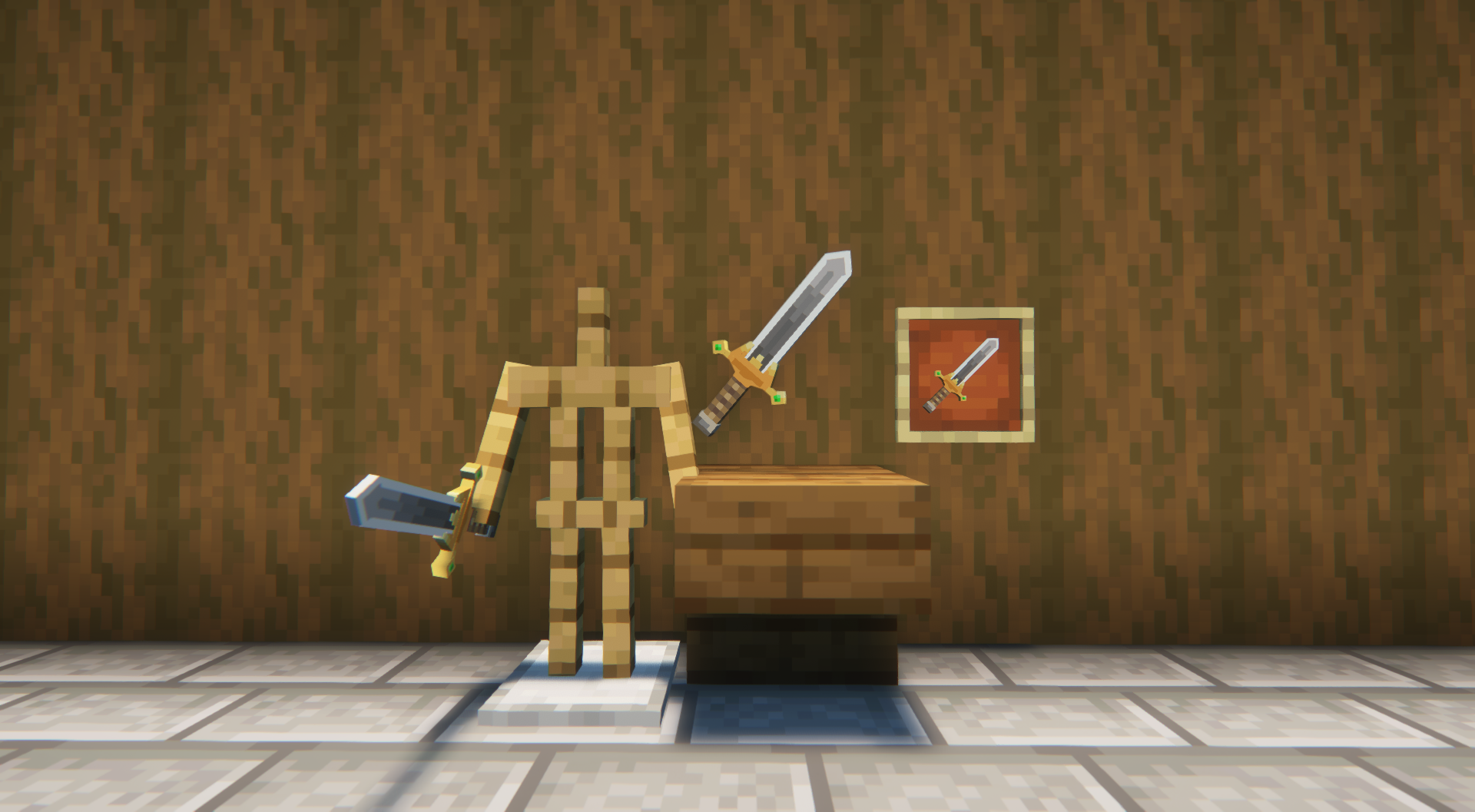
# **Vortherion Sword Texture Pack**
## **Description**
Tired of the normal Netherite Sword? Then try out my resource pack. This texture pack transforms the Netherite Sword into the Vortherion Sword.
## **Usage Guidelines**
This texture pack is designed for non-commercial use, making it perfect for personal gameplay and non-monetized projects. When using the Vortherion Sword Texture Pack assets, please provide proper attribution by acknowledging the source.
VoodooDoll Wide
# VoodooDoll
A resource pack that changes the totem of undying into a plush toy version of the player’s model. No mods required!
## Comparision between versions
### Vanilla [Custom](https://modrinth.com/resourcepack/voodoodoll-custom):
**Pros:**
– all totems can be made unique (perfect for multiplayer)
– supports both the slim and wide player models
**Cons:**
– works only on Minecraft 1.21.5 and up
– a bit complicated to customize
### Vanilla Wide/[Slim](https://modrinth.com/resourcepack/voodoodoll-slim):
**Pros:**
– works with very old versions of Minecraft, from 1.11.0 and up
– easy to customize
**Cons:**
– every totem of undying will look the same (good enough on single-player)
– only supports either the slim or wide player models
You can use Vanilla Custom edition and either Vanilla Wide or Vanilla Slim edition alongside each other, if so desired.
## How to customize
By default, the resource pack only comes with a texture of Steve, so if you want to use your own skin, or someone else’s skin, you will have to follow these instructions.
1. Extract the content of the resource pack from the ZIP.
2. Go to `assets/minecraft/textures/item/totem_of_undying` folder (`assets/minecraft/textures/items/totem` for 1.11-1.12 version).
3. Copy your desired user’s skin texture into the folder and rename it to `totem_of_undying.png` (`totem.png` for 1.11-1.12 version).
4. Overwrite the original file if prompted.
5. Package the content of the resource pack back into ZIP.
6. Done. Have fun :3
VoodooDoll Slim
# VoodooDoll
A resource pack that changes the totem of undying into a plush toy version of the player’s model. No mods required!
## Comparision between versions
### Vanilla [Custom](https://modrinth.com/resourcepack/voodoodoll-custom):
**Pros:**
– all totems can be made unique (perfect for multiplayer)
– supports both the slim and wide player models
**Cons:**
– works only on Minecraft 1.21.5 and up
– a bit complicated to customize
### Vanilla [Wide](https://modrinth.com/resourcepack/voodoodoll-wide)/Slim:
**Pros:**
– works with very old versions of Minecraft, from 1.11.0 and up
– easy to customize
**Cons:**
– every totem of undying will look the same (good enough on single-player)
– only supports either the slim or wide player models
You can use Vanilla Custom edition and either Vanilla Wide or Vanilla Slim edition alongside each other, if so desired.
## How to customize
By default, the resource pack only comes with a texture of Alex, so if you want to use your own skin, or someone else’s skin, you will have to follow these instructions.
1. Extract the content of the resource pack from the ZIP.
2. Go to `assets/minecraft/textures/item/totem_of_undying` folder (`assets/minecraft/textures/items/totem` for 1.11-1.12 version).
3. Copy your desired user’s skin texture into the folder and rename it to `totem_of_undying.png` (`totem.png` for 1.11-1.12 version).
4. Overwrite the original file if prompted.
5. Package the content of the resource pack back into ZIP.
6. Done. Have fun :3
VoodooDoll Custom
# VoodooDoll
A resource pack that changes the totem of undying into a plush toy version of the player’s model. No mods required!
## Comparision between versions
### Vanilla Custom:
**Pros:**
– all totems can be made unique (perfect for multiplayer)
– supports both the slim and wide player models
**Cons:**
– works only on Minecraft 1.21.5 and up
– a bit complicated to customize
### Vanilla [Wide](https://modrinth.com/resourcepack/voodoodoll-wide)/[Slim](https://modrinth.com/resourcepack/voodoodoll-slim):
**Pros:**
– works with very old versions of Minecraft, from 1.11.0 and up
– easy to customize
**Cons:**
– every totem of undying will look the same (good enough on single-player)
– only supports either the slim or wide player models
You can use Vanilla Custom edition and either Vanilla Wide or Vanilla Slim edition alongside each other, if so desired.
## How to customize
By default, the resource pack only comes with textures of Steve and Alex, so if you want to use your own skin, or someone else’s skin, you will have to follow these instructions.
1. Extract the content of the resource pack from the ZIP.
2. Go to `assets/minecraft/textures/item/totem_of_undying` folder.
3. Copy your desired user’s skin texture into the folder and rename it to `.png`. (replace the `` part with whatever name you want, can be an in-game username)
4. Now, navigate to `assets/minecraft/models/doll` folder.
5. Make a copy of either the `alex.json` or `steve.json` depending on the width of the skin’s arms, and rename it to `.json` (the same name you used for the skin texture).
6. Open the JSON file with a text editor and replace the mention of `”alex”` or `”steve”` with `”“`.
7. Then, go to `assets/minecraft/items` and open the `totem_of_undying.json` file with a text editor.
8. Either replace the `steve`/`alex` with `` and `”Steve”`/`”Alex”` with the name that will trigger turning the totem into a doll, or use that as a template for new cases (Warning: you **can’t** add multiple trigger names to the same case, you need to create a separate case for that)
9. Repeat the entire process when making it for more than one person.
10. Package the content of the resource pack back into ZIP.
11. Done. Have fun :3
Instructions for VoodooDoll CIT (discontinued)
**Warning**: These instructions only apply to VoodooDoll CIT v1 and v2. For VoodooDoll Custom, follow the instructions above.
1. Extract the content of the resource pack from the ZIP.
2. Go to `assets/minecraft/citresewn/cit` folder.
3. Copy your desired user’s skin texture into the folder and rename it to `.png`. (replace the `` part with whatever name you want, can be the person in-game username)
4. Make a copy of either the `alex.json` or `steve.json` depending on the width of the skin’s arms, and rename it to `.json`.
5. Open the JSON file with a text editor and replace the mention of `”alex”` or `”steve”` with `”“`.
6. Make a copy of any of the `.properties` files (doesn’t matter which one), and rename it to `.properties`.
7. Open the `.properties` file you’ve just created with a text editor.
8. Replace the `texture=` and `model=` with the name of the PNG and JSON files. The `nbt.display.Name=` is what will trigger the totem of undying to be the voodoo doll when you rename it in the game, so you can change it to whatever you want, as long as it fits the 50 characters limit of anvils.
9. Repeat the entire process if making for more than one person.
10. Package the content of the resource pack back into ZIP.
11. Done. Have fun :3
voodoo totem
This resoursepack allows you to **rename** the totem of undying to **”voodoo”** to replace its model with a beautiful voodoo doll.
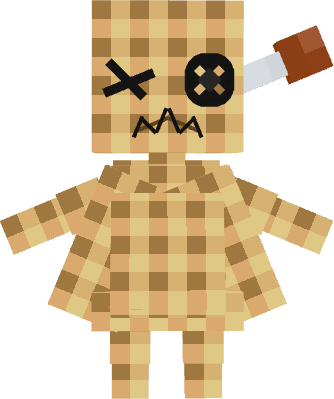 _(its look better in game >.<, so see the gallery)_
I also **strongly recommend** installing the **"RP renames"** mod, it greatly simplifies the use of my resource pack