Wagi’s Furry Villager
# English Description
## About
Changes the appearance of villagers, zombie villagers, and wandering traders into cute animals.
This resource pack requires [ETF](https://modrinth.com/mod/entitytexturefeatures) and [EMF](https://modrinth.com/mod/entity-model-features).
## How to Get Specific Patterns
You can give villagers specific patterns by naming them as follows:
* Brown Shiba Inu → dog_shiba_brown
* Gray striped cat → cat_stripe_grey
* Rabbit with upright ears and red eyes → rabbit_japanese
* Rabbit with floppy ears and red eyes → rabbit_lopear_japanese
Please refer to the gallery for strings to add after “dog” or “cat” or “rabbit”.
## Jobs and Patterns List

## Q&A
* Can I include this resource pack in a mod pack?
* Yes. You are free to include it in a mod pack and publish it.
* Can I publish or stream videos using this resource pack on a monetized channel?
* Yes. You are free to publish videos or live stream yourself playing, regardless of whether your channel is monetized or not.
## Future Updates
* Added more patterns.
* Allow different types of animals to spawn in different biomes.
* Replaced iron golems.
—
# Japanese Description
## このリソースパックについて
村人、ゾンビ村人、行商人の見た目を可愛い動物に変更します。
このリソースパックを動作させるには、[ETF](https://modrinth.com/mod/entitytexturefeatures)と [EMF](https://modrinth.com/mod/entity-model-features)を必要とします。
## 特定の柄を出す方法
村人に以下のように名前を付けることで、特定の柄にすることができます。
* 茶色の柴犬→dog_shiba_brown
* 灰色の縞模様の猫→cat_stripe_grey
* 立ち耳で赤い目のウサギ→rabbit_japanese
* たれ耳で赤い目のウサギ→rabbit_lopear_japanese
dogやcat、rabbitの後ろに付ける文字列は、ギャラリーを参考にしてください。
## Q&A
* このリソースパックをModパックに含めることはできますか。
* はい。自由にModパックに含めて公開することができます。
* このリソースパックを使用した動画を収益化したチャンネルで公開したり、配信したりできますか。
* はい。チャンネルが収益化しているかどうかに関わらず、自由に動画を公開したり、遊んでいる様子をライブ配信することができます。
## 今後のアップデートについて
* 模様のさらなる追加。
* バイオームごとに違う種類の動物が出現するようにする。
* アイアンゴーレムの差し替え。
Wagi’s Furry Agent
# English Description
## About
This resource pack changes the appearance of wolves when given a specific name.
This resource pack requires [ETF](https://modrinth.com/mod/entitytexturefeatures), [EMF](https://modrinth.com/mod/entity-model-features), and [ESF](https://modrinth.com/mod/esf) to function.
## How to Name
The appearance changes depending on the codename you give each agent, regardless of case.
Please check the gallery images for implemented agents.
## Q&A
* Can I include this resource pack in a mod pack?
* Yes. You are free to include it in a mod pack and publish it.
* Can I publish or stream videos using this resource pack on a monetized channel?
* Yes. You are free to publish videos or live stream yourself playing, regardless of whether your channel is monetized or not.
—
# Japanese Description
## このリソースパックについて
オオカミに特定の名前を付けた時の見た目を変更します。
このリソースパックを動作させるには、[ETF](https://modrinth.com/mod/entitytexturefeatures)と [EMF](https://modrinth.com/mod/entity-model-features)、[ESF](https://modrinth.com/mod/esf)を必要とします。
## 名前の付け方
大文字小文字の区別なく、各エージェントのコードネームを付けることで、見た目が変化します。
実装済みのエージェントは、ギャラリーの画像をご確認ください。
## Q&A
* このリソースパックをModパックに含めることはできますか。
* はい。自由にModパックに含めて公開することができます。
* このリソースパックを使用した動画を収益化したチャンネルで公開したり、配信したりできますか。
* はい。チャンネルが収益化しているかどうかに関わらず、自由に動画を公開したり、遊んでいる様子をライブ配信することができます。
WAEPack




# WAEPack
A community maintained continuation of the now discontinued [J0Pack](https://www.planetminecraft.com/texture-pack/j0pack/), WAEPack introduces a soft and unique new look to the game.
## 3D Models (Optional)
In addition to the base pack there’s also `waepack-models` which contains optional 3D textures for blocks like ladders, lily pads, iron bars and more.
## Optifine
WAEPack also has support for the Optifine format allowing further customization such as custom loading screen colors.
## Community paintings
All the paintings in the pack are provided by the WAEverything Discord community. The list of painting authors can be found [here](https://github.com/waeverything/WAEPack/blob/main/painting-authors.md).
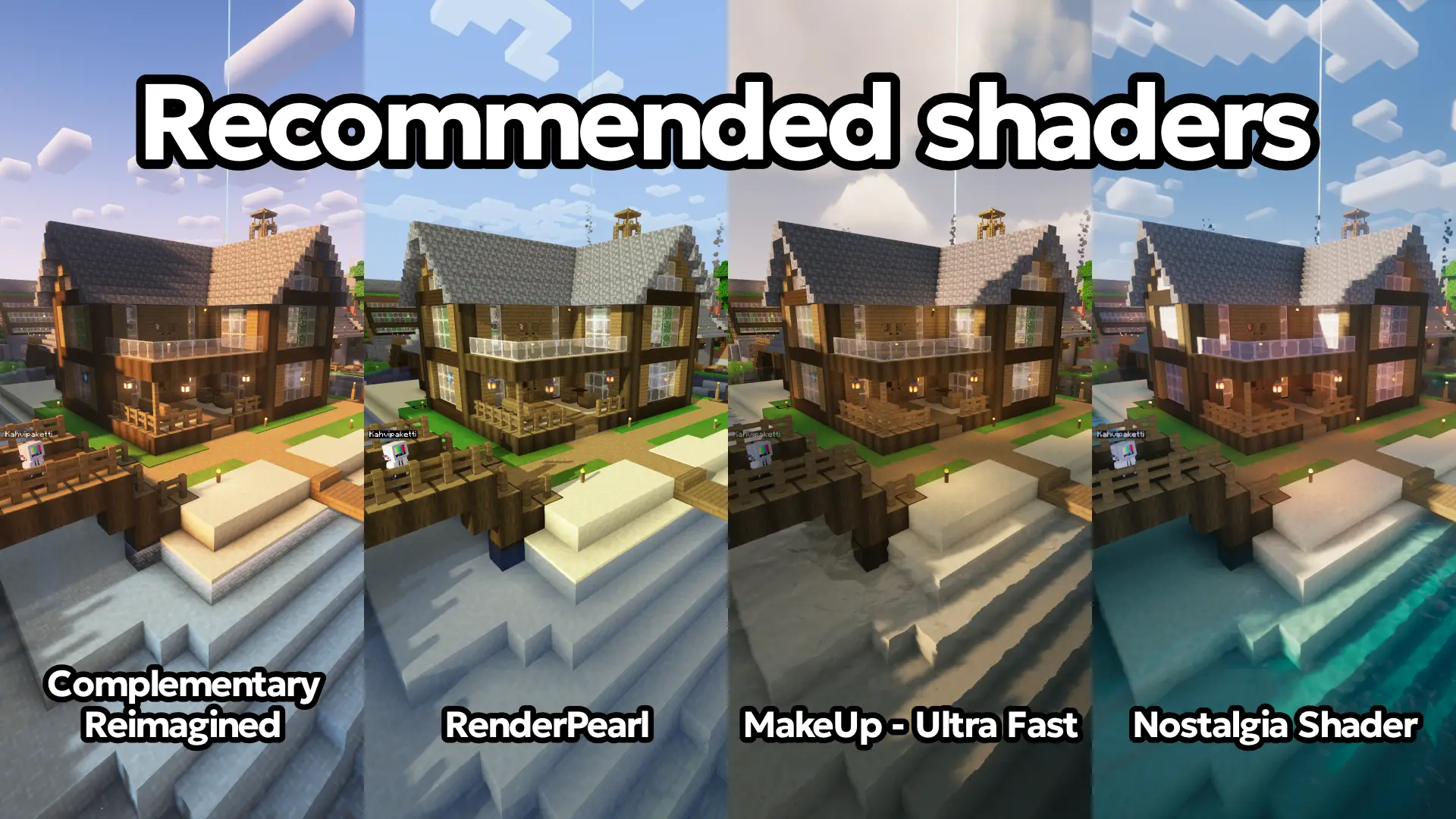
## Recommended shaders
Shaders that we have tested to work well with WAEPack:
– [Complementary Reimagined](https://modrinth.com/shader/complementary-reimagined)
– [RenderPearl](https://modrinth.com/shader/renderpearl)
– [MakeUp – Ultra Fast](https://modrinth.com/shader/makeup-ultra-fast-shaders)
– [Nostalgia Shader](https://modrinth.com/shader/nostalgia-shader)
## Contributing
If you have any time to spare, we would love to have you being part of this project! You can find more information about contributing on our [Github](https://github.com/waeverything/waepack).
Wado ichimonji from anime One piece

OptiFine required!
( Rename Any sword to “Wado ichimonji” to use it. )
For support, download this resource pack from my website:
[wado_ichimonji.zip](https://mineanimecreations.com/resource-pack/wado_ichimonji.zip)
Discord server: discord.gg/z86yJcAZKc.
Also check out my other packs: https://modrinth.com/user/MineAnimeCreations

Wadleee’s PVP Pack
Noticing that most, if not all PVP packs are made for older versions of Minecraft, I decided to make one to use for the newest version of Minecraft, 1.21.8(atm).
# What is Wadleee’s PVP Pack?
Wadleee’s PVP Pack includes many reskins of items, blocks, and the user interface for style, and to give it more of a minimalistic feel. It is also designed especially for a better experience during in-game combat.
### **The Textures That I Have Reskinned Include:**
1. All Swords
2. All Pickaxes
3. All Axes
4. All Shovels
5. All Hoes
6. Fishing Rod
7. Golden Apple
8. Bow
9. Shield(_reskin_)
10. Shield(_slightly lowered for more visibility_)
11. GUI
12. All Wooden Log Types
13. Crosshair
14. Skybox
15. All Armor
16. Outlines on All Ore
17. All Wool Colours
18. Crossbow
19. Mace
20. Ender Pearl
21. Obsidian
22. End Crystal
# Why Get This Pack?
Going back to one of the reasons I created this pack in the first place, this pack works for the newest Minecraft version. Atleast for what I’ve seen, most PVP resource packs usually only work for older versions of Minecraft(which I understand because of the different PVP mechanics for older versions, and servers that include in game combat support older versions). Since the resource pack is made to work for older versions, that means, obviously, the pack is limited to older versions of the game. This pack works as an alternative if the activities you do in game require playing on the newest Minecraft version.
This is not the only reason you may like this pack, because if you prefer something more sleek or stylish than the default Minecraft textures, this pack may be for you. There is also a black and purple, and Black and White theme I did for most of the textures that I reskinned.
# Installation Guide
Download the Pack

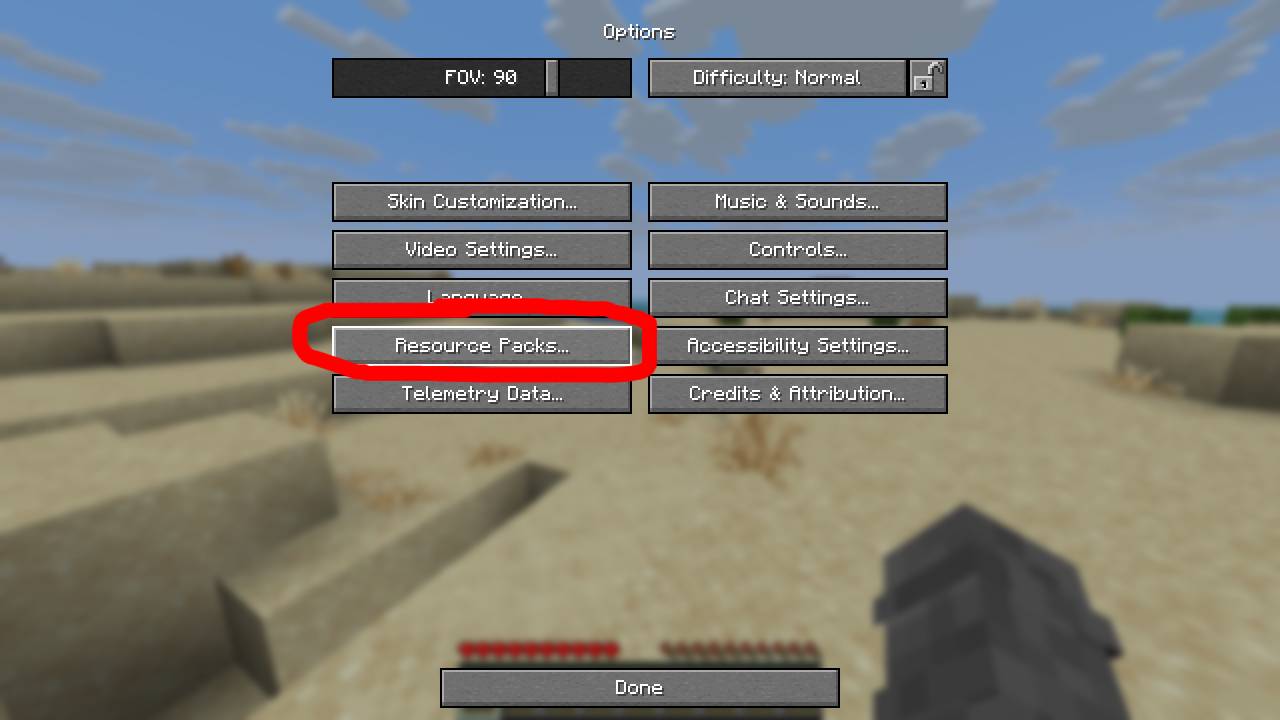
Open Minecraft and go to options > Resource Packs
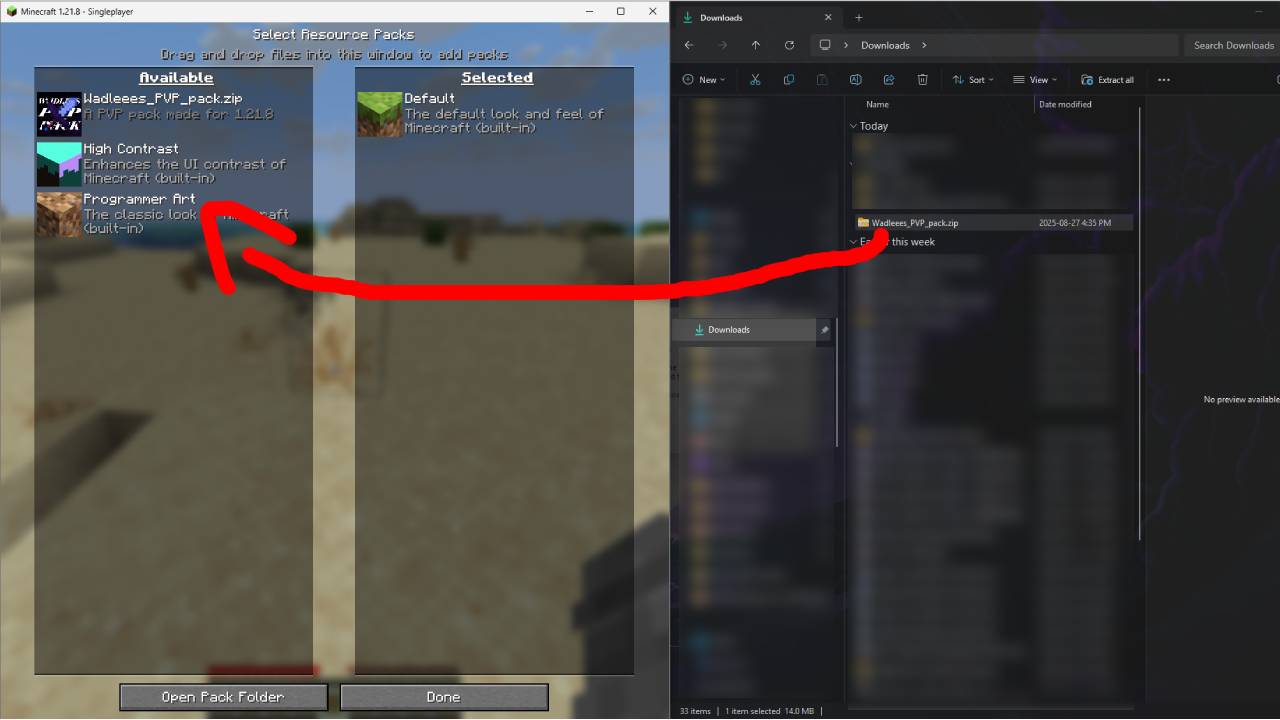
Drag and drop into Minecraft
**Please Note That You Must Use OptiFine In Order To See The Custom, Nighttime Skybox**
Waddling Traders

“`
Turn your Villagers, Iron Golems, and Wolves into characters from Kirby! This pack features custom animations, sounds, and new spears!
“`
W Sideshield
Make your Shield not be obstructive when you hold it in your hand! This Pack makes your Shield appear sideways and lower!
Players are allowed to utilize this pack in their own packs!
I hope you like this Pack!
Vythisi
This pack is a combination I made using a bunch of nice resource
packs. My goal was to improve the game’s immersion and enhance the
exploration experience. To achieve this, I aimed to add variety to
plants and natural blocks, as well as incorporating detailed elements
and 3D blocks, such as an improved GUI, grass details, and bushy
leaves. Additionally, I fixed some bugs and made the game seem more
consistent through small tweaks, including OptiFine features like
glowing ores, glowing armor trims and animated textures.
As of its first public release, this pack is, in my opinion, complete
enough to really improve your experience. However, I still plan on
adding more, such as improved sounds, item detailing, and overall
enhancements to further enrich this beautiful game.
I won’t update this pack soon, as I am currently
working on another big project that aims to improve mobs.
Using OptiFine is highly recommended as many features can’t work without it.
Texture packs used :
Fire Rekindled (www.curseforge.com/minecraft/texture-packs/fire-rekindled) by Tec
Treeshroom+ (www.planetminecraft.com/texture-pack/treeshrooms) by Enkera
Lush Icons (www.planetminecraft.com/texture-pack/lush-icons) and visual leaf decay (www.planetminecraft.com/texture-pack/visual-leaf-decay) by 6_28318530717958
Chests to pouches (www.planetminecraft.com/texture-pack/chests-to-pouches) by Entium
Enhanced items (www.planetminecraft.com/texture-pack/enhanced-items-dripstone-nether-sprouts-amethyst) by _MrMango
Consistent moss (www.planetminecraft.com/texture-pack/consistent-mossy-blocks-java) by NeraW
Advanced GUI (www.planetminecraft.com/texture-pack/custom-gui) by Blasjel
Vunyx’s Redstone Pack
If you want to publish a project containing my work, please mention my username “Vunyx” somewhere. Also, a link to my project would be much appreciated.
# Description
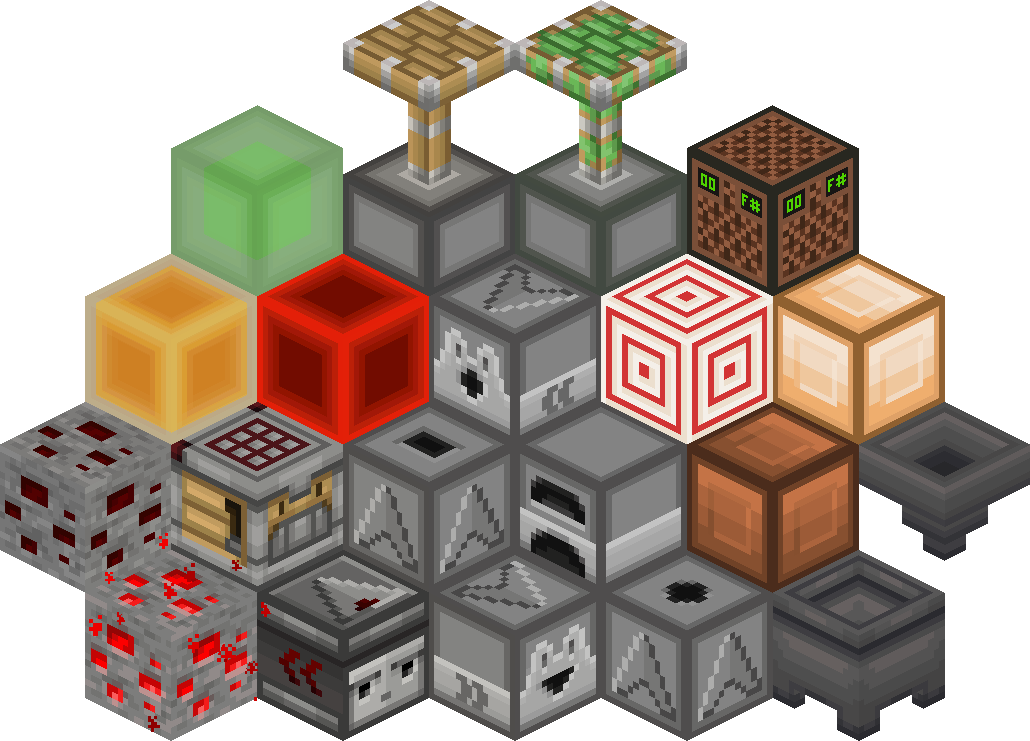
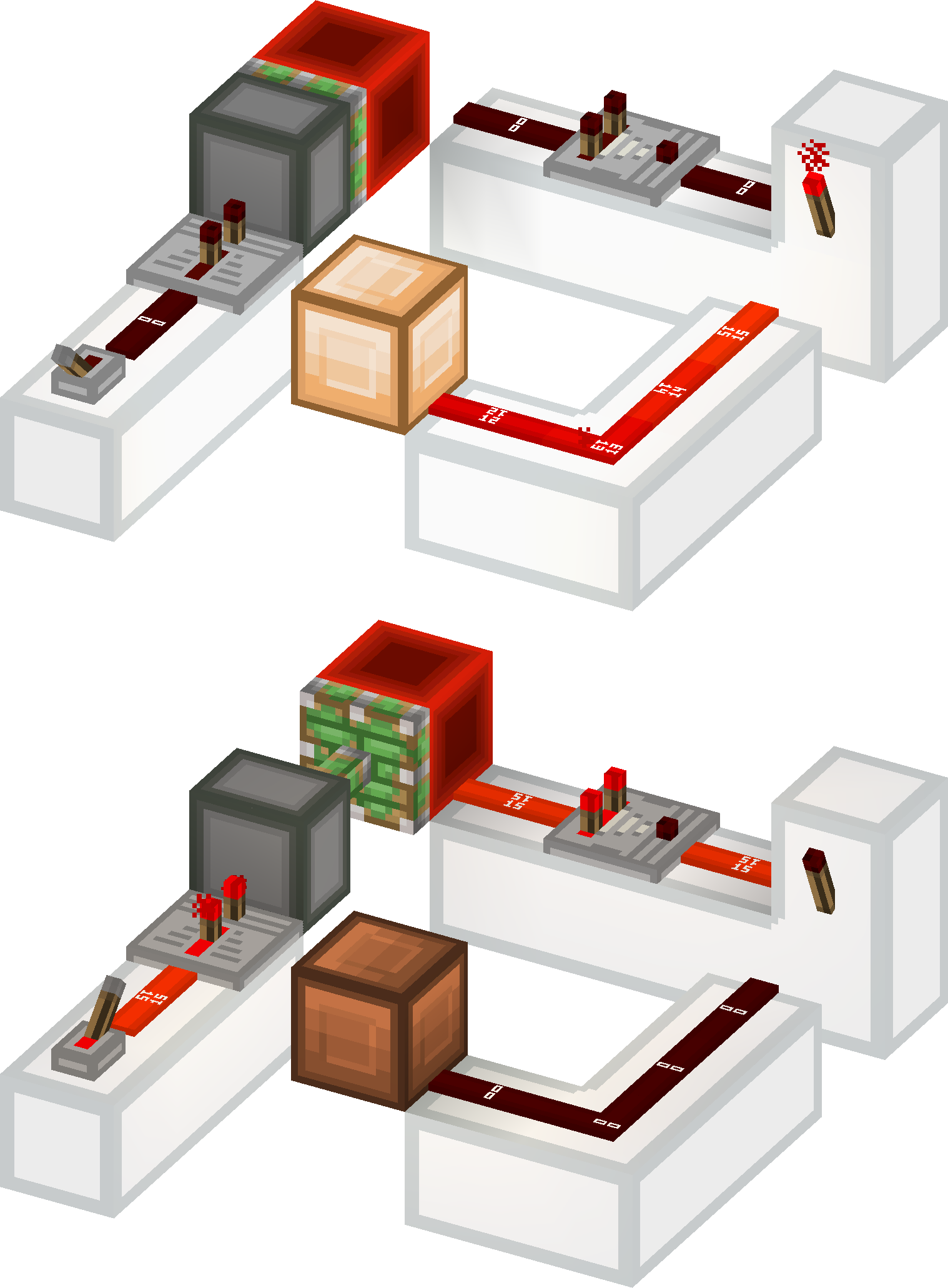
This resource pack gives a **clean look** to all redstone components, while keeping a **vanilla feel**. It brings features from [Vanilla Tweaks](https://vanillatweaks.net/picker/resource-packs), such as **directional indicators** for blocks like droppers or observers, and **visual block states** for blocks like note blocks.
List of current features:
– **smooth clean look** for all redstone related blocks (including rails and minecarts too)
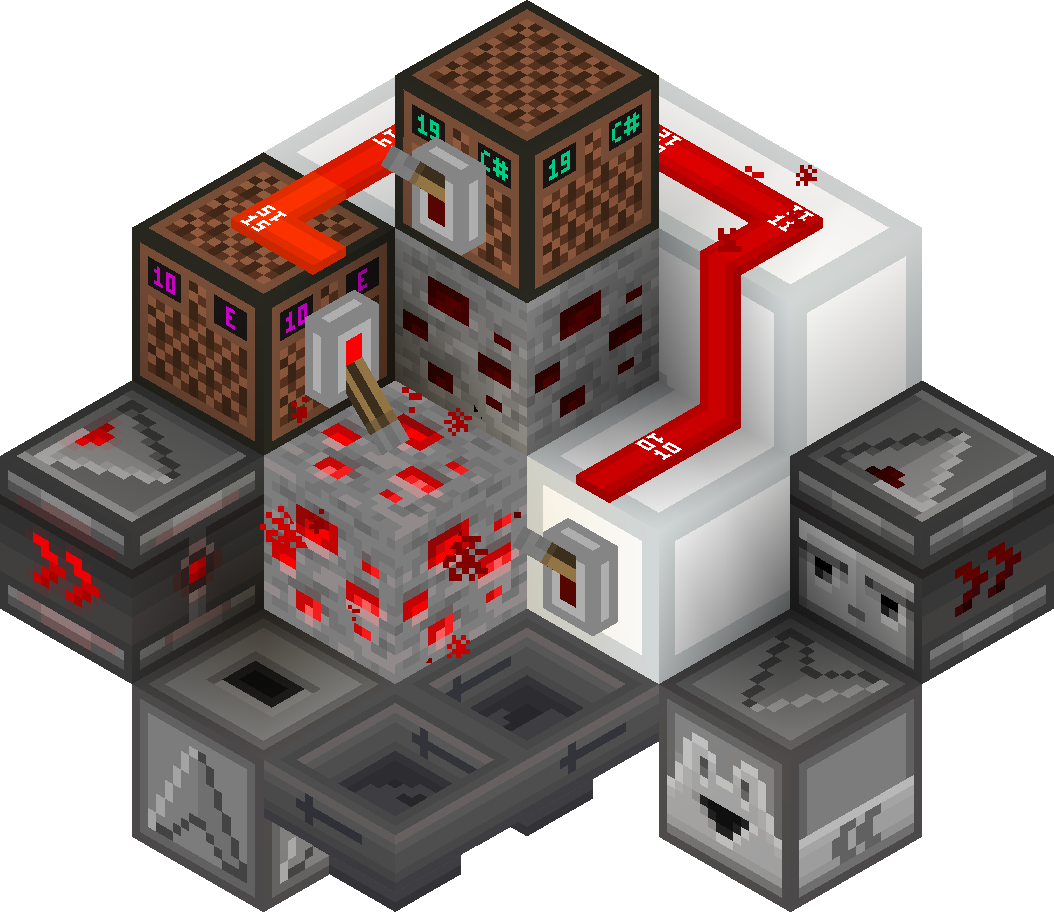
– **directional indicators** for dispensers, droppers, hoppers and observers
– **block states indicators** for redstone dust, redstone ore, levers and note blocks
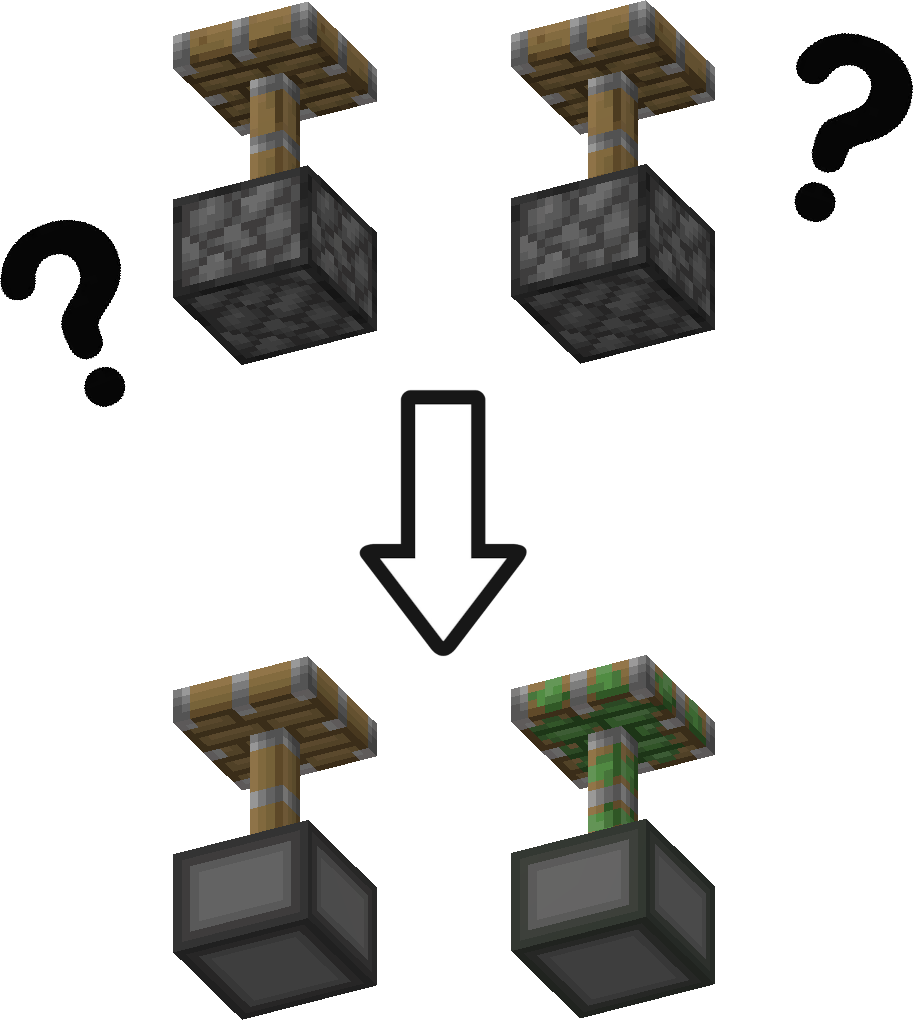
– removes ambiguity between normal and sticky pistons
– **connected outline** for all **wool and glass** blocks (you need [Continuity](https://modrinth.com/mod/continuity) or [Optifine](https://optifine.net/downloads) for the outlines to connect)
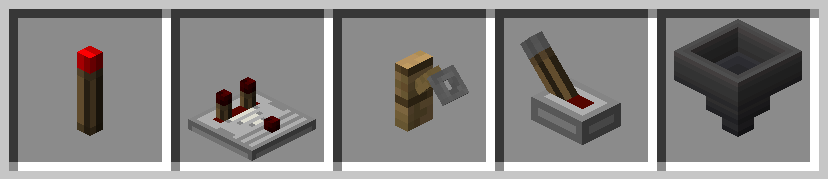
– **3D item models** for all types of torches, repeaters, comparators, levers, tripwire hooks, hoppers and cauldrons
Plans for the future:
– add indicators for cauldrons, composters, beehives and bee nests
– give a clean look to chests and barrels
– versions for 1.13 and older
– reduce file size
### Here is a quick overview of the pack:
### This is how your redstone circuits will look like:
### Block states and direction indicators:
### No ambiguity between normal and sticky pistons:
### 3D item models:
# How to install
After downloading the resource pack, go to **options -> resource packs** and click the **Open Pack Folder** button, or open `%appdata%.minecraftresourcepacks` directly. Put the resource pack in this folder. It should then show up under **Available**. Click the arrow to switch it to the **Selected** tab and click **Done**. That’s it, the pack should now be installed properly.
Vulpix Foxes
Compatibility: 1.18.2 Optifine HD U H9 and later.
This pack replaces Foxes with boxy Vulpix and Snow Foxes with Alolan Vulpix, includes custom models, animations, in-model particles, texture variants, new spawn egg name and subtitles(us).
Credit: Nintendo