Witcher armor
Witcher Armor is a resource pack that adds armor from The Witcher 3 to Minecraft. The pack works on OptiFine, Sodium requires an additional mod — [CIT Resewn](https://modrinth.com/mod/cit-resewn).
### How to install:
> Download the resourcepack, open Minecraft settings (ESC → Options), click “Resource Packs” and drag and drop the archive into the folder that opens. The resource pack will immediately appear in the game window and you can activate it by clicking on the right arrow next to the pack.
### How to use:
> Select an armor of any material and rename it with the anvil. A list of all possible customizations can be found [here](https://drive.google.com/file/d/1LAixlkfE_0vJ7GkkkwEgrpcfoYvHIYGX/view).
Русский
Witcher Armor — это ресурспак, который добавляет броню из The Witcher 3 в Minecraft. Пак работает на OptiFine, для Sodium требуется дополнительный мод — [CIT Resewn](https://modrinth.com/mod/cit-resewn).
### Как установить:
> Загрузите ресурспак, откройте настройки Minecraft (ESC → Настройки), нажмите кнопку «Пакеты ресурсов» и перетащите архив в открывшуюся папку. Ресурспак сразу появится в окне игры, и вы сможете его активировать, нажав на стрелку вправо рядом с паком.
### Как использовать:
> Выберите броню из любого материала и переименуйте ее с помощью наковальни. Список всех возможных кастомизаций можно найти [тут](https://drive.google.com/file/d/1LAixlkfE_0vJ7GkkkwEgrpcfoYvHIYGX/view?usp=sharing).
Українська
Witcher Armor — це ресурспак, який додає обладунки з The Witcher 3 до Minecraft. Пак працює на OptiFine, для Sodium потрібен додатковий мод — [CIT Resewn](https://modrinth.com/mod/cit-resewn).
### Як встановити:
> Завантажте ресурспак, відкрийте налаштування Minecraft (ESC → Налаштування), натисніть кнопку “Пакети ресурсів” і перетягніть архів у папку що відкрилася. Ресурспак одразу з’явиться у вікні гри, і ви зможете його активувати, натиснувши на стрілку праворуч поруч із паком.
### Як користуватися:
> Оберіть броню з будь-якого матеріалу і перейменуйте її за допомогою ковадла. Список всіх можливих кастомізацій можна знайти [тут](https://drive.google.com/file/d/1LAixlkfE_0vJ7GkkkwEgrpcfoYvHIYGX/view?usp=sharing).
Witch Girl

⚠️ Required: OptiFine
Witch Girl is a texture pack that redesigns the Minecraft witch, giving her a more attractive and stylish appearance. Instead of the classic vanilla witch, this pack transforms the mob into a more detailed female character with a charming and visually appealing look, while still keeping the original witch theme.
Important:
This texture pack requires OptiFine to work properly. Without OptiFine, the texture may not appear correctly in the game.
⚠️ Disclaimer / If the texture looks bugged:
If the witch appears glitched or the texture does not load correctly, try the following fixes:
Use Minecraft version 1.16 or higher.
Close and reopen the game, which usually refreshes the textures.
After that, the texture should work normally.
Enjoy your new stylish witch! 🧙♀️✨
Wisp Allays
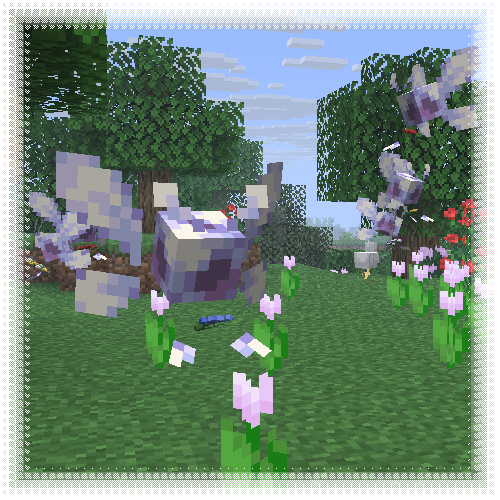
This resourcepack transforms allays into vibrant, cartoony wisps, mostly inspired by Navi from TLOZ :]
**Entity Model Features required!**
[MTR] BB22200
This addon adds three French liveries for the BB 22200 electric locomotive in Minecraft Transit Railway (MTR).
**The pack includes the following skins:**
– BETON livery, inspired by the classic SNCF freight and regional era
– PACA livery, based on the Provence-Alpes-Côte d’Azur regional design
– OUIGO livery, inspired by the modern low-cost SNCF branding
– Bourgogne livery, based on the Bourgogne-franche-compté regional design
– Infra livery, based on the maintenance locomotive from the SNCF
– Old livery, based on the OCEM age
– Gray livery, The Phantom version
– Fret livery, Today HexaFret but this is the SNCF version
– En Voyage livery, the classic livery of the en voyage series
– Proto livery, the old prototype of the BB22200
In rhe V2, we have added the interior of the locomotive. the 2 cabin
The locomotive uses pantographs created by two different authors, both credited in the project.
Requirements:
Minecraft, Minecraft Transit Railway (MTR), and a compatible mod loader (Fabric if required).
Wingman from TF&AL
This resource pack replaces crossbow with Wingman from games Titanfall, Titanfall 2, Apex Legends.
You can change emblem (creeper by default). Just create “emblem.png” and made your own emblem [way: “assetsminecrafttextureswindman”].
Display shows what loaded in the weapon (arrow/firework/nothing).
In inventory/HUD you can see load or empty your weapon. If it “watching up” – empty.
No Optifine needed.
Made with Blockbench.
Windswept Mace (2D+3D)
## Windswept Swirl
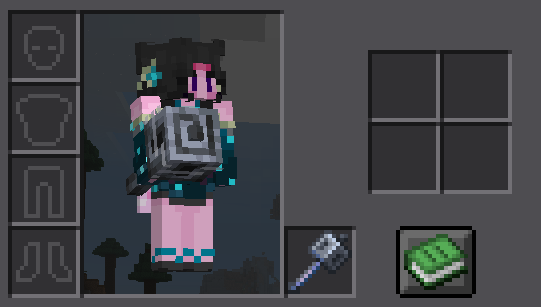
The mace’s heavy core now swirls with a wind effect when held!

## 3D Model, 2D Sprite
While the mace’s held model is now 3D, it keeps the inventory display as a 2D Sprite!
[**🛜Get 25% off on BisectHosting using the code “konci”**](https://www.bisecthosting.com/konci)
Windows PIDS
A custom Minecraft resource pack for the Joban client mod, PIDS. It features iconic Windows screens like the BSOD, bringing a tech-inspired aesthetic to Minecraft.
**NOTE:** In order to insert the images to a PIDS, right click it with a brush and then type in the ID of the desired image to apply it on a PIDS
PIDS PRESET CODE:

Wilo’s 1.7 Sword Blocking

Recently there has been a lot of datapacks & plugins that have implemented/brought back pre-1.9 sword blocking mechanics! Although, by default, the game uses a model similar to 1.8’s when blocking with the sword!
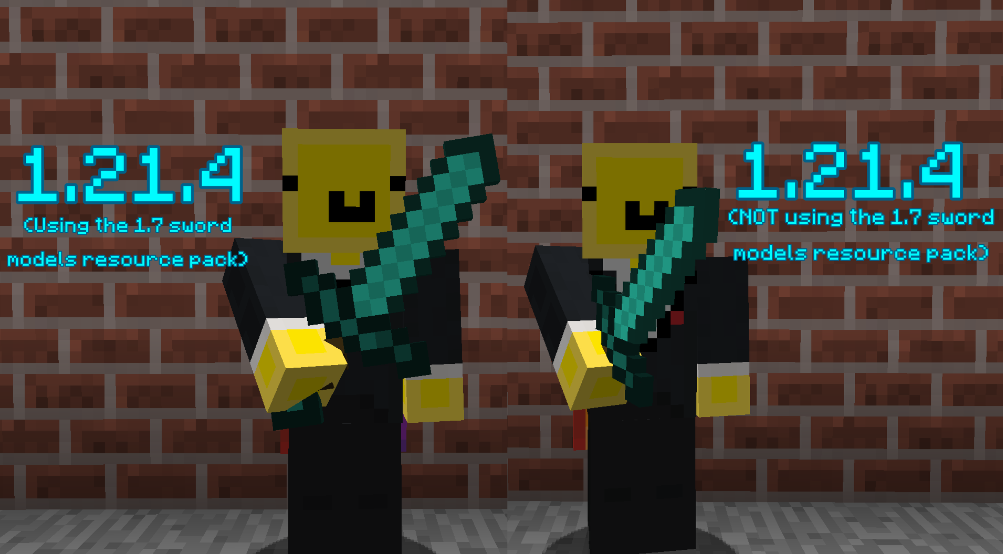
This resource pack makes the sword blocking model much closer and more faithful to the model/positioning from versions 1.7 and prior!
## ⭐ NOTE
This resource pack assumes that the datapack or plugin you are using for sword-blocking uses {animation:”block”} as most do! Another version of this resource pack will likely be uploaded in the future to support sword-blocking without {animation:”block”}
##
## ⚔️ Side-by-side comparison
##
## ❤️ Socials
* Youtube channel: [[YT Link]]([https://www.youtube.com/@wilozyx/videos](https://www.youtube.com/@wilozyx/videos))
* PMC page: [[PMC Link]]([https://www.planetminecraft.com/member/wilozyx/](https://www.planetminecraft.com/member/wilozyx/))
* Discord: wilozyxx
Wild Vanilla – Better plants and flowers
Wild vanilla is a Minecraft resource pack that attempts to update most plants,
flowers and a few other natural elements visually.
It does this in a way that updates them to more modern looking designs that make landscapes
and gardens feel more alive, while sticking to Minecraft Vanilla’s visual style and adhering closely
to the plants’ real-life counterparts.
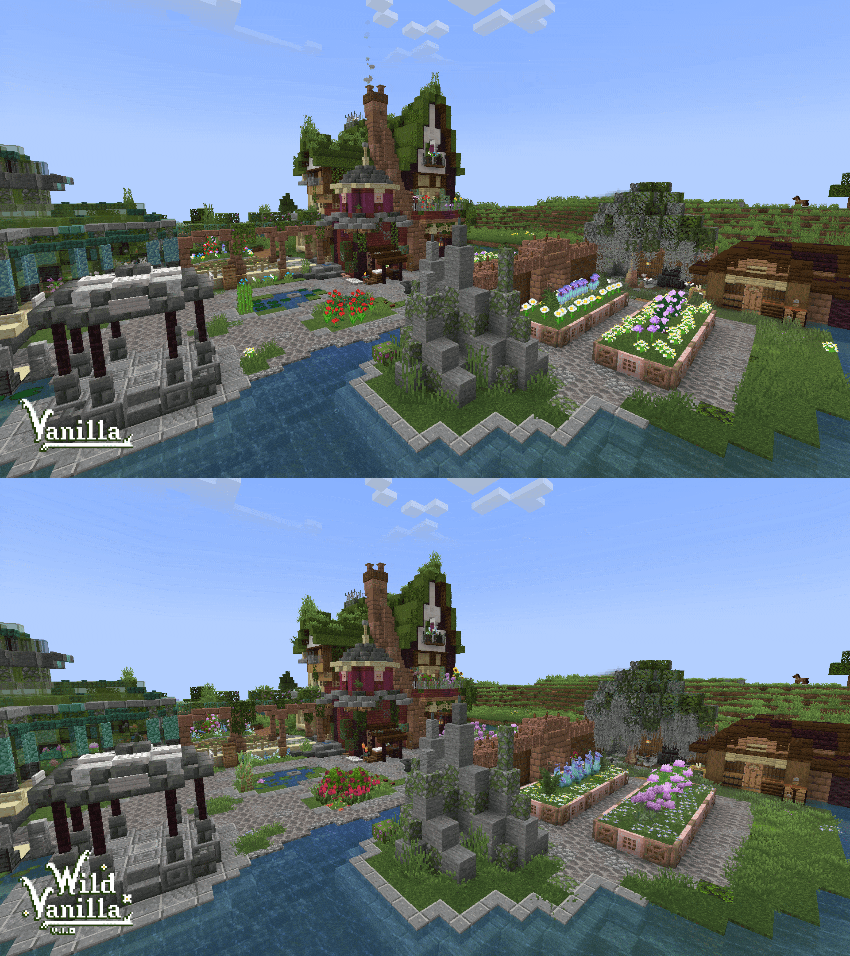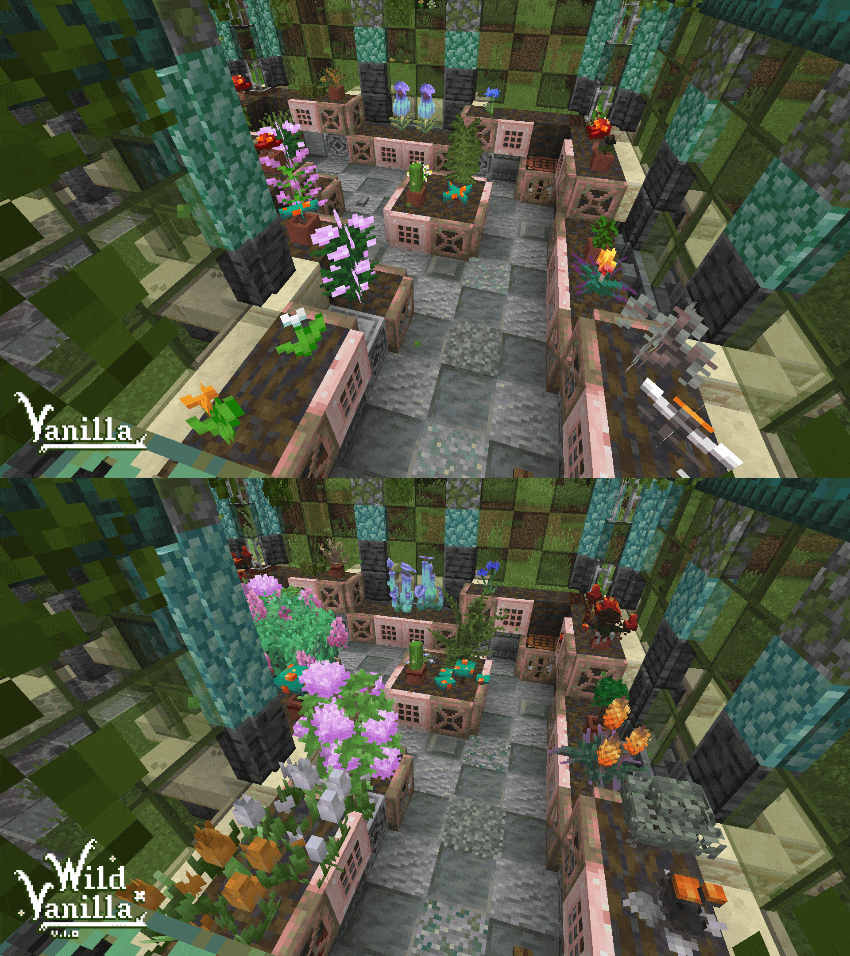
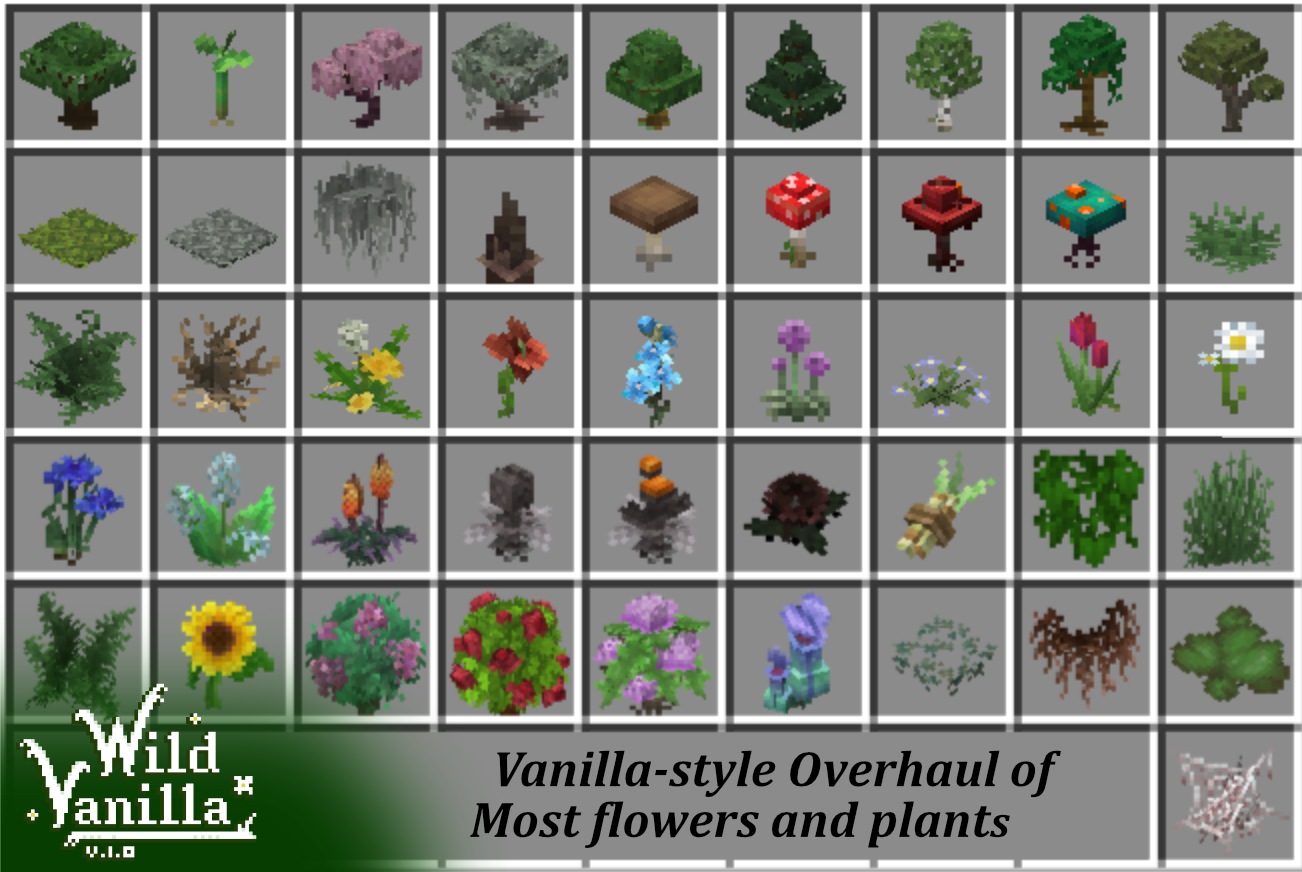
I’ve been making steady progress on the pack, and I currently intend to update the following:
– Grass and ferns, normal and tall.
– All standard flowers in the game, including 2 block tall ones.
– Dripstones, roots
– All Saplings
– All Mushrooms and Fungi
– Other foliage from older versions like Sugarcane and Vines
There’s a few principles I’m using in updating these models:
– Pixel accuracy.
I was kinda shocked to find out that all plants that use the standard cross shape in game are not
pixel accurate and stretched. I intend to fix that, and have all plants be as pixel accurate as I can,
like most of the newly added things are nowadays
– Overlap and Wild growth.*
Most of my models exceed the size of the block they’re planted on. This is to add to the feeling of
the plants growing wild, and adds a lot of visual eyecandy to the world. I also extend them downwards
into the block, adding roots that can be visible if the plant is randomly placed over an edge.
In vanilla this creates an ugly and unnatural seam between plant and air, especially prevalent in grass.
– Life-accurate.
I strive for my models to look as accurate as I can without to their real life counterparts without breaking
the vanilla look. This creates more variety and makes the plants more recognizable. Building a garden
in Minecraft has never been as interesting.
All models are made using Blockbench.
Check out blockbench: [https://www.blockbench.net](www.blockbench.net)
Some screenshots are made using Complementary Reimagined shader.
Get it here: [https://www.complementary.dev/shaders/](www.complementary.dev)
Wildflowers Backport
Enjoy wildflowers from Minecraft 1.21.5 in earlier versions !
You can use the [Continuity mod](https://modrinth.com/mod/continuity) to make the flowers spawn only in birch forest, old growth birch forest and meadow biomes
Or you can download the other versions to get wildflowers in every biomes !