Waguri Totem V2 (Fragrant Flower Blooms with dignity)
🌸 Kaoruko Waguri Totem Resourcepack — *Fragrant Flower Edition*
Carry quiet dignity—replace your Totem of Undying with Kaoruko Waguri from *Kaoru Hana wa Rin to Saku*!
This resourcepack transforms the vanilla totem into a custom Kaoruko model, perfect for fans of her graceful demeanor, petite charm, and emotionally rich romance arc.
✨ Features
✅ Replaces the Totem of Undying with Kaoruko Waguri
🧩 Compatible with vanilla gameplay and datapacks
🔁 Modular asset structure for easy editing and anime swaps
🛠️ Works with Minecraft 1.16+
Wagi’s Furry Villager – Compats
# English Description
## About
This resource pack enables [Wagi’s Furry Villager](https://modrinth.com/resourcepack/wagis-furry-villager)’s villagers to work with professions and merchants added by mods.
This resource pack requires [ETF](https://modrinth.com/mod/entitytexturefeatures), [EMF](https://modrinth.com/mod/entity-model-features), and [Wagi’s Furry Villager](https://modrinth.com/resourcepack/wagis-furry-villager) to function.
## Compatible Mods
– [Chef’s Delight](https://modrinth.com/mod/chefs-delight)
– Cook
– Chef
– [CozyStudios Core](https://modrinth.com/mod/cozystudios-core)
– Arborist
– Mystical Trader
– [Friends&Foes](https://modrinth.com/mod/friends-and-foes)
– Beekeeper
– [Supplementaries](https://modrinth.com/mod/supplementaries)
– Red Merchant
– [VillagersPlus](https://modrinth.com/mod/villagersplus)
– Horticulturist
– Occultist
– Oceanographer
– Alchemist
– [[Let’s Do] Vinery](https://modrinth.com/mod/lets-do-vinery)
– Wandering Winemaker
– [Guard Villagers](https://modrinth.com/mod/guard-villagers)
– Guard
– [Kaleidoscope Cookery](https://modrinth.com/mod/kaleidoscope-cookery)
– Chef
# Japanese Description
## このリソースパックについて
[Wagi’s Furry Villager](https://modrinth.com/resourcepack/wagis-furry-villager)の村人を、Modで追加された職業や行商人に対応させるリソースパックです。
このリソースパックを動作させるには、[ETF](https://modrinth.com/mod/entitytexturefeatures)と [EMF](https://modrinth.com/mod/entity-model-features)、[Wagi’s Furry Villager](https://modrinth.com/resourcepack/wagis-furry-villager)を必要とします。
## 対応しているMod
– [Chef’s Delight](https://modrinth.com/mod/chefs-delight)
– Cook
– Chef
– [CozyStudios Core](https://modrinth.com/mod/cozystudios-core)
– Arborist
– Mystical Trader
– [Friends&Foes](https://modrinth.com/mod/friends-and-foes)
– Beekeeper
– [Supplementaries](https://modrinth.com/mod/supplementaries)
– Red Merchant
– [VillagersPlus](https://modrinth.com/mod/villagersplus)
– Horticulturist
– Occultist
– Oceanographer
– Alchemist
– [[Let’s Do] Vinery](https://modrinth.com/mod/lets-do-vinery)
– Wandering Winemaker
– [Guard Villagers](https://modrinth.com/mod/guard-villagers)
– Guard
– [Kaleidoscope Cookery](https://modrinth.com/mod/kaleidoscope-cookery)
– Chef
VUL’s Create Cursors
**VUL’s Create Cursors** will add custom cursors to your [Create](https://modrinth.com/mod/create) experience via [Cursors Extended](https://modrinth.com/mod/minecraft-cursor) mod.
This pack was inspired by [Create brass cursors](https://modrinth.com/resourcepack/create-brass-style-cursors).
All 12 cursors have been fully redone to match Create’s Brass Casing block. Including small animations for Busy and Grabbing.
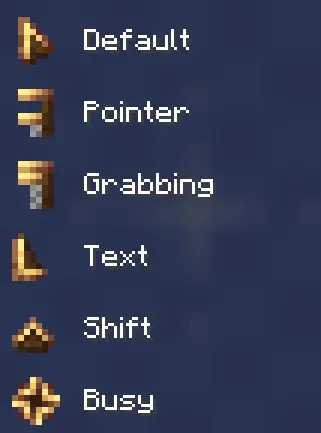 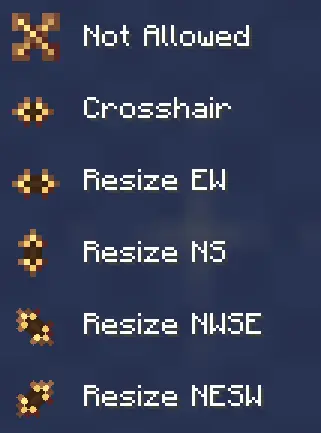
_Remember, you have an option to configure them in mod’s config via mod menu._
VR Hand Fixes
Vivecraft does not support custom 3D Models and to fix that, I’ve made this VR Hand Fixes Resource Pack for 1.20.1 I do know that Vivecraft has an option for the items to be place in the hand properly like the Thirdperson Camera, but it does looks we rid to me, so that lead to this Resource Pack.
After a few weeks on thinking how it works, I finally gotten a prototye of it working with one mod, but now it is working with multiple mods. And you don’t need ETF/EMF for this to work, just Minecraft, Vivecraft and a supported mod in this Resource Pack.
If anyone finds any issues, please let me know on the Offical Modrinth Discord Server!
unofficial translation of voxy
unofficial translation of voxy .You can share and save it to other websites.更多语言[准确性不知道]More languages [Accuracy unknown]_(:з)∠)_
译者:F光荣进退有度![More languages [Accuracy unknown]](https://cdn.modrinth.com/data/cached_images/b0b09b24ca82a7d3b6f7519328dec90b3ede2426.png)
– af_za.json-Afrikaans
– ar_sa.json-اللغة العربية
– ast_es.json-Asturianu
– az_az.json-Azərbaycanca
– ba_ru.json-Башҡортса
– bar.json-Boarisch
– be_by.json-Беларуская
– bg_bg.json-Български
– br_fr.json-Brezhoneg
– brb.json-Braobans
– bs_ba.json-Bosanski
– ca_es.json-Català
– cs_cz.json-Čeština
– cy_gb.json-Cymraeg
– da_dk.json-Dansk
– de_at.json-Österreichisches Deitsch
– de_ch.json-Schwiizerdutsch
– de_de.json-Deutsch
– el_gr.json-Ελληνικά
– en_au.json-English (Australia)
– en_ca.json-English (Canada)
– en_gb.json-English (United Kingdom)
– en_nz.json-English (New Zealand)
– en_pt.json-Pirate Speak
– en_ud.json-ɥsᴉꞁᵷuƎ (uʍoᗡ ǝpᴉsd∩)
– en_us.json-English (US)
– enp.json-Anglish
– enws.json-Shakespearean English
– eo_uy.json-Esperanto
– es_ar.json-Español (Argentina)
– es_cl.json-Español (Chile)
– es_ec.json-Español (Ecuador)
– es_es.json-Español (España)
– es_mx.json-Español (México)
– es_uy.json-Español (Uruguay)
– es_ve.json-Español (Venezuela)
– esan.json-Andalûh
– et_ee.json-Eesti
– eu_es.json-Euskara
– fa_ir.json-فارسی
– fi_fi.json-Suomi
– fil_ph.json-Filipino
– fo_fo.json-Føroyskt
– fr_ca.json-Français québécois
– fr_fr.json-Français
– fra_de.json-Frängisch
– fur_it.json-Furlan
– fy_nl.json-Frysk
– ga_ie.json-Gaeilge
– gd_gb.json-Gàidhlig
– gl_es.json-Galego
– haw_us.json-ʻŌlelo Hawaiʻi
– he_il.json-עברית
– hi_in.json-हिन्दी
– hr_hr.json-Hrvatski
– hu_hu.json-Magyar
– hy_am.json-Հայերեն
– id_id.json-Bahasa Indonesia
– ig_ng.json-Igbo
– io_en.json-Ido
– is_is.json-Íslenska
– isv.json-Medžuslovjansky
– it_it.json-Italiano
– ja_jp.json-日本語
– jbo_en.json-la .lojban.
– ka_ge.json-ქართული
– kk_kz.json-Қазақша
– kn_in.json-ಕನ್ನಡ
– ko_kr.json-한국어
– ksh.json-Kölsch/Ripoarisch
– kw_gb.json-Kernewek
– la_la.json-Latina
– lb_lu.json-Lëtzebuergesch
– li_li.json-Limburgs
– lmo.json-Lombard
– lo_la.json-ລາວ(ປະເທດລາວ)
– lol_us.json-LOLCAT
– lt_lt.json-Lietuvių
– lv_lv.json-Latviešu
– lzh.json-文言(華夏)
– mk_mk.json-Македонски
– mn_mn.json-Монгол
– ms_my.json-Bahasa Melayu
– mt_mt.json-Malti
– nah.json-Mēxikatlahtōlli
– nds_de.json-Platdüütsk
– nl_be.json-Vlaams
– nl_nl.json-Nederlands
– nn_no.json-Norsk nynorsk
– no_no.json-Norsk Bokmål
– oc_fr.json-Occitan
– ovd.json-Övdalsk
– pl_pl.json-Polski
– pt_br.json-Português (Brasil)
– pt_pt.json-Português (Portugal)
– qya_aa.json-Quenya
– ro_ro.json-Română
– rpr.json-Дореформенный русскій
– ru_ru.json-Русский
– ry_ua.json-руснацькый
– sah_sah.json-Сахалыы(Cаха Сирэ)
– se_no.json-Davvisámegiella
– sk_sk.json-Slovenčina
– sl_si.json-Slovenščina
– so_so.json-Af-Soomaali
– sq_al.json-Shqip
– sr_cs.json-Srpski
– sr_sp.json-Српски
– sv_se.json-Svenska
– sxu.json-Säggs’sch
– szl.json-Ślōnskŏ
– ta_in.json-தமிழ்
– th_th.json-ภาษาไทย
– tl_ph.json-Tagalog
– tlh_aa.json-tlhIngan Hol
– tok.json-toki pona
– tr_tr.json-Türkçe
– tt_ru.json-Татарча
– uk_ua.json-Українська
– val_es.json-Català (Valencià)
– vec_it.json-Vèneto
– vi_vn.json-Tiếng Việt
– yi_de.json-ייִדיש
– yo_ng.json-Yorùbá
– zh_cn.json-简体中文(中国大陆)
– zh_hk.json-繁體中文(香港特別行政區)
– zh_tw.json-繁體中文(台灣)
– zlm_arab.json-بهاس ملايو
–
Voxel Trains IR

## About
Voxel Trains is one of the largest [Immersive Railroading](https://www.modrinth.com/mod/immersive-railroading) content packs, it adds about 80 trains from many different countries, including Switzerland, Germany, the Netherlands, Portugal, the US, and more.
You can track our current progress both on [our Discord](https://discord.gg/6RafZxJzTU) and on [our Trello](https://trello.com/b/EIGfPwbC/voxel-trains).
## Important
– If none of our trains are appearing in game, make sure you’ve activated the pack in the resource packs menu.
– If your train items are broken, try turning off OptiFine’s FastRender option.
– If you want to drive trains without fueling them, you can enter IR’s config in-game by pressing `numpad /` -> balance -> FuelRequired = False
– If you need help with anything else feel free to ask on [our discord](https://discord.gg/6RafZxJzTU) in the [#support channel](https://discord.com/channels/488046889933996043/489018239540789258)
## Content
Rolling Stock
Deutsche Bahn
**Locomotives**
– BR 143
– BR 146.2 TRAXX 2
– BR 185.2 TRAXX 2
– BR 218 V160
– V320
– Köf II
**Multiple Units**
– BR 407 Velaro D ICE 3 MS
– BR 481
– VT 98
**Passenger Cars**
– n-Wagen Bnrbdzf 480 and Bnrz 451
– IC1
– Dosto 1 DABbuzfa 778 and Dbuza 747
Union Pacific
**Locomotives**
– ALCO S-4
– 3rd Gen GTEL Big Blow
– 4884-1 Big Boy
– FEF-1
**Passenger Cars**
– UPP Passenger Car
**Auxiliary Tenders**
– UPP #809 ‘Jim Adams’
– UPP #814 ‘Joe Jordan’
Comboios de Portugal
**Locomotives**
– 0180
– 1400
– 1800
– 2600 Nez-Cassé
– 5600 Eurosprinter
**Passenger Cars**
– ACDt 481
– Schindler
– Sorefame Regional
SBB CFF FFS
**Locomotives**
– Re 420
– Re 421
– Re 460 Lok 2000
– Re 482 TRAXX 2
– BR 193 Vectron
– Am 843
– Ee 922
– Eem 923
**Multiple Units**
– Re 450 and DPZplus
– RABe 501 Giruno
– RABe 511 KISS
– RABe 514 DTZ
– Transrapid (Fictional)
**Passenger Cars**
– HVZ
– EW-IV
– EC
– IC2000/IC 2020
Nederlandse Spoorwegen
**Locomotives**
– E 186 TRAXX 2E
– NS 1700
– NS 700 G 400 B
– NS 600
**Multiple Units**
– SLT
– VIRMm
– ICMm
**Passenger Cars**
– ICR
Société Nationale des Chemins de Fer Français
**Locomotives**
– BB 8500
**Multiple Units**
– X2200
Other
**Locomotives**
– Amtrak ACS-64 Cities Sprinter
– Railpool TRAXX 2E
– Hectorrail TRAXX 2
– MÁV TRAXX 2
– H.F. Wiebe V320
– BLS Re 465
– BLS Am 843
– Sersa Am 843
– DSB Traktor 57
**Multiple Units**
– CD 810
**Trams and Light Rail**
– VBZ Tram 2000 (All variants)
– VBZ Be 5/6 Cobra
– VBG Be 5/6 Cobra
– Forchbahn Be 4/6
– DVB NGT6DD
– Rheinbahn GT8S
– Rheinbahn B80D
Freight
**European**
– DB Eaos-x 051
– DB Falns 121
– DB Samms 710
– DB Sggrs 716
– CP Ekklo 40s
– CP Carga Sgnss 455
– SBB Cargo Hbbillnss
– SBB Cargo Tagnpps
– Schweizer Zucker Tagnpps 061
– GEFCO Laeks 427
– Franz Jäger Berlin Safe Wagon
**American**
– BNSF Rotary Gondola
– TTX 53′ Intermodal Well Car
There are also a few buffer stops that are technically freight cars so you can place them on the tracks.
Tracks
There is an assortment of Tracks of different types and conditions. Some of them also exist as a meter gauge variant.
Votv Paintings

# Welcome!
This mod was made to compliment a modpack im making for a streamer called Sethboiardee, feel free to use it as you need, but as for what this mod contains it has:
6 2×2 Argemia Plushies
1 1×2 Argemia poster
1 1×2 Kerfer (Pink)
1 4×3 Red sky event
1 4×4 Self portrait
All rights reserved to [Mr.Dr.Nose](https://mrdrnose.itch.io/) and his game [Voices of the Void](https://mrdrnose.itch.io/votv) | I DO NOT OWN ANYTHING, go play the game, its amazing
VoodooDoll Custom
# VoodooDoll
A resource pack that changes the totem of undying into a plush toy version of the player’s model. No mods required!
## Comparision between versions
### Vanilla Custom:
**Pros:**
– all totems can be made unique (perfect for multiplayer)
– supports both the slim and wide player models
**Cons:**
– works only on Minecraft 1.21.5 and up
– a bit complicated to customize
### Vanilla [Wide](https://modrinth.com/resourcepack/voodoodoll-wide)/[Slim](https://modrinth.com/resourcepack/voodoodoll-slim):
**Pros:**
– works with very old versions of Minecraft, from 1.11.0 and up
– easy to customize
**Cons:**
– every totem of undying will look the same (good enough on single-player)
– only supports either the slim or wide player models
You can use Vanilla Custom edition and either Vanilla Wide or Vanilla Slim edition alongside each other, if so desired.
## How to customize
By default, the resource pack only comes with textures of Steve and Alex, so if you want to use your own skin, or someone else’s skin, you will have to follow these instructions.
1. Extract the content of the resource pack from the ZIP.
2. Go to `assets/minecraft/textures/item/totem_of_undying` folder.
3. Copy your desired user’s skin texture into the folder and rename it to `.png`. (replace the `` part with whatever name you want, can be an in-game username)
4. Now, navigate to `assets/minecraft/models/doll` folder.
5. Make a copy of either the `alex.json` or `steve.json` depending on the width of the skin’s arms, and rename it to `.json` (the same name you used for the skin texture).
6. Open the JSON file with a text editor and replace the mention of `”alex”` or `”steve”` with `”“`.
7. Then, go to `assets/minecraft/items` and open the `totem_of_undying.json` file with a text editor.
8. Either replace the `steve`/`alex` with `` and `”Steve”`/`”Alex”` with the name that will trigger turning the totem into a doll, or use that as a template for new cases (Warning: you **can’t** add multiple trigger names to the same case, you need to create a separate case for that)
9. Repeat the entire process when making it for more than one person.
10. Package the content of the resource pack back into ZIP.
11. Done. Have fun :3
Instructions for VoodooDoll CIT (discontinued)
**Warning**: These instructions only apply to VoodooDoll CIT v1 and v2. For VoodooDoll Custom, follow the instructions above.
1. Extract the content of the resource pack from the ZIP.
2. Go to `assets/minecraft/citresewn/cit` folder.
3. Copy your desired user’s skin texture into the folder and rename it to `.png`. (replace the `` part with whatever name you want, can be the person in-game username)
4. Make a copy of either the `alex.json` or `steve.json` depending on the width of the skin’s arms, and rename it to `.json`.
5. Open the JSON file with a text editor and replace the mention of `”alex”` or `”steve”` with `”“`.
6. Make a copy of any of the `.properties` files (doesn’t matter which one), and rename it to `.properties`.
7. Open the `.properties` file you’ve just created with a text editor.
8. Replace the `texture=` and `model=` with the name of the PNG and JSON files. The `nbt.display.Name=` is what will trigger the totem of undying to be the voodoo doll when you rename it in the game, so you can change it to whatever you want, as long as it fits the 50 characters limit of anvils.
9. Repeat the entire process if making for more than one person.
10. Package the content of the resource pack back into ZIP.
11. Done. Have fun :3
VoidCosmos
VoidCosmos transforms the Minecraft universe into a celestial playground, where players traverse through stunning interstellar vistas. The pack replaces the traditional sky with mesmerizing views of distant galaxies, swirling nebulae, and ominous black holes. Each block reflects the cosmic theme, with starry patterns adorning terrain and structures. From alien landscapes to futuristic architecture, every element evokes a sense of awe and wonder. Whether building a space station or exploring unknown realms, VoidCosmos offers a unique journey through the infinite expanse of the universe.
VoiceChatX-Red
# VoiceChatX-Red
### 📖 About
– VoiceChatX-Red brings life to your Simple Voice Chat icons by adding smooth colors.
– It enhances visuals without changing the core look, making the icons feel more alife and engaging.
### ✨ Features
– Adds smooth color to the Simple Voice Chat mod
– Fully matches the theme aesthetic
– Keeps original item designs clean and simple
– Enhances visual feedback and immersion
– Lightweight and performance-friendly
### 🎯 Why Use This?
– Makes the icons have more color
– Improves overall visual experience
– Keeps a clean and consistent style
– Great for both survival and showcase worlds
– Adds detail without adding clutter
### ⚙️ Compatibility
– Designed for the Simple Voice Chat mod
– Works well alongside most other packs
– May conflict with packs that modify the same icons
– Safe to add or remove anytime
### 🤖 Info
🔗 Check out [All my resourcepacks](https://modrinth.com/user/Apenkont3000)
🐞 Report bugs in my [discord server](https://discord.gg/nf29GuwzRd)