Wolf Cosmetics – Enhance Your Minecraft Experience!
Wolf Cosmetics brings an exciting layer of customization and rewards to your Minecraft server, enhancing player engagement and gameplay. With this plugin, players can unlock and personalize unique cosmetics and receive exclusive rewards through customizable supply drops!
Customizable Supply Drops
Players can earn cosmetic items by participating in supply drops! Each cosmetic has a rarity level—Common, Uncommon, Rare, Epic, Legendary, and Mythic—with drop rates you can adjust in the config file. Customize the drop percentages to fit your server’s economy and reward system!
Cosmetics Customization
Players can access a dedicated cosmetics menu to personalize their Minecraft experience with the following features:
Auras: Surround yourself with stunning particle effects! Customize aura size, height, speed, particle count, and whether they remain stationary or move. Choose from various effects like flames, sparks, and more.
Kill Effects: Make your kills unforgettable with explosive effects, smoke, or custom particle bursts. Each kill can leave a lasting impression!
Chat Colors: Add flair to your in-game chats by choosing from a wide range of colors, making your messages stand out.
Chat Tags: Display your status or rank with custom chat tags, such as [VIP] or [Admin], with colors and formatting options.
Arrow Particles: Enhance your archery skills with custom arrow trails, leaving glowing paths or spark effects behind every shot.
Elytra Particles: Take your flying experience to the next level with dazzling particle effects while gliding with your Elytra.
Configurable Settings
Server admins can fine-tune most aspects of the plugin via config.yml:
Adjust supply drop rates for each rarity level.
Add or remove cosmetics easily.
Modify aura effects, kill effects, and chat customization settings.
WLC Mod
# WLC Mod
## 📖 What is this mod?
This is a complementary mod to go with the World’s Longest Course (WLC) map/server!
While you _aren’t required_ to use this mod to drive on WLC, it is currently _required if_ you want to get OneBoat Completions while on the server. (And using the mod gives better quality of life, to be honest.)
## 🔧 What does the mod do?
Currently, this mod only overcomes a few bugs regarding the respawn process on the WLC server.
However, more features may be added in the future, who knows?
—
### Example usage of the mod
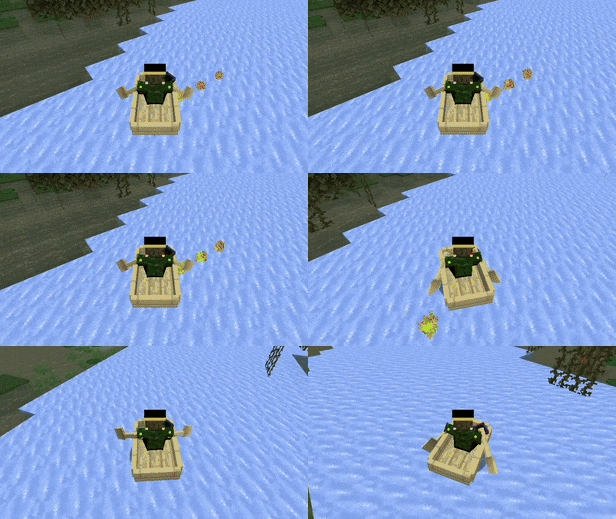
Your inputs automatically get locked during respawn procedures while playing WLC. Locking the inputs prevents a desync bug that would stop the boat in place (see next GIF).
—
### Desync bug (could otherwise occur when not using the mod)
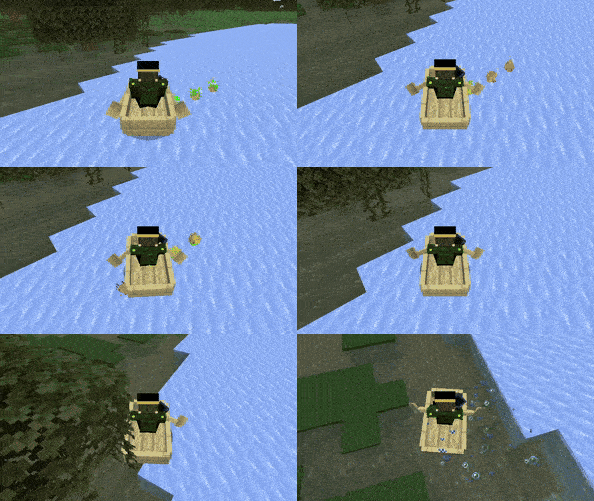
Without the mod, a desync can happen between the client and the server, *causing your velocity to get zeroed right after getting launched*, which is problematic in many ways:
1. It can lead to a buggy, bad experience for the player.
2. It can be exploited to save yourself from falling off the track.
—
### The alternative solution is sadge
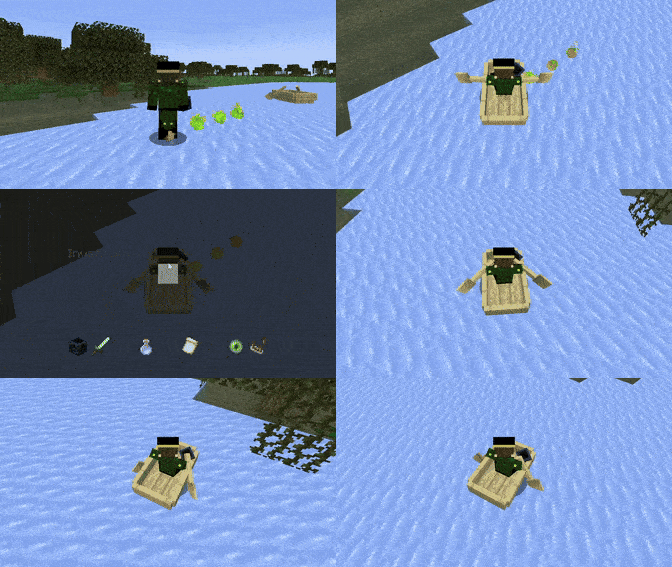
A different solution for players without the mod is to have an inventory (made transparent (albeit dark) with a resource pack) open up right before launching, in order to prevent players from inputting and causing the bug. However,
1. This is not a perfect solution (there are still ways to get around it), and
2. It looks terrible to have the inventory flash on screen, leading to a lower quality of life.
Therefore, I have decided to not respawn players with velocity if they do not have the mod. This means that it could be exploited to save a OneBoat Completion to simply pause and unpause your Run/MiniRun. Thus, OneBoat Completions *require* the mod to be installed.
—
## 🔰 What is World’s Longest Course (WLC)?
World’s Longest Course (WLC) is an ongoing project that I started back in _late 2021_ with the goal of making the **longest ice boat racing course of all time**. Its expansive road explores all kinds of different terrain and scenery, with trophies and other collectables to collect along the way!
A little showcase video of some of the World’s Longest Course map.
WispSMP
> **Disclaimer:** This is an unofficial remake of the WispSMP plugin concept. I am not affiliated with the original WispSMP server or team. This plugin is a fan-made recreation and I do not claim any credit for the original gameplay concept.
# ❤️ WispSMP
Players start with a set number of lives. Each death removes one life. If you hit zero lives, you switch to spectator mode unless revived with the Eye of Revival.
[](https://discord.gg/lusik)
# 🔹Features
– **Visual Lives System**
Custom heart indicators appear in player nametags. They show how many lives a player has left. Hearts update in real time.
– **Spectator on Death**
A player with zero lives switches to spectator mode. No respawn. They watch the world without interaction.
– **Eye of Revival**
Players revive eliminated players with the Eye of Revival. The Eye comes from a pedestal ritual. A revived player returns with full lives.
—
## Commands & Permissions
| Command | Permission | Description |
| ——————– | —————- | ———————————— |
| /revive | wispsmp.revive | Revive a dead player with full lives |
| /pedestal | wispsmp.pedestal | Spawn the pedestal |
| /pedestal deactivate | wispsmp.pedestal | Remove the pedestal |
Aliases: /res, /restore
—
## How It Works
1. **New players join** → Get configured lives (default 3)
2. **Player dies** → Loses one life, hearts update
3. **Out of lives** → Becomes permanent spectator
4. **Revival** → Use the Eye of Revival at the pedestal to restore a player’s full lives
—

# Get the Texture-Pack from my [Discord Server](https://discord.gg/BrGdf2GMuT)
—
Need help or have suggestions? Feel free to reach out via my [Discord Server](https://discord.gg/BrGdf2GMuT).
**Remade by Lusik21556** (@lusik_2155)
Wisp Minigames
# **Wisp Minigames**
Wisp Minigames is a Fabric mod that transforms normal Minecraft survival into chaotic challenge runs with toggleable minigame mechanics.
The minigames are inspired by challenge formats from Wisp’s YouTube channel, then adapted into a playable mod for singleplayer and multiplayer worlds.
You can enable one or multiple minigames at once to create custom chaos combinations for friends, events, or content sessions.
## What this mod is for
Turning regular worlds into fast, unpredictable challenge modes
Adding replayability with modular minigame toggles,
Running multiplayer chaos events without setting up datapacks each time,
Creating “challenge video” style gameplay in your own world!
## Minigames
### Fixed Random Drops
Every block type is remapped to a different drop.
If stone maps to carrots, it will always drop carrots for the whole round. This creates a learnable but completely different progression path.
### Fixed Random Drops (Modded)
Same as Fixed Random Drops, but modded items are included in the possible drop pool for even more variety.
### Fixed Random Drops (Chunked)
Drop mappings depend on the chunk you are in.
The same block can give different drops in different areas, so exploration matters as much as mining.
### Fixed Random Drops (Modded + Chunked)
Chunk-based random drop logic + modded item pool enabled.
Most chaotic version of random drops.
### Chaos Crafting
Crafting outputs are remapped.
Recipes still take normal ingredients, but the result item can be completely different, forcing experimentation and adaptation.
### Random and Multiplied
Randomized drops combined with multipliers.
You still get unexpected items, but in larger amounts, which speeds up progression and escalates chaos.
### Loot Multiplier
Increases item/loot output to make runs faster and more explosive.
Great for short high-intensity sessions.
### Chunk Morph
When you enter a chunk the whole chunk becomes a random block.
### Chunk Locked Inventory
Your usable inventory is effectively tied to chunk progression.
Moving to a new chunk can limit what you can actively use until you unlock items there, forcing route planning and inventory management.
### Death Swap
At intervals, players swap positions.
This creates constant tension: your current location can become your opponent’s trap, and theirs can become yours.
### Rising Lava
Lava level continuously rises over time.
Players must climb, relocate, and route efficiently; stalling is punished.
### Velocity Gamble
Movement behavior can become risky/unpredictable.
Momentum and mobility become a strategic gamble instead of a guaranteed advantage.
### Block Look Mutation
Interacting with or looking at blocks can trigger mutations/changes, making basic traversal and building less reliable and more reactive.
### Target Race
Each player is assigned a target item/block to obtain first.
Targets are from a large early-game-friendly pool for strong variety while staying obtainable.
### Death Message Race
Players race to trigger specific death-message conditions first (easy/hard/very hard types).
It turns normally “bad outcomes” into objectives.
### Would You Rather
Players periodically get two dangerous options and must choose one.
Each choice has consequences/rewards, creating high-risk decisions mid-run.
### Pillars of Fortune
Players gets put on top of pillars. You recive random items. Fight and try to be the last one standing!
## Requirements
Minecraft (Fabric)
Fabric Loader
Fabric API (required)
## Performance recommendation
Sodium is recommended for better FPS and less lag, especially when multiple minigames are active.
## Multiplayer compatibility
Tested and confirmed working on an Essential-hosted world.
Place it down and right-click it to wind it up! Shift-clicking it will open and close its lid.
It can play custom songs from JSON (a GUI editor is currently being worked on).
Thanks to [Aethyus](https://modrinth.com/user/Aethyus) for the textures and icon! Also thanks to freesound.org for the music box wind-up and note sounds (more info can be found on the metadata of the audio files).
Wild Tag
Originally made for _Spigot 1.16_, then rewritten for _Paper 1.20.6_, and now slightly tweaked for _Paper/Folia 1.21.6+_!
Remake of a minigame, requested by a friend 😉
—
Ever thought of playing tag in Minecraft using your world? Well this is the plugin for you!
It has some cool features like uh.. a tracker that is a compass and a custom locator bar (if your server is running on 1.21.6 or above).
⚠️ **CAUTION:** Use on a copy of your world or a new one, as the plugin **will** modify inventories & spawn locations.
### Command
| Command | Description | Permission |
|——————————————————-|———————————————-|—————|
| `wildtag start` | Start a normal match | wildtag.cmd |
| `wildtag start
` | Start a custom match | wildtag.cmd |
| `wildtag stop` | Stop a running match in the world you are in | wildtag.cmd |
| `wildtag reload` | Reloads the plugin | wildtag.cmd |
| `wildtag timer ` | Adds/subtracts time from a running match | wildtag.cmd |
### Development
Requires [WayTrick](https://github.com/Lukiiy/WayTrick) due to the custom locator bar.
WildRTP++
# **WildRTP++**
A feature rich lightweight and simple random teleport plugin built originally for fun and for playing with friends — and now available for everyone.
Powered by Paper and compatible with Multiverse-Core, this plugin allows players to teleport to a random location in any world with optional invite mechanics.
> ## ✨ Features
>
> – 🚀 Random teleport with configurable range
> – 🌍 Full support for Overworld, Nether, and End
> – 🔁 Optional Multiverse-Core world selection
> – 🧠 Safe-Teleport system (avoids lava, void, caves, etc.)
> – 🕒 Configurable cooldowns, delays, and movement cancellation
> – 👥 Invite system — teleport solo or with friends
> – ⚔️ PvP or movement cancels pending teleports
> – ⚙️ Lightweight & beginner-friendly configuration
> ## 🧭 Commands
>
> – /wild – Teleports you to a random location (range configurable & Multiverse compatible)
> – /wildinvite – Invite players to teleport with you (max invites configurable)
> – /wildaccept – Accept a teleport invite
> – /wilddeny -Deny a teleport invite

Config.yml
“`
Config.yml
# WildRTP++ Configuration
# By uCruz_
# Language: en_US (English) or pt_BR (Portuguese Brazil)
language: en_US
# General teleport settings
teleport:
# Warmup time before teleport (in seconds)
warmup-time: 10
# Cooldown between teleports (in seconds)
cooldown: 180
# Minimum distance from spawn (in blocks)
min-distance: 500
# Maximum distance from spawn (in blocks)
max-distance: 5000
# Try to find safe location (max attempts)
max-attempts: 25
# Cancel teleport if player moves
cancel-on-move: true
# Cancel teleport if player is in PvP
cancel-on-pvp: true
# PvP time (in seconds) – player is considered in combat
pvp-time: 10
# Allowed worlds for teleport
worlds:
enabled:
– world
– world_nether
– world_the_end
# Default world if player is in a non-allowed world
default-world: world
# Map origin worlds to destination worlds
# Format: origin_world: destination_world
# If you want to teleport to the same world, leave empty or use the same name
# You can use Multiverse world names here
#
# Examples:
# teleport-destinations:
# world: “world” # Normal world -> stays in normal world
# world_nether: “world” # Nether -> teleports to normal world
# world_the_end: “world” # End -> teleports to normal world
# lobby: “survival” # Lobby -> teleports to survival world (Multiverse)
#
# Leave empty {} to teleport in the same world the player is currently in
teleport-destinations:
world: “world_farm”
world_nether: “world_nether”
world_the_end: “world_the_end”
# Per-world teleport settings (optional)
# Override global settings for specific worlds
world-settings:
world_nether:
# Nether-specific distance (smaller range recommended)
min-distance: 100
max-distance: 1000
# Min/Max Y levels for Nether teleports
min-y: 32
max-y: 120
world_the_end:
min-distance: 100
max-distance: 500
# Group invite system
group:
# Maximum players that can be invited
max-invites: 5
# Invite expiration time (in seconds)
invite-timeout: 30
# Update action bar every X ticks (20 ticks = 1 second)
actionbar-update-interval: 10
# Dangerous blocks (plugin will avoid teleporting to these blocks)
dangerous-blocks:
– LAVA
– WATER
– CACTUS
– MAGMA_BLOCK
– FIRE
– SOUL_FIRE
– CAMPFIRE
– SOUL_CAMPFIRE
– SWEET_BERRY_BUSH
– POWDER_SNOW
– WITHER_ROSE
# A recreation of the [WildLife](https://www.youtube.com/playlist?list=PLU2851hDb3SHoR1-ABT15P2-LhWEM71MJ) series by [Grian](https://www.youtube.com/@Grian)!
Note: For now, there is no plan to add superpowers wildcard as it is complex and will require mods
# Usage
## [Resource Pack](https://modrinth.com/resourcepack/wildlife-rp) (optional but recommended)
## Compatibility: Works with 1.21.3+
## Commands:
“`mcfunction
/wildlifeinfo # Gives info about the plugin
/wildcard # Activates a random wildcard (wildlife.activate)
/wildcardc # Activates a specific wildcard (wildlife.activate)
/wildlife # Starts, stops or continues the series (health counters)
/lives set # Set number of lives of a player in currently running series (wildlife.editlives)
/wildcardstop # Stops any currently running wildcards
“`
Currently available wildcards are –
– Height_Modifier (from ep 1)
– Food_Randomizer (from ep 2)
– Deadly_Snails (from ep 3)
– Fast_Runner (from ep 4)
– Trivia_Bot (from ep 5)
– Random_Mobs (from ep 6)
/wildlife start starts the series, basically giving each player 6 lives
/wildlife continue loads lives from previous session (saved when server stops or /wildlife stop is run)
/wildlife stop stops the life counter and any current wildcard
For trivia questions, you can get the questions from [here](https://github.com/ArmyFury/WildLife/blob/main/trivia.yml). Download this file and place it in ~/plugins/WildLife
### Also check out:
– [SummonFriendlyMobs](https://modrinth.com/plugin/summonfriendlymobs)
– [WoolBurner](https://modrinth.com/plugin/woolburner)
Wild Freaky Blocks
This mod is inspired by original Lucky Block mod.
It is more unbalanced, so i don,t recommended play it on serious survival but hey it is luckyblock – mod for fun.
New Features:
– Herobrine boss
– Thanos gauntlet
– Lighting sword
– Pickaxe 3×3
– Sword form 1.8
– Music disc (Rick roll, creeper aww men etc..)
– Blocks that summon mob grinder, iron and gold farm
– Nike sneakers
– Unlucky Dimension
Challenging dimension where you are not able to live, because radioactive atmosphere slowly kill you.
You can be teleport there, after braking Wild Freaky Block, and you have to find entry in abandoned cities.
Dimension contains:
Abandoned Cities (with loot, teleporter and zombies)
Rats (entity&food)
New blocks (Petriefied Wood set & Toxic Dirt etc..)
Syringe with antidote that protect you from radioactive atmosphere
– Lucky Dimesion
Lucky Dimension is a place that you want to be teleport.
From there you can return to Overworld whenever you want.
You can be teleport there, after braking Wild Freaky Block.
You’re safe in this dimension as long as you avoid bosses, that you can beat for overpower items.
Dimension contains:
Paradise Forest
– Big Tree with Tarantula Boss
– Capybara
– Bananas
– New green Wood set
– New dirt & grass block
Paradise Mountains
– Big Castle with Caesar Boss
– Magic door
– New stone grass block
– Custom textures for vanilla pillager, vindicator and evoker
Paradise Ocean
– Nothing for now
Also: Wild&Freaky Armor and tools ( stronger then netherite), New stone with bricks, cobblestone etc…, New ores (not minerals)
Mod also have casual loot like traps, armores, weapons etc…
This mod is made mainly for 1 block world but i added recipe for lucky blocks too
If you have idea for new features, let me know in the comment.
MOD NEED MCREATOR LINK MOD TO WORK: https://mcreator.net/download/link
The mod was also created in mcreator.
Enjoy 😀
example one of the features:
WhyJan’s Timer Datapack
This custom datapack displays a very simple timer/stopwatch directly above your hotbar.

## Features
– doesn’t require OP to be used (good for servers)
– easy to use
– simple, minimal look
– lag/vanilla friendly
## How to use
“`
/trigger
“`
**Possible actions:**
– _StartTimer_ -> Starts the timer at 0h 0m 0s
– _PauseTimer_ -> Pauses the timer (does not reset the time)
– _ResumeTimer_ -> Resumes the timer at the time before the pause
– _EndTimer_ -> Prints out a message in chat with the final time + resets the timer to 0h 0m 0s
– _ResetTimer_ -> resets the timer to 0h 0m 0s
– _ToggleMode_ -> Toggles the timer between the two time formats: -h -m -s / hh:mm:ss
## Installation
Move the .zip file into the following directory:
_../worldname/datapacks/_
or drag and drop it onto the screen while creating a new world.
OR
check out the video version:
## Contact
Dm me on discord if you have any question: [whyjan](https://discord.com/users/556544829455335434)
