❤️ **If you enjoy this plugin, please consider leaving a like! It means a lot for me.** ❤️
> **⚠️ Compatibility Note:** This plugin is built for **Minecraft 1.21.5 Purpur**. I tested it on Purpur 1.21.5, 1.21.11 and Spigot 1.21. It should work on 1.21-1.21.11 Spigot/Purpur/Paper/Bukkit.
If you want to report a bug or suggest a new plugin, join my [Discord server](https://discord.gg/A7WVnYj3BP).
Also check my other plugin **[SharedHealthAndHunger](https://modrinth.com/plugin/sharedhealthandhunger)**
# 🌍 WorldReset
**Reset your world instantly without restarting the server! Perfect for Speedruns, Manhunts, and Challenges.**
WorldReset is a plugin designed to manage game worlds dynamically. Instead of kicking players and restarting the server to generate a new map, this plugin moves players to a “Limbo” world, deletes the old map, generates a fresh one, and teleports everyone back—all within seconds!
### ✨ Key Features
* **🔄 Instant Reset:** Regenerates Overworld, Nether, and End without shutting down the server.
* **🌱 Seed Control:** Choose between **Random Seed** for a fresh experience or **Fixed Seed** for practice/speedruns.
* **🏹 Spawn Shifter:** Never reset for a good seed again! Configure a target **Structure** (e.g., Village) or **Biome** (e.g., Cherry Grove). The plugin intelligently scans the generated world and **moves the world spawn** directly to your target.
* **🏝️ Smart Land Seeker:** No more spawning in the middle of the ocean! After generating a new world (or shifting spawn), the plugin scans the terrain to ensure the spawn point is on solid ground.
* **☁️ Seamless Limbo:** Players are moved to a waiting world (“Limbo”) during generation.
* **⏱️ Advanced Speedrun Timer:** Built-in Action Bar stopwatch! Race in **Global** mode (first to finish stops the timer) or **Individual** mode (personal timers). Set automatic stop triggers (Goals) such as killing an entity (e.g., Ender Dragon), entering a specific portal, or getting an advancement!
* **🧭 Player Tracker Radar (Compass):** A dynamic compass ribbon at the top of your screen! Track other players in real-time. Players appear as colored dots (`●`) on the compass based on where you look. Fully customizable player colors.
* **🌍 Multi-Language:** Full support for **English** and **Polish** (changeable via command).
—
### 📜 Commands and Permissions
Main command: `/worldreset` or `/wr`
| Command | Description | Permission |
| — | — | — |
| `/wr reset` | Instantly resets the game: moves everyone to Limbo, regenerates the world, and starts a new game. | `worldreset.reset` |
| `/wr limbo` | Toggles Limbo mode. Moves you to Limbo (Pause) or starts a new game if you are already in Limbo. | `worldreset.limbo` |
| `/wr death` | Toggles **Reset on Death** mode (Hardcore) ON/OFF. | `worldreset.death` |
| `/wr silent` | Toggles **Silent Mode** (hides global chat messages) ON/OFF. | `worldreset.silent` |
| `/wr filter structure ` | Sets a target structure (e.g., VILLAGE). Auto-clears biome filter. | `worldreset.filter` |
| `/wr filter biome ` | Sets a target biome (e.g., PLAINS). Auto-clears structure filter. | `worldreset.filter` |
| `/wr seed ` | Sets a fixed seed for future resets. | `worldreset.seed` |
| `/wr seed` | Disables fixed seed (enables Random Seed mode). | `worldreset.seed` |
| `/wr timer ` | Turns the speedrun stopwatch system ON/OFF. | `worldreset.timer` |
| `/wr timer ` | Controls the built-in speedrun stopwatch. | `worldreset.timer` |
| `/wr timer ` | Configures timer settings (RTA/IGT, Global/Individual, end triggers). | `worldreset.timer` |
| `/wr compass ` | Toggles the player tracker radar on top of the screen. | `worldreset.compass` |
| `/wr compass color [player] ` | Sets a specific radar dot color for a player. | `worldreset.compass` |
| `/wr language ` | Changes the plugin language (English / Polish). | `worldreset.language` |
| `/wr reload` | Reloads configuration and language files instantly. | `worldreset.admin` |
1. Download the `.jar` file.
2. Place it in the `/plugins/` folder of your server (Spigot/Paper/Purpur **1.21+**).
3. **Restart** the server.
4. Done! The plugin will generate the `limbo` world and the `game_world`.
* *Tip: To use your own custom lobby, simply stop the server, delete the generated `limbo` folder, and upload your own world folder named `limbo`.*
—
### ❤️ Credits
The default Limbo map is **Floating Island Sanctuary**.
All credits go to the original creator.
**[Download Original Map Here](https://www.planetminecraft.com/project/floating-island-sanctuary/)**
worldlocked
This datapack **makes** your ***worldborder*** a lot **smaller** – but **you** can **expand** it **with** ***emeralds***
You start at 100×100 size of your world
Cost increases with each purchase, infinitely
At start you get **two** villagers
**———————————————————————————————————-**
**Commands:**
`/trigger expand` expands the worldborder by 25/20/15/10/5 (based on difficulty) blocks on each side
`/trigger help` displays ingame help via chat
`/trigger villagers_reset` kills all villagers and spawns two new ones at the world center (only easy – hard)
**———————————————————————————————————-**
**Difficulties:**
*Easy* Cost = 5 + 5 per expansion | expansion size (on each side) = 25
*Normal* Cost = 10 + 5 per expansion | expansion size (on each side) = 20
*Hard* Cost = 15 + 5 per expansion | expansion size (on each side) = 15
*Extreme* Cost = 20 + 10 per expansion | expansion size (on each side) = 10 | can’t respawn villagers
*Insane* Cost = 25 + 10 per expansion | expansion size (on each side) = 5 | can’t respawn villagers
**———————————————————————————————————-**
**Instalation: **
Just put the datapack zip into your world on world creation, it will activate itself
Also don’t use more than one difficulty at a time, it will break
World Randomizer
# World Randomizer
## Description:
This server plugin randomizes the blocks of new chunks when they are generated.

## Replacement Rules
– each block type is always replaced with the same random block type for the same seed.
– no unsupported blocks (like floating torches)
– air is not replaced
– solid blocks are only replaced with solid blocks
– non-occluding blocks are only replaced with non-occluding blocks
– gravity blocks are only replaced by gravity blocks
– fluids are only replaced by fluids
Excluded Blocks
Change: The block is replaced by a other random block
Place: The block is used to replace other blocks
|Block Type |change|place| Reason |
|—————————-|:-:|:-:|——————–|
| Air | x |✓| Gameplay |
| Banners | x | x |Lag |
| (Calibrated-) Sculk Sensor | x | x |Lag |
| End Portal Frame | x |✓| Gameplay |
| Heads & Skulls | x | x |Lag |
| Interactable Blocks | x | x |Lag, Loot Chest |
| Nether Portal | x | x |Lag, Gameplay |
| Observer | x | x |Lag |
| (Trial-) Spawner | x | x |Lag, Nether Fortress|
## Goal
The goal of this challenge is to kill the Ender Dragon, but players are not limited to this.
## Mapping Command
### Description: Displays how a block is shuffled
Usage: “`/mapping []“` / “`/map []“`
### Parameter:
– “`“` – Enter block type you want to check
– None – Uses the item held by executor
### Example:
“` /mapping minecraft:diamond_ore “` =>
“`
Mapping for diamond ore:
diamond ore is replaced with end stone
dirt is replaced with diamond ore
“`
## FAQ:
**Q:** My client / server is lagging
**A:** This plugin significantly slows down the world generation progress.
Additionaly some unfortunate shuffles can cause a lot of lag.
## Credits:
I wasn’t inspired by any particular source, but this has been done multiple times before
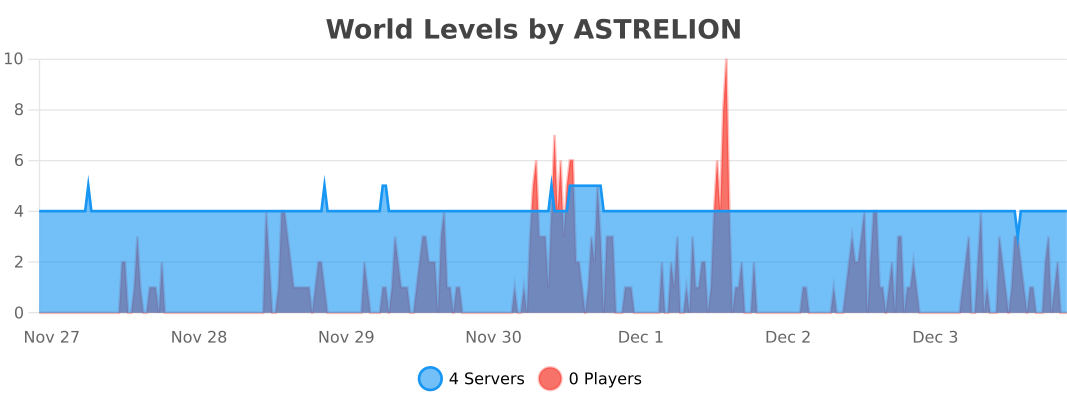
Work together to level up your multiplayer Minecraft server to unlock features and rewards!
## Features
– Level up your multiplayer server by gaining XP through normal gameplay
– **Reward your players** for leveling up the world with:
– Items
– Increasing the world border
– Permissions, groups, and currency (requires [Vault][vault])
– **Control what players can access** based on World Level:
– Building Nether or The End portals
– Mining blocks
– Placing blocks
– Crafting items
– **Trigger any command** upon world level up
– Highly [**customizable**][config] with a full config [schema][schema]
– Add custom XP sources globally or at a per-level basis
– Scale leveling exactly to your liking
– Specify groups of levels per-world or groups of worlds
– Exclude certain worlds from the plugin
– Support for infinite level scaling and rewards
– Optionally reward offline or new players for level gains
– **Customizable messages**, with [MiniMessage][minimessage]
formatting support
– Optionally add [Vault]() for **full
integration with your permission and economy plugin** of
choice
*GIF showing leveling up, Nether access, and world border increases*
### Customizable Server XP Bar

### Level Up Alerts
## Configuration
**This plugin likely requires configuration before it can be useful to you.**
The default configuration file will be created for you, but it can also be found
[here][config]. If your text editor
supports [JSON/YAML schemas](https://json-schema.org/understanding-json-schema/about),
you will also get configuration autocomplete suggestions and linting.
You can find a more detailed example
config [here](https://gitlab.com/ASTRELION/worldlevels/-/blob/main/src/main/resources/example.config.yml).
### Config Examples
*These are partial configurations for the `levels` section specifically.*
How level ranges and XP requirements work
“`yaml
levels:
‘1’:
# level 1 should always require 0 XP
xp: 0.0
‘2’:
# level 2 requires 100 XP to get to
xp: 100.0
‘3’:
xpStep:
# level 3 adds 50 to the previous requirement, making it 150 XP to get to
add: 50.0
‘4’:
xpStep:
# level 4 multiplies the previous requirement by 2, making it 300 XP to get to
mult: 2.0
‘5-10’:
xpStep:
# levels 5-10 adds 50 to the previous requirement, making the following for each:
# level 5 requires 350
# level 6 requires 400
# level 7 requires 450
# level 8 requires 500
# level 9 requires 550
# level 10 requires 600
add: 50.0
’11-‘:
# Level 11 and beyond (scales infinitely) requires 1000 XP to get to
xp: 1000.0
“`
Lock the Nether and The End at the start, and unlock them when the
server reaches level 2 and 3, respectively
“`yaml
levels:
‘1’:
xp: 0.0
# Prevent Nether and End portals from being used initially
allowEnd: false
allowNether: false
‘2’:
xp: 2000.0
# Unlock Nether portals at level 2
allowNether: true
titles:
– title: Netherunlocked!
‘3’:
xp: 4000.0
# Unlock End portals at level 3
allowEnd: true
titles:
– title: The Endunlocked!
‘4-‘:
xp: 8000.0
“`
Award players with different items, and unlock crafting and mining
“`yaml
levels:
‘1’:
xp: 0.0
items:
IRON_INGOT: 1
levels:
crafting:
DIAMOND_HELMET: false
DIAMOND_CHESTPLATE: false
DIAMOND_LEGGINGS: false
DIAMOND_BOOTS: false
mining:
DIAMOND_ORE: false
placing:
DIAMOND_ORE: false
‘2’:
xp: 2000.0
items:
COPPER_INGOT: 1
# crafting: is omitted here because by default all crafting is allowed
# so, at level 2, players can craft diamond armor
# mining: and placing: are omitted for the same reason
‘3-4’:
xp: 4000.0
items:
# Since ‘3-4’ is a range, this awards a diamond for both levels 3 and 4
DIAMOND: 1
‘5-‘:
xp: 8000.0
items:
# Since ‘5-‘ scales infinitely, this awards a netherite ingot every single
# level from 5 onwards
NETHERITE_INGOT: 1
“`
How you can manipulate the world border for each level.
“`yaml
levels:
‘1’:
xp: 0.0
# Sets the initial world border to have a radius of 128, centered at 0,0
worldBorder:
radius: 128
center:
x: 0
z: 0
‘2’:
xp: 2000.0
# Sets the radius of the world border for achieving level 2 at 256
worldBorder:
radius: 256
‘3’:
xp: 4000.0
# Adds the radius of the world border for achieving level 3 to the previous
# radius, making it 512
worldBorder:
radiusStep:
add: 256
‘4-‘:
xp: 8000.0
# Multiplies the radius of the world border for achieving level 4 and onward
# to the previous radius, making it 768, 1152, 1728, and so on
worldBorder:
radiusStep:
mult: 1.5
“`
Award permissions, groups, and currency for certain levels (requires Vault)
“`yaml
levels:
‘1’:
xp: 0.0
‘2’:
xp: 2000.0
# Assigns ‘mypermission.one’ to all players
permissions:
– “mypermission.one”
# Gives all players 50.0 currency
currency:
add: 50.0
‘3’:
xp: 4000.0
# Assigns ‘mypermission.two’ to all players
permissions:
– “mypermission.two”
# Multiply all player’s current currency by 2
currency:
mult: 2.0
‘4’:
xp: 8000.0
# Adds all players to the ‘mygroup’ group
groups:
– “mygroup”
“`
Run commands on level up
“`yaml
levels:
‘1’:
xp: 0.0
‘2’:
xp: 2000.0
# Runs the ‘time set day’ command via the server console
commands:
– “time set day”
‘3’:
xp: 4000.0
# Runs the ‘say You leveled up!’ command via the server console
commands:
– “say You leveled up!”
“`
Require the server’s players to collectively mine a certain amount of
different tiers of ore to get to the next level.
“`yaml
levels:
‘1’:
xp: 0.0
xpWeights:
# This makes it so no vanilla XP sources contribute world level XP
DEFAULT: 0.0
customXPSources:
mineIgnoresSilkTouch: true # set this to prevent XP gains for mining with silk touch
playerMine:
COAL_ORE: 1 # Awards 1 XP for each coal ore mined
‘2’:
xp: 100.0 # requires 100 coal ore mined (defined in level 1) to get this level
xpWeights:
DEFAULT: 0.0
customXPSources:
mineIgnoresSilkTouch: true
playerMine:
COPPER_ORE: 1
‘3’:
xp: 200.0 # requires 200 copper ore mined (defined in level 2) to get this level
xpWeights:
DEFAULT: 0.0
customXPSources:
mineIgnoresSilkTouch: true
playerMine:
IRON_ORE: 1
‘4’:
xp: 300.0 # requires 300 iron ore mined (defined in level 3) to get this level
xpWeights:
DEFAULT: 0.0
customXPSources:
mineIgnoresSilkTouch: true
playerMine:
DIAMOND_ORE: 1
‘5’:
xp: 400.0 # requires 400 diamond ore mined (defined in level 4) to get this level
“`
Specify levels based on world and share rewards
“`yaml
groups:
WorldGroup:
name: The Overworld
# This group only applies to the world named “world”
worlds:
– world
# When this group levels up, it will share items and permission rewards to players in
# the groups listed
rewardOtherGroups:
– NetherGroup
– EndGroup
# Rewards players past rewards when they join the group for the first time
rewardNewPlayers: true
# Rewards players past rewards when they join the group after being offline
rewardOffline: true
levels:
“1-“:
xp: 0.0
xpStep:
add: 100.0
# Every level, this will reward every player in any of the groups a
# gold ingot, due to rewardOtherGroups
items:
GOLD_INGOT: 1
NetherGroup:
name: The Nether
worlds:
– world_nether
rewardOtherGroups:
– WorldGroup
– EndGroup
levels:
“1-“:
xp: 0.0
xpStep:
add: 100.0
EndGroup:
name: The End
worlds:
– world_the_end
rewardOtherGroups:
– NetherGroup
– WorldGroup
levels:
“1-“:
xp: 0.0
xpStep:
add: 100.0
“`
## Messages
The default messages file will be created for you, but it can also be found
[here][messages]. If your text editor
supports [JSON/YAML schemas](https://json-schema.org/understanding-json-schema/about),
you will also get configuration autocomplete suggestions and linting.
Messages support [MiniMessage][minimessage], and have the following custom replacements
available:
| Replacement | Description |
|————————————-|—————————————————————–|
| `` | Current world level |
| `` | Amount of current XP relative to the current level requirements |
| `` | XP requirement to reach the next level |
| `` | Absolute total current XP |
| `` | Name of the level group |
| `` | Plugin version |
| `` | Plugin Modrinth URL |
| `` | Makes inner text clickable for the Modrinth URL |
## Permissions
| Permission | Description |
|—————————–|————————————————————————————|
| `worldlevels.earn.exempt` | Prohibit the player from gaining World Levels XP (by default, all players earn XP) |
| `worldlevels.help` | Access to the `worldlevels help` command |
| `worldlevels.reload` | Access to the `worldlevels reload` command |
| `worldlevels.reset.all` | Access to the `worldlevels reset all` command |
| `worldlevels.reset.rewards` | Access to the `worldlevels reset rewards` command |
| `worldlevels.update` | Access to the `worldlevels update` command |
| `worldlevels.version` | Access to the `worldlevels version` command |
| `worldlevels.xp.add` | Access to the `worldlevels xp add` command |
| `worldlevels.xp.get` | Access to the `worldlevels xp` command |
| `worldlevels.xp.set` | Access to the `worldlevels xp set` command |
## Commands
All the following are prefixed with `worldlevels`. For example, `worldlevels help`.
*Arguments in `<>` are required, arguments in `[]` are optional.*
| Command | Description |
|————————–|——————————————————————————————————-|
| `help` | Shows a list of commands |
| `reload` | Reload the plugin configuration and save from file |
| `xp` | Gets the current XP total and level |
| `xp add ` | Add the given amount of XP to the total, supports negatives |
| `xp set ` | Sets the total XP to the given amount |
| `update` | Checks for plugin updates |
| `version` | Prints the plugin version |
| `reset all` | Resets total XP back to 0 and allows all players to regain rewards |
| `reset rewards [player]` | Resets rewards for the given player (or all players), allowing them to regain rewards for past levels |
## Metrics
This plugin collects anonymized usage statistics via [bStats][bstats]. bStats is
used by many plugins and provides useful statistics for development, but it can
be disabled in the bStats `config.yml` for your server.
In addition to the default stats collected, World Levels also counts a few
stats to better gauge how the plugin is used. These are:
– The number of level groups your server uses
– The average number of worlds in each level group
– The average number of levels in each level group
# Welcome to Wordle!
a Minecraft Wordle clone plugin for your server
## How to play
to play just run:
“`
/wordle
“`
Don’t like that game?
“`
/wordle refresh
“`
## Game Mechanics
1. A dialog interface with a keyboard to type whatever word you desire: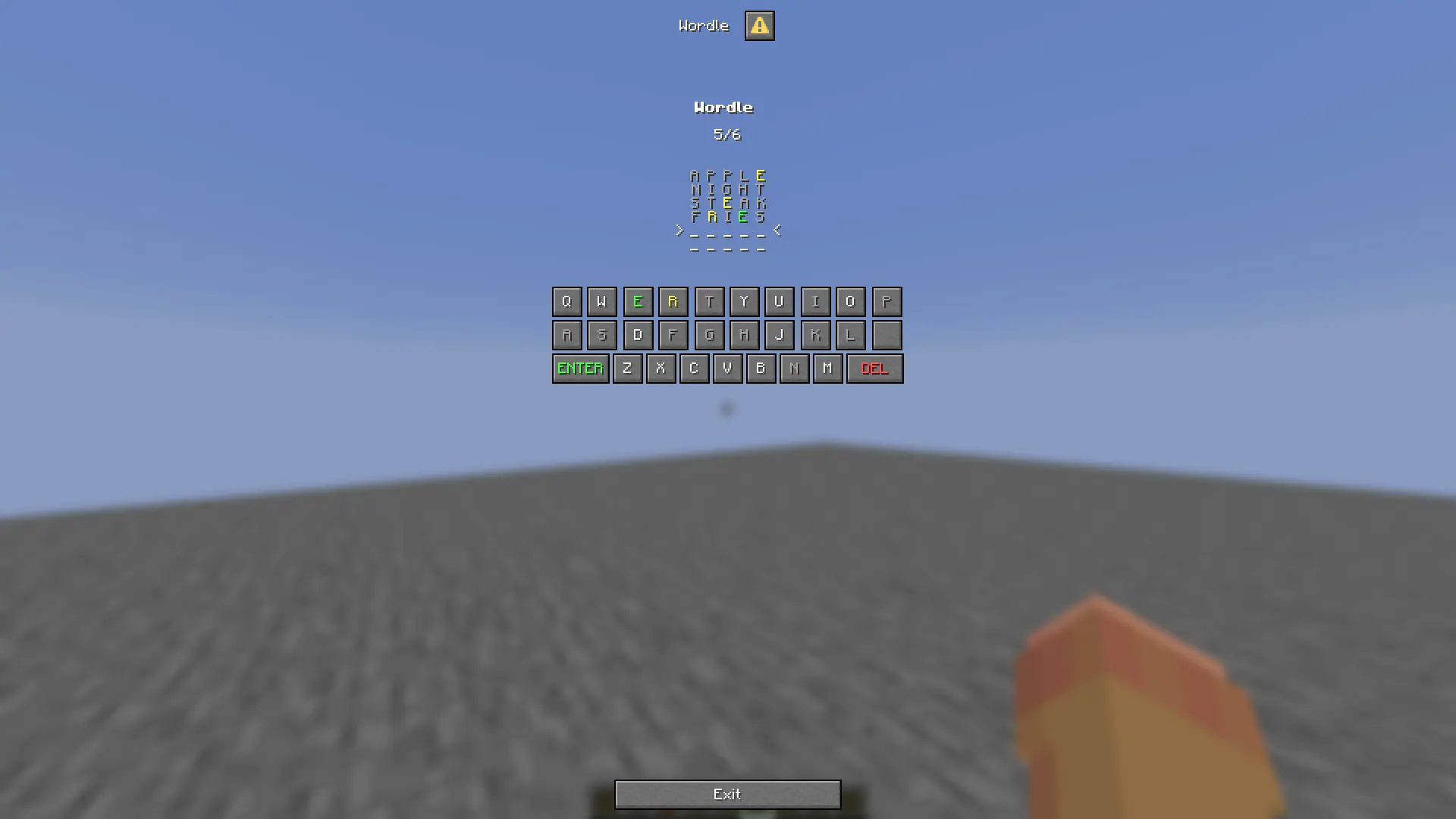
2. Well not every word, just valid ones: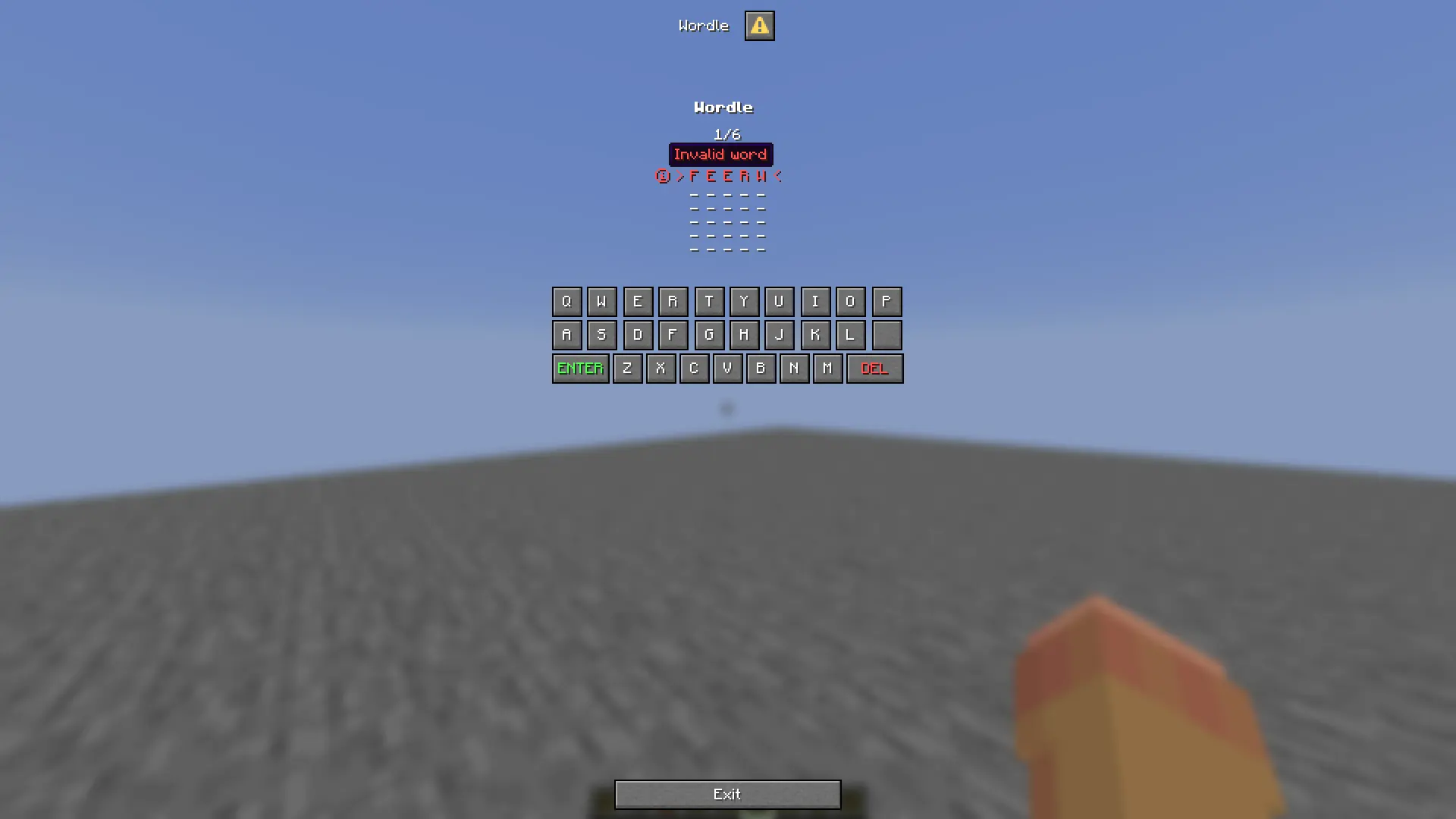
3. When you finish a grid of your game will be sent to you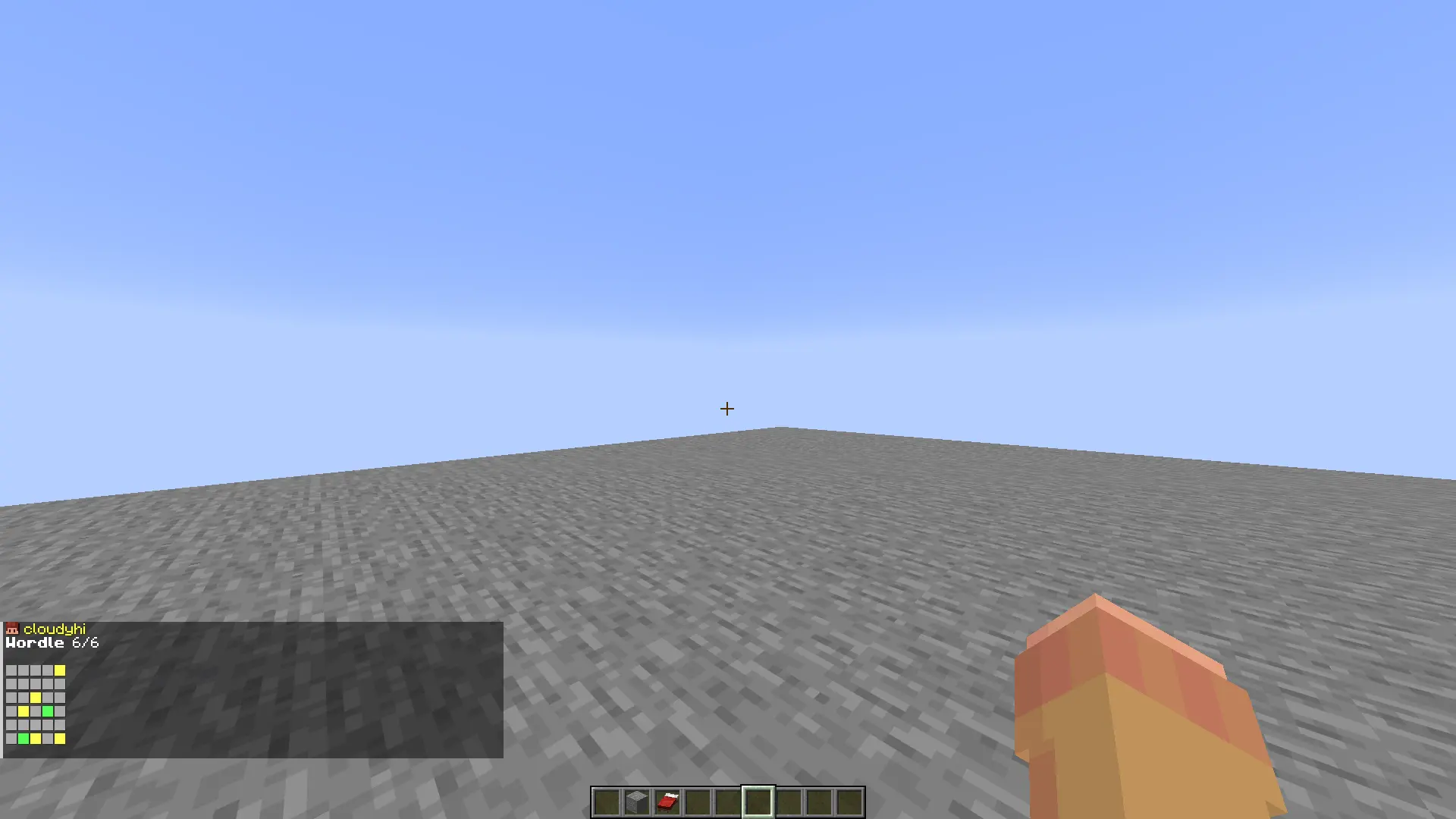
Wordle
Wordle in Minecraft Inventory (GUI)
Inventory keyboard client-side
Multiple data storage (FLAT FILE / MYSQL)
Word restart every day!
99.99% configurable!
ModelData support (for texturepacks!)
You can use any item in the plugin as rewards with in-game command :
“`
/wordscramblerreward
“`
and having in hands the item as reward.
What’s customisable in config.yml ?
– The reward item
– The word that will be scrambled
– All the text
– The plugin prefix
– The time allowed to user to answer
– The time between each event
– Is it case sensitive?
– Sound effect
– Win title screen
Wool Burner
# Wool Burner
**Allows you to delete (burn) all wool in contact like a chain reaction by using a blaze powder item. (Like in bedwars)**
**Usage**
Right click a wool block (of any colour) with a blaze rod item to burn all of the wool in contact with it.
Each world should be first toggled on. Worlds are not enabled by default.
The speed of the burning of wool can be changed. Go to
.//plugins/WoolBurner/config.yml and change the value in _blocks-per-tick_ to any integer. It is the number of blocks deleted each tick. Defaults to 5 if there is no integer present there. DO NOT KEEP THE VALUE VERY HIGH, IT CAN CAUSE LAG.
**Commands**
/wb (alias: /woolburner): Get the plugin’s information
/woolburnertoggle [world] (alias: /wbtoggle [world]): Toggle woolburner in a specific world.
**Permissions**
– [woolburner.info](https://modrinth.com/plugin/woolburner) : Use the /wb command
– woolburner.toggle: Use /wbtoggle command
**Issues and potential new features**:
You can reach out to me in my [discord server](https://discord.gg/aEc7yqecYn). [Discord ID – armyfury]
**This Data Pack adds **15 new armor sets** from all the existing trees in the game!**
—
There are several additional sets indirectly related to the tree among them. But why not add them too!
By using this Data Pack, you can set yourself a new goal! In the form of collecting each new armor set!
## **But that’s not all!**
Some types of armor have unique abilities!
Such as:
– Movement speed
– Reduced gravity
– Increase and decrease player size
**And so on!**
You can also decorate all sets (_except for some hats_) with patterns that you have collected!
But if you don’t want your armor to have unique effects,
You can download the **cropped** version of the datapack
And just focus on collecting and aesthetically enjoying your successes in gathering all the armor sets!
(_**Important!!! It is not recommended to install the cropped and regular versions together, to avoid conflicts.**_)
### Installation instructions:
1. Download the Data Pack (**DP**) and Resource Pack (**RP**)
2. Unzip the file
3. Move the folder with the Data Pack (**DP**) to the **datapacks** folder in your world folder
4. Move the folder with the Resource Pack (**RP**) to the **resourcepacks** folder
5. Enjoy the game!
WoLobbyPvp
# ENG
# ⚔️ WoLobbyPvp – Complete Lobby Combat System
WoLobbyPvp is a lightweight and powerful tool for server owners that turns boring lobby wait times into exciting fun. The plugin allows players to dynamically enter PvP mode using a single item, without the risk of losing inventory or damaging the lobby.
## 🚀 How does it work? (Plugin Mechanics)
The plugin was designed with intuitiveness in mind. It requires no commands from the player:
Automatic Start: Upon joining the server, the player receives a sword in the slot specified in the configuration.
Smart Activation: Combat doesn’t start immediately. Once the sword is selected, a configurable Warmup begins, displayed as an elegant Title in the center of the screen.
Combat Armor: With a single click (LMB), the player summons an armor set. The plugin intelligently saves the player’s current outfit (e.g., skins or decorative armor) and restores it immediately after the fight ends.
Lobby Safety: PvP only works between players who have the mode active. People without the sword in hand are completely safe and cannot be attacked.
No Durability Loss: All items used within the plugin are indestructible (Infinite Durability).
## ⚙️ Configuration Guide (config.yml)
You can customize every element of the plugin to fit your needs:
# Waiting time (in seconds) from the moment the sword is held to full PvP activation.
# The code uses this value in the onSlotChange method to start the countdown.
warmup-seconds: 3
# The item the player will automatically receive upon joining the server.
# They must hold it in their hand to activate combat mode.
activator-item:
# Hotbar slot (1-9) where the player will receive the sword.
slot: 1
# Item material (use names from Spigot documentation, e.g., DIAMOND_SWORD).
material: WOODEN_SWORD
# Display name (supports & colors). Checked in the isPvPItem method.
name: “&c&lChallenge Sword”
# Item lore – adds atmosphere and informs the player about the rules.
lore:
– “&7Status: &eLobby PvP”
– “”
– “&fHold this sword to fight!”
– “&fClick &6LMB&f to equip armor.”
– “”
– “&7Note: Putting the sword away disables PvP mode.”
# The armor set that appears on the player after clicking the Left Mouse Button (LMB).
# These items are created dynamically by the createItem function in the code.
armor:
helmet:
material: IRON_HELMET
name: “&cHelmet”
chestplate:
material: IRON_CHESTPLATE
name: “&cChestplate”
leggings:
material: IRON_LEGGINGS
name: “&cLeggings”
boots:
material: IRON_BOOTS
name: “&cBoots”
# All text and messages displayed to the player while using the plugin.
messages:
# Displayed as a Title and in chat when the countdown ends.
pvp-enabled: “&a&lFIGHT! &7PvP mode has been activated.”
# Information shown after putting the sword away or leaving the server.
pvp-disabled: “&c&lEND! &7PvP mode has been disabled.”
# Main Title text during the countdown.
warmup-title: “&eGet ready…”
# Title Subtitle – %seconds% is automatically replaced by the remaining time in the code.
warmup-subtitle: “&7Combat starts in: &c%seconds%s”
# Message after clicking LMB when the armor is equipped.
armor-equipped: “&a&oYour armor has been equipped!”
“`
## 🛠️ Technical Info and Permissions
The plugin is optimized and does not strain the server CPU.
Permissions:
wolobbypvp.admin – Access to the /wolobbypvp reload command (reloads configuration without restarting the server).
Technical Details:
Versions: Supports versions 1.18.2 and up (thanks to the implemented VersionManager).
Security: Uses advanced UUID mapping to store saved armor, preventing errors even if a player abruptly leaves the server.
Restrictions: The plugin automatically blocks dropping PvP items (DropItem) and manually removing armor from armor slots.
## ❓ FAQ – Frequently Asked Questions
Do players lose their items upon death? No. The plugin blocks item drops and automatically respawns the player with their original inventory restored.
Can I change the sword slot? Yes, in the activator-item.slot section of the config, you can set any slot from 1 to 9.
Does the plugin conflict with other lobby plugins? The plugin works independently. If another plugin grants effects on join, WoLobbyPvp will simply add its items to the designated slots.
### 🆘 Support and Help
Having trouble with configuration? Found a bug?
Discord: wojteko
Bugs: Please report via private message on Discord. Do not use the review section for bug reports!
Project Author: wojteko
# PL
# ⚔️ WoLobbyPvp – Kompletny System Walki w Lobby
WoLobbyPvp to lekkie i potężne narzędzie dla właścicieli serwerów, które zamienia nudne oczekiwanie w lobby w ekscytującą zabawę. Plugin pozwala graczom na dynamiczne przechodzenie w tryb PvP za pomocą jednego przedmiotu, bez ryzyka utraty ekwipunku czy niszczenia lobby.
### 🚀 Jak to działa? (Mechanika Pluginu)
Plugin został zaprojektowany z myślą o intuicyjności. Nie wymaga od gracza wpisywania żadnych komend:
Automatyczny Start: Gracz po wejściu na serwer otrzymuje miecz na określonym w konfiguracji slocie.
Inteligentna Aktywacja: Walka nie zaczyna się od razu. Po wybraniu miecza następuje konfigurowalne odliczanie (Warmup), wyświetlane jako elegancki Title na środku ekranu.
Zbroja Bojowa: Jednym kliknięciem (LPM) gracz przywołuje zestaw zbroi. Plugin inteligentnie zapisuje obecne ubranie gracza (np. skiny lub zbroje ozdobne) i przywraca je natychmiast po zakończeniu walki.
Bezpieczeństwo Lobby: PvP działa tylko między graczami, którzy mają aktywny tryb. Osoby bez miecza w ręku są całkowicie bezpieczne i nie mogą być atakowane.
Brak Zużycia: Wszystkie przedmioty używane w ramach pluginu są niezniszczalne (Infinite Durability).
### ⚙️ Przewodnik po Konfiguracji (config.yml)
Każdy element pluginu możesz dostosować do własnych potrzeb:
# Czas oczekiwania (w sekundach) od momentu wzięcia miecza do ręki do pełnej aktywacji PvP.
# Kod używa tej wartości w metodzie onSlotChange do uruchomienia odliczania.
warmup-seconds: 3
# Przedmiot, który gracz otrzyma automatycznie po wejściu na serwer.
# Musi trzymać go w ręce, aby aktywować tryb walki.
activator-item:
# Slot w pasku szybkiego wyboru (1-9), na który gracz otrzyma miecz.
slot: 1
# Materiał przedmiotu (używaj nazw z dokumentacji Spigota, np. DIAMOND_SWORD).
material: WOODEN_SWORD
# Nazwa wyświetlana (obsługuje kolory &). Sprawdzana w metodzie isPvPItem.
name: “&c&lMiecz Wyzwania”
# Opis przedmiotu – dodaje klimatu i informuje gracza o zasadach.
lore:
– “&7Status: &eLobby PvP”
– “”
– “&fTrzymaj ten miecz, aby walczyć!”
– “&fKliknij &6LPM&f, aby ubrać zbroję.”
– “”
– “&7Uwaga: Schowanie miecza wyłącza tryb PvP.”
# Zestaw zbroi, który pojawia się na graczu po kliknięciu Lewym Przyciskiem Myszy (LPM).
# Przedmioty te są tworzone dynamicznie przez funkcję createItem w kodzie.
armor:
helmet:
material: IRON_HELMET
name: “&cHełm”
chestplate:
material: IRON_CHESTPLATE
name: “&cKlata”
leggings:
material: IRON_LEGGINGS
name: “&cSpodnie”
boots:
material: IRON_BOOTS
name: “&cButy”
# Wszystkie napisy i komunikaty, które widzi gracz podczas korzystania z pluginu.
messages:
# Wyświetlane jako Title i na czacie w momencie zakończenia odliczania.
pvp-enabled: “&a&lWALKA! &7Tryb PvP został aktywowany.”
# Informacja po schowaniu miecza lub wyjściu z serwera.
pvp-disabled: “&c&lKONIEC! &7Tryb PvP został wyłączony.”
# Główny napis Title podczas odliczania.
warmup-title: “&ePrzygotuj się…”
# Podnapis Title – %seconds% jest automatycznie zamieniane na czas pozostały w kodzie.
warmup-subtitle: “&7Walka zacznie się za: &c%seconds%s”
# Komunikat po kliknięciu LPM, gdy zbroja wskoczy na swoje miejsce.
armor-equipped: “&a&oTwoja zbroja została założona!”
“`
### 🛠️ Informacje Techniczne i Uprawnienia
Plugin jest zoptymalizowany i nie obciąża procesora serwera.
Uprawnienia (Permissions):
wolobbypvp.admin – Dostęp do komendy /wolobbypvp reload (przeładowanie konfiguracji bez restartu serwera).
Szczegóły techniczne:
Wersje: Wspiera wersje od 1.18.2 wzwyż (dzięki zaimplementowanemu VersionManager).
Bezpieczeństwo: Wykorzystuje zaawansowane mapowanie UUID do przechowywania zapisanych pancerzy, co zapobiega błędom nawet przy nagłym wyjściu gracza z serwera.
Blokady: Plugin automatycznie blokuje wyrzucanie przedmiotów PvP (DropItem) oraz ręczne zdejmowanie zbroi z slotów pancerza.
### ❓ FAQ – Najczęściej Zadawane Pytania
Czy gracze tracą swoje itemy po śmierci? Nie. Plugin blokuje wypadanie przedmiotów (Drop) i automatycznie respawnuje gracza z przywróconym ekwipunkiem podstawowym.
Czy mogę zmienić slot miecza? Tak, w sekcji activator-item.slot w configu możesz ustawić dowolne miejsce od 1 do 9.
Czy plugin koliduje z innymi pluginami na lobby? Plugin działa niezależnie. Jeśli inny plugin nadaje efekty przy wejściu, WoLobbyPvp po prostu doda swoje przedmioty na wskazane sloty.