xCoinFlip
🎲 xCoinFlip
The best modern and immersive betting system for your Minecraft server
—

—
**xCoinFlip** is a highly optimized and fully customizable plugin that adds a “Heads or Tails” (Coinflip) betting system to your server. Designed to offer a fresh and addictive experience, it allows players to wager their money on 1v1 duels with high-quality animations, boosting engagement and improving your network’s economy flow.
—
> ### ✨ Recent Highlights (v1.0.1)
> * **New:** **Cryptographically Secure Randomness** using `SecureRandom` for 100% fair duels.
> * **New:** **Suspenseful Roulette Animation** with realistic friction/slowing effects.
> * **New:** **Trillion (T) Support** in smart amount parsing for large economies.
> * **New:** **Chat-based Creation Prompt** to quickly set bets without long commands.
—
> ### 🔥 Key Features
– 🎰 **Immersive Roulette Animation:** Unlike other basic betting plugins, our GUI features a spectacular “friction” spin effect. The player heads start spinning smoothly and gradually slow down, generating an incredible level of tension and suspense just before the winner is revealed.
– 🔒 **Provably Fair:** The probability engine is entirely unpredictable. Written using secure randomness parameters (`SecureRandom`), it guarantees a purely impartial 50/50 ratio, eliminating any chance of scams or player exploits.
– 💬 **Lightning-Fast Wagers:** Tired of typing long commands? Players can simply open the GUI, click the “Create Game” button, and the plugin will seamlessly capture their next chat message. It even supports amount abbreviations! Drop a `1.5k`, `50m`, `3B`, or even **`2T`** and the plugin handles the rest.
– 💾 **Excellent Performance (H2 Built-in):** Comes with its own asynchronous built-in database manager to store pending games without consuming main-thread resources, meaning you don’t even need to hassle with external MySQL setups.
– 🎨 **100% Customizable:** The power is in your hands. Modify the GUI layouts (slots, titles, items), chat messages, action bars, sounds, win chances, and global broadcasts directly through the `.yml` files.
– 🎆 **Visual Rewards:** Spectacular victory effects including snappy sounds, firework launches, and totem particles to properly celebrate large wins.
– 📡 **Discord Webhook Integration:** Automatically broadcast massive wins and epic duels directly to your Discord community channels via configurable webhooks.
—
> ### ⚙️ Commands & Permissions
**General Commands – `/cf` or `/coinflip`**
* `/cf menu` : Opens the main active games GUI. *(No specific permission required by default)*
* `/cf create ` : Instantly create a new coinflip wager without opening the GUI.
* `/cf help` : View available commands based on player privileges.
**Admin Commands:**
* `/cf reload` : Hot-reload `config.yml`, `gui.yml`, and `animation.yml` without needing to restart your server.
* **Default Admin Permission:** `xcoinflip.admin` (Can be modified in config).
—
> ### 🎢 Example Menu (Custom)
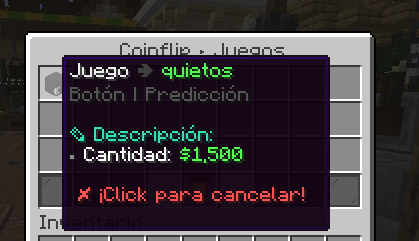
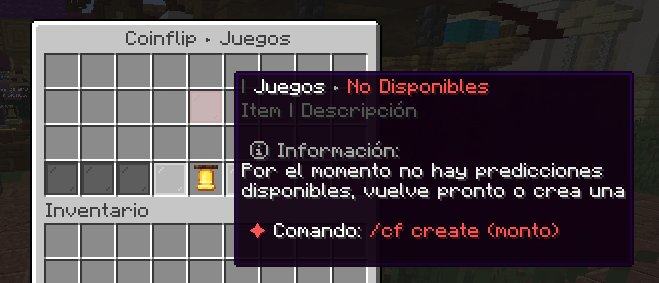
—
> ### 🧩 Dependencies
To ensure xCoinFlip runs smoothly, your server requires the following:
* **[Vault](https://modrinth.com/plugin/vault)** – *(Required)*
* **Any Economy Provider** (EssentialsX, CMI, etc.) – *(Required)*
* **[PlaceholderAPI](https://modrinth.com/plugin/placeholderapi)** – *(Optional but recommended)*
—
> ## 💗 Servers that use our plugin
> * **SolarCraftMc** (Survival Vanilla)
> * **MineFania** (Survival OP)
—
> ### 💬 Support & Community
> Developed and maintained by the **xPlugins** team.
> If you have any questions, suggestions, or need help configuring the plugin, you are more than welcome to join our official [Discord](https://xplugins.es/).
>
> 😊 **Available in: ES / EN / CUSTOM**
xChunkHoppers
# xChunkHoppers
### 🚀 The Ultimate Chunk Collector Plugin




—
## 📋 Description
**xChunkHoppers** is the ultimate solution for Survival, SkyBlock, and Factions servers. It allows you to create “Magic Hoppers” that automatically collect items within a specific radius or the entire Chunk without the need for water streams or lag.
Optimized for high performance, with support for **Hex Colors**, **Effects**, **GUI Menu**, and a **complete API** for developers.
## ✨ Key Features
* **🛡️ Extreme Performance:** Smart caching and `PersistentDataContainer` (PDC). Zero lag.
* **📡 Multi-Types:** Create infinite hopper types (VIP, GOD, BASIC) with configurable ranges (8×8, 64×64, Full Chunk).
* **🎨 Premium Design:** Full support for HEX colors (`&#RRGGBB`) and gradients.
* **🖥️ GUI Menu:** Visual admin panel to obtain items (`/xch menu`).
* **💾 Data Persistence:** `data.yml` system to save locations across restarts.
* **🎵 Visual Effects:** Fully configurable sounds and particles when placing blocks.
* **🔌 Developer API:** Simple API to integrate with other plugins.
* **⚙️ Filtering:** Whitelist or blacklist of materials (e.g., only Cactus and Iron).
—
## 📥 Installation
1. Download `xChunkHoppers.jar`.
2. Place it in your server’s `/plugins/` folder.
3. (Optional) Install **PlaceholderAPI** to use variables.
4. Restart the server.
5. Configure the hopper types in `config.yml` and enjoy!
—
## Example Video:
## 💻 Commands and Permissions
| Command | Description | Permission |
| :— | :— | :— |
| `/xch give [amount]` | Gives a specific ChunkHopper to a player. | `xchunkhoppers.admin` |
| `/xch menu` | Opens the GUI menu with all hoppers. | `xchunkhoppers.admin` |
| `/xch reload` | Reloads the configuration and database. | `xchunkhoppers.admin` |
### Other Permissions
* `xchunkhoppers.place` » Allows placing Chunk Hoppers.
* `xchunkhoppers.break` » Allows breaking and retrieving Chunk Hoppers.
—
## 🛠️ Configuration
“`yaml
# ___ _ _
#__ __ / __ |__ _ _ _ __ | | __ / /___ _ __ _ __ ___ _ __ ___
# / // / | ‘_ | | | | ‘_ | |/ // /_/ / _ | ‘_ | ‘_ / _ ‘__/ __|
# > Made with ❤️ by WillfryDev for the community.
xAlmas
⚡ xAlmas – Premium PvP Soul Economy ⚡
The ultimate, highly customizable PvP economy plugin for your Minecraft server.

[](https://jitpack.io/#WilfryDev/xAlmas)
—
## 📖 Overview
**xAlmas** is a premium Minecraft plugin designed to reward players for their PvP skills. Every time a player gets a kill, they can collect the victim’s “soul” as a physical, highly customizable item. It features a robust anti-farming system, modern HEX color support, and a dedicated Developer API.
Whether you want to use standard dyes or custom Base64 player heads, **xAlmas** gives you complete control over your server’s kill-reward economy!
## ✨ Key Features
* 💀 **Custom Soul Items:** Create infinite types of currencies! Support for standard materials, custom lore, enchantments, hidden flags, and **Base64 Custom Heads**.
* 🛡️ **Advanced Anti-Farming System:** Prevent abuse with built-in IP-matching blocks and configurable per-player cooldowns.
* 🎨 **Modern Formatting:** Full support for **MiniMessage** and **HEX Colors** (`&#HEX` or `<#HEX>`). Make your items and chat messages look stunning.
* 🎲 **Dynamic Drops:** Choose whether souls go directly into the killer’s `INVENTORY` or `DROP` on the ground. You can even set the dropped item to be `random` from your configured list!
* 🌍 **World Whitelist/Blacklist:** Disable soul drops in specific worlds (e.g., spawn or end).
* 📊 **PlaceholderAPI Support:** Display player soul stats on scoreboards or menus using `%xa_almas%`.
* 🔊 **Custom Sounds:** Play specific sounds (with adjustable pitch and volume) when a player collects a soul.
* ⚙️ **Developer API:** Includes a powerful API with custom events so other plugins can interact with the economy.
—
## 💻 Commands & Permissions
All commands are manageable under a single, easy-to-use base command with full Tab-Completer support.
| Command | Description | Permission |
| :— | :— | :— |
| `/xa help` | Shows the custom help menu. | `xalmas.admin` |
| `/xa give ` | Gives a specific amount of souls to a player. | `xalmas.admin` |
| `/xa reload` | Reloads `config.yml`, `almas.yml`, and data safely. | `xalmas.admin` |
—
## 🔌 [PlaceholderAPI](https://modrinth.com/plugin/placeholderapi)
> Make sure you have
> installed to use this feature!
* `%xa_almas%` — Returns the total amount of souls the player has collected.
—
## 🛠️ Configuration Snapshot
Setting up your items in `almas.yml` is incredibly easy. Here is an example of a premium Base64 head setup:
“`yaml
items:
alma_premium:
material: “PLAYER_HEAD”
base64: “eyJ0ZXh0dXJlcyI6eyJTS0lOIjp7InVybCI6Imh0dHA6Ly90ZXh0dXJlcy5taW5lY3JhZnQubmV0L3RleHR1cmUvOGRjODgwNTNjMWE4NTNmNzE2NmM5ZTkzYmIzYzUxN2YwODE5NTQ0NzM5ZGJlYWJkNDhhODU5Y2VkNDIwYjcwYiJ9fX0=”
name: “&#FACBCB☠ Premium Soul &#FACBCB&lF&#EED1D0&lA&#E2D8D5&lN&#D5DED9&lI&#C9E4DE&lA &#FACBCB♫”
lore:
– “”
– “&8 ℹ Information ”
– “”
– “&f Exchange this rare coin for ”
– “&f VIP rewards at spawn. ”
– “”
– “&#FACBCB ▸ Special Edition! ”
– “”
enchantments:
– “DURABILITY:3”
flags:
– “HIDE_ENCHANTS”
“`
—
## 🚀 For Developers (API)
**xAlmas** is built with extensibility in mind. You can use our API via JitPack to hook into the plugin, manipulate soul balances, and listen to custom events.
### 1. Dependency Installation
First, add the JitPack repository and the xAlmas dependency to your project. *(Make sure to replace `VERSION` with the latest release, e.g., `v1.0.1`)*.
**Gradle (Kotlin DSL)**
“`kotlin
repositories {
mavenCentral()
maven(“[https://jitpack.io](https://jitpack.io)”)
}
dependencies {
compileOnly(“com.github.WilfryDev:xAlmas:VERSION”)
}
“`
**Gradle (Groovy)**
“`gradle
repositories {
mavenCentral()
maven { url ‘[https://jitpack.io](https://jitpack.io)’ }
}
dependencies {
compileOnly ‘com.github.WilfryDev:xAlmas:VERSION’
}
“`
**Maven**
“`xml
jitpack.io
[https://jitpack.io](https://jitpack.io)
com.github.WilfryDev
xAlmas
v1.0.1
provided
“`
### 2. Available Events
**`PlayerReceiveSoulEvent`**
This event is fired right before a player receives a soul item from a PvP kill.
* `isCancelled()` / `setCancelled(boolean)`: Cancel the event to prevent the drop.
* `getSoulType()` / `setSoulType(String)`: View or dynamically change the type of soul awarded based on killer’s ranks or permissions.
* `getKiller()` / `getVictim()`: Get the exact players involved in the event.
“`java
@EventHandler
public void onSoulReceive(PlayerReceiveSoulEvent event) {
if (event.getKiller().hasPermission(“vip.doublesouls”)) {
// You can change the soul dropped to a premium one dynamically
event.setSoulType(“alma_premium”);
}
}
“`
### 3. API Methods
You can easily interact with a player’s saved data using the `XAlmasAPI` class.
“`java
import jn.willfrydev.xalmas.api.XAlmasAPI;
// Get the total amount of souls a player has
int totalSouls = XAlmasAPI.getSouls(player.getUniqueId());
// Add souls directly to a player’s data file
XAlmasAPI.addSouls(player.getUniqueId(), 5);
// Remove souls safely (will not drop below 0)
XAlmasAPI.removeSouls(player.getUniqueId(), 2);
“`
—
*Optimized for Paper 1.16.5+.*
> 💗 By xPlugins :=)
X-Hearts
# X-Hearts
Start on one heart, gain a heart every time you die. If you die at 10 hearts you are permanently dead.
Use `/scoreboard players set @s deaths 0` to reset back to 1 heart
Inspired by the X-Life series

## FAQ
**Does this work on a server?**
Yes. Go into your servers folders and go to `world -> datapacks` and put the datapack there. This datapack works multiplayer so play with however many people you would like!
**Is there anyway to change the max amount of hearts?**
Here are all the settings you can change:
– `/function xlife:settings/toggle_hardcore` for toggling whether to go into spectator after running out of hearts or not. By default it is on hardcore mode
– `/function xlife:settings/max_hearts/increase` to increase the max amount of hearts. Default is 10
– `/function xlife:settings/max_hearts/decrease` to decrease the max amount of hearts
## Support us!
Join my Minecraft server **Zonerush.minekeep.gg** for a unique PvP gamemode!
—
**Try my other datapacks! Here are some that you might like.**
[](https://modrinth.com/project/uUdrS8s7) [](https://modrinth.com/project/aik3GVdo)
—
**Join the discord to get updates, support me, and report issues**
[](https://discord.gg/C2WymfUqJx)
## Milestones
– 100 downloads – Dec. 8th | 2025
– 300 downloads – Jan. 13th | 2026
– 1,000 downloads – ???
Would you Rather
A Fabric mod that adds a Would you Rather prompt that progressively complicates your gameplay.
The prompt can be enabled in the New World screen or with the /choice command.
WynnLimbo
# WynnLimbo
Are you tired of sitting in a black box while queuing to join the prof world?
Do you want something to do while waiting? Then this is the mod for you!
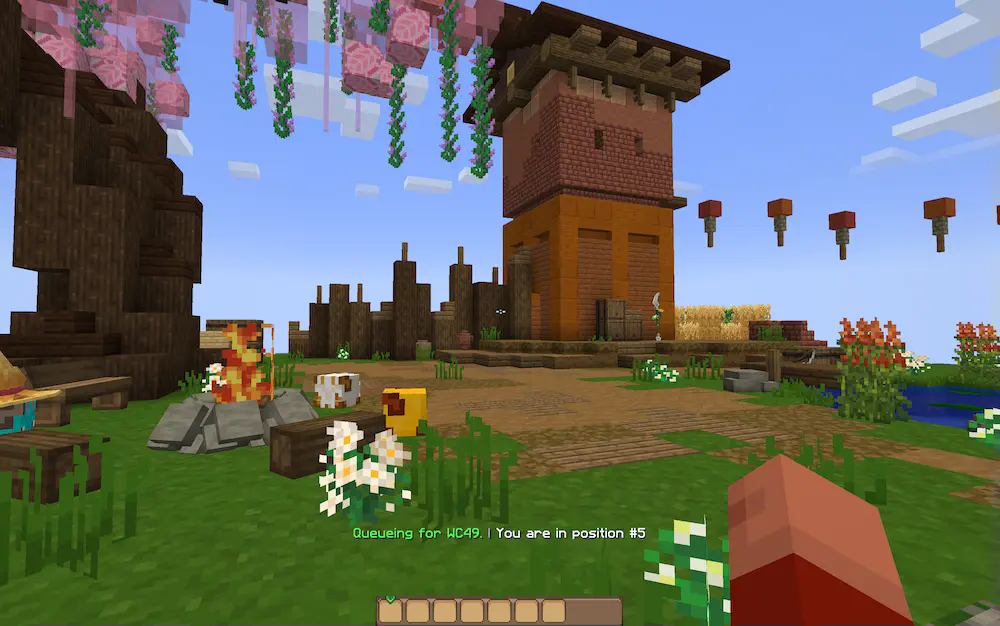
When queuing for worlds, WynnLimbo will drop you onto a small island to explore and jump around on while waiting!
## How it works
When queuing for a world, wynncraft puts the client in state where it only has to spend minimal resources on it. In practice this means that no chunk data is sent to the client and that the server ignores almost all packets from the client. Here is where WynnLimbo comes in. It sends its own chunk and entity data for the client to load and therefore allows you to move around and explore the limbo.
## Credits
This mod was written by _GoldenShadow.
The island was built by Barled, VireVeonix and _GoldenShadow and inspired by builds on wynncraft.
Wyld Life’s Wyldcards
These are the Wyldcards I made for my spin-off of Grian’s Wild Life.
Session one’s Wyldcard:
You Start The season on 1200 Mana Every half heart of damage you take you lose one mana Below 1200 is Blue Below 1000 is Cyan Below 800 is Dark Green Below 600 is Green Below 400 is Yellow Below 200 is red Below 100 is Dark Red When you are dark red you will have strength I, when you hit zero mana, you are out of the series
Session Three’s Wyldcard:
At the start of the season, lives are randomized from 2 to 6. The lives you have determine the hearts you will have
6 lives – 5 Hearts
5 lives – 10 Hearts
4 Lives – 15 Hearts
3 Lives – 20 hearts
2 Lives – 25 Hearts
One Life – You start on 30 hearts.
When you get a kill on red life, you get +5 hearts. Dying on red life will make you lose 30 hearts. When you lose all your hearts you are eliminated!
Wukong Abilities
Wukong Abilities
Unleash the full power of the Monkey King — mythical staff powers, clones, transformations and sky mobility in Minecraft.
For YT Support:
https://youtube.com/@mine_twice?si=67b_mn6T7Nw8Oj4G
—
**⭐ Features**
🌀 Multiple Wukong abilities inspired by mythology
🦊 Clone Summoning & Monkey Army
🪄 Ruyi Jingu Bang Staff with extend, smash & cinematic spin
☁️ Flying Nimbus Cloud you can ride
🔥 Ultimate Transformation Mode
⚡ Fast mobility: dash, trail, cloud burst
📊 Fully configurable cooldowns, damage, animations
🖥️ Built-in GUI for ability editing
🧩 Lightweight & optimized for survival servers
—
**🔐 Permissions**
To use Wukong features, the player must:
• Be an operator, or
• Have proper permissions set via a permissions plugin
All commands and abilities are permission-based and configurable.
—
**WUKONG LEGENDS COMMANDS — Full Control Over Every Monkey King Power**
● ○ ● ○ ● ○ ● ○ ● ○ ● ○ ● ○ ● ○ ● ○ ●
**/wukong**
➤ Gives the legendary Ruyi Jingu Bang
➤ Unlocks all Wukong abilities
➤ Reloads player ability data
➤ Admin-only (configurable)
—
**/wukong help**
➤ Shows full command list
➤ Explains every ability
➤ Clean info menu with icons
—
**/wukong info**
Displays player stats:
• Unlocked abilities
• Cooldowns
• Active animations
• Current mode (Normal / Golden / Ultimate)
—
**/wukong abilities**
➤ Opens the Wukong GUI
➤ Enable/disable abilities
➤ Balanced for servers
—
**/wukong staff**
➤ Gives a new staff
➤ Choose mode: Normal, Giant, Mini
—
**/wukong forms**
Switch between Monkey King forms:
• Normal Mode
• Golden Armor Mode
• Ultimate Transform Mode
➤ Includes cinematic animations
—
**/wukong summon **
Summon Wukong mobs:
• clone
• monkey
• monkey_army
• training_dummy
—
**/wukong nimbus**
➤ Summon or dismiss the Flying Nimbus
➤ Instantly mount the cloud
—
**/wukong config reload**
➤ Reload configs live
➤ Updates cooldowns, effects, animations
—
**/wukong reset **
➤ Reset player progress
➤ Clear cooldowns
➤ Remove transformations
—
**/wukong setmode **
Force-set a player mode:
• normal
• golden
• ultimate
—
**/wukong animate **
Play any animation manually:
• staff_spin
• sunbeam_charge
• ultimate_transform
• dash_trail
• cloud_shield
—
Full Control, Full Power
Admins, creators, and players get complete access to the full Monkey King experience with immersive animations, configurable abilities, and cinematic transformations.
Would you Rather
# Hi! This Datapack is currently in Beta State.
Works for 1.21+
## Would you Rather
How it works:
After every hour of playtime on your world or server you will get promted to pick a choice. A lot of random things can happen. So enjoy (:
If there are any bugs please let me know in the comments!
This is my first public Datapack so please don’t be too strict.
Note. If you want to change the time it takes to get promted, do the following:
Change time between choices:
1. unzip the datapack
2. go to datanullfunctionmain.mcfunction and open it in any texteditor
3. paste one of the following lines of code at the beginning of the file
1 minute per choice
“`
execute as @a if score @s wurtime matches ..70800 run scoreboard players set @s wurtime 70801
“`
3 minutes per choice
“`
execute as @a if score @s wurtime matches ..68.400 run scoreboard players set @s wurtime 68.401
“`
5 minutes per choice
“`
execute as @a if score @s wurtime matches ..66.000 run scoreboard players set @s wurtime 66.001
“`
10 minutes
“`
execute as @a if score @s wurtime matches ..60.000 run scoreboard players set @s wurtime 60.001
“`
20 minutes
“`
execute as @a if score @s wurtime matches ..48.000 run scoreboard players set @s wurtime 48.001
“`
30 minutes
“`
execute as @a if score @s wurtime matches ..36.000 run scoreboard players set @s wurtime 36.001
“`
45 minutes
“`
execute as @a if score @s wurtime matches ..18.000 run scoreboard players set @s wurtime 18.001
“`
MORE THAN 1 HOUR WILL NOT WORK FOR NOW!
WorldTag
# Detailed Introduction to Minecraft WorldTag Plugin

WorldTag is a lightweight identification plugin specially developed for Minecraft servers. Its core positioning is to realize the associated visualization of players’ names and their current worlds, while balancing practicality, convenience and server performance optimization. It does not rely on any redundant dependency plugins, supports the deployment of Minecraft servers of all scales, provides server administrators with an efficient and flexible world identification management solution, and enhances the interactive experience between players.
## Where can I use WorldTag?


## Detailed Explanation of Core Features
As a dedicated plugin focusing on world identification display, WorldTag abandons redundant functions and focuses on the accurate implementation of core needs. Every function is optimized and designed to balance ease of use and stability.
### 1. Automatic Mounting of Player Name World Tags
The core function of the plugin is to automatically add an identification tag corresponding to the current world before players’ names, realizing intuitive visualization of players’ locations. Whenever players switch between different worlds on the server, the tags will be updated in real time without manual operation by administrators. This allows all online players to quickly identify the current world location of target players, facilitating cross-world interaction guidance between players, helping administrators quickly locate players’ scenarios, and improving server management efficiency.
### 2. Customizable Adaptation of Tag Text and Color
The plugin supports highly flexible tag customization. Server administrators can freely configure the display text and color parameters of each world tag according to their server’s operation style and world themes (such as Survival World, Creative World, Dungeon World, etc.). Through simple configuration operations, the tag text can be accurately matched with the server’s world names. Meanwhile, color parameters can be used to distinguish different world types, enhancing the recognition of tags, making world tags not only practical but also consistent with the overall visual style of the server.
### 3. Comprehensive Fault-Tolerance Adaptation Mechanism
To ensure the stable operation of the plugin, WorldTag has built-in intelligent fault-tolerance logic with special optimization for abnormal configuration file scenarios. When the plugin reads the configuration file, if it cannot recognize the target world folder on the server (such as abnormal folder naming, path changes, missing world files, etc.), it will automatically trigger the fault-tolerance mechanism and display the corresponding world tag as [Unknown]. This design can effectively avoid plugin errors, crashes or display disorders caused by configuration abnormalities, ensuring the plugin runs normally in various complex configuration environments.
## Core Advantages of the Plugin
### Lightweight Design with Low Resource Consumption
The plugin adopts a streamlined development logic, eliminating all non-core redundant code for an extremely compact size. It occupies minimal server resources during operation and does not impose any additional burden on server performance indicators such as TPS. It supports various deployment scenarios including small private servers and large public servers, and runs smoothly even on servers with limited resource configurations.
### Zero Dependencies for Easy Deployment
WorldTag does not require the installation of any extra dependency plugins or libraries. After downloading the plugin file, you can directly put it into the server plugin directory to complete deployment, without complex configuration and debugging. This greatly reduces the deployment cost and operation difficulty for server administrators. Both novice administrators and senior operation and maintenance personnel can quickly install and enable the plugin to implement world tag functions rapidly.
## Applicable Scenarios and Summary
WorldTag is suitable for all Minecraft servers with a multi-world architecture, whether it is a comprehensive server with coexisting modes such as Survival, Creative and Adventure, or a dedicated server focusing on specific gameplay. The plugin can realize standardized display of world identifications. Its features of lightweight, zero dependencies and high fault tolerance perfectly solve the pain points of inconvenient player world positioning and unclear identification in multi-world servers, while balancing server performance and management convenience.
In conclusion, WorldTag is a “small yet sophisticated” dedicated identification plugin. Guided by core functions and based on stability, it can add practical world identification functions to the server without complex operations. It not only improves the interactive experience of players but also helps administrators optimize server management efficiency, making it an ideal auxiliary plugin for multi-world Minecraft servers.
## Where can we get WorldTag?
[](https://github.com/Hi-PolarBear/WorldTag)[](https://modrinth.com/plugin/worldtag)[](https://hangar.papermc.io/Hi-PolarBear/WorldTag)